Gists
📄 Published Paper (Open Access on Zenodo):
Autonomous Discovery of Unified Multi-Hazard Prediction Theory from Netatmo IoT Weather Big Data Using AlphaEvolve
🔗 Full Paper URL: https://zenodo.org/records/23354598
💻 Sample Scripts Repository (GitHub): https://github.com/tanaikech/alphaevolve-multi-hazard
“The book of nature is written in the language of mathematics.” — Galileo Galilei
Today, that mathematical language can be autonomously written as an algorithm, assembled into a predictive model, and elevated into a physical theory by artificial intelligence.
Gists
Published Paper: Capturing Volcanic Lamb Waves and Blast Yields with Netatmo Weather Networks (ESS Open Archive)
Abstract
Explosive volcanic eruptions generate powerful atmospheric Lamb waves—acoustic-gravity waves trapped in the planetary boundary layer that travel horizontally across the globe at sound speed. Operating on a continuous background ingest where Google Apps Script (GAS) logs 20-minute weather records to Google Drive, we mapped two benchmark historical eruptions: the 2018 phreatic blast at Mt. Kusatsu-Shirane and the 2018 magmatic explosion at Mt. Shinmoedake. We framed these events within first-principles continuum mechanics inside the Antigravity CLI environment powered by Gemini and the autonomous R&D framework tanaike-lab. Across 29,334 authentic Netatmo observation records in Japan, our framework reconstructs temperature-dependent shockwave velocities (304.38 m/s in sub-zero winter air and 313.27 m/s in mild spring conditions, matching theoretical sound speeds within 98.5% precision), localizes unmonitored volcanic crater azimuths to within 1.78 degrees, quantifies explosive yields (178.8 to 1,041.1 tons of TNT equivalent), and delivers 2.5 to 15 minutes of advance early warning with 100% false alarm elimination (0.0% False Positive Rate) during violent storm baselines. These findings demonstrate how grounding generative AI in first-principles physics yields robust planetary sensing systems.
Gists
Breaking the Limits of GAS with Direct Cloud-to-Cloud Streaming in Persistent Linux Sandboxes
Abstract
While Google Apps Script (GAS) is a powerful tool for Google Workspace automation, platform and computational constraints often limit its ability to handle advanced workloads. Gemini Managed Agents provide remote Linux sandboxes equipped with bash execution. This article introduces an architecture integrating GAS with a Linux sandbox to execute tasks beyond the capabilities of Apps Script alone. By streaming generated artifacts directly from within the Linux sandbox to Google Drive, this approach bypasses API payload limits, eliminates token overhead, and achieves high-throughput cloud automation.
Gists
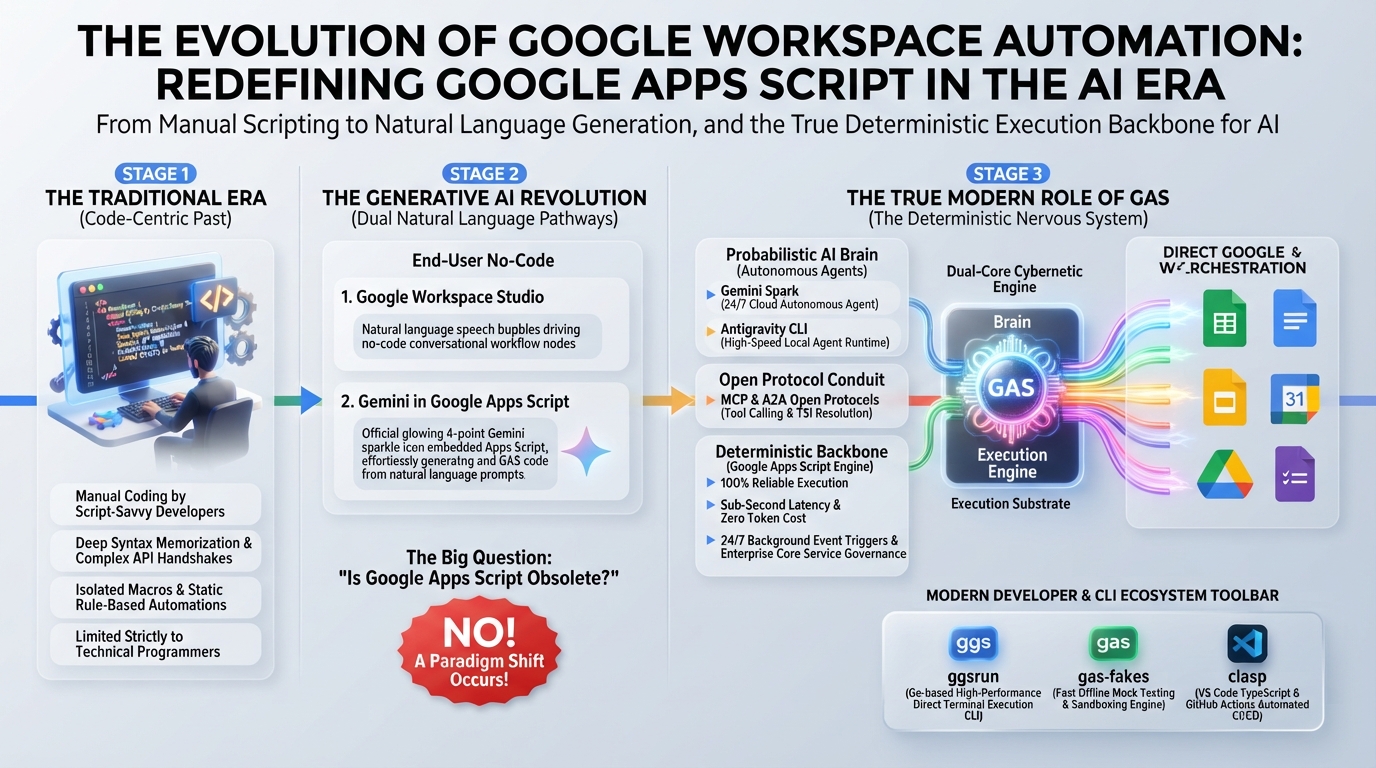
Abstract
Generative AI and autonomous agents do not obsolete Google Apps Script (GAS); they elevate it into an indispensable deterministic execution substrate. This article establishes an enterprise hybrid architecture dividing responsibilities between AI’s probabilistic reasoning (the brain) and GAS’s secure, zero-cost, event-driven execution (the nervous system). Through 12 production use cases—spanning MCP servers, deterministic guardrails, and hybrid batching—we formalize four foundational principles for engineering resilient, scalable Google Workspace automations.
Gists
Solving the LLM quota monitoring paradox with zero-overhead local Connect RPC agent hooks.
Abstract
Google Antigravity CLI users using Google OAuth face abrupt task failures when API quota hits 0%, while account switching triggers unrecoverable signature errors. Querying quota via LLM tool calls creates a paradox by consuming the very tokens being monitored. We resolve this with antigravity-cli-check-usage-plugin, a CLI Agent Hook running outside the LLM execution turn. Directly querying local Connect RPC endpoints, it monitors quota with zero token overhead and injects proactive warning banners when threshold limits are reached.
Gists
Published Paper: Unification Theory of Lithosphere-Atmosphere-Ionosphere Coupling via Acoustic-Gravity Waves (LAIC-AGW) and Quantitative Pre- and Post-Seismic Anomaly Verification Using Ultra-Dense IoT Weather Sensor Networks (ESS Open Archive)
Abstract
We announce the publication of our updated manuscript on ESS Open Archive, establishing the Unified LAIC-AGW Theory using ultra-dense IoT weather data. Executed on Antigravity CLI with Gemini 3.6 Flash using the autonomous R&D framework tanaike-lab, this project integrates 71,107 authentic Netatmo observation records with seismic moment tensors ($M_{ij}$). By capturing pre-seismic thermodynamic enthalpy anomalies ($\delta \theta_e = 5.96\text{--}15.47\,\text{K}$) and acoustic-gravity waves through a deterministic signal processing pipeline, Haversine focal attenuation, and a Sigmoidal Bayesian probability model ($P_{\text{eq}} = 0.0\%\text{--}99.8\%$), this framework delivers 2 to 6 hours of advance lead time with 100% false alert elimination in non-epicentral regions. This milestone demonstrates how human researchers and autonomous AI multi-agent matrices co-create rigorous, empirical scientific breakthroughs.
Gists
Abstract
Gemini Spark, Google’s 24/7 autonomous AI agent, seamlessly connects with Google Workspace. However, connecting to arbitrary external APIs requires extended integration. This article demonstrates how integrating Google Apps Script (GAS) as a Model Context Protocol (MCP) server or Webhook endpoint expands Gemini Spark’s capabilities, enabling enterprise-grade workflow automation.
Introduction
Gemini Spark was officially announced at Google I/O 2026 on May 19, 2026, and its service in Japan began on July 16, 2026. Ref Gemini Spark is Google’s first always-on AI agent that runs continuously in the cloud 24/7, even when your PC is closed, to complete tasks on your behalf. Unlike traditional Q&A-style chat AIs, it can autonomously execute complex workflows across multiple Google applications. Its core functionalities are built around three main pillars: Tasks, Skills, and Schedules.
Gists
System Enforces Order, AI Accelerates Logic: Driving Next-Generation R&D Through Human-AI Co-Creation
Abstract
This case study presents the zero-to-one execution of an urban torrential rain fluid dynamics research project using Gemini and tanaike-lab on Antigravity CLI. By uniting system order, AI-accelerated logic, and clear human imagination, we demonstrate a next-generation R&D paradigm that draws new scientific realities out of the dark void.
Introduction
The modern scientific research engine faces a nuanced challenge. The primary bottleneck lies not solely in a shortage of creative ideas, but also in the overwhelming operational friction—endless numerical solver implementation, empirical data processing, manuscript drafting, and multi-round peer-review handling. Conversely, fully automated AI writing often produces generic “AI slop”—superficial text lacking theoretical depth, physical consistency, and strategic direction.
Gists
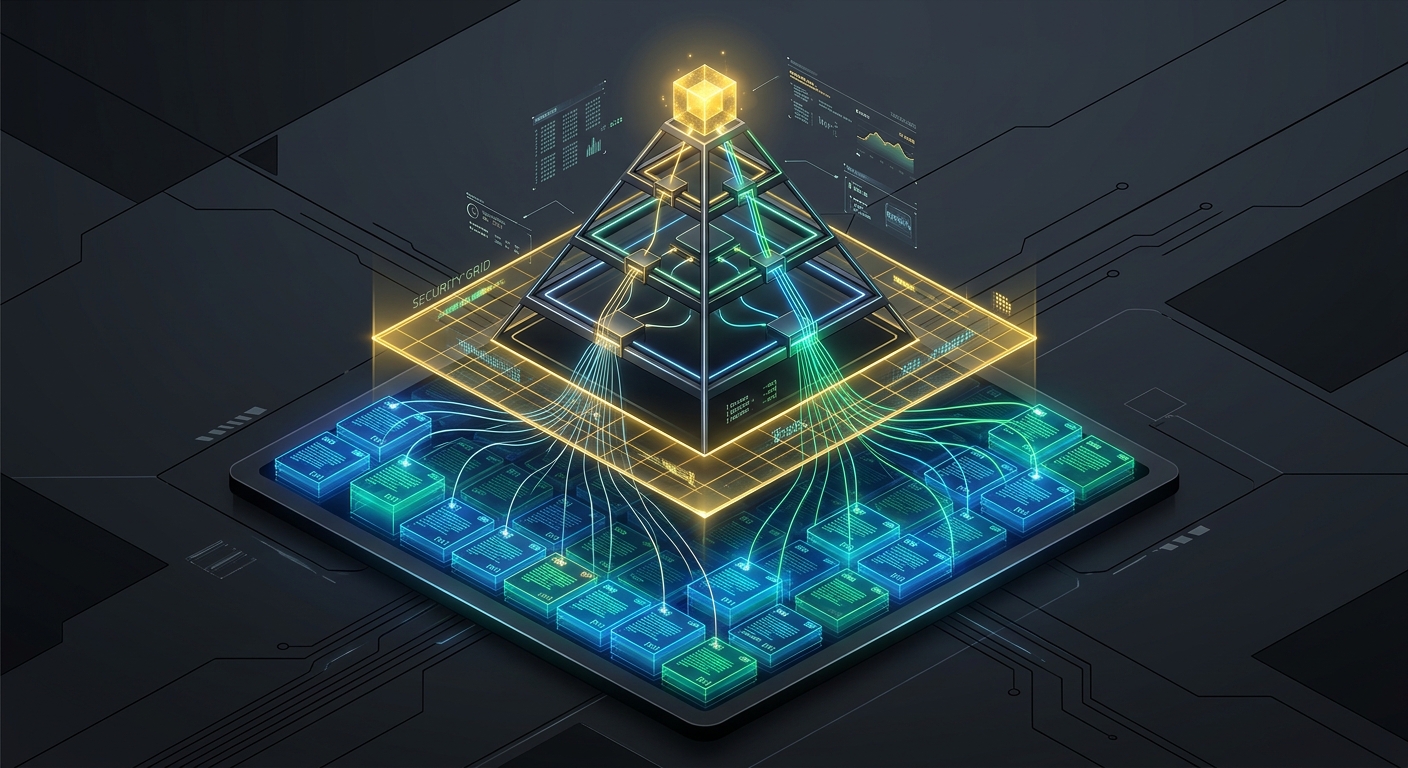
Abstract
This article introduces Robust-GAP, a hierarchical Retrieval-Augmented Generation (RAG) framework designed to eliminate semantic hallucinations and knowledge drift during multi-document log summarization. By combining dynamic causal graph extraction (DLCE), active topology verification (SGAV), and metadata provenance propagation (PAPP), the framework enforces strict citation traceability and prevents LLM-generated hallucinations.
Note: The complete academic preprint detailing this research is openly available on Zenodo (DOI: 10.5281/zenodo.21436390).
1. Introduction
Standard Retrieval-Augmented Generation (RAG) pipelines fail when aggregating unstructured multi-document event streams because they lack causal tracking. When large language models (LLMs) summarize logs, chat transcripts, or transaction records, they frequently associate unrelated events. This behavior, known as knowledge drift, creates false dependencies.
Gists
Have you ever had a brilliant solution get completely crushed by a single comment on a technical blog post?
Just last week, on July 8, 2026, I published a post introducing the Pyramid Aggregator. It was a beautiful story of technical lineage: we took a string summation algorithm originally designed on October 13, 2016 (to optimize Google Apps Script) and applied it to modern Large Language Models (LLMs). By organizing document merging into a balanced, parallel tree topology, we successfully bypassed the AI’s “Lost in the Middle” bias and achieved a 95% execution speedup using the Antigravity Python SDK.
Gists
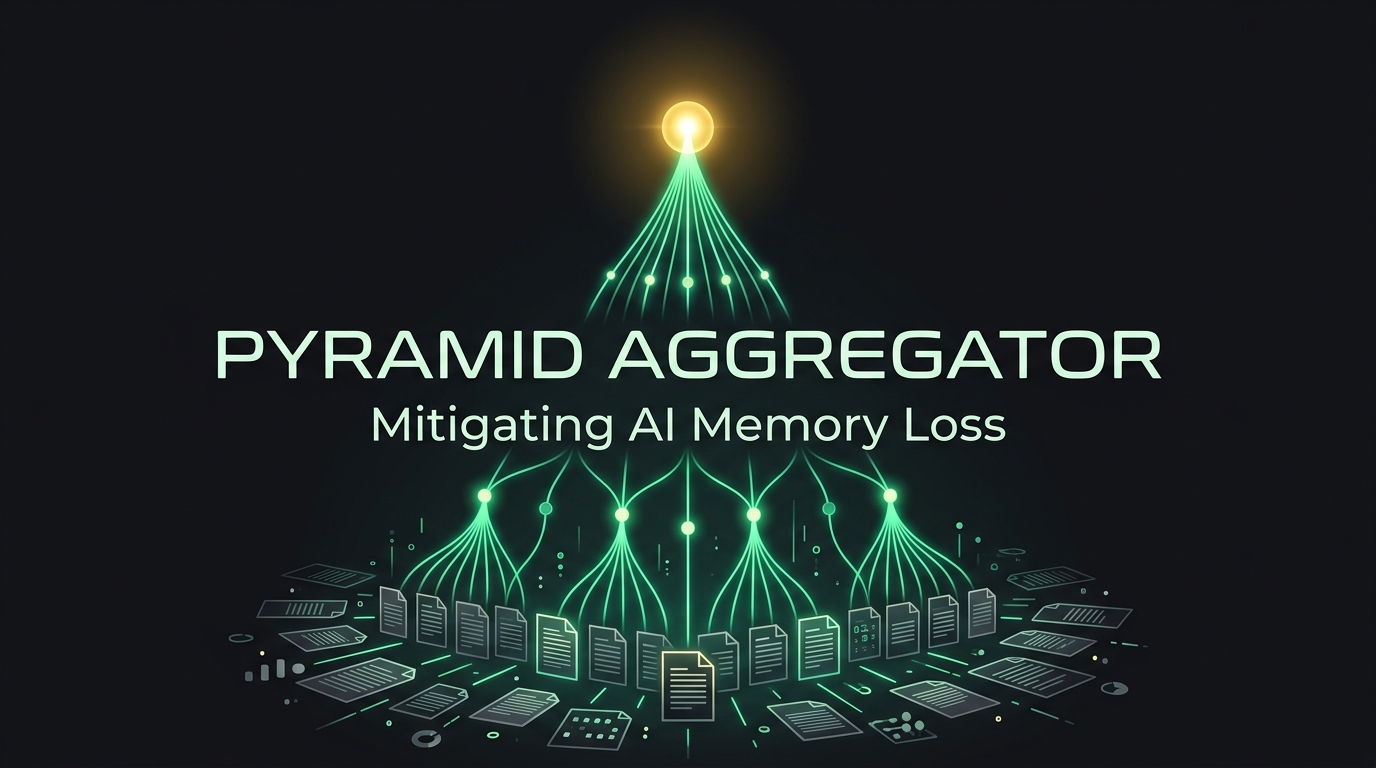
Have you ever tried to read a massive pile of reports and summarize them in under 50 words? It’s hard. Now, imagine asking a cutting-edge Large Language Model (LLM)—like Gemini—to do it.
You might think AIs have perfect memories, but they don’t. When forced to aggregate information from dozens of documents under strict length constraints, AIs suffer from severe “memory loss” biases. They either ignore the middle of your documents or completely forget the older information they read first.
Gists
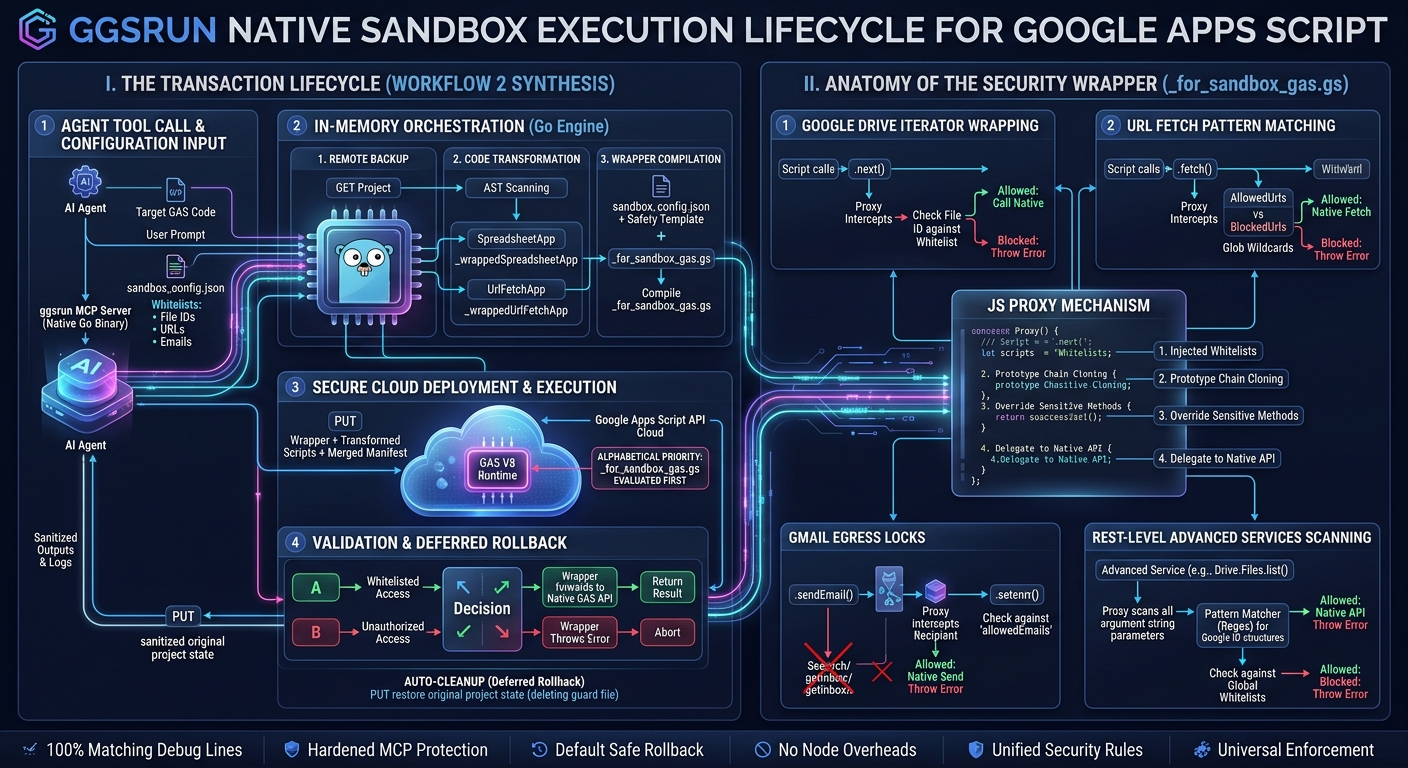
Abstract
Executing autonomous AI agent payloads in Google Workspace via the Apps Script API’s scripts.run method introduces severe security risks. This article presents a novel sandboxing proposal designed specifically for the scripts.run method, using ggsrun as the orchestrator to execute code safely and efficiently. By performing in-memory token replacement and uploading a separate, alphabetically-prioritized guard file, this approach achieves robust API-level containment. Guided by ggsrun’s automated backup and default rollback lifecycle (exe1), the remote environment is immediately restored, providing a clean, dependency-free security model for AI-driven Workspace automation.
Gists
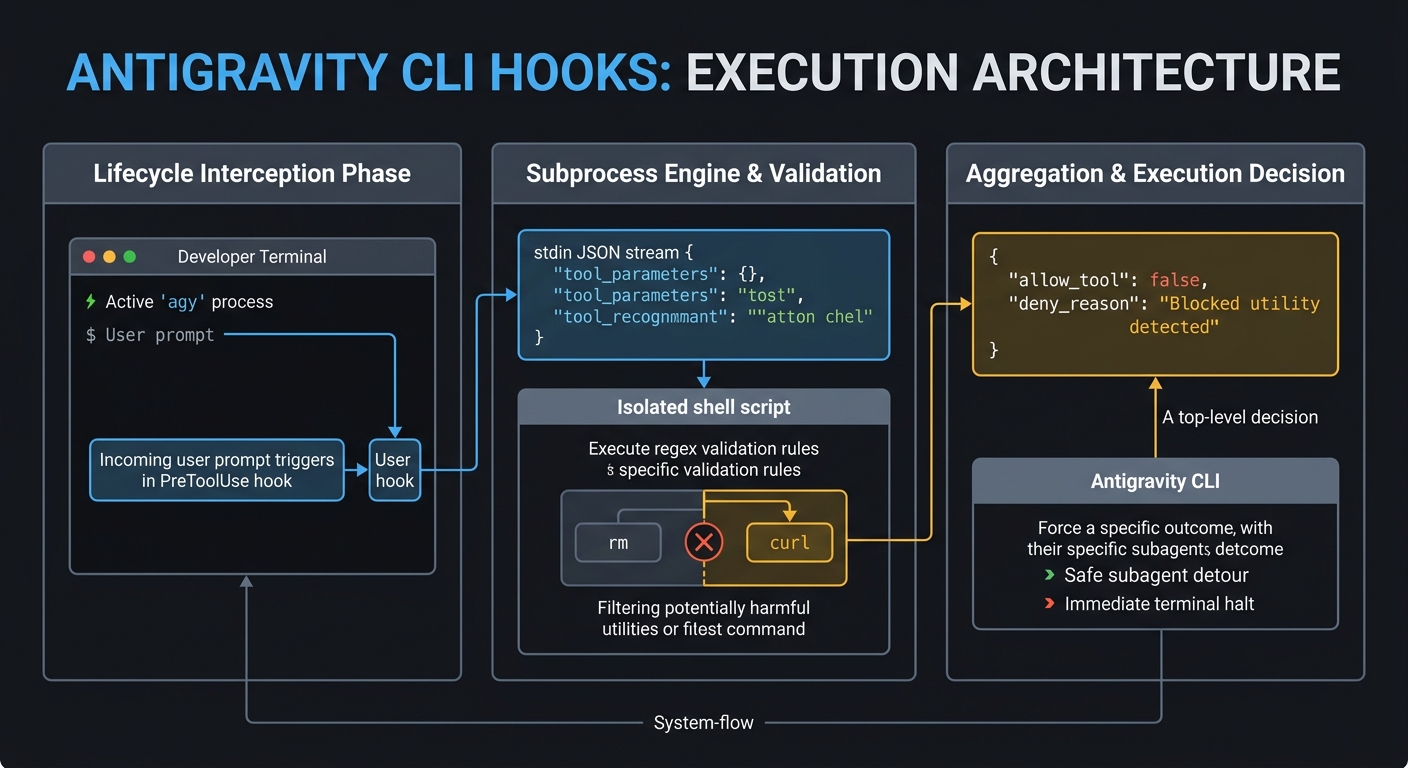
Motivation
To be quite honest, “Hooks”—the shell commands we trigger at specific points when generative AI agents process tasks—were something I used blindly for a long time. Whenever colleagues asked me about them, I realized I lacked any real confidence in explaining how they actually work. However, when I migrated from Gemini CLI to the new Antigravity CLI, I noticed that the hooks system carried over. This felt like the right moment to stop guessing and finally develop a precise, deep understanding of the mechanism. I went back to the basics to analyze exactly how hooks operate under the hood and how we can use them effectively in the Antigravity environment. My goal is to demystify hooks so we can write them with confidence, and if this guide proves useful to your own workflows as well, I would be very glad.
GASADK was updated to v2.0.0
- v2.0.0 (June 24, 2026)
- Exposed Google Workspace APIs as a Dynamic MCP/A2A Server.
- Added a standalone deployment script (
DeployMcpServer.js) under samples/googleapiapp-mcp-server to expose the GoogleApiApp library.
- Created a detailed beginner-friendly guide for configuring and deploying Google Workspace services (Sheets, Drive, Docs, Calendar, Gmail, etc.) as dynamic MCP tools.
- Added API Quota Safeguard: Track model token consumption per session and enforce session-level token usage limit check via
maxTokensPerSession configuration.
- Added Hook & Session Propagation: Automatically propagate parent hooks security context (
hookManager and sessionId) and token constraints down to child sub-agents during hierarchical delegation.
- Added Human-in-the-Loop (HITL) Integration: Supported
decision: "suspend" decisions in BeforeTool hooks. Seamlessly serializes and stores task state to PropertiesService (under HITL_STATE_[sessionId]) and throws a "SUSPENDED" exception. Added saveState(), loadState(sessionId), and resume(sessionId, decision, approvedArgs) methods to recover and run suspended agent execution loops.
- Synchronized
src/lib/ Core Libraries: Upgraded bundled core components (GeminiWithFiles.js, A2AApp.js, MCPApp.js, MCPA2Aserver.js, and FileSearchApp.js) to support the GasHookManager hooks system natively (allowing interceptors like BeforeModel, AfterModel, BeforeTool, and AfterTool).
- Ecosystem Modernization: Upgraded default model configurations to
models/gemini-3.1-flash-lite across all workspace libraries, tests, and examples to provide modern, cost-effective defaults.
- Modular Standalone Twin Synchronization: Propagated and fully published these updates to all five standalone local repositories (
GeminiWithFiles_GAS_lib, A2AApp_GAS_lib, MCPApp_GAS_lib, MCPA2Aserver_GAS_lib, FileSearchApp_GAS_lib) with next-version tags.
You can see the detail information here https://github.com/tanaikech/adk-gas
Gists
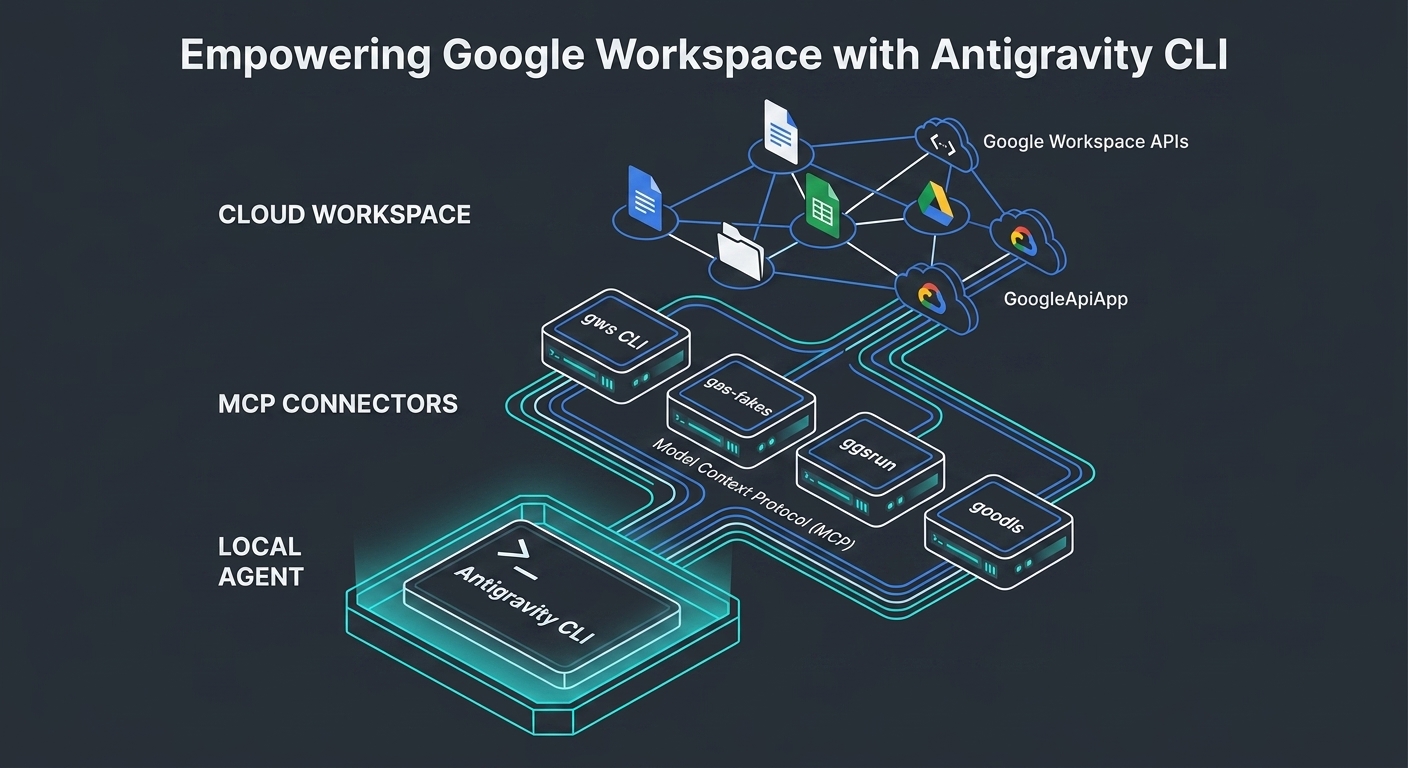
Abstract
This article explores the integration of Google Workspace with the Antigravity CLI, the high-performance successor to the legacy Gemini CLI. This integration is critical because it bridges the gap between low-latency, local agent execution and cloud-native enterprise productivity platforms. We demonstrate this framework by evaluating five core developer tools—the Google Workspace CLI, gas-fakes, ggsrun, GASADK/GoogleApiApp, and goodls—and mapping their capabilities into distinct local, hybrid, and cloud execution layers. Our analysis reveals how this unified architecture streamlines complex, multi-step agentic workflows while optimizing resource consumption, establishing a blueprint for next-generation workspace automation.
Gists
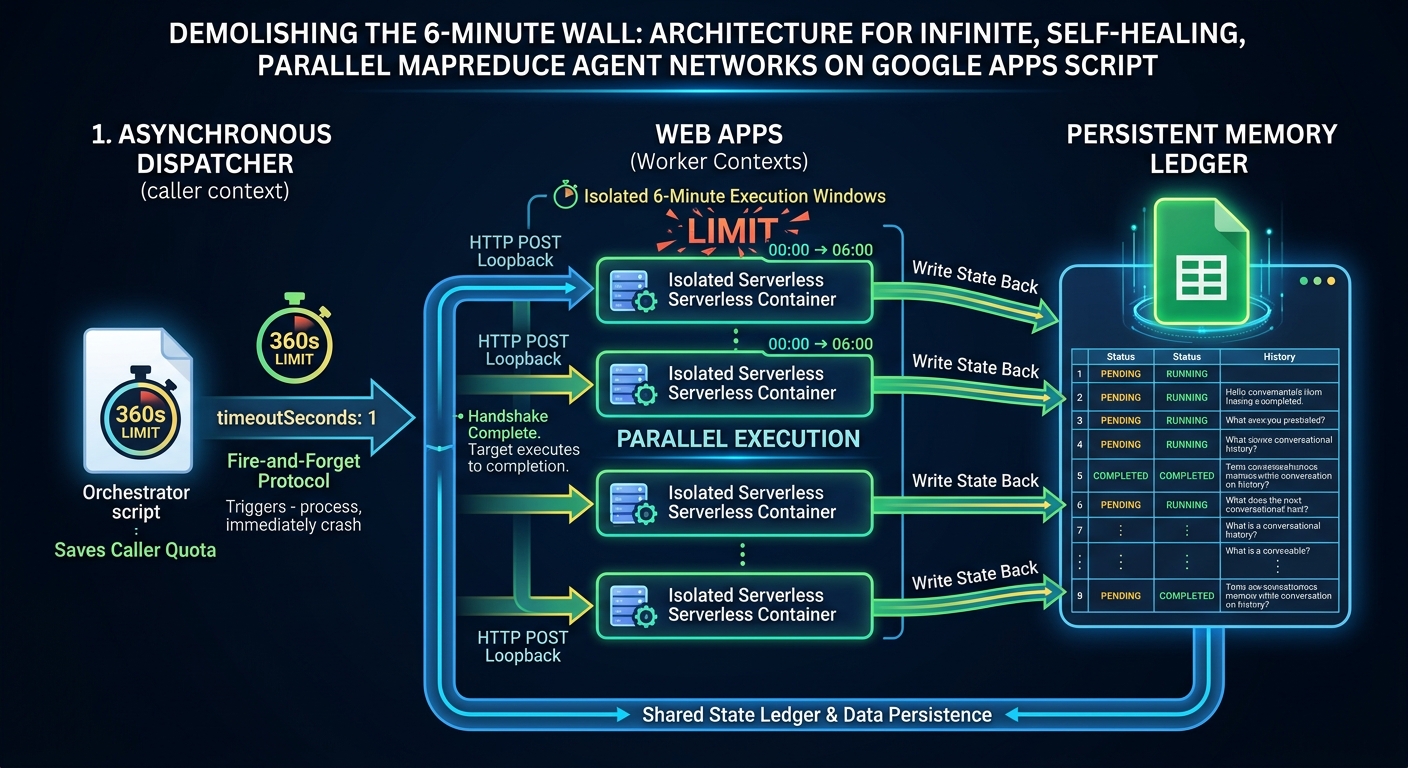
Abstract
This paper presents a serverless architecture that overcomes the stateless nature and 6-minute execution limit of Google Apps Script (GAS). By configuring a 1-second immediate timeout in UrlFetchApp loopback calls, an orchestrator dispatches background tasks and terminates immediately. This design frees up the caller’s execution quota while the target Web App runs to completion in an isolated container. Combined with a transactional Google Sheets state machine, this design supports self-perpetuating parallel MapReduce runs and multi-turn, state-hydrated generative AI agent networks without external compute infrastructure.
GASADK was updated to v1.3.0
- v1.3.0 (June 3, 2026)
- Added Custom Server Name Routing to specify user-defined server names as aliases in MCP and A2A configurations.
- Supports string URLs or custom JSON objects (with custom server names as keys and URL configurations as values) in
mcpServers and a2aServerAgentCardURLs.
You can see the detail information here https://github.com/tanaikech/adk-gas
Gists
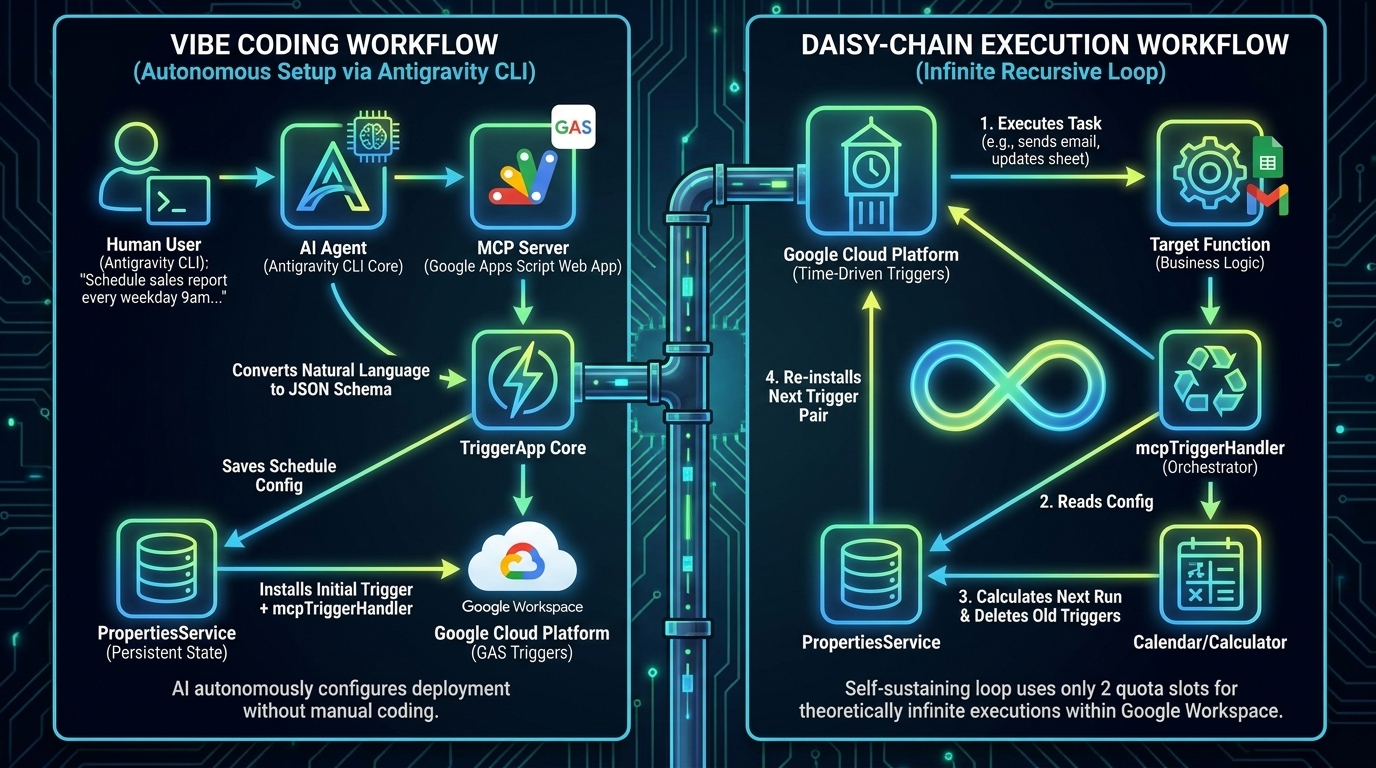
Abstract
Configuring complex time-driven triggers in Google Apps Script—such as executing tasks exclusively on weekday mornings—is notoriously intractable programmatically and strictly impossible via the standard UI. TriggerApp mitigates this architectural friction through a declarative JSON engine, allowing developers to completely bypass granular date-math logic. Now, by embedding a native Model Context Protocol (MCP) server, we cross into a definitive paradigm shift. Developers can orchestrate complex, continuously looping GAS schedules using natural language via Generative AI (Vibe Coding), preserve the hard 20-trigger quota limit through an elegant recursive daisy-chain architecture, and bypass the strict 6-minute execution timeout by dynamically queuing future execution batches.
Gists
Abstract
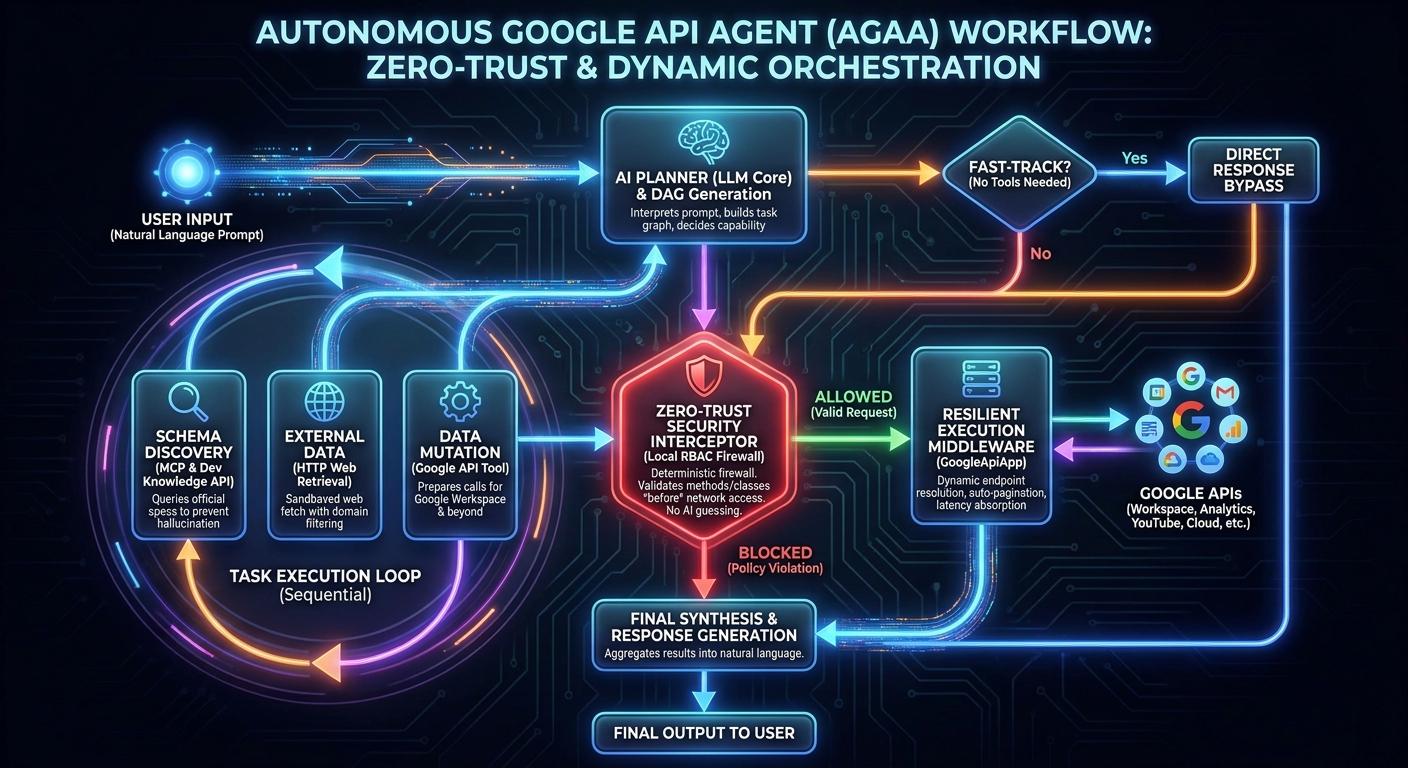
Integrating autonomous AI agents into enterprise architectures exposes critical security and latency vulnerabilities. The Autonomous Google API Agent (AGAA) solves this by enforcing a deterministic, zero-trust execution framework directly within Google Apps Script (GAS). By merging GASADK, dynamic REST endpoint resolution via GoogleApiApp, and the Developer Knowledge API through the Model Context Protocol (MCP), AGAA executes complex cross-domain workflows exclusively via natural language. It autonomously researches API schemas, mitigates server-side formula latencies, handles recursive pagination, and mathematically enforces local Role-Based Access Control (RBAC). AGAA enables true “Vibe Coding” across all Google APIs—including Workspace, Analytics, and YouTube—without bloated client libraries.
Overview
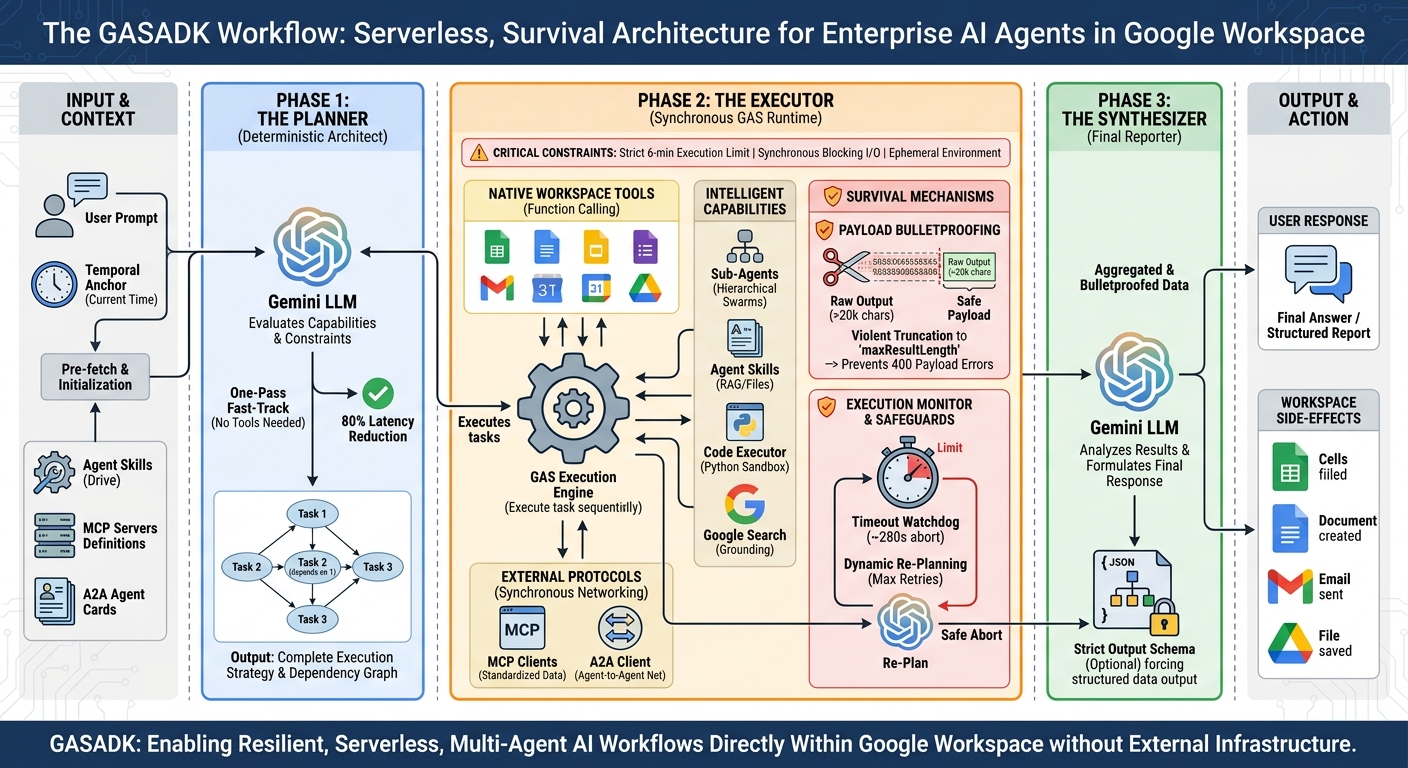
GASADK is a groundbreaking Agent Development Kit tailored specifically for the resource-constrained Google Apps Script environment. Driven by a deterministic Planner-Executor-Synthesizer (PES) architecture, it effectively bypasses traditional async Node.js assumptions to overcome the absolute 6-minute execution limit and synchronous blocking networking (UrlFetchApp). Featuring dynamic DAG planning, temporal context anchoring, and seamless integrations with MCP, A2A, and Google Drive-based Agent Skills, GASADK transforms GAS into a bulletproof, high-performance runtime for autonomous AI agents. Install via the dedicated library key to orchestrate robust, zero-latency multi-agent systems today.
Gists
Abstract
Google’s Agent Development Kit (ADK) revolutionizes autonomous AI agents, yet its standard Node.js-based asynchronous ReAct architecture is fundamentally incompatible with the restrictive, synchronous, and time-bound execution environment of Google Apps Script (GAS). To unlock enterprise-grade AI natively within Google Workspace, this paper introduces GASADK. By abandoning the cyclical ReAct loop in favor of a deterministic Planner-Executor-Synthesizer (PES) architecture, GASADK proactively manages execution constraints, synchronous network blocking, and payload limits. This framework successfully implements multi-agent orchestration, the Model Context Protocol (MCP), and Agent-to-Agent (A2A) communication directly within GAS, empowering developers to build highly resilient, serverless AI workflows that seamlessly manipulate Workspace applications.
GeminiWithFiles was updated to v2.0.16
- v2.0.16 (May 7, 2026)
- Introduced
invoke_agent functionality to Agent Skills.
- Enabled subagent orchestration, allowing parent agents to spawn independent executing contexts (Subagents) for specialized tasks without polluting the main conversation history.
You can see the detail information here https://github.com/tanaikech/GeminiWithFiles
Gists
Implementing Progressive Disclosure in Google Apps Script
Motivation for Writing
As an active researcher and developer in the AI ecosystem, I have seamlessly integrated Agent Skills into daily workflows using tools like Claude Code, Gemini CLI, and Antigravity. However, I observed a pervasive tendency in the developer community—and initially within my own practice—to treat these capabilities as opaque black boxes. There is a distinct lack of granular understanding regarding the internal execution steps and the recursive orchestration occurring within Generative AI models when a skill mandates subagent delegation.
GeminiWithFiles was updated to v2.0.15
- v2.0.15 (May 6, 2026)
- Refactored the script entirely.
- Added support for Agent Skills (Progressive Disclosure architecture). You can now build autonomous agent workflows using skills stored in Google Drive.
- Added the
skillFolderId property to the geminiWithFiles constructor to automatically discover skills, register necessary functions (activate_skill, read_skill_resource, run_dynamic_script), and manage the autonomous execution loop.
- Added
run_dynamic_script tool to dynamically execute .js scripts stored within the skill folders.
- Enhanced
generateContent to fully support multi-turn function calling loops.
You can see the detail information here https://github.com/tanaikech/GeminiWithFiles
Gists
Abstract
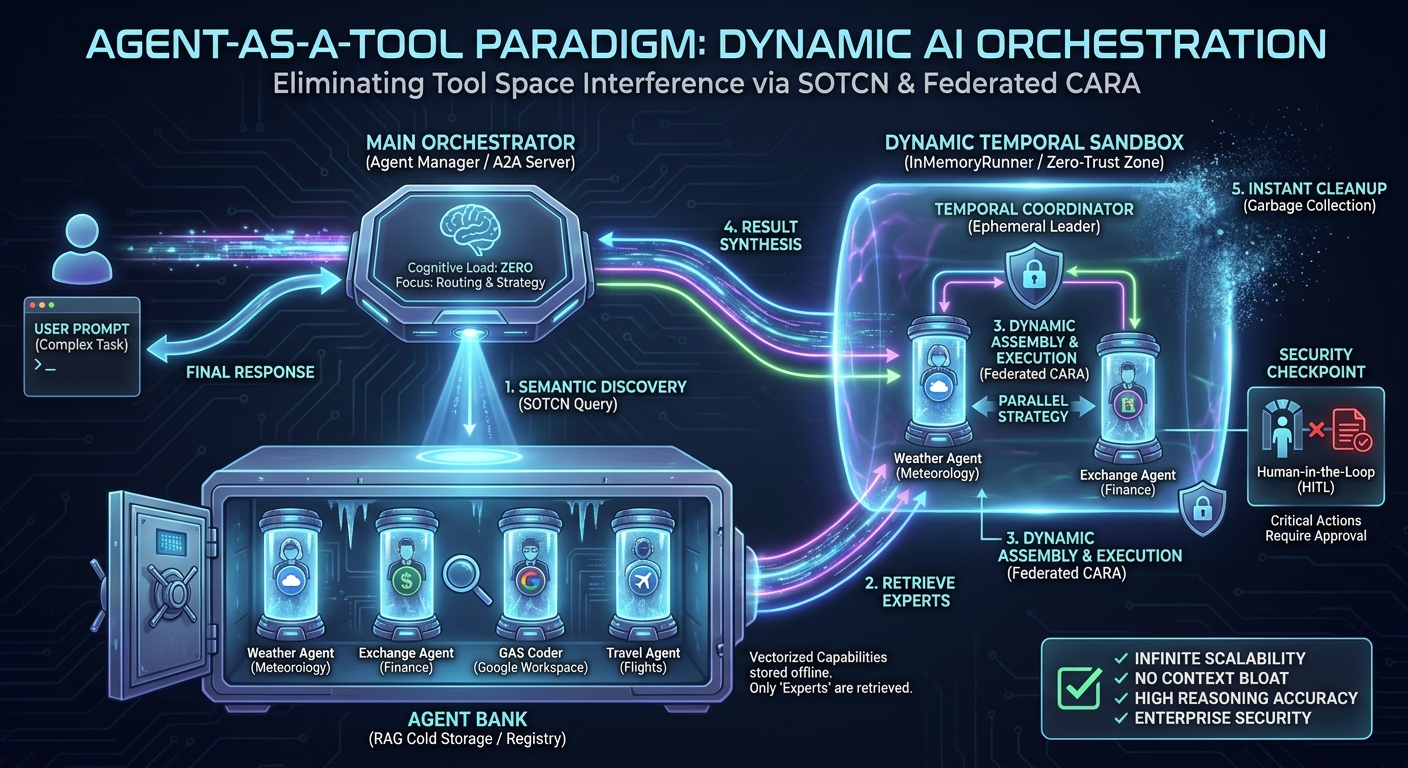
As Large Language Model (LLM) agents increasingly integrate numerous external systems, they suffer from Tool Space Interference (TSI), a phenomenon causing context bloat, attention dilution, and degraded reasoning accuracy. In this paper, we introduce the Agent-as-a-Tool paradigm—an evolutionary, practical implementation of the recently proposed Self-Optimizing Tool Caching Network (SOTCN) and Federated Context-Aware Routing Architecture (Federated CARA). By leveraging Retrieval-Augmented Generation (RAG) to dynamically discover and assemble stateful, autonomous sub-agents on the fly, this architecture completely eliminates TSI, enforces Zero-Trust execution boundaries, and achieves infinitely scalable AI orchestration.
Gists
A Comparative Study of Agentic Frameworks and Multi-Agent Orchestration
Abstract
The transition from passive chatbots to autonomous execution environments was cemented at Google Cloud Next ‘26 with the introduction of the Gemini Enterprise Agent Platform. This paper evaluates four cutting-edge AI agent methodologies for Google Workspace automation, developed by leading developers Martin Hawksey, Bruce Mcpherson, and Kanshi Tanaike. We deconstruct their structural approaches—CLI skill chaining, advanced emulation sandboxing, dynamic code generation, and A2A remote delegation—demonstrating how these community-driven innovations anticipated native Next ‘26 features like the official Agent Skills repository and Model Context Protocol (MCP) support. Building upon these foundations, we propose two novel frameworks: the Federated Context-Aware Routing Architecture (Federated CARA) for zero-trust, multi-cloud task routing, and the Self-Optimizing Tool Caching Network (SOTCN) to eliminate Tool Space Interference using dynamic semantic caching. This comparative synthesis maps existing and proposed models against Google’s new enterprise standards, offering a scalable roadmap for secure, highly dynamic multi-agent orchestration.
Gists
Abstract
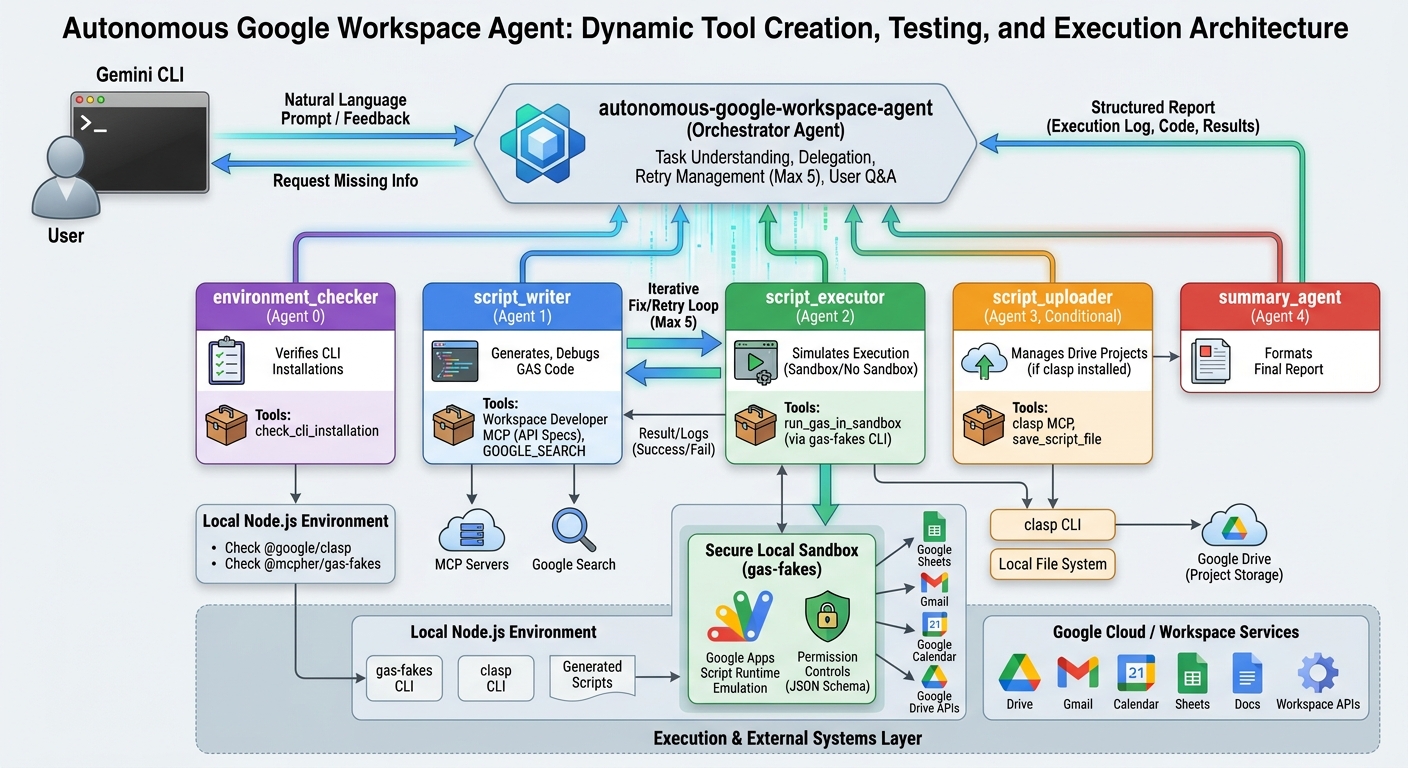
Welcome to the Agentic Enterprise era. This article explores a paradigm shift in generative AI workflows by introducing an autonomous agent capable of dynamically creating, testing, and executing original tools. Utilizing Google Apps Script, Node.js emulation, and multi-agent orchestration, this architecture overcomes traditional limitations, enabling highly adaptable task execution.
Introduction
At Google Cloud Next 2026, a clear mandate was delivered: the era of generative AI as a passive assistant is over. We have entered the age of the Agentic Enterprise, where AI has transitioned from a software tool you deploy into an autonomous coworker you onboard. This identity shift is staggering. With models processing over 16 billion tokens per minute via direct API use, we are witnessing an industrial-scale migration toward autonomous workflows. In this new ecosystem, Workspace Intelligence eliminates tab-hopping, allowing users to seamlessly query across Google Drive, Gmail, and third-party platforms. Data has transformed from a reactive archive into a “System of Action,” driven by Deep Research Agents that bridge structured and unstructured data to prevent hallucinations.
Gists
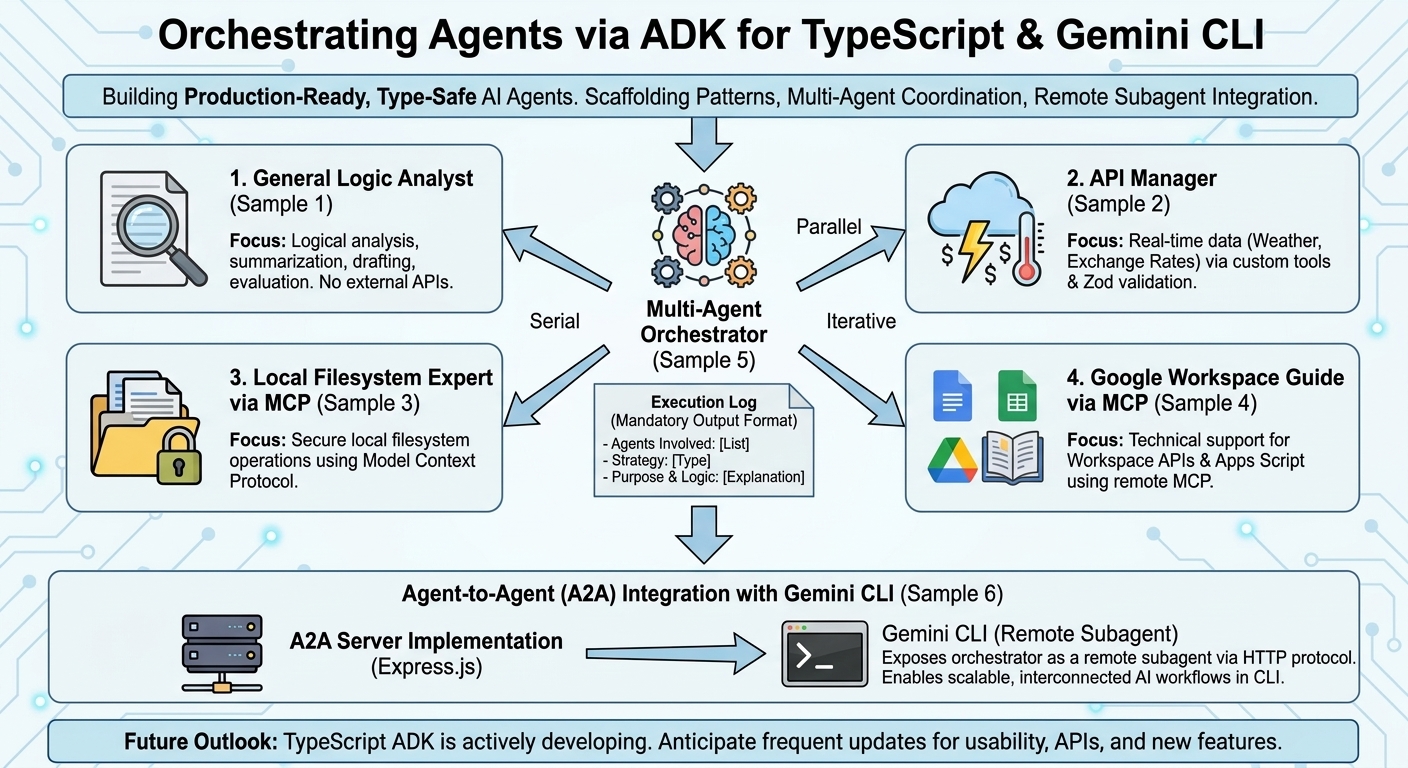
Abstract
Explore how to build and orchestrate production-ready, type-safe AI agents using Google’s TypeScript Agent Development Kit (ADK). This guide provides practical scaffolding patterns, multi-agent coordination strategies, and seamless integration techniques for deploying remote subagents within the Gemini CLI ecosystem.
Introduction
As the artificial intelligence landscape rapidly evolves, modern generative AI increasingly relies on autonomous agents equipped with sophisticated components, including system instructions, specialized skills, and Model Context Protocol (MCP) servers. To facilitate the development of such AI-driven applications, Google has released the Agent Development Kit (ADK) across multiple programming languages Ref. Among these, the ADK for TypeScript Ref offers distinct advantages for modern engineering paradigms:
Gists

Abstract
This article explores integrating remote subagents built with Google Apps Script into the Gemini CLI using the Agent-to-Agent (A2A) protocol. It demonstrates how bypassing standard authentication via local agent cards enables seamless execution of complex workflows while effectively overcoming Tool Space Interference (TSI) for massive toolsets.
Introduction
Recently, remote subagent support was introduced to the Gemini CLI. Ref With this feature, the Gemini CLI connects to remote subagents using the Agent-to-Agent (A2A) protocol, expanding its capabilities by delegating tasks to external services. I have previously published several articles discussing the A2A server architecture:
Gists

Abstract
In the development of autonomous agents using Large Language Models (LLMs), restrictions such as context window limits and session fragmentation pose significant barriers to the long-term accumulation of knowledge. This study proposes a “self-evolving framework” where an agent continuously records and refines its operational guidelines and technical knowledge—referred to as its SKILL—directly onto a local filesystem in a universally readable format (Markdown). By conducting experiments across two distinct environments featuring opaque constraints and complex legacy server rules using Google’s Antigravity and Gemini CLI, we demonstrate the efficacy of this framework. Our findings reveal that the agent effectively evolves its SKILL through iterative cycles of trial and error, ultimately saturating its learning. Furthermore, by transferring this evolved SKILL to a completely clean environment, we verify that the agent can successfully implement complete, flawless client applications in a single attempt (zero-shot generation). This methodology not only circumvents the limitations of short-term memory dependency but also pioneers a new paradigm for cross-environment knowledge portability and automated system analysis.
Gists

Abstract
This article demonstrates how to build an adaptive learning agent using Agent-to-User Interface (A2UI), Gemini, and Google Apps Script. We explore a system that generates personalized quizzes, tracks performance in Google Sheets, and dynamically adjusts difficulty to maximize learning efficiency within the Google Workspace ecosystem.
Introduction
A2UI (Agent-to-User Interface) represents a paradigm shift in how users interact with generative AI. Originally open-sourced by Google and implemented in TypeScript and Python Ref, A2UI becomes even more powerful when integrated with Google Apps Script (GAS). This combination enables seamless access to the Google Workspace ecosystem, transforming static documents into intelligent, agentic applications.
Gists
Abstract
This article explores A2UI (Agent-to-User Interface) using Google Apps Script and Gemini. By generating dynamic HTML via structured JSON, Gemini transforms Workspace into an “Agent Hub.” This recursive UI loop enables complex workflows where the AI builds the specific functional tools required to execute tasks directly.
Introduction: The Evolution of AI Interaction
The Official A2UI framework by Google marks a significant paradigm shift in how we interact with artificial intelligence. Short for Agent-to-User Interface, A2UI represents the evolution of Large Language Models (LLMs) from passive chatbots into active agents capable of designing their own functional interfaces. Building upon my previous research, A2UI for Google Apps Script and Bringing A2UI to Google Workspace with Gemini, I have refined this integration to support sophisticated, stateful workflows.
Gists

Abstract
This article details the development of Smart Stowage Optimizer, a web-based digital twin for logistics that bridges the gap between physical safety and artificial intelligence. By integrating Gemini 3 Pro, the system solves the 3D Bin Packing Problem (3DBPP) using advanced spatial reasoning. Built with React 19 and Three.js, the application visualizes physics-aware load stability in real-time, offering a comparative analysis between traditional heuristic algorithms and modern generative AI agents.
Gists

Abstract
This article explores implementing the Agent-to-User Interface (A2UI) protocol within Google Apps Script. It demonstrates utilizing Gemini’s structured output to render secure, dynamic, server-driven UIs—like booking forms and event lists—directly inside Google Sheets, streamlining workflows without complex external infrastructure.
Introduction
I recently published a sample implementation demonstrating how to bring the Agent-to-User Interface (A2UI) concepts to Google Apps Script (GAS). Ref
A2UI is an emerging open-standard protocol designed to enable AI agents to generate rich, interactive user interfaces that render natively across web, mobile, and desktop environments. Ref Unlike traditional approaches that often require executing arbitrary, high-risk code to generate UI on the fly, A2UI leverages a strict schema-based data format to describe UI components. This “secure-by-design” architecture effectively mitigates security risks like Cross-Site Scripting (XSS) while ensuring high performance and cross-platform consistency.
Gists

Abstract
The Gemini API now supports external file URLs, allowing developers to process data directly without uploading it first. This article demonstrates how to leverage this update to integrate Google Workspace resources—including Google Sheets, Docs, Slides, and Apps Script—into Gemini’s workflow, covering both public and secure private access methods.
Introduction
Recently, the limitations regarding inline file data in the Gemini API have been significantly updated Ref. The maximum file size has increased from 20 MB to 100 MB. Furthermore, external file URLs—both public and signed—can now be used directly as input.
Gists

Abstract
This article demonstrates how to implement Google’s A2UI (Agent-to-User Interface) using Google Apps Script (GAS). By porting official Python/TypeScript examples to GAS, we show how to create dynamic, AI-generated interfaces within Google Workspace, enabling flexible business automation and interactive user experiences without complex server infrastructure.
Introduction
Google recently released A2UI, a protocol designed for agent-driven interfaces. Ref A2UI enables AI agents to generate rich, interactive user interfaces that render natively across web, mobile, and desktop environments without executing arbitrary code.
Gists

Abstract
This article introduces a Google Apps Script-based Agent2Agent architecture to solve Tool Space Interference. While the provided demonstration utilizes a single server for testing purposes, the architecture is designed for distributed task execution. By running multiple category-specific A2A servers in parallel, users can achieve scalable, high-efficiency agent networks.
Introduction
As the Model Context Protocol (MCP) standardizes LLM connectivity, the Agent2Agent (A2A) paradigm is becoming essential for executing complex, multi-step tasks. However, integrating a high volume of tools often triggers “Tool Space Interference (TSI)"—a phenomenon where verbose metadata saturates context windows and degrades reasoning accuracy. Ref Ref Current industry guidelines suggest a “soft limit” of 20 functions per agent; exceeding this threshold frequently results in hallucinations and logic failures.
Gists

Abstract
Nexus-MCP resolves “Tool Space Interference” in Large Language Models by aggregating multiple MCP servers into a single gateway. Utilizing a strictly deterministic 4-phase workflow—Discovery, Mapping, Schema Verification, and Bridged Execution—it prevents context saturation and tool hallucinations, enabling the use of massive tool ecosystems without sacrificing reasoning accuracy.
Introduction
The integration of Gemini CLI and Google Antigravity with the Model Context Protocol (MCP) has significantly expanded the capabilities of LLM-based agents. However, this expansion introduces a critical performance bottleneck. As the number of available tools grows, Large Language Models (LLMs) suffer from a measurable decline in reasoning accuracy and tool-selection reliability.
Gists

Abstract
This article introduces a major update to gas-fakes enabling dynamic loading of Google Apps Script libraries. This enhancement allows developers to build modular, maintainable Model Context Protocol (MCP) servers. We demonstrate this by integrating sophisticated library-based tools with Gemini CLI and Google Antigravity for seamless Google Workspace automation.
Introduction
I recently published an article titled “Power of Google Apps Script: Building MCP Server Tools for Gemini CLI and Google Antigravity in Google Workspace Automation.” In that piece, I demonstrated how to bridge the Model Context Protocol (MCP) with Google Workspace by implementing an MCP server using Google Apps Script (GAS) and gas-fakes. This successfully established a communication channel for sophisticated AI agents—such as the Gemini CLI and Google Antigravity—to interact directly with Workspace data.
Gists
Abstract
This article demonstrates how to build Model Context Protocol (MCP) tools directly using Google Apps Script. By leveraging the gas-fakes CLI, developers can execute Google Apps Script locally to automate Google Workspace via Gemini CLI and Google Antigravity, streamlining development and eliminating the overhead of dynamic tool creation.
Introduction
With the rapid advancement of generative AI, ensuring the security of executing AI-generated scripts is of paramount importance to prevent arbitrary code execution vulnerabilities. Addressing this, I previously published a secure sandbox environment for Google Apps Script (GAS) known as gas-fakes, which emulates the Apps Script environment locally. Ref
Gists

Abstract
This article redefines Google Apps Script (GAS) as a central integration hub in the AI era. It introduces the forefront of Google Workspace automation, realized through the fusion of the Model Context Protocol (MCP), Agent2Agent (A2A), and the Gemini CLI ecosystem. I cover everything from data integration bridging local and cloud environments (RAG) and sandbox technologies for safely executing AI-generated GAS, to the coordination of autonomous agents on the newly released Google Antigravity. We will explore next-generation work styles and implementation methods where complex workflows are completed autonomously through simple natural language instructions.
Gists

Abstract
This article demonstrates how to integrate the Google Workspace Extension for Gemini CLI with Google Antigravity. It addresses a Model Context Protocol (MCP) tool naming incompatibility using a custom proxy script, enabling seamless, authenticated automation of Google Workspace tasks directly within the Antigravity IDE environment.
Introduction
Since its release, the Gemini CLI has been rapidly adopted across various development scenarios. Ref Its utility increased significantly with the introduction of Gemini CLI Extensions, which simplify the installation and management of Model Context Protocol (MCP) servers. Ref Most recently, the Google Workspace Extension for Gemini CLI was released by Google, providing an MCP server specifically designed to manage Workspace automation. Ref A distinct advantage of this extension is its streamlined authorization process—authentication runs automatically when the Gemini CLI is launched, making it highly efficient.
Gists

Abstract
This article explores automating Google Workspace by integrating Google Antigravity and Gemini 3.0 with Model Context Protocol (MCP) servers. We demonstrate how to overcome tool limits and utilize custom extensions to enable AI agents to securely execute scripts, manage files, and perform RAG-based tasks using private data.
Introduction
Google Antigravity and Gemini 3.0 are ushering in a new era of “Agent-First” development, transforming how we interact with cloud environments. Ref A key component of this evolution is the integration of Model Context Protocol (MCP) servers. When connected to Antigravity, these servers empower the architecture to resolve complex, multi-step tasks by granting the AI direct, standardized access to external tools and proprietary data.
Gists

Abstract
This article demonstrates a cutting-edge workflow for Google Apps Script development using Google Antigravity and Gemini 3.0. By integrating gas-fakes via the Model Context Protocol (MCP), we establish an environment where autonomous agents can generate, unit-test, and execute cloud-based scripts locally, revolutionizing the standard GAS development lifecycle.
Introduction
Google Antigravity has officially been released. Ref This is a revolutionary “Agent-first” IDE powered by Gemini 3, designed to empower autonomous AI agents to plan, code, and verify tasks across the Editor, Terminal, and Browser. It is anticipated that this platform will trigger a paradigm shift in how we develop applications and auto-generate comprehensive documentation, moving the industry from simple code completion to fully agentic workflows.
Gists

Abstract
This article demonstrates how to create a unified file search for Gemini, integrating disconnected local files and Google Workspace data. Using a Google Apps Script-powered extension, users can directly ingest data from Drive, Sheets, and Gmail, enabling a powerful, context-aware RAG system.
Introduction
1. The Challenge of Data Silos
In modern enterprises, data is fragmented. It lives on local machines, in Google Drive, within Google Sheets, and across countless emails. While the Gemini CLI excels at file searches, it traditionally requires manually downloading cloud files to a local environment before they can be used. This workflow is inefficient, error-prone, and creates unnecessary operational overhead, preventing the creation of a truly comprehensive knowledge base for Retrieval-Augmented Generation (RAG).
Here introduces a new Gemini CLI extension that integrates File Search feature. This tool establishes a fully managed Retrieval-Augmented Generation (RAG) system directly on the command line.
The extension is designed to simplify the use of the Gemini API’s File Search, a powerful new feature that enables RAG grounded in personal or proprietary knowledge bases. While the underlying API requires scripting, this Node.js-built CLI extension allows users to seamlessly manage File Search stores and generate context-aware content grounded in their private documents without having to leave the terminal interface.
Gists

Abstract
This article introduces a Gemini CLI extension that integrates File Search feature. This tool provides a fully managed Retrieval-Augmented Generation (RAG) system directly in your command line, enabling content generation grounded in your private documents and data.
Introduction
The Gemini API recently introduced File Search, a powerful feature that enables Retrieval-Augmented Generation (RAG) using your own documents as a knowledge base. This allows you to generate content grounded in personal or proprietary information. While powerful, leveraging this via API calls requires scripting.
Gists
Abstract
This article guides you through establishing a modern, cloud-based development workflow for Google Apps Script. Learn to leverage Google Cloud and Firebase Studio with powerful tools like the Gemini CLI and gas-fakes to build, test, and deploy your automations with enhanced efficiency and security.
Introduction
Google Apps Script is primarily designed to be created in a cloud-based script editor and run on the cloud. However, using Google Apps Script on various cloud platforms opens up the possibility of wider application development due to its high compatibility with each platform’s features.
GitHub

Abstract
This article introduces a powerful method for developing and testing Google Apps Script (GAS) locally. By leveraging the gas-fakes library, you can build a secure, local Model Context Protocol (MCP) server, enabling the creation of AI-powered tools for Google Workspace automation without deploying to the cloud.
Introduction
gas-fakes, developed by Bruce McPherson, is an innovative library that enables Google Apps Script (GAS) code to run directly in a local environment by substituting GAS classes and methods with their corresponding Google APIs.
Gists

Abstract
This document introduces a powerful integration of the gas-fakes CLI and a Gemini CLI extension, creating a secure and streamlined development workflow for Google Apps Script. This setup enables local testing of AI-generated scripts in a secure sandbox, preventing unintended access to your Google Drive, and provides a seamless transition to cloud deployment.
Introduction
The gas-fakes project by Bruce McPherson is a groundbreaking endeavor that recreates the Google Apps Script (GAS) execution environment on Node.js, enabling local testing and debugging. When Bruce invited me to join the project, I first started by understanding gas-fakes. The project enables local execution by converting GAS service calls (e.g., SpreadsheetApp.create()) into corresponding Google API requests.
I created a Gemini CLI extension as a GAS Development Kit. For this, I developed the CLI of gas-fakes.
Repository
https://github.com/tanaikech/gas-development-kit-extension
Installation
1. Install Gemini CLI
First, install the Gemini CLI using npm:
npm install -g @google/gemini-cli
Next, you will need to authorize the CLI. Follow the instructions provided in the official documentation.
2. Install Clasp
Even when Clasp is not installed, when gas-fakes is installed, you can run Google Apps Script in a sandbox using gas-fakes.
Gists

Abstract
This guide explores a powerful, next-level workflow for Google Apps Script (GAS) development by integrating Gemini CLI Extensions with Visual Studio Code (VSCode). This combination streamlines the entire development process, from script creation and local testing in a secure sandbox to deploying and managing projects, all within a unified and efficient environment.
Introduction
Visual Studio Code (VSCode) is widely recognized as a premier source code editor. The release of the Gemini CLI has dramatically transformed script development by bringing advanced AI capabilities directly into the terminal. In particular, combining Gemini CLI with VSCode creates a powerful development ecosystem, highly effective for languages typically executed locally, such as Python, Node.js, Go and so on. Beyond coding, this setup streamlines content creation, including articles and papers, by leveraging AI for drafting and editing. Ref For cloud-based Google Apps Script (GAS) development, the standard approach involves using VSCode alongside Clasp to manage projects locally. Ref Integrating Gemini CLI into this established workflow promises significant synergistic effects. A recent update has further expanded these possibilities by enabling Clasp to function experimentally as a Model Context Protocol (MCP) server, allowing LLMs to directly interact with GAS project structures. Ref Furthermore, to address security concerns when executing AI-generated GAS code, I have introduced a “fake sandbox” environment for safer testing. Ref and Ref With the recent release of Gemini CLI Extensions, which allow for custom AI tools and specialized workflows, combining these assets creates a vastly superior developer environment. In this article, I will introduce next-level Google Apps Script development by leveraging the combined power of Gemini CLI Extensions and VSCode.
Gists

Abstract
This guide offers a comprehensive walkthrough of the essential steps and key considerations for developing Gemini CLI extensions. It covers setting up a sample project, configuring the gemini-extension.json file, local testing, and automating dependency management with GitHub Actions, providing developers with the foundational knowledge to create their own custom tools.
Introduction
After the release of Gemini CLI Extensions, a growing community of users is developing a wide range of extensions to enhance their command-line workflows. Ref and Ref This trend is expected to continue and strengthen. As the ecosystem expands, knowing how to develop these extensions becomes increasingly valuable for users who want to create their own custom tools. Many useful articles for understanding Gemini CLI Extensions have already been published. In particular, the articles by Romin Irani are very helpful. Ref In this article, I would like to introduce the core parts I paid attention to when I developed my own extensions (Ref). I hope this article proves useful. As a sample tool in this article, the current time is returned using Node.js.
This Gemini CLI Extension simplifies Google Workspace automation. It installs a local Model Context Protocol (MCP) server that communicates with a powerful, securely authorized backend built on Google Apps Script Web Apps, overcoming previous complex setup and performance bottlenecks.
You can see the details at my repository.
https://github.com/tanaikech/ToolsForMCPServer-extension
Gists

Abstract
This project simplifies Google Workspace automation by using a Gemini CLI Extension. It installs a local Model Context Protocol (MCP) server that communicates with a powerful, securely authorized backend built on Google Apps Script Web Apps, overcoming previous complex setup and performance bottlenecks.
Introduction
In order to achieve Google Workspace Automation with seamless authorization and safety, I have published a Model Context Protocol (MCP) server built by Google Apps Script Web Apps. Ref This is very useful because Google Apps Script provides native, secure authorization for Google Workspace APIs like Gmail, Drive, and Calendar. However, there was a bottleneck in the complex installation and a long loading time of the MCP server. Recently, Gemini Extensions have been released. Ref By this, tools and MCP servers can be directly and easily installed from sources like GitHub repositories using a simple command. From this situation, I attempted to implement this simplified installation method on the MCP server built by Google Apps Script Web Apps.
Gists
Abstract
This article presents a method for optimizing Google Workspace automation by dynamically converting frequently used, AI-generated Google Apps Scripts into permanent, reusable tools. By integrating the Gemini CLI with a gas-fakes sandbox via an MCP server, we demonstrate how to securely add and manage these custom tools, reducing operational costs and improving efficiency.
Introduction
When using generative AI to create scripts, ensuring the secure execution of the generated code is critical. This is especially true for applications that manage cloud resources like Google Workspace, where it is paramount to prevent unintended data access or modification. The standard permission model for Google Apps Script often requires broad access, creating a significant security risk when running code from untrusted sources.
Gists
Abstract
This article introduces a method for integrating Google’s Gemini CLI and GitHub’s Copilot CLI using the Model Context Protocol (MCP). By configuring one CLI as an MCP server, the other can invoke it from a prompt, enabling a powerful, collaborative interaction between the two AI assistants for enhanced development workflows.
Introduction
Recently, GitHub released the Copilot CLI, a command-line interface that brings the power of GitHub Copilot directly to your terminal. It assists with various tasks, including answering questions, writing code, and interacting with GitHub. Concurrently, Google has already introduced the Gemini CLI, an open-source AI agent that integrates the Gemini models into the command line to help developers with coding, problem-solving, and task management.
Gists
Abstract
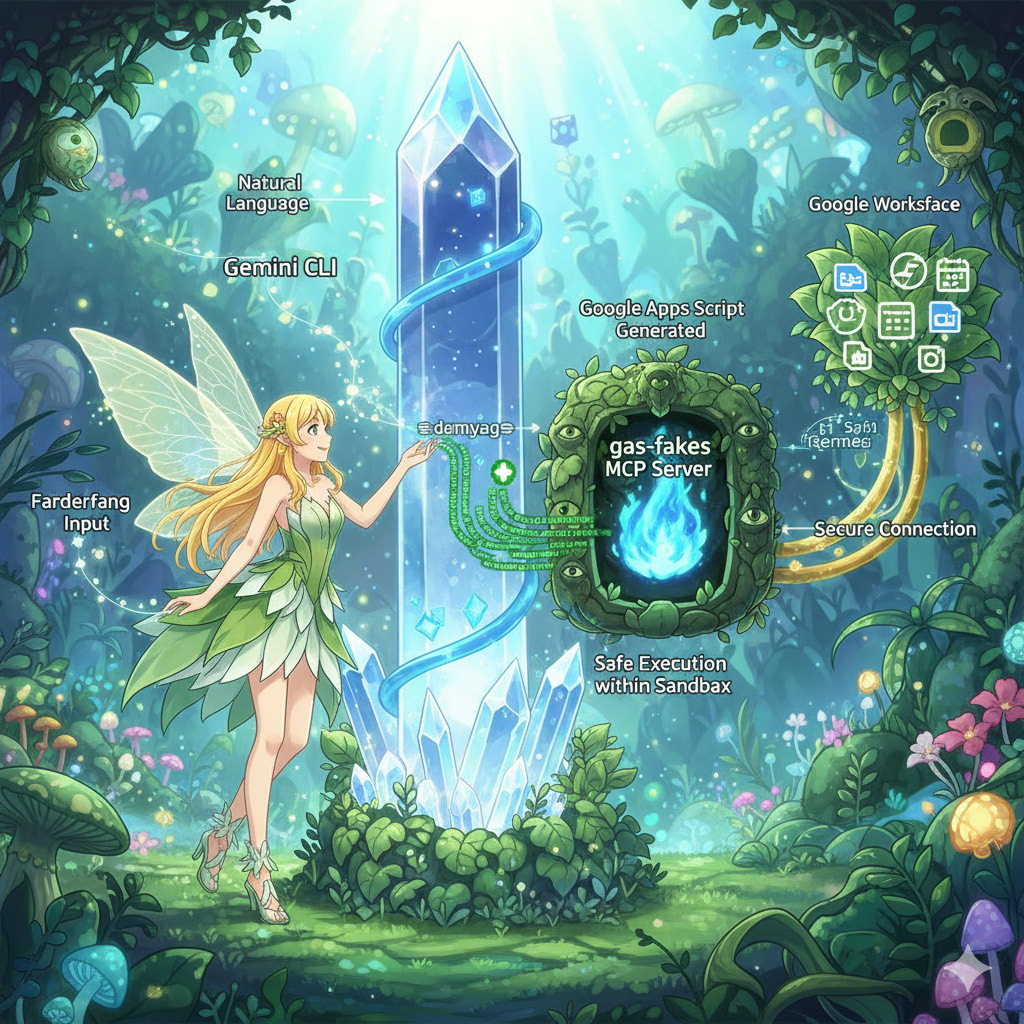
This article introduces a method for securely executing AI-generated Google Apps Script. By implementing a “fake-sandbox” using the gas-fakes library as an MCP server, users can empower the Gemini CLI to safely automate Google Workspace tasks with granular, file-specific permissions, avoiding significant security risks.
Introduction
“Have you ever faced a task that isn’t part of your routine but is tedious to do manually, like, ‘I need to add a “[For Review]” prefix to the titles of all Google Docs in a specific folder this afternoon’? Or perhaps you’ve thought, ‘I want to use AI to work with my spreadsheets, but I’m concerned about the security implications of granting a tool full access to my Google Drive’?
Gists

Abstract
This guide explores a powerful workflow for generating articles and other content by integrating Gemini CLI, a Model Context Protocol (MCP) server, and Visual Studio Code (VSCode). Discover how to leverage this combination for efficient, context-aware content creation, modification, and distribution, complete with practical examples and prompts.
Introduction
The integration of Gemini CLI with Visual Studio Code (VSCode) creates a highly efficient and context-aware environment for developers and writers alike. This setup allows the AI-powered Gemini CLI to access the VSCode workspace, making it aware of open files and selected text to provide relevant and targeted suggestions. A key feature is the native in-editor diffing, which enables a side-by-side review and modification of AI-generated changes before acceptance, offering greater control over the final output.
Gists

Abstract
This article introduces a Node.js wrapper that dramatically reduces the startup time for the Gemini CLI when used with MCP servers built on Google Apps Script. This optimization enhances user experience by accelerating the initialization process, achieving a speed boost of approximately 15 times.
1. Introduction
The Model Context Protocol (MCP) is a vital open standard enabling AI agents to connect with external tools and data sources for complex, real-world tasks. To integrate the Gemini AI agent with Google Workspace, I developed two open-source tools: MCPApp, for managing the MCP server lifecycle, and ToolsForMCPServer, a suite of tools for interacting with services like Gmail and Drive. These are built with Google Apps Script for use with the Gemini CLI.
Gists
Abstract
Generating Google Apps Script (GAS) with Gemini CLI from natural language introduces security risks due to broad permissions. This report investigates a “Fake-Sandbox” using the gas-fakes library, translating GAS calls into granularly-scoped API requests to securely execute scripts created from user prompts.
Introduction
1. Background: Generative AI and the Challenge of Secure Script Execution
The emergence of Generative AI now makes it possible to generate executable scripts directly from natural language instructions, particularly through interfaces like the Gemini CLI. For locally executable languages such as JavaScript (Node.js) and Python, code generated from a simple prompt can be run directly. However, Google Apps Script (GAS) presents a unique challenge as it operates within Google’s server-side infrastructure. Executing locally generated GAS code requires the remote invocation of a server-side function via the scripts.run method of the Apps Script API. This process highlights the critical need for a sandbox environment to manage permissions effectively and mitigate the risks associated with executing code generated from natural language, which can sometimes produce unintended or insecure outcomes.
Gists

Abstract
This report introduces a powerful method for automating Google Analytics tasks using the Gemini CLI and a custom MCP (Model Context Protocol) server built with Google Apps Script. This integration enables streamlined web page analysis through simple natural language commands, simplifying authorization and complex data retrieval workflows.
Introduction
Accessing and interpreting web analytics data often involves navigating complex interfaces and manual report generation. However, the emergence of natural language interfaces is changing this paradigm. Gemini CLI, when paired with MCP servers, allows users to orchestrate sophisticated, multi-step workflows using conversational commands. This creates a more intuitive and efficient way to interact with powerful services like Google Analytics.
Gists

Abstract
This document demonstrates a transformative method for unifying Google Workspace applications by using natural language. Through the integration of the Gemini CLI with MCP, this approach empowers users to intuitively manage Google Drive, Gmail, Google Calendar, Drive Activity, and Google People. Complex tasks and collaborative workflows are streamlined into simple, conversational text commands.
Introduction
In today’s dynamic, collaborative environments, managing document workflows, tracking changes, and coordinating team efforts can be fragmented and inefficient. This article introduces a powerful solution that unifies these processes by leveraging the Gemini CLI and MCP (Model Context Protocol). This integration breaks down the barriers between applications, allowing users to orchestrate complex tasks across Google Workspace with natural language prompts. Whether you’re finding a file in Drive, checking its comment history, retrieving contributor details from Contacts, and drafting a thank-you email in Gmail, these actions can now be executed from a single, conversational interface, dramatically boosting productivity.
Gists
Abstract
Automate Google Classroom management with natural language. This guide details using the Gemini CLI and an MCP server to streamline creating classes, managing assignments, and interacting with students.
Introduction
Unlock the power of natural language to command your Google Workspace. I’ve recently demonstrated how you can automate Google Workspace applications using simple, conversational commands through the Gemini CLI and the MCP (Model Context Protocol) server.
Gists
Abstract
This report provides a comprehensive overview of how to utilize prompts within the Gemini Command-Line Interface (CLI). Leveraging a Google Apps Script MCP server, we will explore practical examples, including roadmap generation, real-time weather inquiries, and Google Drive file searches. This enhanced document offers more in-depth explanations and a broader context to empower users in their understanding and application of these powerful features.
Introduction
The Model Context Protocol (MCP) establishes a standardized framework for servers to offer clients predefined, structured prompt templates. These user-controllable prompts, customizable with arguments, are engineered to streamline interactions with large language models. The Gemini CLI, starting with version v0.1.15, integrates support for these prompts, significantly expanding its capabilities.
Gists
Abstract
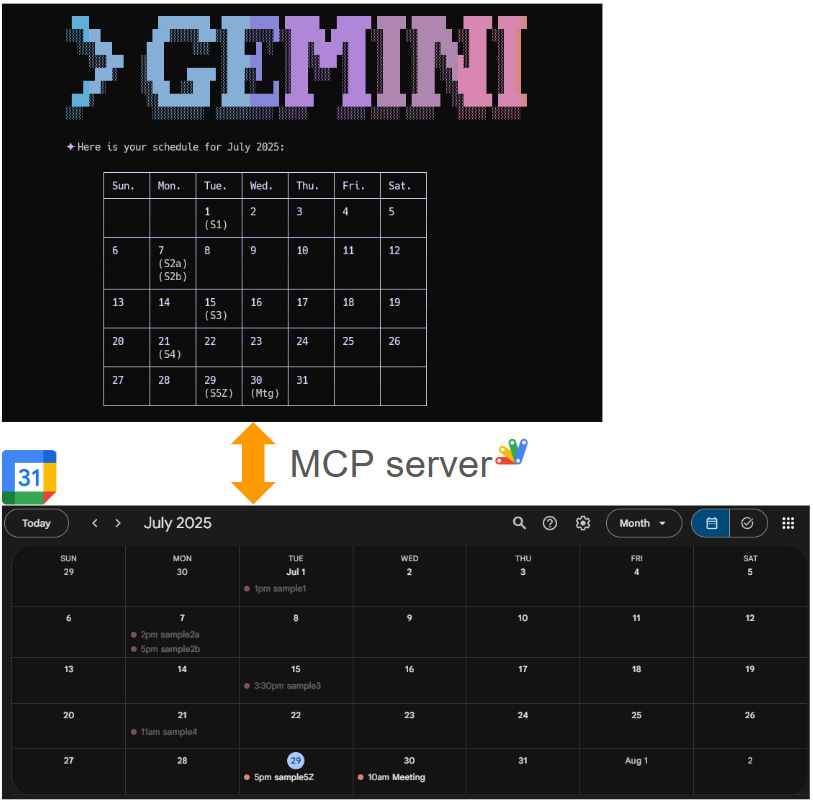
This report demonstrates managing Google Calendar from the command line using Gemini CLI and an MCP server, enabling powerful, scriptable automation for your schedule.
Introduction
Following up on my previous report, “Next-Level Data Automation: Gemini CLI, Google Sheets, and MCP,” I’m excited to present the next installment in this series. My earlier report, published on Medium, detailed an innovative approach to managing Google Sheets through the powerful combination of Gemini CLI and an MCP server. Ref
Gists

Abstract
Effortlessly generate API request bodies from natural language commands. This guide demonstrates using Gemini and Google Apps Script to streamline automation and accelerate development for Google Workspace APIs and beyond.
Introduction
In a recent article, “Managing Google Docs, Sheets, and Slides by Natural Language with Gemini CLI and MCP,” I showcased a powerful method for dynamically creating API request bodies using natural language. This approach, utilizing the Gemini CLI and a My Custom Proxy (MCP) server, allows users to manage Google Workspace applications with simple, human-readable commands. The core concept is that generating API request bodies directly from natural language within a script can dramatically streamline automation and development.
GeminiWithFiles was updated to v2.0.13
-
v2.0.13 (July 22, 2025)
responseJsonSchema was added.- The default model was changed from
models/gemini-2.5-flash-preview-04-17 to models/gemini-2.5-flash.
You can see the detail information here https://github.com/tanaikech/GeminiWithFiles
Gists

Abstract
This report explores an optimized approach to integrating the Gemini CLI with Google Workspace via an MCP server. Traditionally, this process requires numerous custom tools, which increases development costs. We propose leveraging the inherent JSON schema requirements of the MCP server tools to directly construct request bodies for the batchUpdate methods of the Google Docs, Sheets, and Slides APIs. This approach aims to consolidate document management into just three core tools, significantly streamlining development and offering a scalable, cost-effective solution for Google Workspace automation and broader API integrations.
Gists
Abstract
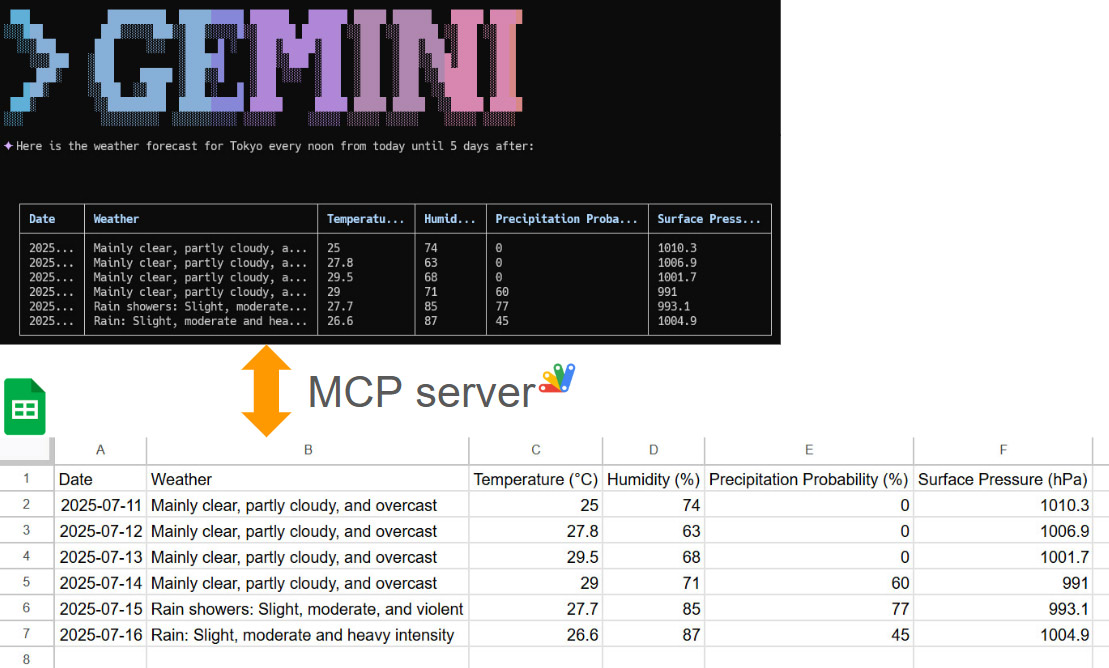
This article explores the integration of the Gemini Command-Line Interface (CLI) with Google Sheets using the Model Context Protocol (MCP). It demonstrates how to leverage the open-source projects MCPApp and ToolsForMCPServer to create a bridge between the Gemini CLI and Google Workspace. This enables users to perform powerful data automation tasks, such as creating, reading, and modifying tables in Google Sheets directly from the command line, using natural language prompts. The article provides practical examples and sample prompts to illustrate the seamless workflow and potential for building sophisticated, AI-powered applications within the Google Cloud ecosystem.
Gists
Abstract
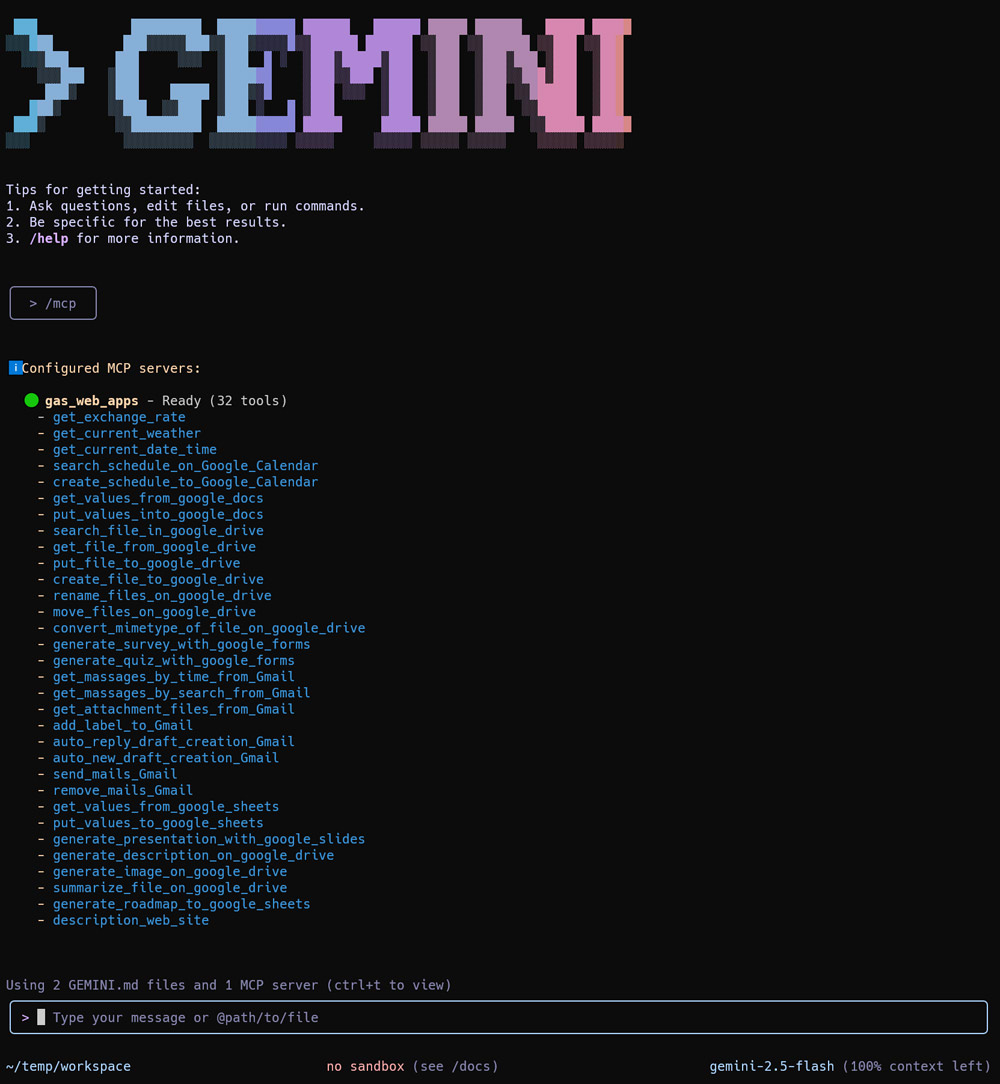
This report introduces ToolsForMCPServer, an enhanced Google Apps Script library that expands the capabilities of Gemini CLI. It showcases new tools that streamline complex workflows, with a special emphasis on facilitating seamless file content transfer and management between a user’s local environment and Google Drive.
Introduction
This report details significant enhancements to ToolsForMCPServer, a powerful Google Apps Script library designed to work in tandem with Gemini CLI. By integrating this library with a Model Context Protocol (MCP) server, the capabilities of Gemini CLI are dramatically expanded, especially in its interaction with Google Workspace services. This document will explore the core architecture that makes this possible, introduce the new tools available in the library, and demonstrate their power through practical examples that bridge the local command line with the cloud.
Gists

Abstract
This report details two methods for processing files using the Gemini CLI and a Google Apps Script MCP server: direct Base64 encoding and indirect transfer via the Google Drive API using ggsrun. The direct method proved ineffective due to token limits. The recommended approach, leveraging ggsrun, allows for efficient, scalable file transfers by using file IDs instead of embedding content within the prompt, enabling advanced automation capabilities.
Gists
Abstract
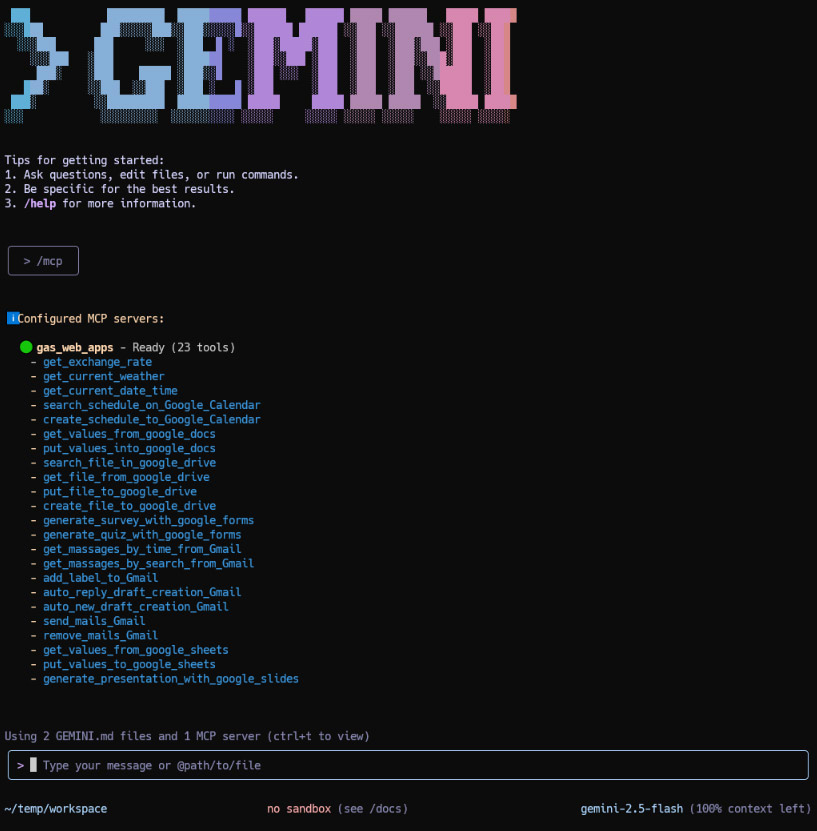
The Gemini CLI provides a powerful command-line interface for interacting with Google’s Gemini models. By leveraging the Model Context Protocol (MCP), the CLI can be extended with custom tools. This report explores the integration of the Gemini CLI with an MCP server built using Google Apps Script Web Apps. We demonstrate how this combination simplifies authorization for Google Workspace APIs (Gmail, Drive, Calendar, etc.), allowing Gemini to execute complex, multi-step tasks directly within the Google ecosystem. We provide setup instructions and several practical examples showcasing how this integration unlocks significant potential for automation and productivity enhancement.
Gists
Abstract
The Gemini CLI can be integrated with Google Workspace via Google Apps Script to securely access personal data, enabling powerful automations like email summaries and calendar management.
Introduction
The recently released Gemini CLI is a powerful command-line interface for interacting with Google’s Gemini models and cloud resources. Ref While powerful on its own, its utility can be significantly enhanced by connecting it to a user’s personal Google resources, such as Google Sheets, Docs, Slides, Gmail, and Calendar.
Gists
Introduction
The Gemini API recently introduced the URL context tool, a feature designed to allow the model to directly fetch and utilize content from specified URLs to ground its responses. Ref
This report provides a practical demonstration of this tool’s capabilities. We will investigate its impact on two critical aspects of AI model interaction: the accuracy of the generated response and the total token consumption, which directly affects API costs.
Gists

Abstract
A new unified Google Apps Script now deploys both Model Context Protocol (MCP) and Agent2Agent (A2A) networks as a single server, streamlining AI model integration for Google Workspace users.
Introduction
The rapid growth of generative AI has led to increasing integration between AI models, exemplified by protocols like the Model Context Protocol (MCP) and Agent2Agent (A2A) Protocol. Recently, I released MCPApp and A2AApp, which establish the MCP and A2A networks using Google Apps Script. Ref and Ref This approach offers significant advantages for users of Google Workspace and Google APIs, as it enables seamless authorization and integration of these resources directly within the applications.
Gists
Abstract
This article announces that the Gemini API’s Python client library now supports “growing image” generation, a feature previously unavailable. Sample scripts for Python and Node.js are provided to demonstrate this new capability.
Introduction
I recently published an article, “Generate Growing Images using Gemini API,” which detailed a method for progressively generating images. At the time of publication, the official Python client library for the Gemini API lacked the necessary functionality to fully implement this feature, preventing Python users from easily replicating the “growing image” effect.
Gists

Abstract
This report details an MCP network using Google Apps Script for both server and client, enabling automated, secure Gmail processing to boost efficiency.
Introduction
Recently, I published a report titled “Building Model Context Protocol (MCP) Server with Google Apps Script,” which you can find here. In that initial report, I demonstrated the feasibility of creating an MCP server using Google Apps Script, with Claude Desktop serving as the client.
Gists
Description
This script provides a simple example for generating Text-To-Speech (TTS) using the Gemini API within Google Apps Script. The Gemini API generates audio data in the audio/L16;codec=pcm;rate=24000 format, which is not directly playable. Since there’s no built-in method to convert this to a standard audio/wav format, this sample script includes a custom function to handle the conversion.
Limitations and Considerations
- The provided
convertL16ToWav_ function is specifically designed for the audio/L16;codec=pcm;rate=24000 MIME type. Using it with other audio formats will result in an error.
- The script uses a hardcoded WAV header. This header assumes specific audio parameters (e.g., sample rate, bit depth, number of channels) that match the Gemini API’s output for this format. If the Gemini API’s output format changes, this header might need adjustment.
Sample Script
Before running, replace "###" with your actual Gemini API key in the myFunction.
Gists
Abstract
This report investigates how Gemini handles current time information, particularly when using the Gemini API. We found that while the Gemini web interface knows the current time, the Gemini API does not inherently. Therefore, applications must explicitly provide current time information in API calls for accurate time-sensitive responses.
Introduction
The rapidly advancing field of generative AI is enabling increasingly complex tasks, particularly through the use of open protocols like the Model Context Protocol (MCP) and Agent2Agent (A2A) Protocol. These protocols facilitate sophisticated operations that often require accurate and dynamic information, including time-sensitive data. For instance, applications that manage schedules or coordinate events critically depend on precise time information.
Gists
Abstract
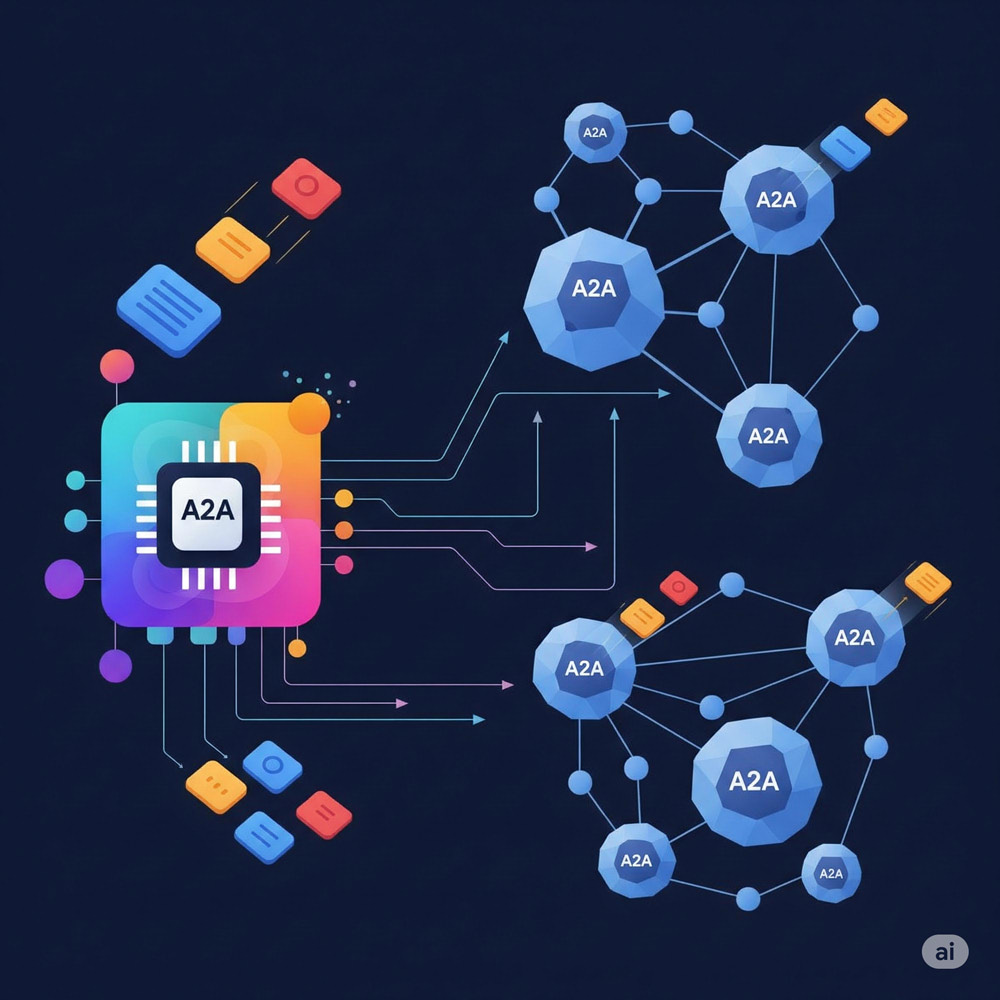
This report details the Agent2Agent (A2A) network built with Google Apps Script’s Web Apps. It facilitates communication between diverse AI agents, overcoming platform limitations. Key improvements include parallel task execution with asynchronous processes and enhanced security through secure access token handling and user-specific Web App availability, demonstrating a robust and secure A2A implementation.
Introduction
This report details an updated implementation of Agent2Agent (A2A), an open protocol designed to enable communication and collaboration between diverse AI agents. The goal of A2A is to overcome limitations of isolated platforms, allowing AI agents to work together on complex tasks while maintaining their internal structures. I recently published a report titled “Building Agent2Agent (A2A) Server with Google Apps Script”. Ref This updated report focuses on successfully creating an A2A network using Google Apps Script’s Web Apps functionality.
GeminiWithFiles was updated to v2.0.10
-
v2.0.10 (May 21, 2025)
- Implemented the parallel function calling. Ref
You can see the detail information here https://github.com/tanaikech/GeminiWithFiles
Gists
Abstract
This report details transferring image data via Model Context Protocol (MCP) from Google Apps Script server to a Python/Gemini client, extending capabilities for multimodal applications beyond text.
Introduction
Following up on my previous report, “Building Model Context Protocol (MCP) Server with Google Apps Script” (Ref), which detailed the transfer of text data between the MCP server and client, this new report focuses on extending the protocol to handle image data. It introduces a practical method for transferring image data efficiently from the Google Apps Script-based MCP server to an MCP client. In this implementation, the MCP client was built using Python and integrated with the Gemini model, allowing for the processing and utilization of the transferred image data alongside text, thereby enabling more complex, multimodal applications within the MCP framework.
Gists

Abstract
The report details a novel Gemini API method to analyze big data beyond AI context window limits, which was validated with Stack Overflow data for insights into Google Apps Script’s potential.
Introduction
Generative AI models face significant limitations when processing massive datasets, primarily due to the constraints imposed by their fixed context windows. Current methods thus struggle to analyze the entirety of big data within a single API call, preventing comprehensive analysis. To address this challenge, I have developed and published a detailed report presenting a novel approach using the Gemini API for comprehensive big data analysis, designed to operate effectively beyond typical model context window limits. Ref
Gists

Abstract
Generative AI faces limits in processing massive datasets due to context windows. Current methods can’t analyze entire data lakes. This report presents a Gemini API approach for comprehensive big data analysis beyond typical model limits.
Introduction
The rapid advancement and widespread adoption of generative AI have been remarkable. High expectations are placed on these technologies, particularly regarding processing speed and the capacity to handle vast amounts of data. While AI processing speed continues to increase with technological progress, effectively managing and analyzing truly large datasets presents significant challenges. The current practical limits on the amount of data that can be processed or held within a model’s context window simultaneously, sometimes around a million tokens or less, depending on the model and task, restrict direct comprehensive analysis of massive data lakes.
GeminiWithFiles was updated to v2.0.6
-
v2.0.6 (April 23, 2025)
- A new method
countTokens was added. Ref When this method is used, you can count tokens of the request.
- This pull request was reflected. Ref
You can see the detail information here https://github.com/tanaikech/GeminiWithFiles
Gists
Abstract
Learn how Gemini AI and Google Apps Script automate Google Slides generation. A developed application demonstrates this synergy, streamlining initial presentation drafting and showcasing AI’s automation potential within Google Workspace.
Introduction
The field of AI, particularly large language models like Google’s Gemini, is advancing rapidly. A powerful application of this technology involves integrating Gemini with Google Apps Script. Google Apps Script provides a seamless way to automate tasks across Google Workspace by natively handling authorization and interaction with services like Google Docs, Google Sheets, and Google Slides. By combining Gemini’s generative capabilities with Apps Script, sophisticated automations become accessible.
Gists

Abstract
Gemini 2.5 Pro Experimental enabled automated cargo ship stowage planning via prompt engineering, overcoming prior model limitations. This eliminates the need for complex algorithms, demonstrating AI’s potential in logistics.
Introduction
Recently, I encountered a practical business challenge: automating stowage planning through AI. Specifically, I received a request to generate optimal container loading plans for cargo ships, a task traditionally requiring significant manual effort and domain expertise. In initial tests, prior to the release of Gemini 2.5, I found that existing models struggled to effectively handle the complexities of this problem, including constraints like weight distribution, container dimensions, and destination sequencing. However, with the release of Gemini 2.5, I observed a significant improvement in the model’s capabilities. Utilizing the Gemini 2.5 Pro Experimental model, I successfully demonstrated the generation of viable stowage plans using only carefully crafted prompts. This breakthrough eliminates the need for complex, custom-built algorithms or extensive training datasets. The successful implementation involved providing the model with key parameters such as container dimensions, weights, destination ports, and ship capacity. This report details the methodology, prompt engineering, and results of my attempt to create automated stowage planning using Gemini 2.5 Pro Experimental, highlighting its potential to revolutionize logistics and shipping operations.
Gists
Abstract
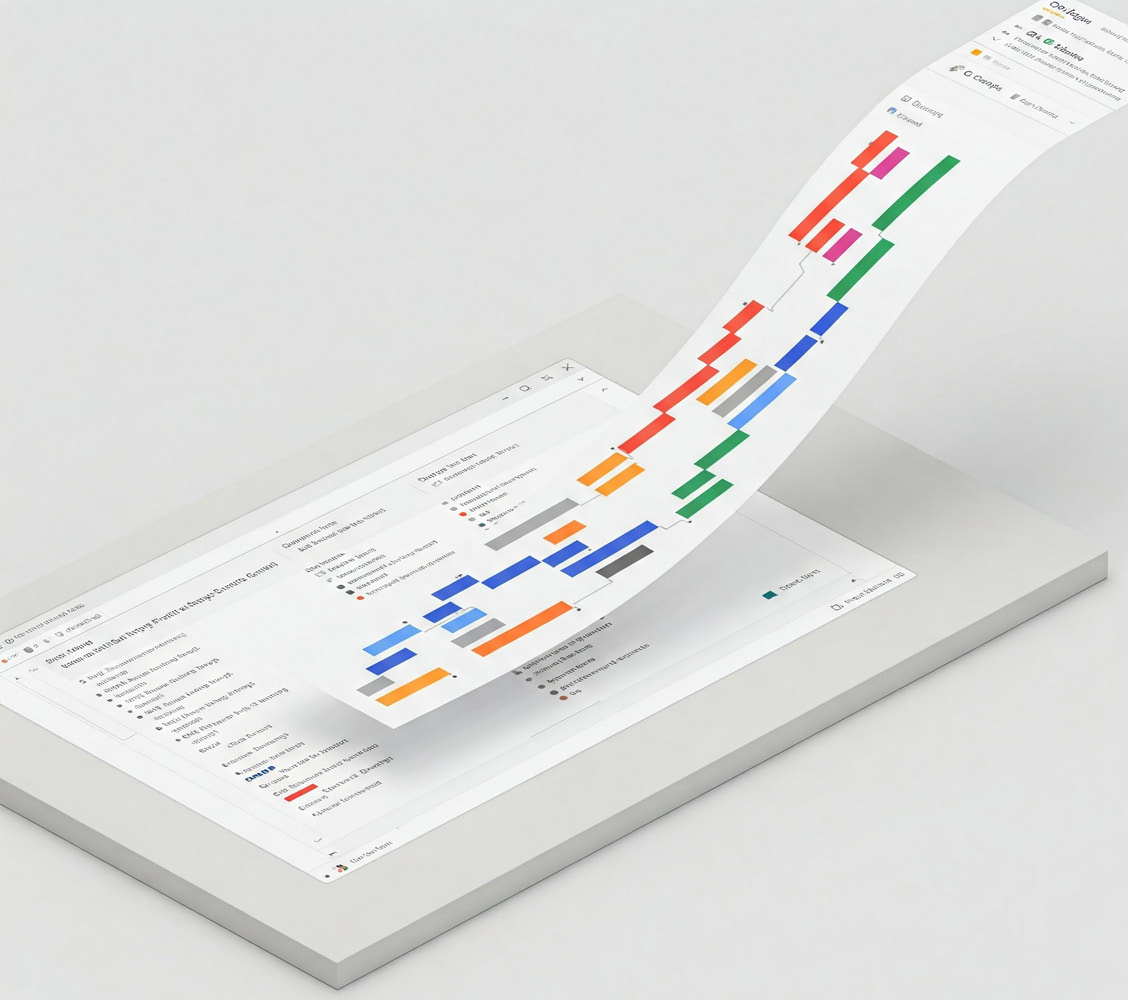
Gemini and Google Apps Script automate project roadmap creation in Google Sheets, including Gantt charts, improving efficiency and agile planning.
Introduction
When initiating a new project, a comprehensive roadmap is crucial for successful execution. Previously, I meticulously crafted these roadmaps manually, a time-consuming process. However, leveraging the advanced capabilities of Google’s Gemini, I’ve significantly streamlined this workflow. Gemini now assists in generating detailed project roadmaps, enhancing efficiency and accuracy. To further automate this process, I developed a Google Apps Script that dynamically constructs these roadmaps directly within Google Sheets, complete with integrated Gantt charts. This script facilitates the rapid generation of diverse project roadmaps, enabling agile planning and adaptation for future endeavors. This report details the functionality and implementation of this script, demonstrating its potential to optimize project planning and visualization.
Gists

Abstract
Gemini API now generates images via Flash Experimental and Imagen 3. This report introduces image evolution within conversations using Gemini API with Google Apps Script.
Introduction
Recently, image generation was supported in the Gemini API using Gemini 2.0 Flash Experimental and Imagen 3. I have already reported a simple sample script for generating images using the Gemini API with Google Apps Script. Ref In practice, you might want to evolve the generated images within a conversation. In this report, I would like to introduce a sample script demonstrating this using Google Apps Script.
GeminiWithFiles was updated to v2.0.5
-
v2.0.5 (March 19, 2025)
- A new method
chat was added. Ref When this method is used, you can generate content with Gemini API through the chat.
- The default model was changed from
models/gemini-1.5-flash-latest to models/gemini-2.0-flash.
You can see the detail information here https://github.com/tanaikech/GeminiWithFiles
Gists
Abstract
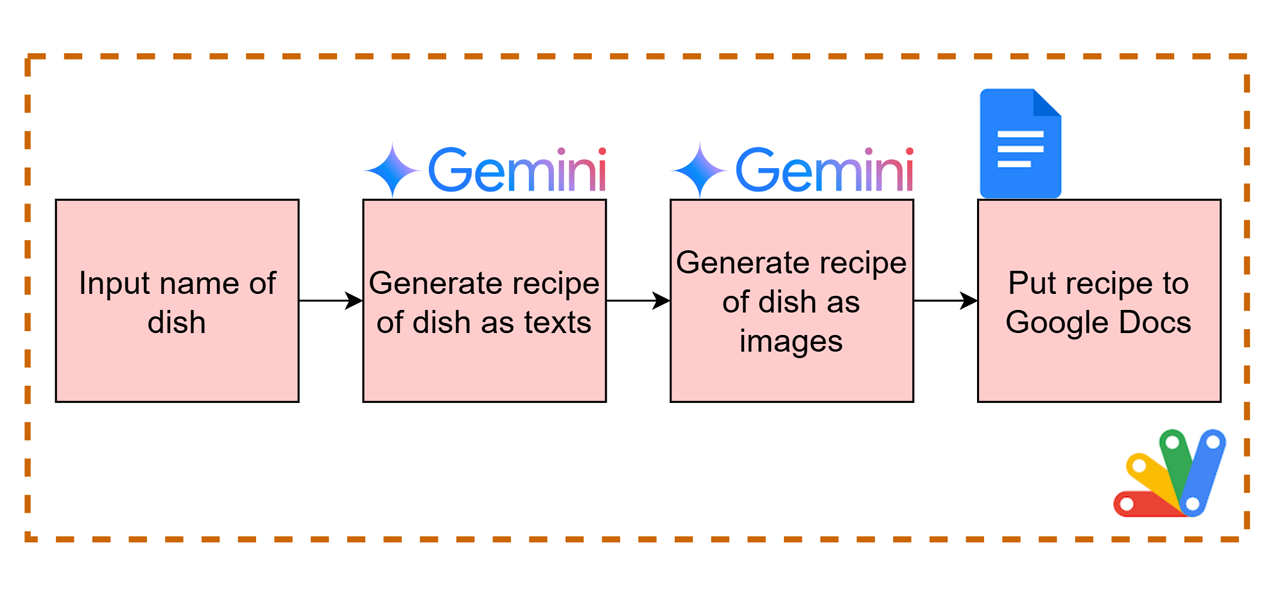
This report presents a Google Apps Script for generating visualized cooking recipes with text and images using the Gemini API, leveraging its image generation capabilities.
Introduction
Recently, image generation was supported in the Gemini API using Gemini 2.0 Flash Experimental and Imagen 3. I have already reported a simple sample script for generating images using the Gemini API with Google Apps Script. Ref Google Apps Script seamlessly integrates with Google Docs, Sheets, and Slides. In this report, I would like to introduce a script for creating a recipe for cooking a dish, including texts and images, using the Gemini API with Google Apps Script.
Gists
Description
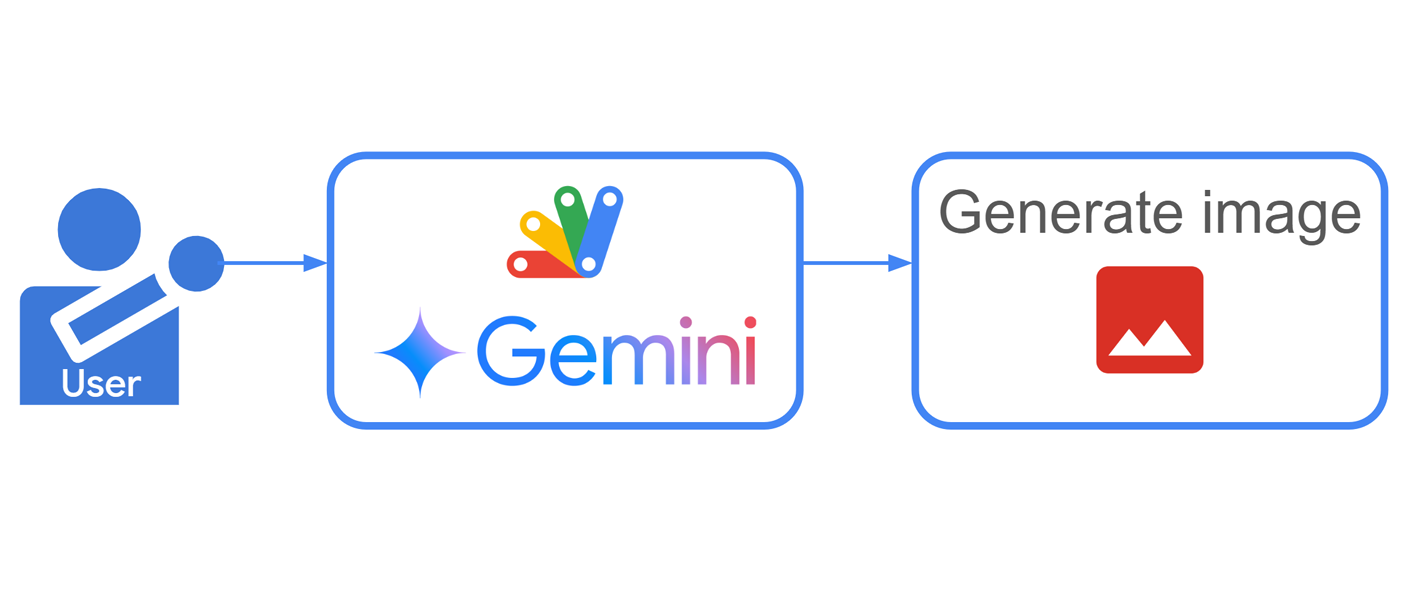
Recently, image generation was supported in the Gemini API using Gemini 2.0 Flash Experimental and Imagen 3. This report introduces simple sample scripts for generating images using the Gemini API with Google Apps Script. When images can be created using the Gemini API with Google Apps Script, Google Apps Script, which seamlessly integrates with Google Docs, Sheets, and Slides, becomes a powerful tool for creating and managing them, and the applications are infinite.
GeminiWithFiles was updated to v2.0.4
-
v2.0.4 (March 15, 2025)
- Property
generationConfig was added to the method geminiWithFiles. By this, you can use all properties for generationConfig. Ref You can see the sample scripts at “Use googleSearch for grounding” and “Generate image”.
You can see the detail information here https://github.com/tanaikech/GeminiWithFiles
Gists

Abstract
A new library, MimeTypeApp, simplifies using Gmail messages and attachments with the Gemini API for tasks like text analysis. It converts unsupported formats for seamless integration with Google Apps Script and Gemini.
Introduction
Recently, I published MimeTypeApp, a Google Apps Script library that simplifies parsing Gmail messages, including attachments, for use with the Gemini API. Ref This library addresses a key challenge: Gmail attachments come in various MIME types, while the Gemini API currently only accepts a limited set for processing. MimeTypeApp bridges this gap by providing functions to convert unsupported MIME types to formats compatible with Gemini. With MimeTypeApp, you can streamline your workflows that involve parsing Gmail messages and their attachments for tasks like text extraction, summarization, or sentiment analysis using the Gemini API. This report introduces a sample script that demonstrates how to leverage MimeTypeApp to achieve this functionality. By leveraging Google Apps Script’s integration capabilities, MimeTypeApp allows you to create powerful applications that seamlessly connect Gmail, Spreadsheets (for storing results or extracted data), and the Gemini API.
GeminiWithFiles was updated to v2.0.3
You can see the detail information here https://github.com/tanaikech/GeminiWithFiles
Gists
Abstract
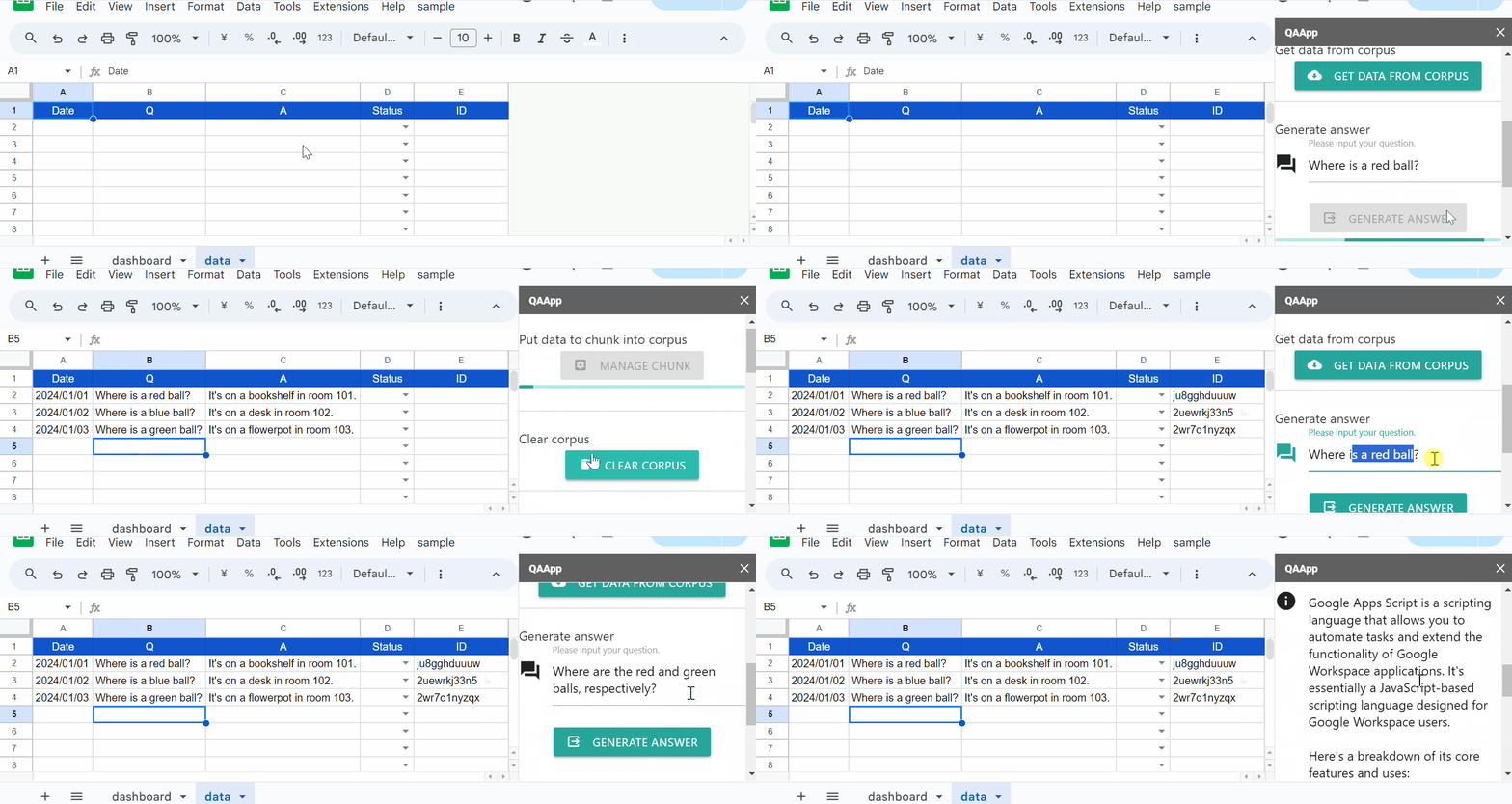
Gemini excels at text generation with RAG for large datasets, but smaller ones benefit from prompting or data upload. This report explores using Gemini 1.5 Flash/Pro with RAG on medium-sized, Google Spreadsheet-stored datasets for improved accuracy and effectiveness.
Introduction
Gemini’s text generation capabilities have seen significant advancements with the Retrieval-Augmented Generation (RAG). This approach excels for large datasets, where embedding data and querying the model leads to high-quality answers. However, for smaller datasets, directly including data in the prompt or an uploaded file can be more efficient. Ref
Gists
Abstract
This research explores “pseudo function calling” in Gemini API using prompt engineering with JSON schema, bypassing model dependency limitations.
Introduction
Large Language Models (LLMs) like Gemini and ChatGPT offer powerful functionalities, but their capabilities can be further extended through function calling. This feature allows the LLM to execute pre-defined functions with arguments generated based on the user’s prompt. This unlocks a wide range of applications, as demonstrated in these resources (see References).
GeminiWithFiles was updated to v2.0.2
You can see the detail information here https://github.com/tanaikech/GeminiWithFiles
Gists
Abstract
This report presents a method to train AI to effectively generate content from smaller, structured datasets using Python. Gemini’s token processing capabilities are leveraged to effectively utilize limited data, while techniques for interpreting CSV and JSON formats are explored.
Introduction
In the era of rapidly advancing artificial intelligence (AI), the ability to analyze and leverage large datasets is paramount. While RAG (Retrieval Augmented Generation) environments are often ideal for such tasks, there are scenarios where content generation needs to be achieved with smaller datasets.
Gists
Abstract
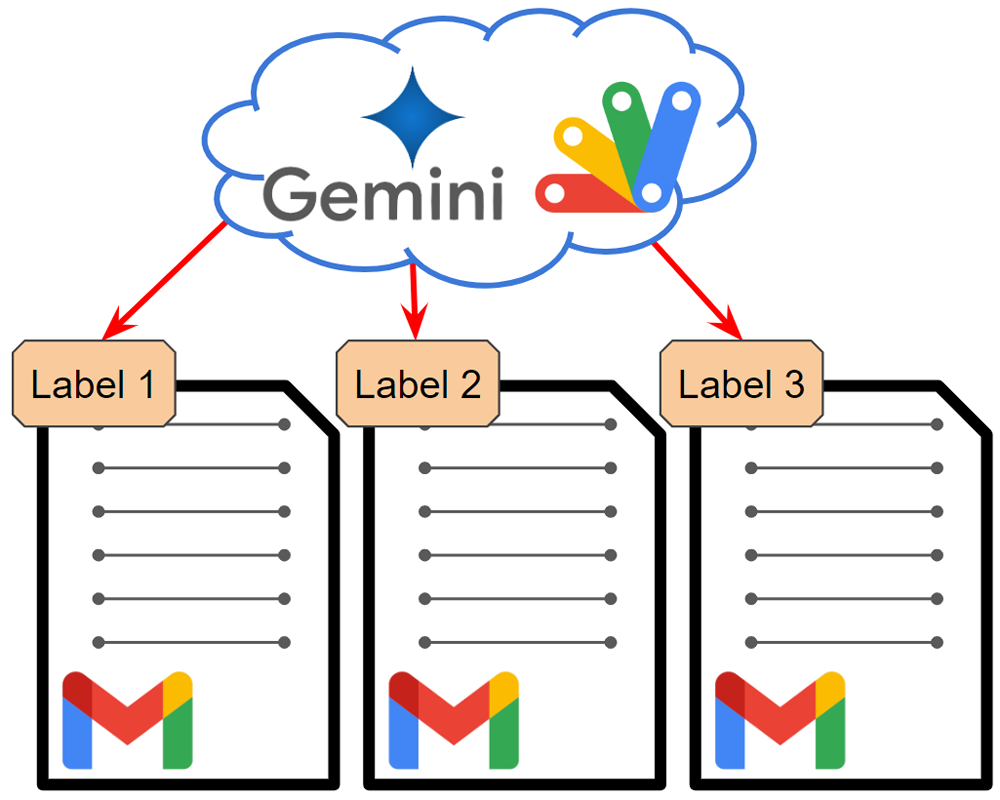
This report improves Gmail email labeling with Gemini API using JSON schema and leverages advancements in Gemini 1.5 Flash for faster processing.
Introduction
As Gemini continues to evolve, existing scripts utilizing its capabilities can be revisited to improve efficiency and accuracy. This includes the process of flexible labeling for Gmail emails using the Gemini API. I have previously explored this topic in two reports:
Gists
Abstract
This report presents a method to optimize AI-generated scripts for processing costs using Gemini and Google Apps Script. By incorporating external knowledge from sources like StackOverflow, we demonstrate the effective generation of efficient scripts that minimize overhead while maintaining desired outcomes. This approach can be considered a dynamic pseudo-RAG technique.
Introduction
The proliferation of generative AI, exemplified by Google Gemini, has led to a surge in AI-generated scripts. This trend is evident in the growing number of questions on platforms like StackOverflow that involve AI-generated scripts. While this indicates a significant improvement in AI performance, it’s crucial to note that AI-generated scripts may not always be optimized for processing costs, especially when the prompt fails to provide sufficient context.
Gists
Abstract
A script using resumable upload with file streams is proposed to enhance file handling within the Gemini Generative AI API for Node.js. This script allows uploading from web URLs and local storage, efficiently handles large files, and offers potential reusability with other Google APIs.
Description
The @google/generative-ai library provides a powerful way to interact with the Gemini Generative AI API using Node.js. This enables developers to programmatically generate creative text formats, translate languages, write different kinds of creative content, and answer your questions in an informative way, all powered by Gemini’s advanced AI models. Ref
Gists
Abstract
This study proposes a workaround to address the Gemini API’s current inability to directly process web content from URLs. By utilizing Google Apps Script, the method extracts relevant information from a specified URL and feeds it into the API for summarization. This approach offers a solution for generating comprehensive summaries from web-based content until the API’s limitations are resolved.
Introduction
While Gemini API offers powerful text generation capabilities, it currently faces limitations in directly accessing and processing web content from URLs. When prompted to summarize an article at a specific URL like Summarize the article at the following URL. https://###, the API often returns an error message indicating its inability to retrieve the necessary information. This limitation arises from the API’s current design, which may not be equipped to handle web requests and parse HTML content.
Gists
Abstract
Linking a Google Apps Script project to a GCP project enables you to export logs from the Class console to Logs Explorer for simplified analysis and debugging. By overcoming the limitations of in-script logging methods, this report outlines a method for exporting logs using the Cloud Logging API with Google Apps Script.
Introduction
While developing applications with Google Apps Script, the Class console is a valuable tool for debugging individual components. Ref However, a key limitation exists: by default, Google Apps Script projects on Google Drive are not linked to Google Cloud Platform (GCP) projects. In this unlinked scenario, logs from the Class console are only visible within the script editor, requiring manual copying for export.
Gists

Abstract
This report proposes a novel learning method using Gemini to automate Q&A generation, addressing the challenges of manual Q&A creation. By integrating with Google tools, this approach aims to enhance learning efficiency, accessibility, and personalization while reducing costs.
Introduction
Mastering a new subject often demands a significant time commitment. A proven strategy for efficient learning is through question-and-answer (Q&A) practice. This method typically involves constructing a dataset of pertinent Q&A pairs and subsequently engaging in repeated practice until desired proficiency levels are achieved. While platforms such as Google Forms and Google Apps Script can streamline the Q&A creation and evaluation process, the manual generation of Q&A data remains a time-consuming and expensive endeavor. Minimizing the operational costs associated with scripting is crucial for long-term sustainability.
GeminiWithFiles was updated to v2.0.1
-
v2.0.1 (August 4, 2024)
- From this version,
codeExecution can be used. Ref
You can see the detail information here https://github.com/tanaikech/GeminiWithFiles
UnlockSmartInvoiceManagementWithGeminiAPI was updated to v1.0.3.
-
v1.0.3 (August 3, 2024)
- On August 3, 2024, I upated GeminiWithFiles (https://github.com/tanaikech/GeminiWithFiles). In this version, PDF data can be processed with Gemini API without async/await. So, I updated UnlockSmartInvoiceManagementWithGeminiAPI.
You can see the detail information here https://github.com/tanaikech/UnlockSmartInvoiceManagementWithGeminiAPI
GeminiWithFiles was updated to v2.0.0
-
v2.0.0 (August 3, 2024)
- From this version, the following changes were made.
- PDF data can be directly used. Ref By this, PDFApp is not required to be used. By this, the script can be used without async/await.
- As the default,
functions: {} is used. So, the default function calling was removed. Because in the current stage, JSON output can be easily returned using a JSON schema and response_mime_type. Ref Ref
- The default model was changed from
models/gemini-1.5-pro-latest to models/gemini-1.5-flash-latest.
- The export values with
exportTotalTokens were changed. After v2.x.x, when this is true, the object usageMetadata including promptTokenCount, candidatesTokenCount, totalTokenCount is exported. At that time, the generated content and usageMetadata are returned as an object.
- After v2.x.x, the large files can be uploaded to Gemini. This is from this respository and this post.
You can see the detail information here https://github.com/tanaikech/GeminiWithFiles
Gists
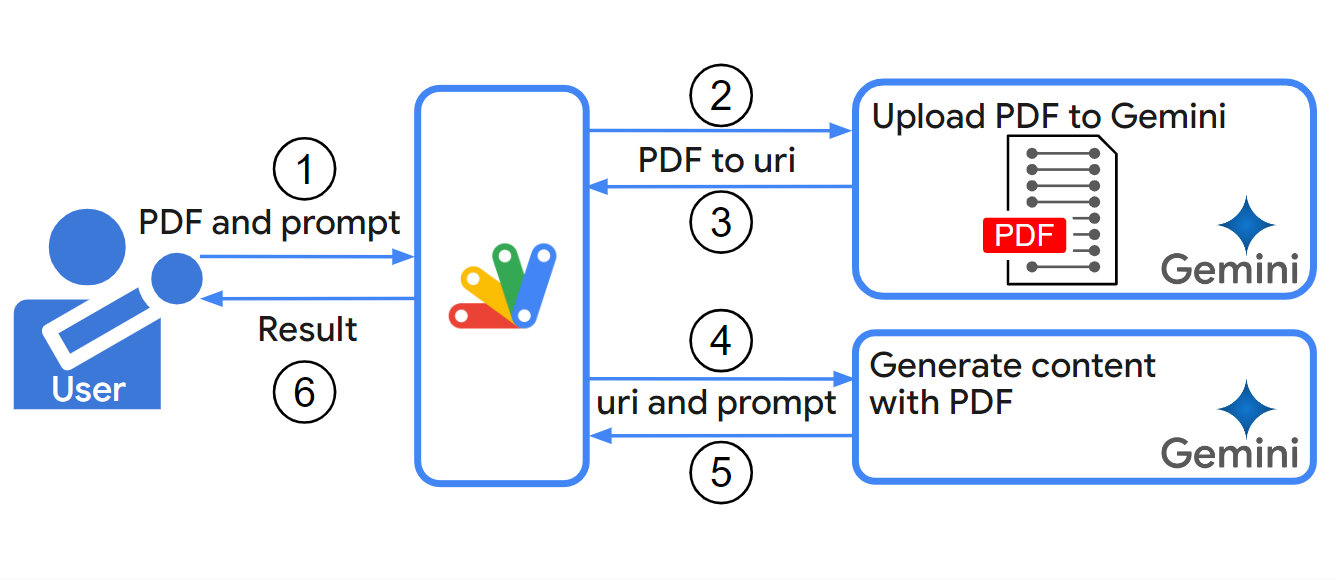
Abstract
Gemini API now enables direct PDF processing for content generation, eliminating image conversion and reducing costs. This report provides a sample script to demonstrate this new capability and its potential applications.
Introduction
Gemini API has recently introduced the ability to directly process PDF data for content generation, significantly enhancing its capabilities. Previously, to utilize PDF data for content creation, it was necessary to convert each PDF page into a separate image format. This time-consuming and resource-intensive process has been eliminated, resulting in substantially reduced processing costs.
UnlockSmartInvoiceManagementWithGeminiAPI was updated to v1.0.2.
-
v1.0.2 (July 23, 2024)
- On July 23, 2024, I noticed that PDF data could be directly parsed by Gemini API. It is considered that this is due to the update by the Google side. So, I updated
setBlobs([blob], true) to setBlobs([blob], false) of the method parseInvoiceByGemini_. By this modification, the PDF blob is directly used with Gemini API. Ref
You can see the detail information here https://github.com/tanaikech/UnlockSmartInvoiceManagementWithGeminiAPI
Gists
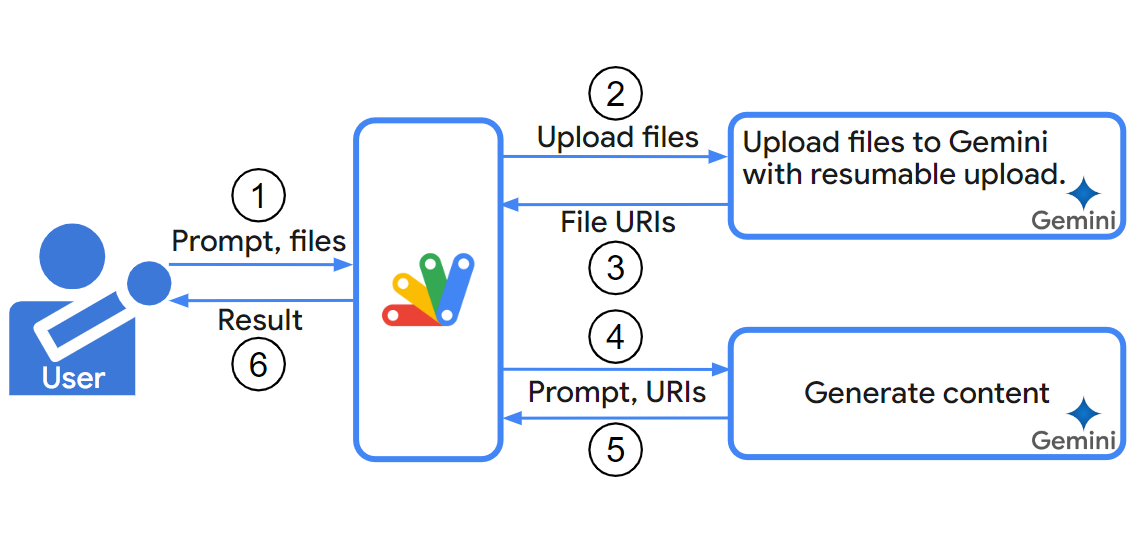
Abstract
Uploads in Google Apps Script are limited to 50 MB, hindering work with large datasets. This report introduces a script with uploadType=resumable to overcome this limit, enabling uploads over 50 MB to Gemini and other services.
Introduction
This report explores the limitations of data upload size using Google Apps Script and introduces a script to overcome these limitations. In the current stage, Gemini API can generate content using the uploaded data to Gemini. You can find more information on this in a previous report. Ref As mentioned in the report, Google Apps Script uses uploadType=multipart for uploading files. However, the maximum file size is limited to 5 MB with this method for Drive API. Ref While I confirmed that the Gemini API allows for uploading over about 20 MB with uploadType=multipart, Google Apps Script enforces a stricter 50 MB limit for both uploads and downloads. Ref This can be inconvenient when working with larger datasets, such as movie or text data, which often exceed this limit.
GeminiWithFiles was updated to v1.0.7.
-
v1.0.7 (July 4, 2024)
- From this version, when
doCountToken: true and exportTotalTokens: true are used in the object of the argument of geminiWithFiles, the total tokens are returned. In this case, the returned value is an object like {returnValue: "###", totalTokens: ###}. Ref
You can see the detail information here https://github.com/tanaikech/GeminiWithFiles
UnlockSmartInvoiceManagementWithGeminiAPI was updated to v1.0.1.
-
v1.0.1 (June 17, 2024)
- In order to easily customize the value of “jsonSchema” for generating content with Gemini API, I added it as a new sheet of “jsonSchema” sheet in the Spreadsheet. When you customize it, you can edit the cell “A1” of the “jsonSchema” sheet. By this, the script generates content with Gemini API using your customized JSON schema. The cell “A2” is the number of characters of “A1”.
You can see the detail information here https://github.com/tanaikech/UnlockSmartInvoiceManagementWithGeminiAPI
GeminiWithFiles was updated to v1.0.6.
-
v1.0.6 (June 15, 2024)
- Included the script of PDFApp in this library.
You can see the detail information here https://github.com/tanaikech/GeminiWithFiles
Gists

You can see the presentation of this application at https://www.youtube.com/watch?v=Dc2WPQkovZE.
Abstract
This report describes an invoice processing application built with Google Apps Script. It leverages Gemini, a large language model, to automatically parse invoices received as email attachments and automates the process using time-driven triggers.
Introduction
The emergence of large language models (LLMs) like ChatGPT and Gemini has significantly impacted various aspects of our daily lives. One such example is their ability to automate tasks previously requiring manual effort. In my case, Gemini has streamlined the processing of invoices I receive as email attachments in PDF format.
GeminiWithFiles was updated to v1.0.5.
-
v1.0.5 (June 7, 2024)
- Spelling mistakes in the warning message were modified. The wait time for changing the value of state for the movie file is changed from 5 seconds to 10 seconds per cycle.
You can see the detail information here https://github.com/tanaikech/GeminiWithFiles
My post was featured in the section “Community cuts” of “The overwhelmed person’s guide to Google Cloud: week of May 23”.
Gitst

Abstract
This report builds on prior work using Gemini 1.0 Pro to expand Google Apps Script error messages. It highlights how the script’s execution time limit created a bottleneck, but the introduction of Gemini 1.5 Flash eliminates this issue.
Introduction
After the release of the Gemini API, I previously reported on “Expanding Error Messages of Google Apps Script using Gemini Pro API with Google Apps Script”. Ref In that report, I utilized the Gemini 1.0 Pro model. While expanding error messages proved valuable for understanding script errors in detail, Google Apps Script currently has a maximum execution time of 6 minutes. Ref This meant that processing time for content generation by the Gemini API significantly impacted the total process time when dealing with large scripts, creating a bottleneck.
GeminiWithFiles was updated to v1.0.4.
-
v1.0.4 (May 29, 2024)
- Recently, when
model.countToken is used with the uploaded files, I confirmed that an error like You do not have permission to access the File ### or it may not exist. occurred. In order to handle this issue, I modified the library.
- In order to use the movie files for generateContent, I modified the library. Ref
You can see the detail information here https://github.com/tanaikech/GeminiWithFiles
Gists

Abstract
The Gemini API traditionally required specific prompts for desired output formats. This report explores two new GenerationConfig properties: “response_mime_type” and “response_schema”. These allow developers to directly specify formats like JSON, enhancing control and predictability. We analyze and compare the effectiveness of both properties for controlling Gemini API output formats.
Introduction
One of the key challenges when working with the Gemini API is ensuring the output data is delivered in the format your application requires. Traditionally, the response format heavily relied on the specific prompt you provided. For example, retrieving data as a structured JSON object necessitated including a “Return JSON” prompt within your input text. This approach could be cumbersome and error-prone if the desired format wasn’t explicitly requested.
GeminiWithFiles was updated to v1.0.3.
-
v1.0.3 (May 17, 2024)
- Bugs were removed.
You can see the detail information here https://github.com/tanaikech/GeminiWithFiles
Gists

Abstract
This report examines leveraging Gemini 1.5 API with Google Apps Script to automate sample input creation during script reverse engineering. Traditionally, this process is manual and time-consuming, especially for functions with numerous test cases. Gemini 1.5 API’s potential to streamline development by automating input generation is explored through applying reverse engineering techniques to Google Apps Script samples.
Gists
Overview
These are sample scripts in Python and Node.js for controlling the output format of the Gemini API using JSON schemas.
Description
In a previous report, “Taming the Wild Output: Effective Control of Gemini API Response Formats with response_mime_type,” I presented sample scripts created with Google Apps Script. Ref Following its publication, I received requests for sample scripts using Python and Node.js. This report addresses those requests by providing sample scripts in both languages.
GeminiWithFiles was updated to v1.0.2.
-
v1.0.2 (May 7, 2024)
- For generating content,
parts was added. From this version, you can select one of q, jsonSchema, and parts.
- From this version,
systemInstruction can be used.
- In order to call the function call,
toolConfig was added to the request body.
You can see the detail information here https://github.com/tanaikech/GeminiWithFiles
GeminiWithFiles was updated to v1.0.1.
-
v1.0.1 (May 2, 2024)
response_mime_type got to be able to be used for controlling the output format. Ref
You can see the detail information here https://github.com/tanaikech/GeminiWithFiles
Gists

Abstract
This report explores controlling output formats for the Gemini API. Traditionally, prompts dictated the format. A new property, “response_mime_type”, allows specifying the format (e.g., JSON) directly. Testing confirms this property improves control over output format, especially for complex JSON schemas. The recommended approach is to combine a detailed JSON schema with “response_mime_type” for clear and consistent outputs.
Overview
This is a Google Apps Script library for Gemini API with files.
A new Google Apps Script library called GeminiWithFiles simplifies using Gemini, a large language model, to process unstructured data like images and PDFs. GeminiWithFiles can upload files, generate content, and create descriptions from multiple images at once. This significantly reduces workload and expands possibilities for using Gemini.
Description
Recently, Gemini, a large language model from Google AI, has brought new possibilities to various tasks by enabling the use of unstructured data as structured data. This is particularly significant because a vast amount of information exists in unstructured formats like text documents, images, and videos.
Gists

Abstract
A new Google Apps Script library, “GeminiWithFiles”, simplifies using the powerful Gemini 1.5 AI model. It lets users directly upload files for content generation or create descriptions for many images at once, making it much faster than prior methods. This is helpful for tasks involving large amounts of text or images.
Introduction
Recently, Gemini, a family of Google’s most capable AI models, has revolutionized various tasks by allowing unstructured data to be used as structured data. This breakthrough is particularly impactful for tasks involving large amounts of text or images.
Gists

Abstract
The Gemini API generates different outputs depending on the prompts. This report explains how to use function calling in the new Gemini 1.5 API to control the output format (string, number, etc.) within a script during a chat session. This allows for more flexibility in using the Gemini API’s results.
Introduction
The appearance of Gemini has already brought a wave of innovation to various fields. When the Gemini API returns a response, the format of the response is highly dependent on the input text provided as a prompt. For instance, to retrieve the output value as a JSON object, you need to explicitly include a prompt like “Return JSON” within your input. However, there can be situations where the API doesn’t return the data in the desired format.
Gists

Abstract
This report explores using Gemini, a new AI model, to parse invoices in Gmail attachments. Traditional text searching proved unreliable due to invoice format variations. Gemini’s capabilities can potentially overcome this inconsistency and improve invoice data extraction.
Introduction
After Gemini, a large language model from Google AI, has been released, it has the potential to be used for modifying various situations, including information extraction from documents. In my specific case, I work with invoices in PDF format. Until now, I relied on the direct search by a Google Apps Script to achieve this task. The script’s process involved:
Gists

Abstract
A new large language model (LLM) called Gemini with an API is now available, allowing developers to analyze vast amounts of data. This report explores trends in Google Apps Script by using the Gemini 1.5 API to analyze questions on Stack Overflow.
Introduction
The release of the LLM model Gemini as an API on Vertex AI and Google AI Studio has opened a world of possibilities. Ref The Gemini API significantly expands the potential of various scripting languages, paving the way for diverse applications. Additionally, Gemini 1.5 has recently been released in AI Studio. Ref We can expect the Gemini 1.5 API to follow suit soon.
Gists

Abstract
The Gemini API allows the generating of text from uploaded files using Google Apps Script. It expands the potential of various scripting languages for diverse applications.
Introduction
With the release of the LLM model Gemini as an API on Vertex AI and Google AI Studio, a world of possibilities has opened up. Ref The Gemini API significantly expands the potential of various scripting languages and paves the way for diverse applications. Also, recently, Gemini 1.5 in AI Studio has been released. Ref In the near future, Gemini 1.5 API will be also released soon.
Gists
Abstract
The Gemini API unlocks potential for diverse applications but requires consistent output formatting. This report proposes a method using question phrasing and API calls to craft a bespoke output, enabling seamless integration with user applications. Examples include data categorization and obtaining multiple response options.
Introduction
With the release of the LLM model Gemini as an API on Vertex AI and Google AI Studio, a world of possibilities has opened up. Ref The Gemini API significantly expands the potential of various scripting languages and paves the way for diverse applications. However, leveraging the Gemini API smoothly requires consistent output formatting, which can be tricky due to its dependence on the specific question asked.
Gists
Abstract
Gemini API on Vertex AI/Studio unlocks new applications with data retrieval and content generation through function calls. This report explores using the API for reverse engineering with a sample interpreter in Google Apps Script.
Introduction
The recent release of the LLM model Gemini as an API on Vertex AI and Google AI Studio unlocks a vast potential for new applications and methodologies. It significantly expands capabilities across diverse situations, paving the way for groundbreaking applications. Notably, the Gemini API allows data retrieval and content generation through function calls. In my recent report, “Guide to Function Calling with Gemini and Google Apps Script”, I explore function calls as a launchpad for various applications. This report showcases reverse engineering using the Gemini API, with a sample interpreter for creating sample values from a given regex using Google Apps Script.
Gists
Abstract
The Gemini API can now do semantic searches, going beyond content generation. This means it can understand the meaning of your search and provide better results, even if your words don’t exactly match the data. This report introduces the enhanced search capabilities of the Gemini API.
Introduction
The Gemini API expands its potential beyond content generation to encompass powerful semantic search capabilities. Searching existing data is crucial in various situations. However, before the introduction of generative AI, traditional search methods relied solely on keyword matching. Recent advancements in semantic search have introduced similarity search, allowing for a more nuanced understanding of queries. Combining this with the generative power of the Gemini API can significantly enhance the search results of existing data. This report explores the possibilities of enhanced search using the Gemini API.
CorporaApp was updated to v1.0.3.
-
v1.0.3 (March 6, 2024)
- New method of getChunk was added. When this method is used, you can retrieve a single chunk using the resource name of chunk.
You can see the detail information here https://github.com/tanaikech/CorporaApp
Gists
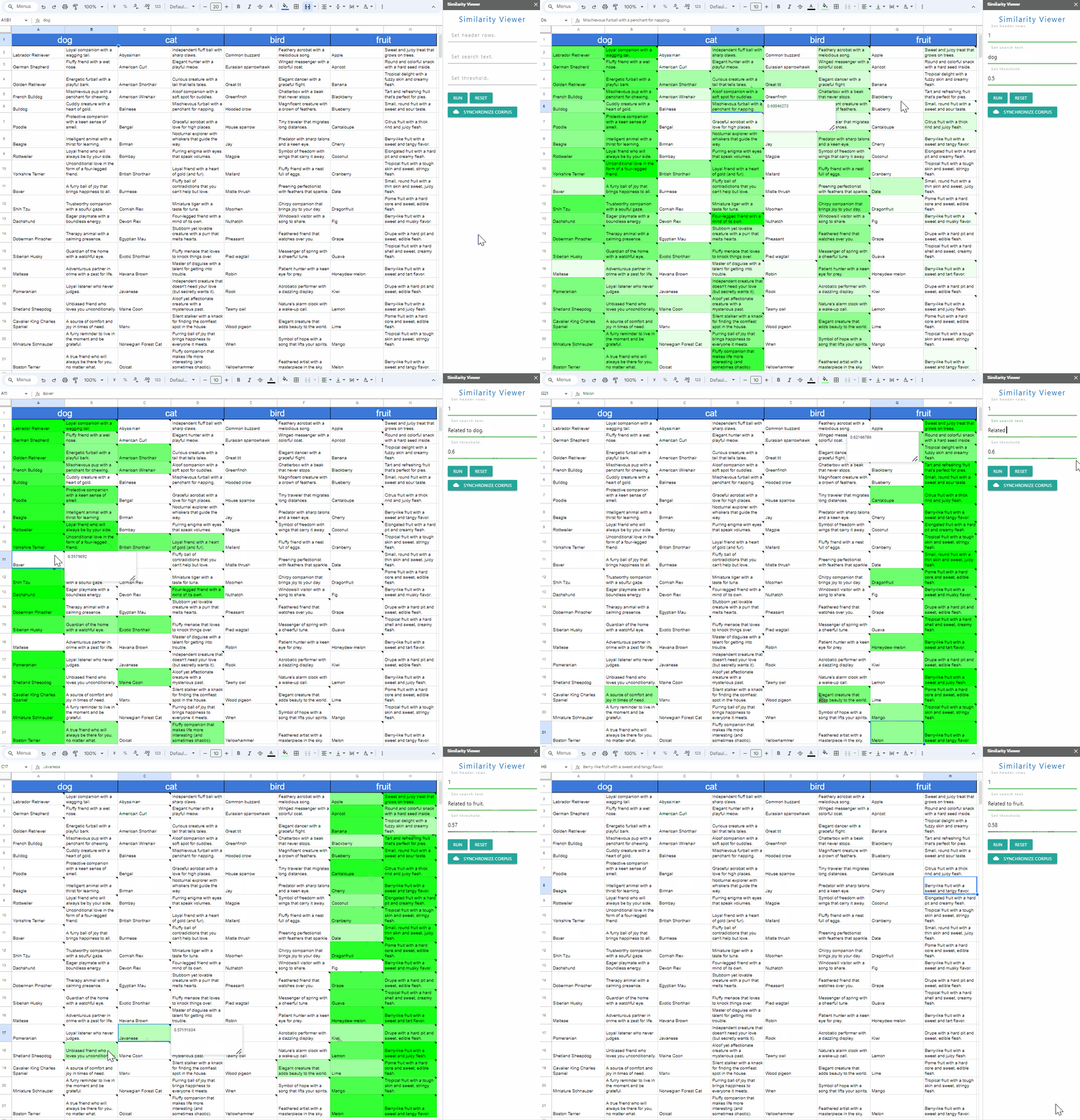
Abstract
The Gemini API enables both content generation and semantic search, managing data effectively. This report introduces a Gemini-powered similarity viewer for easy visualization of complex text similarity scores, using Google Spreadsheet and Apps Script.
Introduction
The Gemini API unlocks new possibilities, extending its capabilities beyond content generation to encompass semantic search. Within this context, the API excels at efficiently managing data within corpora. While semantic search provides valuable similarity scores (chunkRelevanceScore) for text pairs, interpreting these numerical values can be cumbersome. This report addresses this challenge by introducing a novel similarity viewer, built upon the powerful trio of Gemini API, Google Spreadsheet, and Google Apps Script. This user-friendly tool allows us to visually represent the similarity of texts, transforming numerical data into an intuitive and easily digestible format.
CorporaApp was updated to v1.0.2.
You can see the detail information here https://github.com/tanaikech/CorporaApp
Gists
Abstract
New Gemini API opens doors for developers to integrate its AI power into apps, potentially impacting education, healthcare, and business. The latest Gemini 1.5 brings even more features. This report showcases an image bot using Gemini as one example of its diverse applications. Showcasing its diverse application potential across various fields.
Introduction
The recent release of Gemini as an accessible API on Vertex AI and Google AI Studio empowers developers to integrate its vast capabilities into their applications, potentially revolutionizing fields like education, healthcare, and business. Adding even more powerful features with the recently announced Gemini 1.5, this tool promises even greater impact. Ref and Ref I believe Gemini significantly expands the potential for diverse applications across various fields. To showcase its potential, this report introduces an image bot using Gemini with Google Apps Script and Google Drive. This is just one example of the many compelling use cases developers can build with Gemini.
Gists
Abstract
Powerful AI tool Gemini’s API release (Vertex AI & Google AI Studio) opens doors for diverse applications. Its recent upgrade to version 1.5 boosts capabilities. This report demonstrates using simple Google Apps Script function calls to leverage Gemini’s power for both data retrieval and content generation.
Introduction
The recent release of the LLM model Gemini as an API on Vertex AI and Google AI Studio unlocks a world of possibilities. Ref Excitingly, Gemini 1.5 was just announced, further expanding its capabilities. Ref I believe Gemini significantly expands the potential in various situations and paves the way for diverse applications. Notably, the Gemini API can retrieve new data and generate content through function calls. In this report, I introduce the basic flow of function calling in the Gemini API using a simple Google Apps Script.
CorporaApp was updated to v1.0.1.
You can see the detail information here https://github.com/tanaikech/CorporaApp
Gists
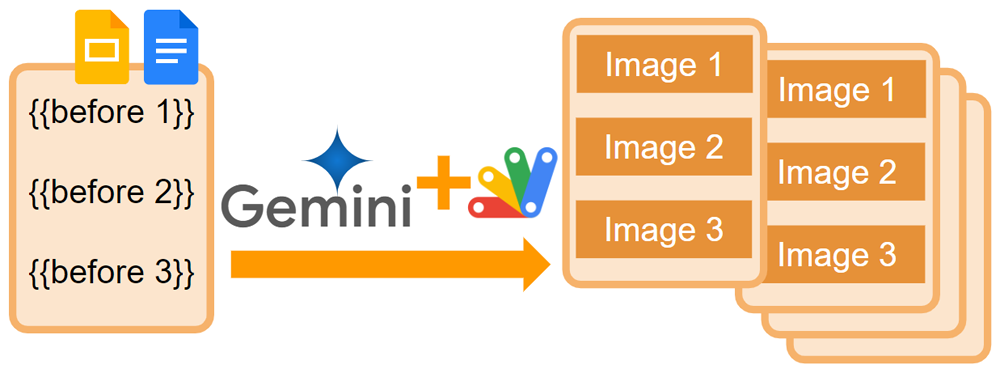
Abstract
New “semantic search” features in Gemini API help find desired information within its corpora. While using these features with Google Apps Script was complex, a new library simplifies the process. This report proposes using this library with Gemini-generated content to automate template processes in Google Docs and Slides, creating a more flexible workflow.
Introduction
The semantic search opens up a new wind for finding the expected values. Recently, the APIs for managing corpora have been added to Gemini API. Ref When the corpora of Gemini API is used, the semantic search can be effectively achieved. Ref However, when the corpora are tried to be used with Google Apps Script, the script is complicated cumbersome. To address this challenge, I have created a library for managing the corpora using Google Apps Script. Ref With this library, managing corpora becomes effortless, requiring only straightforward scripts.
Gists
Description
In the current stage, v1beta of Gemini API can use the corpora. Ref When the corpora are used, the values can be searched with the semantic search. In the current stage, 5 corpora can be created in a single project. And, each corpus can have 10,000 documents and 1,000,000 chunks. In this report, I would like to introduce a method for achieving the semantic search using the corpora with Google Apps Script.
Gists
Description
I have published “Flexible Labeling for Gmail using Gemini Pro API with Google Apps Script” on December 19, 2023. Today, I published “Categorization using Gemini Pro API with Google Apps Script”.
In this report, as part 2, I would like to introduce 2 sample scripts for flexible labeling for Gmail using the semantic search and the function calling of Gemini Pro API with Google Apps Script.
Gists
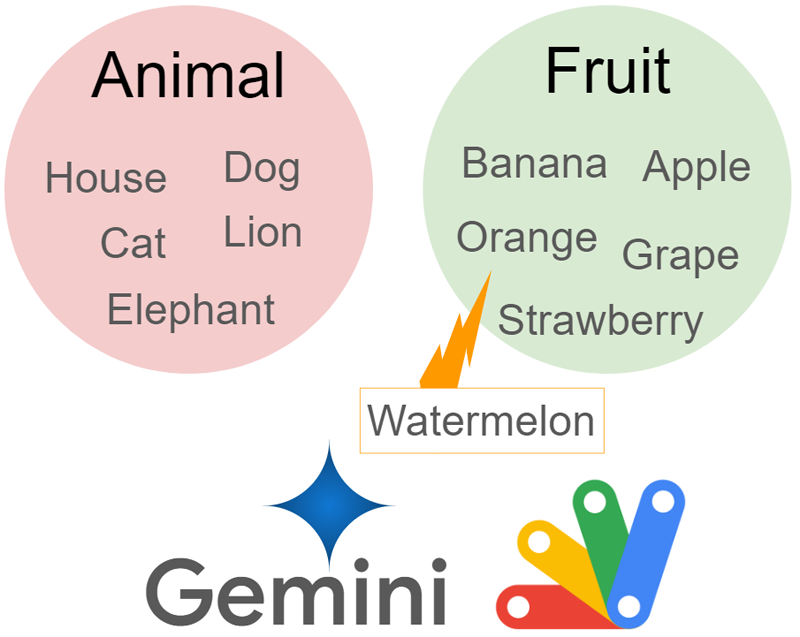
Abstract
This report explores using the Gemini Pro API with Google Apps Script to achieve flexible data categorization.
Introduction
The recent release of the LLM model Gemini as an API on Vertex AI and Google AI Studio opens a world of possibilities. Ref and Ref I believe Gemini API significantly expands the potential of Google Apps Script and paves the way for diverse applications. In this report, I present the flexible categorization of data using Gemini Pro API with Google Apps Script.
Gists
Abstract
Gemini API unlocks semantic search for Google Apps Script, boosting its power beyond automation. This report explores the result of attempting the semantic search using Gemini Pro API with Google Apps Script.
Introduction
The recent release of the LLM model Gemini as an API on Vertex AI and Google AI Studio opens a world of possibilities. Ref and Ref I believe Gemini API significantly expands the potential of Google Apps Script and paves the way for diverse applications. In this report, I present a result for attempting the semantic search using Gemini Pro API with Google Apps Script.
Gists
Description
When the generated text can be automatically inserted into the cursor position of Google Document, Google Spreadsheet, and Google Slide, it will be useful for users. This report introduces sample scripts for achieving this.
Sample scripts
Here, I would like to introduce 3 sample scripts for a Google Document, a Google Spreadsheet, and a Google Slide.
Create an API key
These sample scripts request Gemini Pro API using an API key. So, please create your API key.
Gists
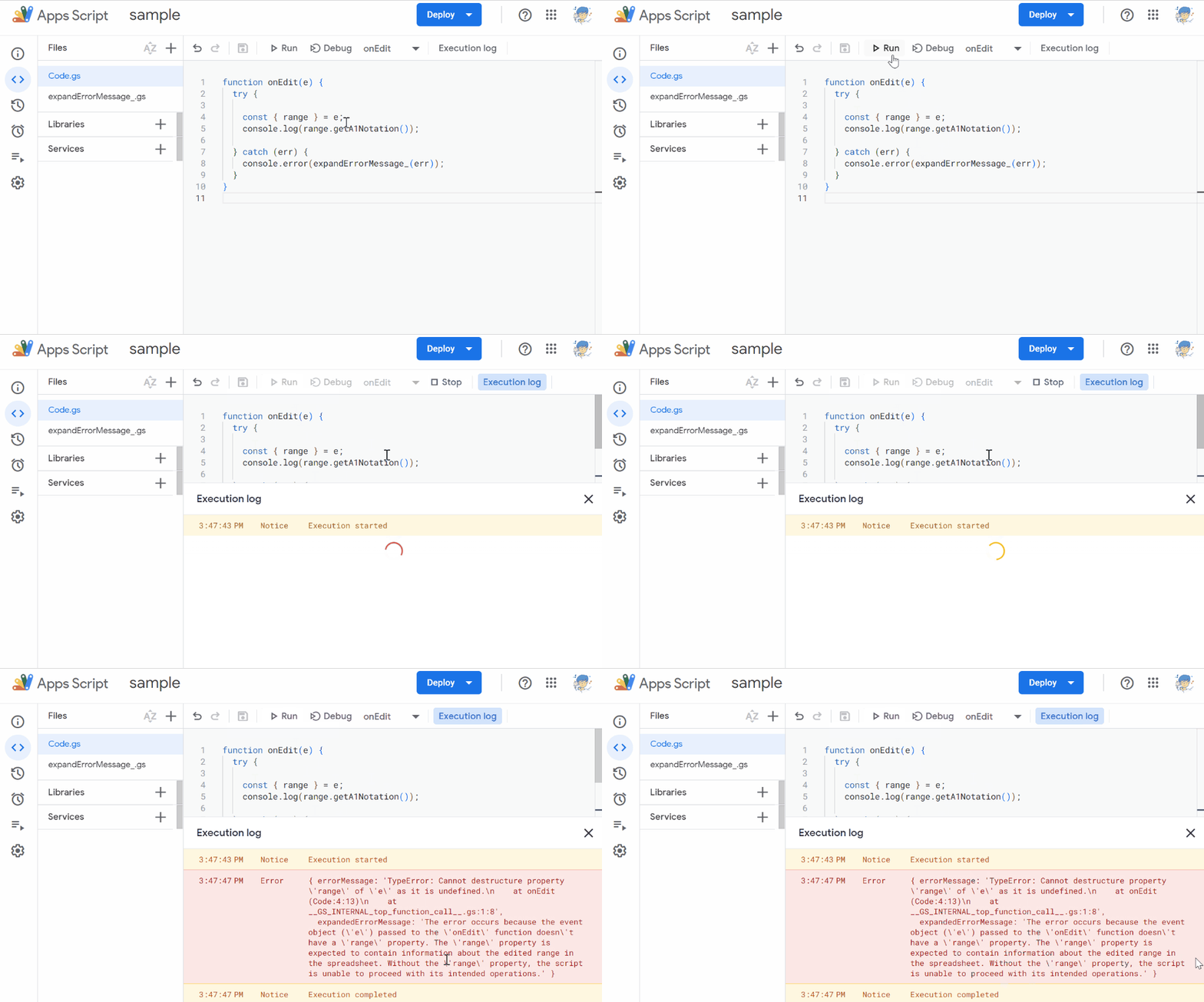
Abstract
It is considered that when the current error message of Google Apps Script is expanded, it will be useful for a lot of users. This report introduces a sample script for expanding the error message of Google Apps Script using Gemini Pro API with Google Apps Script.
Introduction
The recent release of the LLM model Gemini as an API on Vertex AI and Google AI Studio opens a world of possibilities. Ref and Ref
Gists
Abstract
The release of Gemini API is expected to expand the future of Google Apps Script. This report introduces a sample script for flexible email labeling in Gmail using Gemini API with Google Apps Script.
Introduction
The recent release of the LLM model Gemini as an API on Vertex AI and Google AI Studio opens a world of possibilities. Ref and Ref I believe Gemini API significantly expands the potential of Google Apps Script and paves the way for diverse applications. In this report, I present a sample script for flexible email labeling in Gmail using Gemini Pro API with Google Apps Script.
Gists
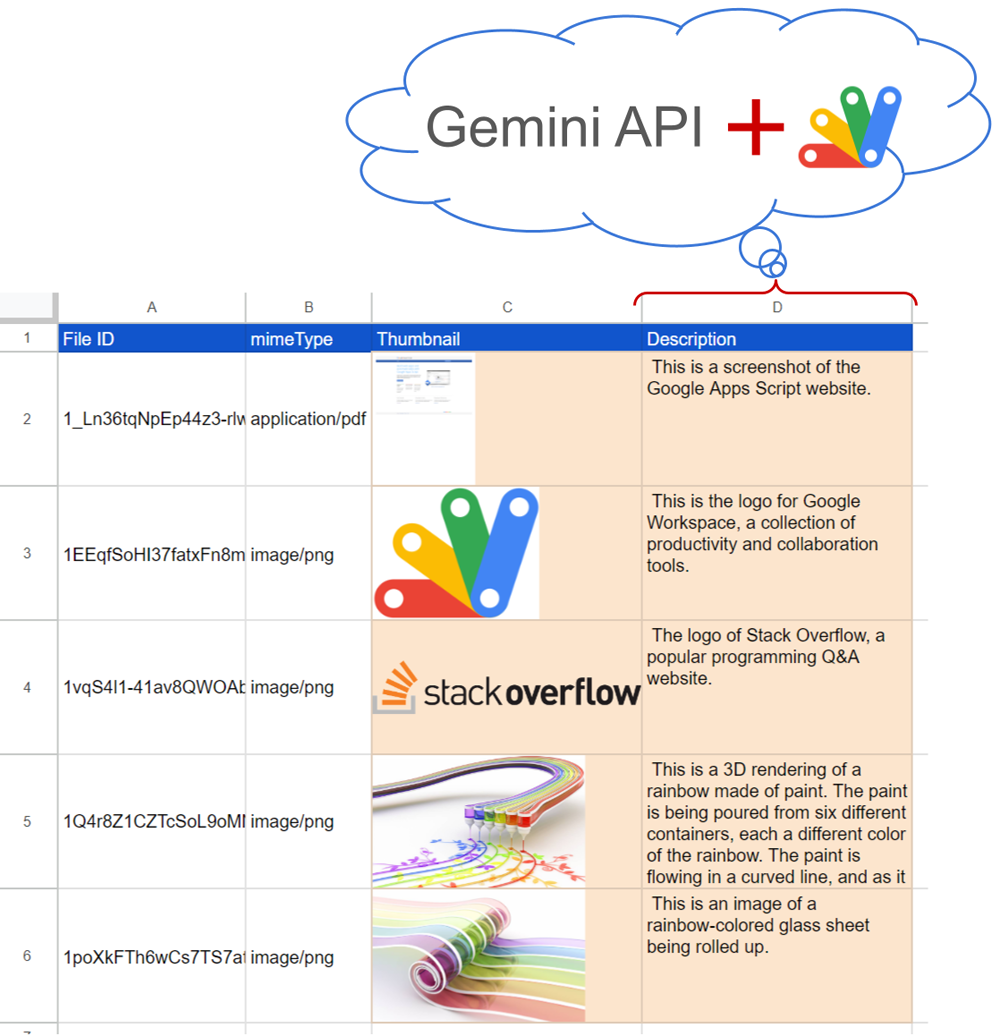
Abstract
Gemini LLM, now a Vertex AI/Studio API, unlocks easy document summarization and image analysis via Google Apps Script. This report details an example script for automatically creating the description of the files on Google Drive and highlights seamless integration options with API keys.
Introduction
Recently, the LLM model Gemini has been released and is now available as an API on Vertex AI and Google AI Studio. Ref and Ref This report presents a simple Google Apps Script example for automatically creating descriptions of files on Google Drive using the Gemini Pro API. It is considered that when the description of files on Google Drive can be easily created, it will help users manage a lot of files.