Gists

Abstract
A new library, MimeTypeApp, simplifies using Gmail messages and attachments with the Gemini API for tasks like text analysis. It converts unsupported formats for seamless integration with Google Apps Script and Gemini.
Introduction
Recently, I published MimeTypeApp, a Google Apps Script library that simplifies parsing Gmail messages, including attachments, for use with the Gemini API. Ref This library addresses a key challenge: Gmail attachments come in various MIME types, while the Gemini API currently only accepts a limited set for processing. MimeTypeApp bridges this gap by providing functions to convert unsupported MIME types to formats compatible with Gemini. With MimeTypeApp, you can streamline your workflows that involve parsing Gmail messages and their attachments for tasks like text extraction, summarization, or sentiment analysis using the Gemini API. This report introduces a sample script that demonstrates how to leverage MimeTypeApp to achieve this functionality. By leveraging Google Apps Script’s integration capabilities, MimeTypeApp allows you to create powerful applications that seamlessly connect Gmail, Spreadsheets (for storing results or extracted data), and the Gemini API.
Gists
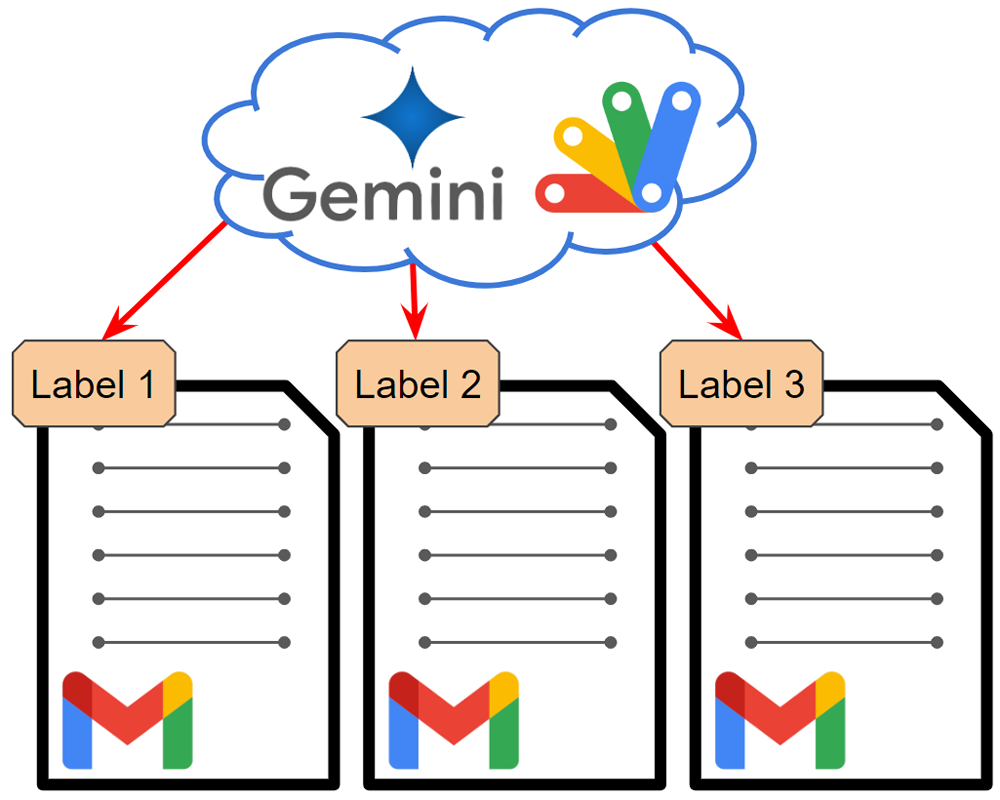
Abstract
This report improves Gmail email labeling with Gemini API using JSON schema and leverages advancements in Gemini 1.5 Flash for faster processing.
Introduction
As Gemini continues to evolve, existing scripts utilizing its capabilities can be revisited to improve efficiency and accuracy. This includes the process of flexible labeling for Gmail emails using the Gemini API. I have previously explored this topic in two reports:
Gists
This is a sample script for searching Gmail messages by Gmail Filters using Google Apps Script.
At Gmail, users can set the filter for the Emails. With this filter, users can filter the Emails of Gmail. But, when the users want to search by the installed filter using Google Apps Script, unfortunately, it seems that this cannot be directly achieved. For example, messages cannot be searched using a filter ID.
Gists
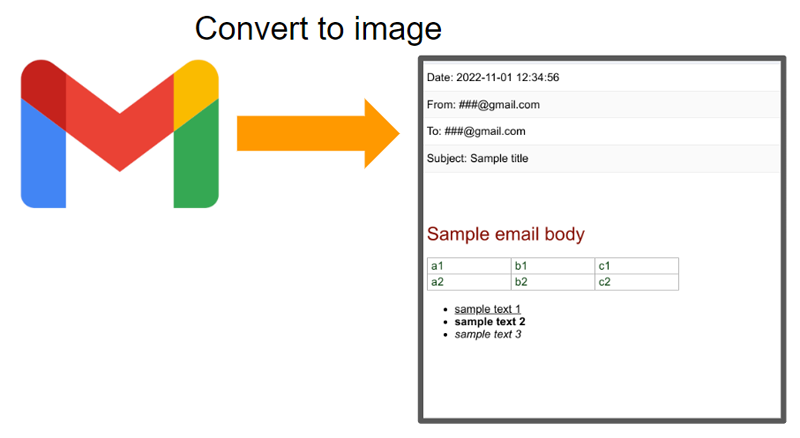
This is a workaround for converting a Gmail message to a PNG image using Google Apps Script.
Sample script
Please set the message ID of Gmail.
function myFunction() {
  var id = "###"; // Please set your message ID of Gmail.

  var message = GmailApp.getMessageById(id);
  var date = Utilities.formatDate(
    message.getDate(),
    Session.getScriptTimeZone(),
    "yyyy-MM-dd HH:mm:ss"
  );
  var from = message.getFrom();
  var to = message.getTo();
  var subject = message.getSubject();
  var htmlBody = message.getBody();
  var imageBlob = Charts.newTableChart()
    .setDataTable(
      Charts.newDataTable()
        .addColumn(Charts.ColumnType.STRING, "")
        .addRow([`<p style="font-size: 120%">Date: ${date}</p>`])
        .addRow([`<p style="font-size: 120%">From: ${from}</p>`])
        .addRow([`<p style="font-size: 120%">To: ${to}</p>`])
        .addRow([`<p style="font-size: 120%">Subject: ${subject}</p>`])
        .addRow([htmlBody])
        .build()
    )
    .setOption("allowHtml", true)
    .setDimensions(512, 512)
    .build()
    .getBlob();

  DriveApp.createFile(imageBlob.setName("sample.png"));
}
Gists
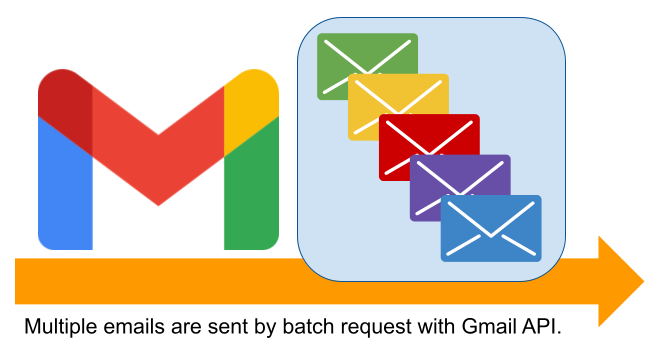
This is a sample script for sending multiple emails using the batch request with Gmail API using Google Apps Script. When multiple emails are sent using “GmailApp.sendEmail” and “MailApp.sendEmail”, a loop is used. But in this case, the process cost becomes high. In this post, I would like to introduce the sample script for reducing the process cost under this situation. Gmail API can be requested with the batch request. The batch request can be processed with the asynchronous process. By this, I thought that the process cost for sending multiple emails. So, this sample script sends multiple emails using the batch request with Gmail API.
Gists
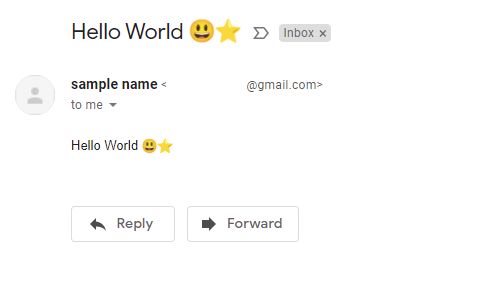
This is a sample script for sending Gmail with the title and body including Emoji using Google Apps Script.
Sample script
This sample script uses Gmail API. So please enable Gmail API at Advanced Google services. Ref
const convert_ = ({ to, emailFrom, nameFrom, subject, textBody, htmlBody }) => {
  const boundary = "boundaryboundary";
  const mailData = [
    `MIME-Version: 1.0`,
    `To: ${to}`,
    nameFrom && emailFrom ? `From: "${nameFrom}" <${emailFrom}>` : "",
    `Subject: =?UTF-8?B?${Utilities.base64Encode(
      subject,
      Utilities.Charset.UTF_8
    )}?=`,
    `Content-Type: multipart/alternative; boundary=${boundary}`,
    ``,
    `--${boundary}`,
    `Content-Type: text/plain; charset=UTF-8`,
    ``,
    textBody,
    ``,
    `--${boundary}`,
    `Content-Type: text/html; charset=UTF-8`,
    `Content-Transfer-Encoding: base64`,
    ``,
    Utilities.base64Encode(htmlBody, Utilities.Charset.UTF_8),
    ``,
    `--${boundary}--`,
  ].join("\r\n");
  return Utilities.base64EncodeWebSafe(mailData);
};

// Please run this function.
function main() {
  const obj = {
    to: "###", // Please set the email for `to`.
    emailFrom: "###", // Please set the email for `from`.
    nameFrom: "sample name",
    subject: "Hello World 😃⭐",
    textBody: "sample text body 😃⭐",
    htmlBody: "<p>Hello World 😃⭐</p>",
  };
  Gmail.Users.Messages.send({ raw: convert_(obj) }, "me");
}
- In order to use Emoji in the subject, the subject value is converted to the base64 data. And, it is used as
=?UTF-8?B?###?=. Ref
- About the method for including Emoji to the email body, I have answered it at this thread of Stackoverflow.
Reference
GmailToList was updated to v1.0.1.
You can see the detail information here https://github.com/tanaikech/GmailToList
Overview
This is a library for exporting all messages of Gmail as a list using Google Apps Script (GAS).
Description
Recently, I have had a situation it had been required to backup all messages in own Gmail. In order to achieve this, I created a simple script. After I created it, I thought that when such situation might occur for other users and the script is published as a library, they might be useful. So I created this library. But I created this for my situation. So if this cannot be used for your environment and an error occurs, I apologize.
Gists
These are sample scripts for adding a label to a message using message ID for Gmail.
Sample 1
This sample adds a label to a thread using message ID. In this case, all messages in the thread have the label. Even if it adds a label to a message in the thread using addLabel(), all messages in the thread have the label, becauce addLabel can only be used for the thread.
Gists
Description :
This sample script is for retrieving emails which replied for received mails. Because there are no samples which confirm whether the owner (me) replied to the received mails, I created this. The point is as follows.
- When there are more than 2 messages in a thread, there might be a possibility to have replied.
- For more than 2 messages in a thread
- The email address of “from” for the 1st message is the sender’s address.
- When the email address of “to” of after 2nd messages is the same to that of “from” of 1st one, it is indicates that the thread was replied by owner.
This sample script is made of Google Apps Script (GAS). But also this can be applied to other languages.
Gists
This is a sample script for sending e-mails from gmail using Nodemailer. In order to use this, please retrieve the folloing parameters before run this script.
- gmail address
- client ID
- client Secret
- Refresh token
- Please include
https://mail.google.com/ in the scope.
- Enable gmail API at API console.
- Install Nodemailer
const nodemailer = require('nodemailer');

var auth = {
    type: 'oauth2',
    user: '### your gmail address ###',
    clientId: '### client ID ###',
    clientSecret: '### client secret ###',
    refreshToken: '### refresh token ###',
};

var mailOptions = {
    from: '#####',
    to: '#####',
    subject: 'sample subject',
    text: 'sample text',
    html: '<b>sample html</b>',
};

var transporter = nodemailer.createTransport({
    service: 'gmail',
    auth: auth,
});

transporter.sendMail(mailOptions, (err, res) => {
    if (err) {
        return console.log(err);
    } else {
        console.log(JSON.stringify(res));
    }
});
Reference :
Gist
This is a sample script for decoding Gmail body with Japanese language using Python.
msg = service.users().messages().get(userId='me', id=id).execute()
parts = msg['payload']['parts']
for e in parts:
    msg = base64.urlsafe_b64decode(e['body']['data']).decode('utf-8').encode('cp932', "ignore").decode('cp932')
    print(msg)