Gists
Abstract
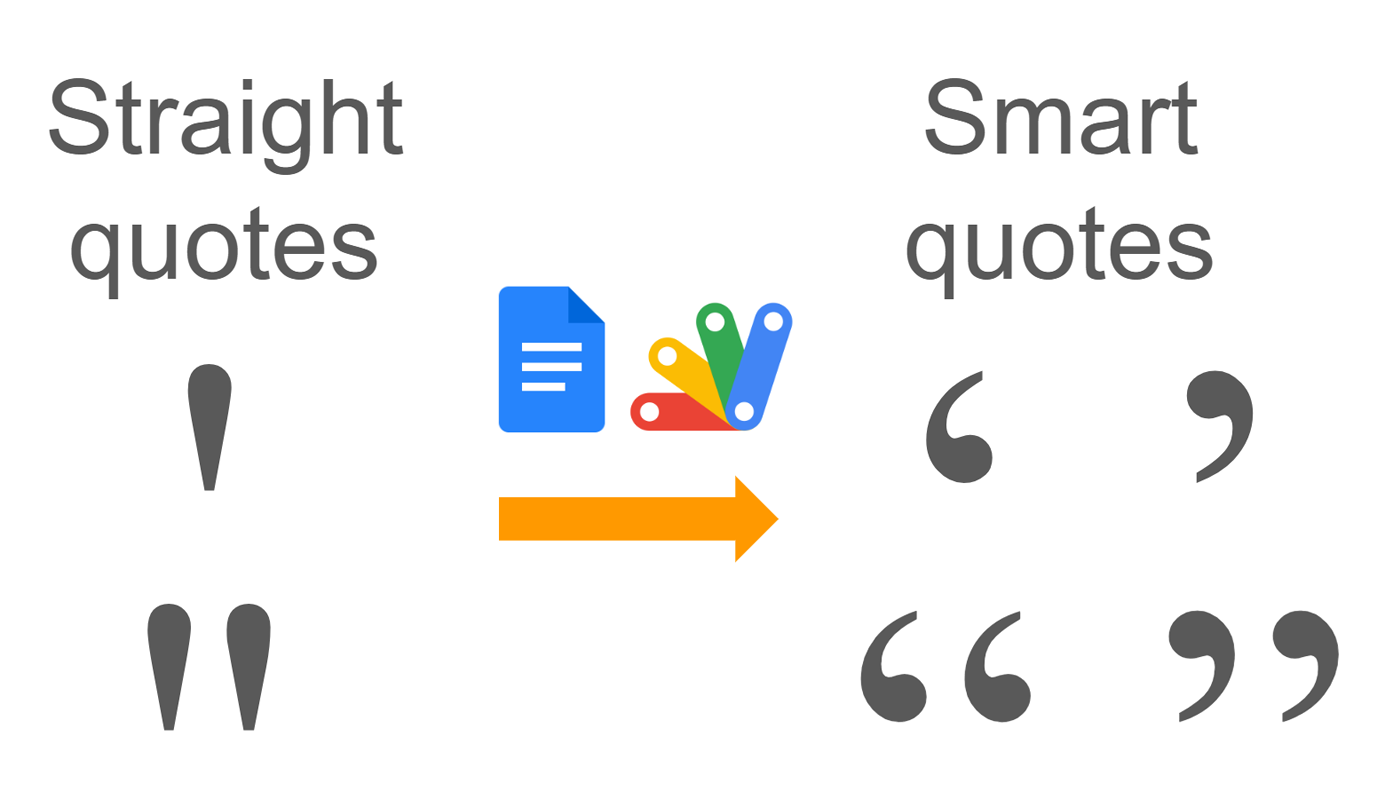
For extensive Google Docs, manually converting straight to smart quotes is inefficient. This report offers an automated solution using Google Apps Script, saving time and effort.
Description
You might find yourself needing to convert straight quotes (both single and double) to smart quotes in Google Docs. For small documents with a limited number of quotes, this can be done manually with minimal effort. However, when dealing with extensive documents and numerous quotes, the manual process becomes time-consuming and inefficient. This report presents a solution to automate this conversion using Google Apps Script, significantly reducing the processing cost for larger projects.
Gists
Abstract
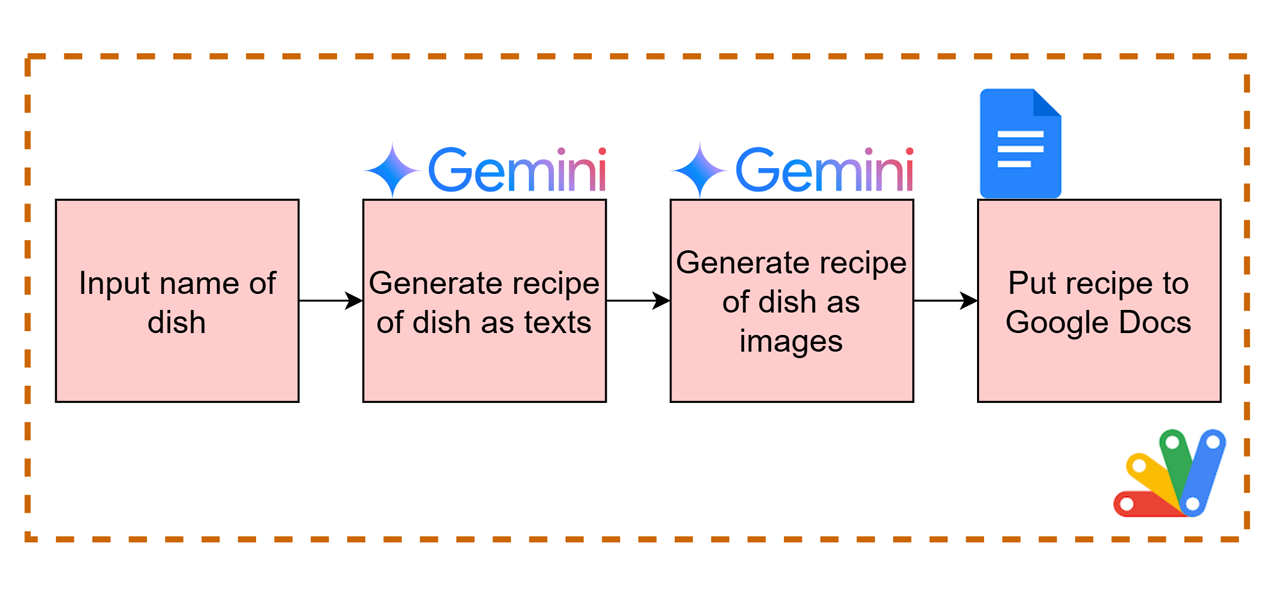
This report presents a Google Apps Script for generating visualized cooking recipes with text and images using the Gemini API, leveraging its image generation capabilities.
Introduction
Recently, image generation was supported in the Gemini API using Gemini 2.0 Flash Experimental and Imagen 3. I have already reported a simple sample script for generating images using the Gemini API with Google Apps Script. Ref Google Apps Script seamlessly integrates with Google Docs, Sheets, and Slides. In this report, I would like to introduce a script for creating a recipe for cooking a dish, including texts and images, using the Gemini API with Google Apps Script.
Gists
Description
Now, Google Docs and Google Sheets can insert smart chips. Smart chips are very useful for easily inserting information like users, maps, files, and so on. However, unfortunately, at the current stage, smart chips cannot be directly managed using Google Apps Script. Specifically, the information within smart chips cannot be directly retrieved by Google Apps Script. Although I believe this will be resolved in a future update, there might be cases where you want to retrieve information from smart chips using Google Apps Script. This report introduces a workaround for achieving this.
Gists
Description
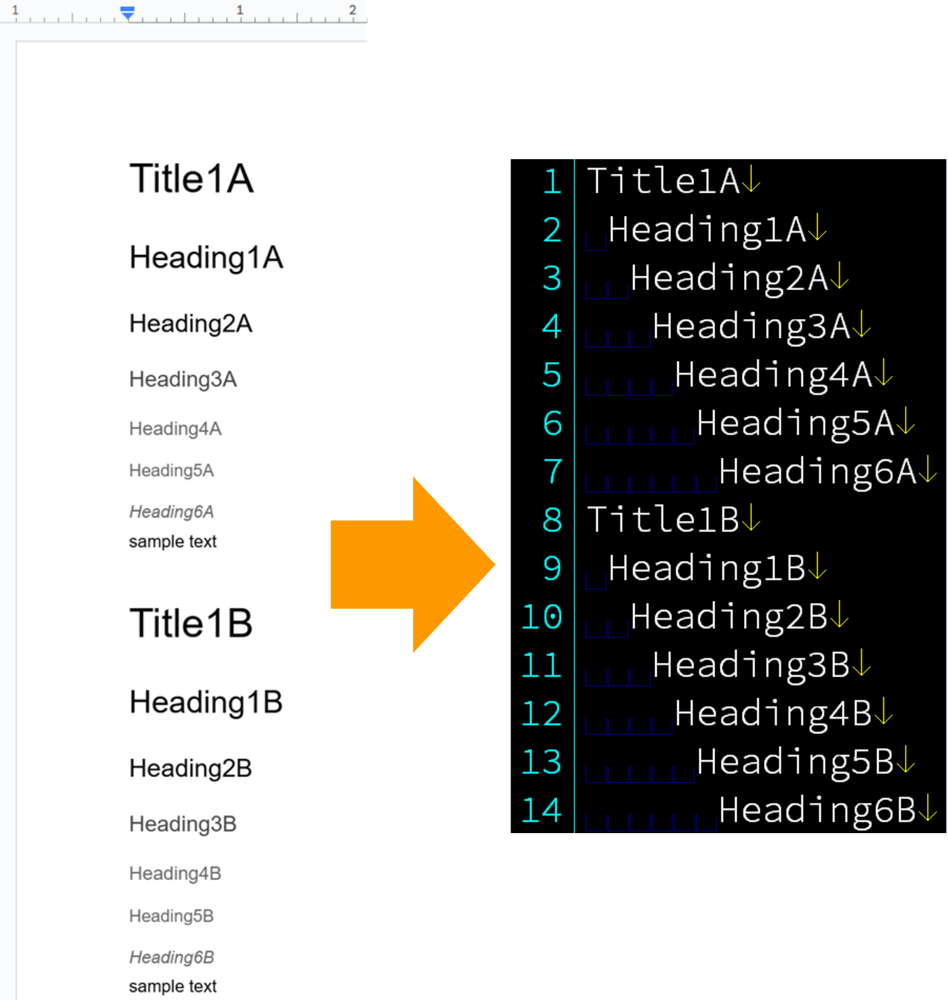
This is a Google Apps Script for creating the tree structure from headings in Google Documents.
Usage
In order to test this script, please do the following steps.
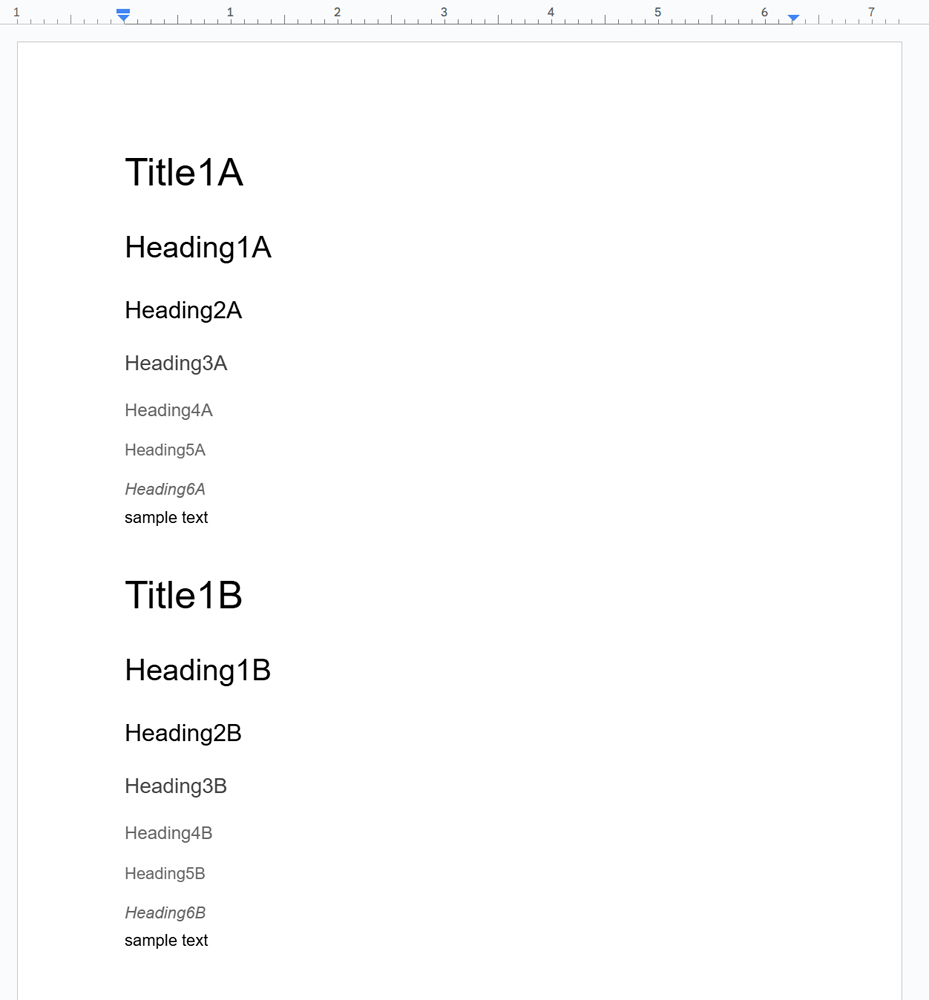
1. Sample Document
Create a sample Document as follows.
2. Sample script
Open the script editor and copy and paste the following script.
Gists
Description
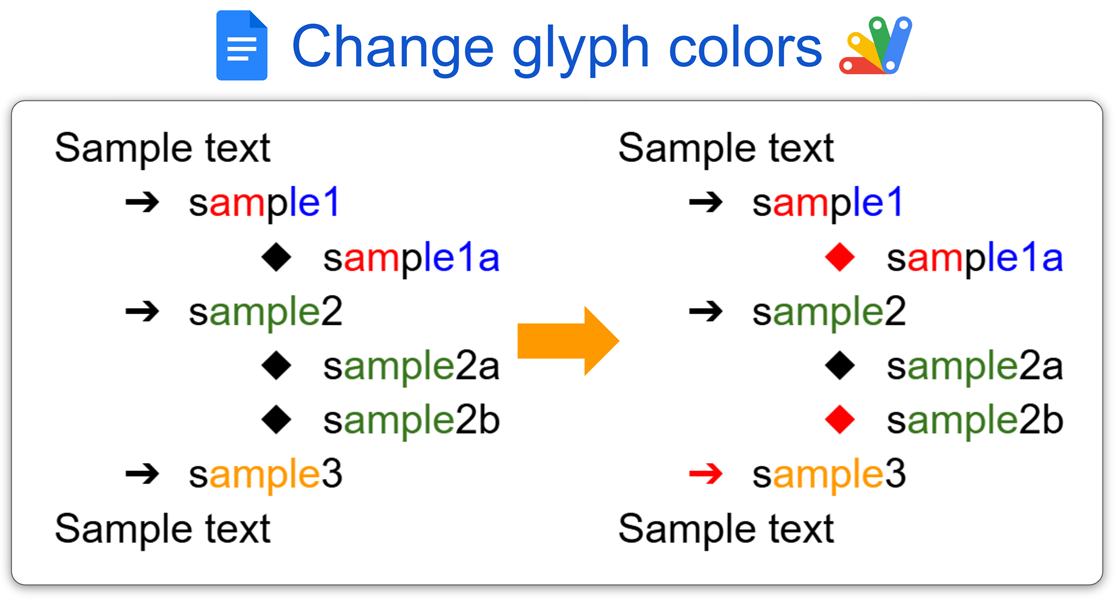
This report introduces a sample script for changing the glyph colors of bullets in lists on Google Documents using Google Apps Script. Currently, there are no built-in methods for achieving this using either the Document service (DocumentApp) or the Docs API. However, this can be accomplished through a specific process. This report will introduce that process using Google Apps Script.
Gists
Abstract
This report outlines a Google Apps Script solution for directly exporting web-published Google Docs to PDF. By circumventing limitations in published URLs, the script enables convenient PDF generation without manual intervention.
Introduction
Google Sheets and Google Docs offer the convenient feature of web publishing, providing readily accessible URLs for sharing. Ref
- Google Sheets:
https://docs.google.com/spreadsheets/d/e/2PACX-###/pubhtml
- Google Docs:
https://docs.google.com/document/d/e/2PACX-###/pub
These URLs utilize a unique ID (###) for each document. While Google Sheets supports direct PDF export by modifying the URL to https://docs.google.com/spreadsheets/d/e/2PACX-###/pub?output=pdf, a similar direct method for Google Docs is currently unavailable.
Gists
Abstract
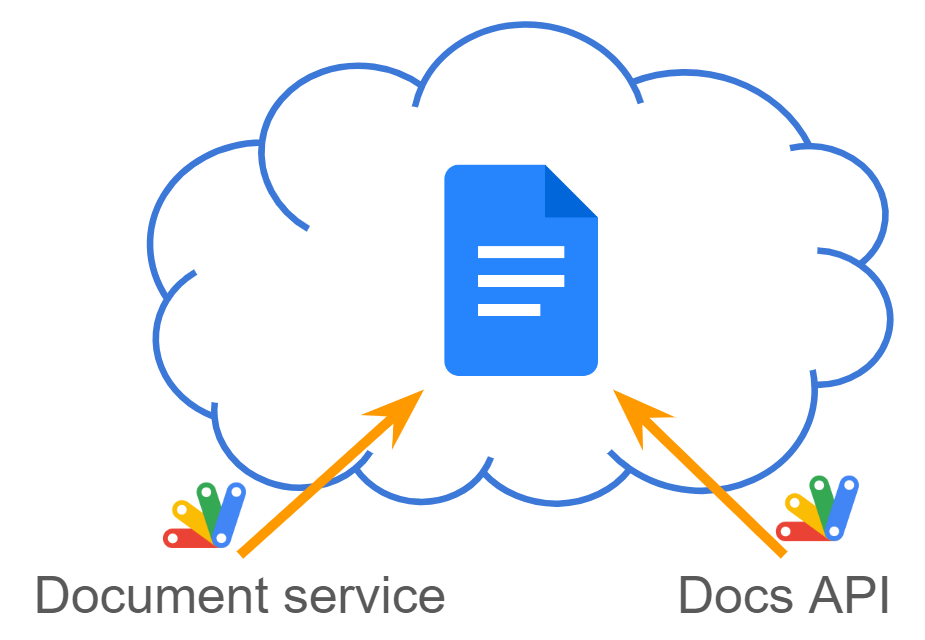
Google Apps Script offers Document service for basic document tasks and Google Docs API for advanced control, requiring more technical expertise. This report bridges the gap with sample scripts to unlock the API’s potential.
Introduction
Google Apps Script provides two powerful tools for managing Google Documents: the Document service (DocumentApp) and the Google Docs API. Ref, Ref While the Document service offers a user-friendly interface for common document manipulation tasks within Apps Script, it has limitations. The Google Docs API, on the other hand, grants finer-grained control over document elements and functionalities not readily available through the Document service.
Gists
Abstract
Current Google Docs API documentation offers methods for working with existing lists but lacks instructions for creating nested lists in new documents. This report fills this gap, empowering developers and streamlining nested list creation using Google Apps Script (concepts applicable to other languages).
Introduction
The official Google Docs API documentation provides instructions for working with existing lists, including converting paragraphs to lists and removing bullets. However, it lacks guidance on creating nested lists within an empty document body. Ref
Gists
Description
This script converts soft breaks to hard breaks in a Google Document using Google Apps Script.
Usage
Follow these steps:
1. Create a New Google Document
Create a new Google Document and open it.
Go to “View” -> “Show non-printing characters” in the top menu to see line breaks in the document body (as shown in the image below).
2. Sample Script
Copy and paste the following script into the script editor of your Google Document.
DocsServiceApp was updated to v1.2.2
You can see the detail information here https://github.com/tanaikech/DocsServiceApp
Gists

Abstract
Gemini API unlocks semantic search for Google Apps Script, boosting its power beyond automation. This report explores the result of attempting the semantic search using Gemini Pro API with Google Apps Script.
Introduction
The recent release of the LLM model Gemini as an API on Vertex AI and Google AI Studio opens a world of possibilities. Ref and Ref I believe Gemini API significantly expands the potential of Google Apps Script and paves the way for diverse applications. In this report, I present a result for attempting the semantic search using Gemini Pro API with Google Apps Script.
Gists
Description
When the generated text can be automatically inserted into the cursor position of Google Document, Google Spreadsheet, and Google Slide, it will be useful for users. This report introduces sample scripts for achieving this.
Sample scripts
Here, I would like to introduce 3 sample scripts for a Google Document, a Google Spreadsheet, and a Google Slide.
Create an API key
These sample scripts request Gemini Pro API using an API key. So, please create your API key.
Gists
Description
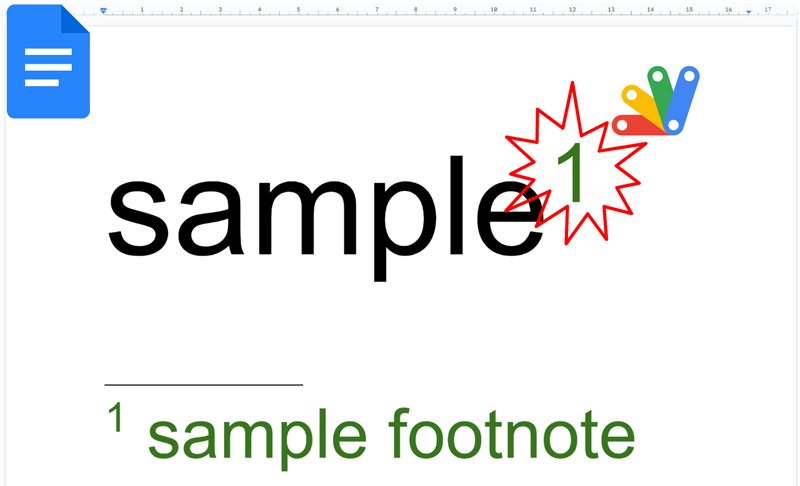
Google Documents can be managed by the Document service of Google Apps Script. Ref One day, you might have a situation in which you are required to manage the footnotes on Google Documents using Google Apps Script. There are several official documents related to the footnotes for Google Apps Script. Ref and Ref However, unfortunately, I’m worried that it might be difficult a little to understand the management of the footnotes from these documents. Actually, I saw some questions related to the footnotes on Google Documents at Stackoverflow. In this report, I would like to introduce a method for managing the footnotes on Google Documents using Google Apps Script.
Gists
Abstract
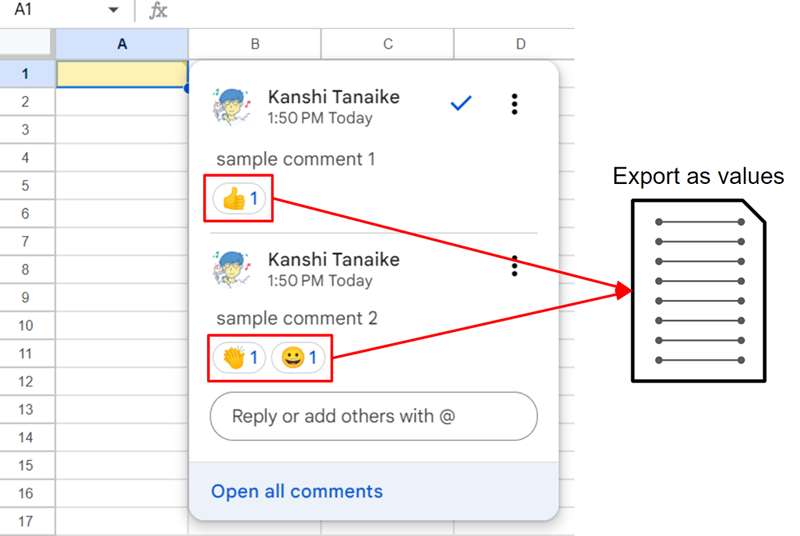
This report introduces the method for retrieving the Emoji reactions from the comments in Google Docs files (Google Documents, Google Slides, and Google Spreadsheets) using Google Apps Script.
Introduction
Recently, the Emoji reactions have been implemented in the comments on Google Docs files (Google Documents, Google Slides, and Google Spreadsheets). Ref With this implementation, the collaborative work has been higher. Here, it is considered that when the Emoji reactions can be retrieved from the Google Docs files, the statistics of the reactions will be also more useful for increasing collaboration. This report introduces a sample script for retrieving Comments including the Emoji reactions from Google Docs files.
Gists
This is a sample script for exporting Google Documents as HTML with the image hyperlinks using Google Apps Script.
Recently, it seems that the specification for exporting Google Documents as HTML data has been changed. When a Google Document are exported as HTML data before, the images in the Google Document were the image hyperlinks, which are publicly shared. But, in the current stage, when a Google Document is exported as HTML data, the images in the Google Document are the data URL (base64 data) of the images. I guess that this might be related to enhancing the security. When the Google Document is exported as a ZIP file, the HTML and images are separated. But, in this case, the images are required to be included in a specific folder like “/images”. I’m worried that this might bring another issue.
Gists
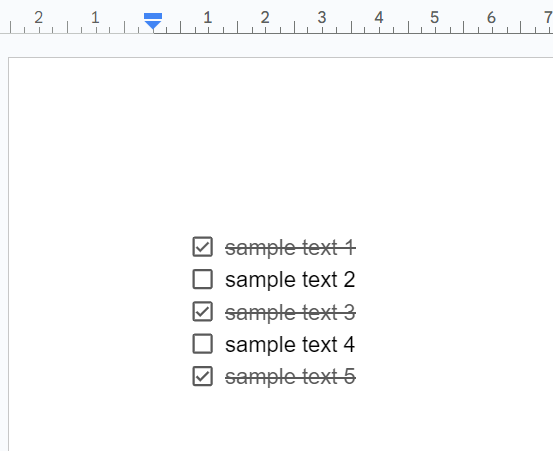
This is a sample script for inserting the paragraphs with the checkboxes in Google Documents using Google Apps Script.
In the current stage, Google Documents can create paragraphs with checkboxes as the paragraph bullet. But, unfortunately, this cannot be created by the Google Document service (DocumentApp). Fortunately, it seems that this got to be able to be achieved by Google Docs API. In this post, I would like to introduce a sample script for this.
Gists
This is a sample script for setting the line space of paragraphs on Google Documents using Google Apps Script.
When the line space of a paragraph on Google Documents is manually set, you can do it as follows.
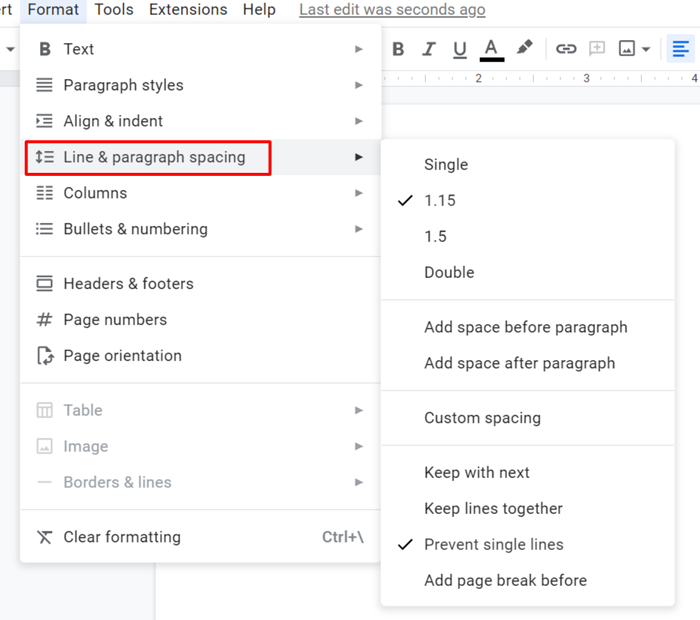
When it is set with Google Apps Script, the following script can be used.
function sample1() {
  const doc = DocumentApp.getActiveDocument();
  const body = doc.getBody();
  const paragraph = body.appendParagraph(
    "sample paragraph 1\nsample paragraph 2\nsample paragraph 3"
  );
  paragraph.setLineSpacing(2); // Double
}
When this script is run, the appended paragraphs have a line space of 2 (Double).
Gists
This is a workaround for retrieving the values and URLs from the smart chips inserted in Google Document using Google Apps Script.
Recently, the smart chips for Google Document are updated. Ref1 and Ref2 It is considered that this update will advance the collaboration for editing Document. So, there might a case that the information of the smart chips is required to be retrieved. Unfortunately, in the current stage, there are no methods for directly retrieving the information of the smart chips while the smart chips of DATE and PERSON can be retrieved. I believe that all smart chips will be able to be managed with Google Apps Script in the future update.
Overview
This is a Google Apps Script library for supporting Document service, Docs API, Spreadsheet service, Sheets API, Slides service and Slides API. The aim of this library is to compensate the processes that they services cannot achieve.
DocsServiceApp was updated to v1.2.0

You can see the detail information here https://github.com/tanaikech/DocsServiceApp
Overview
This is a Google Apps Script library for supporting Document service, Docs API, Spreadsheet service, Sheets API, Slides service and Slides API. The aim of this library is to compensate the processes that they services cannot achieve.
DocsServiceApp was updated to v1.1.0

You can see the detail information here https://github.com/tanaikech/DocsServiceApp
Gists
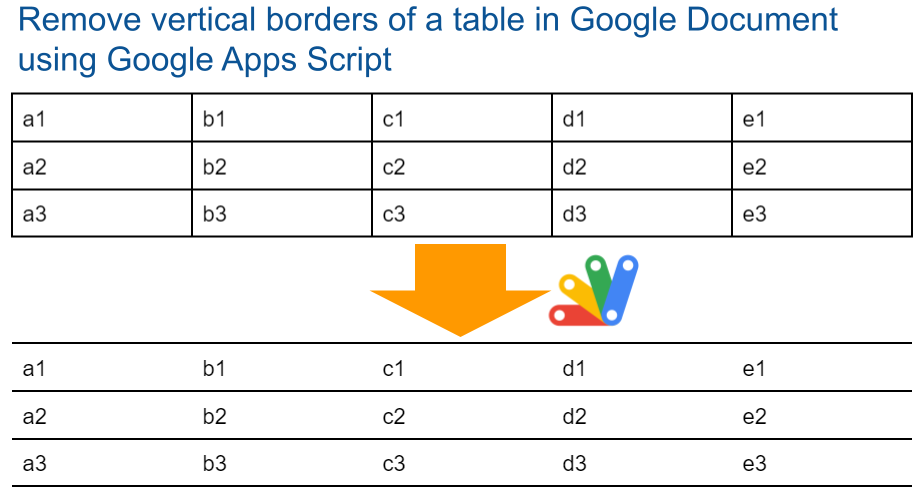
These are sample scripts for removing the vertical borders of a table in Google Document using Google Apps Script.
Unfortunately, in the current stage, only the vertical borders cannot be removed from the table in Google Document using the Google Document service (DocumentApp). I believe that this might be resolved in the future update. But, in the current stage, when Google Docs API is used, this can be achieved. So, Google Docs API can be used as the current workaround. But, I thought that the combination of Google Document service (DocumentApp) and Google Docs API might be a bit complicated. So, I would like to introduce 3 sample scripts.
Gists
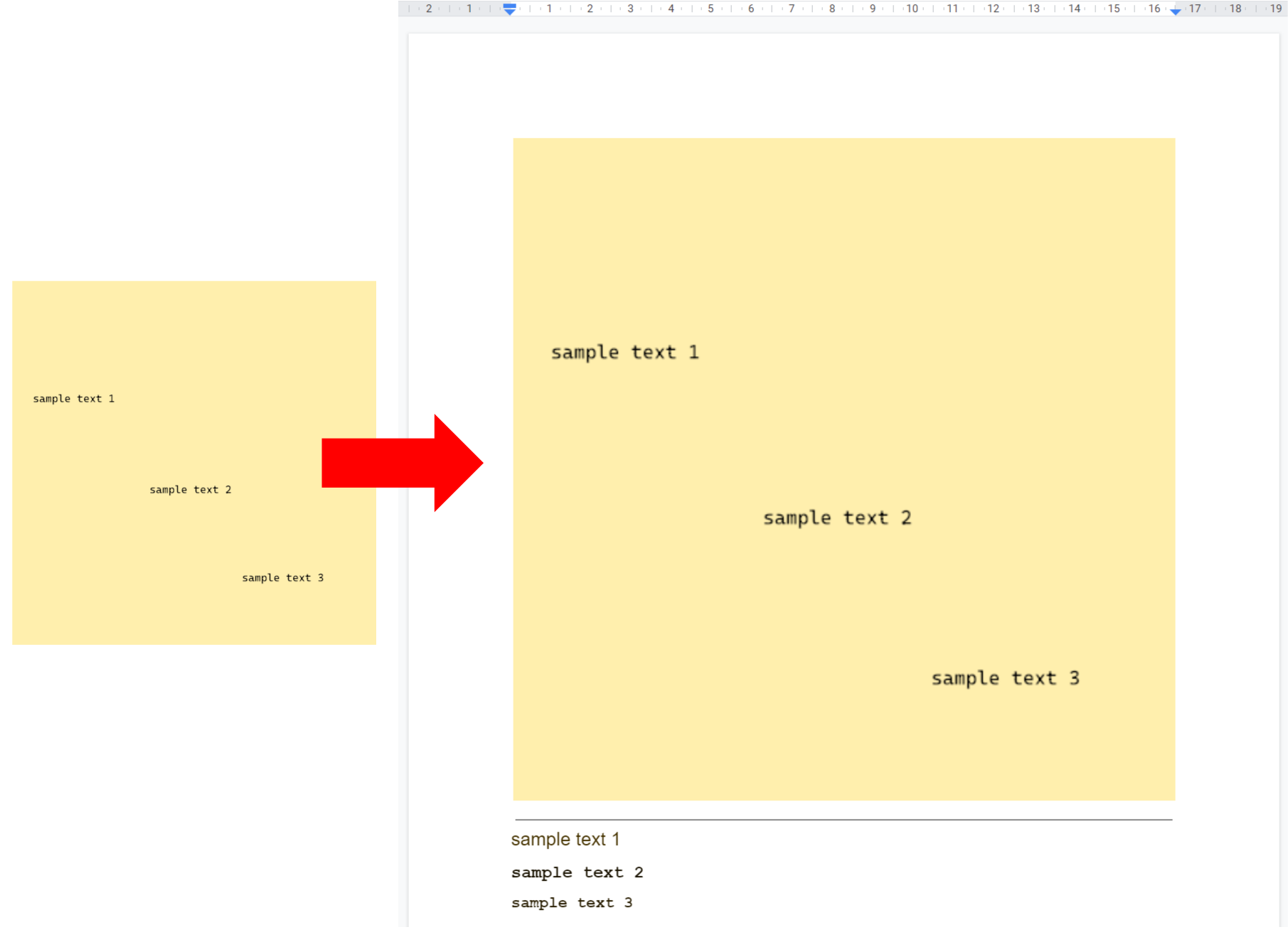
This is a sample script for converting the large images to Google Document by OCR using Google Apps Script.
When the image size, the image file size, the resolution of the image, and so on are large, an error like Request Too Large occurs. In this sample script, such the image can be converted to Google Document by reducing them.
Gists
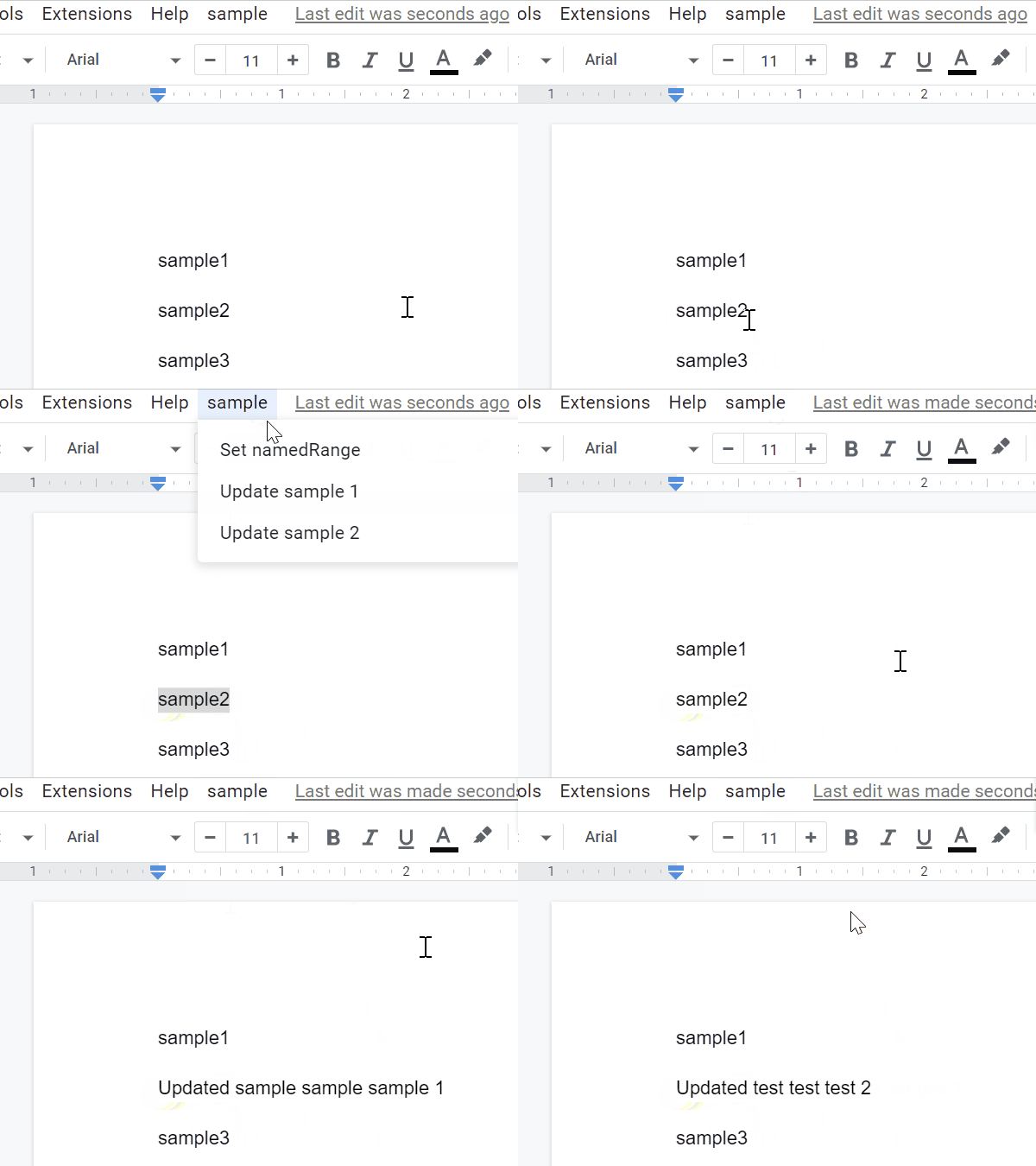
This is a sample script for updating the same position on Google Document using Google Apps Script.
In this case, the named range is used. About the named range on Google Document, in the current stage, unfortunately, this cannot be used with the UI on Google Document. And, when I saw the official document of named range, I thought that this might be a bit difficult. Ref Ref So, I have created a Google Apps Script for managing the named range on Google Document. Ref In this post, I would like to introduce a sample script for updating the same position on Google Document using this GAS library.
Gists
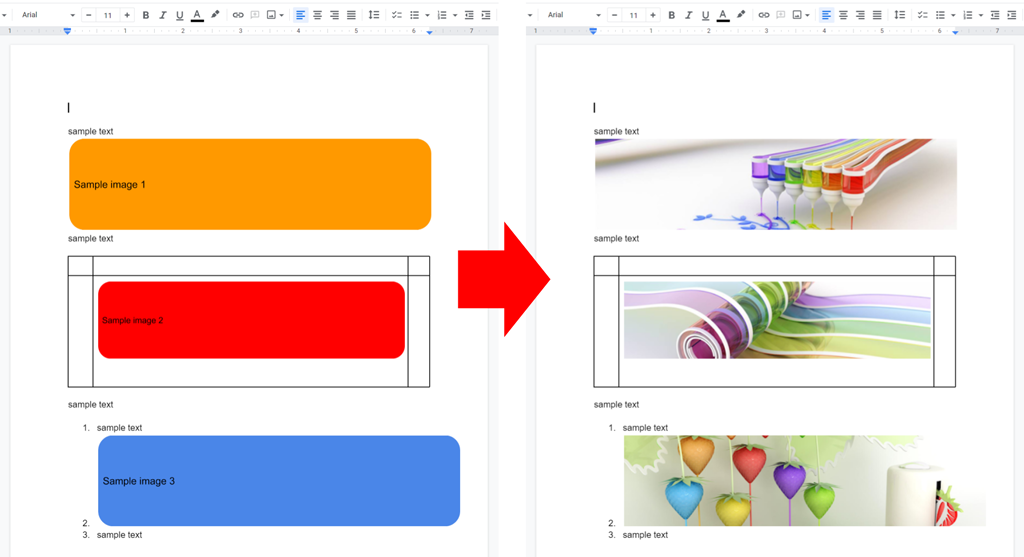
This is a sample script for replacing images on Google Document in order using Google Apps Script.
Sample script
This sample script uses Drive API and Docs API. So, please enable Drive API and Docs API at Advanced Google services. Ref
In this sample script, the images on Google Document are replaced with the image files on your Google Drive in order. Each image in Document is replaced in order of file Ids in fileIds.
Gists
This is a sample script for retrieving the values of dropdown list of the smart chips on Google Document using Google Apps Script.
At August 23, 2021, 3 Classes for retrieving the smart chips have been added to Google Apps Script. But, in the current stage, unfortunately, all values of the smart chips cannot be retrieved by the Classes. For example, the dropdown list of the smart chips cannot be retrieved using the 3 Classes.
Overview

This is a Google Apps Script library for managing the named range on Google Documents.
Description
Google Document can use the named range. When the named range is used, the users can directly access the contents using the named range. For example, the developer can guide the users to the specific content in Google Documents using the named range. But, unfortunately, in the current stage, it seems that the named range cannot be directly used by the UI on Google Documents. It is required to use Google Apps Script. But, I thought that when I saw the official document of the named range, it might be difficult to understand it. Ref So, I created this library. When this library is used, the named ranges on Google Documents can be managed.
Gists
This is a sample script for replacing the multiple paragraphs on Google Document with a regex using Google Apps Script. There is the method of replaceText(searchPattern, replacement) for replacing the text on Google Document. Ref For example, when a text of sample1 is replaced with sample2, this can be achieved by a script like DocumentApp.getActiveDocument().getBody().replaceText("sample1", "sample2"). But, when the texts for replacing are the multiple paragraphs, this script cannot be used. Namely, it is considered that in the current stage, replaceText cannot be used for replacing the multiple paragraphs. In this post, I would like to introduce a sample script for replacing the texts with the multiple paragraphs using Google Apps Script.
Gists
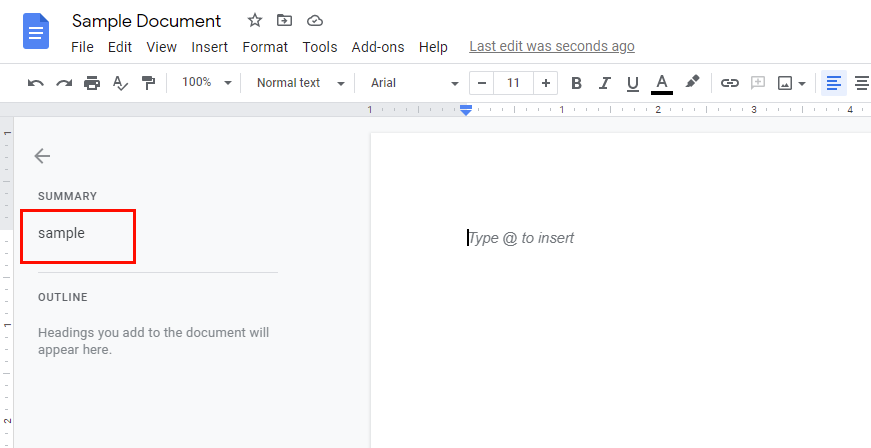
This is a sample script for retrieving the summary of Google Document using Google Apps Script. Recently, a blog of Auto-generated Summaries in Google Docs has been posted. I thought that this is very interesting function. I thought that when this function is released, checking each summary of a lot of Google Document will be much useful for simply confirming the document content. And also, I thought that when all summaries can be retrieved using a script, it will be also useful. In this post, I would like to introduce to retrieve the summary of Google Document using Google Apps Script.
Gists
This is a report for inserting the multiple paragraphs to Google Document in order using Google Docs API.
When the multiple paragraphs are inserted to Google Document using Google Docs API, it is required to pay attention to the index for inserting the texts. In this report, I would like to introduce the points for achieving this with a simple method.
Although this report uses Google Apps Script, the logic of this method can be used for other language.
Gists
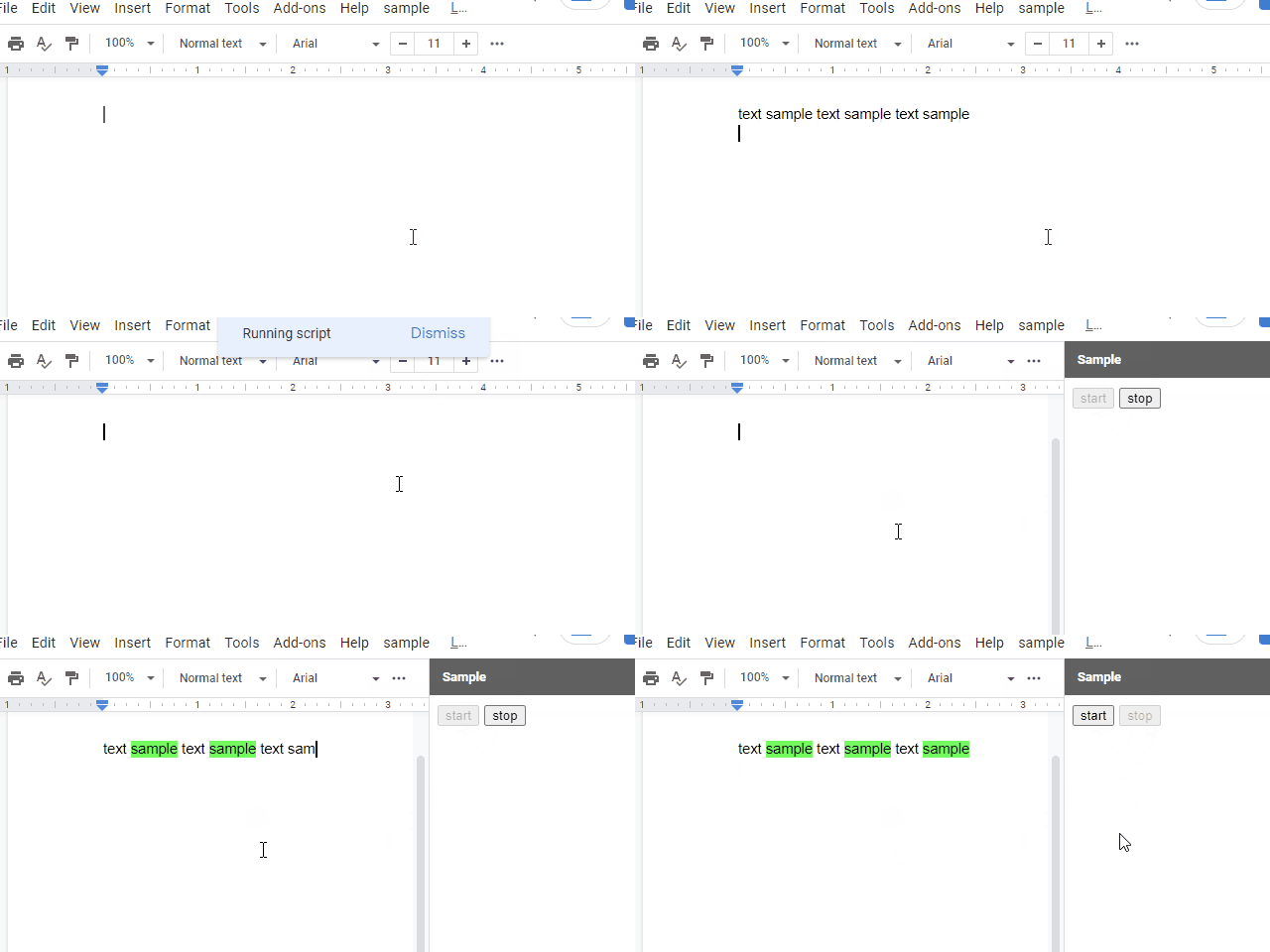
This is a sample script for achieving the pseudo OnEdit trigger for Google Document using Google Apps Script.
In the current stage, there is not OnEdit trigger for Google Document. Ref But I sometimes have the case that I want to use OnEdit trigger. So, as the current workaround, I created this sample script. I think that this workaround can be also used for Google Slides, Google Form and also Google Spreadsheet. In the case of Spreadsheet, what the existing OnEdit trigger and the time-driven trigger cannot do can be achieved.
Gists
This is a sample script for retrieving the glyph value from the list items of Google Document using Google Apps Script.
In the current stage, when the list is put to the Google Document, the count of glyph is automatically calculated. When the glyph values of the list items are tried to be retrieved using the manual operation and the script, unfortunately, the glyph values cannot be retrieved. Only the values of the list are retrieved. Unfortunately, it seems that in the current stage, there are no methods for directly retrieving the glyph value from the list items.
Gists
This is a sample script for replacing the template texts with an array in Google Document using Google Apps Script. This is for Google Apps Script of this report.
The sample input and output situations are as follows.
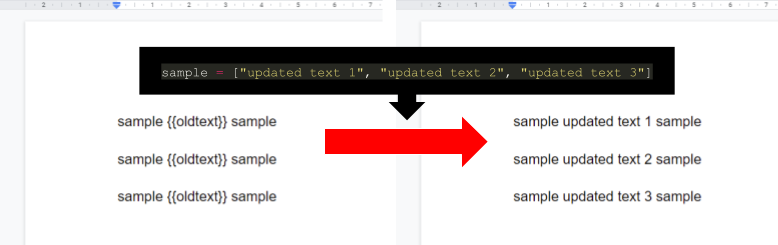
In the current stage, when replaceAllText of Docs API is used with the sample value of ["updated text 1", "updated text 2", "updated text 3"], all values of {{oldText}} are replaced with the 1st value of updated text 1 in one batch request. So in order to replace each {{oldText}} with ["updated text 1", "updated text 2", "updated text 3"], it is required to use a workaround. So I proposed this report.
Gists
This is a sample script for replacing the template texts with an array in Google Document using Docs API with Python.
The sample input and output situations are as follows.
In the current stage, when replaceAllText of Docs API is used with the sample value of ["updated text 1", "updated text 2", "updated text 3"], all values of {{oldText}} are replaced with the 1st value of updated text 1 in one batch request. So in order to replace each {{oldText}} with ["updated text 1", "updated text 2", "updated text 3"], it is required to use a workaround.
Gists
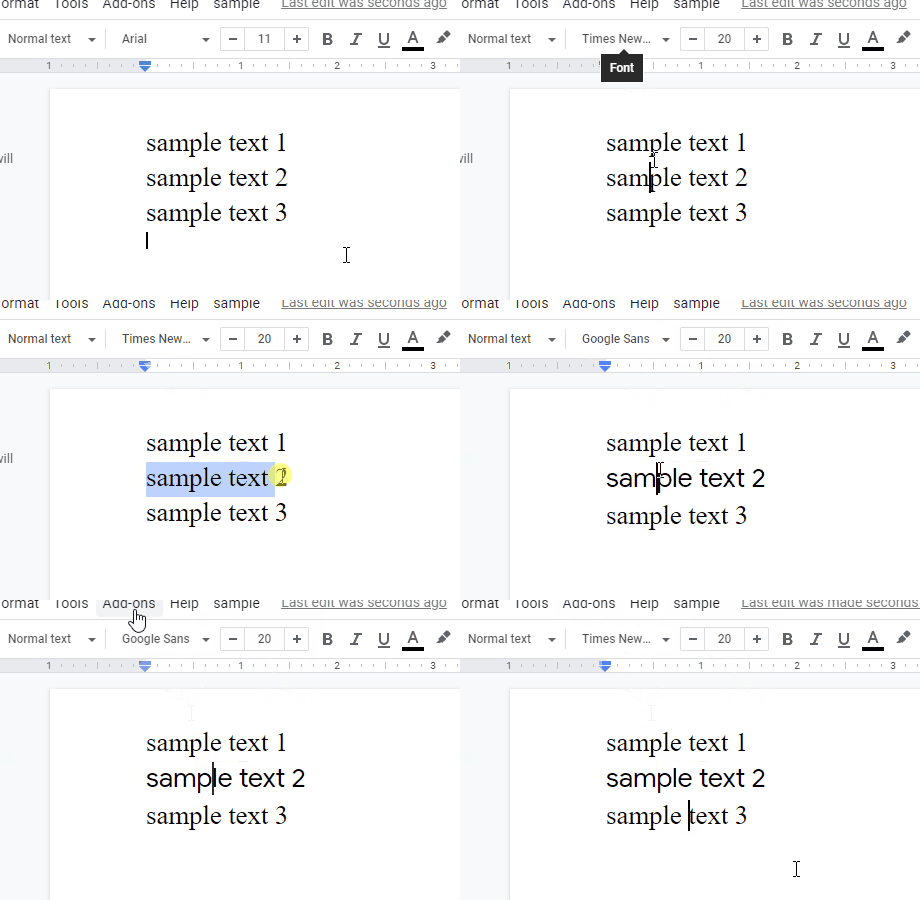
This is a sample script for changing the font of selected text to Google Sans on Google Document using Google Apps Script.
Sample script
Please copy and paste the following script to the script editor of Google Document And, when you use this script, please select a text in Google Document and run the script. By this, the font of selected text is changed to Google Sans.
Overview
This is a Google Apps Script library for supporting Document service, Docs API, Spreadsheet service, Sheets API, Slides service and Slides API. The aim of this library is to compensate the processes that they services cannot achieve.

Description
The Google services, which are Document service, Docs API, Spreadsheet service, Sheets API, Slides service and Slides API, are growing now. But, unfortunately, there are still the processes that they cannot done. I created this GAS library for supporting the Google services.