Gists
Overview
This sample script demonstrates uploading multiple files using split asynchronous processes with resumable upload. It leverages JavaScript and HTML within Google Spreadsheets.
Description
In my previous report, “Resumable Upload of Multiple Files with Asynchronous Process for Google Drive”, I presented an approach for uploading files asynchronously.
This script builds upon that concept, introducing a method for uploading multiple files with split asynchronous processes that utilize resumable upload.
Here’s the process breakdown:
Gists
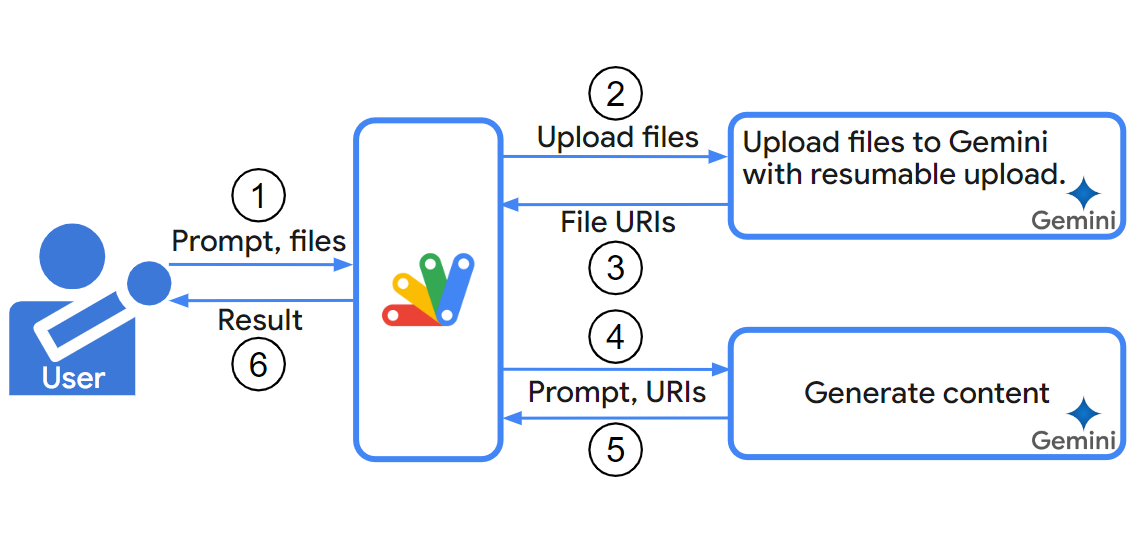
Abstract
Uploads in Google Apps Script are limited to 50 MB, hindering work with large datasets. This report introduces a script with uploadType=resumable to overcome this limit, enabling uploads over 50 MB to Gemini and other services.
Introduction
This report explores the limitations of data upload size using Google Apps Script and introduces a script to overcome these limitations. In the current stage, Gemini API can generate content using the uploaded data to Gemini. You can find more information on this in a previous report. Ref As mentioned in the report, Google Apps Script uses uploadType=multipart for uploading files. However, the maximum file size is limited to 5 MB with this method for Drive API. Ref While I confirmed that the Gemini API allows for uploading over about 20 MB with uploadType=multipart, Google Apps Script enforces a stricter 50 MB limit for both uploads and downloads. Ref This can be inconvenient when working with larger datasets, such as movie or text data, which often exceed this limit.
ResumableUploadForGoogleDrive_js was updated to v2.0.2.
-
v2.0.2 (May 23, 2024)
- From this version, the files could be also uploaded to the shared drive.
CDN
Class ResumableUploadToGoogleDrive
This Class can achieve the resumable upload of a file by reading the file to the memory.
<script src="https://cdn.jsdelivr.net/gh/tanaikech/ResumableUploadForGoogleDrive_js@2.0.2/resumableupload_js.min.js"></script>
Class ResumableUploadToGoogleDrive2
This Class can achieve the resumable upload of a file by directly reading partially the file from the local Disk. By this, the large file which is over the memory of the local PC can be uploaded.
Gists
Abstract
One day, you might have a situation where you are required to make the shared users upload a file and text using a dialog or sidebar on Google Spreadsheet to your Google Drive and Spreadsheet without authorization by the users. This report introduces a solution for achieving this situation.
Introduction
Google Spreadsheet can run Javascript on a dialog and a sidebar. Ref These can be used as a strong tool for working on Spreadsheet. There might be a situation where you want to make the shared users input a value and upload a file without authorization of the scopes. In this report, I would like to introduce 2 patterns to achieve this goal.
Gists
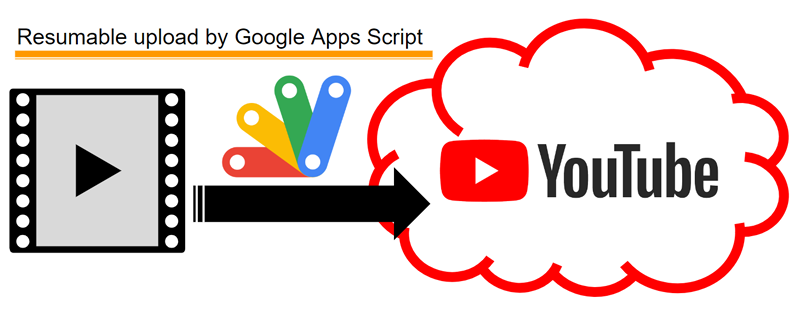
This is a simple sample script for uploading a video file on Google Drive to YouTube with the resumable upload using Google Apps Script.
When you want to upload a video file to YouTube using Google Apps Script, when YouTube API of Advanced Google services is used, the maximum file size is 5 MB, because, in this case, the video file is uploaded with multipart/form-data. When you want to use a video file with more file size using Google Apps Script, a resumable upload is required to be used. But, unfortunately, in the current stage, the methods of Google Apps Script for uploading large video files are not prepared. And also, when I saw the document of resumable upload on YouTube in the official document, I thought that it might be a bit complicated for understanding the resumable upload process. Ref So, in this post, I would like to introduce a simple sample script for uploading video data of more than 5 MB with the resumable upload using Google Apps Script. In this case, the video file is existing in Google Drive. The video file on Google Drive is uploaded to YouTube using Google Apps Script. When this sample script will help you understand the resumable upload of YouTube, I’m glad.
Gists
This is a sample curl command for uploading a video file to YouTube with the resumable upload using YouTube API.
In order to upload a video file to YouTube with the resumable upload using YouTube API, the following 2 processes are required to be done. The basic process of the resumable upload for YouTube is the same with Drive API. Ref So, I think that this document of Drive API might be useful for understanding the resumable upload process.
Gists
This is a sample script for the resumable upload using Axios with Node.js.
Sample script
In this sample script, as a sample situation in order to explain the resumable upload, the file data is loaded from the local PC, and the data is uploaded to Google Drive with the resumable upload.
const axios = require("axios");
const fs = require("fs").promises;

async function sample() {
  const filepath = "./###"; // Please set the filename and file path of the upload file.

  const new_access_token = "###"; // Please set your access token.
  const name = "###"; // Please set the filename on Google Drive.
  const mimeType = "###"; // Please set the mimeType of the uploading file. I thought that when this might not be required to be used.

  // 1. Prepare chunks from loaded file data.
  const split = 262144; // This is a sample chunk size.
  const data = await fs.readFile(filepath);
  const fileSize = data.length;
  const array = [...new Int8Array(data)];
  const chunks = [...Array(Math.ceil(array.length / split))].map((_) =>
    Buffer.from(new Int8Array(array.splice(0, split)))
  );

  // 2. Retrieve endpoint for uploading a file.
  const res1 = await axios({
    method: "POST",
    url: "https://www.googleapis.com/upload/drive/v3/files?uploadType=resumable",
    headers: {
      Authorization: `Bearer ${new_access_token}`,
      "Content-Type": "application/json",
    },
    data: JSON.stringify({ name, mimeType }),
  });
  const { location } = res1.headers;

  // 3. Upload the data using chunks.
  let start = 0;
  for (let i = 0; i < chunks.length; i++) {
    const end = start + chunks[i].length - 1;
    const res2 = await axios({
      method: "PUT",
      url: location,
      headers: { "Content-Range": `bytes ${start}-${end}/${fileSize}` },
      data: chunks[i],
    }).catch(({ response }) =>
      console.log({ status: response.status, message: response.data })
    );
    start = end + 1;
    if (res2?.data) console.log(res2?.data);
  }
}

sample();
Testing
When this sample script is run, the following result is obtained.
ResumableUploadForGoogleDrive_js was updated to v2.0.0.
Overview
This is a Javascript library to achieve the resumable upload for Google Drive.
Description
When a file more than 5 MB is uploaded to Google Drive with Drive API, the resumable upload is required to be used. I have already published the sample script for “Resumable Upload for Web Apps using Google Apps Script”. Ref In this case, Web Apps is used. Here, I would like to introduce the script for the resumable upload created by only Javascript. Unfortunately, in the current stage, at google-api-javascript-client, there are no methods for the resumable upload. And, I thought that when this function is created as a Javascript library, it might be useful for users. Also that library is also useful for me. So I created this. If this was useful for your situation, I’m glad.
Gists
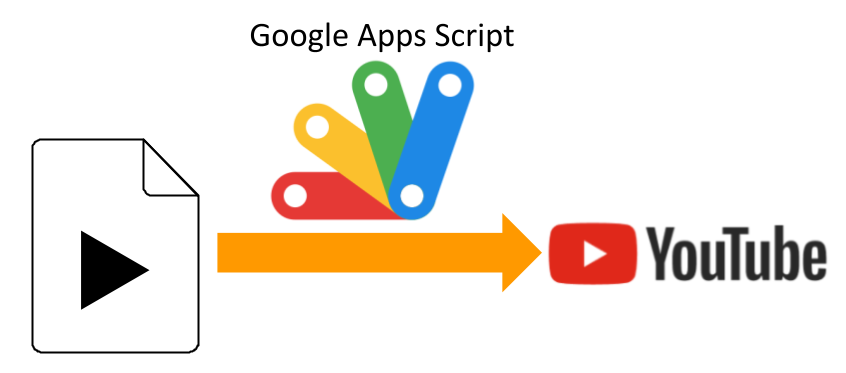
This is a sample script for uploading a movie file on Google Drive to YouTube using Google Apps Script.
Before you use these scripts, please enable YouTube API at Advanced Google services. Ref
Sample script 1
This sample script uses YouTube API at Advanced Google services.
function myFunction() {
  const fileId = "###"; // Please set the file ID of movie file on the Google Drive.

  const res = YouTube.Videos.insert(
    { snippet: { title: "sample title", description: "sample description" } },
    ["snippet"],
    DriveApp.getFileById(fileId).getBlob()
  );
  console.log(res);
}
Sample script 2
This sample script requests to the endpoint of YouTube API with UrlFetchApp by creating the request body. This script requests with multipart/form-data.
Gists
This is a simple sample script for achieving the resumable upload to Google Drive using Axios. In order to achieve the resumable upload, at first, it is required to retrieve the location, which is the endpoint of upload. The location is included in the response headers. After the location was retrieved, the file can be uploaded to the location URL.
In this sample, a text data is uploaded with the resumable upload using a single chunk.
Gists
This is a sample script of Node.js for downloading the data and uploading the data to Google Drive with the resumable upload without saving it as a file. The downloaded data is uploaded to Google Drive with the stream.
Sample script
Before you use this, please set the variables of accessToken, url, fileSize, mimeType and filename. In this case, fileSize is required to set because the data is uploaded with the resumable upload.
Overview
This is a report for safe-uploading files to Google Drive by HTML put in the external server using Google Apps Script.
Description
When you want to make the user upload a file to your own Google Drive using the HTML put in the external server of Google side, when the file size is smaller than 50 MB, this can be achieved without using the access token. Ref (When the HTML is put in the internal server of Google side, you can also use google.script.run.) But, when the file size is over 50 MB, it is required to upload the file with the resumable upload. In this case, the access token is required to be used. In this case that the user uploads to your own Google Drive, when the access token is used in the upload, it is considered that this is the weak point of the security. In this report, I would like to propose the method for safe-uploading files to Google Drive by HTML put in the external server using Google Apps Script. Please think of this as one of several methods.
Gists
This is a sample script for using the values submitted from the HTML form using Google Apps Script and Javascript. In this case, the values include the files.
Issue
<form>
  Text: <input type="text" name="sampleText1" /><br />
  Single file: <input type="file" name="sampleFile1" /><br />
  <input
    type="submit"
    name="button"
    value="submit"
    onclick="main(this.parentNode)"
  />
</form>
<script>
  function main(e) {
    google.script.run.sample(e);
  }
</script>
This is a simple sample script for sending the values of form to Google Apps Script. In this case, texts and file are sent. When the button is clicked, main() is run. In this case, this.parentNode is sent to google.script.run.sample(this.parentNode). At that time, at Google Apps Script side, the text value can be correctly retrieved. But the file cannot be correctly sent. When the file is created as a file on Google Drive, the file is broken. I think that the reason of this issue might be due to character code.
Gists
This is a sample script for uploading a file to Google Drive from the external HTML without the authorization. In this case, the client side can be used at the outside of Google. And as the server side, the Web Apps created by Google Apps Script is used.
Usage
Please do the following flow.
1. Create new project of Google Apps Script.
Sample script of Web Apps is a Google Apps Script. So please create a project of Google Apps Script.
Gists
These are the sample scripts for uploading files of multipart/form-data to Google Drive using Drive API with Node.js. In this case, googleapis for Node.js is not used.
In these sample script, the maximum file size is 5 MB. Please be careful this. When you want to upload the files more than 5 MB, please check this report.
Sample script 1
This sample script uploads a file using the modules of fs and request. Before you use this script, please prepare your access token for uploading the file.
Gists
This is a sample flow for updating a file with the resumable upload using Drive API.
Sample situation:
In this answer, as a sample situation, it supposes that a text file in Google Drive is updated by the resumable upload with the multiple chunks. And as the method for requesting, I use the curl command.
I prepared 2 files for 2 chunks. As the test situation, the 2 chunks of 262,144 bytes and 37,856 bytes are uploaded. So total upload size is 300,000 bytes. Those filenames are data1.txt and data2.txt, respectively.
Gists
This is a simple sample script for achieving the resumable upload to Google Drive using Python. In order to achieve the resumable upload, at first, it is required to retrieve the location, which is the endpoint of upload. The location is included in the response headers. After the location was retrieved, the file can be uploaded to the location URL.
In this sample, a PNG file is uploaded with the resumable upload using a single chunk.
Gists
This is a simple sample script for achieving the resumable upload to Google Drive using Node.js. In order to achieve the resumable upload, at first, it is required to retrieve the location, which is the endpoint of upload. The location is included in the response headers. After the location was retrieved, the file can be uploaded to the location URL.
In this sample, a PNG file is uploaded with the resumable upload using a single chunk.
Gists
This is a simple sample script for uploading a file using the file input tag of HTML. As the important point, the file is sent as the byte array for using Google Apps Script. By this, at Google Apps Script side, the byte array can be converted to a blob using a simple script.
HTML & Javascript
<input id="file" type="file" onchange="saveFile(this)" />
<script>
  function saveFile(f) {
    const file = f.files[0];
    const fr = new FileReader();
    fr.onload = function(e) {
      const obj = {
        filename: file.name,
        mimeType: file.type,
        bytes: [...new Int8Array(e.target.result)]
      };
      google.script.run.withSuccessHandler(e => console.log(e)).saveFile(obj);
    };
    fr.readAsArrayBuffer(file);
  }
</script>
Google Apps Script
function saveFile(e) {
  var blob = Utilities.newBlob(e.bytes, e.mimeType, e.filename);
  DriveApp.createFile(blob);
  return "Done.";
}
Overview
This is a sample script for uploading multiple files with large size (> 50 MB) at the sidebar, dialog of Google Docs and Web Apps using the resumable upload of the asynchronous process with Javascript and Google Apps Script (GAS).
Demo

This is a demonstration of this script. As a demonstration, it uploads 5 files with the size of 100 MB to own Google Drive. When the files were selected and the upload button is clicked, those are uploaded by the resumable upload with the asynchronous process. It is found that the files can be completely uploaded with the asynchronous process. In this demo, as a test case, the chunk size of 20 MB was used.
Overview
This is a Javascript library to achieve the resumable upload for Google Drive.
Description
When a file more than 5 MB is uploaded to Google Drive with Drive API, the resumable upload is required to be used. I have already published the sample script for “Resumable Upload for Web Apps using Google Apps Script”. Ref In this case, Web Apps is used. Here, I would like to introduce the script for the resumable upload created by only Javascript. Unfortunately, in the current stage, at google-api-javascript-client, there are no methods for the resumable upload. And, I thought that when this function is created as a Javascript library, it might be useful for users. Also that library is also useful for me. So I created this. If this was useful for your situation, I’m glad.
Gists
This is a sample script for the resumable upload of Files to Google Drive using Golang. This script uses the library of google-api-go-client. About the installation of google-api-go-client, please check the Quickstart for golang at the official site.
Sample script:
package main

import (
	"context"
	"encoding/json"
	"fmt"
	"io/ioutil"
	"log"
	"net/http"
	"os"

	drive "google.golang.org/api/drive/v3"

	"golang.org/x/oauth2"
	"golang.org/x/oauth2/google"
	"golang.org/x/oauth2/jwt"
)

// ServiceAccount : Use Service account
func ServiceAccount(credentialFile string) *http.Client {
	b, err := ioutil.ReadFile(credentialFile)
	if err != nil {
		log.Fatal(err)
	}
	var c = struct {
		Email      string `json:"client_email"`
		PrivateKey string `json:"private_key"`
	}{}
	json.Unmarshal(b, &c)
	config := &jwt.Config{
		Email:      c.Email,
		PrivateKey: []byte(c.PrivateKey),
		Scopes: []string{
			drive.DriveScope,
		},
		TokenURL: google.JWTTokenURL,
	}
	client := config.Client(oauth2.NoContext)
	return client
}

func main() {
	filename := "sample.txt"     // Filename
	baseMimeType := "text/plain" // MimeType
	client := ServiceAccount("credential.json") // Please set the json file of Service account.

	srv, err := drive.New(client)
	if err != nil {
		log.Fatalln(err)
	}
	file, err := os.Open(filename)
	if err != nil {
		log.Fatalln(err)
	}
	fileInf, err := file.Stat()
	if err != nil {
		log.Fatalln(err)
	}
	defer file.Close()
	f := &drive.File{Name: filename}
	res, err := srv.Files.
		Create(f).
		ResumableMedia(context.Background(), file, fileInf.Size(), baseMimeType).
		ProgressUpdater(func(now, size int64) { fmt.Printf("%d, %d\r", now, size) }).
		Do()
	if err != nil {
		log.Fatalln(err)
	}
	fmt.Printf("%s\n", res.Id)
}
Note:
- In this sample, the Service account is used. So the file is uploaded to the Service account’s Drive. When
client retrieved from OAuth2 is used, the file is uploaded to owner’s Drive.
References:
Gists
There are 2 sample scripts.
- Create new Spreadsheet using a text value as CSV data.
- Overwrite the existing Google Document using a text value.
When you use these script, please enable Drive API and retrieve your access token.
Create New Spreadsheet using Text Value
const request = require('request');

const textData = "a1, b1, c1, d1, e1"; // This is used as CSV data.
const orgMimeType = "text/csv";
const orgFileName = "sample.csv";
const accessToken = "###"; // Access token
const metadata = {
  name: "convertedSampleCSV",
  mimeType: "application/vnd.google-apps.spreadsheet",
};

const url = "https://www.googleapis.com/upload/drive/v3/files?uploadType=multipart";
const boundary = "xxxxxxxxxxx";
var data = "--" + boundary + "\r\n";
  data += "Content-Disposition: form-data; name=\"metadata\"\r\n";
  data += "Content-Type: application/json; charset=UTF-8\r\n\r\n";
  data += JSON.stringify(metadata) + "\r\n";
  data += "--" + boundary + "\r\n";
  data += "Content-Disposition: form-data; name=\"file\"; filename=\"" + orgFileName + "\"\r\n";
  data += "Content-Type: " + orgMimeType + "\r\n\r\n";

var payload = Buffer.concat([
  Buffer.from(data, "utf8"),
  new Buffer(textData, 'binary'),
  Buffer.from("\r\n--" + boundary + "--", "utf8"),
]);

const options = {
  method: 'post',
  url: url,
  headers: {
    "Content-Type": "multipart/related; boundary=" + boundary,
    'Authorization': 'Bearer ' + accessToken,
  },
  body: payload,
};
request(options, (error, response, body) => {
  console.log(body);
});
Overwrite Existing Google Document using Text Value
This can be used when you don’t want to update the existing Google Docs without changing the file ID.
Gists
ggsrun is also a CLI application for using Google Drive.
Here, I would like to introduce a sample command. This is a sample command for uploading a file to a shared folder using ggsrun.
This situation supposes that the shared folder is https://drive.google.com/drive/folders/abcdefg?usp=sharing and the folder has the edit permission.
Sample command:
$ ggsrun u -f "sample.txt" -p "abcdefg" --serviceaccount "###JSON file of Service Account###"
- If you have already used OAuth2, you can upload the file by
ggsrun u -f "sample.txt" -p "###folderId###".
Gists
This is a sample script for uploading multiple files from local PC to Google Drive using Google Apps Script. The dialog, sidebar and Web Apps can be used as the GUI interface.
Sample 1
In this sample, the following flow is run.
- Select files at browser.
- Upload the files every file.
- Save each file in Google Drive.
When you use this, please copy and paste the Google Apps Script and HTML to the script editor, and run the HTML using the dialog, sidebar and Web Apps.
Gists
News
At October 11, 2019, I published a Javascript library to to run the resumable upload for Google Drive. When this is used, the large file can be uploaded. You can also use this js library.
Description
This is a sample script for uploading files to Google Drive using Javascript. The files are uploaded by Drive API v3. gapi.client.drive.files.create() can create an empty file on Google Drive. But it cannot directly upload files including contents. I think that this might not be able to upload files and metadata with the multipart/related, although this might be resolved by the future update. So now, as one of workarounds, I use using XMLHttpRequest.
Gists
This is a sample script for uploading files from local PC to Google Drive using Python. In this sample, Quickstart is not used. So when you use this script, please retrieve access token.
Curl sample :
curl -X POST \
    -H "Authorization: Bearer ### access token ###" \
    -F "metadata={name : 'sample.png', parents: ['### folder ID ###']};type=application/json;charset=UTF-8" \
    -F "file=@sample.png;type=image/png" \
    "https://www.googleapis.com/upload/drive/v3/files?uploadType=multipart"
]
Python sample :
When above curl sample is converted to Python, it becomes as follows.
Gists
This is a sample script for uploading local file to Google Drive without the authorization using HTML form. A selected file in your local PC using HTML form is uploaded to Google Drive and saved to Google Drive.
When you use this, at first, please deploy Web Apps. The script is doPost() of following scripts.
Script : Google Apps Script
function doPost(e) {
  var data = Utilities.base64Decode(e.parameters.data);
  var blob = Utilities.newBlob(data, e.parameters.mimetype, e.parameters.filename);
  DriveApp.createFile(blob);
  var output = HtmlService.createHtmlOutput("<b>Done!</b>");
  output.setXFrameOptionsMode(HtmlService.XFrameOptionsMode.ALLOWALL);
  return output;
  // return ContentService.createTextOutput("Done.") <--- Here, an error occurred.
}
Flow :
- Retrieve data, filename and mimetype as
e.parameters.data, e.parameters.filename and e.parameters.mimetype, respectively.
- Decode the data using
Utilities.base64Decode().
- Create blob using
Utilities.newBlob().
- Create the file in the root folder of Google Drive.
Script : HTML
https://script.google.com/macros/s/#####/exec is the URL obtained when the Web Apps was deployed. Please replace it to your Web Apps URL. You can open this HTML for the browser of your local PC.
Gists
This sample script is for uploading CSV file as Spreadsheet and modifying permissions using Golang.
I think that the detail information of google-api-go-client is a bit little. The sample scripts are so little. It retrieves most information from only godoc and GitHub. So I publish such sample scripts here. If this is useful for you, I’m glad.
Important points :
- Give mimeType of file that it wants to upload to
options of Media(r io.Reader, options ...googleapi.MediaOption).
- In order to give
options, use googleapi.ContentType().
- Give mimeType of file that it wants to convert, when it uploads it to Google Drive, to
file of Create(file *File).
- In order to give
file, use &drive.File{}.
- For installing permissions, use
&drive.Permission{}. Each parameter is the same to them for Python.
This sample script uses Quickstart. So in order to use this sample script, at first, please do Step 1 and Step 2 of the Quickstart.
Gist
This sample script is for uploading image files to Slack using Incoming Webhooks by Google Apps Script.
When users try to upload image files to Slack using Incoming Webhooks, it has been known that although the access token is required to directly upload them, Incoming Webhooks can upload them by using the tag of image_url. In this sample script, it uploads image files (BMP, GIF, JPEG and PNG) on Google Drive to Slack using Incoming Webhooks. The script is written by Google Apps Script.
Gists
In order to use this script, please retrieve client id, client secret and refresh token before. About this, you can see the detail information at https://gist.github.com/tanaikech/d9674f0ead7e3320c5e3184f5d1b05cc.
1. Simple item upload
This is for the simple item upload is available for items with less than 4 MB of content. The detail information is https://dev.onedrive.com/items/upload_put.htm.
var fs = require('fs');
var mime = require('mime');
var request = require('request');

var file = './sample.zip'; // Filename you want to upload on your local PC
var onedrive_folder = 'SampleFolder'; // Folder name on OneDrive
var onedrive_filename = 'sample.zip'; // Filename on OneDrive

request.post({
    url: 'https://login.microsoftonline.com/common/oauth2/v2.0/token',
    form: {
        redirect_uri: 'http://localhost/dashboard',
        client_id: onedrive_client_id,
        client_secret: onedrive_client_secret,
        refresh_token: onedrive_refresh_token,
        grant_type: 'refresh_token'
    },
}, function(error, response, body) {
    fs.readFile(file, function read(e, f) {
        request.put({
            url: 'https://graph.microsoft.com/v1.0/drive/root:/' + onedrive_folder + '/' + onedrive_filename + ':/content',
            headers: {
                'Authorization': "Bearer " + JSON.parse(body).access_token,
                'Content-Type': mime.getType(file), // When you use old version, please modify this to "mime.lookup(file)",
            },
            body: f,
        }, function(er, re, bo) {
            console.log(bo);
        });
    });
});
2. Resumable item upload
This is for the resumable item upload is provided for large files or when a resumable transfer may be necessary.
The detail information is https://dev.onedrive.com/items/upload_large_files.htm.