Gists
Abstract
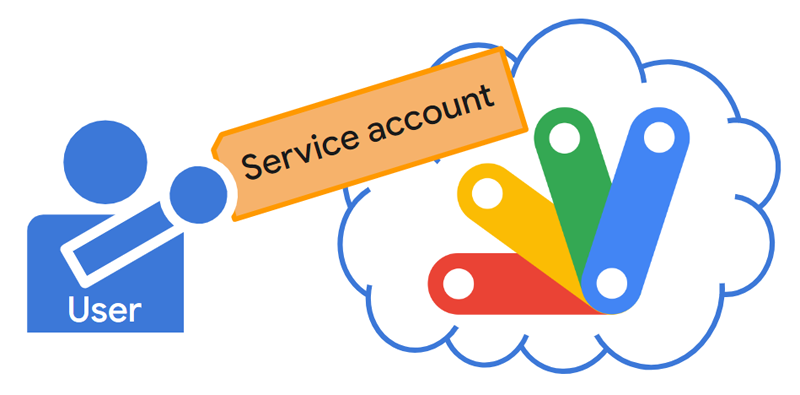
One day, you might have a situation where it is required to run Google Apps Script using the service account. Unfortunately, in the current stage, Google Apps Script cannot be directly run with the service account because of the current specification. So, this report introduces a workaround for executing Google Apps Script using the service account.
Introduction
When you want to execute Google Apps Script from outside of Google, as the basic approach, it can be achieved by Google Apps Script API. Ref In order to use Google Apps Script, it is required to link the Google Apps Script project with the Google Cloud Platform project. Ref But, in the current stage, Google Apps Script can be executed by Google Apps Script API with only the access token obtained from OAuth2. Unfortunately, the access token obtained by the service account cannot used for executing Google Apps Script using Google Apps Script API. It seems that this is the current specification on the Google side. However, there might be a case that it is required to execute Google Apps Script using the service account. In this report, I would like to introduce a workaround for executing Google Apps Script using the service account. In this workaround, the Web Apps created by Google Apps Script is used. The Web Apps can be used for executing the preserved functions of doGet and doPost from outside of Google. Ref In this workaround, this Web Apps is used for executing the various functions.
go-gettokenbyserviceaccount was updated to v1.0.1
You can get this from https://github.com/tanaikech/go-gettokenbyserviceaccount
getcode was updated to v1.0.1
You can get this from https://github.com/tanaikech/getcode
go-getfilelist was updated to v2.0.0
You can get this from https://github.com/tanaikech/go-getfilelist
Gists
This is the sample scripts for creating new event with Google Meet link to Google Calendar using various languages. When I saw the official document of “Add video and phone conferences to events”, in the current stage, I can see only the sample script for Javascript. But I saw the several questions related to this for various languages. So I published the sample scripts for creating new event with Google Meet link to Google Calendar using various languages.
Gists
This is a sample script for directly using the request body of the string JSON for Google APIs with googleapis of golang.
At googleapis for golang, when Google API is used, it is required to create the request body like this sample script. I have several contacts for creating about such request body. I thought that such script might be a bit difficult for users. I thought that when the string JSON object is directly used for this, it might be useful. So I would like to introduce about this. When this was useful for your situation, I’m glad.
Gists
This is a sample script for setting the number format of cells on Google Spreadsheet using batchUpdate in Sheets API with golang. In this case, googleapis for golang is used. The script of the authorization can be seen at the official document.
Sample script
In this script, the number format of the column “A” is changed to yyyy-mm-dd hh:mm:ss. And, please include https://www.googleapis.com/auth/spreadsheets to the scopes.
sheetId := 12345678  // Please set the sheet ID which is not Spreadsheet ID. Please be careful this.

repeatCellRequest := &sheets.RepeatCellRequest{
    Fields: "userEnteredFormat.numberFormat",
    Range: &sheets.GridRange{
        SheetId:          int64(sheetId),
        StartRowIndex:    0,
        StartColumnIndex: 0,
        EndColumnIndex:   1,
    },
    Cell: &sheets.CellData{
        UserEnteredFormat: &sheets.CellFormat{
            NumberFormat: &sheets.NumberFormat{
                Pattern: "yyyy-mm-dd hh:mm:ss",
                Type:    "DATE",
            },
        },
    },
}
requestBody := &sheets.BatchUpdateSpreadsheetRequest{
    Requests: []*sheets.Request{&sheets.Request{
        RepeatCell: repeatCellRequest,
    }},
}
resp, err := srv.Spreadsheets.BatchUpdate(bookID, requestBody).Do()
if err != nil {
    log.Fatal(err)
}
fmt.Printf("%#v\n", resp)
References
Updated: GetFileList for golang, Javascript, Node.js and Python
This is the libraries to retrieve the file list with the folder tree from the specific folder of own Google Drive and shared Drives.
go-getfilelist was updated to v1.0.3
-
v1.0.3 (May 14, 2020)
-
Shared drive got to be able to be used. The file list can be retrieved from both your Google Drive and the shared drive.
- For example, when the folder ID in the shared Drive is used
folderID of Folder(folderID), you can retrieve the file list from the folder in the shared Drive.
You can get this from https://github.com/tanaikech/go-getfilelist
Libraries of gdoctableapp for golang, Node.js and python were updated to v1.1.0
Libraries of gdoctableapp for golang, Node.js and python were updated to v1.0.5
Update History
Gists
This is a sample script for the resumable upload of Files to Google Drive using Golang. This script uses the library of google-api-go-client. About the installation of google-api-go-client, please check the Quickstart for golang at the official site.
Sample script:
package main

import (
	"context"
	"encoding/json"
	"fmt"
	"io/ioutil"
	"log"
	"net/http"
	"os"

	drive "google.golang.org/api/drive/v3"

	"golang.org/x/oauth2"
	"golang.org/x/oauth2/google"
	"golang.org/x/oauth2/jwt"
)

// ServiceAccount : Use Service account
func ServiceAccount(credentialFile string) *http.Client {
	b, err := ioutil.ReadFile(credentialFile)
	if err != nil {
		log.Fatal(err)
	}
	var c = struct {
		Email      string `json:"client_email"`
		PrivateKey string `json:"private_key"`
	}{}
	json.Unmarshal(b, &c)
	config := &jwt.Config{
		Email:      c.Email,
		PrivateKey: []byte(c.PrivateKey),
		Scopes: []string{
			drive.DriveScope,
		},
		TokenURL: google.JWTTokenURL,
	}
	client := config.Client(oauth2.NoContext)
	return client
}

func main() {
	filename := "sample.txt"     // Filename
	baseMimeType := "text/plain" // MimeType
	client := ServiceAccount("credential.json") // Please set the json file of Service account.

	srv, err := drive.New(client)
	if err != nil {
		log.Fatalln(err)
	}
	file, err := os.Open(filename)
	if err != nil {
		log.Fatalln(err)
	}
	fileInf, err := file.Stat()
	if err != nil {
		log.Fatalln(err)
	}
	defer file.Close()
	f := &drive.File{Name: filename}
	res, err := srv.Files.
		Create(f).
		ResumableMedia(context.Background(), file, fileInf.Size(), baseMimeType).
		ProgressUpdater(func(now, size int64) { fmt.Printf("%d, %d\r", now, size) }).
		Do()
	if err != nil {
		log.Fatalln(err)
	}
	fmt.Printf("%s\n", res.Id)
}
Note:
- In this sample, the Service account is used. So the file is uploaded to the Service account’s Drive. When
client retrieved from OAuth2 is used, the file is uploaded to owner’s Drive.
References:
Gists
This is a sample script for creating a table to Google Document by retrieving values from Google Spreadsheet for Golang.
Before you use this script, please install go library of go-gdoctableapp.
$ go get -v -u github.com/tanaikech/go-gdoctableapp
Sample script:
This sample script uses Service Account.
In this sample script, the values are retrieved from Sheet1!A1:C5 of Spreadsheet, and new table is created to the Document using the values.
package main

import (
	"encoding/json"
	"fmt"
	"io/ioutil"
	"log"
	"net/http"
	"os"

	gdoctableapp "github.com/tanaikech/go-gdoctableapp"
	"golang.org/x/oauth2"
	"golang.org/x/oauth2/google"
	"golang.org/x/oauth2/jwt"
	docs "google.golang.org/api/docs/v1"
	sheets "google.golang.org/api/sheets/v4"
)

// ServiceAccount : Use Service account
func ServiceAccount(credentialFile string) *http.Client {
	b, err := ioutil.ReadFile(credentialFile)
	if err != nil {
		log.Fatal(err)
	}
	var c = struct {
		Email      string `json:"client_email"`
		PrivateKey string `json:"private_key"`
	}{}
	json.Unmarshal(b, &c)
	config := &jwt.Config{
		Email:      c.Email,
		PrivateKey: []byte(c.PrivateKey),
		Scopes: []string{
			docs.DocumentsScope,
			sheets.SpreadsheetsScope,
		},
		TokenURL: google.JWTTokenURL,
	}
	client := config.Client(oauth2.NoContext)
	return client
}

func main() {
	spreadsheetID := "###" // Please set here
	documentID := "###"    // Please set here

	client := ServiceAccount("credential.json") // Please set the json file of Service account.
	srv, err := sheets.New(client)
	if err != nil {
		log.Fatalf("%v", err)
	}

	// Retrieve values from Spreadsheet.
	sheetValues, err := srv.Spreadsheets.Values.Get(spreadsheetID, "Sheet1!A1:C5").Do()
	if err != nil {
		log.Fatalf("%v", err)
	}
	values := sheetValues.Values

	// Put the retrieved values to Document.
	g := gdoctableapp.New()
	obj := &gdoctableapp.CreateTableRequest{
		Rows:    int64(len(values)),
		Columns: int64(len(values[0])),
		Append:  true,
		Values:  values,
	}
	res, err := g.Docs(documentID).CreateTable(obj).Do(client)
	if err != nil {
		log.Fatalf("%v", err)
	}
	fmt.Println(res)
}
References:
Overview
This is a Golang library for managing tables on Google Document using Google Docs API.
Description
Google Docs API has been released. When I used this API, I found that it is very difficult for me to manage the tables on Google Document using Google Docs API. Although I checked the official document, unfortunately, I thought that it’s very difficult for me. So in order to easily manage the tables on Google Document, I created this library.
Gists
This is a sample script for dynamically retrieving the keys and values from struct property using golang.
Sample script:
Go Playground
package main

import (
	"fmt"
	"reflect"
)

func main() {
	s := struct {
		key1 string
		key2 string
		key3 string
	}{"value1", "value2", "value3"}

	r := reflect.ValueOf(&s).Elem()
	rt := r.Type()
	for i := 0; i < rt.NumField(); i++ {
		field := rt.Field(i)
		rv := reflect.ValueOf(&s)
		value := reflect.Indirect(rv).FieldByName(field.Name)
		fmt.Println(field.Name, value.String())
	}
}
Gists
This is a sample script for sorting a slice using Golang. Recently, I had a situation for sorting the coordinates of cells of Spreadsheet. As a test case, it thinks of the situation that the randomized cells are sorted. I think that this can be also used for a table except for Spreadsheet.
Sample slice:
The sample slice is as follows.
ar := []struct {
    row   int
    col   int
    value string
}{
    {0, 0, "A1"},
    {0, 1, "B1"},
    {0, 2, "C1"},
    {1, 0, "A2"},
    {1, 1, "B2"},
    {1, 3, "D2"},
    {2, 0, "A3"},
    {2, 2, "C3"},
}
When each element of above slice is put to a Spreadsheet, it becomes as follows.
Overview
This is a Golang library for running HTTP requests with the asynchronous process. The progress of requests can be also shown.
Demo

In this demonstration, 5 requests are run by 2 workers. And before each request, the waiting time for 2 seconds is added as a sample. By this, you can easily see the work with 2 workers. Also you can see this script at the following sample script.
go-getfilelist was updated to v1.0.2
You can get this from https://github.com/tanaikech/go-getfilelist
Gists
This is a sample golang script for retrieving access token using Service Account of Google by Google’s OAuth2 package.
The script without using Google’s OAuth2 package is here.
package main

import (
    "encoding/json"
    "fmt"
    "io/ioutil"
    "os"

    "golang.org/x/oauth2"
    "golang.org/x/oauth2/google"
    "golang.org/x/oauth2/jwt"
)

func serviceAccount(credentialFile string) (*oauth2.Token, error) {
    b, err := ioutil.ReadFile(credentialFile)
    if err != nil {
        return nil, err
    }
    var c = struct {
        Email      string `json:"client_email"`
        PrivateKey string `json:"private_key"`
    }{}
    json.Unmarshal(b, &c)
    config := &jwt.Config{
        Email:      c.Email,
        PrivateKey: []byte(c.PrivateKey),
        Scopes: []string{
            "https://www.googleapis.com/auth/drive.metadata.readonly",
        },
        TokenURL: google.JWTTokenURL,
    }
    token, err := config.TokenSource(oauth2.NoContext).Token()
    if err != nil {
        return nil, err
    }
    return token, nil
}

func main() {
    token, err := serviceAccount("credentials.json") // Please set here
    if err != nil {
        fmt.Println(err)
        os.Exit(1)
    }
    fmt.Println(res)
}
Overview
This is a Golang library to retrieve access token from Service Account of Google without using Google’s OAuth2 package.
You can get this from https://github.com/tanaikech/go-gettokenbyserviceaccount
Gists
This sample script is for using the string values to []googleapi.Field for Golang. The property of fields can often be used to the Google APIs. When such APIs are used by the Go library, there are the cases that fields parameter is required to be used. For example, at the quickstart of Drive API for golang, the value is directly put to Fields() like r, err := srv.Files.List().PageSize(10).Fields("nextPageToken, files(id, name)").Do(). For this situation, when the string value is put to Fields() as follows,
go-getfilelist was updated to v1.0.1
You can get this from https://github.com/tanaikech/go-getfilelist
Overview
This is a Golang library to retrieve the file list with the folder tree from the specific folder of Google Drive.
Description
When I create applications for using Google Drive, I often retrieve a file list from a folder in the application. So far, I had created the script for retrieving a file list from a folder for each application. Recently, I thought that if there is the script for retrieving the file list with the folder tree from the folder of Google Drive as a library, it will be useful for me and other users. So I created this.
Gists
This is a sample script for creating a downloaded file as a zip file using Golang. The downloaded file is not created to a file as a temporal file. The zip file is directly created. When you use this, please modify url, downloadedFileName and zipFileName.
Sample script:
package main

import (
    "archive/zip"
    "bytes"
    "fmt"
    "io"
    "io/ioutil"
    "log"
    "net/http"
    "os"
    "time"
)

func main() {
    url := "https://localhost/sample.png"
    downloadedFileName := "sample.png"
    zipFileName := "sample.zip"

    res, err := http.Get(url)
    if err != nil {
        log.Fatal(err)
    }
    body, err := ioutil.ReadAll(res.Body)
    if err != nil {
        fmt.Fprintf(os.Stderr, "Error: %v. ", err)
        os.Exit(1)
    }
    defer res.Body.Close()
    buf := new(bytes.Buffer)
    w := zip.NewWriter(buf)
    fh := &zip.FileHeader{
        Name:     downloadedFileName,
        Modified: time.Now(),
        Method:   8,
    }
    f, err := w.CreateHeader(fh)
    if err != nil {
        log.Fatal(err)
    }
    if _, err := f.Write(body); err != nil {
        log.Fatal(err)
    }
    err = w.Close()
    if err != nil {
        log.Fatal(err)
    }
    file, err := os.Create(zipFileName)
    if err != nil {
        log.Fatal(err)
    }
    if _, err = io.Copy(file, buf); err != nil {
        log.Fatal(err)
    }
    file.Close()
    fmt.Println("Done.")
}
Note:
As an important point, when the file is downloaded, os.FileInfo cannot be used. So in this situation, it uses zip.FileHeader. At that time, please remember to set Method. Method is 0 as the default. This means no compression. The sample script uses 8 to Method. This means the DEFLATE method.
Gists
This is a sample script for transposing slice from (n x m) to (m x n) for golang.
Script :
package main

import "fmt"

func transpose(slice [][]string) [][]string {
    xl := len(slice[0])
    yl := len(slice)
    result := make([][]string, xl)
    for i := range result {
        result[i] = make([]string, yl)
    }
    for i := 0; i < xl; i++ {
        for j := 0; j < yl; j++ {
            result[i][j] = slice[j][i]
        }
    }
    return result
}

func main() {
    sample := [][]string{
        []string{"a1", "a2", "a3", "a4", "a5"},
        []string{"b1", "b2", "b3", "b4", "b5"},
        []string{"c1", "c2", "c3", "c4", "c5"},
    }
    ar := transpose(sample)
    fmt.Println(ar)
}
Result :
[
    ["a1", "b1", "c1"],
    ["a2", "b2", "c2"],
    ["a3", "b3", "c3"],
    ["a4", "b4", "c4"],
    ["a5", "b5", "c5"]
]
The Go Playground
https://play.golang.org/p/XoZy7m65rEG
Gists
This is a sample script for copying values from JSON to a struct using reflect package.
Script :
package main

import (
	"encoding/json"
	"fmt"
	"reflect"
)

type obj struct {
	Key1 string `json:"k1"`
	Key2 string `json:"k2"`
	Key3 int64  `json:"k3"`
	Key4 int    `json:"k4"`
	Key5 bool   `json:"k5"`
}

func main() {
	data := `{"k1": "v1", "k2": "v2", "k3": 1234567890, "k4": 456, "k5": true}`
	d := map[string]interface{}{}
	json.Unmarshal([]byte(data), &d)
	obj := &obj{}
	s := reflect.ValueOf(obj).Elem()
	typeOfT := s.Type()
	for i := 0; i < s.NumField(); i++ {
		for j, f := range d {
			if typeOfT.Field(i).Tag.Get("json") == j {
				fl := s.FieldByName(typeOfT.Field(i).Name)
				switch fl.Kind() {
				case reflect.Bool:
					fl.SetBool(f.(bool))
				case reflect.Int, reflect.Int64:
					c, _ := f.(float64)
					fl.SetInt(int64(c))
				case reflect.String:
					fl.SetString(f.(string))
				}
			}
		}
	}
	fmt.Printf("%+v\n", obj) // &{Key1:v1 Key2:v2 Key3:1234567890 Key4:456 Key5:true}
}
Result :
&{Key1:v1 Key2:v2 Key3:1234567890 Key4:456 Key5:true}
The Go Playground
https://play.golang.org/p/Rz-GNbFyDfh
Gists
This sample script is for parsing JSON object. In the object, the keys are number and changing every time.
Object:
{
    "key1": {
        "key2": [
            {"0": [{"key3": "value3a"}, {"key3": "value3b"}]},
            {"1": [{"key3": "value3c"}, {"key3": "value3d"}]}
        ]
    }
}
Script:
package main

import (
    "encoding/json"
    "fmt"
    "strconv"
)

type key1 struct {
    Key1 key2 `json:"key1"`
}

type key2 struct {
    Key2 []interface{} `json:"key2"`
}

func main() {
    data := `{"key1": {"key2": [{"0": [{"key3": "value3a"}, {"key3": "value3b"}]},{"1": [{"key3": "value3c"}, {"key3": "value3d"}]}]}}`
    k1 := &key1{}
    json.Unmarshal([]byte(data), &k1)
    for i, e := range k1.Key1.Key2 {
        if key, ok := e.(map[string]interface{})[strconv.Itoa(i)].([]interface{}); ok {
            for _, f := range key {
                fmt.Printf("%+v\n", f.(map[string]interface{})["key3"])
            }
        }
    }
}
Result:
value3a
value3b
value3c
value3d
The Go Playground
https://play.golang.org/p/xm2KvgOIkKH
Gists
This sample script is for uploading CSV file as Spreadsheet and modifying permissions using Golang.
I think that the detail information of google-api-go-client is a bit little. The sample scripts are so little. It retrieves most information from only godoc and GitHub. So I publish such sample scripts here. If this is useful for you, I’m glad.
Important points :
- Give mimeType of file that it wants to upload to
options of Media(r io.Reader, options ...googleapi.MediaOption).
- In order to give
options, use googleapi.ContentType().
- Give mimeType of file that it wants to convert, when it uploads it to Google Drive, to
file of Create(file *File).
- In order to give
file, use &drive.File{}.
- For installing permissions, use
&drive.Permission{}. Each parameter is the same to them for Python.
This sample script uses Quickstart. So in order to use this sample script, at first, please do Step 1 and Step 2 of the Quickstart.
Gists
Flow :
In my sample script, the script was made using the Quickstart. The flow to use this sample script is as follows.
- For Go Quickstart, please do Step 1 and Step 2.
- Please put
client_secret.json to the same directory with my sample script.
- Copy and paste my sample script, and create it as new script file.
- Run the script.
- When
Go to the following link in your browser then type the authorization code: is shown on your terminal, please copy the URL and paste to your browser. And then, please authorize and get code.
- Put the code to the terminal.
- When
Done. is displayed, it means that the update of spreadsheet is done.
Request body :
For Spreadsheets.Values.BatchUpdate, BatchUpdateValuesRequest is required as one of parameters. In this case, the range, values and so on that you want to update are included in BatchUpdateValuesRequest. The detail information of this BatchUpdateValuesRequest can be seen at godoc. When it sees BatchUpdateValuesRequest, Data []*ValueRange can be seen. Here, please be carefull that Data is []*ValueRange. Also ValueRange can be seen at godoc. You can see MajorDimension, Range and Values in ValueRange.
Gists
This is a sample script for exporting a project on Google Drive to local PC using Golang Quickstart. A file with refresh token is saved to the same directory with this script as go-quickstart.json. Before you run this script, please enable Drive API on your Google API console.
Points for exporting project
- In order to export project, both
drive.DriveScriptsScope and drive.DriveScope have to be included in the scope.
- The mimeType for exporting has to be “application/vnd.google-apps.script+json”.
If you already have the file with refresh token, at first, please delete it and run this script. By this, the scopes of refresh token and access token are updated.
Overview
This is a Golang library to automatically get an authorization code for retrieving access token using OAuth2.
Description
When it retrieves an access token and refresh token using OAuth2, the code for retrieving them has to be got by authorization on own browser. In order to retrieve the code, in generally, users have to click the authorization button and copy the code on the browser. This library can be automatically got the code by launching HTML server as a redirected server. At first, I have used this for retrieving the code from Google. But recently I noticed that this can be used for other sites. They are Google, GitHub, Slack and so on. This library can be used for creating such applications.
This sample script is for retrieving values from a deep nested JSON. There are 2 patterns. So for these, the benchmark were measured.
Script :
package main

import (
    "encoding/json"
    "testing"
)

const (
    data = `{
      "A_key1": {
        "B_key1": {
          "C_key": "value"
        }
      }
    }`
)

func BenchmarkB1(b *testing.B) {
    b.ResetTimer()
    for i := 0; i < b.N; i++ {
        var p map[string]interface{}
        json.Unmarshal([]byte(data), &p)
        a1 := p["A_key1"]
        a2 := p["A_key1"].(map[string]interface{})["B_key1"]
        a3 := p["A_key1"].(map[string]interface{})["B_key1"].(map[string]interface{})["C_key"]
        _ = a1 // --> map[B_key1:map[C_key:value]]
        _ = a2 // --> map[C_key:value]
        _ = a3 // --> value
    }
}

func BenchmarkB2(b *testing.B) {
    b.ResetTimer()
    for i := 0; i < b.N; i++ {
        var p map[string]interface{}
        json.Unmarshal([]byte(data), &p)
        b1 := p["A_key1"]
        temp, _ := json.Marshal(b1)
        json.Unmarshal(temp, &p)
        b2 := p["B_key1"]
        temp, _ = json.Marshal(b2)
        json.Unmarshal(temp, &p)
        b3 := p["C_key"]
        _ = b1 // --> map[B_key1:map[C_key:value]]
        _ = b2 // --> map[C_key:value]
        _ = b3 // --> value
    }
}
Result :
$ go test -bench .
BenchmarkB1-4             300000              4177 ns/op
BenchmarkB2-4             100000             13619 ns/op
PASS
It was found that the process cost of json.Unmarshal() was high. json.Unmarshal() for test 2 is 3 times larger than that for test 1.
When a string without no strings is split by strings.Split(), the created slice is the same to the slice created by make(). The length of the slice doesn’t become zero.
Sample script :
package main

import (
    "fmt"
    "strings"
)

func main() {
    sample1a := strings.Split("", " ")
    fmt.Printf("%v, %v, '%v', %v, %+q\n", sample1a, len(sample1a), sample1a[0], len(sample1a[0]), sample1a[0])

    sample1b := make([]string, 1)
    fmt.Printf("%v, %v, '%v', %v, %+q\n", sample1b, len(sample1b), sample1b[0], len(sample1b[0]), sample1b[0])

    var sample2a []string
    fmt.Printf("%v, %v\n", sample2a, len(sample2a))

    sample2b := []string{}
    fmt.Printf("%v, %v\n", sample2b, len(sample2b))
}
Result :
strings.Split() : [], 1, '', 0, ""
make()          : [], 1, '', 0, ""
var                : [], 0
[]string{}      : [], 0
This sample is for changing from “float64” to “int” for values did unmarshal using map[string]interface{}.
When it did unmarshal using map[string]interface{}, a number with “int” was changed to “float64”. And it shows an error as follows.
Error :
panic: interface conversion: interface {} is float64, not int
Sample Script :
It solves using following script.
package main

import (
    "encoding/json"
    "fmt"
    "reflect"
)

func main() {
    data := `{"key": 10}`
    var i map[string]interface{}
    json.Unmarshal([]byte(data), &i)

    val1 := i["key"]
    fmt.Printf("%v, %v\n", val1, reflect.TypeOf(val1)) // 10, float64

    i["key"] = int(i["key"].(float64))
    val2 := i["key"]
    fmt.Printf("%v, %v\n", val2, reflect.TypeOf(val2)) // 10, int
}
Go Playground
This sample is for replacing JSON key by golang.
package main

import (
    "encoding/json"
    "fmt"
)

func main() {
    json1 := `{"key1": "value1"}`

    obj := map[string]interface{}{}
    json.Unmarshal([]byte(json1), &obj)

    fmt.Println(obj) // <-- map[key1:value1]

    obj["key2"] = obj["key1"]
    delete(obj, "key1")

    fmt.Println(obj) // <-- map[key2:value1]
}
This sample script is for splitting command-line arguments by golang. There are 2 types. One is the regular expression is used. Another is that Split() and TrimSpace() are used.
Here, each process speed was compared.
Script :
package main

import (
    "regexp"
    "strings"
    "testing"
)

func BenchmarkB1(b *testing.B) {
    str := "test1.txt, test2.txt"
    b.ResetTimer()
    for i := 0; i < b.N; i++ {
        ar := regexp.MustCompile(`\s*,\s*`).Split(str, -1)
        var result []string
        for _, x := range ar {
            result = append(result, x) // --> 'test.js', 'test2.py'
        }
        _ = result
    }
}

func BenchmarkB2(b *testing.B) {
    str := "test1.txt, test2.txt"
    b.ResetTimer()
    for i := 0; i < b.N; i++ {
        ar := strings.Split(str, ",")
        var result []string
        for _, x := range ar {
            result = append(result, strings.TrimSpace(x)) // --> 'test.js', 'test2.py'
        }
        _ = result
    }
}
Result :
$ go test -bench .
BenchmarkB1-4             100000             13048 ns/op
BenchmarkB2-4            3000000               399 ns/op
PASS
Just as expected, the regular expression was slow. And it’s much slower than that of Split() and TrimSpace().
Decoding JSON by Golang
func main() {
    data := `{
      "A_key1": {
        "B_key1": {
          "C_key": "value"
        }
      },
      "A_key2": {
        "B_key2": {
          "C_key": "value"
        }
      },
      "A_key3": {
        "B_key3": {
          "C_key": "value"
        }
      },
      "A_key4": {
        "B_key4": {
          "C_key": "value"
        }
      },
      "A_key5": {
        "B_key5": {
          "C_key": "value"
        }
      }
    }`
    var p interface{}
    json.NewDecoder(strings.NewReader(data)).Decode(&p)
    fmt.Println(p)
}
Go Playground
Dynamically Creating JSON by Golang
obj := map[string]interface{}{}
obj["hoge"] = "huga"
fmt.Println(obj)
Go Playground
Retrieving Response Headers by Golang
res, _ := client.Do(req)
contentType := res.Header.Get("Content-Type")
contentLength := res.Header.Get("Content-Length")
This sample script dynamically creates nested JSON objects.
Script
obj := map[string]interface{}{}
for i := 1; i <= 5; i++ {
    value := map[string]interface{}{
        fmt.Sprintf("B_key%d", i): map[string]interface{}{
            "C_key": "value",
        },
    }
    obj[fmt.Sprintf("A_key%d", i)] = value
}
Result
{
  "A_key1": {
    "B_key1": {
      "C_key": "value"
    }
  },
  "A_key2": {
    "B_key2": {
      "C_key": "value"
    }
  },
  "A_key3": {
    "B_key3": {
      "C_key": "value"
    }
  },
  "A_key4": {
    "B_key4": {
      "C_key": "value"
    }
  },
  "A_key5": {
    "B_key5": {
      "C_key": "value"
    }
  }
}
I have never heard this. I would like to use this from now.
package main

import "fmt"

type st struct {
    data1 int
    data2 int
}

func main() {
    c1 := make(chan *st, 1)
    c2 := make(chan *st, 1)
    c1 <- &st{1, 2}
    c2 <- <-c1
    close(c1)
    close(c2)
    res, _ := <-c2
    fmt.Println(res.data2)
}

>>> 2