Gists
Abstract
Gemini Spark, Google’s 24/7 autonomous AI agent, seamlessly connects with Google Workspace. However, connecting to arbitrary external APIs requires extended integration. This article demonstrates how integrating Google Apps Script (GAS) as a Model Context Protocol (MCP) server or Webhook endpoint expands Gemini Spark’s capabilities, enabling enterprise-grade workflow automation.
Introduction
Gemini Spark was officially announced at Google I/O 2026 on May 19, 2026, and its service in Japan began on July 16, 2026. Ref Gemini Spark is Google’s first always-on AI agent that runs continuously in the cloud 24/7, even when your PC is closed, to complete tasks on your behalf. Unlike traditional Q&A-style chat AIs, it can autonomously execute complex workflows across multiple Google applications. Its core functionalities are built around three main pillars: Tasks, Skills, and Schedules.
Gists
Abstract
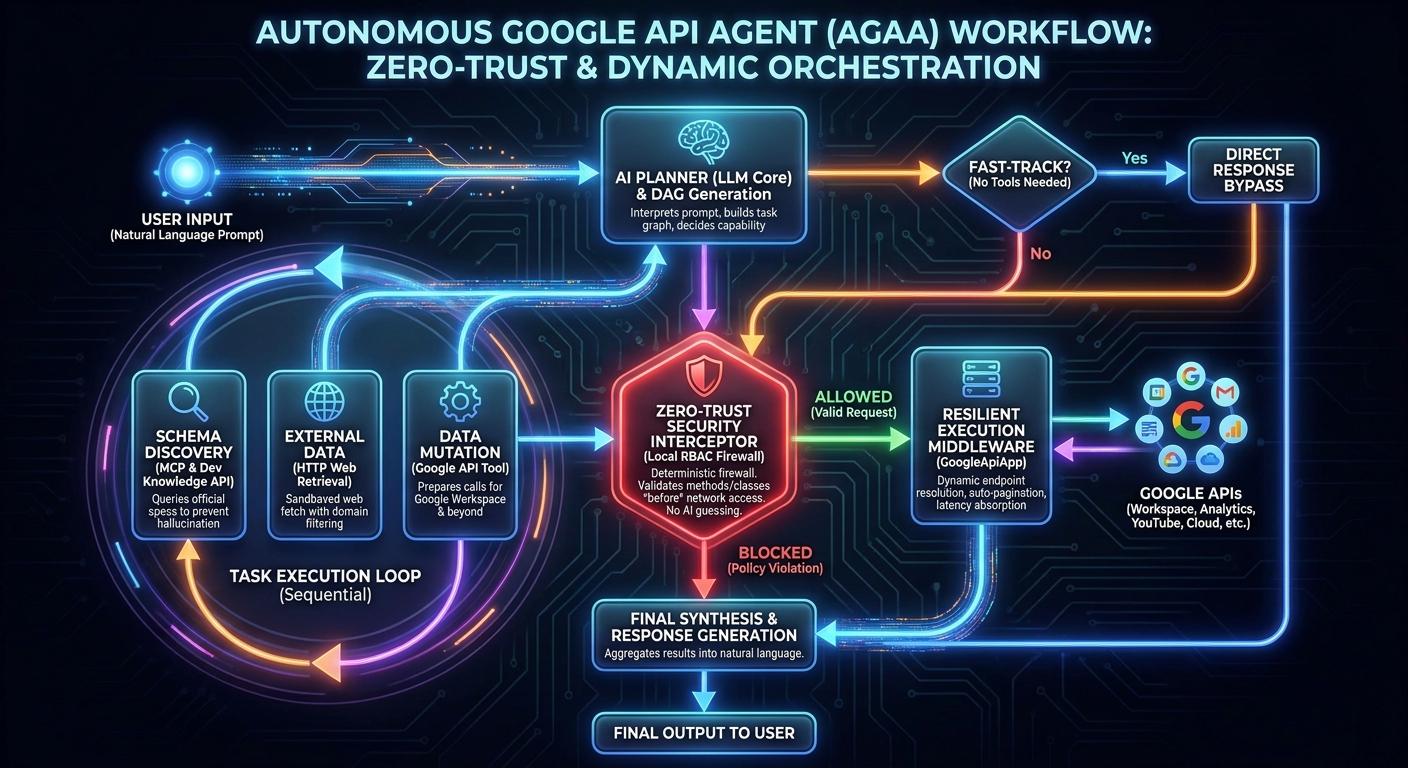
Integrating autonomous AI agents into enterprise architectures exposes critical security and latency vulnerabilities. The Autonomous Google API Agent (AGAA) solves this by enforcing a deterministic, zero-trust execution framework directly within Google Apps Script (GAS). By merging GASADK, dynamic REST endpoint resolution via GoogleApiApp, and the Developer Knowledge API through the Model Context Protocol (MCP), AGAA executes complex cross-domain workflows exclusively via natural language. It autonomously researches API schemas, mitigates server-side formula latencies, handles recursive pagination, and mathematically enforces local Role-Based Access Control (RBAC). AGAA enables true “Vibe Coding” across all Google APIs—including Workspace, Analytics, and YouTube—without bloated client libraries.
Overview
This is a library for running Batch Requests for Google APIs using Javascript.
Description
When users use Google’s APIs, one quota is used for one API call. When the batch request is used, several APIs can be called by one quota, although there are some limitations in the batch request.
google-api-javascript-client can run the batch request. Ref But, I created this for my self study. This library can achieve the batch request using fetch without using google-api-javascript-client.
Gists
This sample script is for using the string values to []googleapi.Field for Golang. The property of fields can often be used to the Google APIs. When such APIs are used by the Go library, there are the cases that fields parameter is required to be used. For example, at the quickstart of Drive API for golang, the value is directly put to Fields() like r, err := srv.Files.List().PageSize(10).Fields("nextPageToken, files(id, name)").Do(). For this situation, when the string value is put to Fields() as follows,