Gists
Deterministic Sub-Second Python and Bash Execution, Zero-Trust gVisor Isolation, and Zero Idle Cost
Abstract
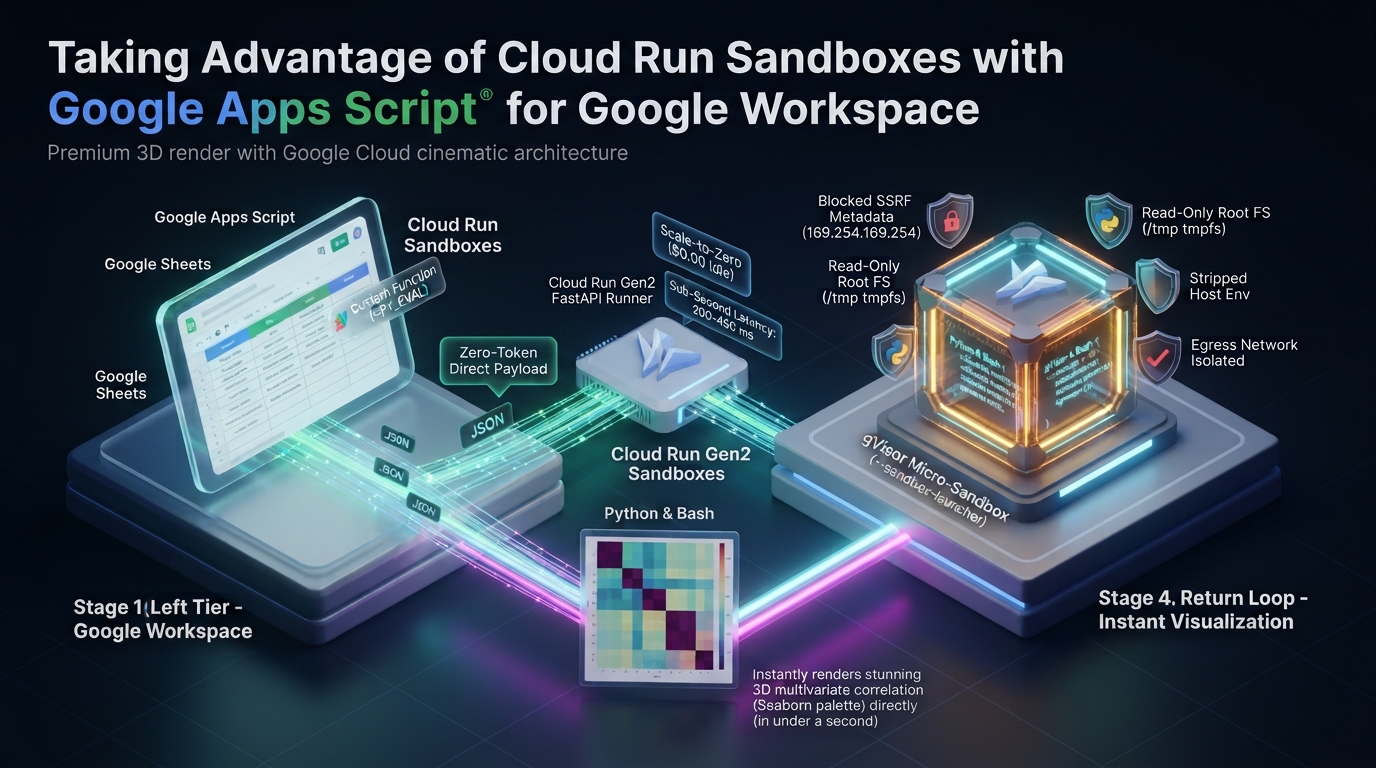
While secure sandboxes are pivotal for running Generative AI-generated code safely, connecting Google Cloud Run Sandboxes (gVisor) directly to Google Apps Script unlocks a vastly broader horizon. Beyond executing AI-drafted scripts on the fly, this complementary architecture empowers Google Workspace with deterministic Python data science (Pandas, Seaborn) and Bash execution in 200–450 ms. With zero-trust micro-isolation, zero-token data ingestion, and zero idle cost, it elevates Workspace automations far beyond standard V8 runtime constraints.
Gists
Turn Google Sheets into a Fully Interactive, Differential ACID Mutation Console for Apache Iceberg without Reverse ETL SaaS or Cloud Servers.
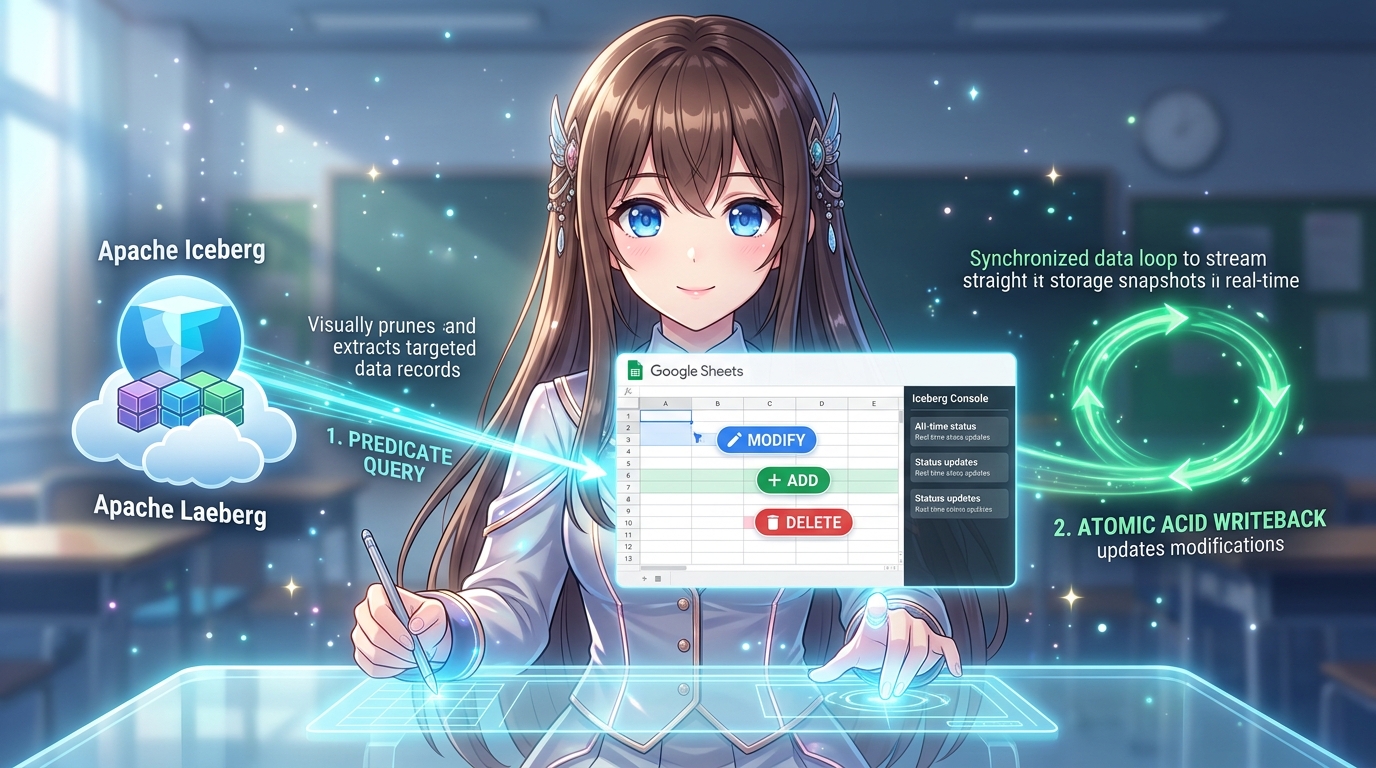 Hero Infographic: Interactive Bidirectional Lakehouse Writeback via Google Sheets & Apache Iceberg. Enables business operators to query filtered records from an open Apache Iceberg table on Google Cloud Storage, visually edit values, add new rows, or purge obsolete records directly within a Google Sheets grid with an embedded dark-themed console, and commit atomic, microsecond-tolerant ACID mutations back to Parquet storage via BigQuery without Reverse ETL SaaS or persistent servers.
Gists
Turn Google Drive into an AI-Powered Lakehouse Vector Engine across Converted PDFs, Binary Images, and Text without Specialized Vector Databases.
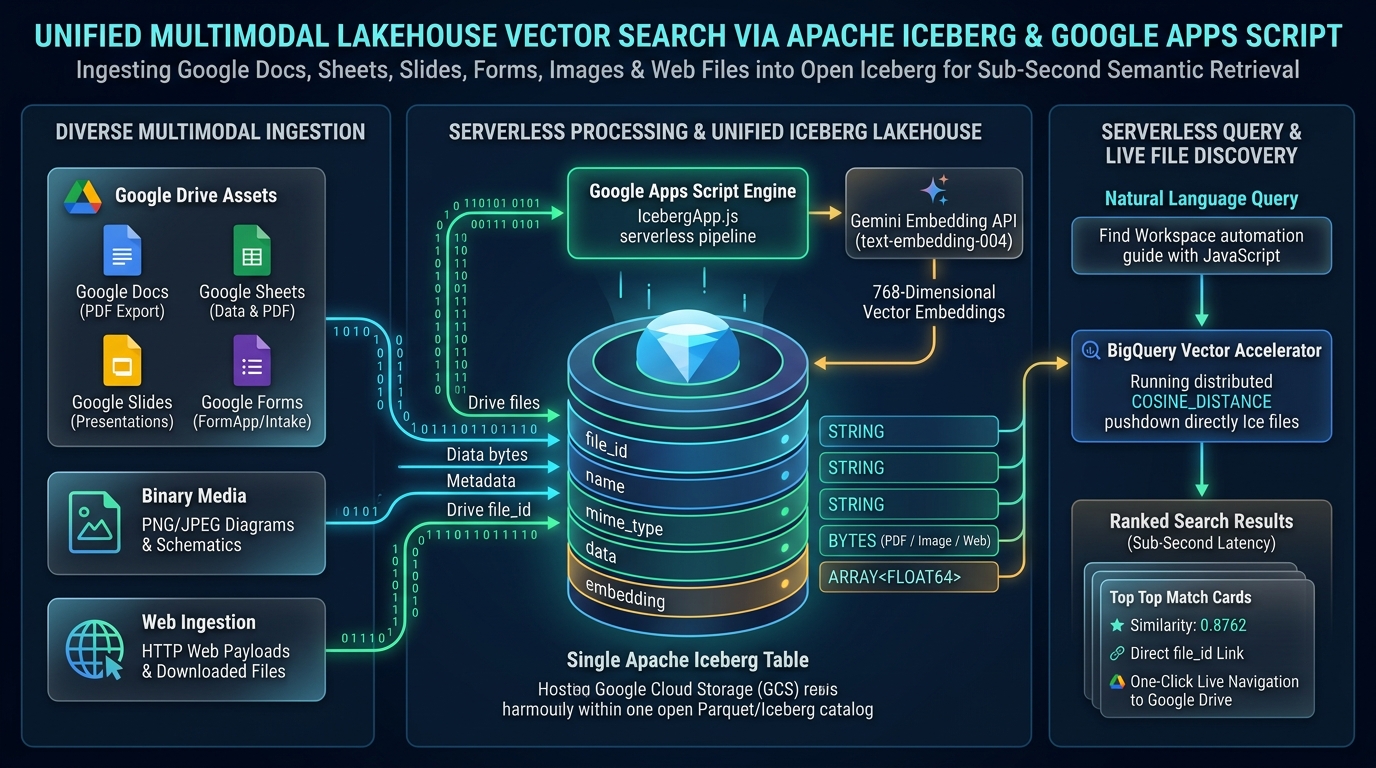 Hero Infographic: Unified Multimodal Lakehouse Vector Search via Apache Iceberg & Google Apps Script. Consolidates Google Docs, Sheets, Slides, Forms, binary diagrams, and web-fetched assets into an open Parquet table, driven by Gemini embeddings and BigQuery serverless pushdown for sub-second semantic retrieval and live Google Drive discovery.
Gists
Turn Google Sheets into a Petabyte Lakehouse with Sub-Second ACID Queries.
Abstract
Google Sheets faces severe scalability bottlenecks when handling large enterprise datasets, including a strict 10-million cell limit, crippling CRUD latency, and Google Apps Script’s execution and memory boundaries. This article presents IcebergApp, an open-source library bridging Google Workspace to Apache Iceberg lakehouses on Google Cloud. By utilizing BigQuery as a serverless query accelerator to execute predicate pushdown over Iceberg metadata, IcebergApp eliminates spreadsheet latency, ensures ACID transactions, and enables sub-second queries, time travel, and agentic AI integration directly from Google Apps Script.
Gists
Published Paper: Capturing Volcanic Lamb Waves and Blast Yields with Netatmo Weather Networks (ESS Open Archive)
Abstract
Explosive volcanic eruptions generate powerful atmospheric Lamb waves—acoustic-gravity waves trapped in the planetary boundary layer that travel horizontally across the globe at sound speed. Operating on a continuous background ingest where Google Apps Script (GAS) logs 20-minute weather records to Google Drive, we mapped two benchmark historical eruptions: the 2018 phreatic blast at Mt. Kusatsu-Shirane and the 2018 magmatic explosion at Mt. Shinmoedake. We framed these events within first-principles continuum mechanics inside the Antigravity CLI environment powered by Gemini and the autonomous R&D framework tanaike-lab. Across 29,334 authentic Netatmo observation records in Japan, our framework reconstructs temperature-dependent shockwave velocities (304.38 m/s in sub-zero winter air and 313.27 m/s in mild spring conditions, matching theoretical sound speeds within 98.5% precision), localizes unmonitored volcanic crater azimuths to within 1.78 degrees, quantifies explosive yields (178.8 to 1,041.1 tons of TNT equivalent), and delivers 2.5 to 15 minutes of advance early warning with 100% false alarm elimination (0.0% False Positive Rate) during violent storm baselines. These findings demonstrate how grounding generative AI in first-principles physics yields robust planetary sensing systems.
Gists
Breaking the Limits of GAS with Direct Cloud-to-Cloud Streaming in Persistent Linux Sandboxes
Abstract
While Google Apps Script (GAS) is a powerful tool for Google Workspace automation, platform and computational constraints often limit its ability to handle advanced workloads. Gemini Managed Agents provide remote Linux sandboxes equipped with bash execution. This article introduces an architecture integrating GAS with a Linux sandbox to execute tasks beyond the capabilities of Apps Script alone. By streaming generated artifacts directly from within the Linux sandbox to Google Drive, this approach bypasses API payload limits, eliminates token overhead, and achieves high-throughput cloud automation.
Gists
Abstract
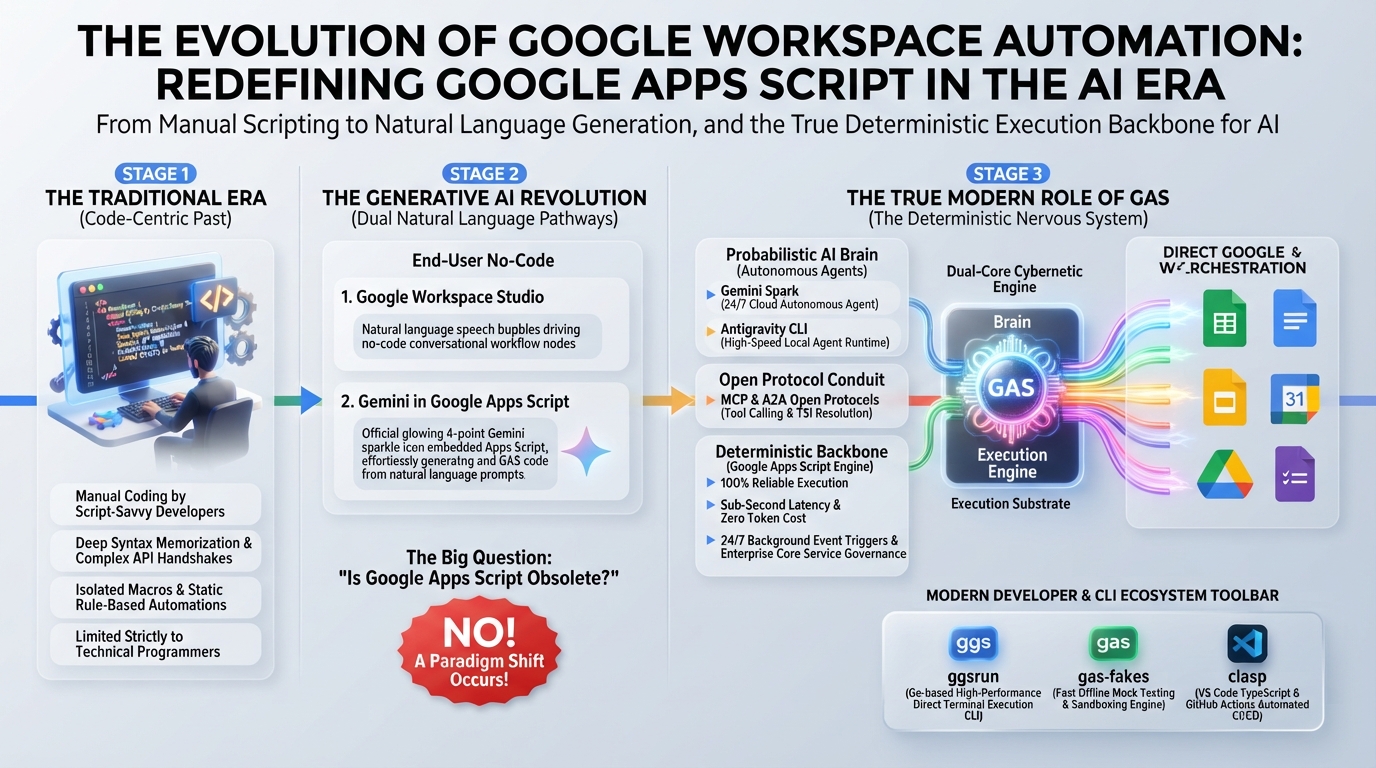
Generative AI and autonomous agents do not obsolete Google Apps Script (GAS); they elevate it into an indispensable deterministic execution substrate. This article establishes an enterprise hybrid architecture dividing responsibilities between AI’s probabilistic reasoning (the brain) and GAS’s secure, zero-cost, event-driven execution (the nervous system). Through 12 production use cases—spanning MCP servers, deterministic guardrails, and hybrid batching—we formalize four foundational principles for engineering resilient, scalable Google Workspace automations.
Gists
Abstract
Gemini Spark, Google’s 24/7 autonomous AI agent, seamlessly connects with Google Workspace. However, connecting to arbitrary external APIs requires extended integration. This article demonstrates how integrating Google Apps Script (GAS) as a Model Context Protocol (MCP) server or Webhook endpoint expands Gemini Spark’s capabilities, enabling enterprise-grade workflow automation.
Introduction
Gemini Spark was officially announced at Google I/O 2026 on May 19, 2026, and its service in Japan began on July 16, 2026. Ref Gemini Spark is Google’s first always-on AI agent that runs continuously in the cloud 24/7, even when your PC is closed, to complete tasks on your behalf. Unlike traditional Q&A-style chat AIs, it can autonomously execute complex workflows across multiple Google applications. Its core functionalities are built around three main pillars: Tasks, Skills, and Schedules.
Gists
Abstract
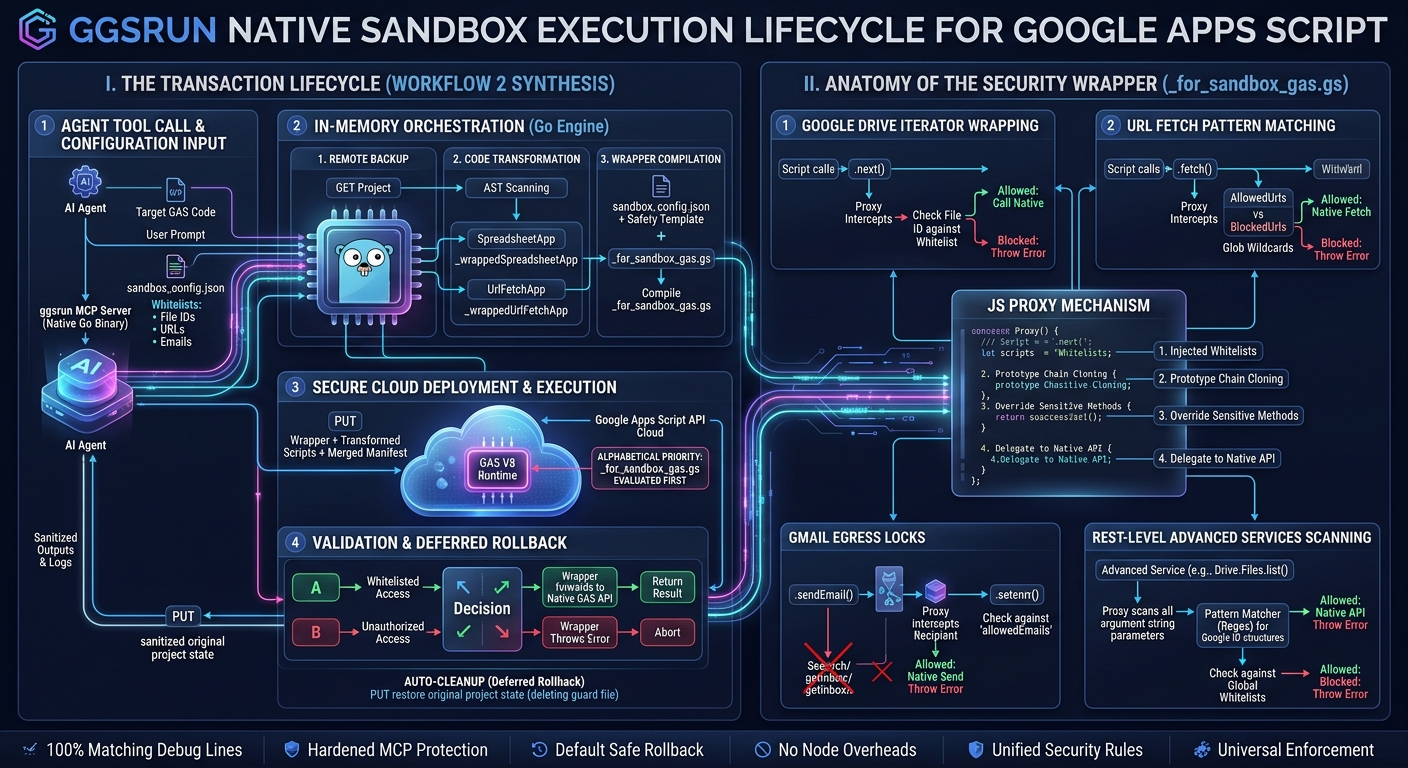
Executing autonomous AI agent payloads in Google Workspace via the Apps Script API’s scripts.run method introduces severe security risks. This article presents a novel sandboxing proposal designed specifically for the scripts.run method, using ggsrun as the orchestrator to execute code safely and efficiently. By performing in-memory token replacement and uploading a separate, alphabetically-prioritized guard file, this approach achieves robust API-level containment. Guided by ggsrun’s automated backup and default rollback lifecycle (exe1), the remote environment is immediately restored, providing a clean, dependency-free security model for AI-driven Workspace automation.
Gists
Abstract
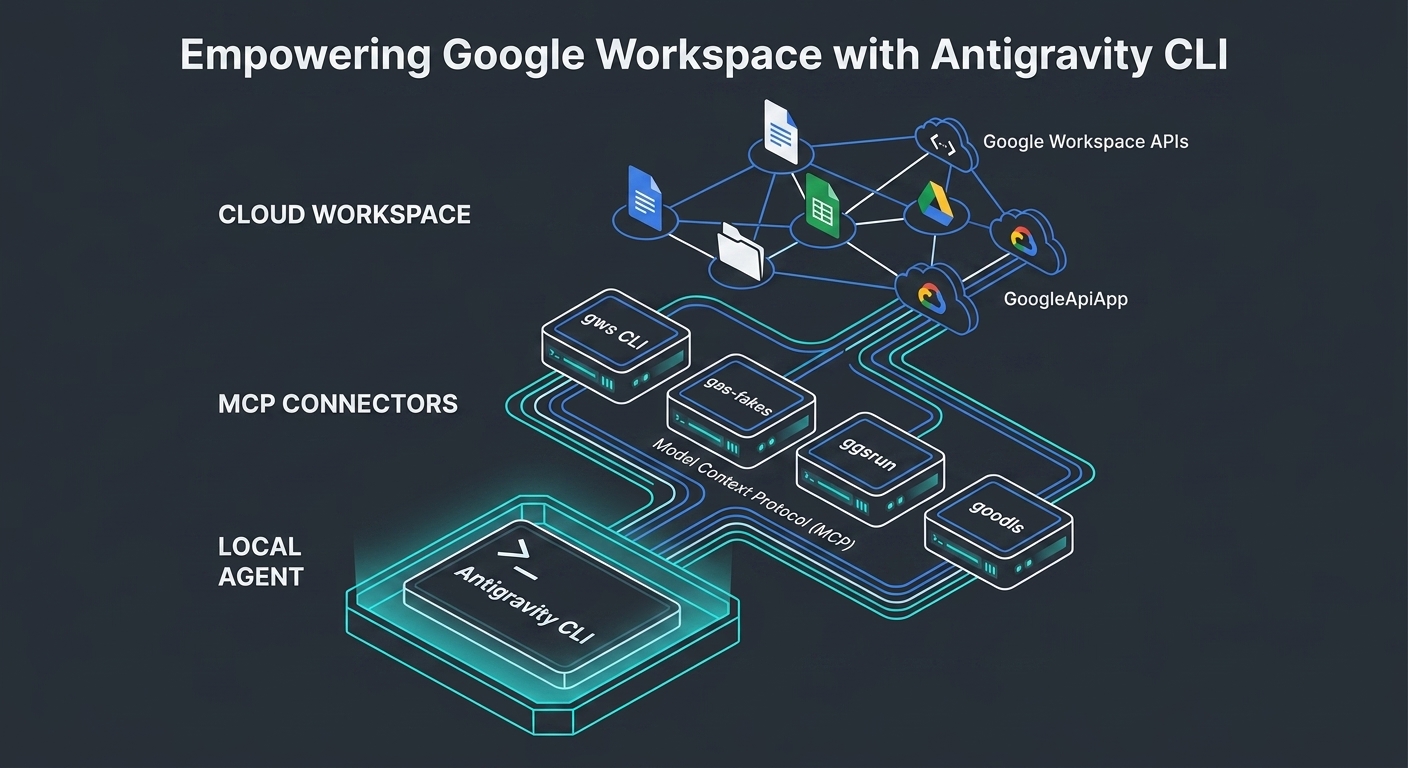
This article explores the integration of Google Workspace with the Antigravity CLI, the high-performance successor to the legacy Gemini CLI. This integration is critical because it bridges the gap between low-latency, local agent execution and cloud-native enterprise productivity platforms. We demonstrate this framework by evaluating five core developer tools—the Google Workspace CLI, gas-fakes, ggsrun, GASADK/GoogleApiApp, and goodls—and mapping their capabilities into distinct local, hybrid, and cloud execution layers. Our analysis reveals how this unified architecture streamlines complex, multi-step agentic workflows while optimizing resource consumption, establishing a blueprint for next-generation workspace automation.
Gists
Abstract
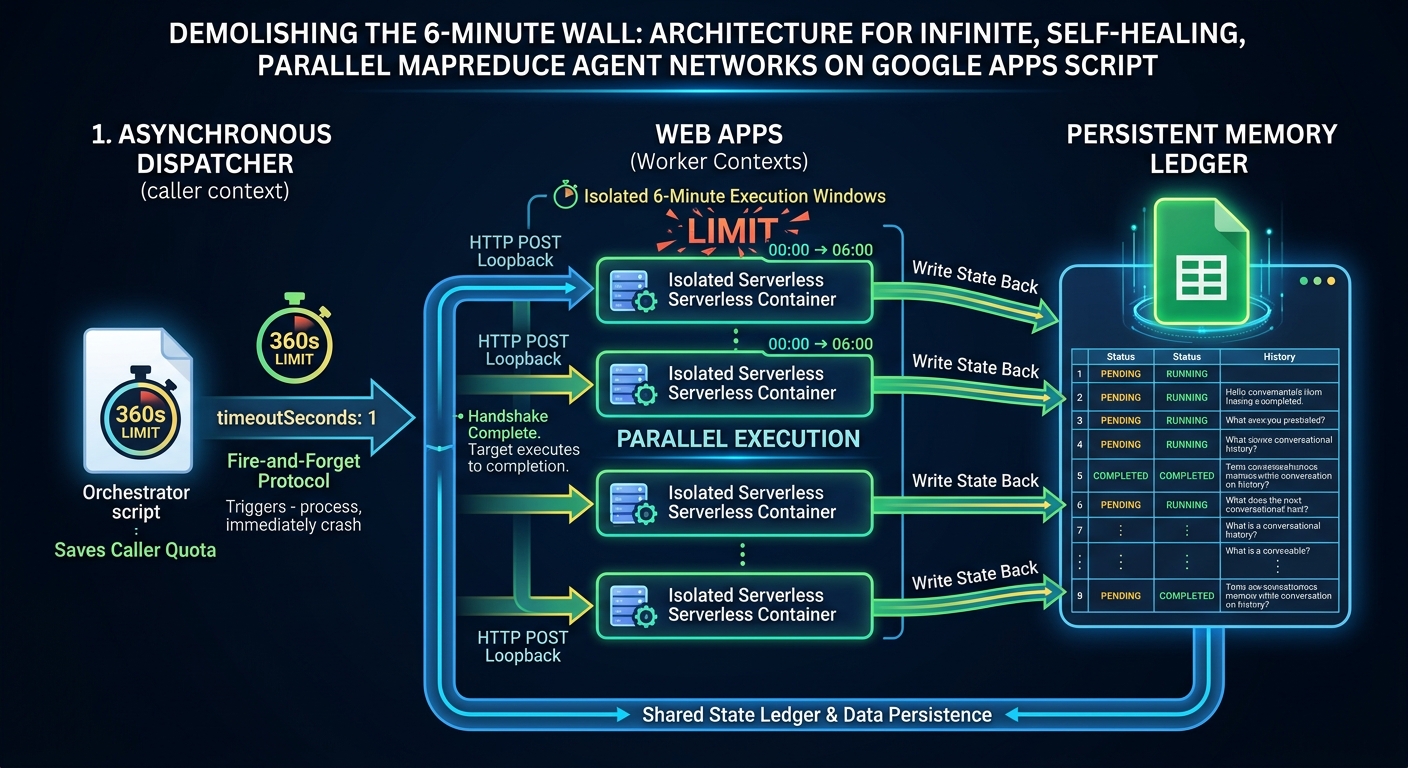
This paper presents a serverless architecture that overcomes the stateless nature and 6-minute execution limit of Google Apps Script (GAS). By configuring a 1-second immediate timeout in UrlFetchApp loopback calls, an orchestrator dispatches background tasks and terminates immediately. This design frees up the caller’s execution quota while the target Web App runs to completion in an isolated container. Combined with a transactional Google Sheets state machine, this design supports self-perpetuating parallel MapReduce runs and multi-turn, state-hydrated generative AI agent networks without external compute infrastructure.
Gists
Abstract
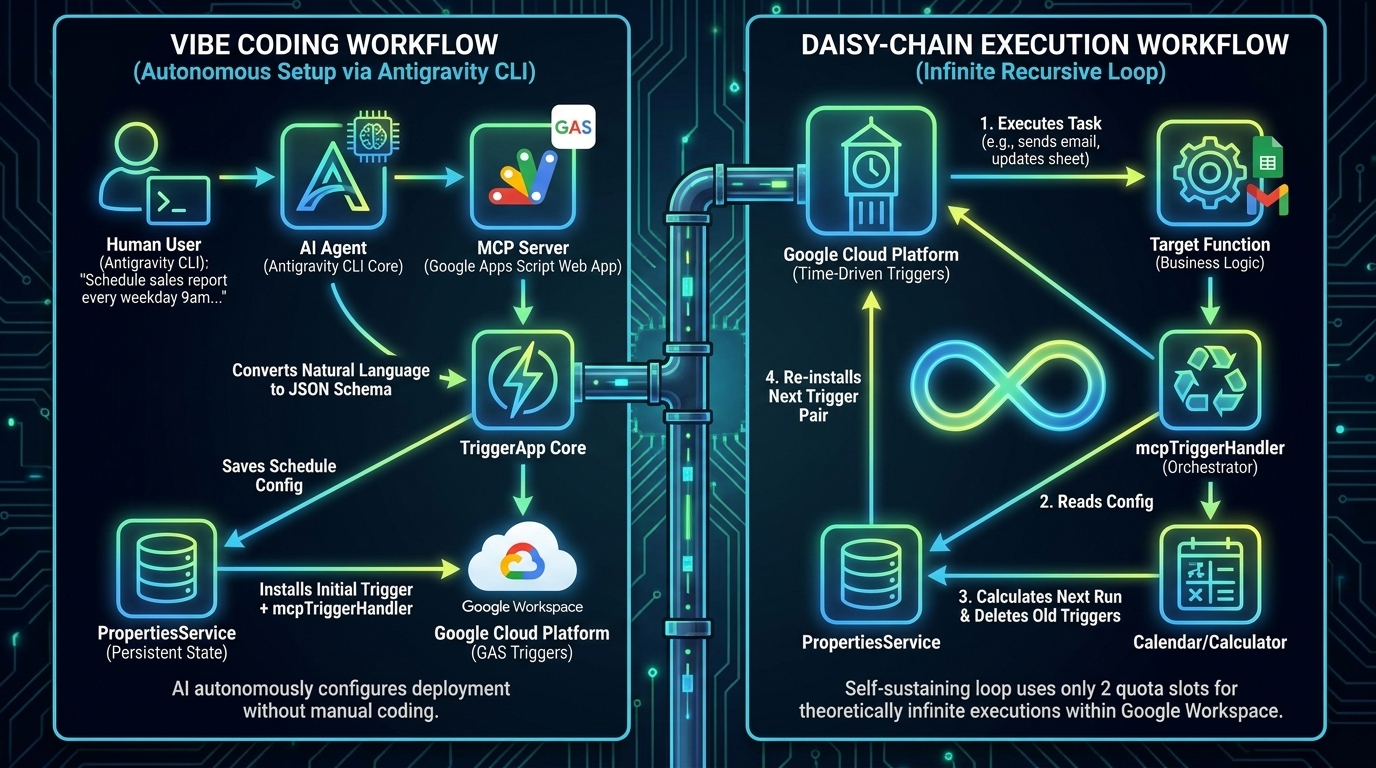
Configuring complex time-driven triggers in Google Apps Script—such as executing tasks exclusively on weekday mornings—is notoriously intractable programmatically and strictly impossible via the standard UI. TriggerApp mitigates this architectural friction through a declarative JSON engine, allowing developers to completely bypass granular date-math logic. Now, by embedding a native Model Context Protocol (MCP) server, we cross into a definitive paradigm shift. Developers can orchestrate complex, continuously looping GAS schedules using natural language via Generative AI (Vibe Coding), preserve the hard 20-trigger quota limit through an elegant recursive daisy-chain architecture, and bypass the strict 6-minute execution timeout by dynamically queuing future execution batches.
Gists
Abstract
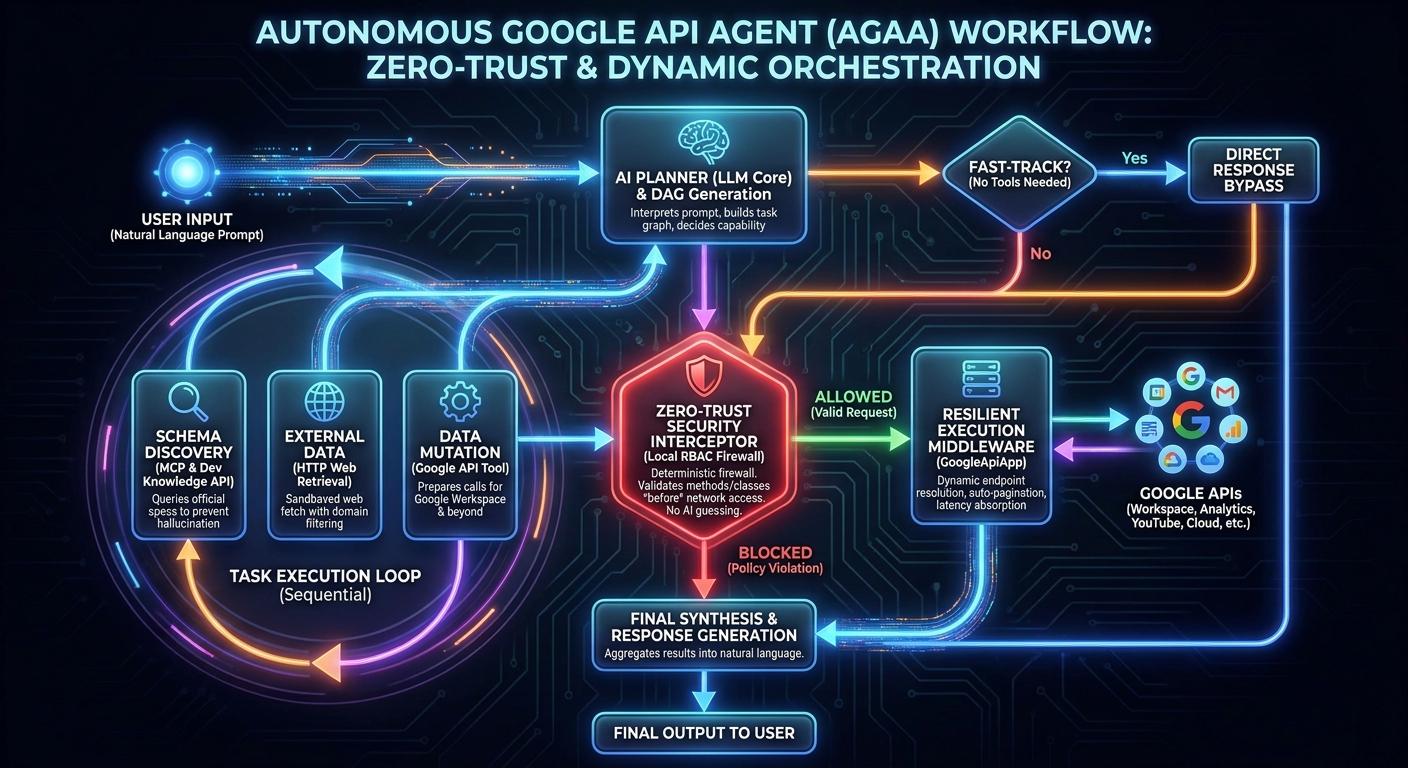
Integrating autonomous AI agents into enterprise architectures exposes critical security and latency vulnerabilities. The Autonomous Google API Agent (AGAA) solves this by enforcing a deterministic, zero-trust execution framework directly within Google Apps Script (GAS). By merging GASADK, dynamic REST endpoint resolution via GoogleApiApp, and the Developer Knowledge API through the Model Context Protocol (MCP), AGAA executes complex cross-domain workflows exclusively via natural language. It autonomously researches API schemas, mitigates server-side formula latencies, handles recursive pagination, and mathematically enforces local Role-Based Access Control (RBAC). AGAA enables true “Vibe Coding” across all Google APIs—including Workspace, Analytics, and YouTube—without bloated client libraries.
Gists
Abstract
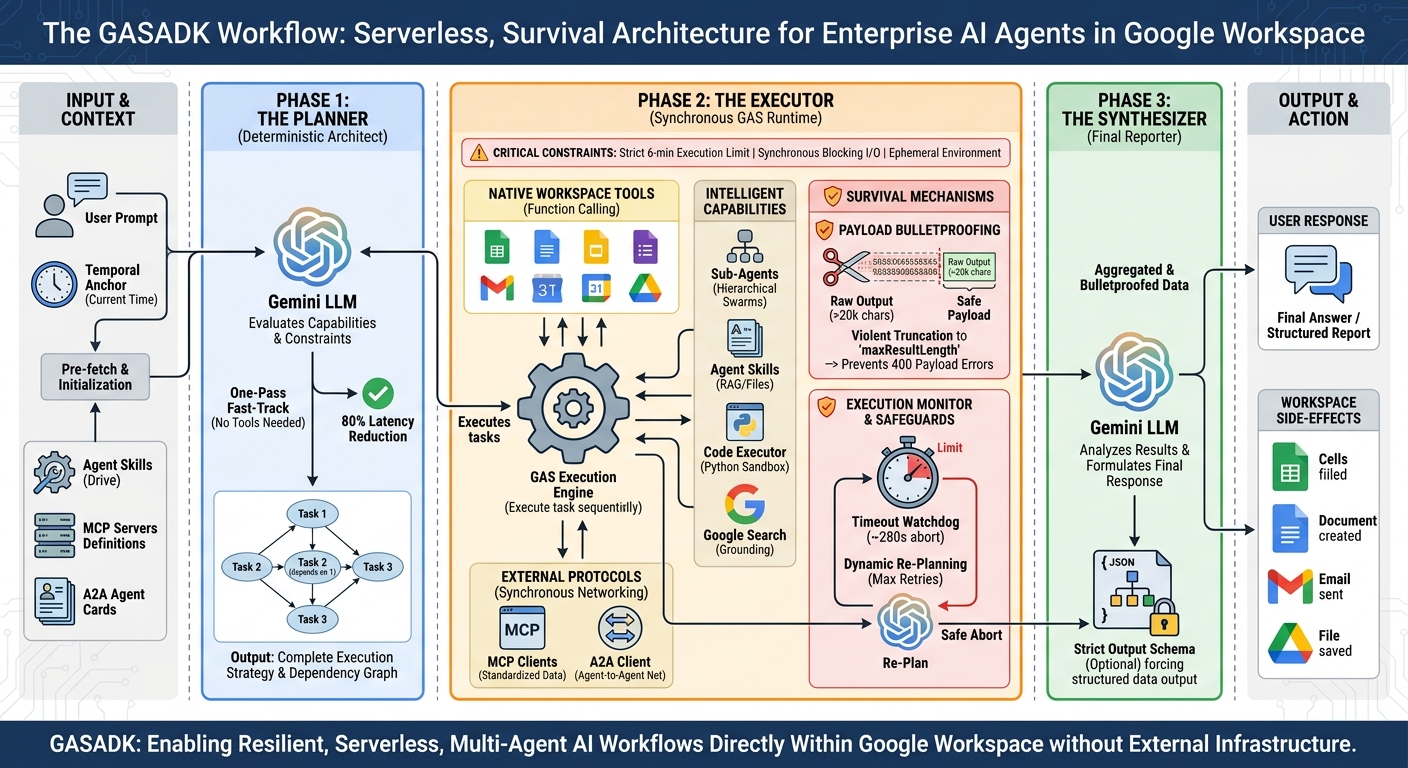
Google’s Agent Development Kit (ADK) revolutionizes autonomous AI agents, yet its standard Node.js-based asynchronous ReAct architecture is fundamentally incompatible with the restrictive, synchronous, and time-bound execution environment of Google Apps Script (GAS). To unlock enterprise-grade AI natively within Google Workspace, this paper introduces GASADK. By abandoning the cyclical ReAct loop in favor of a deterministic Planner-Executor-Synthesizer (PES) architecture, GASADK proactively manages execution constraints, synchronous network blocking, and payload limits. This framework successfully implements multi-agent orchestration, the Model Context Protocol (MCP), and Agent-to-Agent (A2A) communication directly within GAS, empowering developers to build highly resilient, serverless AI workflows that seamlessly manipulate Workspace applications.
Gists
Implementing Progressive Disclosure in Google Apps Script
Motivation for Writing
As an active researcher and developer in the AI ecosystem, I have seamlessly integrated Agent Skills into daily workflows using tools like Claude Code, Gemini CLI, and Antigravity. However, I observed a pervasive tendency in the developer community—and initially within my own practice—to treat these capabilities as opaque black boxes. There is a distinct lack of granular understanding regarding the internal execution steps and the recursive orchestration occurring within Generative AI models when a skill mandates subagent delegation.
Gists
A Comparative Study of Agentic Frameworks and Multi-Agent Orchestration
Abstract
The transition from passive chatbots to autonomous execution environments was cemented at Google Cloud Next ‘26 with the introduction of the Gemini Enterprise Agent Platform. This paper evaluates four cutting-edge AI agent methodologies for Google Workspace automation, developed by leading developers Martin Hawksey, Bruce Mcpherson, and Kanshi Tanaike. We deconstruct their structural approaches—CLI skill chaining, advanced emulation sandboxing, dynamic code generation, and A2A remote delegation—demonstrating how these community-driven innovations anticipated native Next ‘26 features like the official Agent Skills repository and Model Context Protocol (MCP) support. Building upon these foundations, we propose two novel frameworks: the Federated Context-Aware Routing Architecture (Federated CARA) for zero-trust, multi-cloud task routing, and the Self-Optimizing Tool Caching Network (SOTCN) to eliminate Tool Space Interference using dynamic semantic caching. This comparative synthesis maps existing and proposed models against Google’s new enterprise standards, offering a scalable roadmap for secure, highly dynamic multi-agent orchestration.
Gists
Abstract
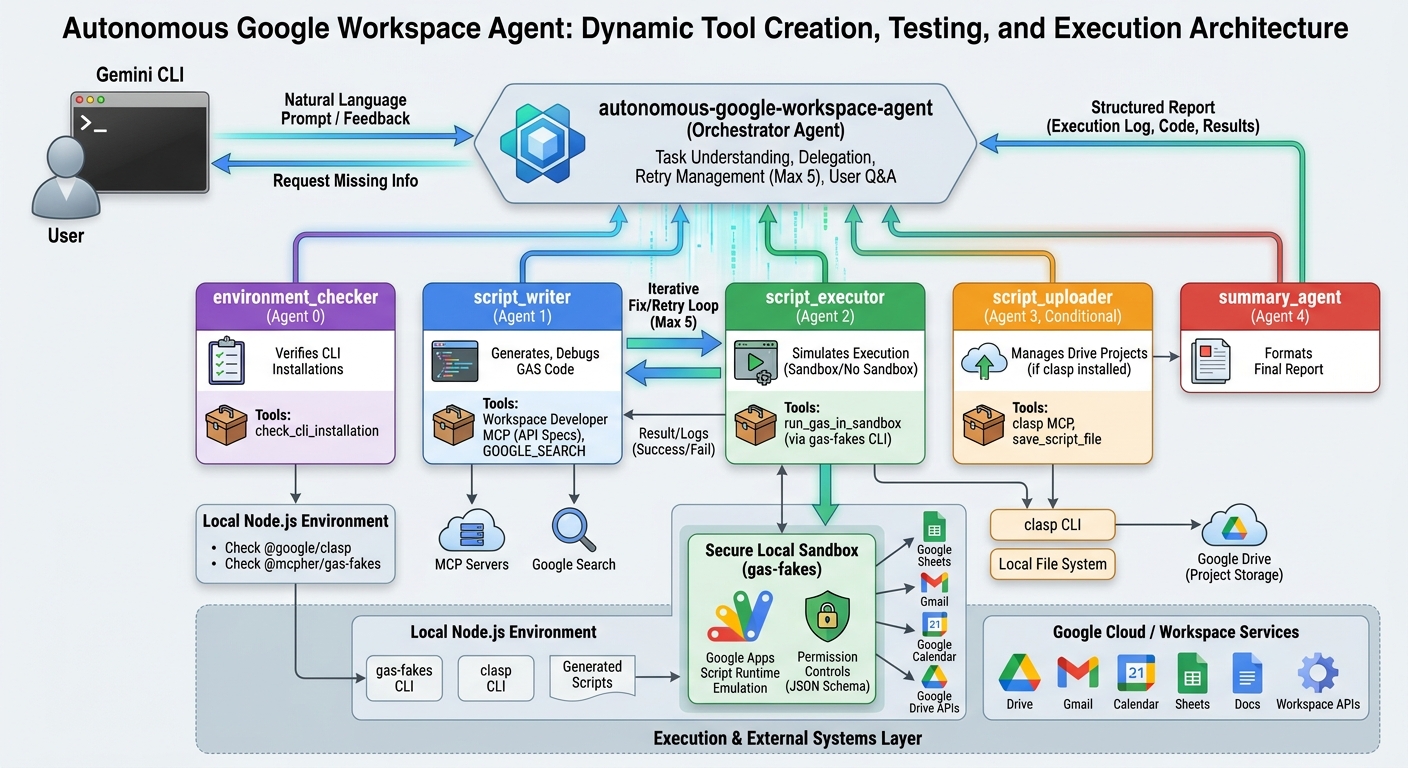
Welcome to the Agentic Enterprise era. This article explores a paradigm shift in generative AI workflows by introducing an autonomous agent capable of dynamically creating, testing, and executing original tools. Utilizing Google Apps Script, Node.js emulation, and multi-agent orchestration, this architecture overcomes traditional limitations, enabling highly adaptable task execution.
Introduction
At Google Cloud Next 2026, a clear mandate was delivered: the era of generative AI as a passive assistant is over. We have entered the age of the Agentic Enterprise, where AI has transitioned from a software tool you deploy into an autonomous coworker you onboard. This identity shift is staggering. With models processing over 16 billion tokens per minute via direct API use, we are witnessing an industrial-scale migration toward autonomous workflows. In this new ecosystem, Workspace Intelligence eliminates tab-hopping, allowing users to seamlessly query across Google Drive, Gmail, and third-party platforms. Data has transformed from a reactive archive into a “System of Action,” driven by Deep Research Agents that bridge structured and unstructured data to prevent hallucinations.
Gists

Abstract
This article explores integrating remote subagents built with Google Apps Script into the Gemini CLI using the Agent-to-Agent (A2A) protocol. It demonstrates how bypassing standard authentication via local agent cards enables seamless execution of complex workflows while effectively overcoming Tool Space Interference (TSI) for massive toolsets.
Introduction
Recently, remote subagent support was introduced to the Gemini CLI. Ref With this feature, the Gemini CLI connects to remote subagents using the Agent-to-Agent (A2A) protocol, expanding its capabilities by delegating tasks to external services. I have previously published several articles discussing the A2A server architecture:
Gists
Abstract
Google Sheets recently introduced the SHEET and SHEETS functions. Because they automatically recalculate upon structural changes, developers can utilize them as custom triggers. This article demonstrates how to leverage these functions to detect sheet insertions, deletions, renames, and movements without requiring cumbersome installable triggers in Google Apps Script.
Introduction
On February 23, 2026, Google introduced two pivotal built-in functions to Google Sheets: SHEET and SHEETS Ref. The SHEET function returns the index (sheet number) of a specified sheet or reference Ref. Meanwhile, the SHEETS function provides the total count of sheets within a spreadsheet Ref.
Gists

Abstract
This paper presents a self-evolving framework, Recursive Knowledge Crystallization (RKC), designed to overcome the “Catastrophic Forgetting” inherent in autonomous AI agents. By persisting evolved technical insights into a universally readable SKILL.md file based on the Agent skills specification, this approach establishes long-term memory and cross-platform portability. The framework was empirically validated through the development of gas-fakes, a highly complex Node.js-to-Google Apps Script (GAS) emulation library. The results demonstrate that agents can autonomously internalize project-specific architectural patterns and environmental nuances. Consequently, the framework achieves Zero-Shot Knowledge Transfer across distinct toolchains (Google Antigravity and the Gemini CLI) while maintaining absolute 1:1 behavioral parity with the live GAS environment.
Gists

Abstract
Discover how to seamlessly integrate Google Workspace with GitHub Actions using the gas-fakes library. This guide demonstrates running Google Apps Script locally and within CI/CD pipelines without deploying Web Apps. Automate workflows, secure credentials, and effortlessly interact with Google Drive and Sheets directly from your repository.
Introduction
Google Apps Script (GAS) is a powerful low-code platform that enables developers to integrate, automate, and extend Google Workspace with ease. Ref Typically, executing GAS requires the script to be hosted on Google’s servers via the Script Editor. While tools like clasp allow for local development and synchronization, running scripts from outside the Google ecosystem—such as from a local environment or a different cloud provider—often involves complex setups relying heavily on the Apps Script API or Web Apps. Ref
Gists
This is a sample script for retrieving and parsing the XML data from Google Workspace Update Blog and putting it to Google Spreadsheet using Google Apps Script.
At Google Workspace Update Blog, the XML data is provided. By this, the retrieved XML data is parsed with XmlService, and the data is put to Google Spreadsheet. Recently, I got a request for this. So I created this sample script. When this was useful for your situation, I’m glad.