Abstract
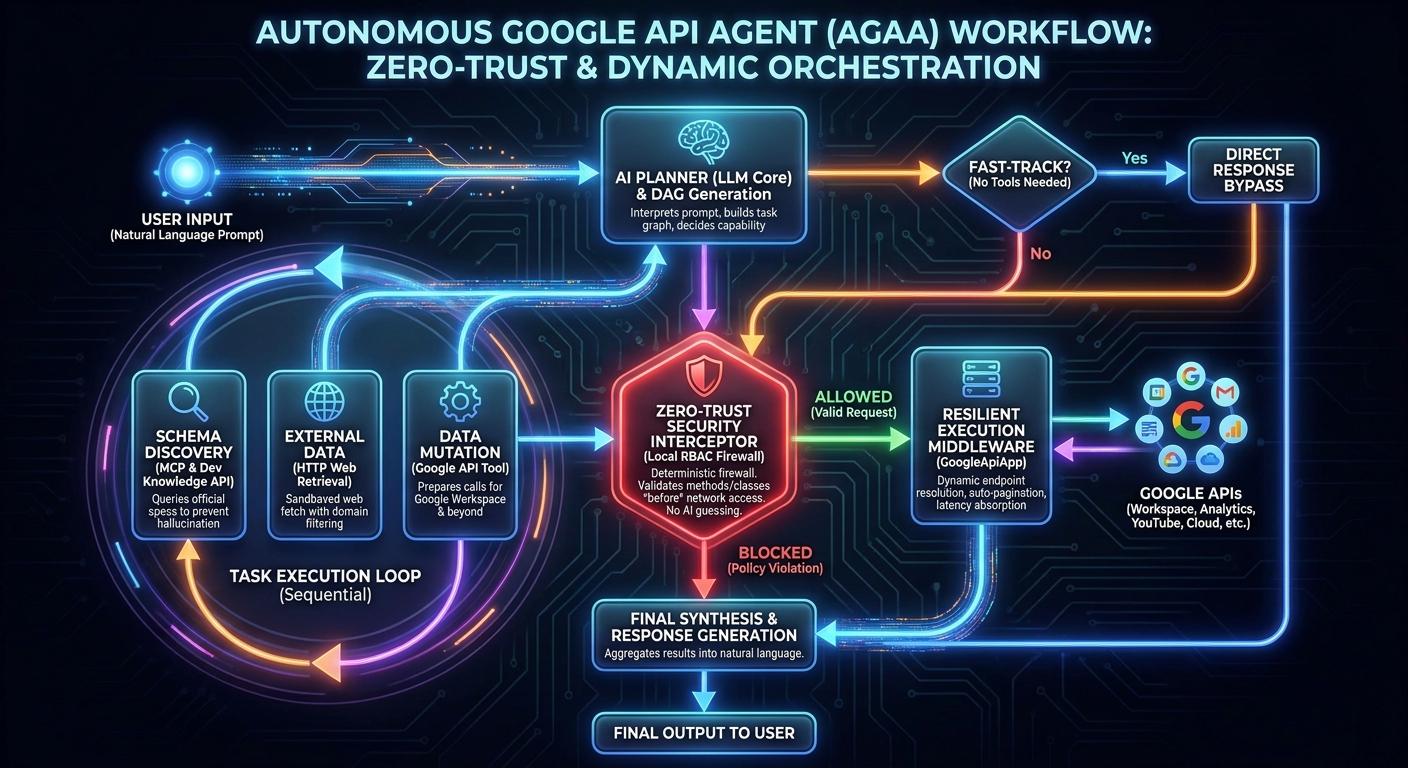
Integrating autonomous AI agents into enterprise architectures exposes critical security and latency vulnerabilities. The Autonomous Google API Agent (AGAA) solves this by enforcing a deterministic, zero-trust execution framework directly within Google Apps Script (GAS). By merging GASADK, dynamic REST endpoint resolution via GoogleApiApp, and the Developer Knowledge API through the Model Context Protocol (MCP), AGAA executes complex cross-domain workflows exclusively via natural language. It autonomously researches API schemas, mitigates server-side formula latencies, handles recursive pagination, and mathematically enforces local Role-Based Access Control (RBAC). AGAA enables true “Vibe Coding” across all Google APIs—including Workspace, Analytics, and YouTube—without bloated client libraries.
1. Introduction: The Evolution of Agentic Orchestration
Deploying generative AI directly against enterprise infrastructure requires more than clever system prompts; it requires an uncompromising orchestration layer. Blindly trusting a Large Language Model (LLM) with broad OAuth scopes is a recipe for catastrophic data loss.
Recently, I published GASADK (Agent Development Kit for Google Apps Script) [Ref 1, Ref 2], a runtime framework designed to bring autonomous agent capabilities to the stringent memory and execution limits of the GAS ecosystem. However, invoking the vast universe of Google APIs within an agentic loop immediately presents a scaling problem. Hardcoding static client libraries and custom tool wrappers for hundreds of dynamic REST endpoints bloats the LLM’s context window, exhausts token limits, and cripples inference latency.
To systematically eliminate this barrier, I developed GoogleApiApp [Ref 3], an ES6 utility that dynamically queries the Google API Discovery Service. By taking a simple API name, version, and method, GoogleApiApp resolves the correct REST endpoint on the fly. It handles authentication, automated caching, rigorous RFC 6570 parameter encoding, and silent list pagination without requiring pre-compiled SDKs.
By fusing GASADK with GoogleApiApp, we cross the threshold into true Vibe Coding. The Autonomous Google API Agent (AGAA) allows developers to transition from writing rigid, boilerplate API scripts to dictating cross-service automation entirely via natural language.
Crucially, AGAA is not confined to Google Workspace. Because it leverages the Discovery Service, it autonomously orchestrates any exposed Google API—from Google Analytics and Google Classroom to YouTube and Cloud Resource Manager. The agent dynamically fetches REST schemas via an MCP server connected to the Developer Knowledge API, maps execution graphs, and dispatches highly resilient network calls, all while strictly enforcing granular Role-Based Access Control (RBAC) directly inside the local GAS environment.
2. Core Architecture & Innovations
LLMs are inherently probabilistic text generators; they are not trustworthy execution engines. AGAA acts as an absolute firewall between the LLM Planner and your live Google data, operating on a sophisticated, phase-separated model.
- Autonomous Schema Discovery (MCP Integration): AGAA is mathematically forbidden from guessing or hallucinating API payloads. It natively queries the Google Developer Knowledge API via MCP (
mcp_0) to extract official documentation, exact endpoints, and required JSON body structures before executing any network request. - Universal API Agnosticism: AGAA does not care if you are formatting a Docs paragraph, fetching Classroom rosters, parsing Analytics dimensions, or querying YouTube metadata. It utilizes a single dynamic tool wrapper for all Google APIs, eliminating tool bloat entirely.
- Fast-Fail Method Validation: Rejects improperly formatted or incomplete method names (e.g., hallucinating
createinstead ofdocuments.create) locally before initiating costly network requests, saving tokens and execution time. - Formula Latency Suspension: Autonomously detects uncomputed
#N/AorLoading...states in Spreadsheet cells and suspends the GAS thread to wait for server-side computations to resolve before retrying. - Autonomous Pagination Integration: Detects
nextPageTokenin responses and recursively aggregates list data across multiple pages without requiring the LLM to manage while-loops or page states. - Execution Loop Limiters: Tracks deterministic tool invocation signatures, mathematically halting runaway token burn if the LLM repeatedly attempts to hit a blocked URL or executes the same failed API method more than 3 times.
3. The Zero-Trust Security Interceptor
Security cannot be an LLM prompt instruction; it must be a deterministic reality. Granting an LLM unfettered access to Google Drive via the https://www.googleapis.com/auth/drive scope is dangerous. AGAA shifts the security burden away from the AI and into hardcoded JavaScript middleware.
The securityConfig object enforces Zero-Trust boundaries regardless of the underlying OAuth token’s capabilities.
- Implicit Deny: Any Google API service not explicitly defined in your configuration object is mathematically blocked by default.
- Action Class Inference: AGAA parses the requested REST method string (e.g.,
files.delete) and uses regex to classify it dynamically asREAD,WRITE, orDELETE. - Hierarchical Method Masking: Developers define granular
allowMethodsanddenyMethodsusing hierarchical dot-notation matching. Allowingspreadsheets.valuesautomatically permitsspreadsheets.values.updatebut definitively blocksspreadsheets.create. - Network Egress Sandboxing: External web scraping via the
fetch_http_gettool is sandboxed throughallowDomainsanddenyDomains, evaluated using strict hierarchical string matching to prevent data exfiltration. - Intervention Protocol: If an action violates the RBAC policy, the tool locally returns a
[SECURITY BLOCKED]payload to the agent. AGAA’s system instructions mathematically forbid the LLM from attempting to bypass the firewall, forcing a graceful synthesis of the failure state.
4. Workflow Architecture
The step-by-step workflow of AGAA operates as a dynamic Directed Acyclic Graph (DAG), seamlessly weaving between planning, schema discovery, execution, and security evaluation.
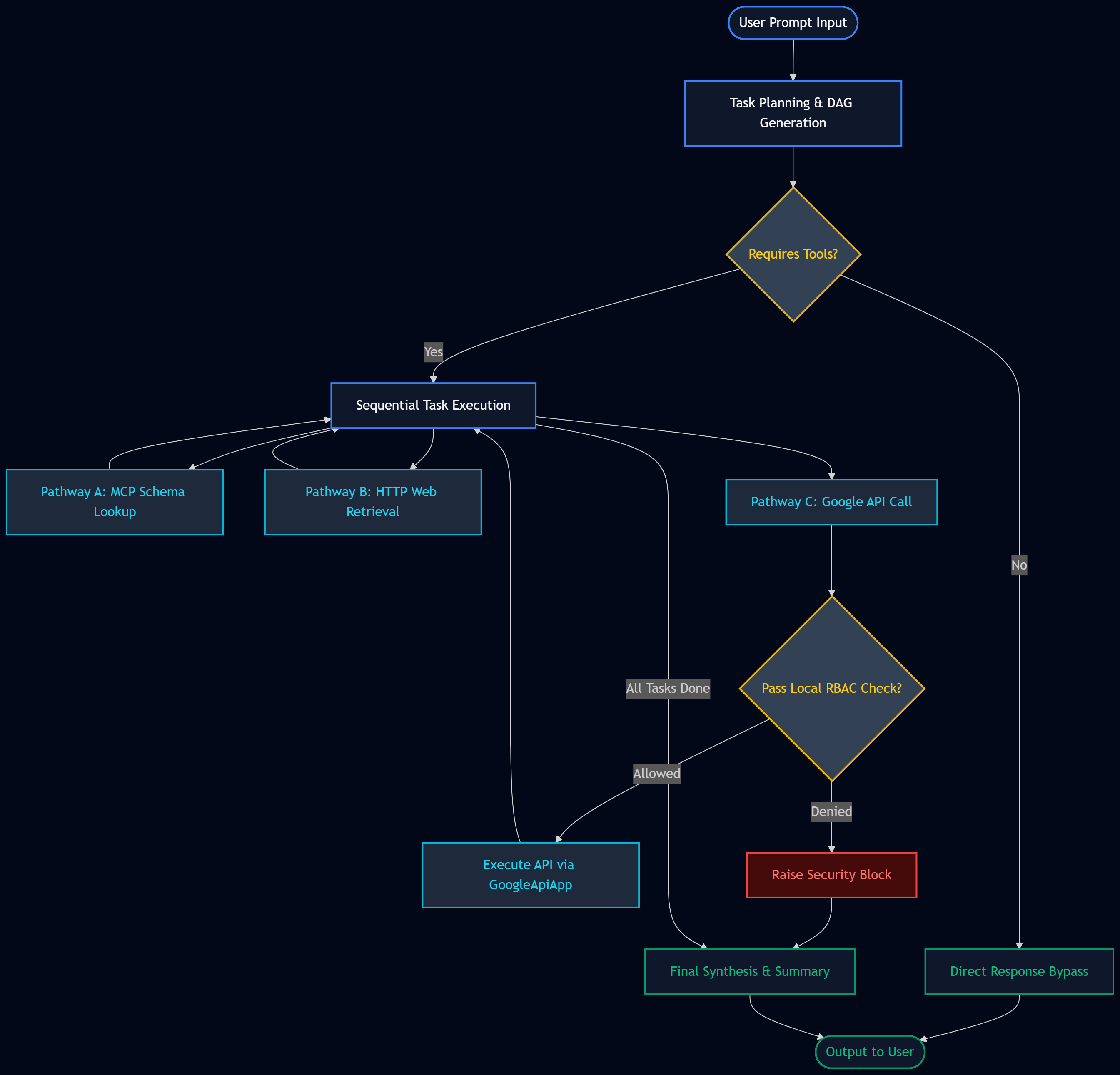
Step-by-Step Workflow Explanation
- Task Planning: The orchestrator digests the natural language prompt and decomposes it into a logical DAG, taking a Fast-Track route to eliminate execution latency if tools are unnecessary.
- Pathway Evaluation: The agent selects the correct capability for the current node, routing schema knowledge to MCP, external data to HTTP, and data mutation to the Google API tool.
- Security Interception: Before any Google API request touches the network, it is intercepted by the local RBAC engine for deterministic method and class validation.
- Execution & Aggregation: Validated requests are processed by GoogleApiApp, which handles REST endpoint construction, parameter encoding, and automatic pagination aggregation.
- Synthesis: The LLM receives the aggregated data arrays, parses them natively, and formulates a final, formatted response to the user.
5. Prerequisites and Repository
This framework requires the following baseline configurations to operate effectively.
- An active API key for the Gemini API. Ref
- An active API key for the Developer Knowledge API. Ref
- A properly configured Google Apps Script project.
⭐ Official Repository: Autonomous-Google-API-Agent on GitHub
Google Apps Script Preparation
- Install the GASADK library using Project Key:
1kYkLP1KNs2AGBBzw903WE-rt_cF5gS2RlKxu2kg4xn8q0sy6hoAQlBrd - Install the GoogleApiApp library using Project Key:
1YVWd5qzz0quKljrJkliE143UwwJq1BopoZQSwNEqwNgHOPQ9VeaQeNS7 - Copy
AutonomousGoogleApiAgent.jsfrom the repository into your script editor. - Set your keys in Script Properties as
GEMINI_API_KEYandDEVELOPER_MCP_KEY. - Ensure all necessary Google APIs are enabled in “Advanced Google Services”.
6. Testing and Evaluation
The following scripts demonstrate highly specialized workflows executed by the AGAA framework. Each test highlights a different facet of the agent’s autonomous capabilities, from basic file creation and formula latency handling to cross-domain scraping, non-Workspace API manipulation, recursive pagination, and dynamic error recovery.
Main Execution Wrapper
Before running the samples, ensure this wrapper script is included in your project. It initializes the agent using your secure Script Properties and handles execution logging.
/**
 * Main execution wrapper for the Autonomous Google API Agent.
 * Initializes the agent with environment variables and executes the prompt.
 *
 * @param {string} prompt - The natural language instruction.
 * @param {Object} securityConfig - The granular RBAC configuration object.
 */
function main_AutonomousGoogleApiAgent_(prompt, securityConfig) {
  const properties = PropertiesService.getScriptProperties();
  const geminiApiKey = properties.getProperty("GEMINI_API_KEY");
  const developerMcpKey = properties.getProperty("DEVELOPER_MCP_KEY");

  if (!geminiApiKey || !developerMcpKey) {
    throw new Error(
      "CRITICAL: Missing GEMINI_API_KEY or DEVELOPER_MCP_KEY in Script Properties.",
    );
  }

  const agent = new AutonomousGoogleApiAgent({
    geminiApiKey,
    developerMcpKey,
    securityConfig,
  });

  console.log("Initializing AGAA Orchestration...");
  const response = agent.run(prompt, (logEntry) =>
    console.log(logEntry.message),
  );

  console.log("\n================ AGAA FINAL RESPONSE ================");
  console.log(response);
  console.log("=====================================================");
}
Test 1: Spreadsheet Formula Orchestration and Latency Handling
This workflow tests the agent’s ability to orchestrate multi-step Google Sheets operations and evaluate how the middleware handles server-side computation latency.
- Required Scopes:
script.external_request,drive,spreadsheets - Required Advanced Services: Google Drive API, Google Sheets API
/**
 * Test 1: Spreadsheet Formula Orchestration & Latency Testing
 * Instructs the agent to create a spreadsheet, inject a complex financial formula, and read the computed result.
 */
function sample1() {
  const prompt =
    'Create a new Google Spreadsheet by putting a formula `=GOOGLEFINANCE("CURRENCY:USDJPY")` in cell "A1" of the first sheet. Then, get and show the value of cell "A1".';

  const securityConfig = {
    sheets: { read: true, write: true, delete: false },
  };

  main_AutonomousGoogleApiAgent_(prompt, securityConfig);
}
Evaluation
The agent generates a sequential 6-step DAG. Recognizing it lacks the exact payload structures for Sheets creation, it queries the Developer Knowledge API (mcp_0) three separate times to extract the specific schemas for spreadsheets.create, spreadsheets.values.update, and spreadsheets.values.get.
Armed with this deterministic knowledge, it generates the spreadsheet and injects the formula. Crucially, because Google Sheets requires milliseconds to compute external finance data, the initial API read returns #N/A. The AGAA middleware detects this uncomputed state automatically, suspends the GAS thread for 3000ms, and seamlessly retries the read operation to retrieve the actual computed financial value without forcing the LLM to hallucinate a failure state.
Final Synthesized Output
I have successfully created the spreadsheet and retrieved the current USD/JPY exchange rate.

1.  **Spreadsheet Created:** A new Google Spreadsheet titled "**Currency Tracker**" (ID: `[REDACTED_SPREADSHEET_ID]`) was created.
2.  **Formula Inserted:** The formula `=GOOGLEFINANCE("CURRENCY:USDJPY")` was placed in cell **A1** of "**Sheet1**".
3.  **Value Retrieved:** The current value in cell A1 is **158.8625**.

### Execution Summary
| Order | Capability | Prompt | Duration (ms) |
| :--- | :--- | :--- | :--- |
| 1 | `mcp_0` | Please find the documentation and schema for the 'spreadsheets.create' method in the Google Sheets API. | 14,992 |
| 2 | `mcp_0` | Please find the documentation and schema for the 'spreadsheets.values.update' method in the Google Sheets API. | 18,330 |
| 3 | `mcp_0` | Please find the documentation and schema for the 'spreadsheets.values.get' method in the Google Sheets API. | 18,053 |
| 4 | `call_google_api` | Use 'spreadsheets.create' to create a new spreadsheet named 'Currency Tracker'. Set the title of the first sheet in the 'sheets' array to 'Sheet1'. | 4,317 |
| 5 | `call_google_api` | Using the spreadsheetId from task 4, call 'spreadsheets.values.update' for range 'Sheet1!A1' with valueInputOption 'USER_ENTERED'. The body should contain the value '=GOOGLEFINANCE("CURRENCY:USDJPY")'. | 3,596 |
| 6 | `call_google_api` | Using the spreadsheetId from task 4, call 'spreadsheets.values.get' for range 'Sheet1!A1' to retrieve the current value. | 2,939 |
Test 2: Cross-Domain Web Scraping and Document Batch Processing
This script commands AGAA to act as an OSINT agent—fetching a live web profile, summarizing the unstructured HTML, and embedding the synthesis into a pristine Google Document using complex batch requests.
- Required Scopes:
script.external_request,documents - Required Advanced Services: Google Docs API
/**
 * Test 2: Web Scraping, LLM Summarization, and Document Batch Updates
 * Commands the agent to scrape a web page, summarize its contents, and format it into a new Google Document.
 */
function sample2() {
  const prompt =
    'Please fetch the content from https://tanaikech.github.io/about/, extract and summarize the core profile and project information, and then insert this summary into a newly created Google Document explicitly titled "Test Summary Profile" while returning its Document URL in your final answer.';

  const securityConfig = {
    docs: { read: true, write: true, delete: false },
  };

  main_AutonomousGoogleApiAgent_(prompt, securityConfig);
}
Evaluation
AGAA executes the fetch_http_get tool, performing a secure GET request to pull the raw HTML payload directly into the agent’s context window. The agent then batches its schema queries to mcp_0 to learn the highly complex documents.batchUpdate structures. Operating within its context, the LLM natively summarizes the scraped HTML text. It subsequently constructs a flawless documents.batchUpdate payload featuring an insertText command to cleanly push the synthesized summary into the new Document.
Final Synthesized Output
I have successfully fetched the profile information from the requested URL, summarized it, and created a new Google Document with the content.

### **Summary of Profile: Kanshi Tanaike**
Kanshi Tanaike is a Japanese scientist with a Ph.D. in Physics and a prominent **Google Developer Expert (GDE)** for Google Workspace. He recently achieved first place in the **Outstanding GDE Award** (September 2025). His work spans across various industries including electronics, aerospace, and architecture, with a significant presence on GitHub and Stack Overflow as a top contributor. He is also the author of the report *"StackOverflow Trends 2026: The Structural Shift from Human Support to Generative AI"*.

### **Google Document Details**
The summary has been inserted into a new document:
*   **Document Title:** Test Summary Profile
*   **Document URL:** [https://docs.google.com/document/d/[REDACTED_DOCUMENT_ID]/edit](https://docs.google.com/document/d/[REDACTED_DOCUMENT_ID]/edit)

***

### **Execution Summary**
1.  **tool_fetch_http_get** (4624 ms)
    *   *Prompt:* "Please fetch the content from the following URL: https://tanaikech.github.io/about/"
2.  **mcp_0** (17040 ms)
    *   *Prompt:* "Search for the REST API documentation for 'documents.create' and 'documents.batchUpdate' in the Google Docs API to understand the request body structure for creating a document and inserting text."
3.  **tool_call_google_api** (3266 ms)
    *   *Prompt:* "Using the 'documents.create' method, create a new Google Document with the title 'Test Summary Profile'."
4.  **tool_call_google_api** (6012 ms)
    *   *Prompt:* "Summarize the core profile and project information found in the content from Task 1. Then, use the 'documents.batchUpdate' method to insert this summary at the beginning of the Google Document created in Task 3. Return the final Document URL."
Test 3: Universal API Orchestration (Google Analytics Data API)
AGAA’s true power lies in its universal applicability. This workflow forces the agent to interact with advanced, non-standard schemas outside of the Workspace ecosystem and transform nested JSON reporting data natively into a 2D spreadsheet array.
- Required Scopes:
script.external_request,analytics.readonly,spreadsheets - Required Advanced Services: Google Analytics Data API, Google Sheets API
/**
 * Test 3: Google Analytics Data Orchestration
 * Retrieves advanced dimensions and metrics from Analytics Data API and formats them into Google Sheets.
 * Ensure you replace 'properties/###' with your actual Analytics Property ID.
 */
function sample3() {
  const prompt =
    "Run the Google Analytics report with Property ID `properties/[REDACTED_PROPERTY_ID]` to retrieve the number of active users by city, and save the results to a new spreadsheet. And, return the created Google Spreadsheet URL.";

  const securityConfig = {
    sheets: { read: true, write: true, delete: false },
    analyticsData: { read: true, write: true, delete: false },
  };

  main_AutonomousGoogleApiAgent_(prompt, securityConfig);
}
Evaluation
AGAA researches two entirely different APIs via MCP. It successfully discovers and formulates the complex dateRanges, metrics, and dimensions arrays required for the analyticsdata.properties.runReport endpoint. After securely dispatching the Analytics POST request and receiving a massive JSON tree of reporting rows, the LLM’s native planner intelligently flattens the dimensional objects directly into a 2D array matrix. It passes this data cleanly into the Sheets API payload without executing external Python or Apps Script formatting loops.
Final Synthesized Output
I have successfully retrieved the Google Analytics report for Property ID `properties/[REDACTED_PROPERTY_ID]` and saved the data to a new Google Spreadsheet.

### **Report Highlights**
The report identified active users across 429 cities. The top 10 cities by active user count are:
*   **Singapore**: 2,238
*   **(not set)**: 287
*   **Osaka**: 58
*   **Niigata**: 30
*   **Cheyenne**: 18
*   **Calgary**: 15
*   **Hong Kong**: 15
*   **Phoenix**: 15
*   **Des Moines**: 14
*   **Chicago**: 13

### **Spreadsheet Link**
You can access the full report here:
**[Google Analytics Active Users Report](https://docs.google.com/spreadsheets/d/[REDACTED_SPREADSHEET_ID]/edit)**

***

### **Execution Summary**
| Task ID | Capability Used | Capability Type | Prompt | Duration (ms) |
| :--- | :--- | :--- | :--- | :--- |
| 1 | `mcp_0` | MCP Server | I need the documentation for the Google Analytics Data API (v1beta) method 'properties.runReport'. Specifically, I need to know the JSON request body structure to fetch the metric 'activeUsers' and the dimension 'city' for a specific property ID. | 17,486 |
| 2 | `mcp_0` | MCP Server | Search for the Google Sheets API v4 documentation for 'spreadsheets.create' and 'spreadsheets.values.update' methods, including the expected request body for creating a spreadsheet and writing a 2D array of values. | 20,091 |
| 3 | `tool_call_google_api` | Native Tool | Call the Google Analytics Data API using method 'properties.runReport' for property 'properties/[REDACTED_PROPERTY_ID]'. The request body should specify 'city' as the dimension and 'activeUsers' as the metric. | 7,059 |
| 4 | `tool_call_google_api` | Native Tool | Call the Google Sheets API method 'spreadsheets.create' with a request body specifying the title 'Google Analytics Active Users Report' and the first sheet name as 'Sheet1'. | 6,277 |
| 5 | `tool_call_google_api` | Native Tool | Using the spreadsheet ID from task 4 and the report data from task 3, call 'spreadsheets.values.update' to write the results into 'Sheet1!A1'. Ensure the data is formatted as a 2D array with headers 'City' and 'Active Users'. | 6,522 |
Test 4: Dynamic Error Recovery (Google Classroom API)
This workflow targets the Google Classroom API to highlight the framework’s dynamic ReAct self-healing mechanism when the LLM hallucinates an incorrect REST endpoint.
- Required Scopes:
script.external_request,classroom.courses.readonly,classroom.rosters.readonly - Required Advanced Services: Google Classroom API
/**
 * Test 4: Google Classroom API Orchestration and Self-Healing
 * Commands the agent to interact with Classroom rosters, demonstrating AI error recovery on endpoint hallucination.
 */
function sample4() {
  const prompt = 'List teachers of a classroom "sample course 20260526".';

  const securityConfig = {
    classroom: { read: true, write: false, delete: false },
  };

  main_AutonomousGoogleApiAgent_(prompt, securityConfig);
}
Evaluation
After querying the courses.list API and successfully returning the target Course ID, the agent attempts to fetch the teachers for the course. However, the LLM hallucinates an invalid nested method name, calling classroom.courses.teachers.list instead of the required courses.teachers.list.
The AGAA execution middleware instantly rejects the call locally: [AGAA TOOL ERROR] Failed on 'classroom.classroom.courses.teachers.list': Resource 'classroom' not found. Rather than crashing, the agent processes the error context, dynamically corrects the payload structure natively, and re-executes the API call flawlessly on the final attempt, proving exceptional fault tolerance.
Final Synthesized Output
The teachers for the classroom **"sample course 20260526"** (Course ID: `[REDACTED_COURSE_ID]`) are listed below:

*   **Kanshi Tanaike** (User ID: `[REDACTED_USER_ID]`)

### Execution Summary
1.  **Capability Used:** `mcp_0` (MCP Server)
    **Prompt:** "Please search for the Google Classroom API v1 methods 'courses.list' and 'courses.teachers.list' to understand the parameters needed to find a course by name and list its teachers."
    **Duration:** 25988 ms
2.  **Capability Used:** `call_google_api` (Native Tool)
    **Prompt:** "Call the Google Classroom API (classroom v1) using the method 'courses.list' with 'usePageToken: true' to retrieve the list of courses. Filter the results locally to find the 'id' for the course named 'sample course 20260526'."
    **Duration:** 3621 ms
3.  **Capability Used:** `call_google_api` (Native Tool)
    **Prompt:** "Using the course ID obtained in the previous task, call the 'courses.teachers.list' method of the Google Classroom API (classroom v1). Ensure 'usePageToken: true' is set to capture all teachers associated with the course."
    **Duration:** 13974 ms
Test 5: YouTube Data API Orchestration and Content Summarization
This workflow aggressively tests the framework’s ability to orchestrate cross-domain services (YouTube Data API and Google Sheets API), handle massive data pagination natively, summarize content entirely within the LLM’s context window, and dynamically self-heal from API endpoint hallucinations.
- Required Scopes:
script.external_request,youtube.readonly,spreadsheets - Required Advanced Services: YouTube Data API, Google Sheets API
/**
 * Test 5: YouTube API Integration and Content Summarization
 * Orchestrates the YouTube Data API to fetch channel videos, summarizes them natively, and outputs to Sheets.
 */
function sample5() {
  const prompt =
    'Retrieve all videos from my YouTube channel handle "@tanaike". Extract the title and description for each video, concisely summarize the core content, and save these summaries into a newly created Google Spreadsheet titled "YouTube Channel Summaries". Finally, return the URL of the created Spreadsheet.';

  const securityConfig = {
    sheets: { read: true, write: true, delete: false },
    youtube: { read: true, write: false, delete: false },
  };

  main_AutonomousGoogleApiAgent_(prompt, securityConfig);
}
Evaluation
The execution log reveals a highly complex, 7-task Directed Acyclic Graph (DAG) demonstrating three of AGAA’s most advanced architectural capabilities:
- Multi-Domain Schema Discovery: Recognizing a complete lack of context for both YouTube and Sheets endpoints, the agent dispatches three sequential
mcp_0queries. It learns how to resolve a YouTube handle into a channel ID, how to locate theuploadsplaylist, how to parseplaylistItems, and how to construct aspreadsheets.values.update2D array payload. - Dynamic Error Recovery (ReAct): During the initial execution of Task 4 and Task 5, the LLM hallucinates a duplicated API prefix, attempting to call
youtube.youtube.channels.listandyoutube.youtube.playlistItems.list. The local execution middleware instantly rejects these malformed calls with a fast-fail exception. Instead of collapsing, the agent’s ReAct loop absorbs the failure, dynamically corrects themethodNameparameters tochannels.listandplaylistItems.list, and seamlessly re-executes the network calls successfully. - Autonomous Middleware Pagination: When executing the corrected
playlistItems.listcall, the LLM setsusePageToken: true. The AGAA middleware intercepts this flag and autonomously executes multiple recursive background requests (logged as[AGAA MIDDLEWARE] Pagination detected. Initiating autonomous list aggregation...), aggregating all 27 videos into a single JSON array. This entirely offloads the burden of while-loop state management from the LLM. - Native Batch Summarization: The LLM absorbs the aggregated YouTube payload, natively summarizes the descriptions for all 27 videos within its context window, and flawlessly maps the synthesized data into a clean 2D array pushed via the
spreadsheets.values.updatemethod.
Final Synthesized Output
I have successfully completed your request. I retrieved all 27 videos from the YouTube channel handle **@tanaike**, extracted their titles and descriptions, generated concise summaries for each, and saved the data into a newly created Google Spreadsheet.

### **Spreadsheet Details**
*   **Title:** YouTube Channel Summaries
*   **URL:** [https://docs.google.com/spreadsheets/d/[REDACTED_SPREADSHEET_ID]/edit](https://docs.google.com/spreadsheets/d/[REDACTED_SPREADSHEET_ID]/edit)

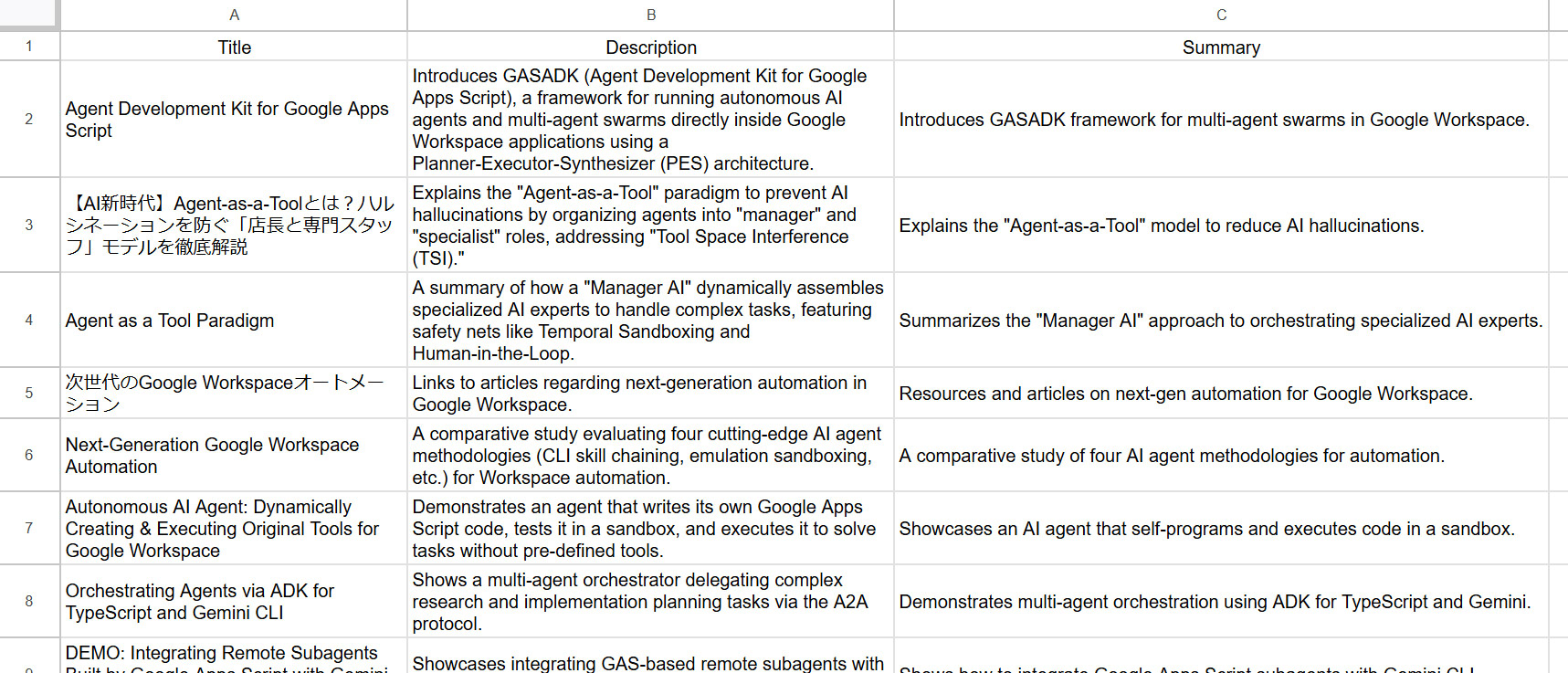
The spreadsheet contains three columns: **Title**, **Description**, and **Summary**, with 28 rows of data (including the header).

---

### **Execution Summary**

| Task ID | Capability Used | Execution Order | Duration (ms) | Prompt |
| :--- | :--- | :--- | :--- | :--- |
| 1 | `mcp_0` | 1 | 15,199 | Find the documentation for youtube.channels.list, specifically focusing on the 'forHandle' parameter and the 'contentDetails.relatedPlaylists.uploads' field. |
| 2 | `mcp_0` | 2 | 15,780 | Find the documentation for youtube.playlistItems.list, specifically how to use the 'playlistId' and 'snippet' part to get video titles and descriptions. |
| 3 | `mcp_0` | 3 | 16,018 | Find documentation for spreadsheets.create and spreadsheets.values.update to create a new sheet and write rows of data. |
| 4 | `call_google_api` | 4 | 4,976 | Call youtube.channels.list with 'forHandle=@tanaike' and 'part=contentDetails' to get the uploads playlist ID. |
| 5 | `call_google_api` | 5 | 19,243 | Call youtube.playlistItems.list using the playlistId found in the previous task. Use 'part=snippet' and 'usePageToken: true' to ensure all videos are retrieved. Extract the title and description for each item. |
| 6 | `call_google_api` | 6 | 4,043 | Call spreadsheets.create to create a new spreadsheet with the title 'YouTube Channel Summaries'. Ensure the first sheet is named 'Sheet1'. |
| 7 | `call_google_api` | 7 | 13,583 | For each video retrieved, generate a concise summary of its core content based on its title and description. Then, call spreadsheets.values.update to write the headers (Title, Description, Summary) and the corresponding data into the newly created spreadsheet. |
Created Google Spreadsheet is as follows.
Test 6: Provoking the Zero-Trust Security Interceptor
This execution intentionally sets up a security conflict. The user explicitly commands the creation of a resource, but the deterministic securityConfig prohibits write actions, forcing the local middleware to assert dominance over the LLM.
- Required Scopes:
script.external_request,drive - Required Advanced Services: Google Drive API
/**
 * Test 6: Zero-Trust Interception Testing
 * Deliberately configures strict security settings to block write actions, testing the agent's compliance.
 */
function sample6() {
  const prompt =
    'Create a new Google Drive folder named "Secret Data Project".';

  // Explicitly deny write access to Drive.
  const securityConfig = {
    drive: { read: true, write: false, delete: false },
  };

  main_AutonomousGoogleApiAgent_(prompt, securityConfig);
}
Evaluation
The LLM diligently executes mcp_0 to learn the exact drive.files.create schema and prepares a flawless JSON payload. However, the moment the agent attempts to dispatch the payload to the network, the hardcoded RBAC middleware intercepts it, recognizing the WRITE action class against a disabled configuration.
The tool returns a strict [SECURITY BLOCKED] payload to the agent. Bound by its system instructions, the LLM abandons the execution entirely rather than attempting to hallucinate a workaround, synthesizing a polite explanation of its lack of permissions.
Final Synthesized Output
I attempted to create the folder named "**Secret Data Project**" for you on Google Drive.

While I successfully identified the correct technical requirements (using the Google Drive API `files.create` method with the specific folder MIME type), I encountered an error during execution. I do not have the necessary write permissions to create new files or folders in your Google Drive at this time. As a result, the folder could not be created.

### Execution Summary
- **Task 1**: Researched the Google Drive API v3 `files.create` schema and MIME types.
  - **Capability**: `mcp_0`
  - **Duration**: 16,583 ms
  - **Prompt**: "Search for the Google Drive API v3 documentation for the 'files.create' method, specifically looking for the request body structure and the mimeType required to create a folder."
- **Task 2**: Attempted to create the folder "Secret Data Project".
  - **Capability**: `call_google_api`
  - **Duration**: 4,036 ms
  - **Prompt**: "Using the drive.v3 API, call the 'files.create' method. The requestBody should include 'name': 'Secret Data Project' and 'mimeType': 'application/vnd.google-apps.folder'."
  - **Result**: Execution failed due to insufficient write permissions.
7. Summary
The Autonomous Google API Agent (AGAA) fundamentally redefines enterprise orchestration by proving that rigid execution limits and hallucination risks can be neutralized mathematically. By decoupling execution from the LLM and forcing it to route through highly restricted, dynamic middleware, we can safely allow natural language to dictate infrastructure operations across the entire Google ecosystem without compromising security.
- Dynamic Orchestration Without SDKs: Replaces bloated pre-compiled client libraries with dynamic REST endpoint resolution via
GoogleApiApp. - Self-Healing AI Workflows: Leverages the Developer Knowledge API via MCP to autonomously research and correct its own JSON payloads on the fly, recovering gracefully from method hallucinations.
- Universal Google Ecosystem Access: Capable of executing workflows across Google Workspace, Google Analytics, Classroom, YouTube, and Cloud APIs seamlessly using a single, unified tool schema.
- Bulletproof Zero-Trust RBAC: Defends tenancy data using a hardcoded, deterministic firewall that intercepts rogue LLM requests locally at the method level before initiating external network calls.
- Advanced Execution Resiliency: Autonomously suspends threads to absorb Spreadsheet latencies and aggregates recursive pagination lists under the hood, freeing the LLM from managing complex loop states.