A Go CLI and MCP server that turns Gemini and any AI agent into a Socratic writing and code review coach
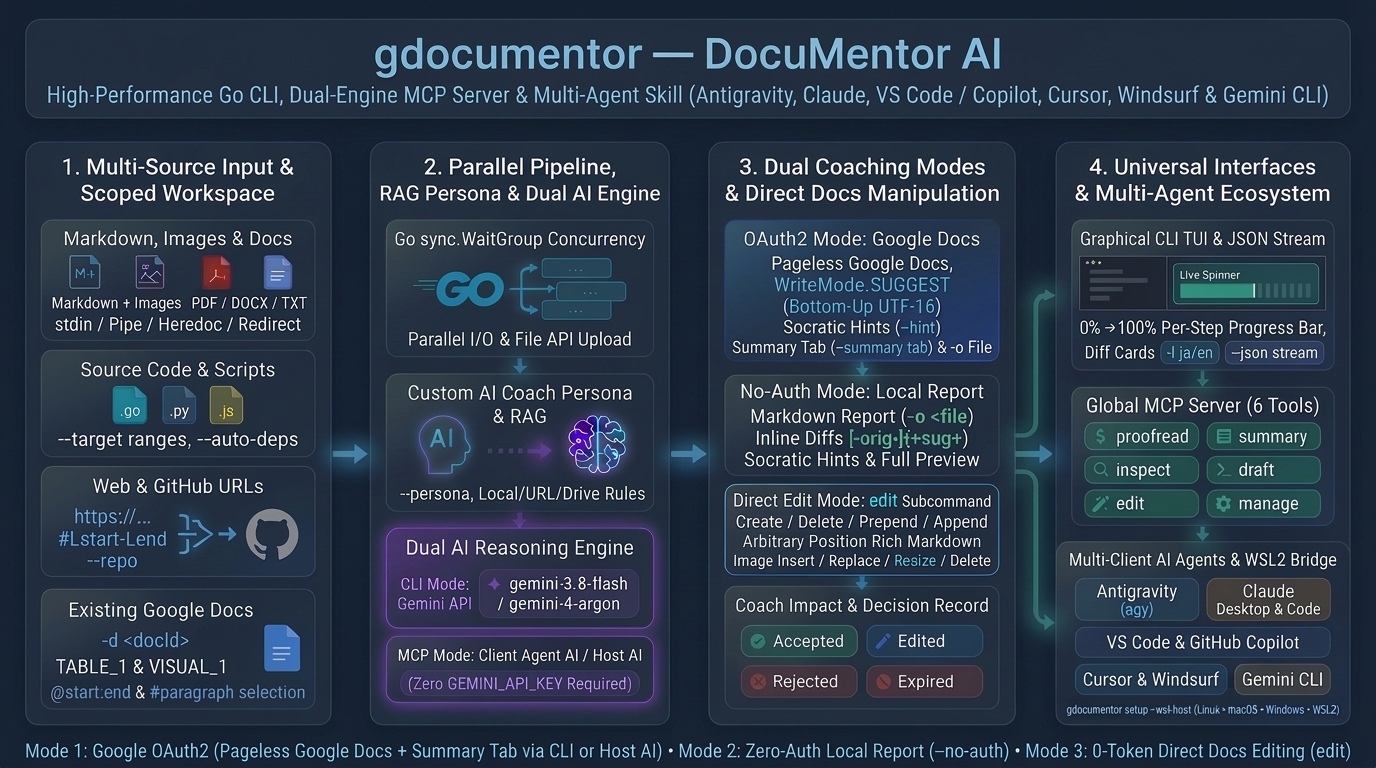 Figure 1. Overview of the
gdocumentor architecture and its four core pillars.
In my previous two articles—Building a Multimodal, Suggestion-Based AI Writing Coach with Gemini and Google Docs (Ref) and Beyond Passive AI Rewrites and Vibe Coding in Google Docs (Ref)—I introduced the Google Apps Script add-on DocuMentor AI (Ref). Those earlier articles explain the foundational inspiration behind the project, how programmatic Google Docs API (v1) suggestions and comments (Ref) can replace passive AI ghostwriting with active learning, and how a single Google Docs container-bound or Marketplace script can serve both individuals and school/enterprise domains. For background on those foundational concepts and the Google Apps Script implementation, please refer to those two published articles (Ref, Ref).
In this third installment, I introduce gdocumentor (Ref)—a high-performance Golang CLI tool, Global Model Context Protocol (MCP) Server (gdocumentor mcp), and Google Antigravity Agent Skill / Plugin (with support for 7 major AI agent environments) that liberates DocuMentor AI from the confines of a single open browser tab and transforms it into a 1-to-N scriptable, terminal-native, and autonomous AI-agent-driven coaching and document automation platform.
The 4 Core Pillars (Figure 1)
- 1. Multi-Source Input & Scoped Workspace: Ingests local files (
.md,.pdf,.docx,.txt, source code),stdin, Web/GitHub URLs (#Lstart-Lend), and Google Docs (-d <docId>), with scoped line/character ranges (-t,--range) and automatic cross-file dependency discovery (--auto-deps). - 2. Parallel Pipeline, RAG Persona & Dual AI Engine: Runs concurrent Go goroutine I/O (
sync.WaitGroup) with custom personas (--persona) and RAG rulebooks (-r). Standalone CLI Mode calls the built-in Gemini API (gemini-3.8-flash/gemini-4-argon) viaGEMINI_API_KEY, while MCP Server Mode (gdocumentor mcp) uses the client AI agent’s own LLM (Host AI) (noGEMINI_API_KEYrequired). - 3. Dual Coaching Modes, 0-Token Direct Editing & Decision Record: Supports Google Docs OAuth2 Mode (bottom-up UTF-16
WriteMode.SUGGESTinline edits, Socratic--hintcomments, and a🎓 DocuMentor AI Summarytab via--summary-tab), Zero-Auth Local Mode (--no-auth) for local Markdown reports (-o), 0-Token Direct Editing (edit) for Markdown/table/image insertion and resizing, and Decision Record tracking (Accepted,Edited,Rejected,Expired). - 4. Universal Interfaces & Multi-Agent MCP: Provides an interactive CLI TUI, a pure JSON stream (
--json), and 6 MCP tools (proofread,summary,inspect,draft,edit,manage).
1. Defining the Problem & Why Move Beyond a Browser Add-on
Why Passive AI Rewrites Fail
- Cognitive Debt (MIT Media Lab, June 2025): Passively accepting AI text measurably reduces brain activity and neural connectivity (Ref).
- The “Shortcut Trap” (CMU, Wharton & MIT, 2026): Just 10 minutes of passive AI reliance drops independent problem-solving performance by 20% (Ref, Ref).
- Declining Thinking Skills (Nikkei XTECH, Oct 2026): 42.1% of AI users cite declining thinking ability as their #1 concern (Ref).
Instead of silently overwriting text, gdocumentor enforces active human judgment:
Suggest Mode: Proposes inline diffs (WriteMode.SUGGEST) paired with💡 Reasonand🎓 Learning Pointreplies.Socratic Hint Mode (--hint): Withholds the rewritten answer and attaches only diagnostic hints so the human author writes the fix.
Two Limits of a Browser Add-on
- 1. 1-to-1 Browser Constraint: A Google Apps Script sidebar only works on one open browser tab at a time (with a 6-minute execution limit).
- 2. Locked to Internal Gemini API: A browser add-on cannot delegate reasoning to external AI agents (Antigravity, Claude Desktop, Cursor, VS Code) that you already use.
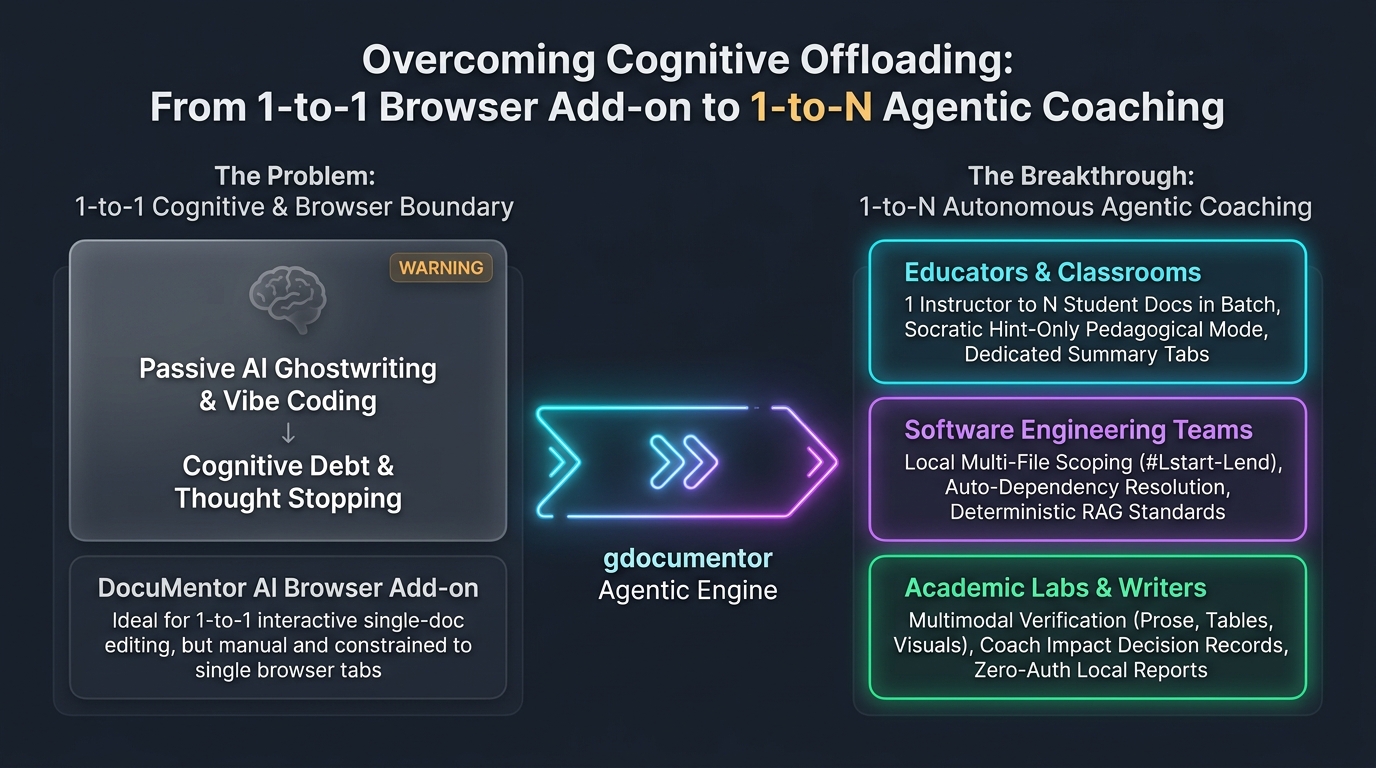 Figure 2. Paradigm shift from a 1-to-1 browser add-on to 1-to-N autonomous agentic coaching across classrooms, engineering teams, and research labs.
What gdocumentor Unlocks (Figure 2)
- Classrooms (1 Instructor ➔ N Student Docs): Batch-deliver Socratic hints (
--hint), course rubrics (-r), and Summary Tabs (--summary-tab) across dozens of essays from the terminal or an AI agent. - Engineering Teams (Local Repos & GitHub): Review exact line ranges (
-t,#L1-L35) with automatic import resolution (--auto-deps) and team coding standards (-r), bridging code reviews directly into Pageless Google Docs. - Research Labs & Individual Writers: Cross-check prose, tables (
TABLE_1), and figures (VISUAL_1), track author growth via the Decision Record, or run 100% locally via--no-auth.
| Dimension | GAS Add-on (DocuMentor AI) |
Go CLI & MCP Server (gdocumentor) |
|---|---|---|
| Execution | 1-to-1 browser sidebar | 1-to-N terminal, CI/CD, and MCP AI agents |
| Inputs | Current open Google Doc only | .md, .docx, .pdf, .txt, source code, stdin, Web/GitHub URLs, Google Docs (-d) |
| Code Context | Single document tab | Cross-file dependency resolver (--auto-deps) |
| AI Engine | Internal GEMINI_API_KEY |
CLI: GEMINI_API_KEY | MCP (gdocumentor mcp): Client Host AI (0 GEMINI_API_KEY) |
| Direct Editing | N/A | 0-Token edit command/tool (Markdown, tables, image insert/resize) |
2. Architecture: 4-Stage Pipeline & Dual-Engine MCP
A. The 4-Stage Processing Pipeline
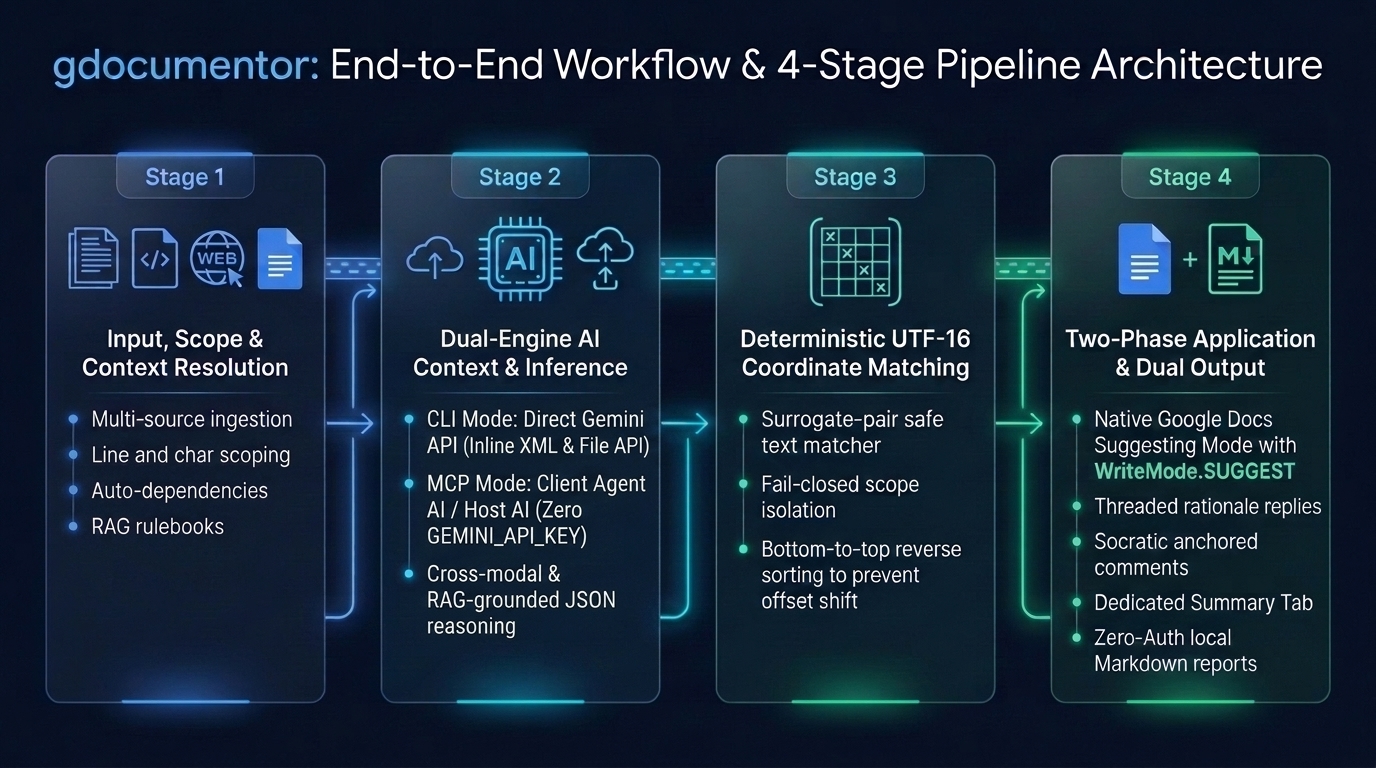 Figure 3. End-to-end workflow and 4-stage processing pipeline of
gdocumentor.
- Stage 1 — Input, Scope & Context: Loads targets, marks
--target/--rangeblocks editable (retaining surrounding lines as read-only context), resolves--auto-depsand-rRAG rules, and converts Markdown + local images into Pageless Google Docs. - Stage 2 — Dual-Engine AI Inference: Standalone CLI packs text rules/context into XML blocks, uploads PDFs/visuals to the Gemini File API, and calls
gemini-3.8-flash/gemini-4-argon; MCP Server delegates reasoning to the client AI agent’s own LLM (model: "agent-ai"). - Stage 3 — Surrogate-Pair-Safe UTF-16 Matching (
utf16idx): Maps edits to exact UTF-16[StartIndex, EndIndex)offsets, filters out read-only scopes, and sorts bottom-to-top (StartIndexdescending) to prevent index drift. - Stage 4 — Two-Phase Application: Phase 1 applies
WriteMode.SUGGESTreplacements +addCommentReplyrationales (orinsertCommentin--hintmode); Phase 2 re-fetches coordinates to anchorVISUAL_N/TABLE_Ncomments, builds the🎓 DocuMentor AI Summarytab, and updates the Decision Record (or writes a local Markdown report in--no-authmode).
B. Standalone CLI vs. MCP Server
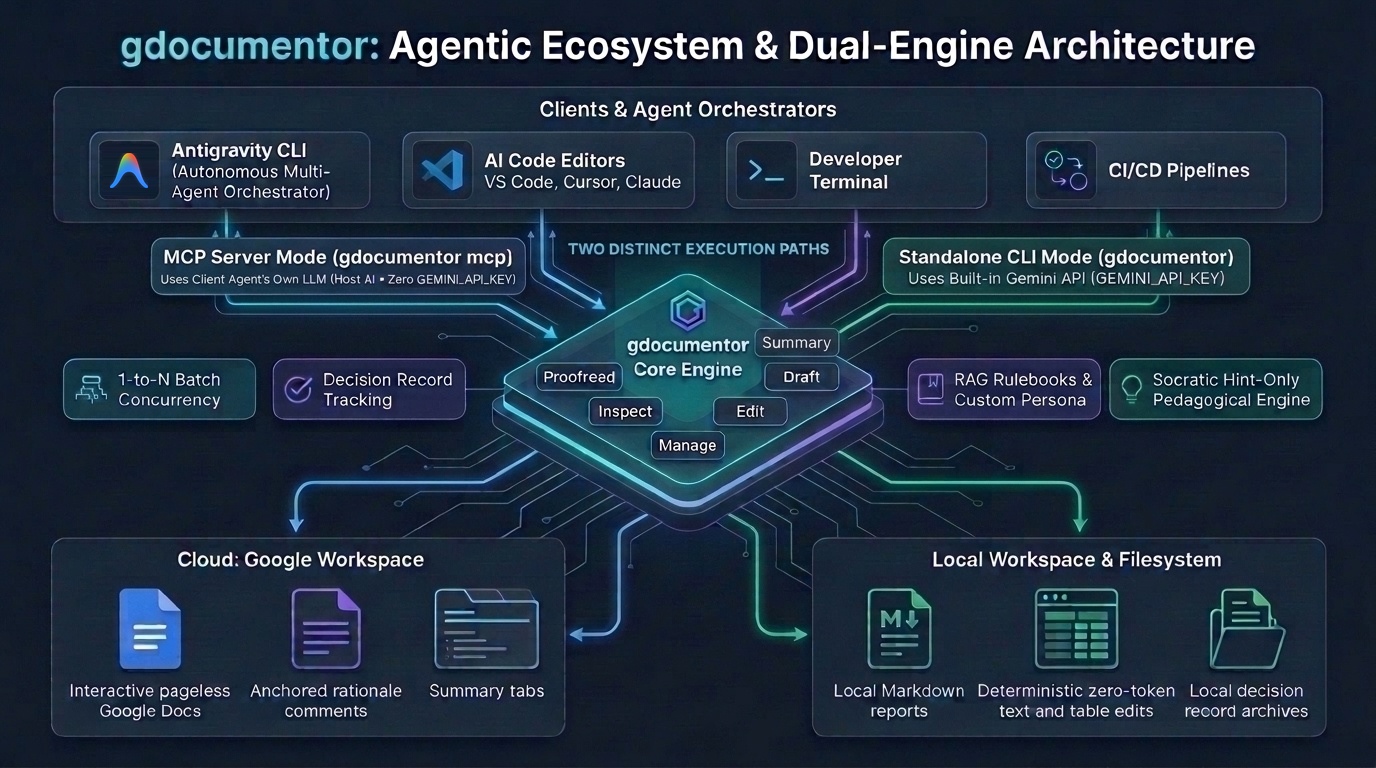 Figure 4. Agentic ecosystem and dual-engine MCP architecture connecting AI orchestrators to Google Workspace and local filesystems.
| Feature | 💻 Standalone CLI (gdocumentor) |
🤖 MCP Server (gdocumentor mcp) |
|---|---|---|
| Reasoning Brain | Built-in Gemini API (gemini-3.8-flash / gemini-4-argon) |
Client AI Agent’s LLM (model: "agent-ai") |
GEMINI_API_KEY |
Required | Not Required |
| Execution Flow | 1-command self-contained pipeline | 1-step (aiResult) or 2-step (prepareOnly ➔ skipDocInsert: true) |
| Best For | Terminal one-liners, shell loops, CI/CD gates | Conversational coaching in agy, Claude Desktop, Cursor, VS Code |
C. 10 Standout Capabilities of gdocumentor
- 1. Zero-
GEMINI_API_KEYHost-AI MCP + Standalone CLI Dual Engine: Delegates reasoning to your AI agent’s own LLM (gdocumentor mcp) with no extra API key, or runs as a self-contained CLI viaGEMINI_API_KEY. - 2. Zero-Drift UTF-16 Coordinate Matching (
utf16idx): Converts UTF-8 to surrogate-pair-safe UTF-16 offsets and appliesbatchUpdateedits bottom-to-top (StartIndexdescending) so character indices never shift. - 3. Socratic
--hintMode & Rationale Replies: Replaces passive ghostwriting withWriteMode.SUGGESTdiffs +💡 Reason/🎓 Learning Pointreplies, or withholds answers entirely (--hint) so authors revise text themselves. - 4. Multimodal Prose × Table (
TABLE_1) × Figure (VISUAL_1) Verification: Cross-checks narrative claims against embedded images and tables, anchoring comments directly onto mismatched figures or tables. - 5. Fail-Closed Line/Char Scoping (
--target) + Auto-Dependencies (--auto-deps): Restricts edits strictly to specified ranges (#L1-L35,@0:2500) while automatically attaching imported files as read-only context. - 6. 4-State Decision Record & Learning from Both AI (
🤖 AI) and Human (👤 Human) Reviews (summary): TracksAccepted,Edited(via bigram similarity),Rejected, andExpiredoutcomes, whilegdocumentor summaryanalyzes existing suggestions and comments—including those written by human colleagues, instructors, or peer reviewers (👤 Human) as well as AI (🤖 AI)—to synthesize personalized writing/coding habits and actionable learning advice. - 7. Zero-Auth Local Mode (
--no-auth): Runs 100% locally without Google Cloud or OAuth2 tokens to output Markdown diff reports (-o). - 8. 0-Token Direct Google Docs Editor (
gdocumentor edit): Creates Pageless Docs, converts/inserts rich Markdown + tables + local images, and resizesVISUAL_1in place without consuming a single LLM token. - 9. 7-Client Installer (
gdocumentor setup) & Windows 11 ↔ WSL2 Bridge (--wsl-host): Auto-configures Antigravity, Claude Desktop, Claude Code, Cursor, VS Code, Windsurf, and Gemini CLI—including a 1-commandwsl.exebridge with automaticC:\...⇄/mnt/c/...path translation. - 10. 1-to-N Parallel Batch Scaling & Multi-Language Coaching (
-l): Processes multiple Google Docs concurrently and outputs coaching feedback in any target language (-l en,ja,de,fr,es,zh,ko,auto).
D. Why Build gdocumentor in Go (Golang)?
- Zero-Dependency Single Static Binary (
CGO_ENABLED=0): No Pythonvenvor Node.jsnode_modules—a single binary runs out of the box on macOS, Linux, and Windows (amd64/arm64). - Millisecond Cold Starts for MCP
stdio& WSL2 Bridges: Instant subprocess startup keeps multi-step MCP tool chains (inspect➔edit➔proofread) snappy even acrosswsl.exe. - Goroutine Concurrency (
sync.WaitGroup) with No Time Limits: Loads files, converts Base64 images, uploads Gemini File API assets, and processes 1-to-N Google Docs in parallel without GAS’s 6-minute ceiling. - Native
rune&unicode/utf16Precision: Fast, type-safe conversion between UTF-8 strings and Google Docs API UTF-16 code units. - Guaranteed
deferCleanup & Shared Type Safety: Automatically cleans up temporary cloud/local files on exit (defer) and shares 100% identical structs across Standalone CLI and MCP Server modes.
E. Why Self-Provisioning (gdocumentor setup) & WSL2 ↔ Windows Cross-OS Bridging Are Unique
- Push-Based Self-Provisioning Binary (Zero
npx/uvDependencies): Unlike client-side pull commands (claude mcp add,code --add-mcp) or external Node/Python installers (Smithery,FastMCP), the compiledgdocumentorbinary itself knows every client’s OS config path and JSON schema (mcpServersvs. VS Code’sservers) and non-destructively merges its own setup in one command. - Simultaneous MCP Server + Native Agent Skill/Rule Deployment: Existing MCP installers only register JSON server entries, leaving the Host AI unaware of workflow rules;
gdocumentor setupsimultaneously installs native coaching skills, rules, and subagents across all 7 clients (SKILL.md,.cursor/rules/gdocumentor-workflow.mdc,.github/instructions/gdocumentor.instructions.md,.windsurf/rules/gdocumentor-workflow.md,rules/gdocumentor-workflow.md,agents/gdocumentor-coach.md). - 1-Command WSL2 ➔ Windows Host Cross-OS Bridge (
--wsl-host): Previously, connecting Windows GUI clients (Claude Desktop, Cursor, VS Code, Windsurf) to a WSL2 MCP server required manually editing%APPDATA%JSON files or fragilebash -cscripts; runninggdocumentor setup --all --wsl-hostinside WSL2 auto-detects the Windows user profile under/mnt/c/Users/<WinUser>, updates Windows-side config files directly, and injects a shell-freewsl.exe --execbridge. - Unified OAuth2 Credentials & Lifecycle Management (
--status/--uninstall): All Windows GUI clients and WSL2 CLI agents share a single Linux-sidegdocumentorbinary, Google Application Default Credentials (~/.config/gcloud/application_default_credentials.json), and Decision Records (~/.config/gdocumentor/decision_records/), with built-in cross-OS status diagnostics (--status) and clean non-destructive removal (--uninstall).
3. Quick Setup: Isolated Test Workspace (./gdocumentor_test)
Pre-compiled static binaries (CGO_ENABLED=0) for macOS, Linux, and Windows (amd64 / arm64) are available on GitHub Releases.
# 1. Install binary (Linux amd64 example; or use go install github.com/tanaikech/gdocumentor@latest)
curl -L https://github.com/tanaikech/gdocumentor/releases/latest/download/gdocumentor_linux_amd64 -o gdocumentor
chmod +x gdocumentor && sudo mv gdocumentor /usr/local/bin/

# 2. Install as an Antigravity CLI Plugin (or run: gdocumentor setup --all)
agy plugin install https://github.com/tanaikech/gdocumentor

# 3. Set Gemini API Key (Required for Part 1 CLI commands; NOT needed for Part 2 MCP prompts)
export GEMINI_API_KEY="your-gemini-api-key"

# 4. Create an isolated test workspace and copy sample files
mkdir -p gdocumentor_test && cd gdocumentor_test
git clone --depth 1 https://github.com/tanaikech/gdocumentor.git _repo
cp -r _repo/sample . && cp "$(command -v gdocumentor)" ./gdocumentor && rm -rf _repo
- Individual OAuth2 setup (
gcloud auth application-default login): INSTALL_INDIVIDUAL.md - Organization / school setup: INSTALL_ORGANIZATION.md
4. Part 1: 6 Foundational CLI Commands
Command 1: Zero-Auth Local Mode (--no-auth)
- 🔑 Credentials:
GEMINI_API_KEY: Required | Google OAuth2: Not Required - 🎯 What it does: Proofreads
./sample/sample_article.md(includingTABLE_1and local diagramVISUAL_1) 100% locally and saves./my_first_review.md.
./gdocumentor --no-auth -i ./sample/sample_article.md -o ./my_first_review.md
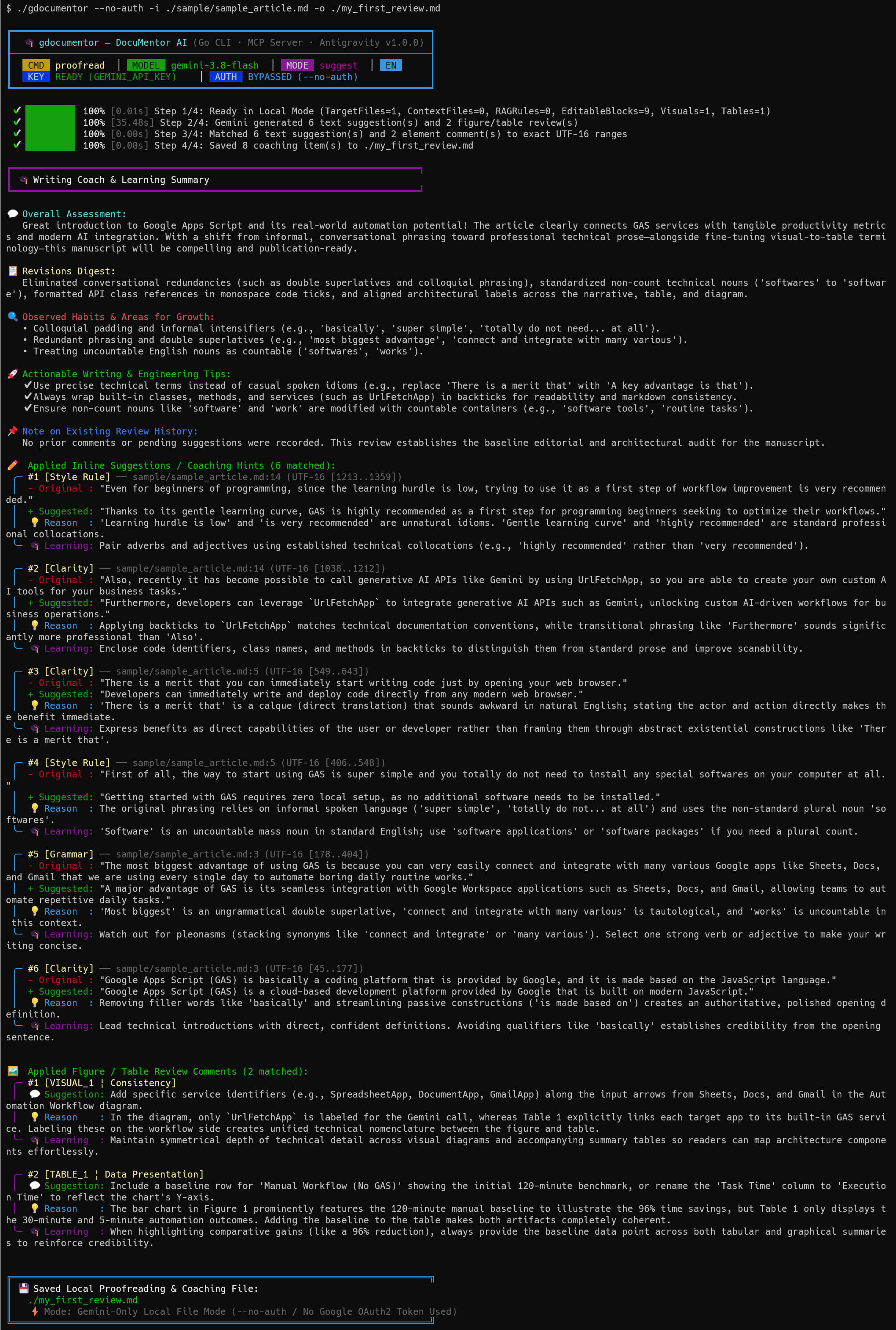 Figure 5. Terminal execution result of Command 1 in Zero-Auth local mode (
--no-auth).
- Pipeline Execution (Figure 5): Confirms
AUTH BYPASSED (--no-auth)and processesTargetFiles=1, EditableBlocks=9, Visuals=1, Tables=1. - Learning Summary & Inline Suggestions: Catches fillers (
'basically'), double superlatives ('most biggest'), and uncountable nouns ('softwares'), listing 6 bottom-to-top UTF-16 inline suggestions (#1–#6) with- Original,+ Suggested,💡 Reason, and🎓 Learning. - Multimodal Cross-Check (
VISUAL_1&TABLE_1): Detects thatVISUAL_1shows a 120-minute manual baseline in its chart whileTABLE_1omits that baseline row.
Command 2: Interactive Pageless Google Docs + Summary Tab (--summary-tab)
- 🔑 Credentials:
GEMINI_API_KEY: Required | Google OAuth2: Required - 🎯 What it does: Converts
./sample/sample_article.md(with its table and local PNG) into a Pageless Google Document, appliesWriteMode.SUGGESTinline edits + rationale replies, and creates a🎓 DocuMentor AI Summarytab.
./gdocumentor -i ./sample/sample_article.md \
  -o ./interactive_coach_report.md \
  --title "My Interactive Writing Coach Demo" \
  --summary-tab
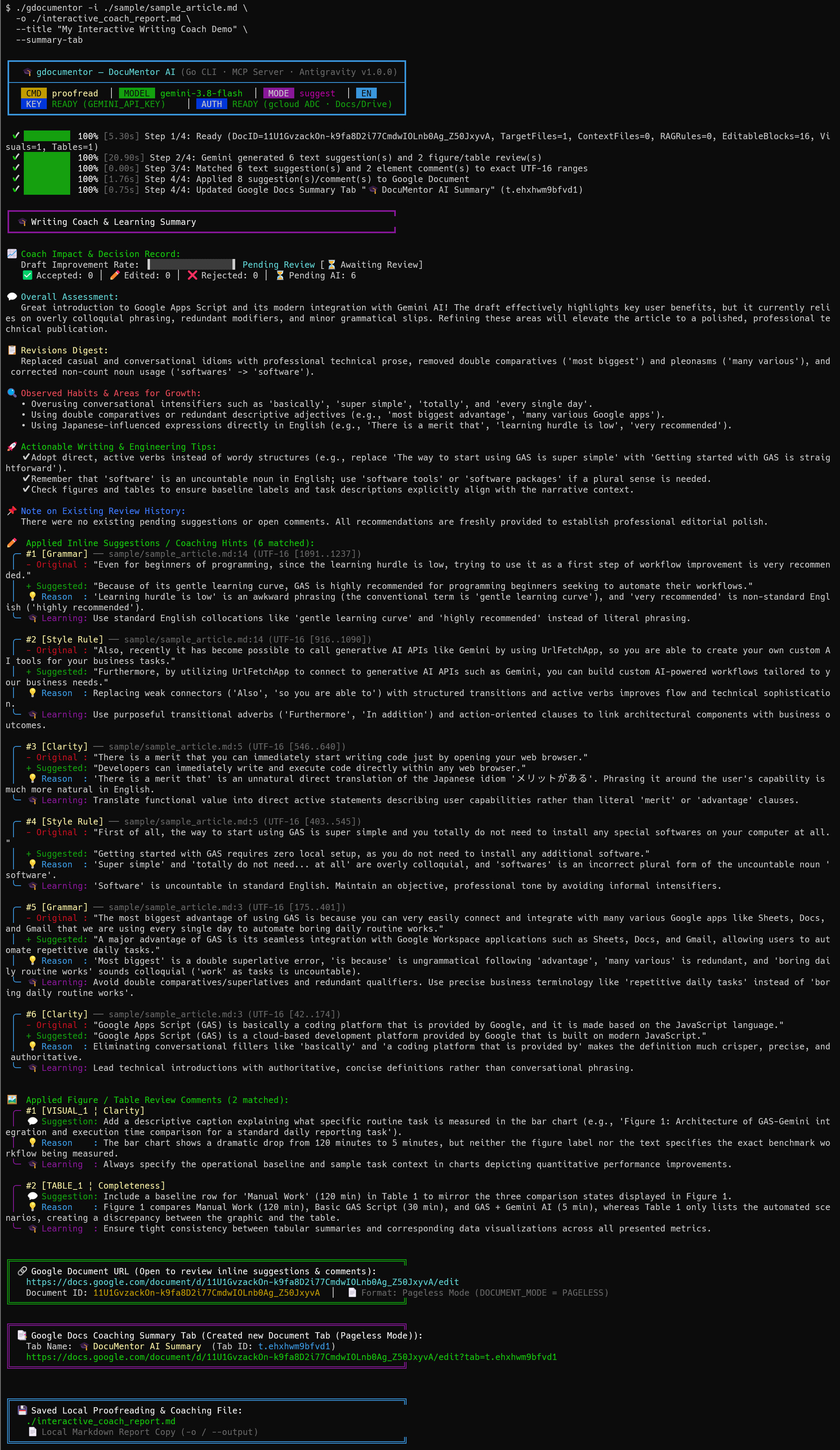 Figure 6. Terminal execution result of Command 2 creating a Pageless Google Document and a dedicated Summary Tab.
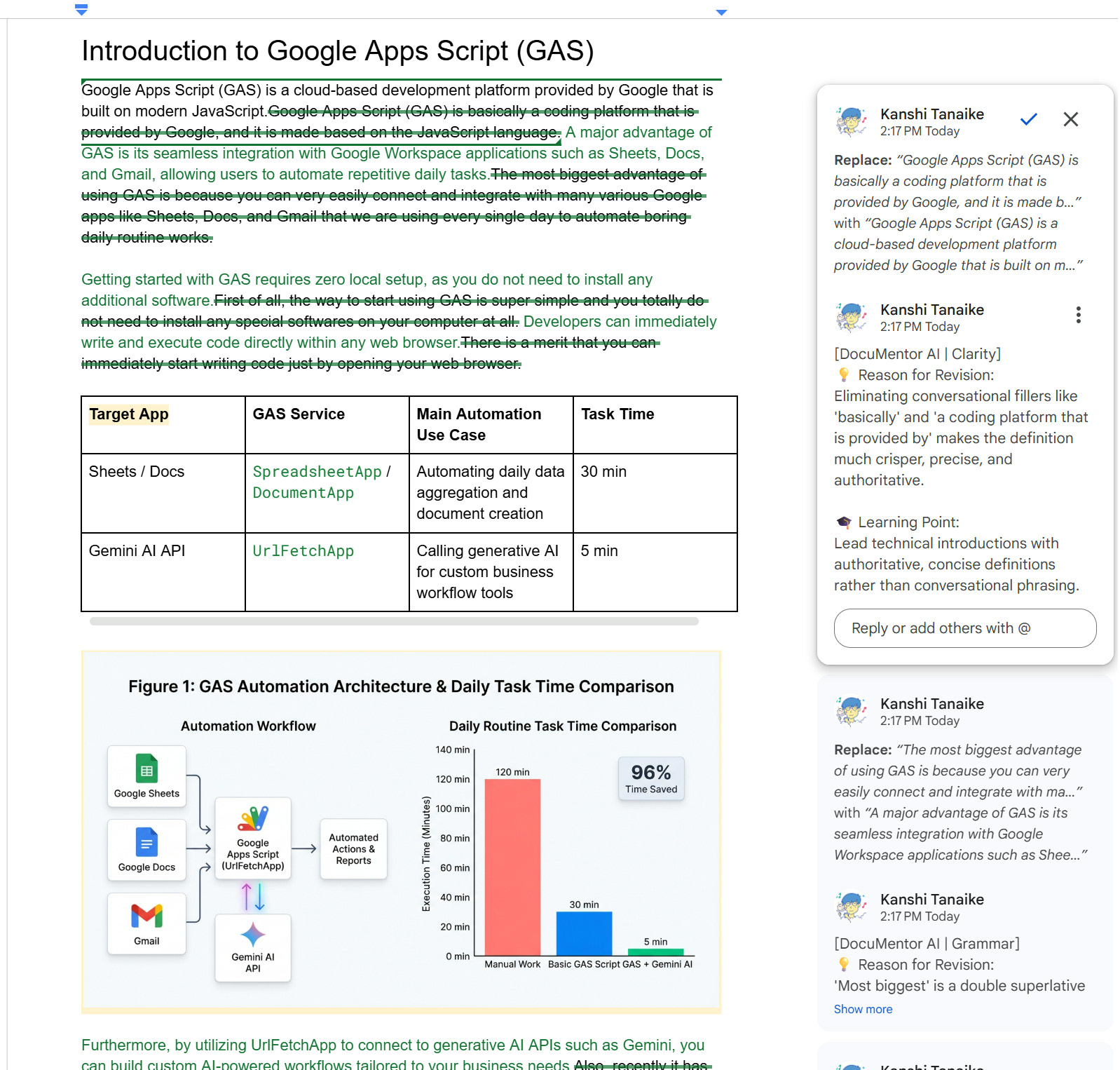 Figure 7. Pageless Google Document created by Command 2 with native inline Suggested Edits and educational rationale replies.
- Terminal Output (Figure 6): Converts Markdown + image into a Pageless Doc, applies 8 coaching items, creates the Summary Tab, initializes the Decision Record (
Pending AI: 6), and prints clickable URLs. - Google Docs Canvas (Figure 7): Awkward phrases are replaced via green
WriteMode.SUGGESTedits, each paired with a threaded💡 Reason for Revisionand🎓 Learning Pointreply on the right.
Command 3: Socratic Hint-Only Mode (--hint) + Persona + RAG Rubric
- 🔑 Credentials:
GEMINI_API_KEY: Required | Google OAuth2: Required - 🎯 What it does: Adopts a supportive professor persona (
--persona), enforces./sample/rules/writing_guidelines.md(-r), withholds all rewritten answers (--hint), and attaches Socratic questions as anchored Google Docs comments.
./gdocumentor -i ./sample/sample_article.md \
  --hint \
  --persona "You are a supportive university writing professor. Encourage critical thinking and explain structural weaknesses clearly without giving away the rewritten sentence." \
  -r ./sample/rules/writing_guidelines.md \
  --summary-tab \
  -o ./socratic_hints_report.md \
  --title "Student Essay - Socratic Hint Coaching"
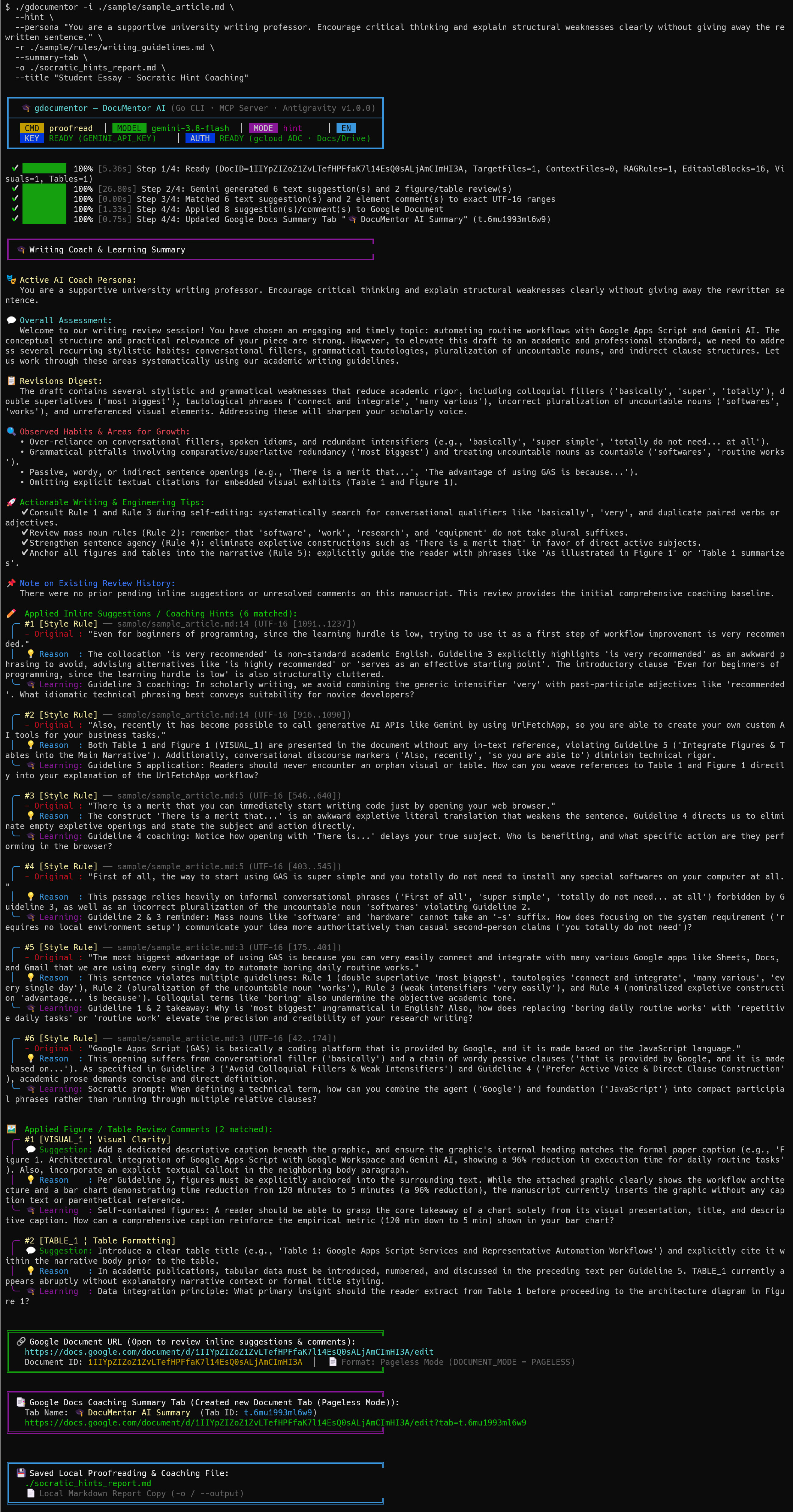 Figure 8. Terminal execution result of Command 3 in Socratic Hint-Only Mode (
--hint) with a custom professor persona and RAG writing guidelines.
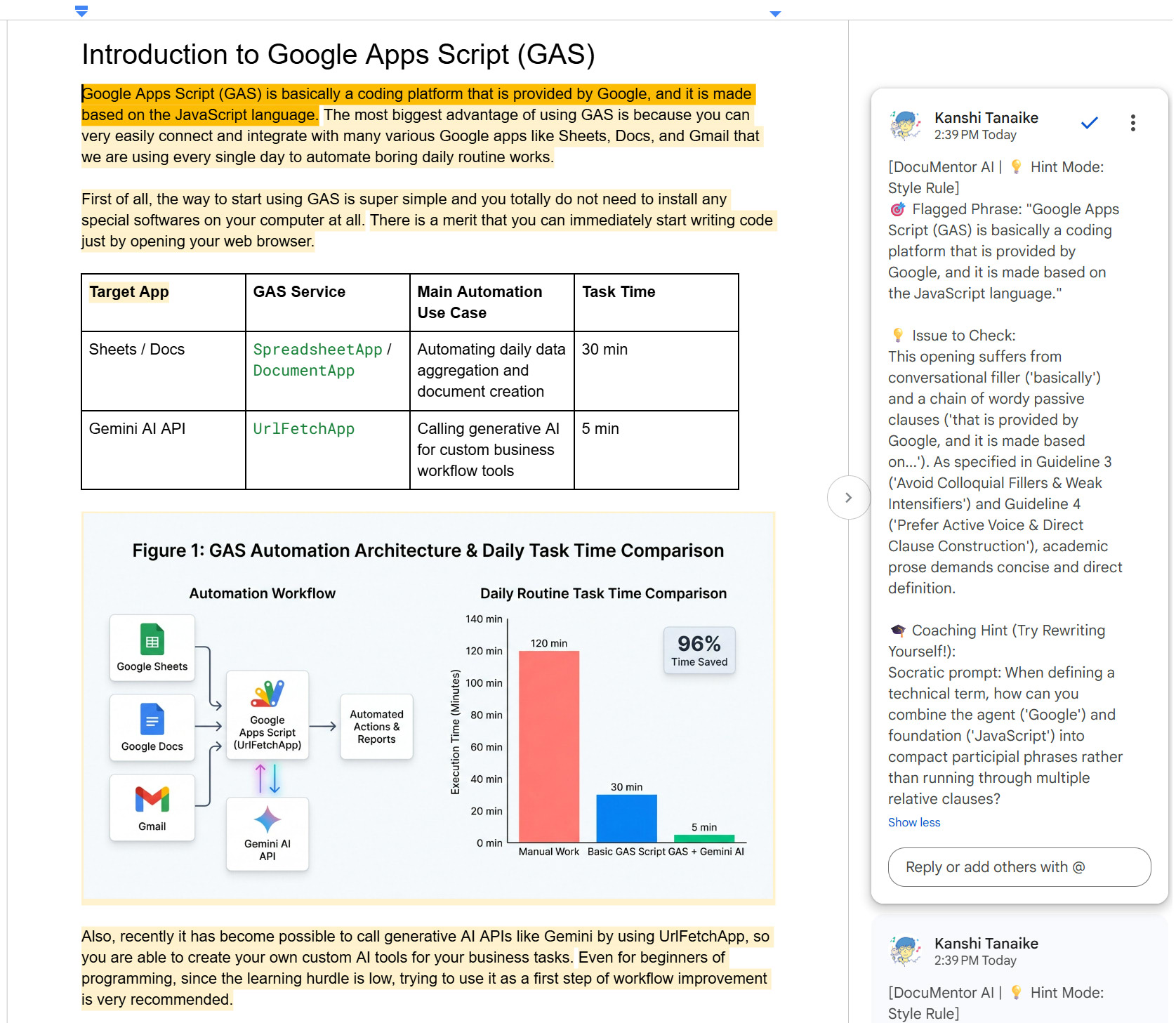 Figure 9. Google Document created by Command 3 showing anchored Socratic coaching hints without forced text rewrites.
- Terminal Output (Figure 8): Shows
MODE hintandRAGRules=1. Every card omits+ Suggestedand instead cites the exact rule violated (Guideline 1–Guideline 5) with a Socratic prompt. - Google Docs Canvas (Figure 9): Not a single word of the student’s Google Doc is overwritten. Yellow-highlighted comments show the
🎯 Flagged Phrase,💡 Issue to Check, and🎓 Coaching Hint (Try Rewriting Yourself!).
Command 4: Scoped GitHub Code Review (#L1-L35) + Auto-Dependencies (--auto-deps)
- 🔑 Credentials:
GEMINI_API_KEY: Required | Google OAuth2: Required - 🎯 What it does: Reviews only lines 1–35 of a remote GitHub file, shallow-clones the repo in the background to attach imported files as read-only context (
--auto-deps), and posts line-by-lineWriteMode.SUGGESTcode diffs into Google Docs.
./gdocumentor \
  -t "https://github.com/tanaikech/DocuMentorAI/blob/main/src/code.js#L1-L35" \
  --auto-deps \
  -p "Focus on readability, maintainability, and modern JavaScript / Google Apps Script best practices." \
  -o ./github_code_review.md \
  --title "GitHub Scoped Code Review (#L1-L35)"
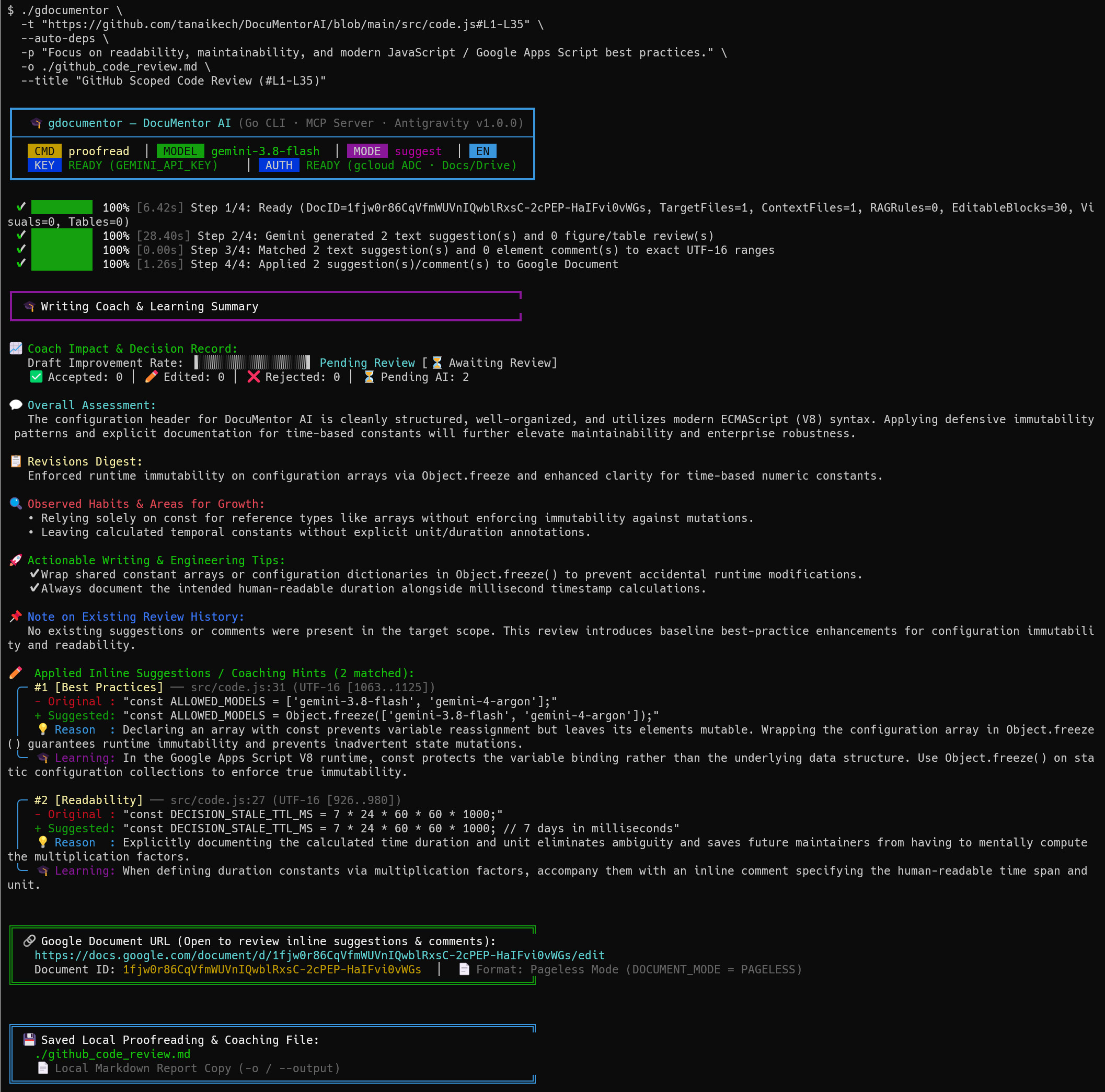 Figure 10. Terminal execution result of Command 4 performing a scoped GitHub code review (
#L1-L35) with automatic dependency resolution (--auto-deps).
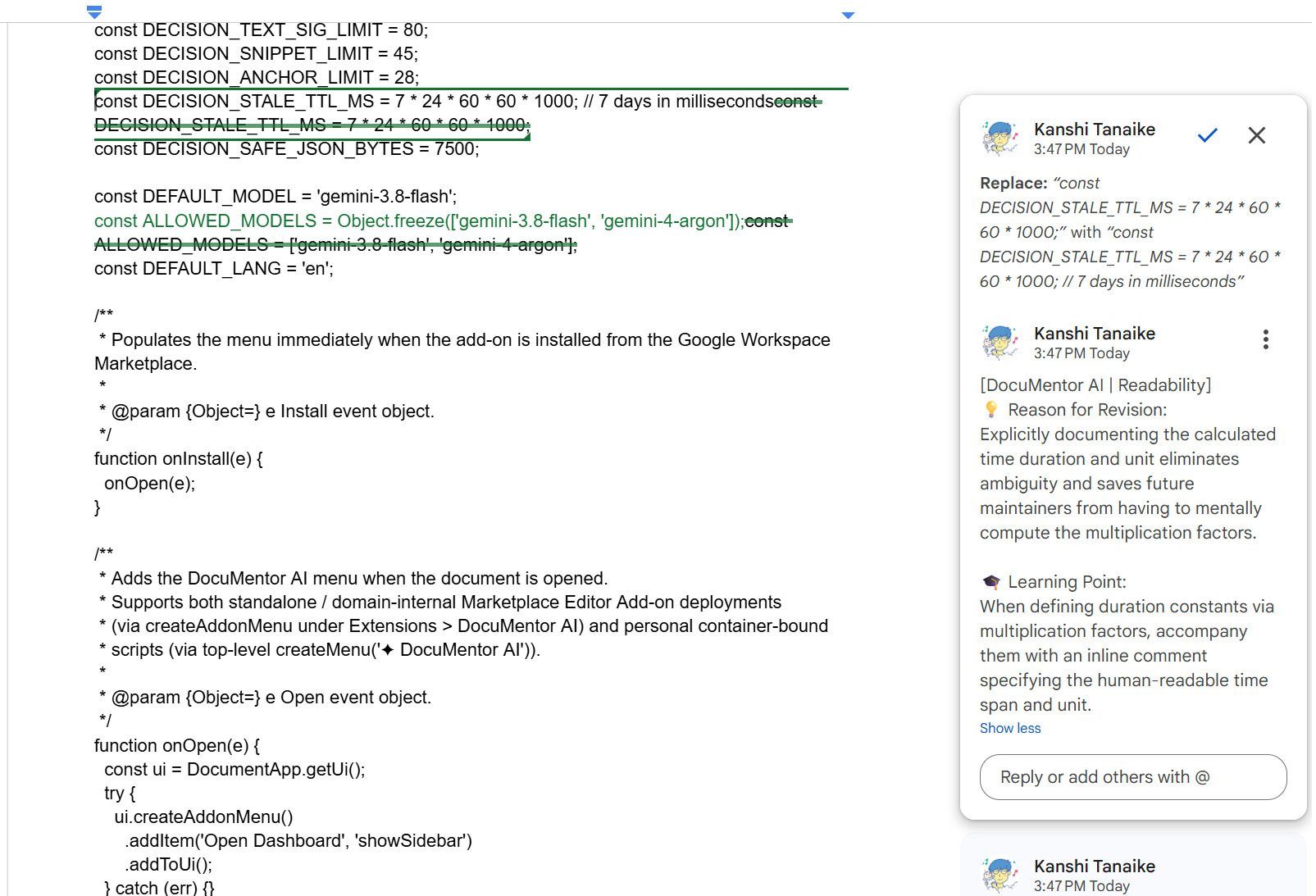 Figure 11. Google Document created by Command 4 with line-by-line inline code suggestions and V8 best-practice rationales.
- Terminal Output (Figure 10): Resolves
TargetFiles=1, ContextFiles=1, EditableBlocks=30and proposes 2 scoped improvements: wrappingALLOWED_MODELSinObject.freeze(...)(src/code.js:31) and documenting millisecond units onDECISION_STALE_TTL_MS(src/code.js:27). - Google Docs Canvas (Figure 11): Renders clean line-by-line code in Google Docs with green
WriteMode.SUGGESTdiffs strictly inside lines 1–35.
Command 5: Structural Inspection, Decision Record & Learning from AI + Human Reviews (inspect, manage, & summary)
- 🔑 Credentials:
inspect/manage: 0 Gemini tokens (GEMINI_API_KEYNot Required) |summary:GEMINI_API_KEYRequired in CLI mode (or 0GEMINI_API_KEYvia Host-AI MCP) | Google OAuth2: Required - 🎯 What it does: Inspects exact UTF-16 coordinates (
inspect), tracks how authors respond to suggestions (manage), and analyzes both AI-generated (🤖 AI) and human-authored (👤 Human) suggestions and comments on a Google Doc (summary) to give the author actionable learning advice.
# 1. Inspect paragraph coordinates (@start:end), visual/table IDs, and pending AI/Human suggestions (0 LLM tokens)
./gdocumentor inspect -d "<YOUR_GOOGLE_DOC_ID>"

# 2. Analyze existing suggestions & comments (from BOTH AI and human reviewers, including resolved history) to get learning advice
./gdocumentor summary -d "<YOUR_GOOGLE_DOC_ID>" --include-resolved --summary-tab

# 3. Accept all pending suggestions and update the Coach Impact & Decision Record (0 LLM tokens)
./gdocumentor manage -d "<YOUR_GOOGLE_DOC_ID>" --accept-all
- Structural Inspection (
inspect): Prints all tabs, paragraph UTF-16@start:endcoordinates,VISUAL_N/TABLE_NIDs, active suggestions (🤖 AIvs.👤 Human), and Decision Record counters with 0 LLM tokens. - Learning Advice from AI & Human Reviews (
summary): Reads all open and resolved (--include-resolved) inline suggestions and comment threads on the Google Document—not only those created by generative AI (🤖 AI), but also edits and comments left by human colleagues, teachers, or editors (👤 Human)—and generates a Writing Coach & Learning Summary (explaining why each human or AI edit matters, recurring weak points/habits, and concrete tips for future writing) without modifying the document text. - Decision Reconciliation (
manage --accept-all): Accepts pending suggestions and reconciles~/.config/gdocumentor/decision_records/<docId>.jsoninto ✅ Accepted, ✏️ Edited (author refined the text), ❌ Rejected, or 🗑️ Expired (>7 days or deleted), computing the Draft Improvement Rate while separating AI (🤖 AI) from human (👤 Human) edits.
Command 6: Zero-Token Direct Google Docs, Markdown & Image Editing (edit)
- 🔑 Credentials:
GEMINI_API_KEY: Not Required (0 tokens) | Google OAuth2: Required - 🎯 What it does: Creates a Google Doc, inserts initial text, converts and inserts rich Markdown (headings, formatting, checklist, 2×2 table, and
./sample/sample_figure.png) before Paragraph 2, and resizesVISUAL_1to320pt.
# 1. Create a new Google Document and insert initial paragraphs
DOC_ID=$(./gdocumentor edit --create-doc --title "Live Release Notes" --json | jq -r '.documentId')
printf "Paragraph 1: Introduction\nParagraph 2: Conclusion" | ./gdocumentor edit -d "$DOC_ID"
# 2. Convert and insert rich Markdown (with a native table & local image) right before Paragraph 2
./gdocumentor edit -d "$DOC_ID" --before-paragraph 2 --markdown << 'EOF'
## Key Highlights (Inserted from Markdown)
This section includes **bold**, *italic*, `inline_code_var`, and a [Google Docs API](https://developers.google.com/docs/api) link.
- Automated Coaching Pipeline
- Supports Socratic `--hint` mode
- [x] Direct Markdown & Image Insertion
| Feature | Status |
| :--- | :---: |
| Native Markdown Conversion | **Ready** |
| Image Insert / Replace / Delete | `Active` |

EOF
# 3. Replace the first image (VISUAL_1) with a resized 320pt width version
./gdocumentor edit -d "$DOC_ID" --replace-image VISUAL_1 --with-image ./sample/sample_figure.png --image-width 320
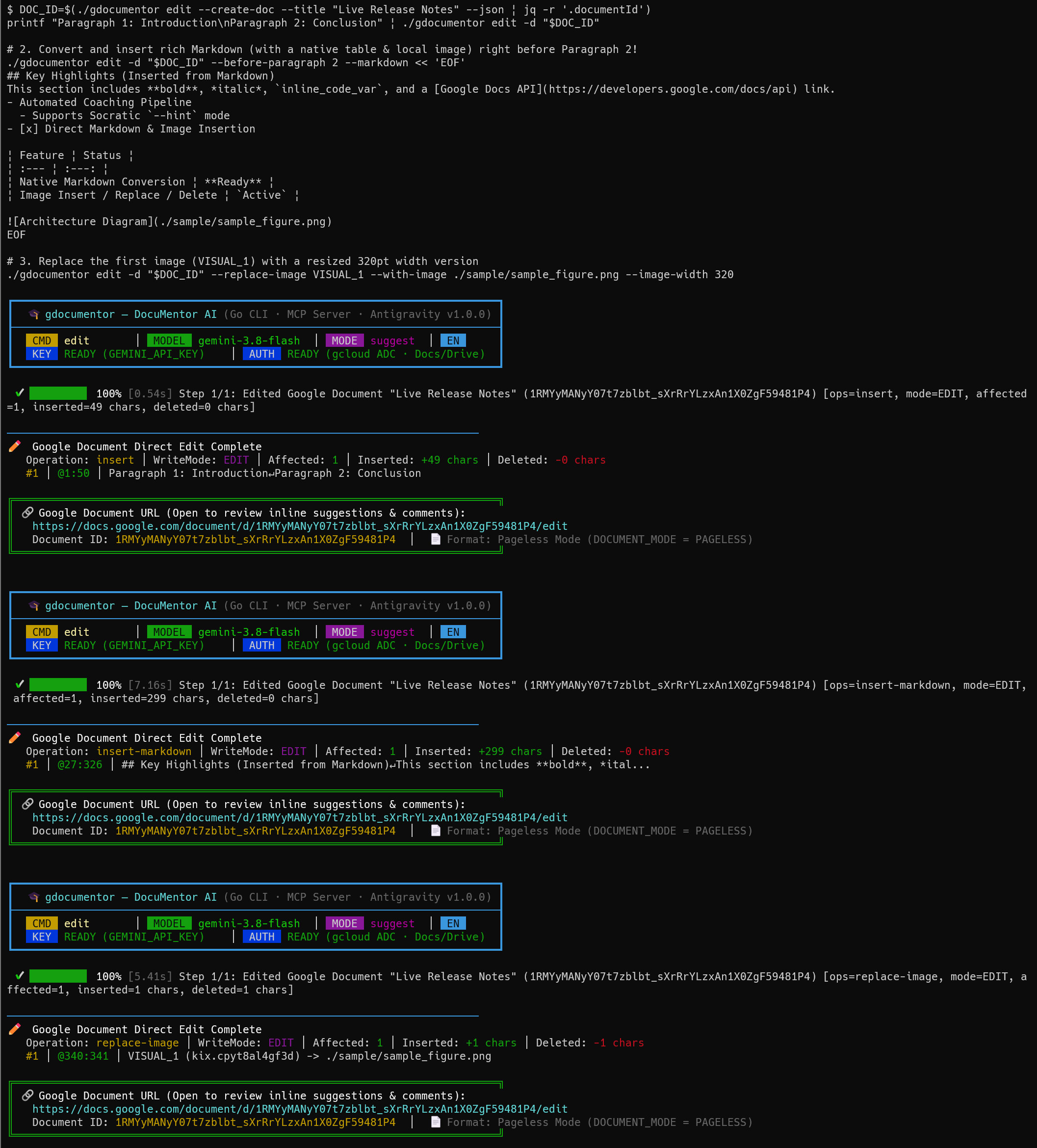 Figure 12. Terminal execution result of Command 6 executing deterministic 0-token Google Docs creation, rich Markdown insertion, and image resizing via
gdocumentor edit.
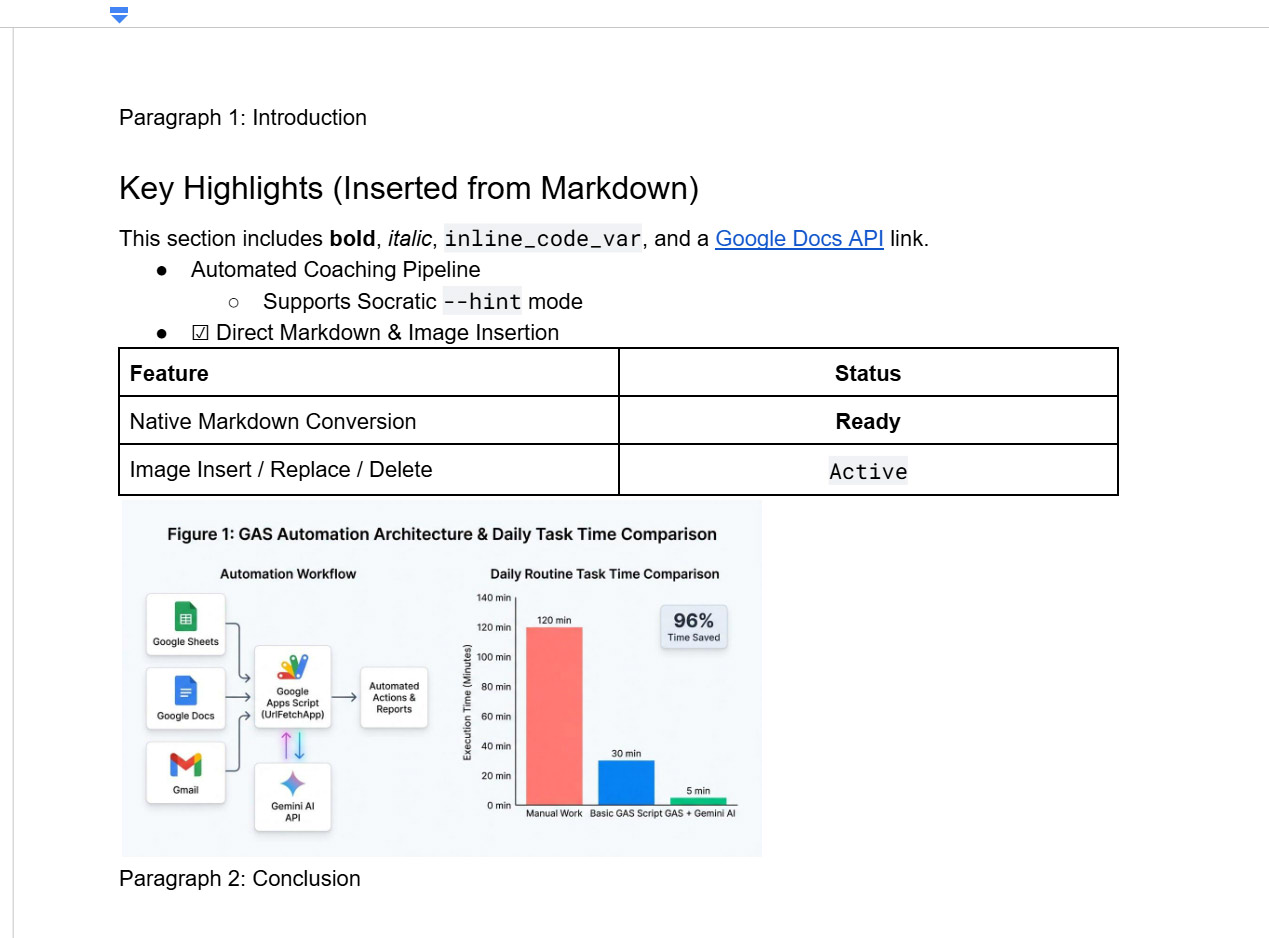 Figure 13. Google Document created by Command 6 showing converted rich Markdown, a native 2×2 table, and a 320pt resized diagram placed between the introduction and conclusion.
- Terminal Output (Figure 12): Executes
insert,insert-markdown, andreplace-imagedeterministically in seconds with 0 Gemini tokens. - Google Docs Canvas (Figure 13): Renders native Heading 2, bold/italic/code/link styling, nested bullets + checkbox, a 2×2 table, and
VISUAL_1resized to320ptright between Paragraph 1 and Paragraph 2.
5. Part 2: 6 Autonomous AI Agent Prompts (Zero GEMINI_API_KEY via Host-AI MCP)
How Multi-Client AI Agents Work Without GEMINI_API_KEY
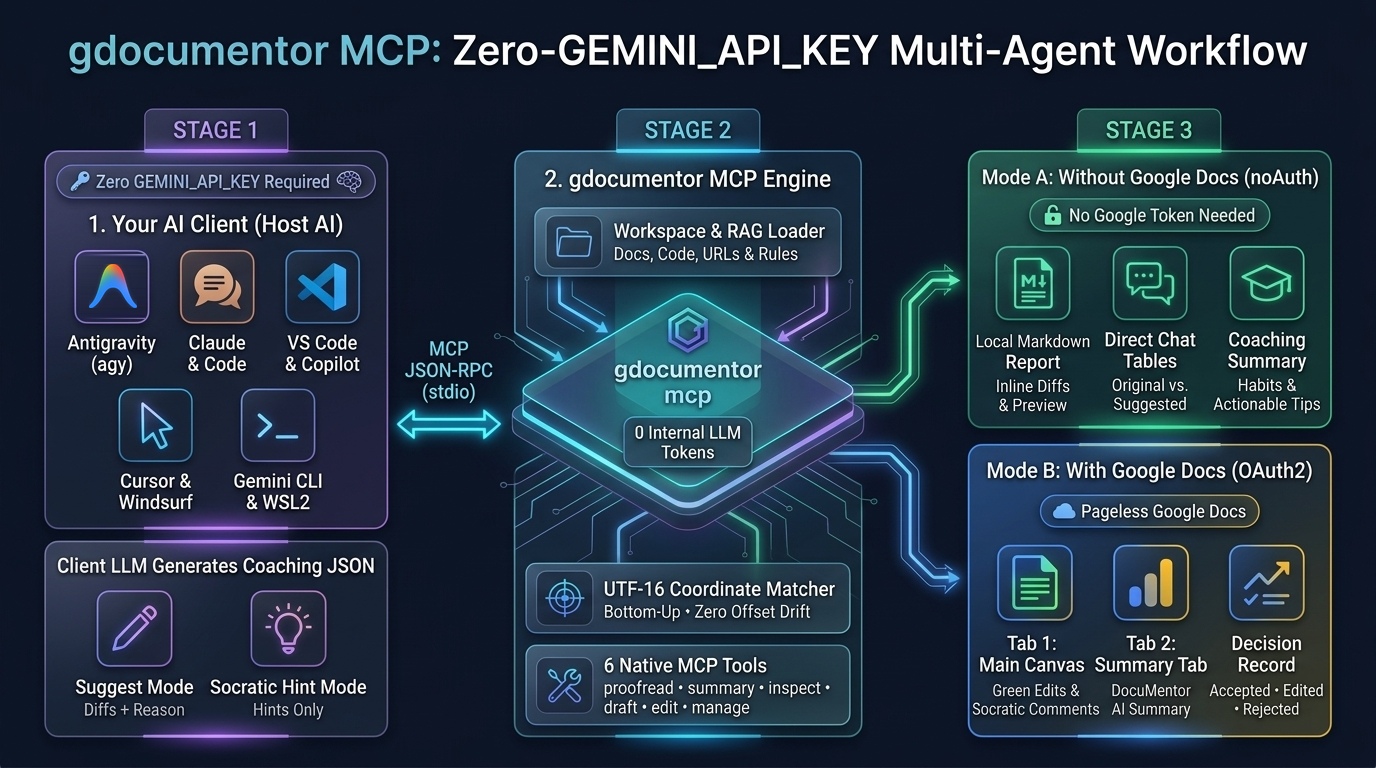 Figure 14. 3-stage visual workflow of the
gdocumentor MCP Server in Zero-GEMINI_API_KEY Host-AI Mode across multi-client AI agents, showing Stage 1 (Your AI Client / Host AI), Stage 2 (gdocumentor MCP Engine), and Stage 3 (Mode A: Without Google Docs vs. Mode B: With Google Docs).
- Stage 1 — Your AI Client (
Host AI•Zero GEMINI_API_KEY): Antigravity (agy), Claude Desktop, Claude Code, VS Code (Copilot), Cursor, Windsurf, or Gemini CLI uses its own active LLM (model: "agent-ai") to generate the coaching JSON (aiResult) inSuggest ModeorSocratic Hint Mode. - Stage 2 —
gdocumentorMCP Engine (MCP JSON-RPC stdio): Loads workspace/RAG context, mapsoriginalTextto bottom-up UTF-16 coordinates (utf16idx), and exposes 6 MCP tools (proofread,summary,inspect,draft,edit,manage). - Stage 3 (🟢 Mode A — Without Google Docs /
noAuth: true): Needs noGEMINI_API_KEYand no Google OAuth token, outputting local Markdown reports (-o) and direct chat tables. - Stage 3 (🔵 Mode B — With Google Docs /
OAuth2): Creates/updates Pageless Google Docs with inlineWriteMode.SUGGESTedits or Socratic hints (Tab 1), a🎓 DocuMentor AI Summarytab (Tab 2), and the Decision Record.
# View detailed setup help & cross-platform (WSL2 <-> Windows 11) guide:
gdocumentor setup --help

# Install & configure ALL supported AI clients on Linux / macOS / WSL2:
gdocumentor setup --all

# Inside WSL2, configure Windows 11 GUI apps (Claude Desktop, Cursor, VS Code, Windsurf) via wsl.exe bridge:
gdocumentor setup --all --wsl-host
Prompt 1: Zero-Auth Local Proofreading in ./
- 🔑 Credentials:
GEMINI_API_KEY: Not Required | Google OAuth2: Not Required (noAuth: true)
Use gdocumentor without a Google OAuth access token (--no-auth) to proofread ./sample/sample_article.md (including its table and diagram) and save the coaching report to ./article_coaching.md in the current working directory. Then summarize the top 3 writing improvements and habits it found.
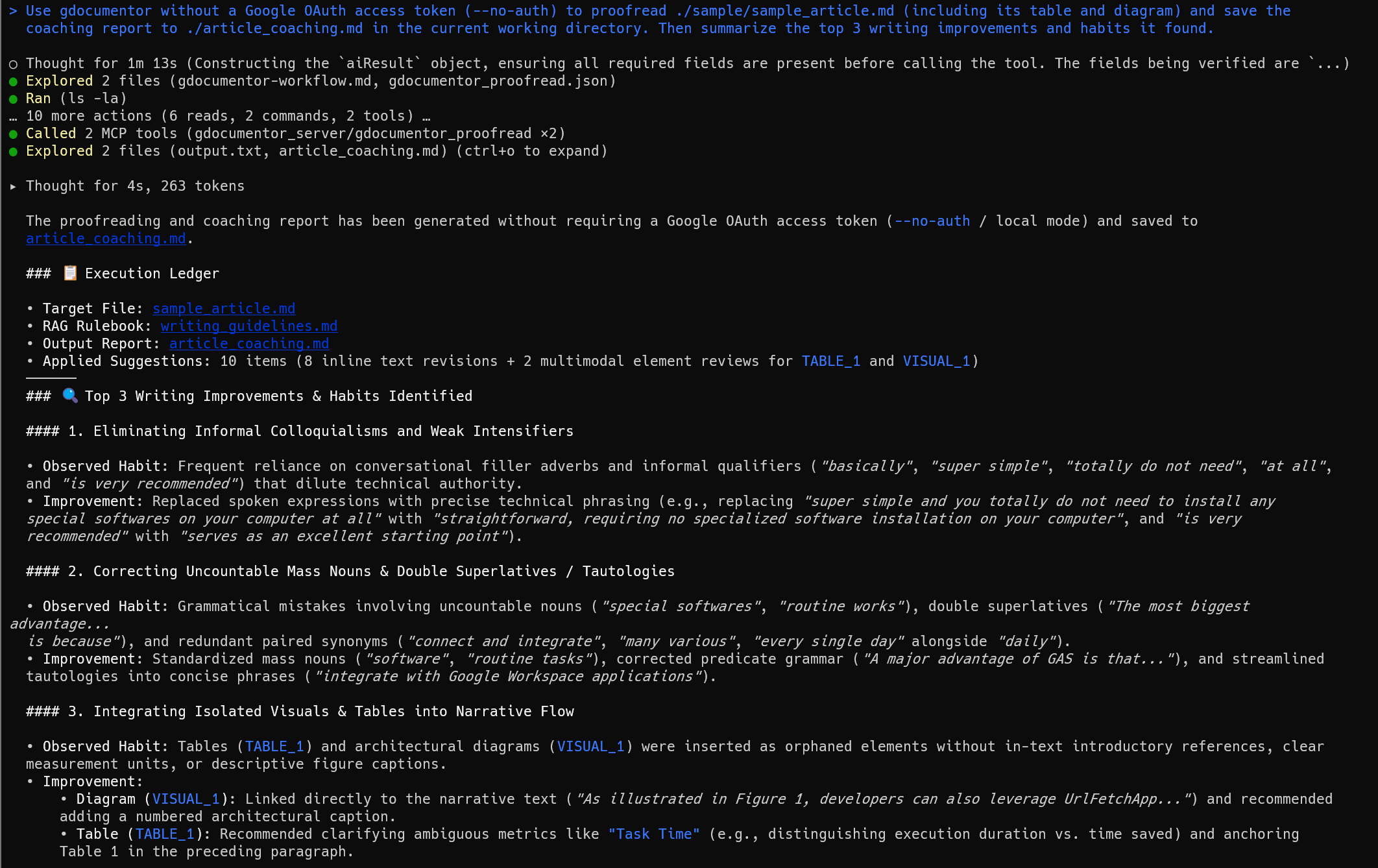 Figure 15. Execution result of Prompt 1 in Antigravity CLI (
agy) performing Zero-Auth local proofreading via Host-AI MCP and summarizing top writing habits.
- Host-AI MCP Execution (Figure 15):
agyrunsgdocumentor_proofread(noAuth: true) using its own Host AI, applying 10 coaching items (8 text +TABLE_1+VISUAL_1) into./article_coaching.md. - Top 3 Habits Identified: Summarizes (1) removing colloquial fillers (
"basically","super simple"), (2) fixing uncountable nouns ("softwares"➔"software") and double superlatives ("most biggest"), and (3) integratingVISUAL_1andTABLE_1into the narrative prose.
Prompt 2: Socratic Hint-Only Mode + Summary Tab for Educators
- 🔑 Credentials:
GEMINI_API_KEY: Not Required | Google OAuth2: Required
I am a university writing instructor. Please use gdocumentor in Socratic Hint-Only mode (--hint) to review ./sample/sample_article.md into a new Google Document titled 'Student Draft - Socratic Coaching', generate the 🎓 DocuMentor AI Summary tab (--summary-tab), and also save a local copy of the hint report to ./student_socratic_hints.md in the current directory. Use a supportive professor persona so the student gets hints on how to improve their writing without being handed the rewritten answers. Give me the Google Docs link when finished.
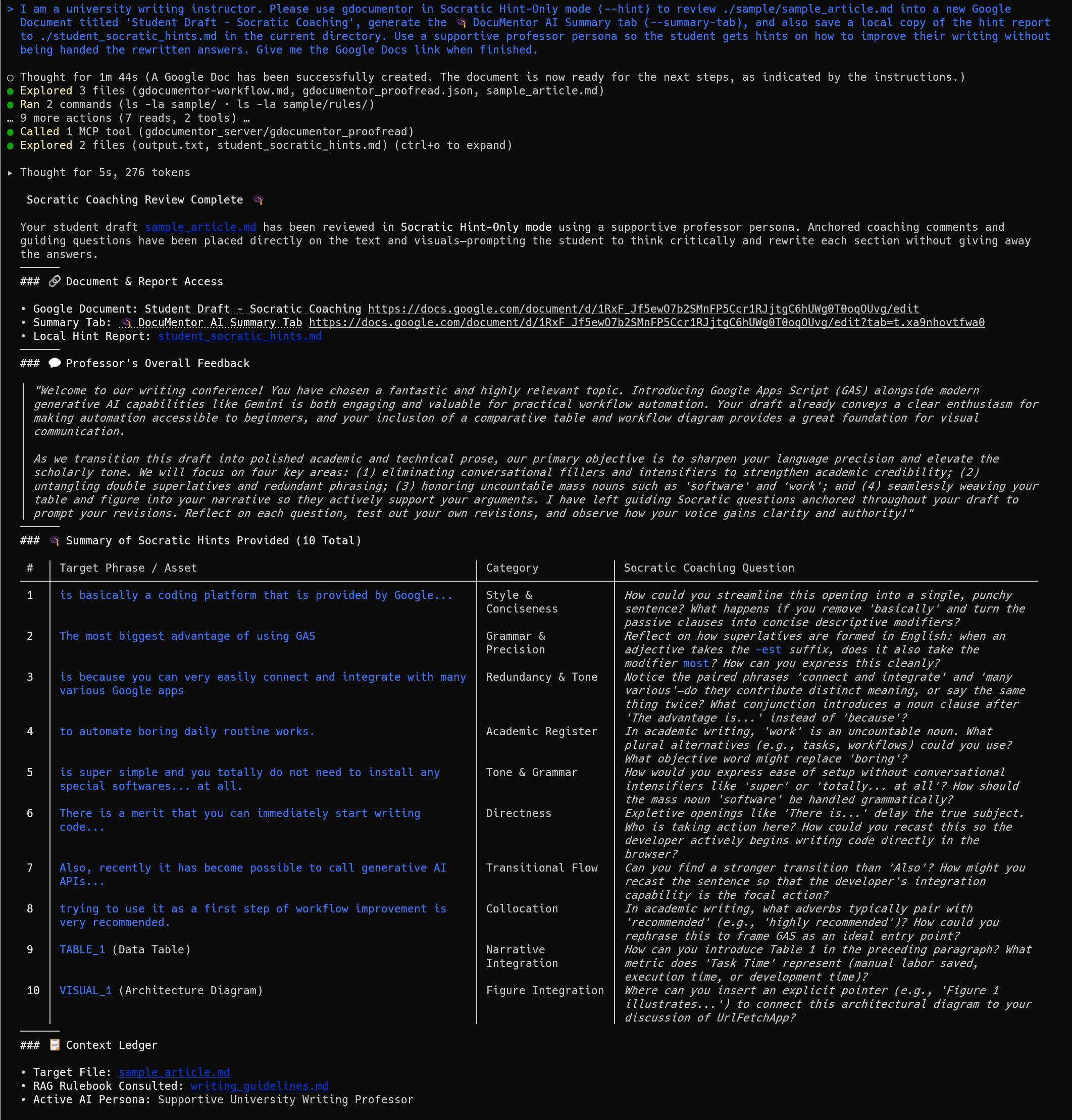 Figure 16. Execution result of Prompt 2 in Antigravity CLI (
agy) orchestrating Socratic Hint-Only coaching with a supportive professor persona.
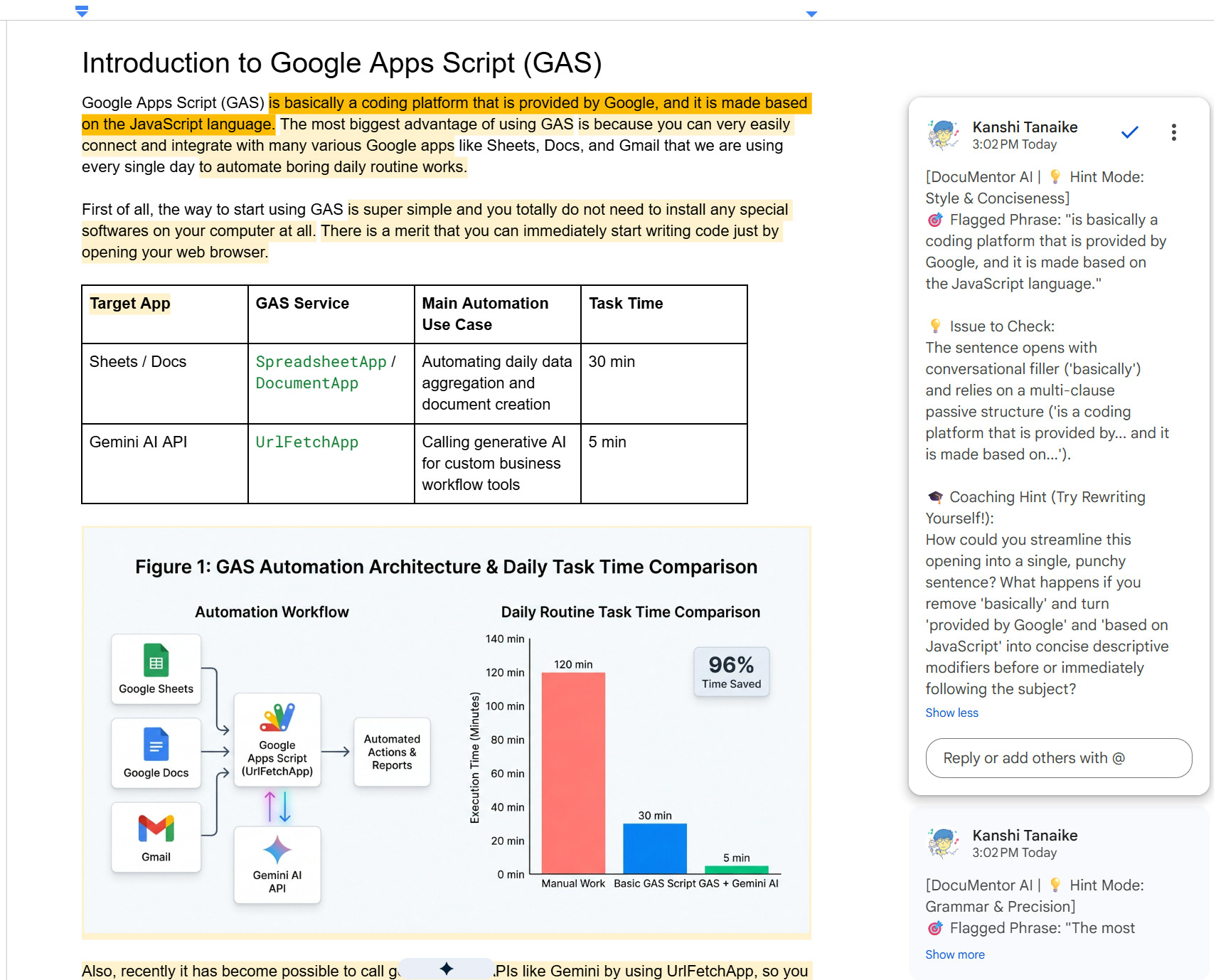 Figure 17. Google Document created by Prompt 2 with anchored Socratic reflection hints from the professor persona.
- Agent Output (Figure 16): Completes in 1 MCP tool call, returning the Google Doc URL, Summary Tab URL, and a 10-row Socratic question table.
- Google Docs Canvas (Figure 17): Anchors 10 yellow-highlighted Socratic hints in Google Docs without overwriting the student’s text.
Prompt 3: Scoped Live Web Page Proofreading (@0:2500)
- 🔑 Credentials:
GEMINI_API_KEY: Not Required | Google OAuth2: Required
Use gdocumentor to proofread the web page https://go.dev/doc/effective_go (only character range @0:2500) into a new Google Document with inline Suggested Edits, and also save the local report to ./effective_go_review.md in the current working directory. Tell me the main stylistic takeaways.
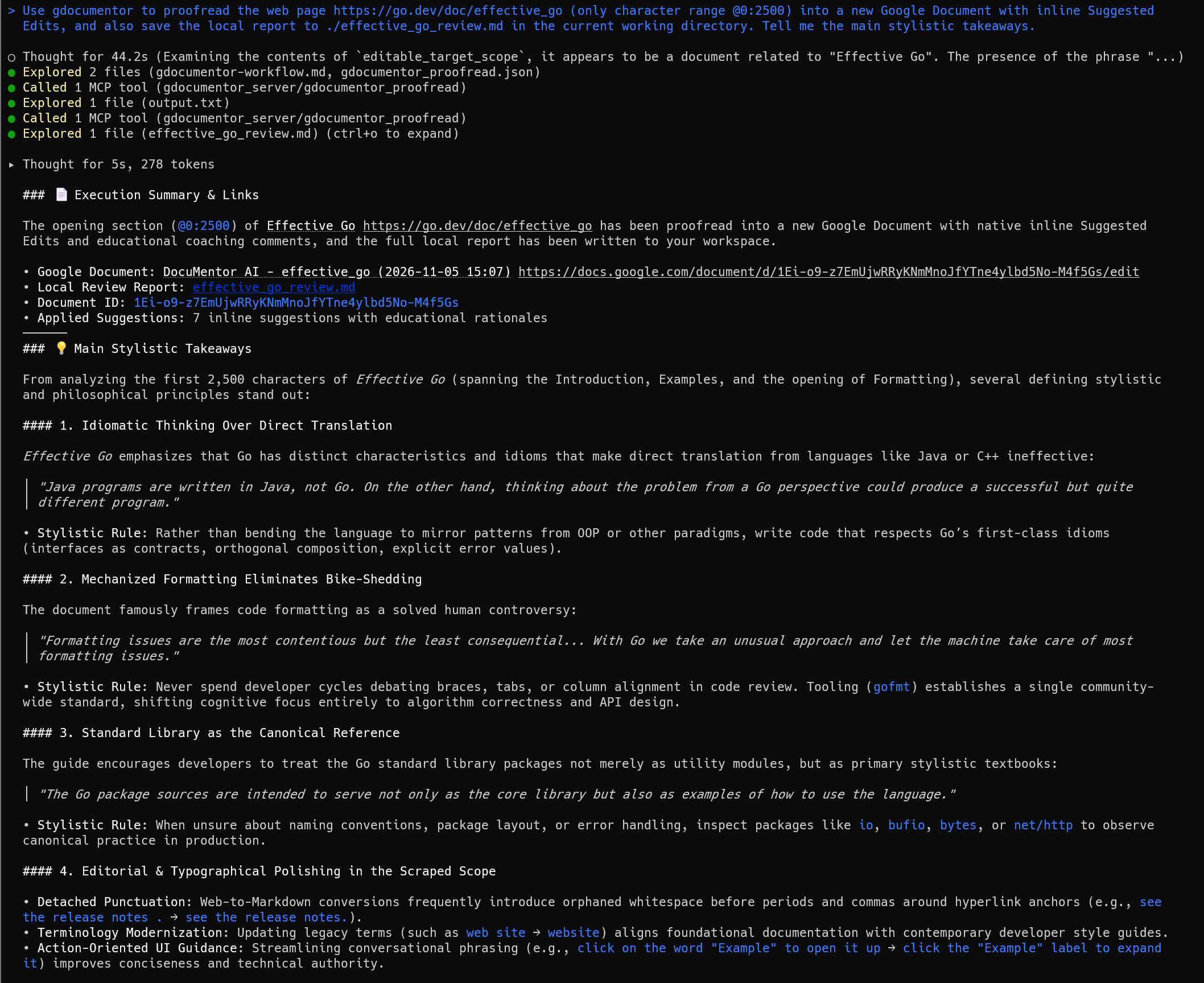 Figure 18. Execution result of Prompt 3 in Antigravity CLI (
agy) proofreading a live web page (Effective Go character range @0:2500).
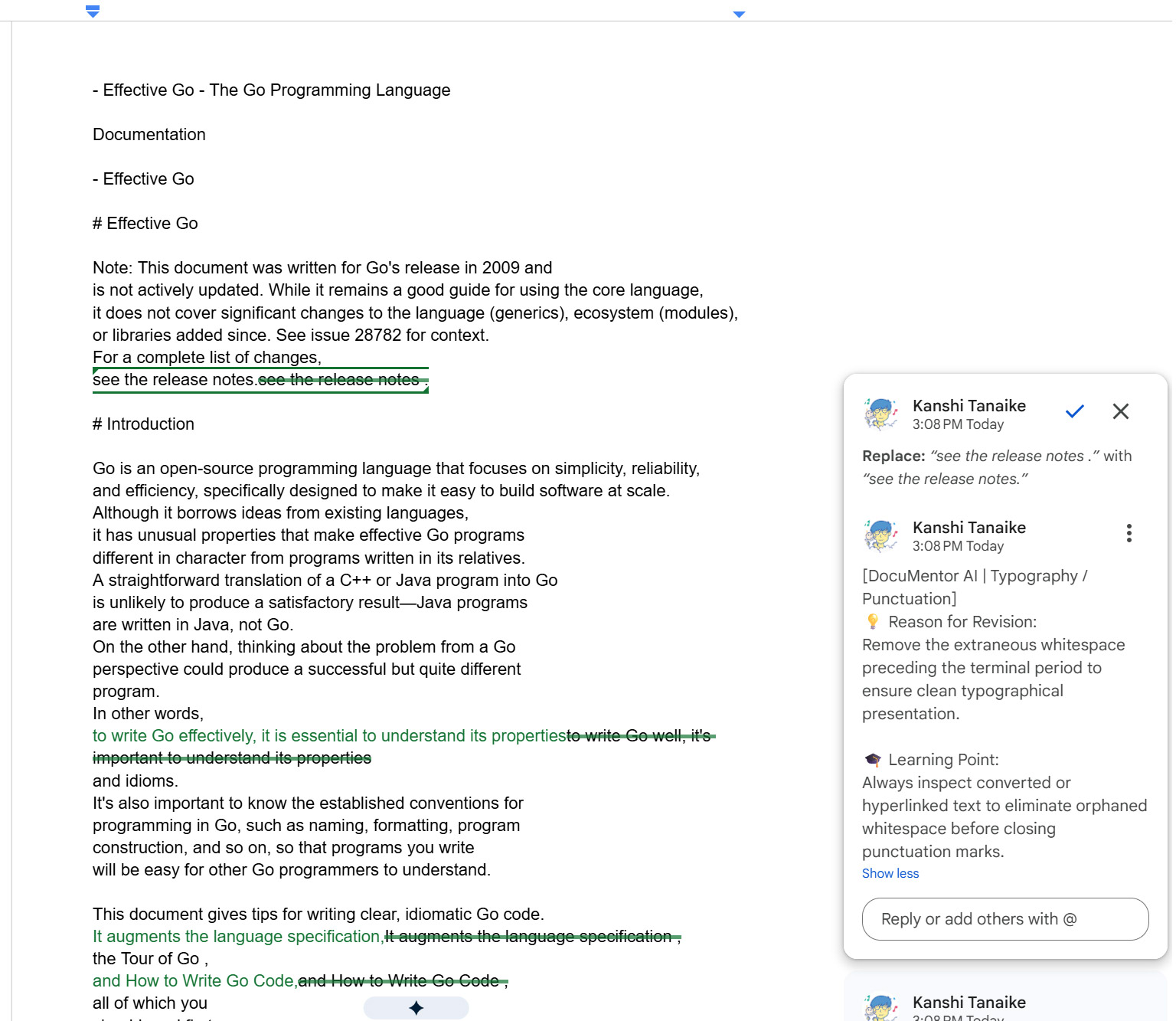 Figure 19. Google Document created by Prompt 3 showing inline typography and style suggestions on the imported
Effective Go web text.
- Agent Output (Figure 18): Fetches
https://go.dev/doc/effective_go@0:2500, restricts edits to the first 2,500 UTF-16 units, applies 7 suggestions, and summarizes 4 stylistic takeaways. - Google Docs Canvas (Figure 19): Polishes prose tone and fixes detached punctuation spaces from HTML scraping via inline
WriteMode.SUGGESTedits.
Prompt 4: Scoped Code Review with RAG Coding Standards
- 🔑 Credentials:
GEMINI_API_KEY: Not Required | Google OAuth2: Required
Create a small JavaScript file named ./demo_script.js in the current working directory containing a 20-line function that fetches data from an API without error handling or const/let best practices. Then use gdocumentor to review lines 1 to 20 of ./demo_script.js applying ./sample/rules/coding_standards.md, create a Google Document with inline Suggested Edits, save a local report to ./code_review_report.md in the current directory, and summarize the issues found.
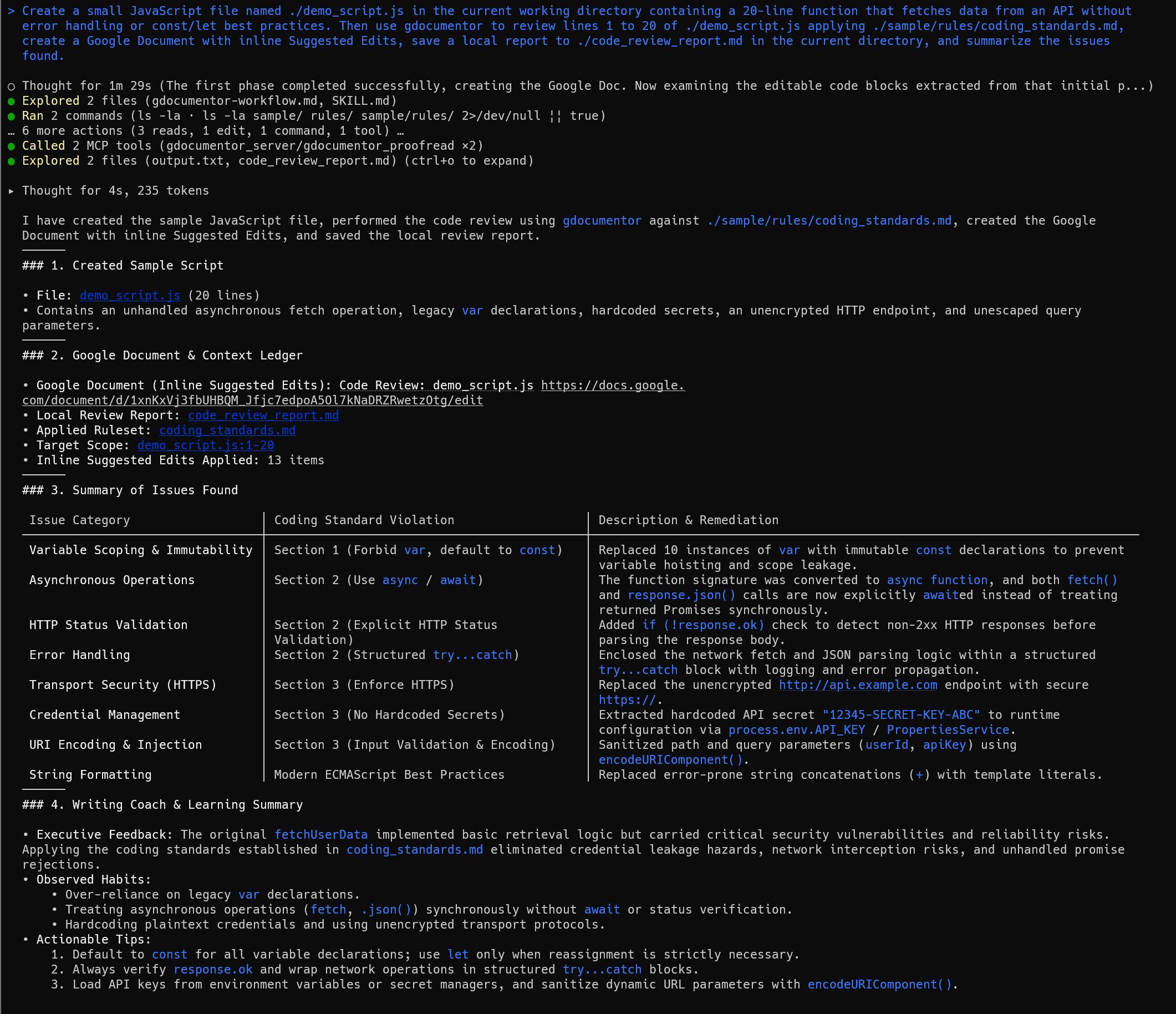 Figure 20. Execution result of Prompt 4 in Antigravity CLI (
agy) generating ./demo_script.js and reviewing lines 1–20 against RAG coding standards.
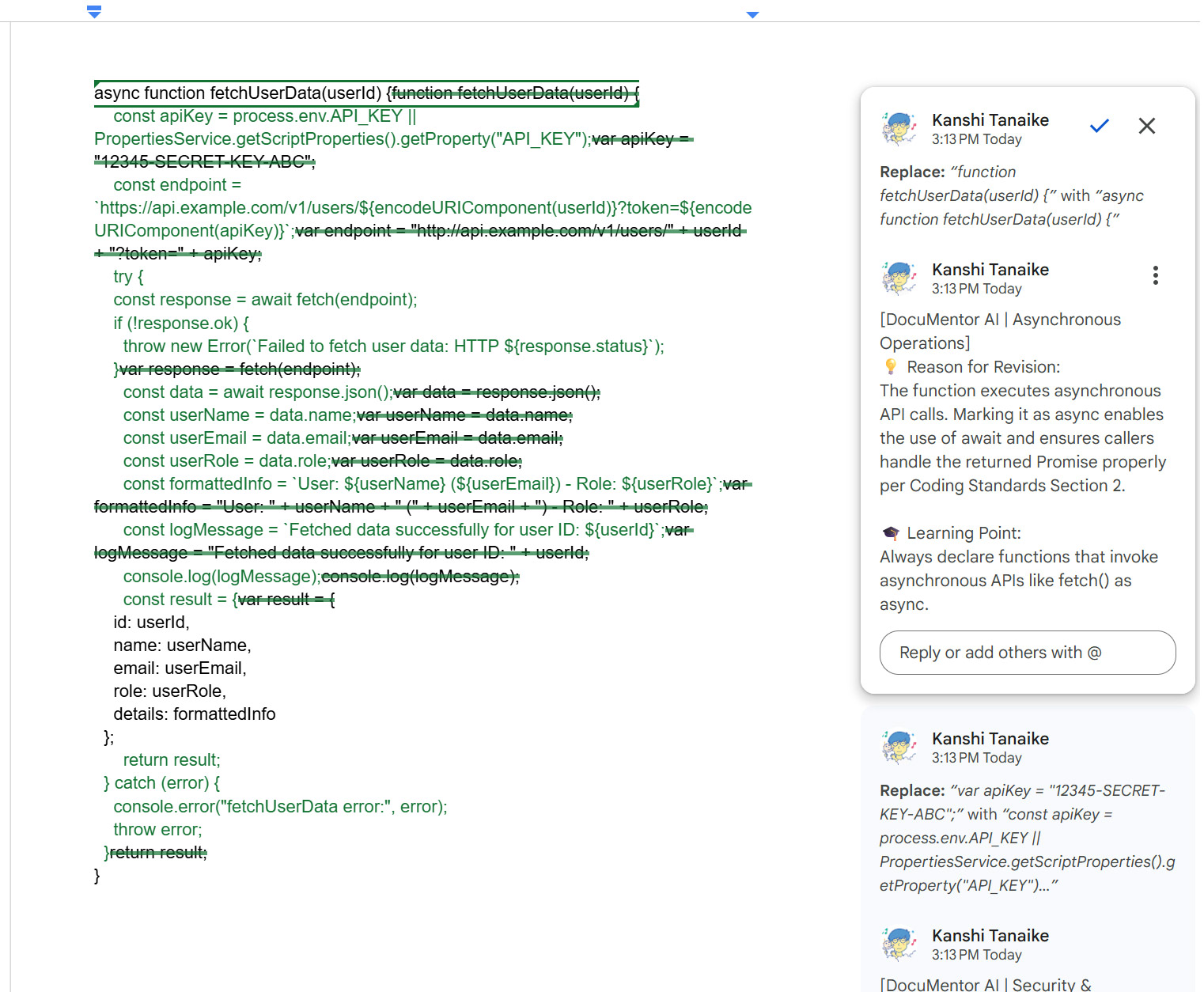 Figure 21. Google Document created by Prompt 4 showing inline JavaScript code suggestions explicitly referencing sections of
coding_standards.md.
- Agent Output (Figure 20): Generates
./demo_script.js(20 lines), audits it againstcoding_standards.md, applies 13 inline code suggestions, and outputs an 8-category violation table (Section 1–Section 3). - Google Docs Canvas (Figure 21): Upgrades
vartoconst, addsasync/await+try...catch+response.ok, replaces hardcoded secrets, and upgradeshttp://tohttps://withencodeURIComponent, citingCoding Standards Section 2in the Google Docs comment cards.
Prompt 5: Zero-Token Direct Markdown & Image Editing via MCP (edit & inspect)
- 🔑 Credentials:
GEMINI_API_KEY: Not Required (0 proofreading tokens) | Google OAuth2: Required
Using gdocumentor's edit and inspect tools (without calling Gemini proofreading), create a new Google Document titled 'Project Status Report', write an introductory paragraph and a conclusion paragraph, and then insert the contents of ./sample/sample_article.md as converted rich Markdown (including its table and ./sample/sample_figure.png) right between the introduction and the conclusion. Finally, resize the inserted image VISUAL_1 to a width of 300pt and give me the Google Document URL.
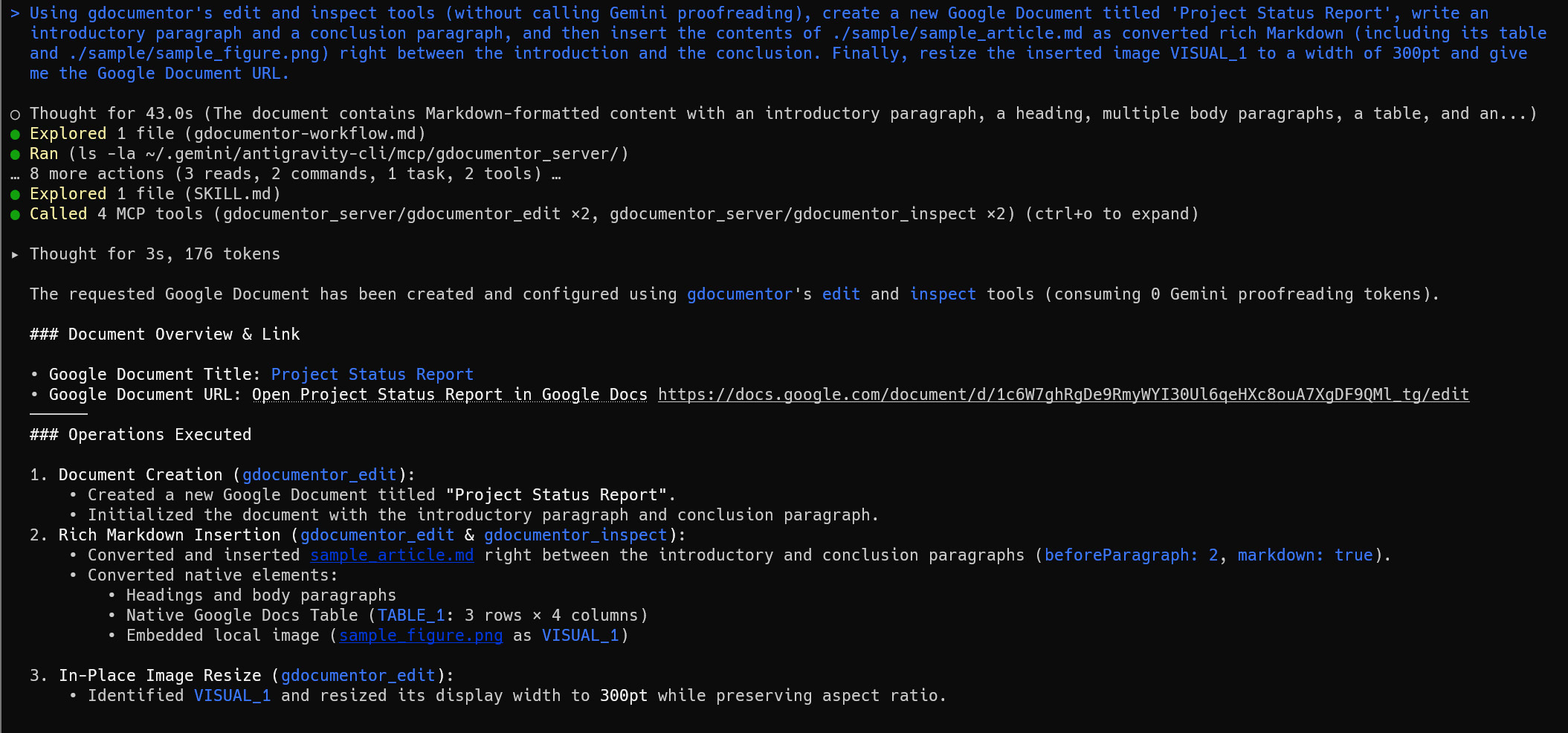 Figure 22. Execution result of Prompt 5 in Antigravity CLI (
agy) orchestrating 0-token document creation, Markdown insertion, and in-place image resizing via MCP tools.
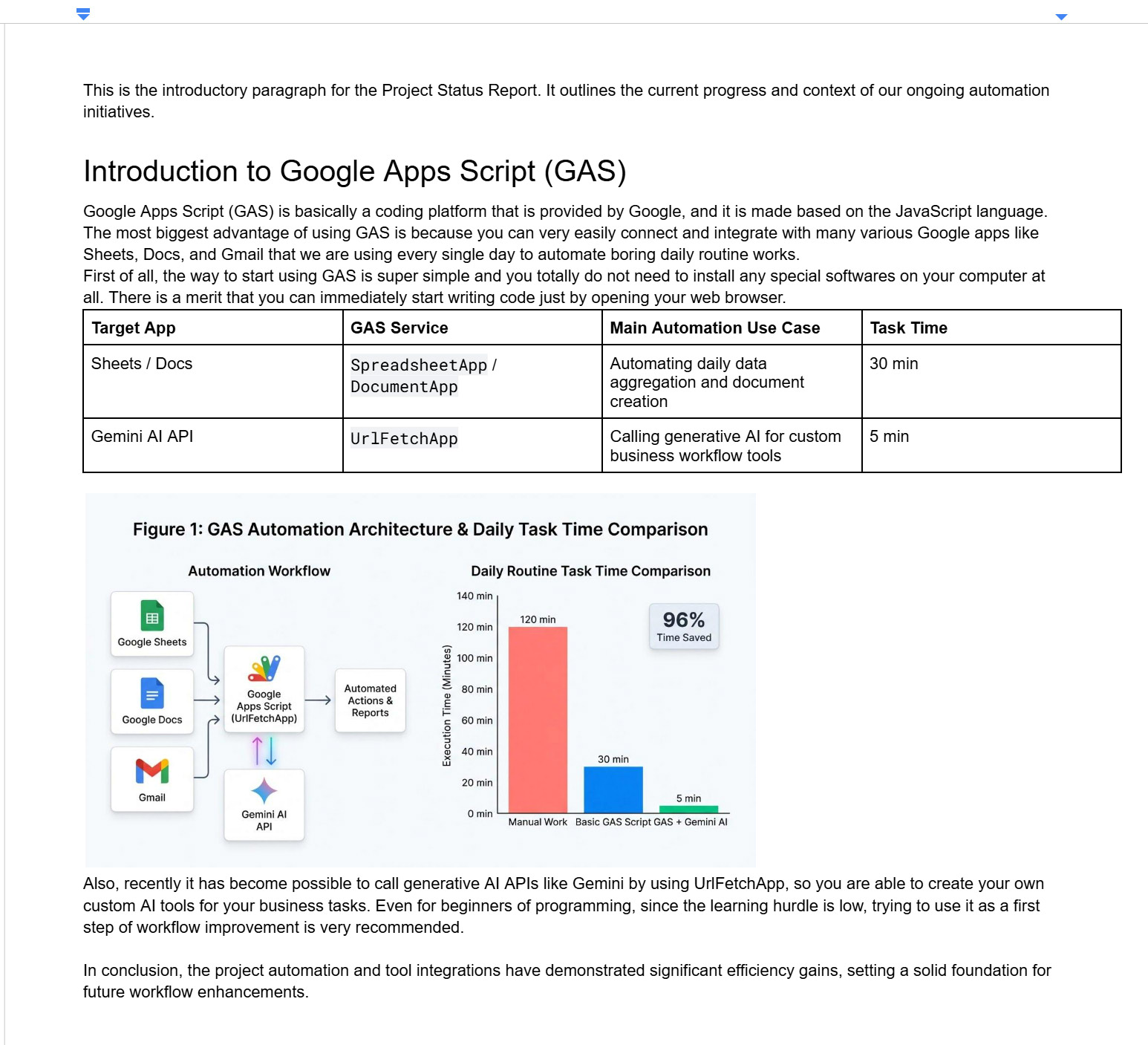 Figure 23. Google Document created by Prompt 5 showing the composite Project Status Report with converted Markdown, table, and 300pt figure between the introduction and conclusion.
- Agent Output (Figure 22): Chains
gdocumentor_editandgdocumentor_inspectwith 0 proofreading tokens to create the Doc, insert converted Markdown before Paragraph 2, and resizeVISUAL_1to300pt. - Google Docs Canvas (Figure 23): Shows the composite Google Document with the converted article, 4-column table, and
300ptdiagram cleanly sandwiched between the introduction and conclusion.
Prompt 6: Parallel Multi-Document Batch Processing (3 Google Docs Concurrently)
- 🔑 Credentials:
GEMINI_API_KEY: Not Required | Google OAuth2: Required
I want to test parallel batch processing using gdocumentor's MCP server. Please perform the following steps:

1. Use the gdocumentor_edit MCP tool to create 3 separate Google Documents on Google Drive with different titles and short sample texts containing intentional typos or stylistic flaws:
   - Document 1: Title 'Essay Draft - Climate Action', Content: A short 3-paragraph draft about renewable energy with repetitive sentences and informal phrasing.
   - Document 2: Title 'Tech Memo - Microservices Architecture', Content: A short technical proposal with vague performance claims and passive voice.
   - Document 3: Title 'Client Support - Inquiry Reply', Content: A customer support reply with overly blunt phrasing and missing greeting structure.

2. Once the 3 Google Documents are created, process all 3 documents in parallel (concurrent sub-tasks or simultaneous tool calls) using the gdocumentor_proofread MCP tool:
   - Proofread Document 1 with mode: 'suggest' and create a dedicated summary tab (summaryTab: true).
   - Proofread Document 2 in Socratic Hint-Only mode (mode: 'hint') with persona: 'Senior Software Architect'.
   - Proofread Document 3 with mode: 'suggest' focusing on polite business tone and client clarity.
   - For each document, also save a local Markdown report (./essay_review.md, ./tech_memo_review.md, ./client_reply_review.md) strictly in the current working directory (workDir: '.').

3. When parallel execution completes, provide a Markdown comparison table displaying:
   - Document Title
   - Google Docs Link (URL)
   - Review Mode applied (Suggest vs. Socratic Hint)
   - Top 2 key improvement highlights for each document.
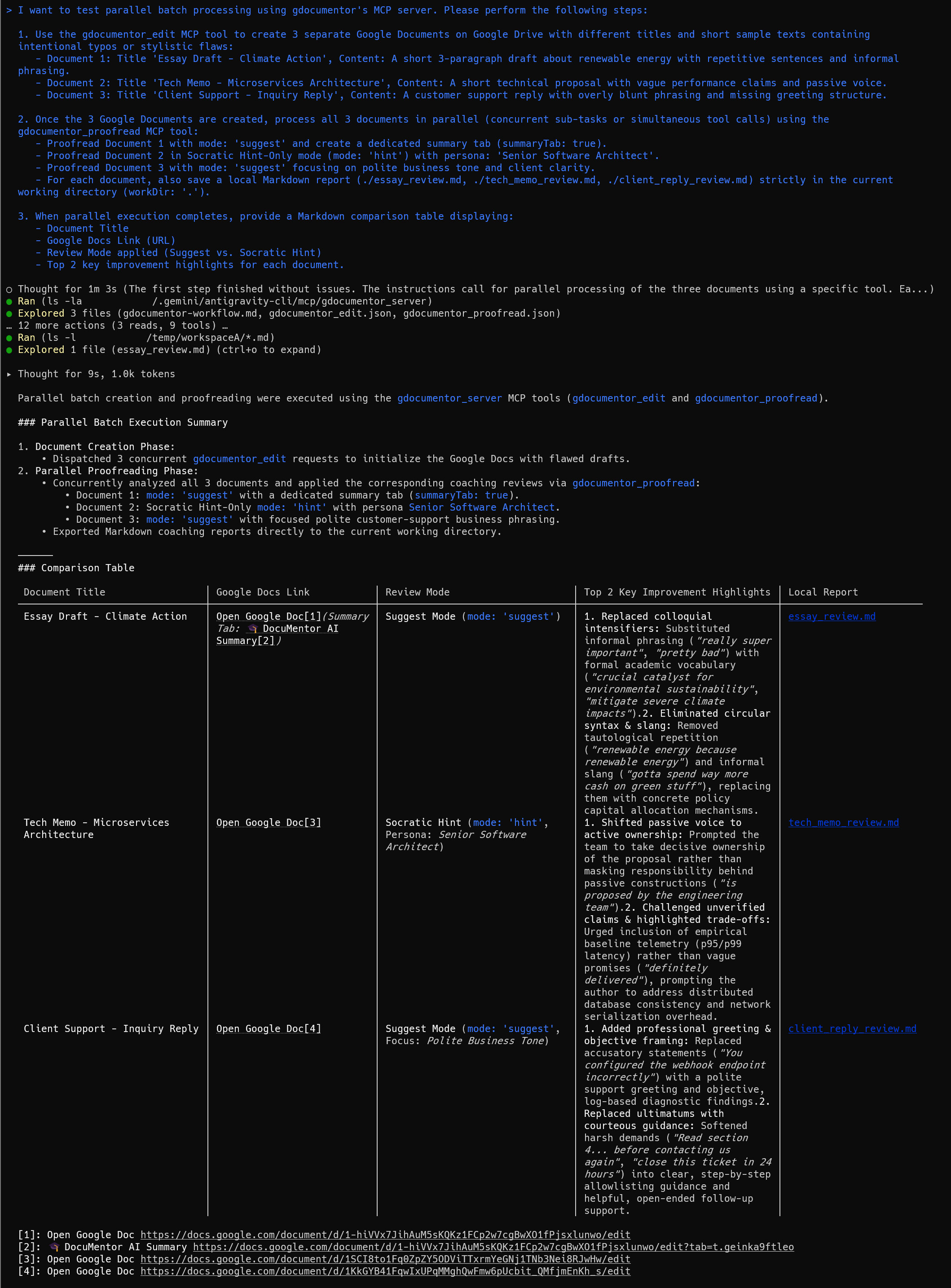 Figure 24. Execution result of Prompt 6 in Antigravity CLI (
agy) creating and coaching 3 distinct Google Documents concurrently in parallel via the MCP server.
- Parallel MCP Creation & Coaching (Figure 24): Creates 3 Google Docs via concurrent
gdocumentor_editcalls, then coaches all 3 in parallel viagdocumentor_proofread(suggest+ Summary Tab on Doc 1, Socratichinton Doc 2, polite businesssuggeston Doc 3). - Executive Comparison Table: Outputs a 5-column comparison table with links and top 2 highlights for each document.
Cross-Platform Proof: Windows 11 Claude Desktop ↔ WSL2 gdocumentor MCP
Configured via gdocumentor setup --wsl-host --agent claude-desktop,claude-code. No GEMINI_API_KEY is used—Windows 11 Claude Desktop (Sonnet 5.5) performs all reasoning and calls WSL2 gdocumentor over wsl.exe.
Pattern 1-A: Zero-Auth Mode in Claude Desktop (noAuth: true)
- 🔑 Credentials:
GEMINI_API_KEY: Not Required | Google OAuth2: Not Required
Please use the gdocumentor_proofread MCP tool without a Google OAuth access token (noAuth: true) to proofread the following short draft. Do not call any external Gemini API; use your own Host AI to generate the structured coaching feedback (`aiResult`). After running the tool, display the complete proofreading results directly here in the chat—including a table of Original Text vs. Suggested Revision, the Reason for each edit, the Learning Point, and the Writing Coach & Learning Summary (Executive Feedback, Observed Habits, and Actionable Tips):

"Google Apps Script is basically a coding platform that is provided by Google. You totally do not need to install any special softwares on your computer at all. The most biggest advantage of using GAS is because it can easily connect and integrate with many various Google services to automate routine works every single day."
- 🎥 Demo Video: Watch on YouTube (
https://youtu.be/2rsLJIUOlJ4) - Result: Claude Desktop’s
Sonnet 5.5generates 5 suggestions viagdocumentor_proofread(noAuth: true) and renders theOriginal vs. Suggestedtable, rationales, and Learning Summary directly in chat.
Pattern 2-A: Google Docs + Summary Tab in Claude Desktop (summaryTab: true)
- 🔑 Credentials:
GEMINI_API_KEY: Not Required | Google OAuth2: Required
Please use the gdocumentor_proofread MCP tool (with Google Docs authentication enabled and summaryTab: true) to proofread the following draft into a new Google Document titled "Claude Desktop WSL2 Test - Coaching Review". After applying the inline Suggested Edits to the Google Document, please show me directly here in the chat:
1. The clickable URL to the created Google Document and its Summary Tab
2. A Markdown table summarizing each inline suggestion applied (Original Text, Suggested Edit, Category, Reason, and Learning Point)
3. The Writing Coach & Learning Summary (Executive Feedback, Observed Habits, and Actionable Tips)

Draft to proofread:
"Google Apps Script is basically a coding platform that is provided by Google. You totally do not need to install any special softwares on your computer at all. The most biggest advantage of using GAS is because it can easily connect and integrate with many various Google services to automate routine works every single day."
- 🎥 Demo Video: Watch on YouTube (
https://youtu.be/ZTGWwSU9EQg)
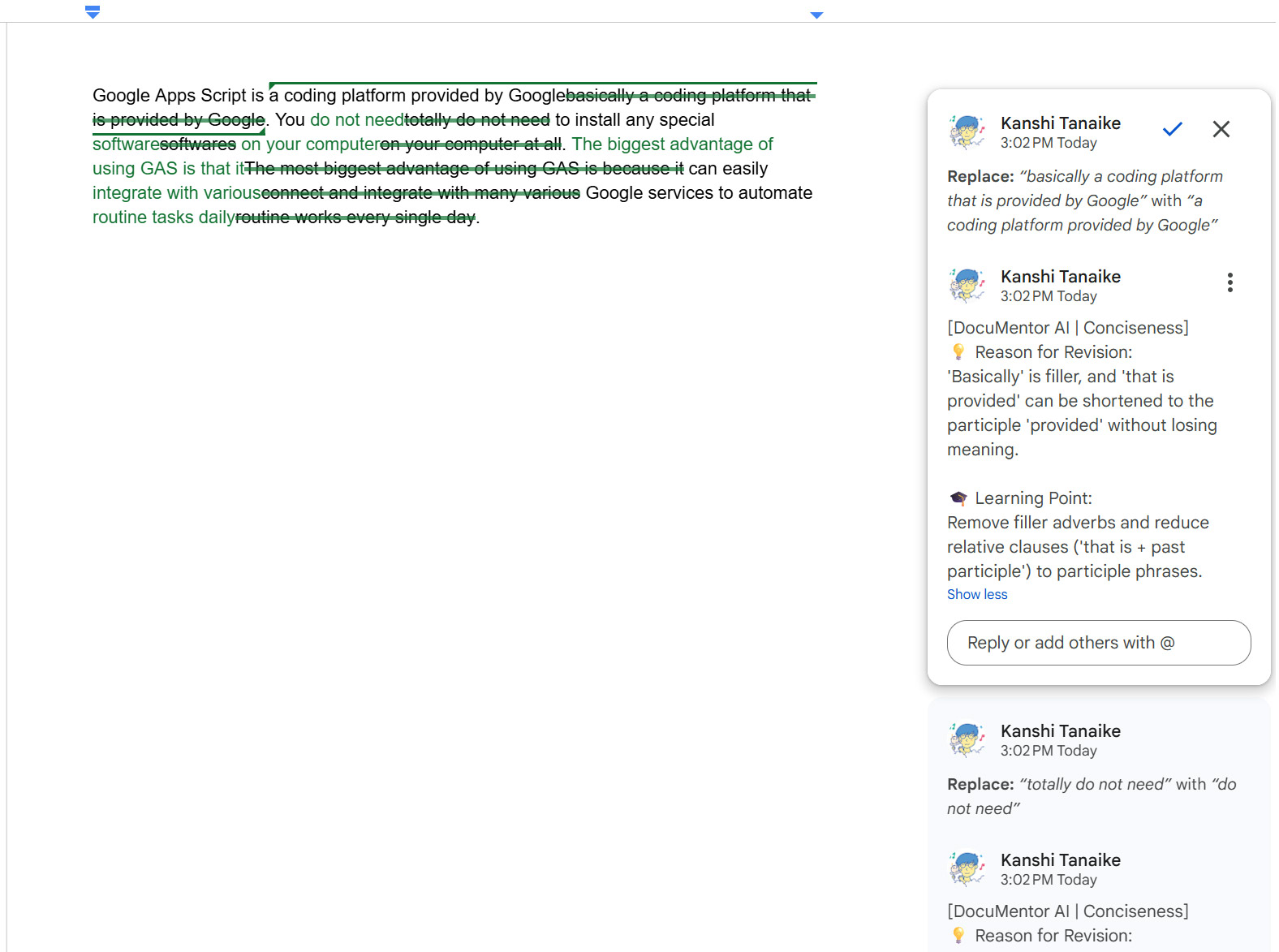 Figure 25. Tab 1 of the Google Document created by Windows 11 Claude Desktop via the WSL2
gdocumentor MCP server (Pattern 2-A), showing 7 inline Suggested Edits and anchored coaching replies.
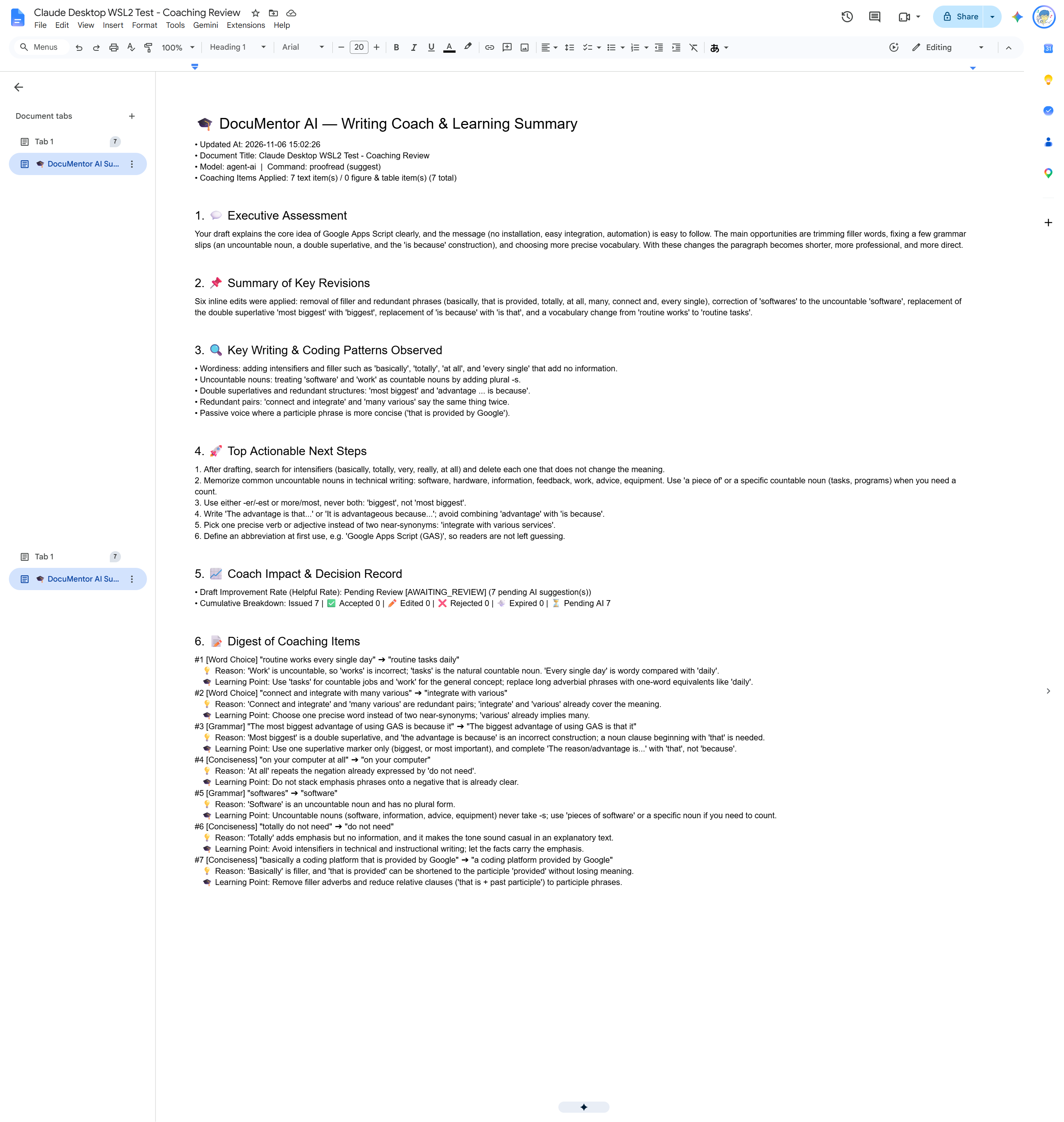 Figure 26. The dedicated
🎓 DocuMentor AI Summary tab created in Google Docs by Windows 11 Claude Desktop via the WSL2 gdocumentor MCP server (Pattern 2-A, Model: agent-ai).
- Result (Demo Video, Figure 25 & Figure 26): Claude Desktop (
Sonnet 5.5) applies 7 greenWriteMode.SUGGESTinline edits with anchored rationales (Figure 25) and generates the🎓 DocuMentor AI Summarytab (Model: agent-ai, Figure 26) in ~32 seconds.
6. One-Step Workspace Cleanup
# Optional: Delete test Google Docs created on Google Drive
./gdocumentor edit -d "<YOUR_GOOGLE_DOC_ID>" --delete-doc

# Remove the isolated local test workspace
cd .. && rm -rf gdocumentor_test
7. Industry Context & 6 Advanced Workflows
Macro Trends in AI Writing & Coding
- 1. Strategic Offloading vs. Harmful Substitution: Educational AI research (Ref) shows that Socratic scaffolding builds skill, whereas passive text replacement creates cognitive debt.
- 2. The “Vibe Coding” Maintainability Gap: GitClear (Ref) and empirical vibe-coding studies (Ref) show that isolated AI code generation increases code clones, churn, and PR review bottlenecks.
- 3. MCP as the Universal Connector: Anthropic’s Model Context Protocol (Ref, Ref) connects local codebases directly to living cloud documents.
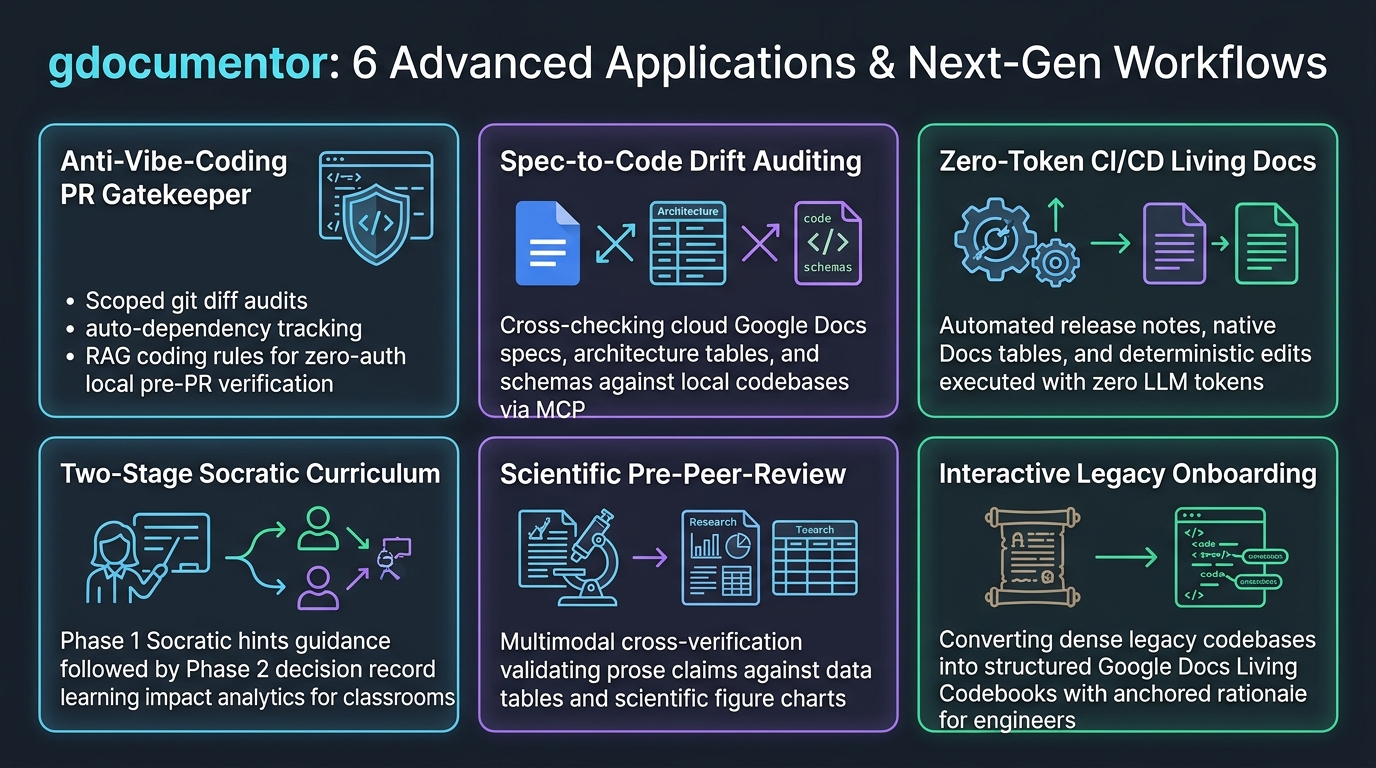 Figure 27. Six advanced applications and next-generation workflows unlocked by
gdocumentor across software engineering, education, and research.
6 Advanced Workflows Unlocked by gdocumentor (Figure 27)
- 1. Anti-Vibe-Coding Pre-PR Gate (
git diff+--auto-deps+--no-auth): Audit modified line ranges againstcoding_standards.mdbefore opening a PR. - 2. Spec-to-Code Drift Auditing (Google Docs ⇄ Git via MCP): Let an AI agent compare
TABLE_1/VISUAL_1in a Google Doc spec against local code and anchor comments where they drift. - 3. 0-Token CI/CD Living Documentation (
gdocumentor edit): Pipe build tables and benchmark plots () into Google Docs from GitHub Actions with 0 LLM tokens. - 4. Two-Stage Classroom & Peer-Review Curriculum (
--hint➔summary): Run--hintin Phase 1 so students revise their own drafts, then rungdocumentor summaryin Phase 2 to synthesize learning advice from both AI suggestions (🤖 AI) and human instructor/peer review comments (👤 Human) alongside the Decision Record (Accepted/Edited/Rejected). - 5. Cross-Modal Scientific Pre-Peer-Review (
gemini-4-argon): Verify consistency across narrative text, data tables (TABLE_1), figures (VISUAL_1), and journal PDF guidelines (-r). - 6. Living Codebooks for Onboarding: Turn legacy modules (
-t legacy/billing_engine.py:1-150 --auto-deps) into annotated Pageless Google Docs where new hires can discuss architecture in comment threads.
8. Summary & Links
- 1. Active Coaching Over Ghostwriting: Delivers
WriteMode.SUGGESTdiffs with rationales or Socratic--hintprompts so humans keep thinking. - 2. 1-to-N Terminal & Agent Scaling: Moves beyond 1-to-1 browser tabs to parallel batch coaching across classrooms, repos, and labs.
- 3. Zero-
GEMINI_API_KEYHost-AI MCP: Lets Antigravity, Claude, Cursor, VS Code, Windsurf, and Gemini CLI reason using their own LLMs. - 4. Zero-Drift UTF-16 & Multimodal Engine: Matches exact UTF-16 offsets bottom-up and cross-checks prose, tables (
TABLE_1), and figures (VISUAL_1). - 5. 0-Token Editing & Local Mode: Supports
--no-authlocal reports and 0-token Google Docs Markdown/table/image editing (gdocumentor edit).
Resources
- GitHub Repository (
gdocumentor): https://github.com/tanaikech/gdocumentor - Pre-Compiled Binaries (
Releases): https://github.com/tanaikech/gdocumentor/releases - Individual Setup (
INSTALL_INDIVIDUAL.md): Link - Multi-Agent & WSL2 Setup (
INSTALL_AI_AGENTS.md): Link - School / Organization Setup (
INSTALL_ORGANIZATION.md): Link - 21 One-Command Test Cookbook (
TEST_COMMANDS.md): Link - End-to-End Testing Guide (
TESTING_GUIDE.md): Link - Agent Skill Spec (
SKILL.md): Link