
Introduction
Over the past three years, I published a three-part series on automating semantic Gmail labeling with Google Apps Script (GAS) and the Gemini API:
- Part 1 (Dec 19, 2023): Flexible Labeling for Gmail using Gemini Pro API with Google Apps Script introduced prompt-based free-text classification mapped through a label dictionary (
labelObj). - Part 2 (Jan 30, 2024): Flexible Labeling for Gmail using Gemini Pro API with Google Apps Script Part 2 replaced free-text prompts with Semantic Search (Gemini Corpora) and Function Calling.
- Part 3 (Sep 19, 2024): Flexible Labeling for Gmail using Gemini API with Google Apps Script Part 3 adopted strict JSON Schema structured outputs (
responseMimeType: "application/json") with Flash-tier batching.
Each generation improved structural reliability, yet all three shared one underlying constraint: they relied on autoregressive text generation (generateContent) to emit classification tokens one by one. In November 2026, Google DeepMind introduced the Gemini Decisions API (POST https://generativelanguage.googleapis.com/v1beta/decisions, powered by gemini-decision-1). It evaluates structured questions in a single forward pass with zero output tokens and returns calibrated probabilities (0.01 to 0.99) alongside confidence scores.
In this article, I explain why the Decisions API fits Google Apps Script’s execution model and walk through three self-contained V8 GAS applications. I start with Flexible Labeling for Gmail (Part 4) and a controlled 4-method benchmark, move to a Gmail Model Cascade Router, and close with a 1,000-Item Parallel Compliance Audit in Google Sheets. Every latency, token, and accuracy measurement below comes from live Google Apps Script V8 runs.
1. Why Gemini Decisions API Fits Google Apps Script
As described on the official Google Apps Script site:
“Apps Script is the only low-code platform that makes it quick and easy to build business solutions that integrate, automate, and extend Google Workspace. With Apps Script, business users can build custom solutions on top of Google Workspace — no professional development experience required. Apps Script is available to anyone with a Gmail account.”
Because Google Apps Script has native affinity with Google Workspace, it is an exceptional platform for exercising fine-grained control over Gmail, Google Sheets, Google Drive, Docs, and Forms—whether through time-driven triggers, event triggers like onEdit and onFormSubmit, or custom spreadsheet functions. At the same time, GAS enforces a strict 6-minute (360-second) hard execution limit. When a script loops through hundreds of compliance rules or dozens of emails using autoregressive generateContent calls, token decoding latency and per-item network overhead accumulate quickly.
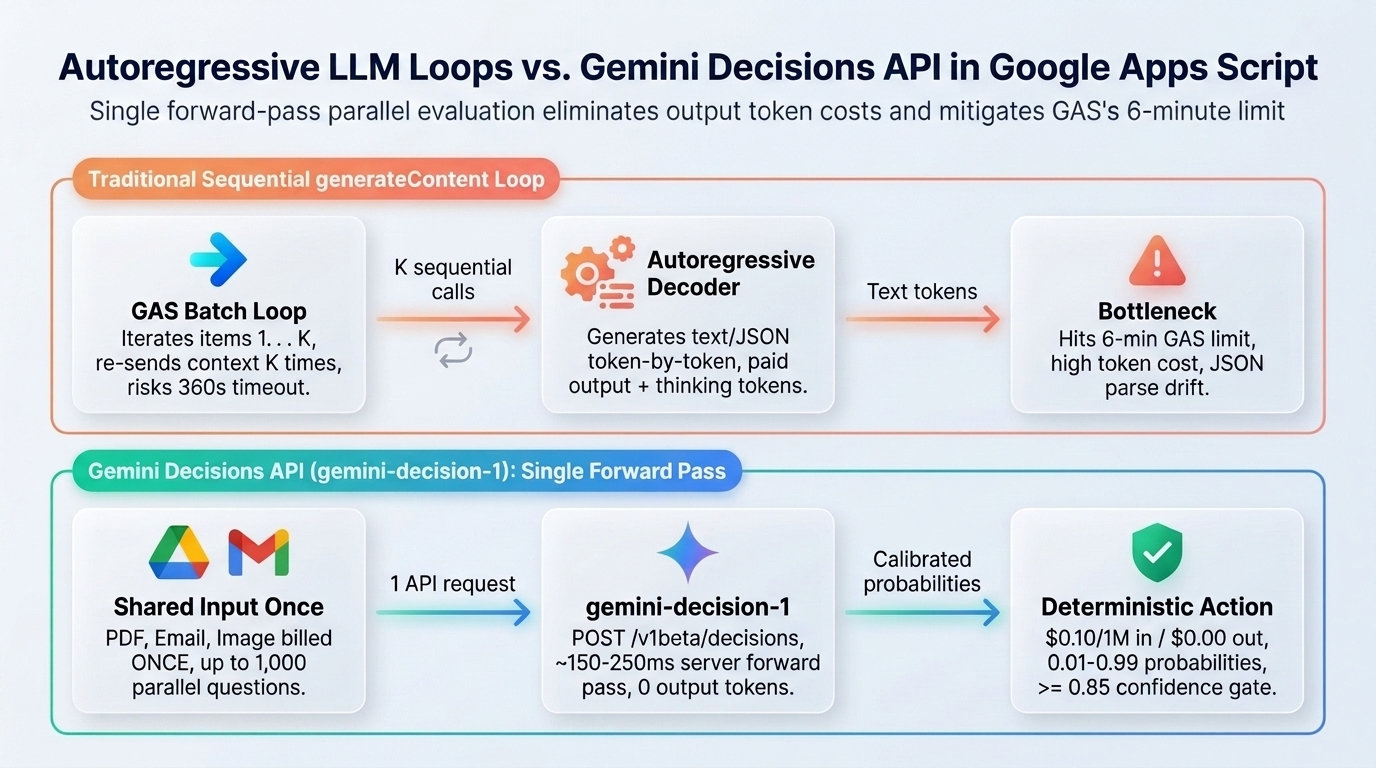 Figure 1: Comparison between sequential autoregressive
generateContent loops and single forward-pass parallel evaluation with gemini-decision-1 in Google Apps Script.
In practice, the Gemini Decisions API changes four design constraints inside GAS:
- Mitigating GAS’s 6-Minute Execution Limit: A single Decisions API request evaluates up to 1,000 independent questions against one shared multimodal input in one forward pass. Google’s official documentation reports server-side latencies of ~150–250 ms for standard contexts, and I measure full end-to-end GAS
UrlFetchApplatency directly in the benchmark below. - Zero Output Token Billing and Shared Input Reuse: Sending a Drive PDF or an email with attachments once as
inputincurs input token billing only once ($0.10 per 1M input tokens as of November 23, 2026), while evaluating up to 1,000 criteria generates strictly `0` output tokens ($0.00 output cost). - Calibrated Probabilities with Zero JSON Parse Failures: Instead of decoding text tokens into JSON and hoping the model expresses uncertainty accurately,
gemini-decision-1returns structured probability maps andconfidencescores across three typed question primitives:noul(Yes/No probability in0.01–0.99),choice(2–255 discrete classes), andscore(ordered rubric expected score). - Native Multimodal Ingestion: GAS can pass Drive PDFs and Gmail attachments directly as typed
documentandimageblocks without building OCR or pre-extraction pipelines.
2. Three Practical Applications Across Orthogonal Axes
To show where zero-output-token decisions outperform autoregressive generation—and where reasoning models remain essential—I built three standalone GAS applications along three distinct axes:
- Use Case 1 — Gmail Labeling Evolution & 4-Method Benchmark (Part 1 → Part 4): Multi-axis inbox classification (
choice,noul,score, plus aNeedsReviewsafety gate) paired with a controlled 4-method benchmark comparinggemini-3.8-flash(Methods 1–3) againstgemini-decision-1(Method 4). - Use Case 2 — Vertical Escalation (Model Cascade Router): Confidence-gated routing in Gmail that handles routine inquiries cheaply with
gemini-decision-1and escalates only complex or uncertain threads togemini-4-hydrogen(thinkingLevel: "HIGH") for deep reasoning and reply drafting. - Use Case 3 — Horizontal Scale (1 Input × 1,000 Criteria): Shared-input parallel compliance auditing of a Drive PDF against up to 1,000 checklist criteria in Google Sheets.
Repository & File Layout: All scripts are published in https://github.com/tanaikech/gemini-decisions-api-gas. The source filenames (
src/usecase3_gmail_flexible_labeling.js,src/usecase3_gmail_benchmark.js,src/usecase2_gmail_cascade_router.js, andsrc/usecase1_compliance_audit.js) keep their original file numbering; this article orders them from Gmail labeling evolution to horizontal Sheets scale.
All six .js files in src/ (including the production operations runner src/production_runners.js) are V8-compatible and designed to coexist inside a single GAS project without namespace collisions. Each application exposes both a single one-shot test function (with pre-flight checks, a 4.5-minute safety timeout, automatic Drive log export, and full cleanup) and a production-ready runner for day-to-day Workspace automation.
3. Shared Core Client (src/decisions_client.js)
The shared client centralizes UrlFetchApp.fetch calls and passes GEMINI_API_KEY strictly via the x-goog-api-key header, never in query URLs. It also handles bounded exponential backoff on HTTP 429/5xx, normalizes response field names, and enforces a 35 MB raw-byte inline limit so Base64 expansion stays safely below UrlFetchApp’s 50 MB body cap.
function callGeminiDecisionsApi_(sharedInput, questions, modelOverride) {
  const payload = {
    model: modelOverride || GEMINI_DECISIONS_CONFIG.MODEL_DECISION,
    input: sharedInput,
    questions: questions,
  };
  const res = postGeminiJsonWithRetry_(
    GEMINI_DECISIONS_CONFIG.DECISIONS_ENDPOINT,
    payload,
  );
  const rawAnswers = res.body.answers || res.body.decisions || {};
  const normalizedAnswers = {};
  Object.keys(questions).forEach(function (qId) {
    normalizedAnswers[qId] = normalizeDecisionAnswer_(rawAnswers[qId]);
  });
  return {
    answers: normalizedAnswers,
    usage: {
      inputTokens: res.body.usage ? res.body.usage.totalInputTokens : null,
      outputTokens: 0,
      thinkingTokens: 0,
    },
    apiLatencyMs: res.apiLatencyMs,
    retries: res.retries,
  };
}
The complete client—including multimodal input builders, MIME whitelisting, generateContent wrappers with explicit thinkingLevel control, and Gmail/Drive cleanup helpers—is available in src/decisions_client.js.
4. Use Case 1: Flexible Labeling for Gmail (Part 4) & 4-Method Benchmark
I start by picking up directly from my three prior Gmail labeling articles (Part 1, Part 2, and Part 3), which focused on multi-axis inbox classification in Google Apps Script (src/usecase3_gmail_flexible_labeling.js and src/usecase3_gmail_benchmark.js).
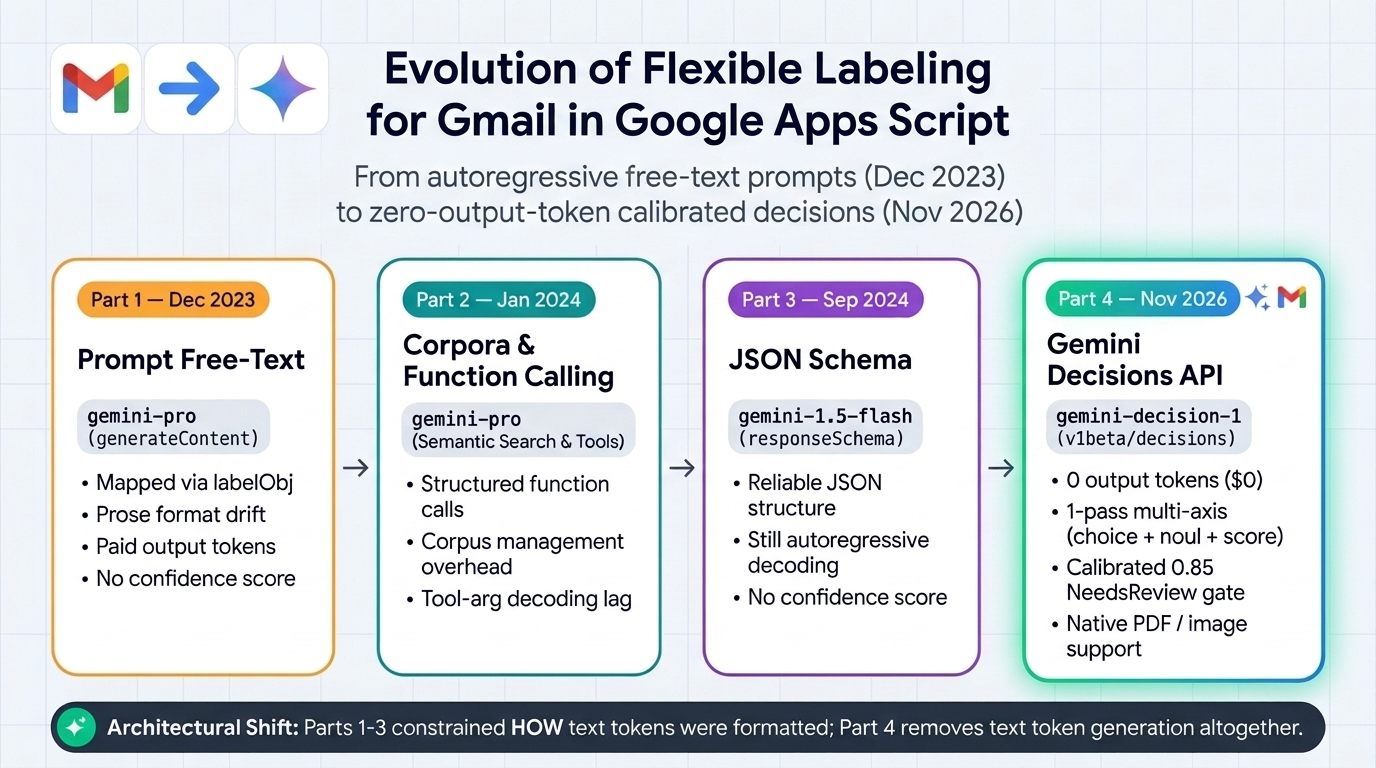 Figure 2: Architectural progression across Part 1 (Prompt Free-Text), Part 2 (Semantic Search / Function Calling), Part 3 (JSON Schema), and Part 4 (Gemini Decisions API).
Figure 2 and Table 1 summarize the structural shift across the four generations. Parts 1 through 3 progressively constrained how autoregressive text tokens were formatted; Part 4 removes text token generation altogether while adding native calibrated confidence gating (NeedsReview when confidence < 0.85).
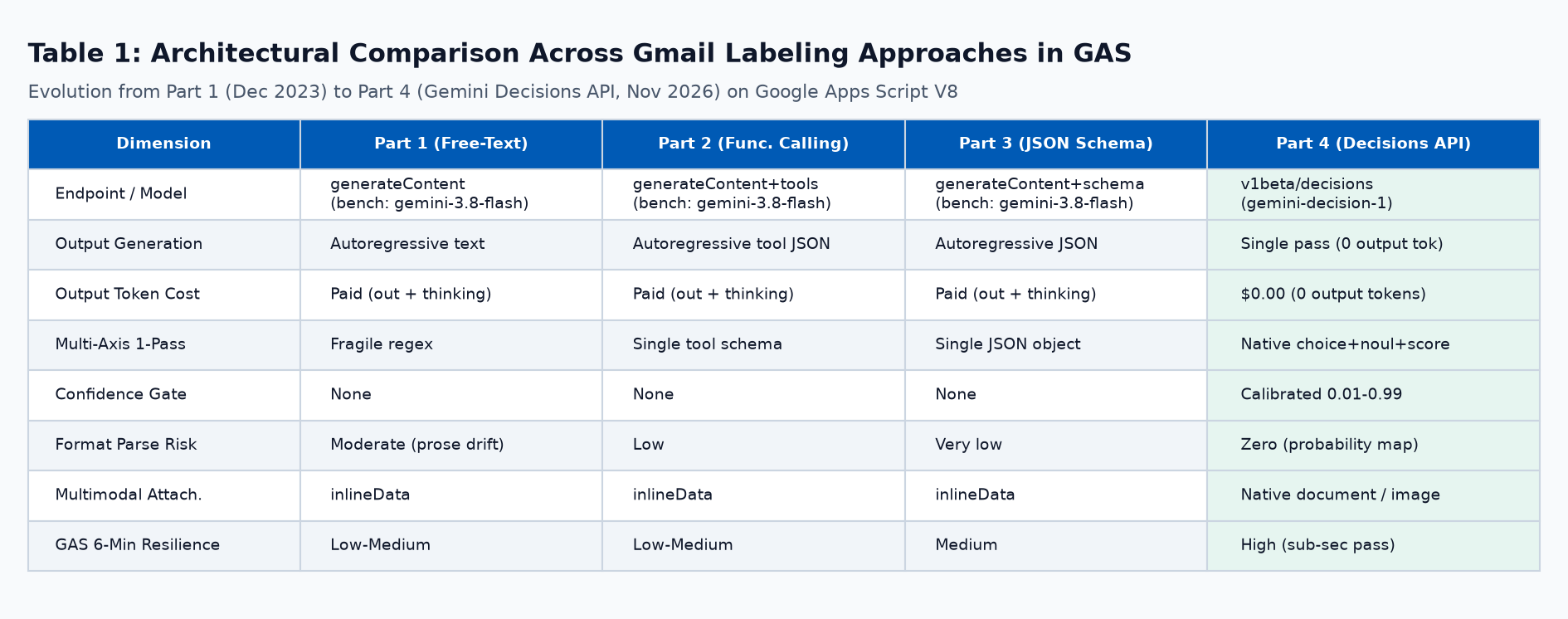 Table 1: Architectural comparison across Part 1 through Part 4 Gmail labeling implementations in Google Apps Script.
In src/usecase3_gmail_flexible_labeling.js, uc3ClassifyEmailWithDecisions_() evaluates primary category (choice), independent boolean flags (is_action_required, is_urgent via noul), and priority (score) in one pass. The production trigger entry point labelGmailWithDecisions() caches GmailLabel objects in a per-run Map to minimize Gmail API overhead.
Controlled 4-Method Benchmark Design (src/usecase3_gmail_benchmark.js)
What this benchmark tests: Given the exact same 6 incoming Gmail emails (including a PDF invoice attachment and an intentionally ambiguous message), all four GAS labeling approaches—Part 1 Free-Text, Part 2 Function Calling, and Part 3 JSON Schema on gemini-3.8-flash vs. Part 4 Decisions API on gemini-decision-1—are asked to predict the exact same three outputs for every email: a primary category (Academic, Finance, Advertisement, Support, or Other), two boolean flags (ActionRequired, Urgent), and a 1–5 priority score. The goal is to measure whether switching from autoregressive text/JSON generation to Decisions API reduces latency and token cost without sacrificing accuracy, and whether calibrated confidence catches ambiguous emails before applying a wrong label.
To keep the comparison fair inside GAS without deprecated models or execution-order bias, testUseCase3GmailBenchmark() applies six experimental controls illustrated in Figure 3:
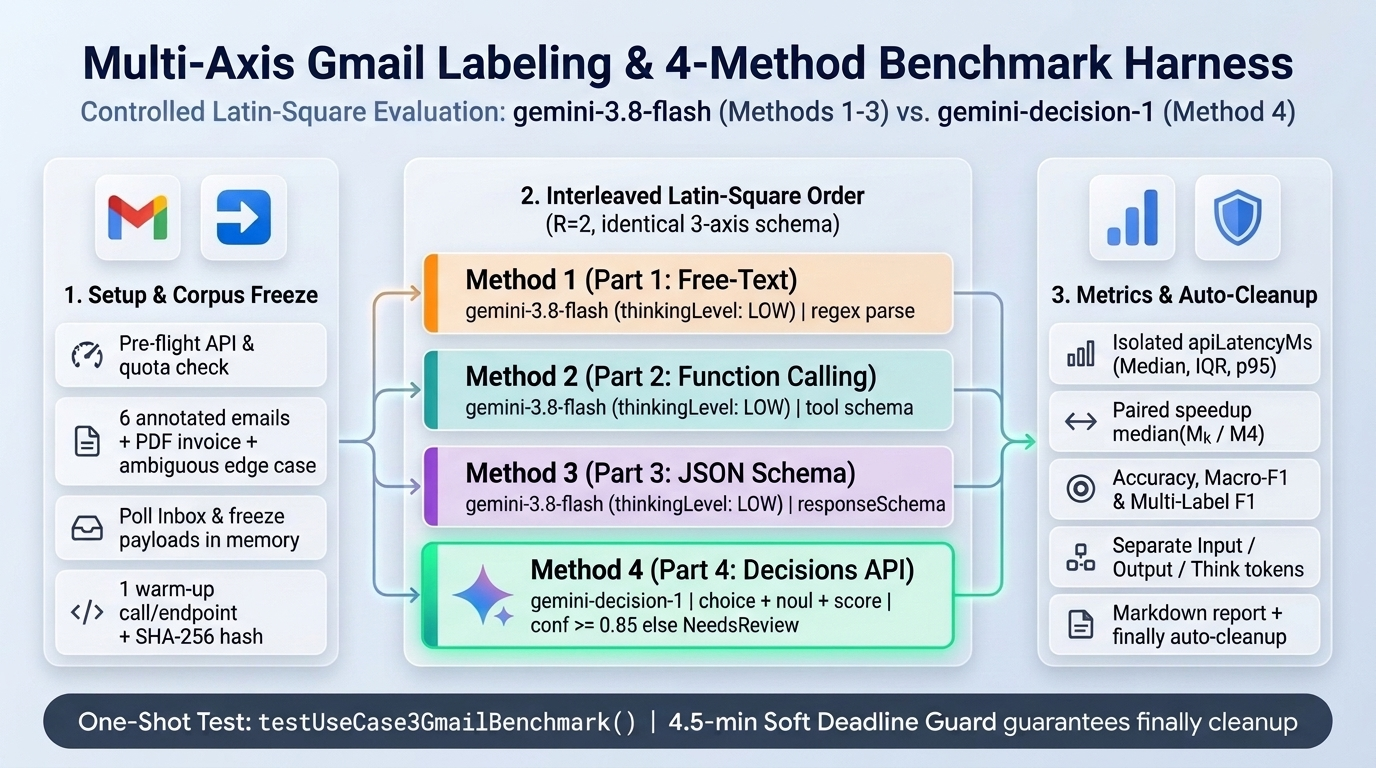 Figure 3: One-shot Latin-square benchmark harness in
src/usecase3_gmail_benchmark.js measuring isolated API latency, accuracy, Macro-F1, and token cost across all four methods.
- Identical 3-Axis Schema and Multimodal Payload: All four methods evaluate the exact same 6 labeled test emails—Academic, Finance, Advertisement, Support, a Finance email with a PDF invoice attachment, and an intentionally ambiguous edge case—pre-loaded in memory before timing starts.
- Why
gemini-3.8-flash(thinkingLevel: "LOW") for Methods 1–3: The original Parts 1–3 articles used older models (gemini-proandgemini-1.5-flash) that have since been deprecated. Standardizing Methods 1–3 ongemini-3.8-flash—the current fast, cost-efficient Flash-tier model developers naturally choose for high-frequency GAS classification rather than a heavier reasoning model likegemini-4-hydrogen—keeps the benchmark reproducible and isolates architectural differences from model-generation differences. Because bothgemini-3.8-flashandgemini-4-hydrogenrejectthinkingLevel: "MINIMAL"andthinkingBudget: 0with HTTP 400 (defaulting toMEDIUM/HIGHthinking), Methods 1–3 explicitly setthinkingLevel: "LOW"andtemperature: 0.0, logging thinking tokens alongside output tokens. - Warm-Up and Latin-Square Interleaving: One discarded warm-up call per endpoint eliminates cold-start DNS/TLS bias, and interleaved Latin-square rotation (
[M1,M2,M3,M4],[M2,M3,M4,M1], …) across 2 repeats (48 timed trials total) removes execution-order drift. - Isolated API Timing: Timing wraps only
UrlFetchApp.fetch(), keeping API latency cleanly separated from response parsing and post-benchmark live Gmail label application. - Direct Production Reuse: Method 4 invokes
uc3ClassifyEmailWithDecisions_()directly fromsrc/usecase3_gmail_flexible_labeling.js. - Reproducible Logging & Auto-Cleanup: The script logs run metadata (UTC timestamp, model IDs,
thinkingLevel, pricing reference date) alongside a formatted Markdown summary table to Google Drive, then removes all temporary threads and nested labels infinally.
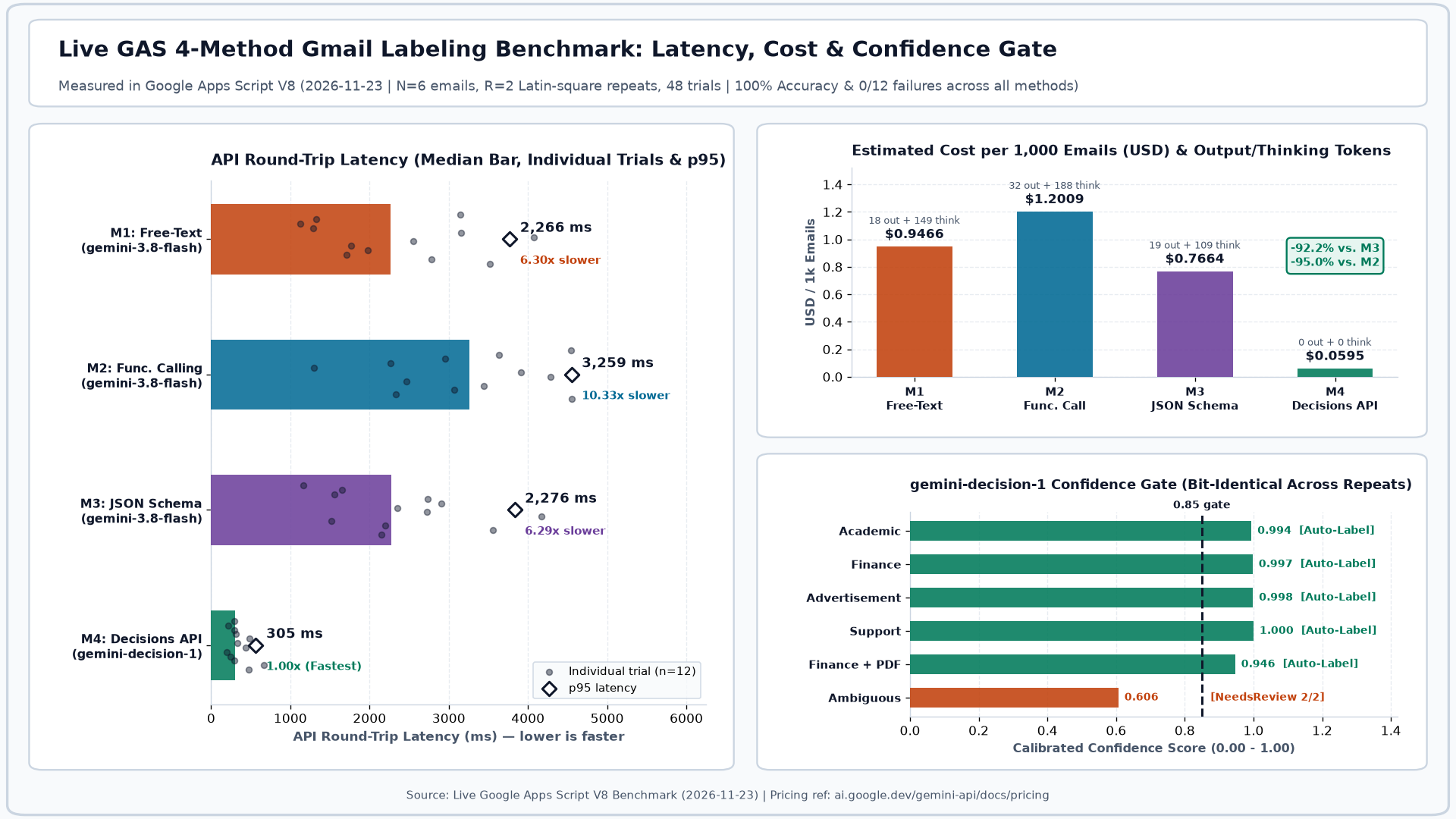 Figure 4: Empirical latency distribution (left), estimated cost per 1,000 emails with output/thinking token counts (top right), and
gemini-decision-1 calibrated confidence gate across all 6 emails (bottom right), measured across 48 live GAS V8 trials.
Figure 4 reads across three complementary panels: the left panel plots median API latency bars overlaid with all 12 individual trial points and p95 diamond markers; the top-right panel compares estimated cost per 1,000 emails alongside average output and thinking token counts; and the bottom-right panel shows gemini-decision-1’s calibrated confidence for each test email against the dashed 0.85 auto-label threshold.
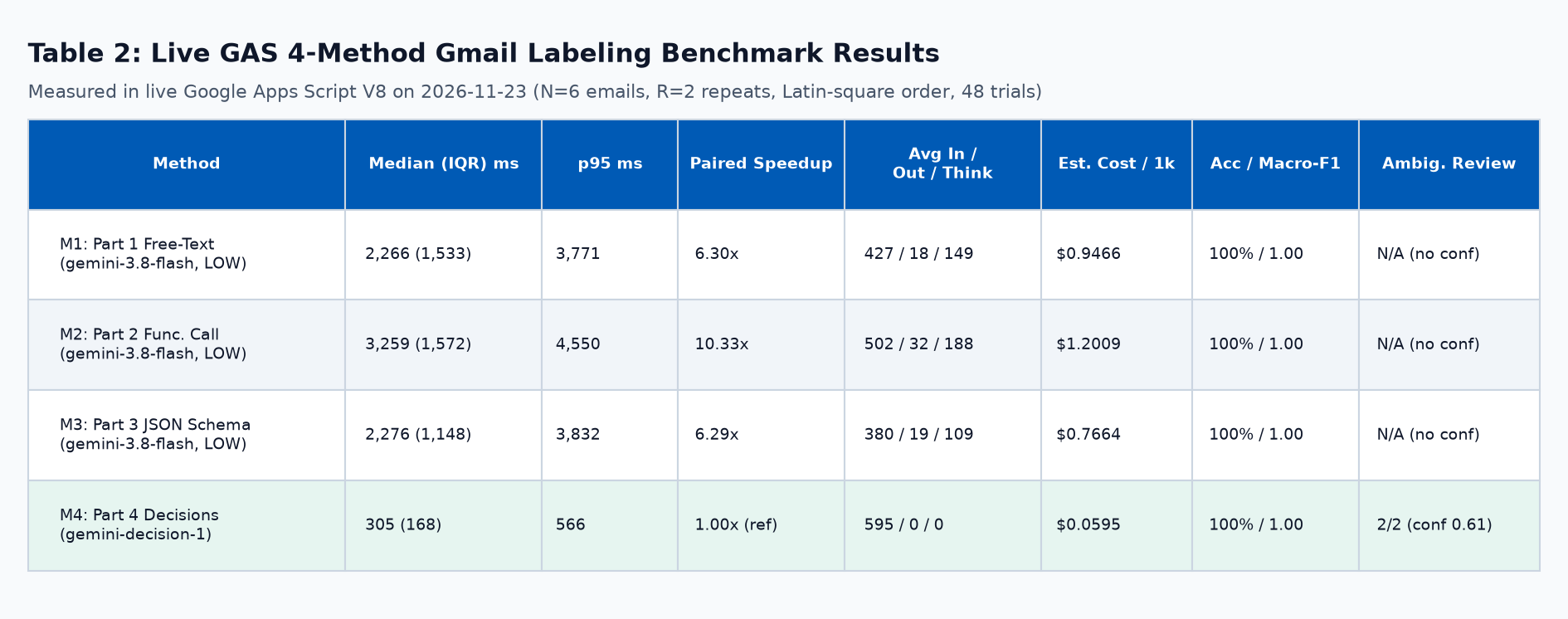 Table 2: Live GAS V8 benchmark results measured via
testUseCase3GmailBenchmark() (N = 6, R = 2, measured on November 23, 2026).
Key Empirical Findings from Live GAS Execution
The live Latin-square benchmark across 48 API calls (measured on November 23, 2026; post-benchmark live Gmail label application total: 3,750 ms across 6 threads) revealed four concrete takeaways:
- 6.29x to 10.33x Faster Paired Latency: At a median GAS
UrlFetchApplatency of 305 ms (IQR 168 ms, p95 566 ms),gemini-decision-1outperformedgemini-3.8-flash(thinkingLevel: "LOW") by 6.29x over JSON Schema (2,276 ms), 6.30x over Free-Text (2,266 ms), and 10.33x over Function Calling (3,259 ms). All four methods achieved identical 100.0% Category Accuracy, 1.00 Macro-F1, 1.00 Multi-Label F1, and 0/12 parse/HTTP failures. - 92.2% to 95.0% Lower Cost per 1,000 Emails: Although Decisions API used slightly more average input tokens per call (595 vs. 380–502) due to typed question definitions, its $0.10 / 1M input rate** and strictly **0 output and 0 thinking tokens** drove estimated cost down to **$0.0595 / 1,000 emails. That is 12.9x cheaper than JSON Schema ($0.7664), 15.9x cheaper than Free-Text ($0.9466), and 20.2x cheaper than Function Calling ($1.2009).
- Calibrated Safety Gate Prevented Silent Mislabeling: On the intentionally ambiguous email, all four methods predicted
Academicinstead ofOther. Methods 1–3 had no uncertainty signal and silently applied the wrong label, whereasgemini-decision-1returnedconfidence = 0.6064(compared with0.9462–0.9996on the five clear emails, including the attached PDF invoice) and routed 2/2 trials safely toNeedsReview. - Deterministic Probability Reproducibility: Across both Latin-square repeats,
gemini-decision-1returned bit-identical confidence scores on every email (0.9936for Academic,0.9462for Finance + PDF,0.6064for Ambiguous). By contrast,gemini-3.8-flashvaried in thinking token length and latency across repeats even attemperature = 0.0.
5. Use Case 2: Gmail Trigger-Driven Model Cascade Router
While Use Case 1 focuses on multi-axis inbox labeling, real support and operations pipelines must also decide when to invoke a heavyweight reasoning model to draft a substantive reply. Not every incoming email warrants frontier reasoning latency and cost, yet complex outages or legal disputes cannot be answered with static templates. Use Case 2 implements a two-stage model cascade in src/usecase2_gmail_cascade_router.js.
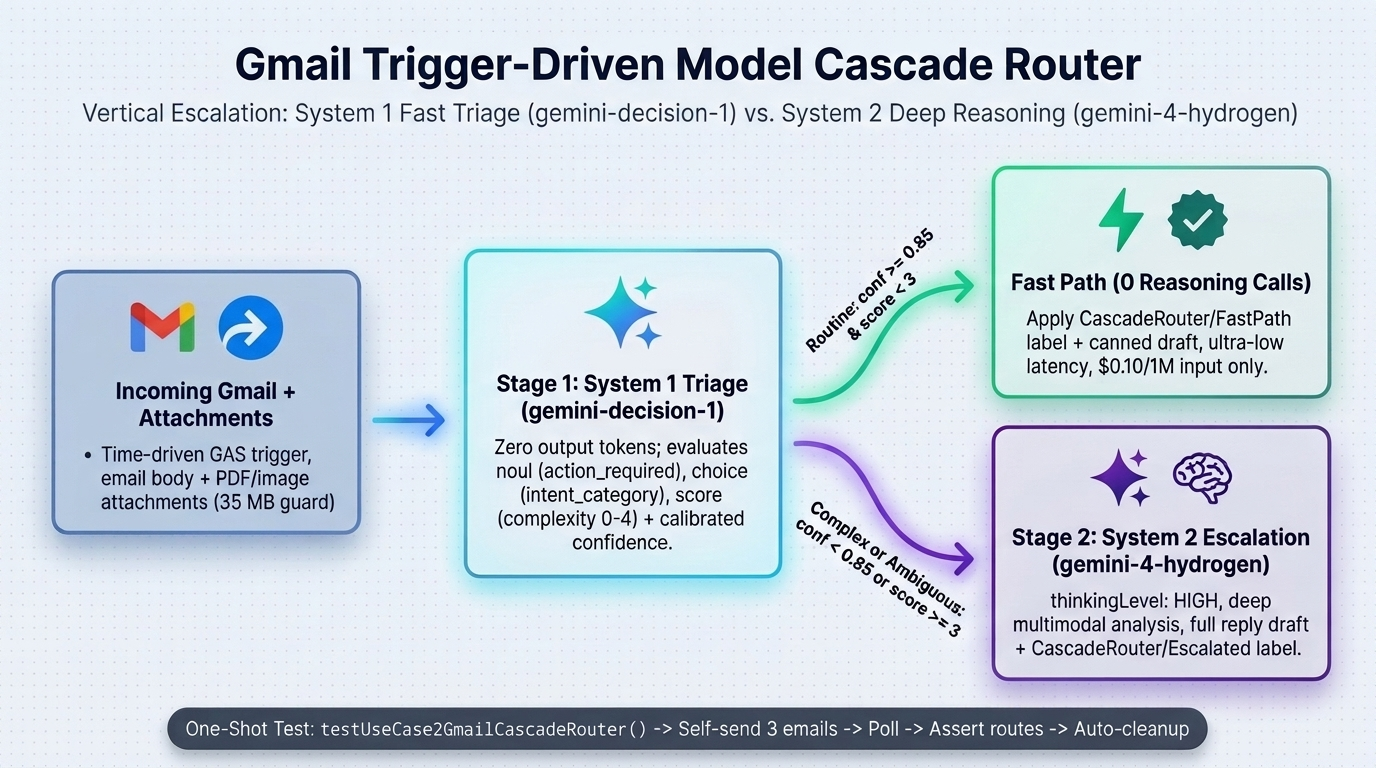 Figure 5: Vertical escalation workflow routing routine Gmail threads through
gemini-decision-1 (Fast Path) and cascading complex or low-confidence threads to gemini-4-hydrogen.
Stage 1 evaluates each incoming Gmail thread—including whitelisted PDF or image attachments—with gemini-decision-1 across three questions: is_action_required (noul), intent_category (choice across routine_inquiry, billing, technical_escalation, and informational), and complexity_risk (score on a 0–4 rubric). A simple threshold rule (confidence < 0.85 or complexity >= 3) decides whether to escalate:
const shouldEscalate =
  confidence < UC2_CONFIDENCE_THRESHOLD ||
  complexityScore >= UC2_COMPLEXITY_CASCADE_THRESHOLD;

if (shouldEscalate) {
  const escRes = uc2CallReasoningEscalation_(emailText, attachments, {
    category: category,
    confidence: confidence,
    complexityScore: complexityScore,
  });
  thread.addLabel(escalatedLabel);
  createdDrafts.push(thread.createDraftReply(escRes.draftBody));
} else {
  thread.addLabel(fastLabel);
}
When shouldEscalate is true, Stage 2 invokes gemini-4-hydrogen with thinkingConfig: { thinkingLevel: "HIGH" } to draft a detailed reply (with an optional fallback to gemini-3.8-flash).
Live GAS Validation & Cascade Results (testUseCase2GmailCascadeRouter())
What this validation tests: Unlike Use Case 1’s head-to-head model comparison, Use Case 2 verifies whether a two-stage cascade router inside Gmail can reliably separate routine inquiries from ambiguous or high-risk threads—handling routine mail cheaply with gemini-decision-1 alone while escalating only the hard cases to gemini-4-hydrogen for full reply drafting. Specifically, it measures (1) routing accuracy (does every email take the intended path?) and (2) latency savings (how much time is saved on routine mail by skipping Stage 2 reasoning?).
To validate both branches without preparing sample emails manually, testUseCase2GmailCascadeRouter() generates a real PDF attachment (incident_409.pdf, reporting an EU-West HTTP 500 API outage with a $42,000 billing dispute and SLA penalty clause) and sends 3 fixed test emails to your own Gmail Inbox:
- Routine Inquiry (Fast Path): Subject
"Password reset link question", a brief plain-text question asking where to reset an account password, with no attachments. - Ambiguous Follow-Up (Escalated): Subject
"Re: Following up on our discussion", an intentionally underspecified message asking to confirm “the revised terms and technical workaround before Friday” with no prior context or attachments. - Complex Outage + PDF (Escalated): Subject
"URGENT: Production outage + $42k billing SLA dispute", reporting a 3-hour production outage with the legal SLA and billing dispute report (incident_409.pdf) attached.
After polling Inbox until all 3 emails arrive (excluded from API timing), runGmailCascadeRouter() runs Stage 1 triage on each thread and escalates qualifying threads to Stage 2 gemini-4-hydrogen (thinkingLevel: "HIGH") to generate a Gmail reply draft. It then verifies all 3 routing outcomes, saves the log to Google Drive (GeminiDecisionsTestLogs/), and deletes all temporary drafts, threads, and nested labels in finally.
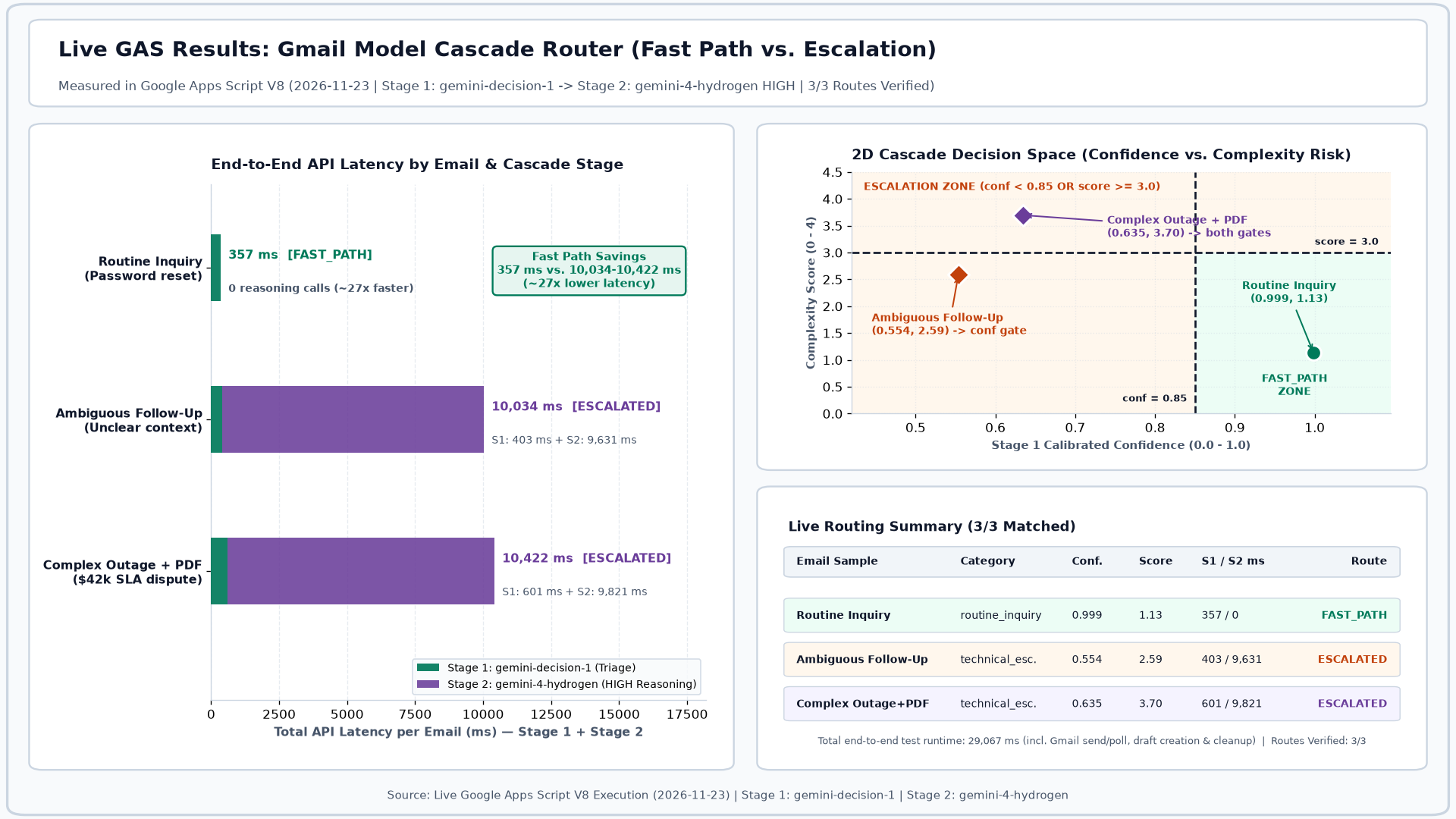 Figure 6: Empirical Stage 1 vs. Stage 2 API latency (left), 2D confidence-complexity decision plane with
conf = 0.85 and score = 3.0 gates (top right), and live routing summary across all three GAS V8 test emails (bottom right).
In the live GAS V8 run, all 3/3 routing checks passed. The three panels in Figure 6 highlight the measured trade-offs:
- Fast Path vs. Escalated Latency (Left Panel): Decomposes total API latency per email into Stage 1
gemini-decision-1triage (green) and Stage 2gemini-4-hydrogendeep reasoning (purple). Routine Inquiry finished on the Fast Path in 357 ms with 0 reasoning calls, whereas Ambiguous Follow-Up took 10,034 ms (403 ms+9,631 ms) and Complex Outage + PDF took 10,422 ms (601 ms+9,821 ms)—roughly 27x lower latency on routine traffic. - 2D Confidence–Complexity Plane (Top-Right Panel): Plots Stage 1 calibrated
confidence(x-axis, gate at0.85) againstcomplexityScore(y-axis, gate at3.0). Only the green lower-right quadrant (conf >= 0.85andscore < 3.0) permitsFAST_PATH. Routine Inquiry (0.999,1.13) lands squarely inside the green zone; Ambiguous Follow-Up (0.554,2.59) is caught by the confidence gate despitescore < 3.0; and Complex Outage + PDF (0.635,3.70) triggers both gates. - Live Routing Summary (Bottom-Right Panel): Lists each email’s predicted category (
routine_inquiryvs.technical_escalation), confidence, complexity score, Stage 1 / Stage 2 latencies, final route (FAST_PATHvs.ESCALATED), and total end-to-end test runtime (29,067 ms including Gmail delivery polling, draft creation, and cleanup).
Key Empirical Findings from Live GAS Execution
- ~27x Faster Routine Triage Without Wasting Reasoning Tokens: Routine inquiries resolve on the Fast Path in 357 ms with zero calls to
gemini-4-hydrogen, reserving the ~9.6–9.8 s deep-reasoning budget exclusively for threads that genuinely require substantive reply synthesis. - Dual-Axis Gating Catches Ambiguity That Complexity Scores Alone Miss: Relying solely on a complexity rubric (
score >= 3.0) would have sent the underspecified follow-up (score = 2.59) down the Fast Path; pairing it withgemini-decision-1’s calibratedconfidence < 0.85gate (0.554) ensured 3/3 accurate routing decisions. - Sub-Second Multimodal Screening Inside GAS: Even with an attached PDF outage and SLA dispute report (
incident_409.pdf), Stage 1 triage completed in 601 ms without OCR or text-extraction preprocessing, keeping scheduled Gmail cascade runs comfortably within GAS’s 6-minute execution limit.
6. Use Case 3: 1,000-Item Parallel Compliance Audit on Google Sheets
Use Cases 1 and 2 operate on Gmail threads. Use Case 3 shifts to Google Sheets to demonstrate horizontal scale (1 shared multimodal input × up to 1,000 criteria) in src/usecase1_compliance_audit.js. When auditing a corporate security policy or vendor contract PDF against hundreds of checklist rules, calling a chat model once per row re-sends the entire document hundreds of times.
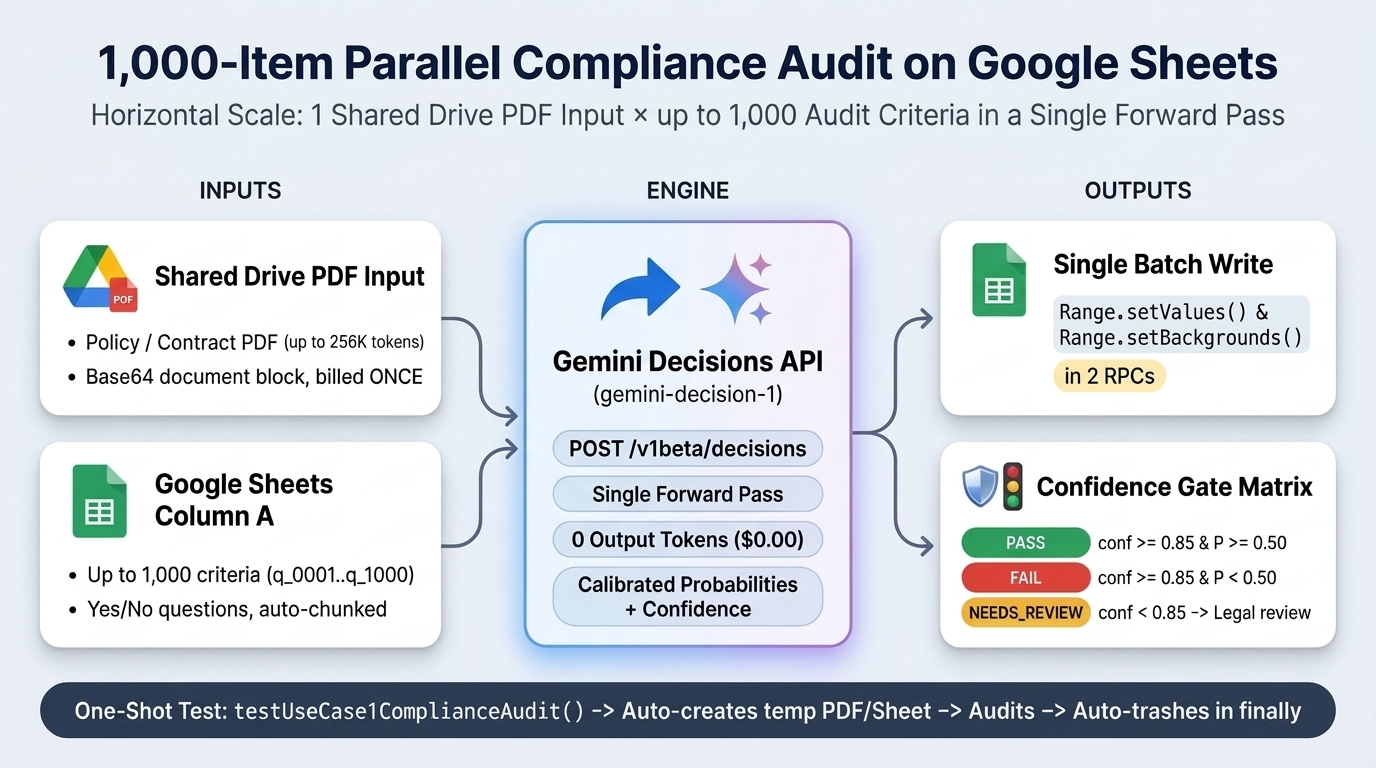 Figure 7: Horizontal scale workflow in
src/usecase1_compliance_audit.js evaluating up to 1,000 criteria against one shared Drive PDF input per batch.
How Google Sheets, Google Drive, and Gemini Decisions API Work Together
In this workflow, Google Sheets acts as both the checklist input table and the color-coded audit report, while Google Drive stores the target PDF (such as a security policy or vendor contract). Row 1 holds four headers (Audit Criterion, P(Compliant), Confidence, Verdict), you list one yes/no compliance question per row in Column A (A2:A), and runComplianceAudit(fileId, spreadsheetId, sheetName) executes four concrete steps inside GAS:
- 1. Read Checklist Criteria from Google Sheets:
SpreadsheetApp.openById()reads all non-empty rows from Column A (A2:A) in a singlegetValues()call while keeping track of exact row offsets. - 2. Load the Target PDF Once from Google Drive:
DriveApp.getFileById(fileId)retrieves the PDF blob, checks its MIME type and the 35 MB inline guard, and Base64-encodes the document once as a sharedinputblock (document). - 3. Evaluate All Rows in One Decisions API Call: GAS maps every row in Column A to a
noulquestion (q_0001–q_1000, automatically chunking sheets with more than 1,000 rows) and sends the single shared PDF plus all questions together viaUrlFetchApp.fetch()togemini-decision-1. - 4. Batch Write Verdicts & Highlights Back to Columns B–D: GAS applies the
0.85confidence gate (PASSin green,FAILin red,NEEDS_REVIEWin yellow) and fillsP(Compliant)(Column B),Confidence(Column C), andVerdict(Column D) in just two batched RPCs (setValuesandsetBackgrounds).
// 1. Map Column A criteria to noul questions (up to 1,000 per batch)
chunk.forEach(function (entry, idx) {
  const qKey = "q_" + String(sliceStart + idx + 1).padStart(4, "0");
  questions[qKey] = {
    type: "noul",
    instructions:
      "Does the document explicitly satisfy this compliance requirement? " +
      "Criterion: " +
      entry.text,
  };
});

// 2. Send 1 shared Drive PDF + all questions in one forward pass
const response = callGeminiDecisionsApi_(sharedInput, questions);

// 3. Batch-write Columns B–D (P(Compliant), Confidence, Verdict) & row colors
const outRange = sheet.getRange(2, 2, valuesMatrix.length, 3);
outRange.setValues(valuesMatrix);
outRange.setBackgrounds(bgMatrix);
How to Run This in Your Own Google Sheet
You can execute this audit in two practical ways using src/production_runners.js:
- Interactive Custom Menu in Google Sheets (Recommended): Open any Google Spreadsheet, click Extensions > Apps Script, paste the project files, and reload the Sheet.
onOpen()adds a Gemini Decisions menu: click Initialize Audit Sheet Headers to format Row 1, enter your audit questions in Column A (Row 2+), then click Run Compliance Audit on Active Sheet… and paste a Google Drive PDF URL or File ID. Columns B–D populate automatically within seconds. - Standalone / Automated Batch Execution: Set
AUDIT_PDF_FILE_IDandAUDIT_SPREADSHEET_ID(plus optionalAUDIT_SHEET_NAME) in Script Properties and runrunProductionComplianceAudit()from the GAS editor or a time-driven trigger—or callrunComplianceAudit(fileId, spreadsheetId, sheetName)directly from another script.
Live GAS Validation & Audit Results (testUseCase1ComplianceAudit())
What this test does: Suppose you have one security policy PDF in Google Drive and a Google Sheet listing 25 checklist items (such as “Does the policy require AES-256 encryption?” or “Does it offer HIPAA BAA compliance?”). With a normal chat LLM, checking each row separately means uploading the same PDF 25 times. Here, runComplianceAudit() sends the PDF once together with all 25 questions in a single Decisions API request, then writes every PASS, FAIL, or NEEDS_REVIEW result back to the Sheet. This test checks three practical things: how many input tokens are saved by sending the PDF once instead of 25 times, how fast the API call and Sheet update complete, and whether clear items are judged accurately while ambiguous items are flagged NEEDS_REVIEW for human review.
To verify this workflow without preparing external files beforehand, testUseCase1ComplianceAudit() generates a sample policy PDF and a checklist Sheet automatically:
- Input Document (11-Clause Sample Policy PDF): Created natively in GAS via
Utilities.newBlob(...).getAs('application/pdf')as “Acme Cloud Services — Master Data Processing & Security Policy (v2.4)”. It explicitly documents concrete controls such as TLS 1.3 in transit, AES-256 at rest, 48-hour PII breach notification, 90-day log purge, RBAC with hardware MFA, 30-day subprocessor notice, multi-region daily backups, annual third-party pentests, SOC 2 Type II reports, California governing law, and written opt-in for AI model training. - Audit Checklist (25 Ground-Truth Criteria on a Temporary Google Sheet): Contains 11 expected
PASScriteria satisfied by the policy (e.g., AES-256, TLS 1.3, 90-day log purge, hardware MFA, RBAC), 11 expectedFAILcriteria absent or contradicted (e.g., ISO 27001, HIPAA BAA, strict EU data residency, CMEK, 99.999% uptime SLA, 4-hour RTO), and 3BORDERLINEcriteria with nuanced legal or SLA wording (EU GDPR SCC compatibility, financial-sector RTO targets, and penalty-free subprocessor exit).
runComplianceAudit() sends the PDF once with all 25 noul questions in a single gemini-decision-1 forward pass. Each returned probability P passes through the 0.85 confidence gate: P >= 0.85 maps to PASS, P <= 0.15 to FAIL, and 0.15 < P < 0.85 to NEEDS_REVIEW. The script then writes all 25 probabilities, confidences, verdicts, and row highlights back to the Sheet in one batch, saves the log to Google Drive (GeminiDecisionsTestLogs/), and trashes both temporary files inside finally.
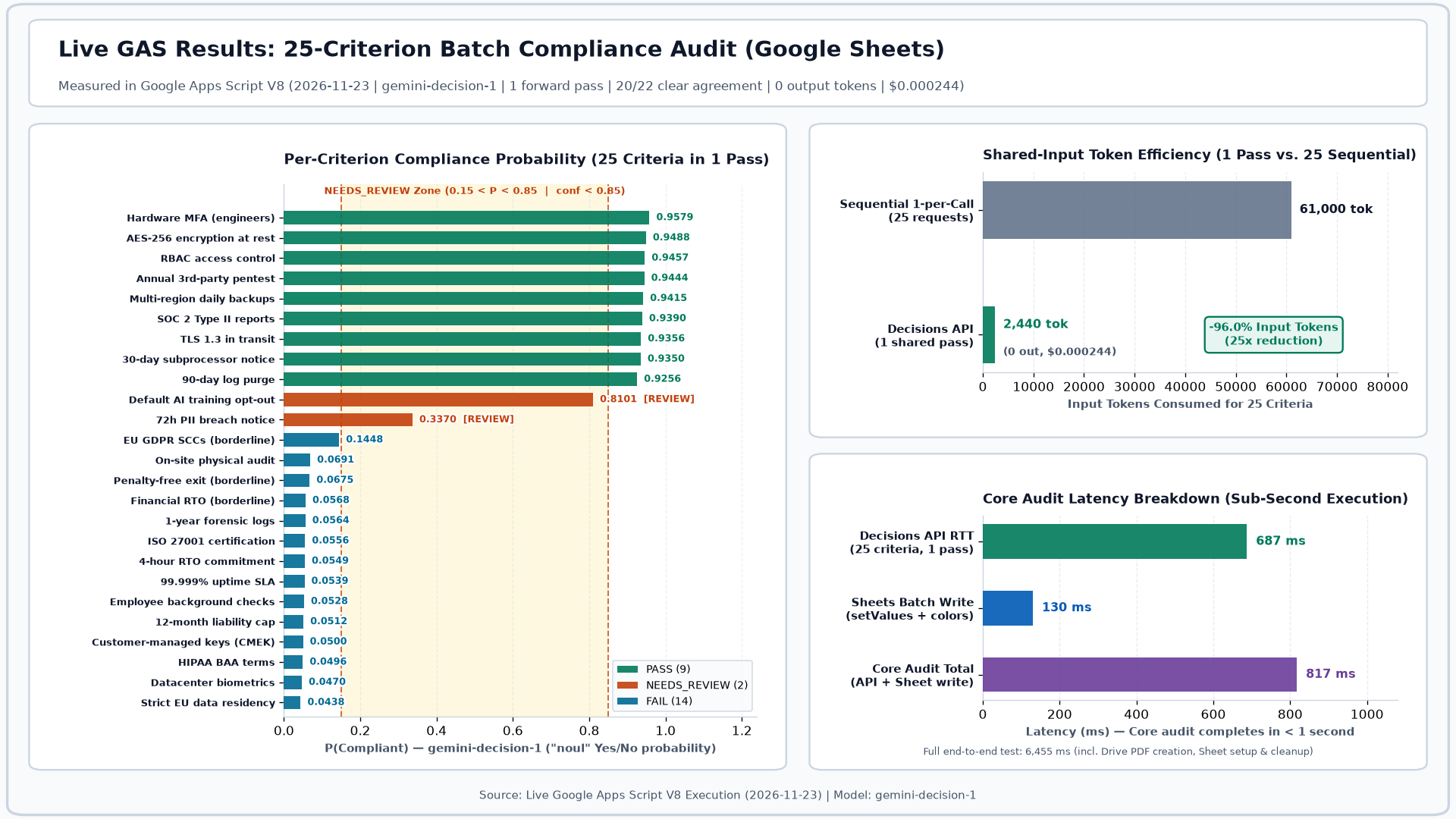 Figure 8: Empirical per-criterion compliance probabilities for all 25 criteria (left), shared-input token savings vs. sequential calls (top right), and sub-second core audit latency breakdown (bottom right) measured in live GAS V8.
Here is how to read the three graphs in Figure 8 (out of the 22 clear PASS/FAIL ground-truth items, 20/22 (90.9%) were auto-classified accurately, and the remaining 2 were safely routed to human review rather than misclassified):
- Left Graph — What the Labels and Numbers Mean: The labels down the left side (such as
Hardware MFA (engineers),AES-256 encryption at rest, andISO 27001 certification) are shortened names of the 25 checklist items written in Column A of the Google Sheet, sorted from highest to lowest score. The number next to each bar (0.9579down to0.0438) isP(Compliant)—the calibrated Yes probability (0.01–0.99) returned directly by the Gemini Decisions API (gemini-decision-1) for eachnoulquestion in its JSON response (answers.q_0001–q_0025). GAS does not calculate these probabilities itself; it writes each returned value directly into Column B of the Sheet and applies a simple threshold rule: 9 green bars (P >= 0.85) becomePASS, 14 blue bars (P <= 0.15) becomeFAIL(all 11 missing requirements plus the 3 unguaranteed borderline clauses), and the 2 orange bars inside the yellow shaded band (0.15 < P < 0.85, i.e.,confidence < 0.85)—AI training opt-out (0.8101: written opt-in vs. default opt-out) and 72-hour breach notice (0.3370: 48-hour wording vs. 72-hour question)—are flaggedNEEDS_REVIEWfor human confirmation. - What the Left Graph Reveals: First, clear
PASSitems (0.9256–0.9579) and clearFAILitems (0.0438–0.1448) separate cleanly toward1.0and0.0in a single API call. Second, instead of overconfidently guessing on nuanced wording, calibration honestly places only the two ambiguous items into the middle orange zone for human review. Third, all threeborderlineclauses lacking explicit PDF guarantees (0.0568–0.1448) fail safely rather than slipping through as falsePASSverdicts—the safest behavior for real compliance audits. - Top-Right Graph — Input Tokens Saved by Sending the PDF Once: The gray bar shows how many input tokens are needed if you send the same PDF 25 separate times (
61,000tokens). The green bar shows Decisions API sending the PDF once alongside all 25 questions (2,440tokens,0output tokens, $0.000244 total)—a 96.0% reduction (25× fewer input tokens). - Bottom-Right Graph — Execution Time Breakdown (Under 1 Second): The green bar (687 ms) is the single Decisions API call evaluating all 25 questions, the blue bar (130 ms) is GAS writing all verdicts and colors back to Google Sheets, and the purple bar (817 ms) is the combined core audit time. (The
6,455 msnote at the bottom includes creating and deleting the temporary test PDF and Sheet.)
Key Empirical Findings from Live GAS Execution
- Sub-Second Core Audit Across 25 Criteria in One Pass: Evaluating all 25 criteria against a multi-clause Drive PDF and writing all verdicts plus row highlights back to Google Sheets completed in 817 ms (
687 msAPI +130 msbatched Sheets write), making interactive menu-driven audits practical inside GAS. - 96.0% Input Token Reduction via Shared-Document Evaluation: Sending the PDF once instead of repeating it per row cut input usage from 61,000 to 2,440 tokens (
0output tokens, $0.000244 total), meaning scaling a checklist from 25 to 1,000 rows adds only the short question strings rather than multiplying document cost. - Zero False-Certainty Errors Through Calibrated Review Gating: On nuanced legal wording—48-hour vs. 72-hour breach notice (
P = 0.3370) and written opt-in vs. default AI exclusion (P = 0.8101)—the0.15 < P < 0.85band safely routed both items toNEEDS_REVIEW, achieving 20/22 (90.9%) clear ground-truth agreement with zero overconfident misclassifications.
7. Setup, Production Operation & Future Extensions
Follow the step-by-step guide in README.md from tanaikech/gemini-decisions-api-gas to paste the six src/*.js files and src/appsscript.json into a new Google Apps Script project, set GEMINI_API_KEY in Script Properties, and authorize OAuth scopes once. You can verify each workflow immediately using testUseCase3GmailBenchmark(), testUseCase2GmailCascadeRouter(), or testUseCase1ComplianceAudit().
Running All Three Use Cases in Production (src/production_runners.js)
To move directly from testing to daily Workspace operation without writing glue code, src/production_runners.js adds LockService-guarded trigger runners, idempotent trigger installers, and a Google Sheets custom menu controlled by PRODUCTION_CONFIG:
- Use Case 1 — Automated Gmail Flexible Labeling: Optionally customize
LABELING_SEARCH_QUERYorLABELING_PREFIXinPRODUCTION_CONFIG, then runsetupGmailLabelingTrigger()once from the editor toolbar to schedulerunProductionGmailLabeling()every 10 minutes (or runrunProductionGmailLabeling()manually for a one-off inbox pass). - Use Case 2 — Automated Gmail Model Cascade Router: Optionally adjust
CASCADE_SEARCH_QUERYorCASCADE_CREATE_DRAFTSinPRODUCTION_CONFIG, then runsetupCascadeRouterTrigger()once to poll Gmail every 10 minutes viarunProductionCascadeRouter()—handling routine mail on the Fast Path and draftinggemini-4-hydrogenreplies only for escalated threads. - Use Case 3 — Interactive Google Sheets Audit (or Standalone Batch): In a container-bound Spreadsheet project, reload the Sheet to open the Gemini Decisions custom menu (
onOpen()), click Initialize Audit Sheet Headers, enter your criteria in Column A (Row 2+), and click Run Compliance Audit on Active Sheet… with any Google Drive PDF URL or File ID. For standalone or scheduled audits, setAUDIT_PDF_FILE_IDandAUDIT_SPREADSHEET_ID(plus optionalAUDIT_SHEET_NAME) in Script Properties and runrunProductionComplianceAudit(). - Stopping Scheduled Automation: Run
removeProductionTriggers()anytime from the editor toolbar to remove all installed time-driven triggers cleanly.
Future Extensions
Beyond these three core applications, the same zero-output-token architecture extends naturally to broader Workspace agent systems:
- Multi-Agent GAS Routing (e.g., GASADK): Use
gemini-decision-1as a sub-second dispatcher selecting which GAS tool or sub-agent to invoke before spending reasoning tokens. - MCP / A2A Security Guardrails (e.g., MCPApp, A2AApp): Evaluate incoming tool arguments and outgoing actions against dozens of
noulsafety policies in a single forward pass. - Google Forms Real-Time Attachment Validation: Inspect uploaded PDFs or images on
onFormSubmitand flag low-confidence submissions for human verification immediately.
Summary
The Gemini Decisions API (gemini-decision-1) removes the primary bottleneck of running AI inside Google Apps Script—sequential autoregressive token generation—by evaluating structured questions in a single sub-second forward pass with strictly zero output tokens and native calibrated probabilities:
- Faster & Cheaper Inbox Classification (Use Case 1): In a controlled 48-trial live GAS benchmark against
gemini-3.8-flash(thinkingLevel: "LOW"),gemini-decision-1achieved 6.29x–10.33x faster latency (median 305 ms), 92.2%–95.0% lower cost ($0.0595 / 1,000 emails), identical 100.0% accuracy / 1.00 Macro-F1, and caught 2/2 ambiguous emails via its0.85confidence gate. - Smart Reasoning Escalation (Use Case 2): Pairing
gemini-decision-1triage withgemini-4-hydrogen(thinkingLevel: "HIGH") resolved routine Gmail inquiries in 357 ms (~27x faster, zero reasoning calls) while accurately escalating ambiguous and complex PDF outage threads (3/3 verified). - Horizontal Batch Auditing in Sheets (Use Case 3): Sending one Drive PDF once alongside 25 checklist criteria cut input tokens by 96.0% (
61,000 → 2,440, $0.000244), completed API evaluation plus batched Sheets write in 817 ms, and routed nuanced clauses safely toNEEDS_REVIEWwith zero false-certainty errors. - Broad Google Workspace Potential: Because Decisions API runs at sub-second latency and low cost, Google Apps Script developers can build not only scheduled time-driven automations, but also responsive
onEdit/onFormSubmitevent triggers and real-time Google Sheets custom functions across Gmail, Sheets, Drive, Docs, and Forms.
All source scripts, one-shot test harnesses, and turnkey production runners are ready to copy and deploy from https://github.com/tanaikech/gemini-decisions-api-gas.
References
- Part 1 (Dec 19, 2023): Kanshi Tanaike, Flexible Labeling for Gmail using Gemini Pro API with Google Apps Script, Medium (Google Cloud).
- Part 2 (Jan 30, 2024): Kanshi Tanaike, Flexible Labeling for Gmail using Gemini Pro API with Google Apps Script Part 2, Medium (Google Cloud).
- Part 3 (Sep 19, 2024): Kanshi Tanaike, Flexible Labeling for Gmail using Gemini API with Google Apps Script Part 3, Medium (Google Cloud).
- Google Apps Script Official Product Page: Google Workspace, https://workspace.google.com/products/apps-script/.
- Quotas for Google Services (Google Apps Script): Google Developers, https://developers.google.com/apps-script/guides/services/quotas.
- Gemini Decisions API Official Documentation: Google AI Studio, https://aistudio.google.com/docs/decisions-api.
- Gemini API Pricing & Documentation: Google AI for Developers, https://ai.google.dev/gemini-api/docs/pricing (verified November 23, 2026).
- GitHub Repository & Source Code: https://github.com/tanaikech/gemini-decisions-api-gas — complete copy-paste-ready GAS files in
src/and setup instructions inREADME.md.