Enhanced copyTo() using Google Apps Script
Here, it introduces an application of Retrieving Spreadsheet ID from Range using Google Apps Script.
Please check this. https://github.com/tanaikech/getSpreadsheetByRange
Here, it introduces an application of Retrieving Spreadsheet ID from Range using Google Apps Script.
Please check this. https://github.com/tanaikech/getSpreadsheetByRange
This is a sample script for retrieving spreadsheet ID from a range using Google Apps Script. I sometimes want to retrieve spreadsheet ID from ranges. In such case, I always use this.
getSheet()getParent()var id = "123456789abcdefg";
var sheet = "Sheet";
var cells = "a1:b10";
var range = SpreadsheetApp.openById(id).getSheetByName(sheet).getRange(cells);
var id = range.getSheet().getParent().getId();
>>> id ---> 123456789abcdefg
.gs. This bug was modified.The usage is here.
This is a sample script for retrieving values by header title for Spreadsheet. This is created by Google Apps Script. The main script is as follows.
When the instance is retrieved, all data of the sheet is analyzed. So when the each value is retrieved, the speed is fast.
function GetValueByKey(sheetname) {
return new getValueByKey(sheetname);
};
(function(r) {
var getValueByKey;
getValueByKey = (function() {
getValueByKey.name = "getValueByKey";
function getValueByKey(sheetname) {
var alldata, e, header, ss;
try {
ss = SpreadsheetApp.getActiveSpreadsheet().getSheetByName(sheetname);
} catch (error) {
e = error;
throw new Error("Error: No sheetname (" + sheetname + ").");
}
alldata = ss.getDataRange().getValues();
header = alldata[0];
alldata.shift();
this.manageddata = (function(header, alldata) {
var i, j, k, key, len, len1, result, temp, value;
result = [];
for (j = 0, len = alldata.length; j < len; j++) {
value = alldata[j];
temp = {};
for (i = k = 0, len1 = header.length; k < len1; i = ++k) {
key = header[i];
temp[key] = value[i];
}
result.push(temp);
}
return {
values: result,
headerLength: header.length,
dataLength: alldata.length
};
})(header, alldata);
}
getValueByKey.prototype.getValue = function(index, key) {
return this.manageddata.values[index][key];
};
getValueByKey.prototype.getAllValues = function() {
return this.manageddata;
};
return getValueByKey;
})();
return r.getValueByKey = getValueByKey;
})(this);
Following sheet is a sample sheet for this.
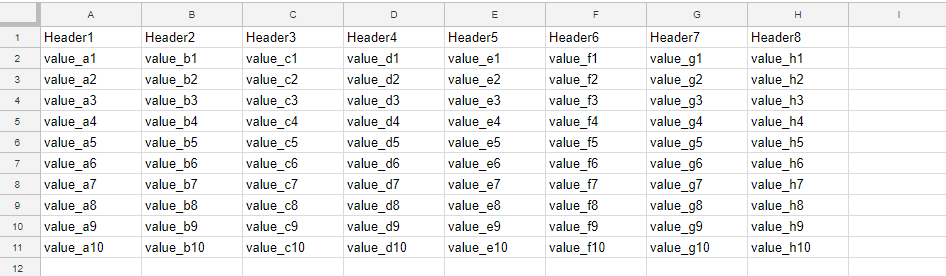
This is a sample script for exporting a project on Google Drive to local PC using Golang Quickstart. A file with refresh token is saved to the same directory with this script as go-quickstart.json. Before you run this script, please enable Drive API on your Google API console.
drive.DriveScriptsScope and drive.DriveScope have to be included in the scope.If you already have the file with refresh token, at first, please delete it and run this script. By this, the scopes of refresh token and access token are updated.
OnedriveApp was updated to v1.0.2.
OnedriveApp was updated to v1.0.1.
Added a method for retrieving access token and refresh token using this library.
By added this method, OneDrive APIs can be used by only this library.
This sample script is for changing values by checking duplicated values of JSON for Javascript.
Please see the following script. There is an array with a JSON data with 3 keys and 3 values. It is found that the values for each element duplicate. These duplicated values are changing by adding numbers.
I use this for managing filenames. This script also can be used for Google Apps Script. If this was useful for you, I’m glad.
ImgApp was updated to v1.2.0. New method was added.
This method is for updating thumbnail of files on Google Drive using images you selected.
For example, zip files don’t have the thumbnail on Google Drive. An icon is shown as the thumbnail. For the most files, Google Drive can create automatically each thumbnail. But there are sometimes files which cannot be created the thumbnail. Zip file is also one of them. In order to add and update thumbnails to such files, I added this method.
This sample script is for updating thumbnail of file on Google Drive using Python.
This sample supposes that quickstart is used and default quickstart works fine. In order to use this sample, please carry out as follows.
main() of the default quickstart to this sample.import base64 # This is used for this sample.
def main():
credentials = get_credentials()
http = credentials.authorize(httplib2.Http())
service = discovery.build('drive', 'v3', http=http)
with open("./sample.png", "rb") as f:
res = service.files().update(
fileId="### file ID ###",
body={
"contentHints": {
"thumbnail": {
"image": base64.urlsafe_b64encode(f.read()).decode('utf8'),
"mimeType": "image/png",
}
}
},
).execute()
print(res)
contentHints.thumbnail.image is URL-safe Base64-encoded image. So an image data that you want to use as new thumbnail has to be converted to URL-safe Base64-encoded data. For this, it uses base64.urlsafe_b64encode() at Python.