Gists
This is a sample script for retrieving the values with and without duplicating from JSON object using Google Apps Script. Also this can be used by Javascript.
Sample script
var obj = [
{ key1: "value1a", key2: "value1b" },
{ key1: "value2a", key2: "value2b" },
{ key1: "value5a", key2: "value5b" },
{ key1: "value3a", key2: "value3b" },
{ key1: "value1a", key2: "value1b" },
{ key1: "value4a", key2: "value4b" },
{ key1: "value5a", key2: "value5b" },
{ key1: "value3a", key2: "value3b" }
];
var res = obj.reduce(
function(obj, e) {
if (
obj.withoutDuplicating.some(function(f) {
return f.key1 === e.key1 && f.key2 === e.key2;
})
) {
obj.withDuplicating.push(e);
} else {
obj.withoutDuplicating.push(e);
}
return obj;
},
{ withoutDuplicating: [], withDuplicating: [] }
);
Logger.log(res);
Result
{
"withoutDuplicating": [
{
"key1": "value1a",
"key2": "value1b"
},
{
"key1": "value2a",
"key2": "value2b"
},
{
"key1": "value5a",
"key2": "value5b"
},
{
"key1": "value3a",
"key2": "value3b"
},
{
"key1": "value4a",
"key2": "value4b"
}
],
"withDuplicating": [
{
"key1": "value1a",
"key2": "value1b"
},
{
"key1": "value5a",
"key2": "value5b"
},
{
"key1": "value3a",
"key2": "value3b"
}
]
}
Note
- As other situation, when
f.key1 === e.key1 && f.key2 === e.key2 is modified to f.key1 === e.key1, the duplication of key1 can be retrieved.
Reference
Gists
This is a sample script for creating new table and putting values to cells using Google Docs API with Google Apps Script. Unfortunately, in the current stage, although I had been looking for the method for creating a table and putting the values in each cell at the official document, I couldn’t find. Google Docs API is growing now. So such documents might be not prepared yet. By this situation, I investigated about the method for achieving this method.
Gists
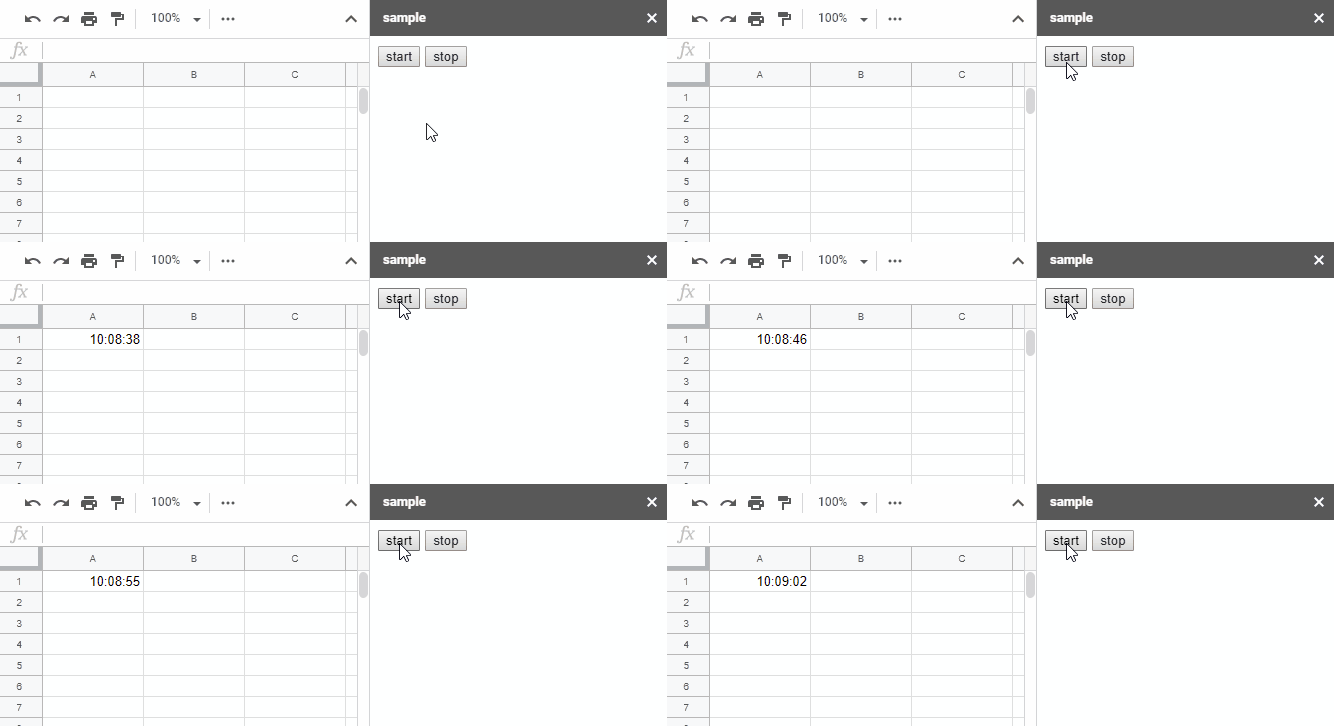
This is a sample script for investigating the possibility of the real time processes in a cell on Google Spreadsheet using Google Apps Script. As a sample situation, it tried the real time clock in a cell on Google Spreadsheet using Google Apps Script.
Demo:

Usage:
When you use this script, please do the following flow.
- Copy and paste the following script to the script editor (the container-bound script of Spreadsheet).
- Run the function of
run().
- By this, a sidebar is opened on the Spreadsheet.
- When you click a button of “start”, the clock is started at the cell “A1” of the active sheet.
- In this sample script, the value is updated every 0.2 seconds. But the process speed of Google Apps Script is often changed even if the same script is run. So when you see the demonstration, there are sometimes the cases of 2 second step.
- If you want to stop the clock, please click “stop” button.
Sample script:
function runCLock() {
Utilities.sleep(200);
var time = Utilities.formatDate(
new Date(),
Session.getScriptTimeZone(),
"HH:mm:ss"
);
SpreadsheetApp.getActiveSheet()
.getRange("A1")
.setValue(time);
}
function run() {
var str =
'<input type="button" value="start" onclick="start()"><input type="button" id="stop" value="stop" onclick="stop=true"><script>var stop=false; function work(){return new Promise((resolve, reject)=> google.script.run.withSuccessHandler(()=> resolve()).runCLock());}async function start(){while(!stop) await work();}</script>';
var html = HtmlService.createHtmlOutput(str);
SpreadsheetApp.getUi().showSidebar(html);
}
Expanded HTML:
At above sample script, HTML is minified. Below script is the expanded HTML.
Gists
This is a sample script for deleting pages of Google Document from the last page using Google Apps Script. There are no methods for directly deleting pages of Google Document. This is one of several workarounds. In this workaround, the following flow is used.
Flow
- Retrieve paragraphs in the body of Document.
- Retrieve elements in each paragraph. The page break is included in the paragraph.
- Delete elements from last page in order.
- When the number of page breaks is the same with deletePages, the script is stopped.
By this flow, several pages can be deleted from the last page in order.
Gists
This is a sample script for retrieving total page of Google Document using Google Apps Script. There are no methods for directly retrieving the total page of Google Document. This is one of several workarounds. In this workaround, the total page is retrieved by converting to PDF format.
var n =
DriveApp.getFileById(id)
.getBlob()
.getDataAsString()
.split("/Contents").length - 1;
Logger.log("totalPages: %s", n);
- When you use this, please set the Google Document ID as
id.
Gists
Overview
These are sample scripts for processing the duplicated rows of 2 dimensional arrays using Google Apps Script.
Description
When I use Google Spreadsheet and/or see Stackoverflow, I sometimes see the situation which is required to process the duplicated rows of 2 dimensional arrays. I thought that when the sample scripts for it have already prepared, they will be useful for other users including me. So I published this post. This sample scripts can be also used for Javascript. If this post is useful for you, I’m glad.
Overview
This is a CLI tool for retrieving the number of comments, stars and forks of Gists.
Demo

In this demonstration, a Gist is retrieved by an URL. You can see that the number of comments, stars and forks can be retrieved.
The detail information and how to get this are https://github.com/tanaikech/gistwatcher.
Gists
At April 8, 2019, the specification of Google Apps Script Project was changed. Various specification was changed. Please see the detail at Google Cloud Platform Projects. Here, I would like to introduce one change which might be useful for users. The official document says as follows.
When you enable an advanced service for your script project in the Apps Script editor, it is automatically enabled in the default GCP project when the script project is saved.
Gists
This is a sample script for backing up a project as a zip file. When you use this script, please install a GAS library of ProjectApp2. You can back up both the standalone script type and the container-bound script type.
In this script, the blob of zip file can be retrieved from ProjectApp2. So you can also send it as email without creating a file.
var projectId = "### fileId of project ###";
var blob = ProjectApp2.getProjectBlob(projectId, true);
DriveApp.createFile(blob[0].setName("backupProject.zip"));
Testing:
- July 2, 2020: I could confirm that the script worked. So in the current stage, it seems that the specification is not changed.
Overview
This is a Golang library for running HTTP requests with the asynchronous process. The progress of requests can be also shown.
Demo

In this demonstration, 5 requests are run by 2 workers. And before each request, the waiting time for 2 seconds is added as a sample. By this, you can easily see the work with 2 workers. Also you can see this script at the following sample script.