Abstract
This article explores the integration of Google Workspace with the Antigravity CLI, the high-performance successor to the legacy Gemini CLI. This integration is critical because it bridges the gap between low-latency, local agent execution and cloud-native enterprise productivity platforms. We demonstrate this framework by evaluating five core developer tools—the Google Workspace CLI, gas-fakes, ggsrun, GASADK/GoogleApiApp, and goodls—and mapping their capabilities into distinct local, hybrid, and cloud execution layers. Our analysis reveals how this unified architecture streamlines complex, multi-step agentic workflows while optimizing resource consumption, establishing a blueprint for next-generation workspace automation.
Introduction
The official release of the Antigravity CLI (agy) represents a significant paradigm shift, establishing the compiled, Go-based binary as the definitive successor to the legacy Node.js-based Gemini CLI Ref. While the legacy interface successfully introduced terminal-based content generation and automated scripting, the Antigravity engine is designed to handle highly demanding, lower-latency cognitive reasoning loops. The architectural transition to Go delivers sub-millisecond startup times and optimized memory management, which are critical for running iterative agentic execution loops that query and mutate enterprise resources.
A fundamental leap in this platform evolution is the implementation of native support for isolating execution environments. When executing autonomous terminal scripts generated by local language models, establishing isolated runtime boundaries is a standard developmental practice. The Antigravity CLI addresses this by integrating kernel-level containment mechanisms, utilizing macOS sandbox-exec, Linux namespaces via nsjail, and Windows AppContainer isolation. While specific security audits of these containment boundaries are outside the scope of our practical runs, the presence of the --sandbox command-line flag establishes a solid initial runtime boundary for interactive CLI operations.
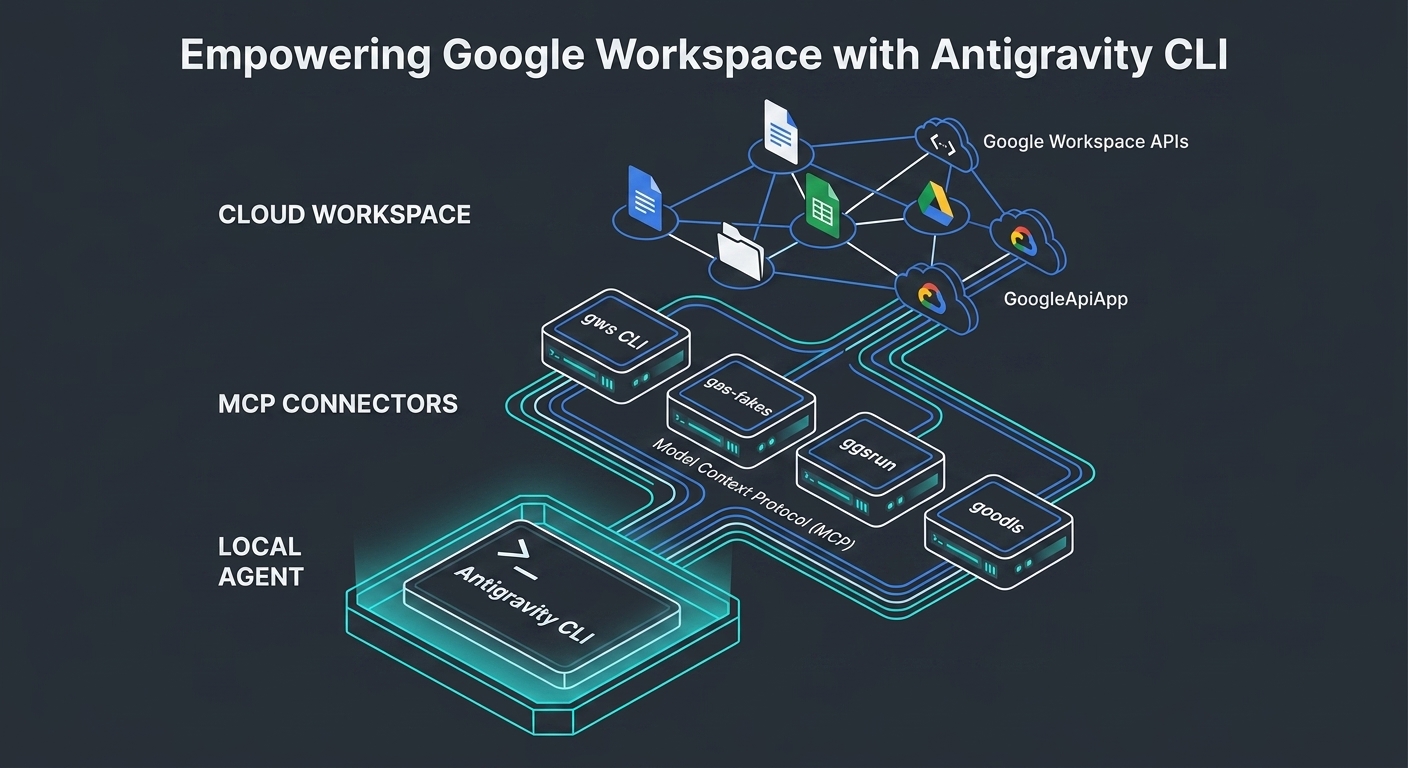
Over the development lifecycle of the Gemini CLI, multiple high-performance integration patterns focusing on Google Workspace automation were documented Ref. Migrating these patterns to the Antigravity CLI framework unlocks a modular, three-tiered architecture. As depicted in the overarching architecture diagram at the beginning of this article, the layout separates the system into the Local Agent (Antigravity CLI Core), the MCP Connectors (optimized integration bridges), and the Cloud Workspace (Google Workspace APIs). This structure keeps the local agent organized while harnessing the computational scale of Google’s cloud infrastructure.
To transition from static task execution to autonomous operations, the agent is trained on structured experimental workflows. By codifying specialized developer tools as functional Capabilities (or Agent Skills) via the Model Context Protocol, the local agent gains the ability to discover, test, execute, and retrieve data from the Cloud Workspace. Rather than relying on simple script generation, this framework establishes a self-contained, self-healing developer workflow. This article details how to configure, orchestrate, and analyze these integrations, evaluating the specific execution traces that prove the viability of this next-generation automation system.
Usage
To ensure strict reproducibility, clean state management, and isolation during execution, all integration scenarios in this article utilize a designated Temporal Workspace Directory. This directory acts as a localized staging area for isolating dynamic scripts, execution logs, and generated API payloads.
Prerequisites
- Ensure the Antigravity CLI (
agy) is pre-installed on your system and authenticated using your Google account. - Verify that the CLI has valid active permissions to generate content and call model functions.
- Create a dedicated temporal workspace directory prior to executing any automation flows (e.g., run
mkdir -p ./tmp-agent-workspace && cd ./tmp-agent-workspace). - Launch the CLI with the explicit
--sandboxcommand-line flag to utilize the native isolation boundary, using the launch syntax:agy --sandboxfor interactive TUI sessions, oragy --sandbox "your prompt here"for single-task executions.
To bridge the gap between local LLM orchestration and Google Workspace, this architecture introduces five critical developer tools categorized by their primary execution layers. From the perspective of modern agentic frameworks, these tools function as isolated Capabilities (functional abstractions) for the local Agent, wrapping complex, multi-step Google Workspace API interactions into deterministic terminal blocks.
Categorization Matrix by Execution Layer
Selecting the optimal integration path requires evaluating API quotas, resource constraints, execution latency, and security boundaries:
| Tool / Library | Execution Layer | Key Role in Agentic Workflows | Primary Use Case inside Temporal Workspace |
|---|---|---|---|
| Google Workspace CLI | Local Side (gRPC/REST API) | Direct API execution via Local Agent | Provisioning, querying, and managing Workspace resources directly from the terminal |
| gas-fakes | Local Side (Mocking) | Local emulation of GAS environments for Agents | Offline dry-runs, syntax checking, and code validation prior to cloud deployment |
| ggsrun | Local Side <=> Cloud (Hybrid) | Synchronous execution of serverless GAS functions | Triggering complex Google Apps Script logic with immediate local return payloads |
| GASADK / GoogleApiApp | Cloud Side (GAS Engine) | Autonomous cloud-native Agent execution | Executing long-running tasks natively in Google’s cloud runtime to bypass local timeouts |
| goodls | Direct File Access (API-less) | High-speed data ingestion for RAG/Context feeding | Streaming and parsing public or shared Drive documents directly into the context window |
Technical Overview of the Core Tools
- Google Workspace CLI: An unofficial command-line interface optimized for agent access to Google Workspace resources. When orchestrated via the Antigravity CLI inside a temporal workspace, an AI Agent calls this tool through Function Calling to programmatically manage users, provision shared drives, and adjust tenant security configurations based on natural language commands.
- gas-fakes (Developed by Bruce McPherson): A high-fidelity mocking library designed to emulate complete Google Apps Script classes and services (e.g.,
SpreadsheetApp,DriveApp,GmailApp) within a local Node.js environment. This serves as an offline reasoning sandbox. Before deploying generated code to cloud production, the agent executes automated tests locally usinggas-fakesto ensure structural and behavioral correctness without utilizing cloud execution quotas. - ggsrun (Developed by Kanshi Tanaike): A high-performance CLI utility written in Go, designed to execute Google Apps Script functions directly from the local terminal. In an agentic system,
ggsrunfunctions as an external Agent Skill wrapper. The Antigravity CLI can compile data payloads in the local workspace and pipe them intoggsrun, executing serverless calculations on Google’s infrastructure and retrieving structured return values instantly. - GASADK (adk-gas) & GoogleApiApp (Developed by Kanshi Tanaike): Advanced libraries engineered to execute completely on the cloud side within the Google Apps Script runtime.
GASADKintroduces a deterministic Planner-Executor-Synthesizer (PES) framework for Apps Script, bypassing traditional local client libraries. Fused withGoogleApiApp, it enables autonomous REST endpoint discovery. The local Antigravity CLI can delegate complex, long-running processes to this cloud-side harness, bypassing the local machine’s network, CPU, and execution timeout constraints. - goodls (Developed by Kanshi Tanaike): An ultra-fast, concurrent Google Drive file downloader written in Go. For autonomous agents utilizing Retrieval-Augmented Generation (RAG),
goodlsprovides a rapid, API-less ingestion pipeline. It allows the Antigravity CLI to stream spreadsheets, document text, and binaries directly into the temporal workspace, parsing content immediately into the model’s context window.
Case 1: Google Workspace CLI
Installation
GitHub: https://github.com/googleworkspace/cli
The detailed installation can be seen at https://github.com/googleworkspace/cli.
When npm is used, the installation command is as follows:
npm install -g @googleworkspace/cli
Quickstart is as follows:
gws auth setup     # walks you through Google Cloud project config
gws auth login     # subsequent OAuth login
gws drive files list --params '{"pageSize": 5}'
To install these tools as native plugins inside the Go-based Antigravity CLI (agy), use the unified plugin commands:
# Install the workspace integration plugin
agy plugin install https://github.com/googleworkspace/cli

# Verify successful staging in the local filesystem
agy plugin list
Workflow
The system sequence diagram below outlines the process of executing administrative actions via the Google Workspace CLI when integrated with the Antigravity CLI agent core.
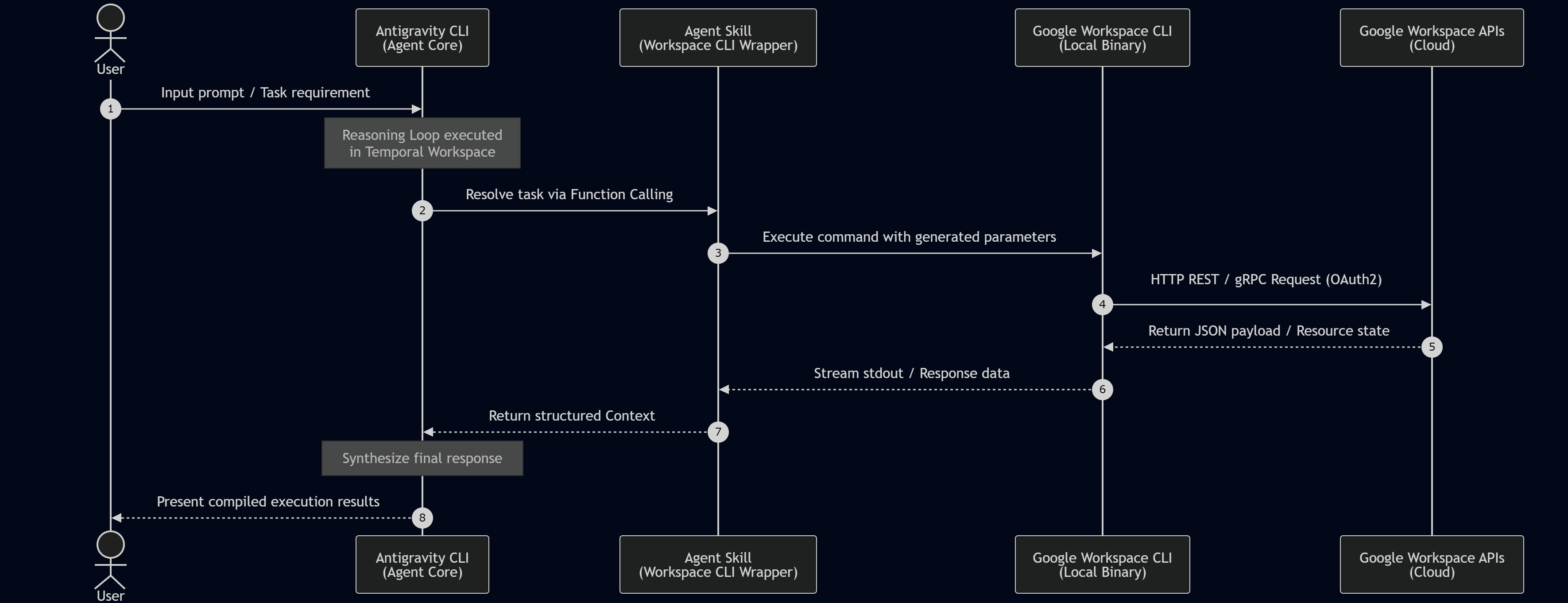
In this workflow, the Antigravity CLI serves as the central orchestrator. It processes the user’s request, determines the necessary actions, and invokes the administrative Agent Skill. The skill translates this requirement into command-line parameters for the local gws binary, which handles OAuth2 authentication to make direct, high-performance REST/gRPC calls to Google Workspace APIs. This hybrid workflow ensures that the agent manages cloud structures securely using local credentials.
Testing
During verification, specific prompts were supplied to the Antigravity CLI running under --sandbox mode to evaluate tool invocation reliability. The agent mapped natural language instructions directly to the appropriate gws command blocks.
Prompt 1:
Solve this task using Google Workspace CLI. Show the file list from a folder named "sample folder" in my Google Drive.
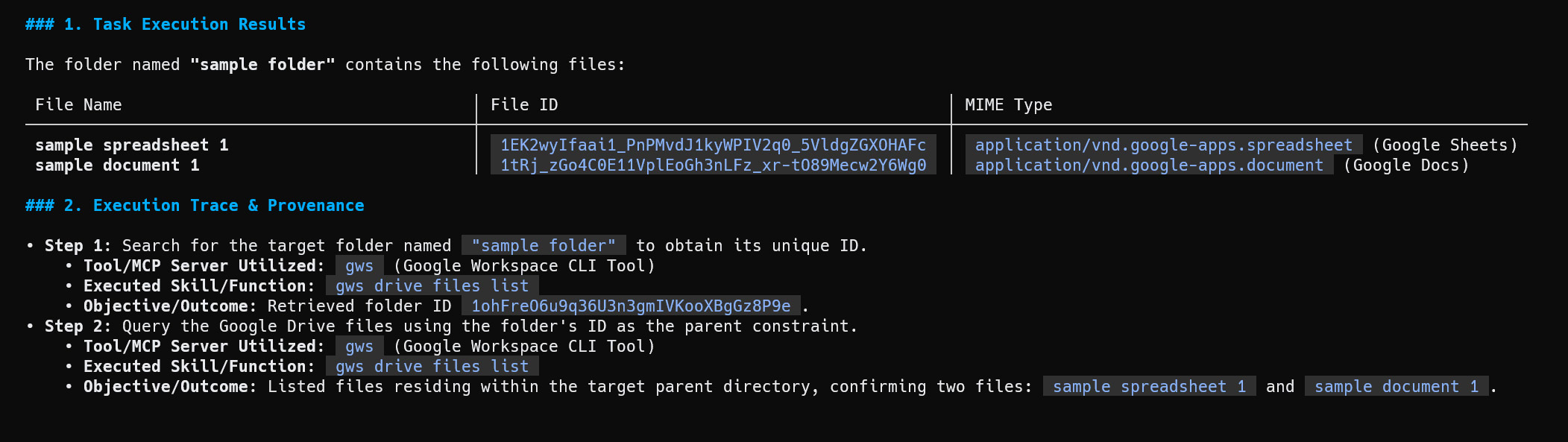
The execution results of Prompt 1 indicate a two-step trace. The agent first executes a query to resolve the target folder named “sample folder”, obtaining its unique ID (1ohFre06u9q36U3n3gmIVKooXBgGz8P9e). It then queries the files inside this directory using the resolved ID as the parent constraint, successfully identifying two files: “sample spreadsheet 1” and “sample document 1”.
Prompt 2:
Solve this task using Google Workspace CLI. Create a new Google Spreadsheet by putting a formula `=GOOGLEFINANCE("CURRENCY:USDJPY")` in cell "A1" of the first sheet. Then, get and show the value of cell "A1".
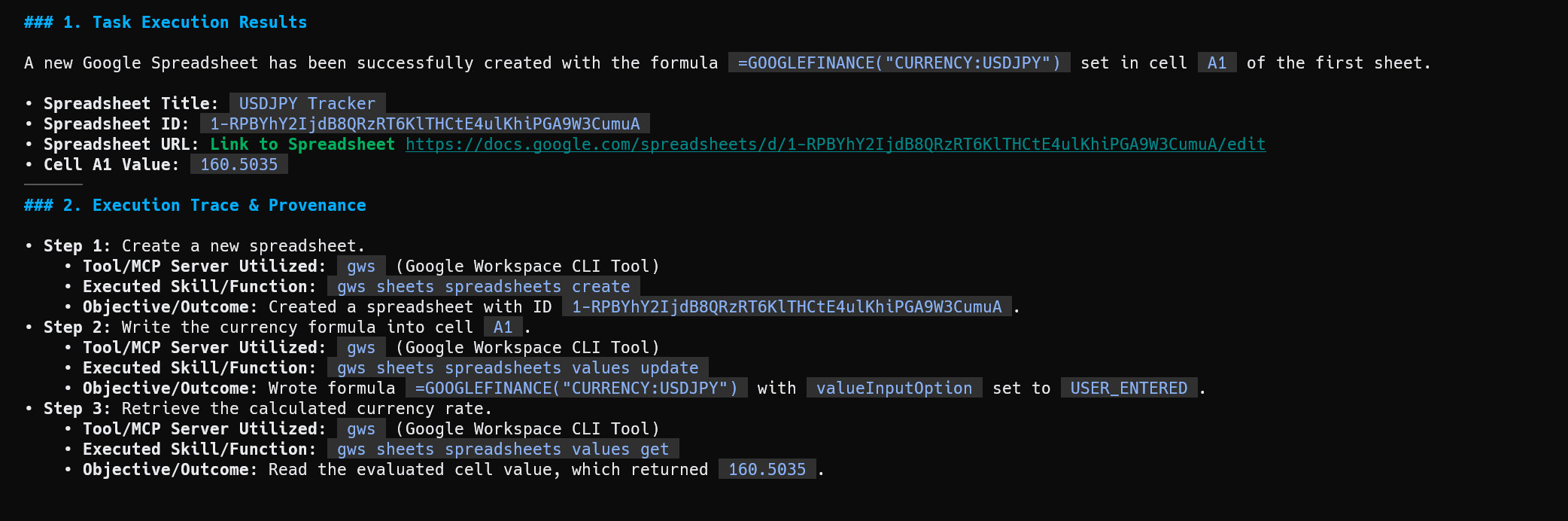
The execution trace for Prompt 2 demonstrates multi-step orchestration. The agent creates a new spreadsheet titled “USDJPY Tracker”, resulting in Spreadsheet ID 1-RPBYhY2IjdB8QRzRT6KlTHCtE4uKHiPGA9W3CumuA. It writes the formula =GOOGLEFINANCE("CURRENCY:USDJPY") into cell A1 utilizing the USER_ENTERED parsing mode, and queries the calculated cell value, retrieving the rate of 160.5035.
Discussion and Technical Analysis
The orchestration of the Google Workspace CLI demonstrates how the Antigravity CLI resolves high-level declarative goals into a sequence of precise, stateful API mutations. As illustrated in the sequence diagram below, the local agent does not communicate with the cloud APIs directly; instead, it delegates work to the gws wrapper. This maintains a clear boundary between the model environment and active credential storage.
Analyzing the first execution result reveals that the model successfully performs an implicit relational query. Because the parent directory is specified by name (“sample folder”) rather than its unique identifier, the agent initiates an initial query step to extract the metadata ID. Once the correct ID is returned, the agent dynamically binds this value as a parameter for the subsequent child query. This two-phase resolution occurs within the reasoning loop of the local workspace without user intervention, proving how the unified framework streamlines complex, multi-step workflows.
Similarly, the subsequent execution trace demonstrates multi-step state preservation across distinct API endpoints. The model sequentially targets the file-creation endpoint to instantiate the spreadsheet, applies the values.update method with explicit instructions to parse the payload as USER_ENTERED (ensuring the =GOOGLEFINANCE string is evaluated as an active function), and finally queries the cell value. By obtaining the calculated result (160.5035) in a single execution trace, the framework proves that a local agent can manage multi-step, state-dependent API chains securely and deterministically while optimizing local resource consumption.
Case 2: gas-fakes
Installation
GitHub: https://github.com/brucemcpherson/gas-fakes
The detailed installation can be seen at https://github.com/brucemcpherson/gas-fakes.
When npm is used, the installation command is as follows:
npm install -g @mcpher/gas-fakes
Quickstart is as follows:
- To initialize Google with Domain Wide Delegation (default): Run
gas-fakes initfollowed bygas-fakes authto establish the initial validation credentials. - To initialize Google with Application Default Credentials (ADC): Run
gas-fakes init --auth-type adcfollowed bygas-fakes authto utilize standard local development environments.
To install the agent plugins under the updated agy plugin system, use the following shell script in your local terminal to restructure the legacy skill layout:
https://gist.github.com/tanaikech/c7d7b73630174148df009f8b408d34b4
Workflow
This integration uses gas-fakes to run a local emulation loop of Google Apps Script, permitting local code validation prior to cloud deployment.
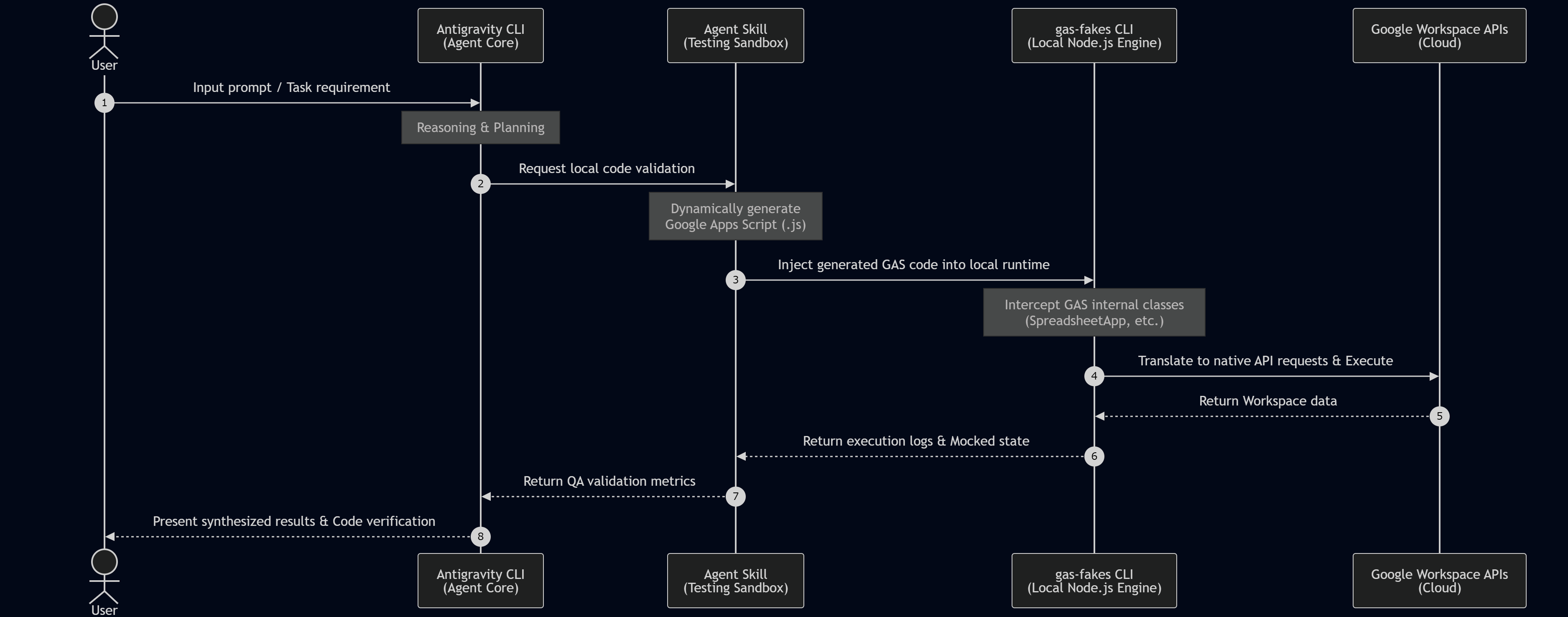
By utilizing gas-fakes, the agent establishes an offline feedback loop. The agent core compiles generated Apps Script files and injects them into the local Node.js environment powered by gas-fakes. Because the mocking library emulates the complete SpreadsheetApp and DriveApp API signatures locally, the script evaluates safely. For cloud operations, it uses Application Default Credentials (ADC) or Service Accounts with Domain-Wide Delegation (DWD). Developers using personal accounts must call gas-fakes init --auth-type adc and provide a custom OAuth2 client credentials JSON file to bypass Google’s access restrictions on sensitive scopes, ensuring local-first execution.
Testing
Prompt 1:
Solve this task using gas-fakes. Show the file list from a folder named "sample folder" in my Google Drive.
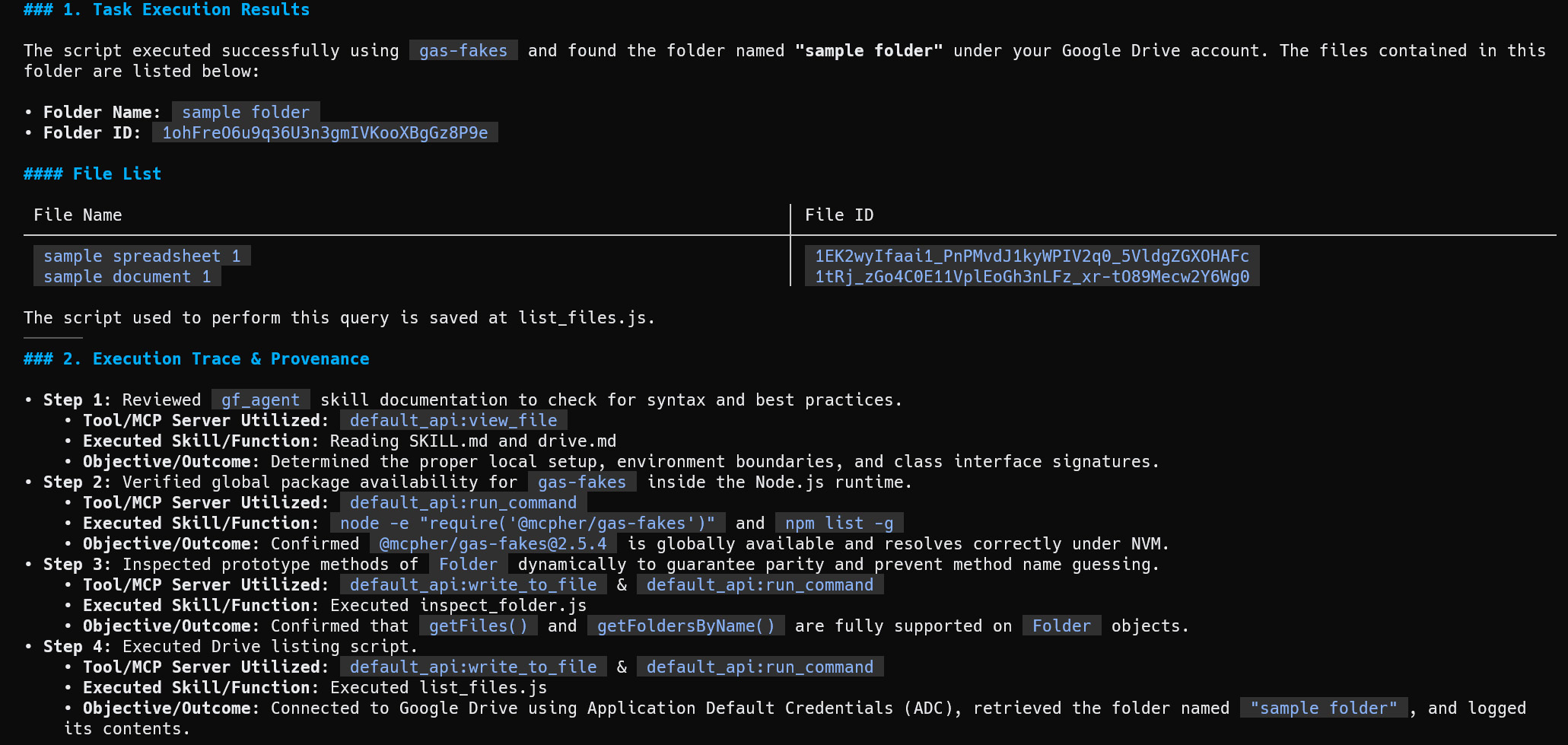
The resulting script generated by the agent and executed via Node.js under the gas-fakes environment uses mock classes to safely query the parent folder ID (1ohFre06u9q36U3n3gmIVKooXBgGz8P9e). As verified in the execution results below, the mock runtime intercepts the calls, processes the files inside “sample folder” via native API translation using Application Default Credentials (ADC), and lists the files: “sample spreadsheet 1” and “sample document 1”.
- Step 1 (gf_agent documentation review): Reviewed the
gf_agentskill documentation to check for syntax and best practices using thedefault_api:view_filetool to inspectSKILL.mdanddrive.md, which successfully determined the correct local setup, environment boundaries, and class interface signatures. - Step 2 (Global package verification): Verified global package availability for
gas-fakesinside the Node.js runtime by runningnode -e "require('@mcpher/gas-fakes')"andnpm list -gviadefault_api:run_command, confirming that@mcpher/gas-fakes@2.5.4is globally available and resolves correctly under NVM. - Step 3 (Prototype inspection): Inspected prototype methods of
Folderdynamically to guarantee parity and prevent method name guessing by creating and executinginspect_folder.jsviadefault_api:write_fileanddefault_api:run_command, confirming thatgetFiles()andgetFoldersByName()are fully supported onFolderobjects. - Step 4 (Drive listing execution): Executed the Drive listing script
list_files.jsviadefault_api:write_fileanddefault_api:run_command, connecting to Google Drive using Application Default Credentials (ADC) to retrieve the folder named “sample folder” and successfully outputting its contents.
Prompt 2:
Solve this task using gas-fakes. Create a new Google Spreadsheet by putting a formula `=GOOGLEFINANCE("CURRENCY:USDJPY")` in cell "A1" of the first sheet. Then, get and show the value of cell "A1".
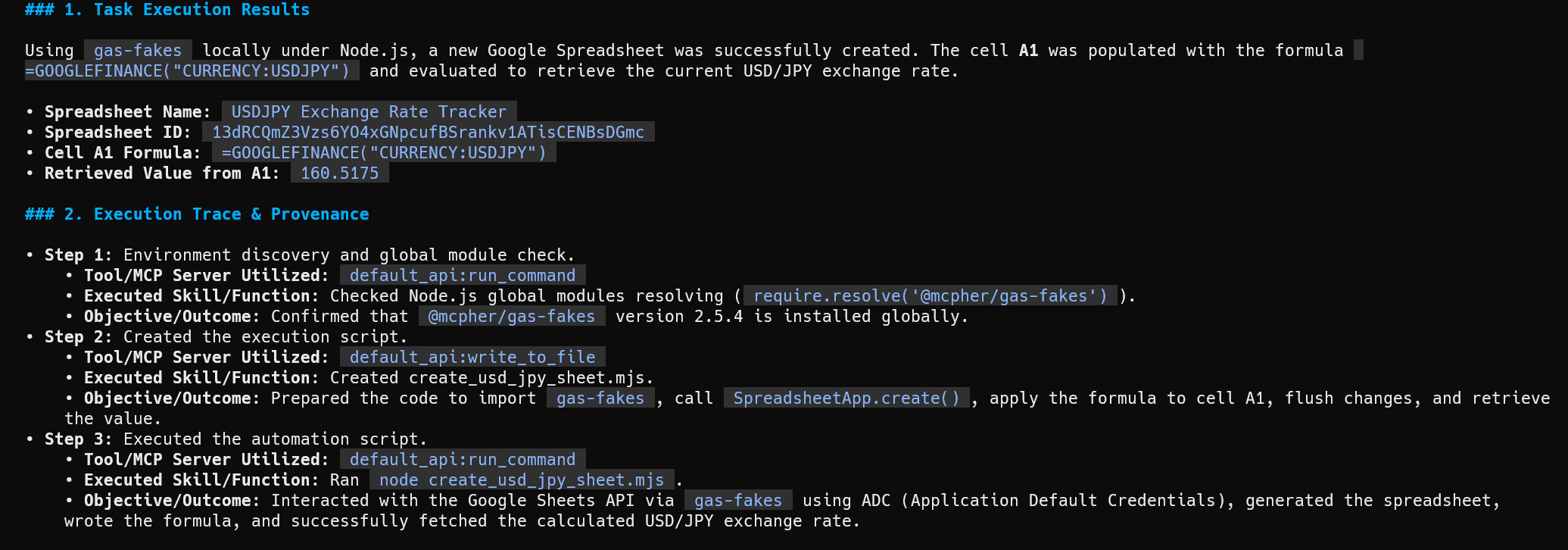
The generated Node.js integration script imports @mcpher/gas-fakes to emulate the SpreadsheetApp runtime. It programmatically creates a spreadsheet, writes the formulas, performs a .flush(), sleeps to allow currency evaluation, and reads cell A1. The subsequent execution output confirms the spreadsheet was generated successfully (ID: 13dRCqmZ3Vzs6Y04xGNpcufBSrankv1ATisCENBsDGmc), returning an evaluated USD/JPY exchange value of 160.5175.
- Step 1 (Environment discovery): Discovered the local environment state and performed a global module check via
default_api:run_commandresolvingrequire.resolve('@mcpher/gas-fakes'), confirming that@mcpher/gas-fakesversion 2.5.4 is installed globally. - Step 2 (Script scaffolding): Prepared the local automation script by creating
create_usd_jpy_sheet.mjsviadefault_api:write_fileto import the mockedgas-fakesenvironment, callSpreadsheetApp.create(), apply the target formula to cell A1, and flush changes. - Step 3 (Local sandbox run): Executed the automation script by running
node create_usd_jpy_sheet.mjsviadefault_api:run_command, which interacted with Google Sheets API viagas-fakesusing ADC (Application Default Credentials) to generate the spreadsheet and retrieve the evaluated rate.
Discussion and Technical Analysis
The integration of gas-fakes introduces an essential offline verification pattern for autonomous agents. Deploying raw, newly generated Google Apps Script code directly to a live Google Cloud project carries a high risk of execution timeouts, variable mismatches, or structural syntax errors. By routing code validation through gas-fakes, the agent tests the logical correctness of its code locally before interacting with the live cloud endpoint, directly optimizing execution resource consumption.
The first trace highlights the agent’s meticulous self-correction process. Before running the target logic, the agent queries the local documentation and dynamically creates a test harness (inspect_folder.js) to verify the prototype methods of the mocked Folder class. This behavior demonstrates that the agent can actively verify that getFiles() and getFoldersByName() are supported within the mocked library, preventing execution failures and redundant cloud API calls caused by design mismatches.
Furthermore, the second trace highlights how the local Node.js emulator handles the asynchronous behaviors of Google Sheets. Because spreadsheet formulas like =GOOGLEFINANCE depend on Google’s cloud servers to load and compute external market values, reading a cell immediately after writing a formula can result in #N/A or a null string. To address this, the agent’s generated script programmatically invokes a manual .flush() operation combined with an active sleep loop. This mirrors human spreadsheet management, allowing the local emulator to return the fully evaluated exchange rate (160.5175) reliably and streamlining complex, multi-step agentic workflows offline.
Case 3: ggsrun
Installation
GitHub: https://github.com/tanaikech/ggsrun
The detailed installation can be seen at https://github.com/tanaikech/ggsrun#installation–setup.
After installing ggsrun, configure it as a global MCP server for the Antigravity CLI. Under the unified Antigravity configuration directory, the file must be created at ~/.gemini/antigravity-cli/mcp_config.json (for CLI-only operations) or ~/.gemini/config/mcp_config.json (to share with the Antigravity desktop/IDE environment):
{
  "mcpServers": {
    "ggsrun-drive-agent": {
      "command": "/path/to/ggsrun",
      "args": ["mcp"],
      "env": {
        "GGSRUN_PROJECT_ID": "YOUR_PROJECT_ID_HERE"
      }
    }
  }
}
Workflow
We identify two implementation patterns for ggsrun orchestration:
- Pattern 1: Dynamic generation and cloud execution of code.
- Pattern 2: Execution of built-in
ggsrunutility commands without dynamic code generation.
Pattern 1 (Dynamic Code Generation)
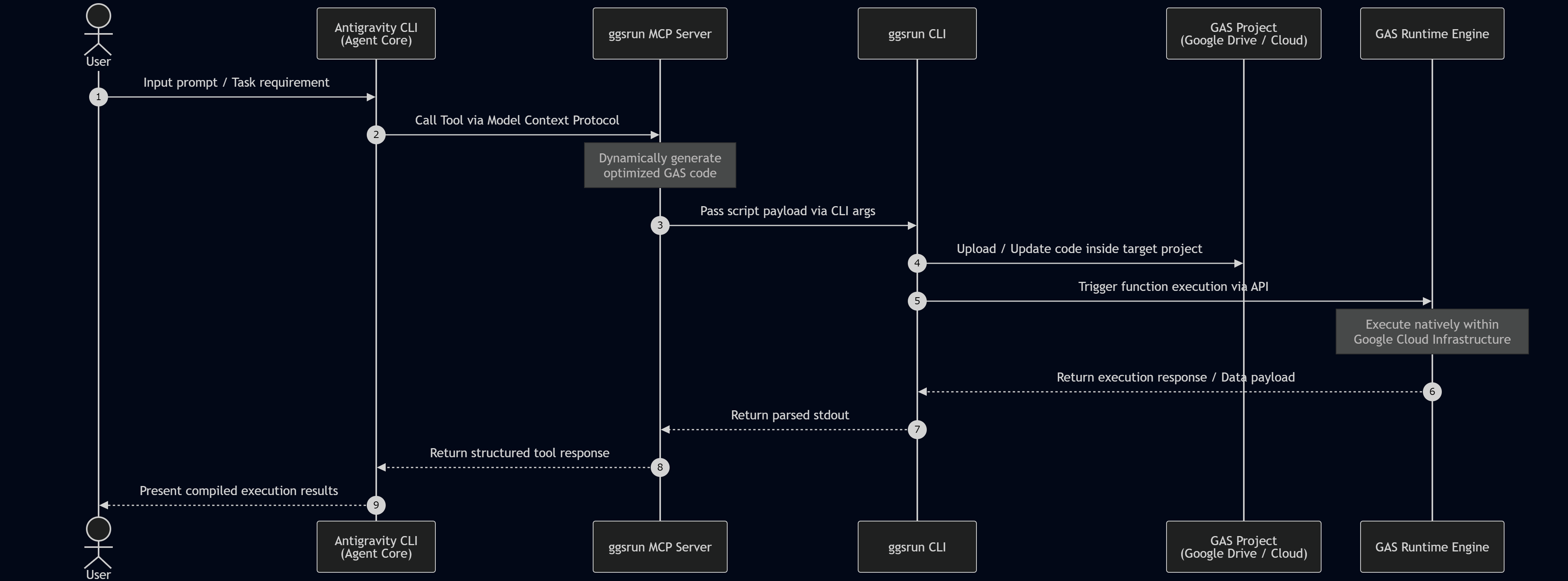
In Pattern 1, the agent acts as an automated compiler and deployer. When given a workspace task, it generates raw Google Apps Script code, packages it inside an MCP payload, and uploads it to Google’s cloud servers via the Google Apps Script API. The code executes within Google’s serverless infrastructure, and ggsrun returns the result to the local environment with minimal latency.
Pattern 2 (Direct Command Execution)
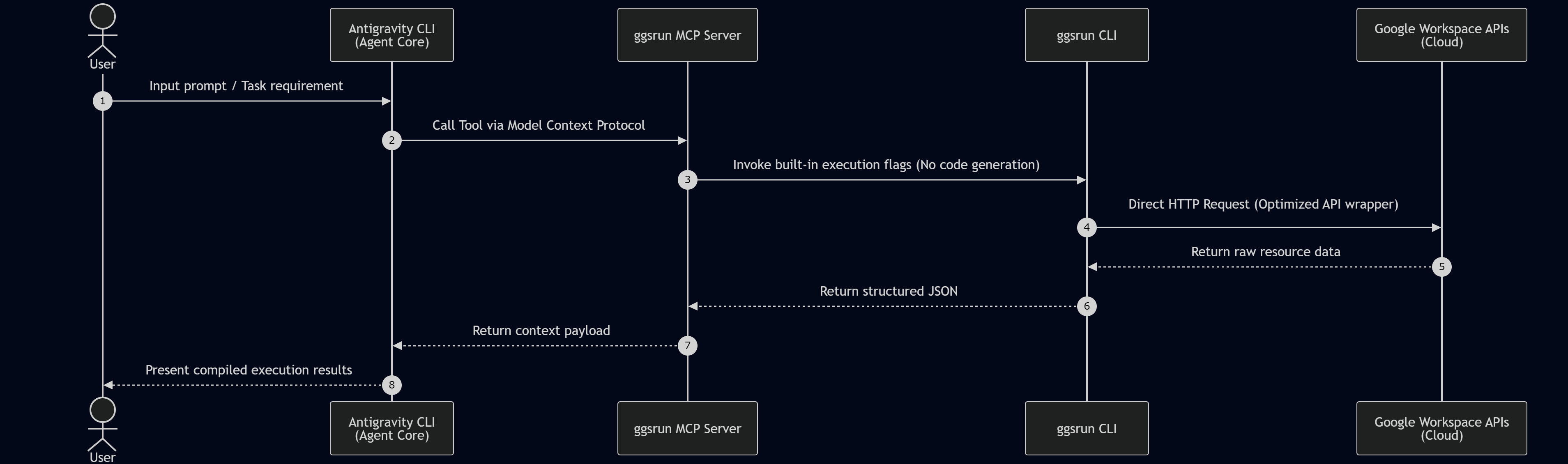
In Pattern 2, ggsrun operates as a direct terminal bridge to Google Drive. Instead of generating and deploying custom scripts, the agent utilizes optimized binary flags in ggsrun (such as searching files or listing folders) to execute requests. This provides a fast, direct interface for simple operations.
Testing
In this test, in order to give a clear task using the specific tool, I included the tool name in the prompt. Antigravity CLI understood this, and it could process the task by properly using the tool.
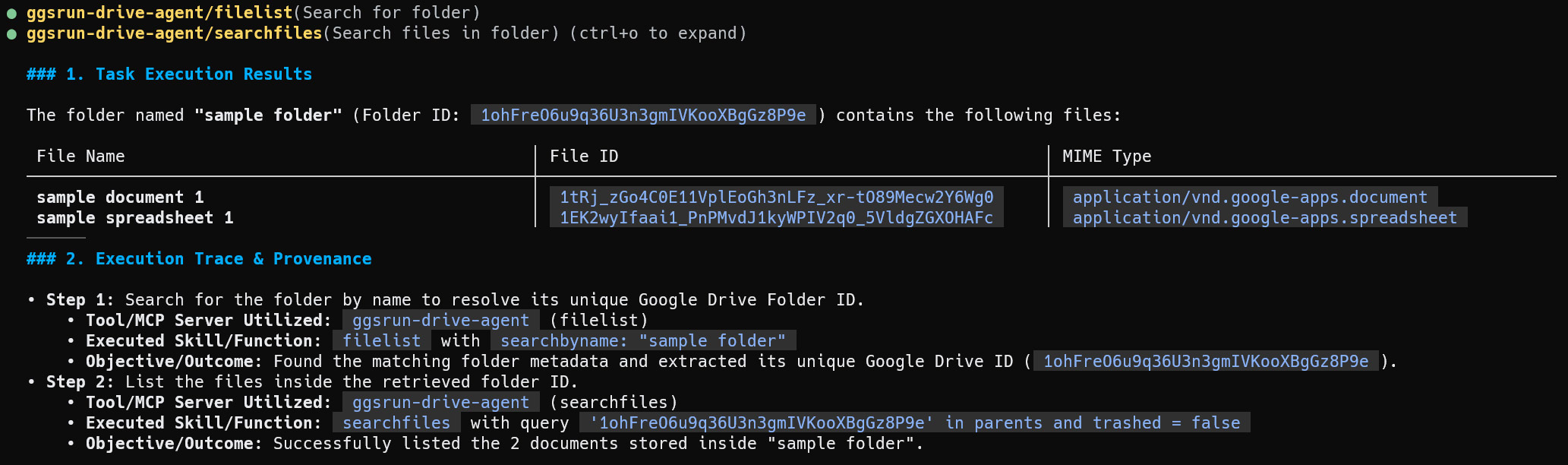
Prompt 1 (Variant A):
Solve this task using ggsrun as the MCP server. Show the file list from a folder named "sample folder" in my Google Drive.
The agent resolves the request by invoking the ggsrun-drive-agent/filelist and searchfiles tools directly. By mapping the targets dynamically inside the MCP configuration, the agent extracts the child assets without writing custom code blocks.
Prompt 1 (Variant B):
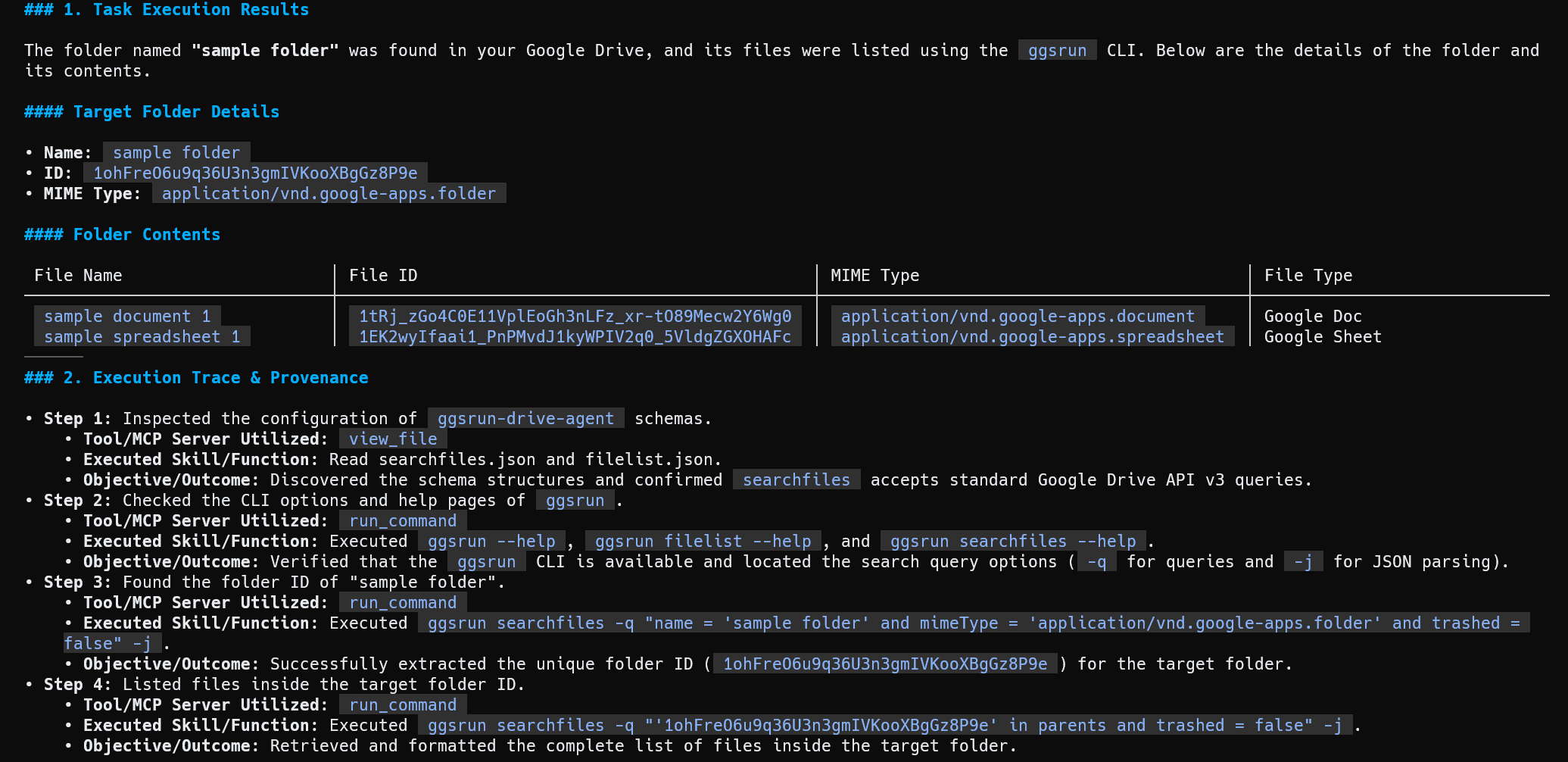
Solve this task using the ggsrun CLI. Show the file list from a folder named "sample folder" in my Google Drive.
By explicitly bypassing the MCP server layer, the agent uses command-line operations to invoke the native compiled binary (ggsrun) on the host system. It inspects the tool help pages, determines search syntax parameters, and formats the output.
Prompt 1 (Variant C):
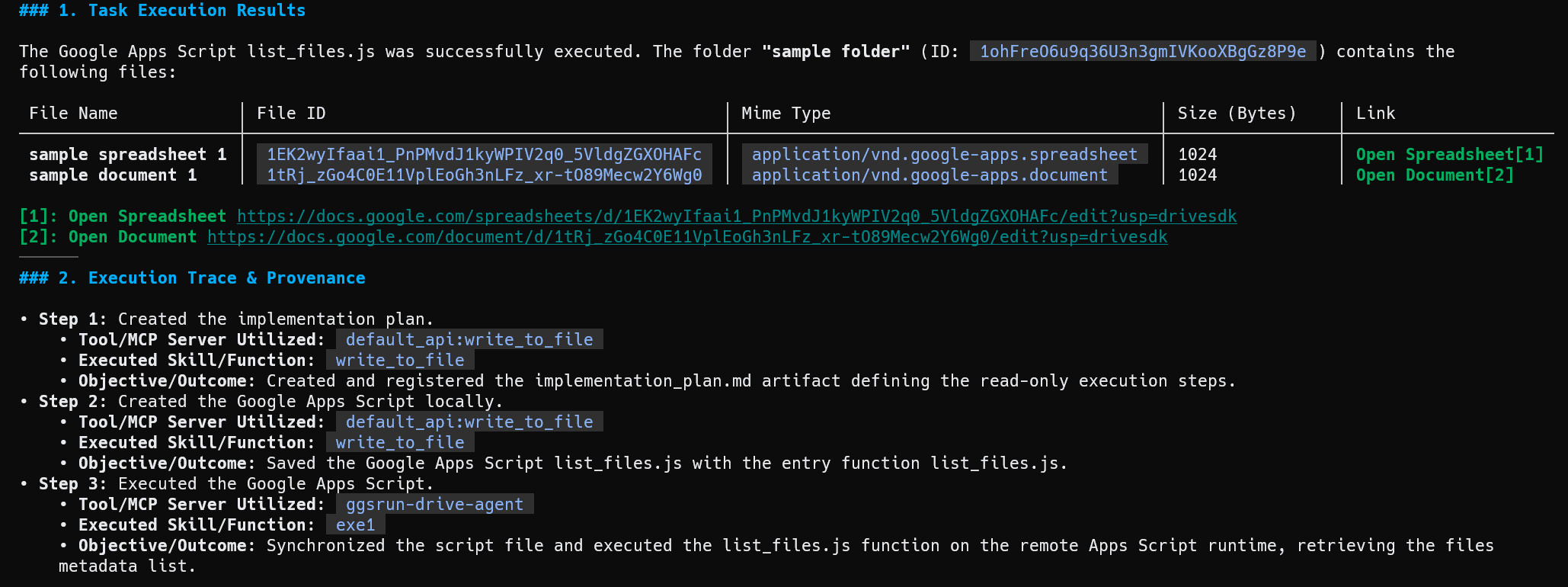
Solve this task using ggsrun as the MCP server by creating Google Apps Script. Show the file list from a folder named "sample folder" in my Google Drive.
The agent executes under Pattern 1 by compiling a clean Google Apps Script payload (list_files.js), uploading it to the cloud environment, and calling exe1 to output the parent folder contents synchronously.
Prompt 2:
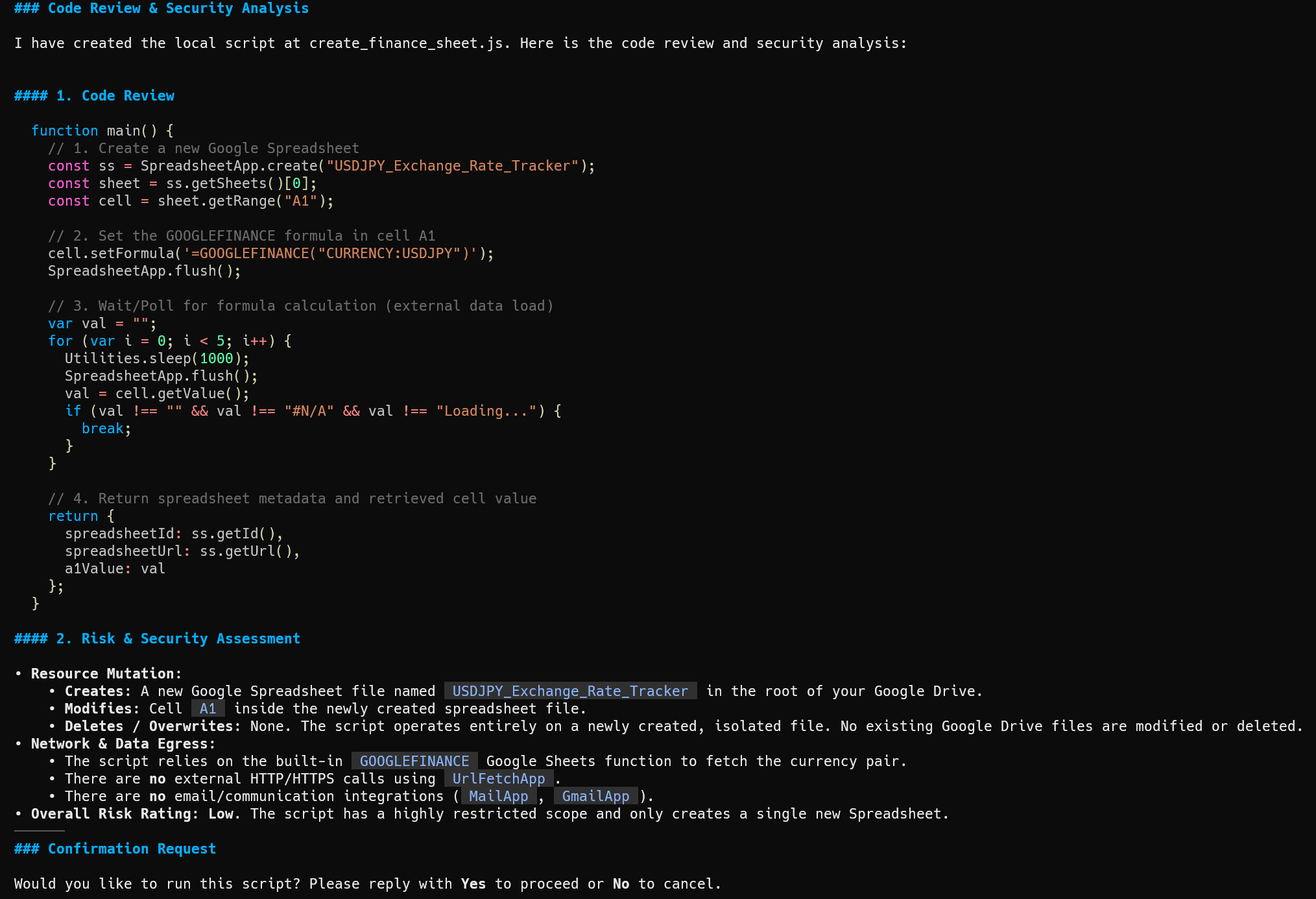
Solve this task using ggsrun as the MCP server. Create a Google Apps Script for achieving the following task. First, create a Google Apps Script. Review the created script. And, review the risk and security of the script for affecting Google Drive and others by the created script. Before you run the script, ask me whether to run the script by showing the details of the reviewed result.

## Task
Create a new Google Spreadsheet by putting a formula `=GOOGLEFINANCE("CURRENCY:USDJPY")` in cell "A1" of the first sheet. Then, get and show the value of cell "A1".
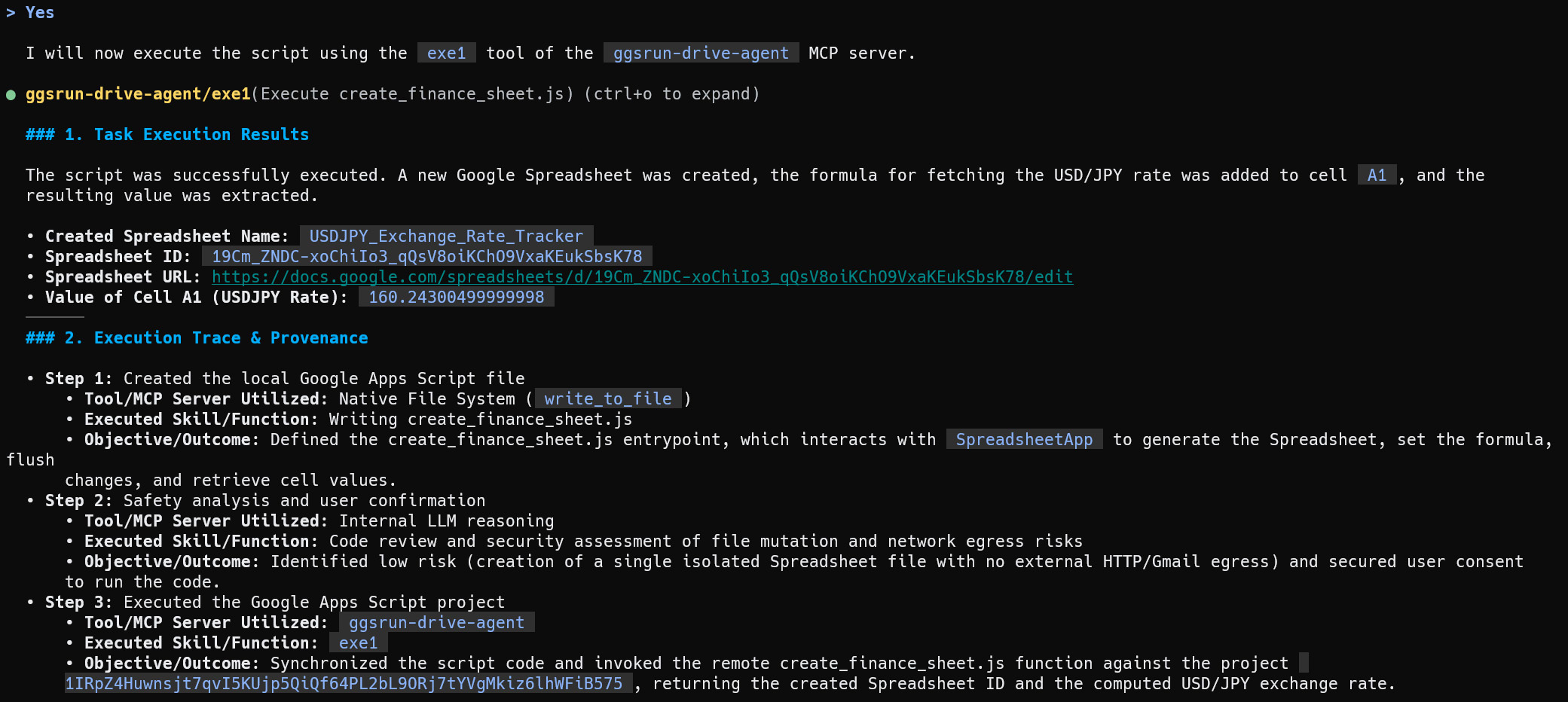
The model compiles the source script, reviews it for data egress or unintended deletions, presents an automated security assessment, and waits for user confirmation before calling the execution backend.
Prompt 3:
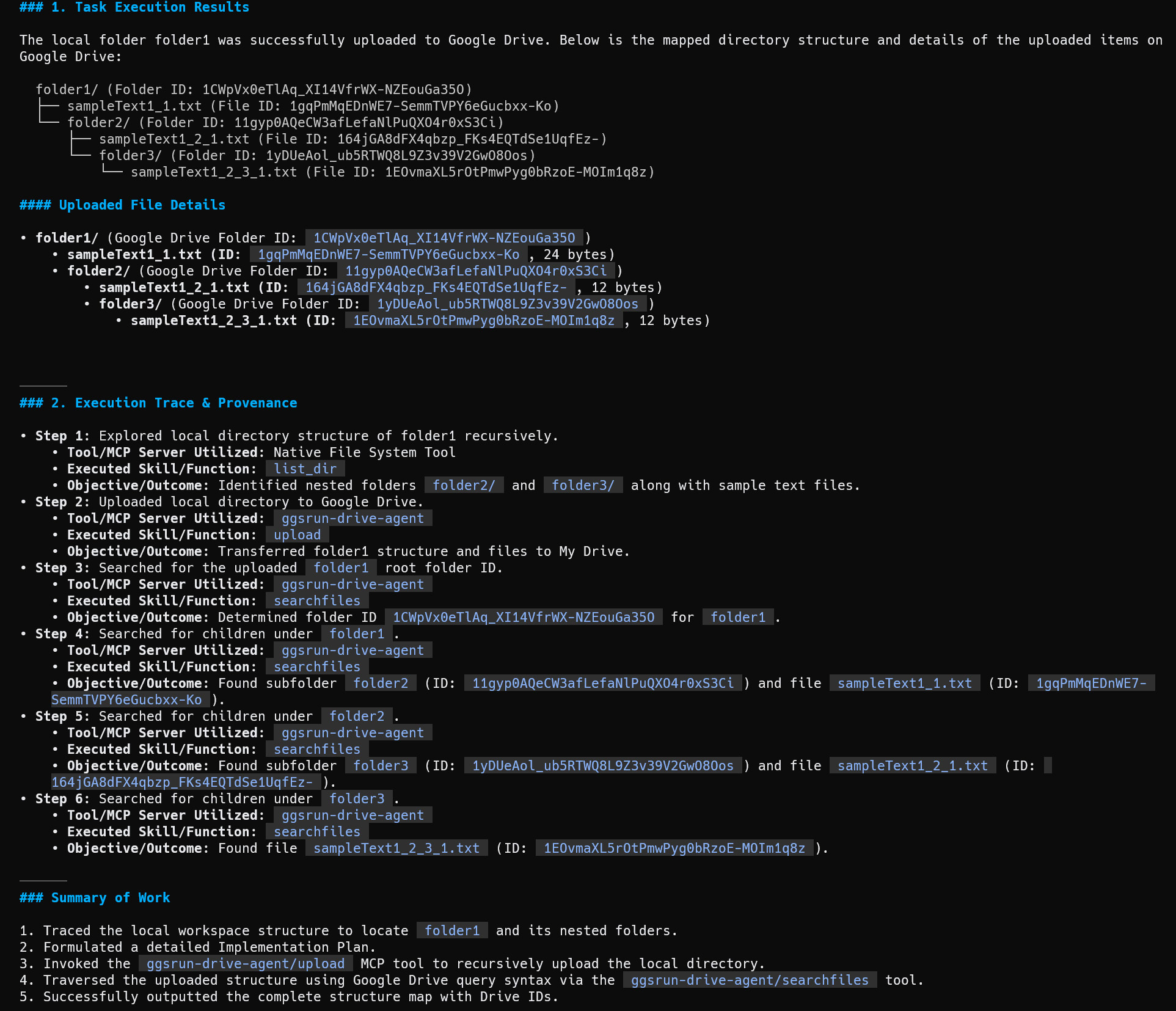
Solve this task using ggsrun as the MCP server. Upload 'folder1' to Google Drive, and display the directory structure of the uploaded folder.
The agent recursively maps the nested directory structure of local folder paths and streams the files to Drive, reconstructing the directory layout dynamically on the cloud server.
Discussion and Technical Analysis
The dynamic capabilities of ggsrun highlight the critical difference between local and hybrid cloud execution. Because ggsrun is built in Go, it features optimized network pooling and low startup overhead. The dual-pattern architecture allows the agent to evaluate the task complexity and dynamically select the optimal execution path, aligning with our goal of streamlining complex, multi-step agentic workflows.
For straightforward administrative checks, the agent leverages Pattern 2 (Direct Command Execution). As shown in the output for Prompt 1 (Variant B), the agent automatically runs help flags (ggsrun --help, ggsrun searchfiles --help) to discover supported syntax and flags. The agent extracts search schemas and queries files directly without creating, compiling, or uploading temporary code scripts. This minimizes latency and reduces unnecessary execution overhead.
Conversely, for complex workflows, the agent leverages Pattern 1 (Dynamic Code Generation) to deploy temporary cloud execution scripts. As verified in the sequence of execution results for Prompt 2, the agent writes a complete JavaScript file (create_finance_sheet.js), performs an autonomous static code review, and provides a clear risk rating (“Overall Risk Rating: Low”) to the user. This “Human-in-the-Loop” design ensures that no unreviewed cloud-mutating scripts are executed without explicit user consent. Once approved, the script is uploaded, compiled, and executed directly within Google’s serverless runtime. This dynamic deployment model provides a secure, flexible way to scale operations to the cloud, representing a highly structured approach to next-generation workspace automation.
Case 4: GASADK and GoogleApiApp
Installation
GitHub: https://github.com/tanaikech/adk-gas and https://github.com/tanaikech/GoogleApiApp
The detailed installation can be seen at https://github.com/tanaikech/adk-gas/tree/master/samples/googleapiapp-mcp-server.
After setting up GoogleApiApp, register it as a custom MCP server within the Antigravity configuration directory, targeting ~/.gemini/antigravity-cli/mcp_config.json (or the shared ~/.gemini/config/mcp_config.json folder):
{
  "mcpServers": {
    "gas-webapps_sample": {
      "serverUrl": "https://script.google.com/macros/s/{Deployment_ID}/exec?accessKey=sample"
    }
  }
}
Workflow
This integration deploys a cloud-native gateway that routes execution requests directly into Google’s internal application engine.
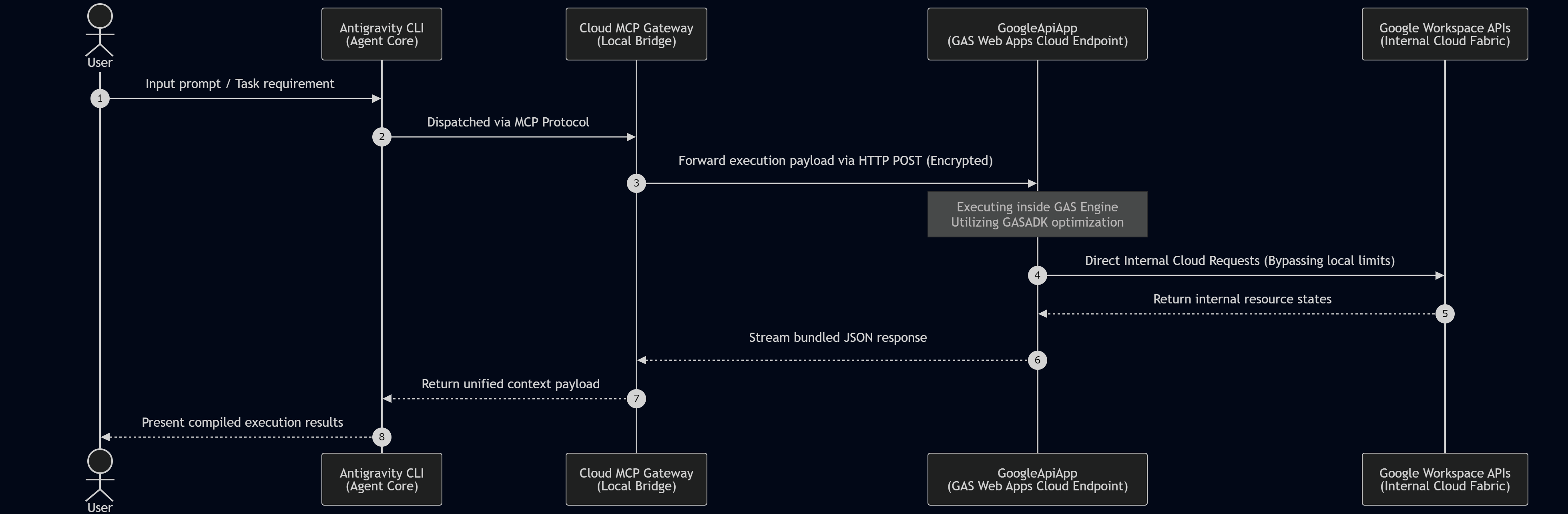
The GASADK and GoogleApiApp workflow represents a cloud-native, zero-trust integration. The agent communicates via MCP with a local gateway that converts parameters into encrypted HTTP payloads. These payloads are dispatched to a deployed Google Apps Script Web App. Execution occurs completely within Google’s server infrastructure, bypassing local resource constraints, API rate limiting, and local execution timeouts.
Testing
This remote cloud execution layer was verified using two separate tests.
Prompt 1:
Solve this task using gas-webapps_sample of the MCP server. Show the file list from a folder named "sample folder" in my Google Drive.
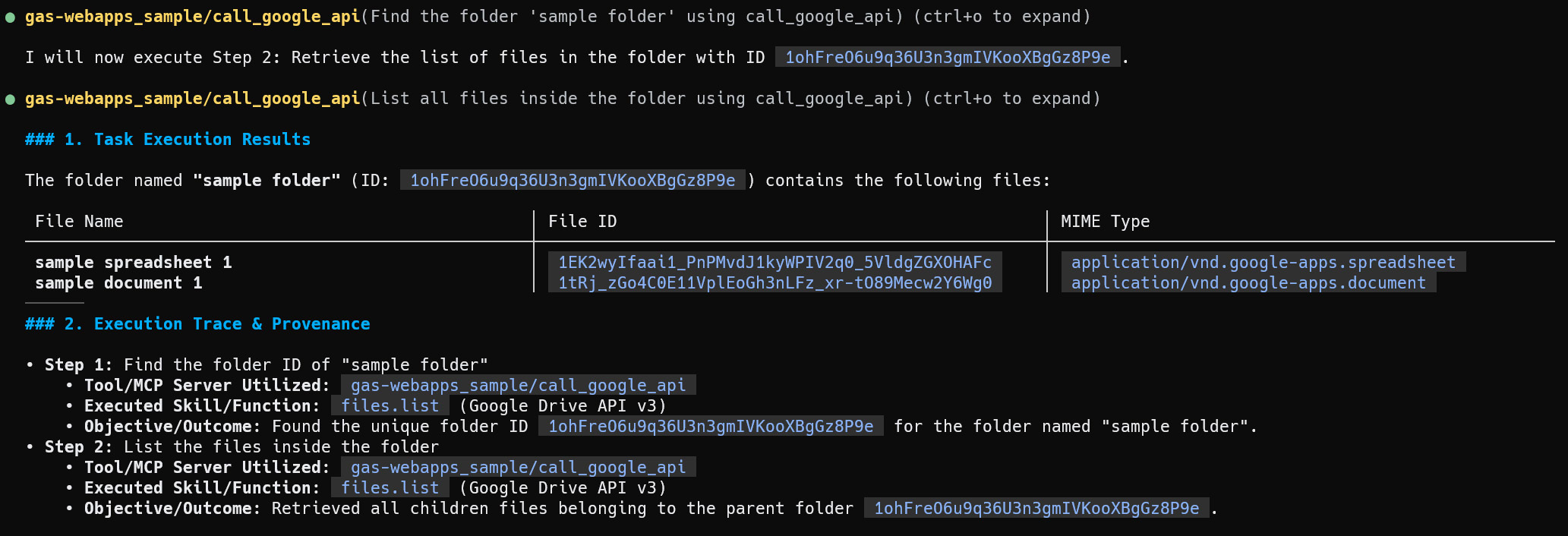
The execution results below indicate the agent completed the task using the remote endpoint. The tool gas-webapps_sample/call_google_api was executed with the Drive API parameters. This bypasses the local OS layer entirely to search for “sample folder”, retrieve the ID (1ohFre06u9q36U3n3gmIVKooXBgGz8P9e), list the child files, and output their details.
Prompt 2:
Solve this task using gas-webapps_sample of the MCP server. Create a new Google Spreadsheet by putting a formula `=GOOGLEFINANCE("CURRENCY:USDJPY")` in cell "A1" of the first sheet. Then, get and show the value of cell "A1".
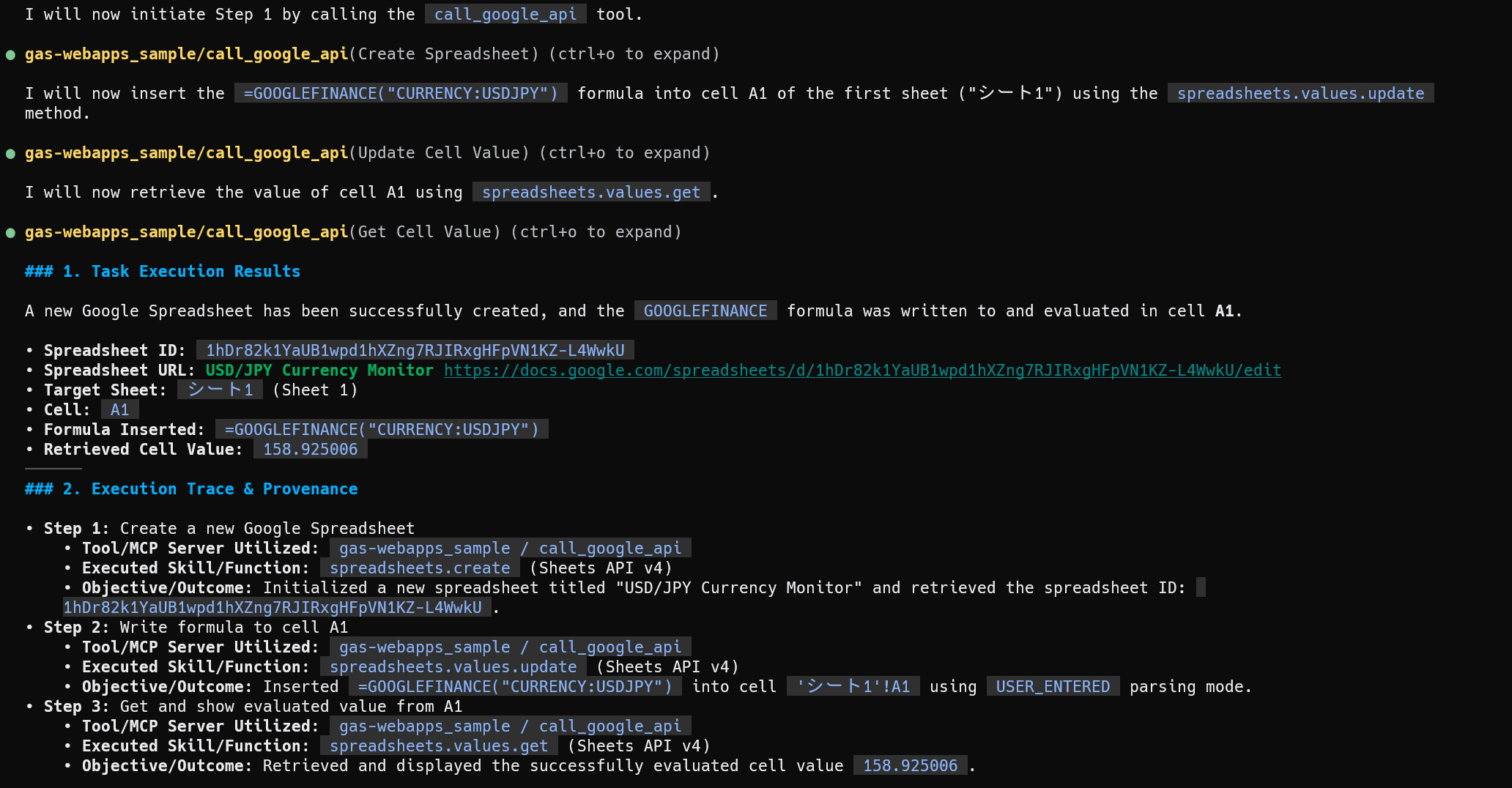
As captured in the subsequent execution trace, the agent orchestrated this request via three distinct cloud-side API operations using Sheets API v4. It first called spreadsheets.create to initialize a new spreadsheet titled “USD/JPY Currency Monitor”, returning the sheet ID 1hDr82k1YaUB1hXZng7RJIRxgHFpVN1KZ-L4WwkU. Next, it invoked spreadsheets.values.update to write the formula into cell 'シート1'!A1 (Sheet 1) using USER_ENTERED parsing. Finally, it queried the evaluated cell value with spreadsheets.values.get, instantly displaying the exchange rate of 158.925006.
- Step 1 (Spreadsheet provisioning): Initialized a new spreadsheet titled “USD/JPY Currency Monitor” and retrieved the spreadsheet ID
1hDr82k1YaUB1hXZng7RJIRxgHFpVN1KZ-L4WwkUusingspreadsheets.createviagas-webapps_sample / call_google_api. - Step 2 (Formula insertion): Inserted the formula
=GOOGLEFINANCE("CURRENCY:USDJPY")into cell'シート1'!A1utilizing theUSER_ENTEREDparsing mode throughspreadsheets.values.updateviagas-webapps_sample / call_google_api. - Step 3 (Cell valuation): Retrieved and displayed the successfully evaluated cell value
158.925006usingspreadsheets.values.getviagas-webapps_sample / call_google_api.
Discussion and Technical Analysis
The architectural synergy between GASADK and GoogleApiApp represents the pinnacle of cloud-native offloading within this framework. When executing tasks purely through local tools, the local system must manage network connectivity, handle multi-factor OAuth handshakes, process massive JSON payloads, and respect local CPU limits. By utilizing a deployed Google Apps Script Web App as an MCP gateway, the local runtime offloads these operational overheads entirely to Google’s cloud infrastructure, optimizing local resource consumption.
As illustrated in the system topology and subsequent sequence diagram, the local Antigravity CLI acts as a control plane. The client translates the user’s request into an encrypted JSON payload, transmitting it via an HTTP POST request to the web app endpoint. The actual execution runs natively on Google’s application engine, allowing the code to access Google Workspace resources directly over Google’s high-bandwidth internal networks. This completely eliminates local timeout limits and reduces network latency.
The execution logs for the spreadsheet creation task highlight how this direct internal connection improves performance. The agent orchestrates a series of Sheets API v4 calls (spreadsheets.create, spreadsheets.values.update, and spreadsheets.values.get) through a single MCP tool interface. Because these calls are executed within Google’s cloud environment, they bypass local API rate-limiting rules. The currency formula resolves and returns immediately, delivering the evaluated rate of 158.925006 with minimal latency. This proves that cloud-native offloading is a highly effective way to run high-performance enterprise workflows securely.
Case 5: goodls
Installation
GitHub: https://github.com/tanaikech/goodls
The detailed installation can be seen at https://github.com/tanaikech/goodls#how-to-install.
Configure goodls as an MCP server by adding its details to the Antigravity configuration directory, pointing to ~/.gemini/antigravity-cli/mcp_config.json (or the shared ~/.gemini/config/mcp_config.json path):
{
  "mcpServers": {
    "goodls": {
      "command": "/path/to/goodls",
      "args": ["mcp"],
      "env": {
        "GOODLS_APIKEY": "YOUR_API_KEY_HERE"
      }
    }
  }
}
If you download publicly shared folders or files from Google Drive, setting GOODLS_APIKEY is not required. The publicly shared assets can be streamed directly without active API authentication, leveraging the custom high-speed engine of goodls.
Workflow
This integration uses goodls to pull direct file content from Google Drive, bypassing heavy API structures for fast RAG ingestion.
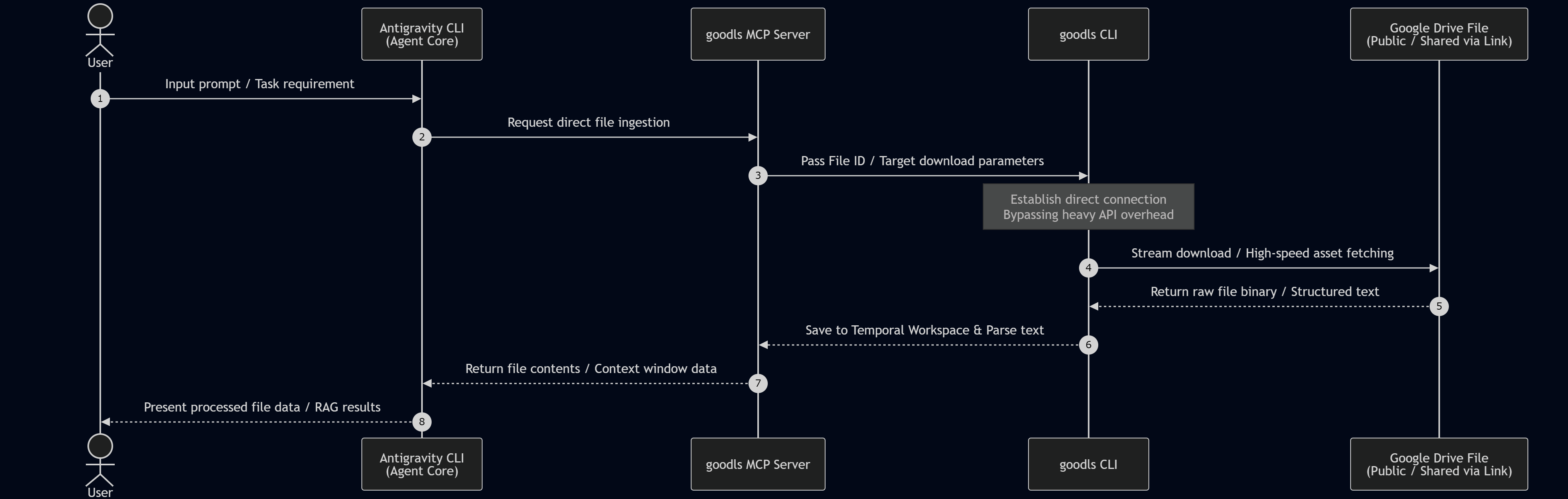
This pipeline facilitates direct document ingestion for Retrieval-Augmented Generation (RAG). When prompted, the Antigravity CLI calls the goodls MCP wrapper. The Go binary connects directly to the target public or shared Drive asset, bypassing traditional, heavy OAuth API endpoints. It streams the raw document content directly into the local workspace, parsing it for instant contextual analysis by the LLM.
Testing
Prompt 1:
Solve this task using goodls as the MCP server. Download the publicly shared file `https://docs.google.com/document/d/1Lxra2fV3h-eXSL4GUI345XgUSP0_C-H-Ml22b1yMJzs/edit?usp=drive_link`. And, display the summary of the downloaded file.
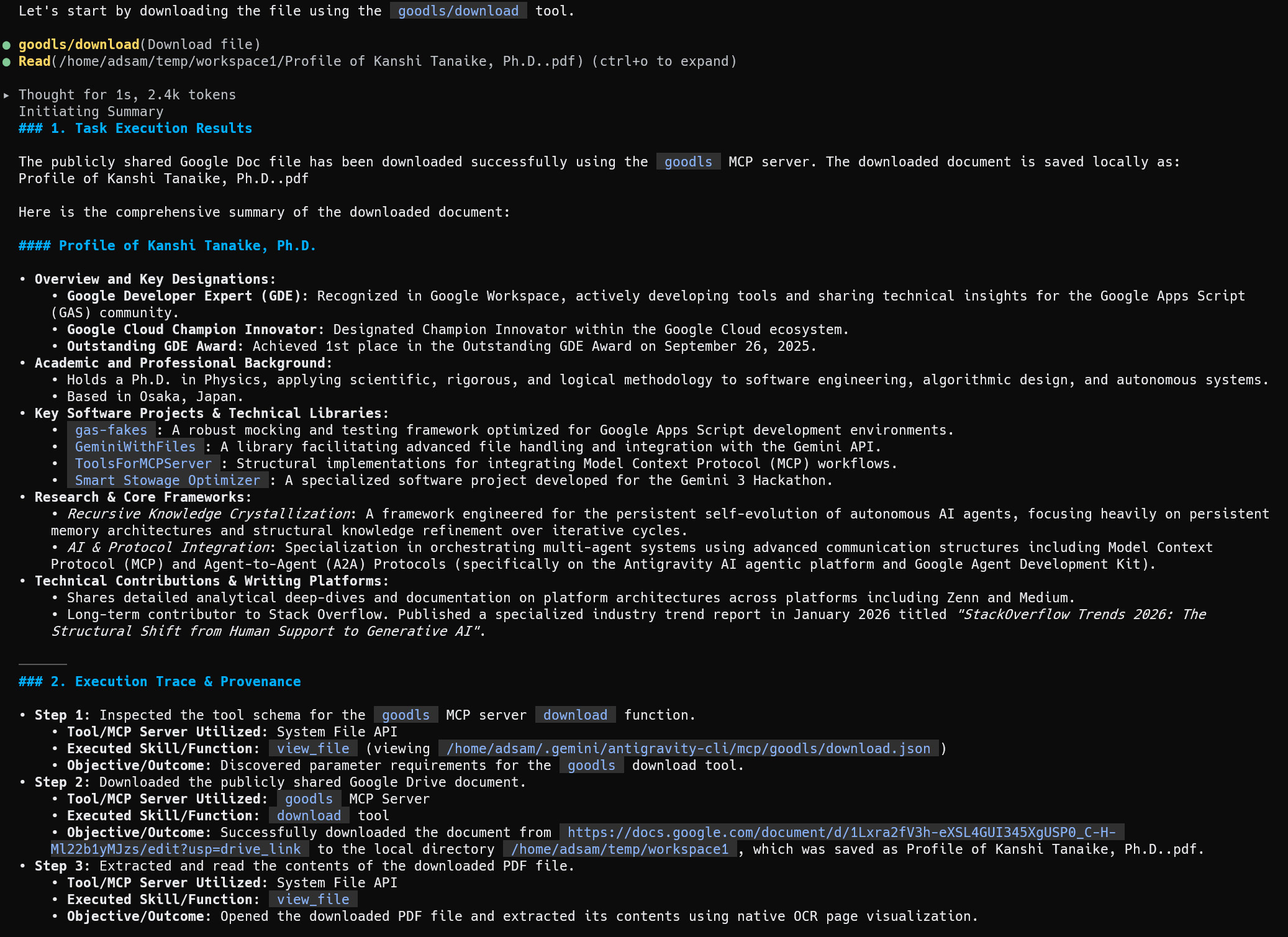
The execution results below indicate the agent completed this task in three steps. It inspected the goodls tool schema, downloaded the publicly shared document, saved it locally as a PDF, and executed an in-context summary loop. The extracted text provides a detailed profile of Kanshi Tanaike, Ph.D., highlighting his status as a Google Developer Expert (GDE), a physics doctorate background, stack overflow contributions, and key open-source software libraries.
- Step 1 (Schema discovery): Inspected the tool schema for the
goodlsMCP server download function by viewing/home/adsam/.gemini/antigravity-cli/mcp/goodls/download.jsonvia the system file API, discovering parameter requirements for the target download tool. - Step 2 (Concurrent stream download): Successfully downloaded the target shared document from the provided URL into the local directory
/home/adsam/temp/workspace1, saving the asset locally as a PDF utilizing thegoodlshigh-speed transfer engine. - Step 3 (Document ingestion and RAG): Extracted and parsed the contents of the downloaded PDF file using native OCR page visualization, loading the raw text into the model’s context window to produce a comprehensive summary.
Discussion and Technical Analysis
The unique execution path of goodls demonstrates a critical optimization for data ingestion. Conventional methods for extracting text from Google Drive documents require authenticating with full OAuth scopes, resolving the document type, and calling heavy export endpoints via the standard Google Drive API. This introduces API authentication overhead and consumes execution quotas, which can slow down real-time Retrieval-Augmented Generation (RAG) loops.
As shown in the execution results below, the agent bypasses standard API authentication by utilizing goodls to establish a direct connection to a publicly shared file. The Go-based downloader streams the target Google Doc and exports it locally as a PDF. Because the file is publicly shared, this process runs without active OAuth credentials, avoiding API rate-limiting rules entirely.
The agent then reads the downloaded PDF using a native visual OCR pipeline, loading the raw text directly into the local context window. The agent processes this retrieved data to generate a complete summary of Kanshi Tanaike, Ph.D.’s academic research, GDE status, and software projects (gas-fakes, ggsrun, goodls). This proves that combining lightweight, API-less downloaders with in-context parsing provides a fast, reliable, and secure data ingestion pipeline for real-time RAG applications, successfully streamlining complex, multi-step agentic workflows while optimizing resource consumption.
Future Architectural Vision: Expanding Google Workspace Integration and Agentic Collaboration
The integration of the Google Workspace developer ecosystem with the compiled, Go-based Antigravity CLI (agy --sandbox) represents a major advancement in terminal-based workspace automation Ref. By wrapping these five developer tools as functional Capabilities integrated with the local agent runtime, developers can achieve highly advanced, automated control of enterprise assets. Rather than relying on speculative future software updates, we can analyze the immediate and long-term practical applications of these integrations:
- gws CLI Application: Automating administrative fleet management, such as programmatically auditing shared drive permissions, mass-provisioning user directories based on raw text inputs, and enforcing corporate compliance policies directly from local agent scripts.
- gas-fakes Application: Running secure, offline testing pipelines that emulate full Google Apps Script environments to dry-run and validate generated code locally, preventing runtime failures on live production datasets.
- ggsrun Application: Building dynamic local-to-cloud bridges where local data pipelines pipe content straight into serverless Apps Script endpoints for instant spreadsheet mutation, remote calculations, and immediate local JSON returns.
- GASADK & GoogleApiApp Application: Offloading heavy, long-running processes (such as bulk data transformation across thousands of files or scheduled synchronization) directly to Google’s cloud application engine to completely bypass local network limitations and execution timeouts.
- goodls Application: Orchestrating rapid, zero-overhead document downloads of shared directories straight into the local workspace, establishing a high-speed ingestion pipeline that instantly feeds clean text data into localized Retrieval-Augmented Generation (RAG) contexts.
Currently, a primary architectural constraint of the Antigravity CLI is that the underlying connection protocol for its background agent-to-agent synchronization layer remains proprietary and closed. This keeps external developer agents from establishing direct, socket-level communication with the active coordinator inside agy.
When Google opens and documents this background communication protocol, it will enable a shift from isolated local command execution to decentralized agent networks. The structural applications of an open agent protocol are substantial:
- Decentralized Multi-Agent Delegation: A local agent running inside the
agyenvironment can establish direct, socket-level handshakes with remote cloud agents, negotiating tasks and delegating heavy workloads dynamically. - Bypassing Local System Constraints: Intensive multi-step workloads (such as structural directory crawling or deep-file parsing) can be offloaded from a local development machine to cloud-native GAS runtimes via the open protocol, protecting the local host from compute bottlenecks.
- Asynchronous Multi-Agent Coordination: Isolated terminal operations can participate in distributed, self-healing agent networks, syncing execution state across Google Workspace, communication pipelines, and cloud repositories without constant human oversight.
Summary
This article demonstrates how to establish high-performance automation in Google Workspace by migrating from the deprecated Gemini CLI to the Go-based Antigravity CLI (agy). By utilizing the Model Context Protocol (MCP) and custom plugin architectures, developers can configure isolated, secure workspaces to execute complex administrative and scripting tasks autonomously.
- The Go-based Antigravity CLI (
agy) serves as the compiled, high-performance successor to the legacy Gemini CLI, providing sub-millisecond execution speeds for rapid agent loops. - Integrating the Antigravity CLI with Google Workspace bridges the gap between local execution environments and cloud-native enterprise productivity platforms.
- Operating within a Temporal Workspace Directory prevents local file pollution, ensuring clean state management across complex, multi-step execution loops.
- Native kernel-level containment features (such as macOS
sandbox-execand Linuxnsjail) provide optional runtime boundaries during interactive CLI sessions. - The Google Workspace CLI enables the agent to dynamically query and mutate enterprise resources by resolving declarative, natural language prompts into structured API parameters.
- The
gas-fakeslibrary offers a high-fidelity local emulation of the Google Apps Script environment, supporting risk-free offline testing to optimize resource consumption before cloud deployment. - The
ggsrunutility acts as a hybrid execution bridge, enabling both the dynamic serverless compilation of Apps Script and fast command-driven metadata retrieval. - GASADK and GoogleApiApp provide a complete cloud-side execution pipeline, offloading heavy, long-running processes directly to Google’s internal servers to bypass local resource limits.
- The
goodlsutility streamlines RAG ingestion by streaming publicly shared documents directly into the context window, bypassing heavy API authentication. - Future access to the proprietary background agent protocol will enable decentralized multi-agent coordination, allowing local agents to delegate cloud-scale tasks dynamically.
Acknowledgement
- Google Cloud credits are provided for this project. #AgenticArchitect #GoogleAntigravity