Abstract
As Large Language Model (LLM) agents increasingly integrate numerous external systems, they suffer from Tool Space Interference (TSI), a phenomenon causing context bloat, attention dilution, and degraded reasoning accuracy. In this paper, we introduce the Agent-as-a-Tool paradigm—an evolutionary, practical implementation of the recently proposed Self-Optimizing Tool Caching Network (SOTCN) and Federated Context-Aware Routing Architecture (Federated CARA). By leveraging Retrieval-Augmented Generation (RAG) to dynamically discover and assemble stateful, autonomous sub-agents on the fly, this architecture completely eliminates TSI, enforces Zero-Trust execution boundaries, and achieves infinitely scalable AI orchestration.
Introduction
The rapid evolution of LLMs and their standardized integration with external systems—notably through the Model Context Protocol (MCP)—has transformed LLM-based agents from simple conversational interfaces into advanced, autonomous AI systems capable of executing complex workflows. However, as the number of tools and external skills accessible to an agent increases, a critical performance bottleneck has emerged.
This phenomenon is defined as Tool Space Interference (TSI). Ref As officially highlighted at Google Cloud Next ‘26, the excessive use of MCP servers and tools leads to “context bloat,” where massive amounts of data—such as verbose JSON schemas and system metadata—are loaded into the active context window. This not only exhausts token limits but also triggers “attention dilution.” Overlapping tool functionalities and conflicting semantics become noise, severely impairing the model’s reasoning capabilities and routing accuracy.
Current technical guidelines suggest a soft limit of approximately 20 tools per agent to maintain high selection accuracy. Exceeding this threshold causes context saturation, leading to a surge in fatal errors such as tool hallucination, the generation of invalid parameters, and the breakdown of execution flows. This creates an orchestration paradox: the more we attempt to scale the system’s capabilities, the less reliable the agent paradoxically becomes.
To overcome the TSI problem, I have previously proposed and implemented several architectural approaches. These strategies strongly anticipate the concepts of “Agent Skills” (an agent-first solution to context bloat) and “A2A Orchestration” (a native capability for agents to mutually delegate and coordinate tasks) announced at Next ‘26:
- Nexus-MCP: A Unified Gateway for Scalable and Deterministic MCP Server Aggregation (Published December 25, 2025): This approach employs a strictly deterministic workflow, aggregating a massive tool ecosystem into a single gateway to prevent context saturation.
- Overcoming Tool Space Interference: Bridging Google ADK and A2A SDK via Google Apps Script (Published January 1, 2026): This architecture decentralizes toolsets into categorized Agent-to-Agent (A2A) servers, significantly reducing the cognitive load on each orchestrating node.
- Empowering Autonomous AI Agents through Dynamic Tool Creation (Published April 24, 2026): This initiative introduces autonomous agents capable of dynamically generating, testing, and executing custom tools on the fly within sandboxed environments.
- Next-Generation Google Workspace Automation (Published April 27, 2026): In this comparative study, I proposed two theoretical frameworks designed for advanced enterprise deployment: the Self-Optimizing Tool Caching Network (SOTCN), which prevents TSI through dynamic semantic tool caching, and the Federated Context-Aware Routing Architecture (Federated CARA), a zero-trust orchestration layer that dynamically routes AI tasks based on operational context and security requirements.
Positioning of this Paper: This paper serves as the ultimate convergence and practical realization of both SOTCN and Federated CARA. By fusing these theoretical models utilizing the Google ADK and TypeScript, we dramatically elevate the concept of dynamic tool injection into a new paradigm: Agent-as-a-Tool. This study demonstrates how these architectures can be seamlessly implemented as production-ready, highly scalable code for the Agentic Enterprise.
Repository
You can see the script in this article at https://github.com/tanaikech/agent-as-a-tool.
The Agent-as-a-Tool Paradigm
Building upon prior efforts in aggregation, decentralization, and dynamic routing, this study proposes a paradigm that fundamentally resolves the TSI problem while achieving infinite operational scalability and preserving high reasoning accuracy.
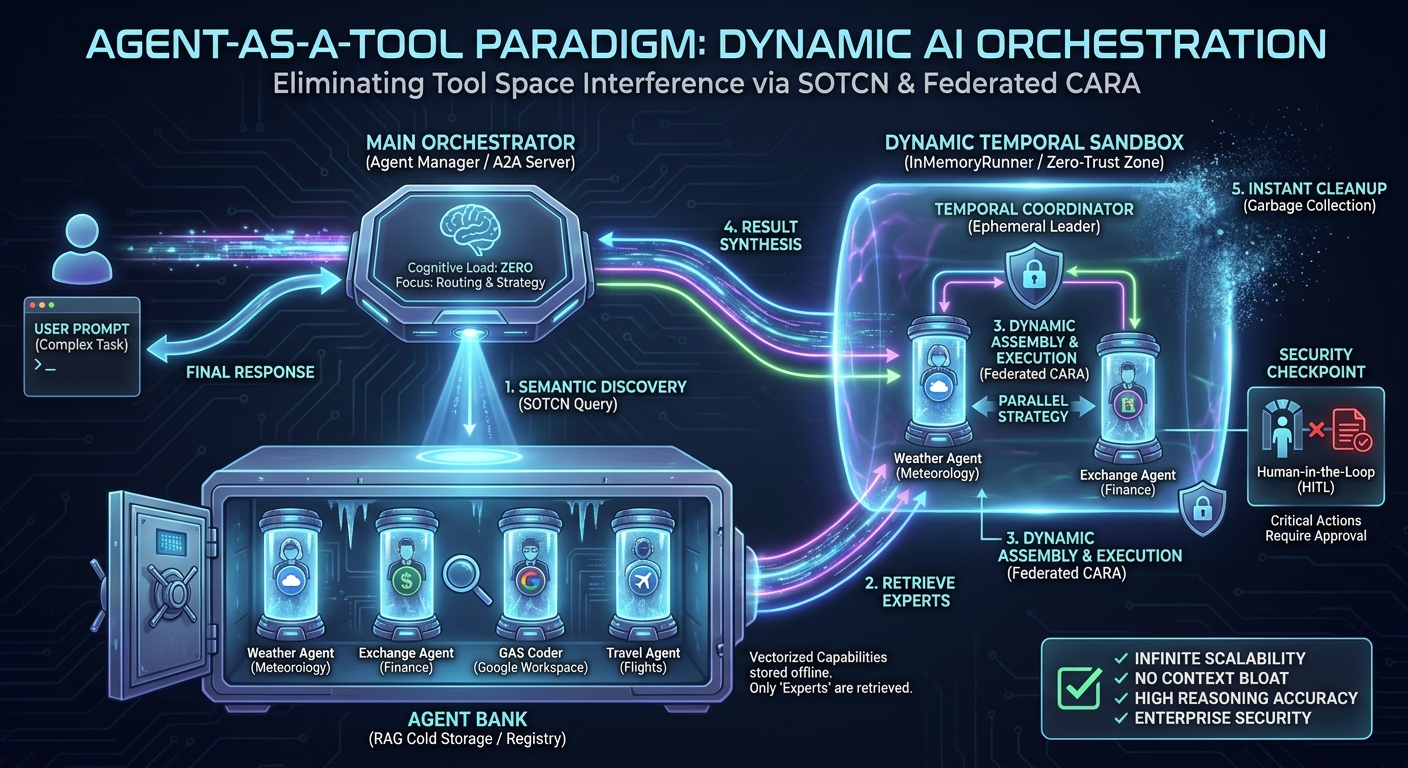
In the original SOTCN proposal, I theorized storing tool metadata in “cold storage” and dynamically injecting only the most relevant functions into the LLM’s active context. The Agent-as-a-Tool paradigm elevates this concept to its logical extreme. Instead of merely injecting static “tools” (such as bare API endpoints or JSON schemas), the system dynamically retrieves and delegates tasks to stateful, fully autonomous sub-agents.
By utilizing a Retrieval-Augmented Generation (RAG) database known as an “Agent Bank,” the orchestrator extracts only the minimum agentic resources required for a user’s task to assemble a temporary task force on the fly. This provides two decisive advantages:
- Encapsulation of Expertise (SOTCN Evolved): When raw tools are passed directly to an orchestrator, the primary LLM must independently interpret complex parameters, intricate instructions, and error-handling mechanisms every single time. By caching and injecting Agents instead of Tools, we encapsulate domain-specific system prompts, contextual history, self-reflection, and correction capabilities within the sub-entities. The main model is never exposed to the raw mechanics of the underlying tools.
- Distributed Cognitive Load: By dynamically invoking sub-agents, the primary orchestrator offloads the “How” (tool execution procedures) and focuses entirely on high-level meta-reasoning: the “Who and What” (task decomposition, planning, and dependency mapping). This perfectly aligns with standard specifications for seamless A2A coordination.
Architecture and Execution Workflow
Implemented via the Google ADK and Gemini API, the proposed system processes tasks autonomously and dynamically through a structured workflow that codifies the Federated CARA and SOTCN principles into executable logic:
- Agent Bank Preparation (SOTCN Storage): We construct diverse sub-agents that encapsulate specialized tools and domain knowledge. Their functional specifications (name, description, required skills) are vectorized and stored in a RAG-based search engine (Google Gen AI File Search Store). This acts as the resilient “cold storage” registry.
- Dynamic Discovery via Semantic Search: Upon receiving a user prompt, the main orchestrator (Agent Manager) does not process the task directly. Instead, it utilizes a
search_expert_agentstool to query the RAG system, analyzing the prompt’s intent and extracting only the Top-K specialized agents essential for the task, keeping the active context pristine. - Context-Aware Dynamic Assembly & Execution (Federated CARA in Action): The orchestrator acts as a sophisticated routing engine. Using the
execute_with_dynamic_subagentstool, it analyzes task dependencies and dynamically formulates an execution strategy—routing tasks using Single, Parallel (for independent sub-tasks), or Sequential (for dependent sub-tasks) execution patterns. To prevent state contamination, the system utilizes anInMemoryRunnerto spawn a temporary entity (Temporal Coordinator), attaches the retrieved agents as sub-agents, executes the task, and immediately garbage-collects the entities from memory upon completion. - Zero-Trust & Human-in-the-Loop Failsafes: Embodying the core philosophy of Federated CARA, securing execution boundaries is paramount. The system is programmed with strict
File Operation Rules. For critical operations (e.g., creating, modifying, or deleting files), the orchestrator automatically pauses execution to enforce a strict “Human-in-the-Loop” (HITL) protocol, requiring explicit user approval before acting. By operating as an A2A Server, it establishes an enterprise-grade, Zero-Trust environment.
Through this architecture, even if the total number of tools accessible to the enterprise scales to thousands, the main orchestrator’s cognitive load remains virtually zero.
System Execution Flow in Practice
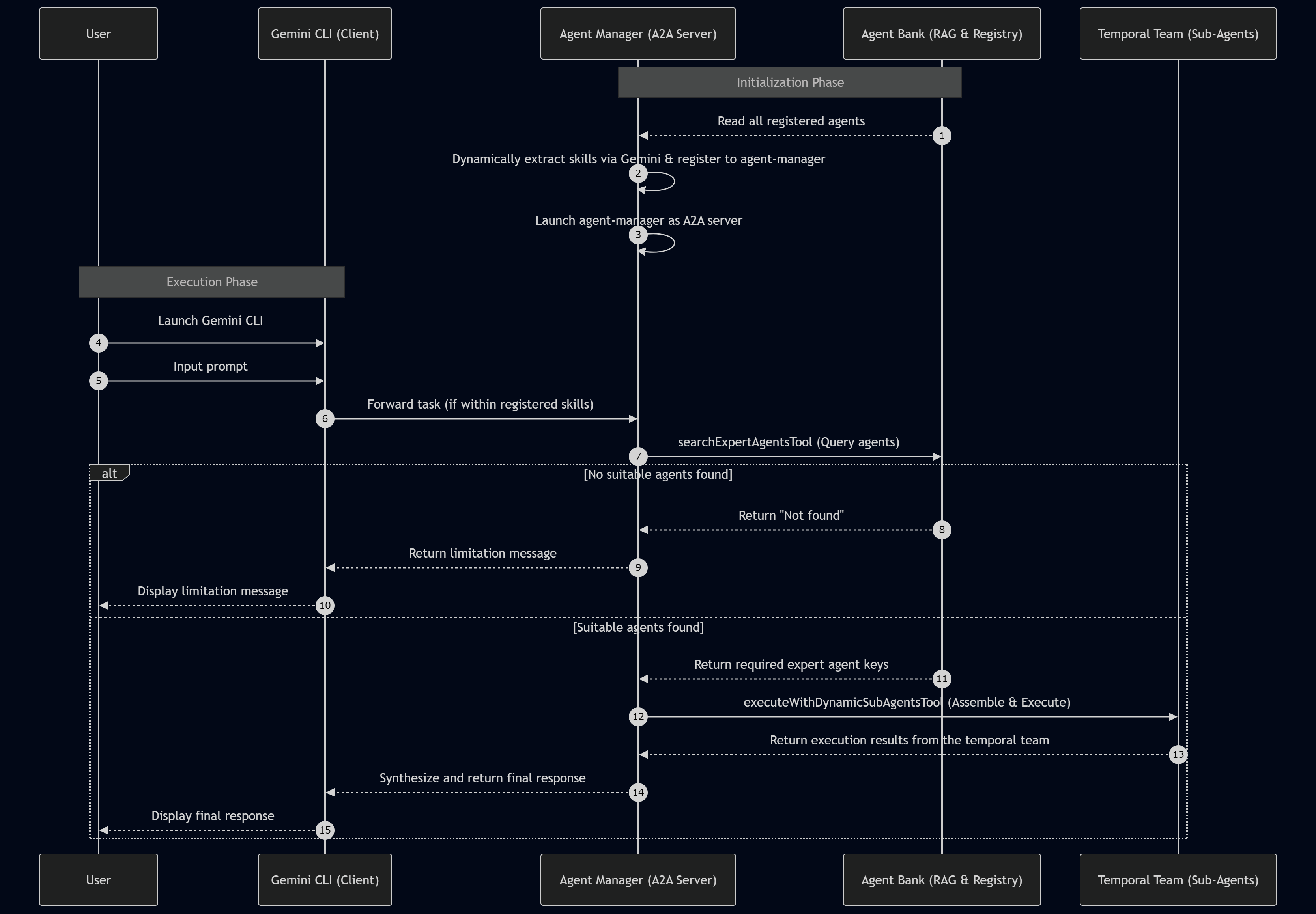
To illustrate how the theories of SOTCN and Federated CARA function in a live environment, the practical execution flow of the system is detailed below. This flow highlights the dynamic skill extraction and the ephemeral assembly of sub-agents.
Step-by-Step Breakdown
- Agent Extraction & Skill Identification: The system reads all registered agents from the Agent Bank (Registry) and dynamically extracts their overarching capabilities and functional skills using the Gemini API.
- Skill Registration: These extracted skills are systematically registered into the core description of the main
agent-manager, establishing its semantic capability matrix. - Server Launch: The main
agent-manageris deployed as a standalone Agent-to-Agent (A2A) server. - Client Activation: The user launches the Gemini CLI to serve as the local client interface.
- User Input: The user inputs a prompt defining their specific task, workflow, or goal.
- Task Routing: If the prompt’s task falls within the functional scope of the
agent-manager’s registered capabilities, the orchestrator is natively triggered by the CLI. - Semantic Search (SOTCN): The
agent-managerexecutes thesearch_expert_agentstool to query the Agent Bank’s File Search Store. It retrieves one or multiple expert agents required for the task. If the requested task cannot be processed by any registered agent, the RAG system notifies the orchestrator, which gracefully forwards a transparent limitation message back to the user. - Dynamic Assembly & Execution (Federated CARA): If the required agents are found, the orchestrator triggers the
execute_with_dynamic_subagentstool. This process spawns a freshTemporal Coordinatorusing an in-memory runner, attaches the retrieved agents to form an ephemeral task force, and executes the complex task based on the optimal strategy (Single, Parallel, or Sequential). - Result Synthesis: The temporal team processes the data and returns the execution results to the
agent-manager. The manager synthesizes the final response, securely flushes the temporal team from memory to prevent state contamination, and delivers the comprehensive output back to the Gemini CLI.
Project Setup and Prerequisites
To demonstrate this architecture practically, I have prepared a complete Node.js/TypeScript implementation. You can view the full repository of sample scripts at https://github.com/tanaikech/agent-as-a-tool.
To follow along with this guide, ensure your environment meets the following requirements:
- Node.js is installed and configured on your system.
- Gemini CLI is installed and accessible via your terminal.
1. Install agent-as-a-tool
To retrieve and initialize the scripts, execute the following commands in your terminal:
git clone https://github.com/tanaikech/agent-as-a-tool
cd agent-as-a-tool
npm install
The directory structure is defined below. src/agentbank.ts acts as the registry for the sample agents. You can modify this file to add or remove agents tailored to your enterprise workflows.
agent-as-a-tool/
├── package.json
├── tsconfig.json
├── src/
│   ├── a2aserver.ts
│   ├── agent.ts
│   ├── agentbank.ts
│   ├── autonomous-google-workspace-agent.ts
│   └── store_manager.ts
└── test/
    └── test_search.ts
In this sample, three sophisticated agents are included. The third agent is derived fromEmpowering Autonomous AI Agents through Dynamic Tool Creation. When utilizing this agent, please refer to the article for specific sandbox setup instructions.
1. Currency Exchange Agent (exchange_agent)
 - Capabilities: A financial specialist providing accurate global currency exchange rates.
 - Features: Dynamically handles current rates and relative date requests (e.g., "last Friday") by resolving the exact temporal context before API retrieval.

2. Weather Agent (weather_agent)
 - Capabilities: A professional meteorologist providing precise weather forecasts.
 - Features: Computes target dates, times, and geographic coordinates for relative requests (e.g., "in 3 hours") to deliver perfectly timed data.

3. Autonomous Google Workspace Agent (autonomous-google-workspace-agent)
 - Capabilities: A Senior Orchestrator managing the full lifecycle of Google Apps Script (GAS) development.
 - Internal Sub-Agents:
     - Environment Checker: Validates local tool installations (e.g., @google/clasp).
     - Script Writer: Generates GAS-compatible code using live official documentation via MCP.
     - Script Executor: Simulates and tests scripts in a locally sandboxed environment.
     - Script Uploader: Manages Drive project creation and secure uploading via clasp.
     - Summary Agent: Consolidates technical results into structured execution reports.
To enable these agents, you must configure your Gemini API key as an environment variable:
export GEMINI_API_KEY=<YOUR_API_KEY_HERE>
2. Store Agents to RAG
To securely index the initial agents into the File Search Store (Agent Bank), execute the following command:
npm run regAgents
If you add new capabilities to agentbank.ts and re-run this command, the script dynamically compares existing metadata, ensuring only newly added agents are registered and entirely avoiding duplicate ingestion.
You can inspect the registered agent list by running npm run regAgentList, or selectively clear the stores using npm run deleteStores.
Once the store is created, map it to your environment session:
export AGENT_BANK="{your store name}"
3. Launch Web Server
This framework can function natively as a standalone web server or as a delegated sub-agent linked to the Gemini CLI. Let’s first test it as a standalone server.
Launch the Web server:
npm run web
$ npm run web

> adk-full-samples@1.0.0 web
> npx adk web src/agent.ts

+-----------------------------------------------------------------------------+
| ADK API Server started                                                      |
|                                                                             |
| For local testing, access at http://localhost:8000.                         |
+-----------------------------------------------------------------------------+
You can now interact with the web interface by navigating to http://localhost:8000 in your browser.
4. Testing: Web Server
A demonstration video for scenarios 1 through 4 in this section is available here:
Once you have executed npm run web and launched your browser at http://localhost:8000, evaluate the following test cases.
Scenario 1
Prompt:
What is the latest exchange rate from USD to JPY?
Result: The orchestrator correctly processes the semantic intent, dynamically fetching and executing a single exchange_agent to retrieve the latest financial rates.
Scenario 2
Prompt:
Please tell me the weather in Tokyo at noon tomorrow.
Result: The orchestrator interprets the temporal requirement, processes the task using the weather_agent, which correctly calculates “tomorrow at noon” before querying the weather API.
Scenario 3
Prompt:
I am traveling to Paris. Please check the weather in Paris on 2026-05-01 12:00 (Latitude 48.85, Longitude 2.35, Timezone Europe/Paris). Also, I need to plan my budget, so please provide the latest exchange rate from JPY to EUR simultaneously.
Result: The orchestrator dissects this complex prompt, semantic-searches the Agent Bank, and identifies two required experts. Utilizing the CARA-inspired routing engine, it formulates a Parallel execution strategy, assembling and coordinating both the exchange_agent and weather_agent concurrently, seamlessly synthesizing their outputs.
Scenario 4
Prompt:
Please tell me the weather in Tokyo tomorrow, and also book a flight from New York to Tokyo for next Monday.
Result: The orchestrator successfully procures the weather forecast via the weather_agent. However, recognizing that no flight-booking agent exists in the Agent Bank, the system strictly enforces its operational boundaries, returning the weather data while transparently explaining its limitation regarding the flight booking.
5. Launch A2A Server
To test this architecture directly within your terminal as an enterprise sub-agent for the Gemini CLI, it is required to launch the Agent-to-Agent (A2A) server endpoint.
npm run a2a
When this command executes, the routing endpoint becomes active:
$ npm run a2a

> adk-full-samples@1.0.0 a2a
> npx tsx src/a2aserver.ts

Server started on http://localhost:8000
Try: http://localhost:8000/.well-known/agent-card.json
To configure this A2A server as an accessible sub-agent for the Gemini CLI, create or update .gemini/agents/agent-as-a-tool.md with the following configuration:
---
kind: remote
name: agent-as-a-tool
agent_card_url: http://localhost:8000/.well-known/agent-card.json
---
You can inspect the generated agent card specifications by opening the provided URL (http://localhost:8000/.well-known/agent-card.json) in your browser.
6. Testing: A2A Server
A demonstration video for the A2A server using scenarios 1 through 4 is available here:
Once the server is configured and running, launch the Gemini CLI. We use the prefix @agent-as-a-tool to route the intent directly to our newly created orchestrator.
Scenario 1
Prompt:
@agent-as-a-tool What is the latest exchange rate from USD to JPY?
Result: The orchestrator receives the delegated request from the Gemini CLI and successfully answers using the exchange_agent.
Scenario 2
Prompt:
@agent-as-a-tool Please tell me the weather in Tokyo at noon tomorrow.
Result: Processed seamlessly via the dynamically loaded weather_agent.
Scenario 3
Prompt:
@agent-as-a-tool I am traveling to Paris. Please check the weather in Paris on 2026-05-01 12:00 (Latitude 48.85, Longitude 2.35, Timezone Europe/Paris). Also, I need to plan my budget, so please provide the latest exchange rate from JPY to EUR simultaneously.
Result: Mirroring the web testing, the agent-as-a-tool orchestrator dynamically delegates sub-tasks to both the exchange_agent and weather_agent, returning a synthesized response directly to your CLI session.
Scenario 4
Prompt:
@agent-as-a-tool Please tell me the weather in Tokyo tomorrow, and also book a flight from New York to Tokyo for next Monday.
Result: The A2A orchestrator accurately audits its capability matrix, retrieving the weather while explicitly refusing the flight booking due to the lack of an applicable sub-agent.
Scenario 5
In this scenario, we utilize the advanced agent I previously published inEmpowering Autonomous AI Agents through Dynamic Tool Creation.
Prompt:
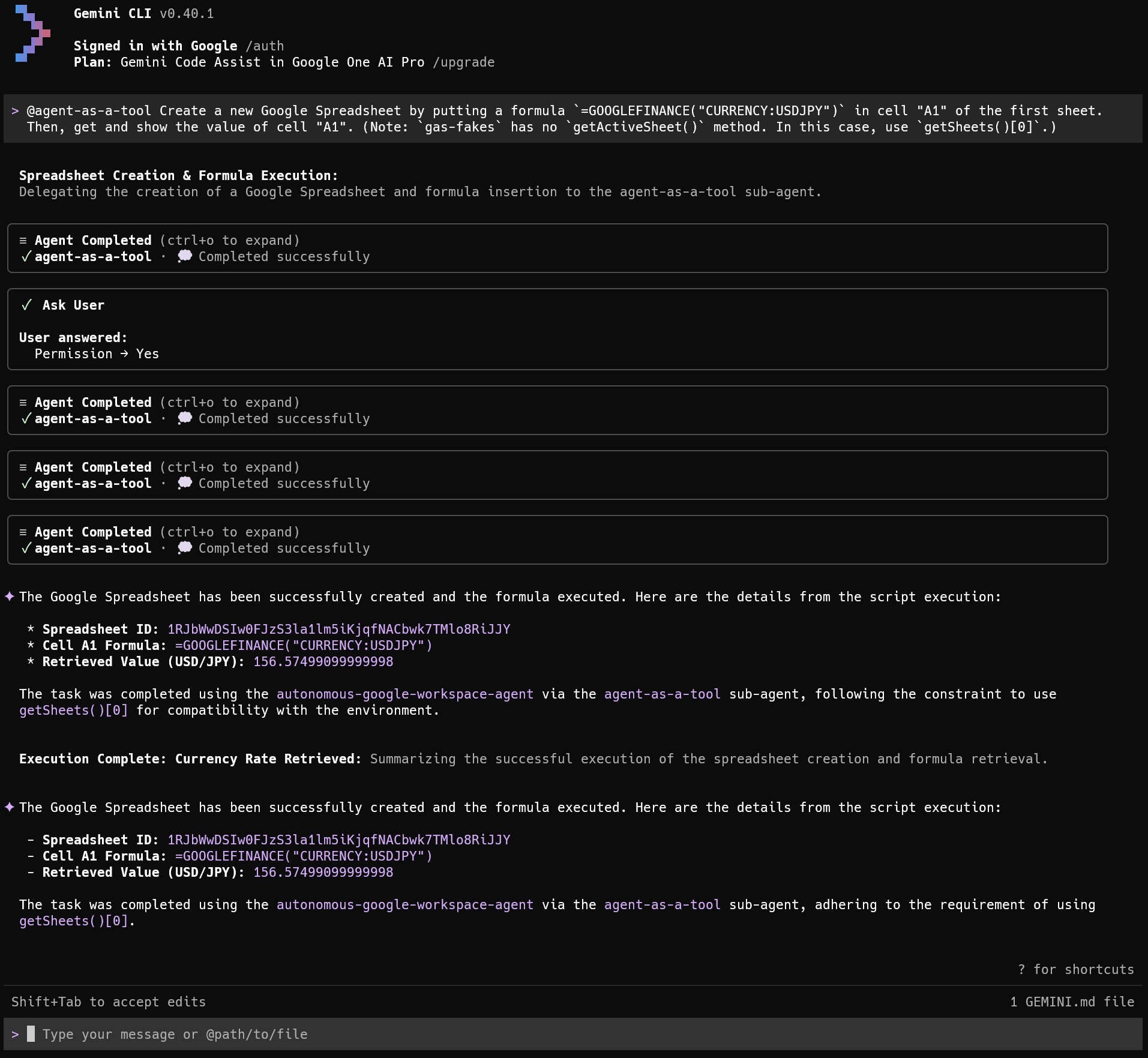
@agent-as-a-tool Create a new Google Spreadsheet by putting a formula `=GOOGLEFINANCE("CURRENCY:USDJPY")` in cell "A1" of the first sheet. Then, get and show the value of cell "A1". (Note: `gas-fakes` has no `getActiveSheet()` method. In this case, use `getSheets()[0]`.)
When this prompt is processed, the system retrieves the complex autonomous-google-workspace-agent from the Agent Bank. Because creating a new Google Spreadsheet demands specific Google Drive authorization, the agent correctly halts execution and requests explicit authorization to execute file creation workflows. Once approved, the orchestrator leverages local sandboxing (gas-fakes) to simulate, validate, and execute the generated Google Apps Script, perfectly achieving the goal. This also indicates that by using Agent-as-a-Tool, you can use existing agents as they are.
Security Considerations and Zero-Trust Governance
As autonomous agents assume greater operational responsibility in enterprise environments, security must be treated as a foundational architectural component rather than an afterthought. The Agent-as-a-Tool paradigm natively incorporates robust security measures, heavily inspired by the zero-trust principles of the Federated Context-Aware Routing Architecture (Federated CARA). This framework secures the execution environment through three primary mechanisms:
1. Attack Surface Minimization via Dynamic Injection
Traditional agents that load massive toolsets into their active context window inadvertently expand their attack surface. Malicious prompt injections can easily trick an over-privileged LLM into triggering unintended functions. By utilizing the RAG-based storage inherited from the Self-Optimizing Tool Caching Network (SOTCN), our orchestrator injects only the strictly necessary sub-agents for a specific task. If a tool or capability is not retrieved by the semantic search, it physically cannot be executed within that session, intrinsically shielding the system from arbitrary functional exploits.
2. Ephemeral Execution and State Isolation
To prevent data leakage across different tasks or users (state contamination), the architecture deeply integrates an InMemoryRunner for temporal generation. Sub-agents are never persistent entities. The orchestrator dynamically spawns a Temporal Coordinator and its assigned sub-agents strictly for the duration of the given task. Once the execution is complete and the synthesized result is returned, the temporal team is immediately garbage-collected from memory. This ephemeral execution model ensures that sensitive data processed in one session cannot cross-pollinate or influence subsequent AI interactions, maintaining strict state isolation.
3. Human-in-the-Loop (HITL) and Boundary Control
The Agent Manager also serves as a strict security triage engine. For non-destructive, read-only operations (such as fetching weather forecasts or exchange rates), it delegates and operates fully autonomously. However, for critical operations—specifically creating, modifying, or deleting files—the system enforces a mandatory Human-in-the-Loop (HITL) protocol. The orchestrator is explicitly instructed via its core system prompt (File Operation Rules) to halt execution and request direct user confirmation before proceeding with any action that crosses predefined security boundaries. This dual-layered approach—autonomous execution for read-only tasks and mandated HITL for write operations—establishes a scalable, enterprise-grade governance model without sacrificing system agility.
Future Perspectives on Dynamic Orchestration
In this article, as an experimental approach to the dynamic use of AI agents, we successfully demonstrated the dynamic selection, assembly, and execution of pre-built, safety-verified agents from an Agent Bank based on specific task requirements. However, this foundational approach naturally paves the way for an even more advanced future capability.
In addition to utilizing an Agent Bank, we can envision a scenario where optimal agents are dynamically constructed from scratch by pulling highly granular resources from a “Tool Bank,” an “MCP Server Bank,” or a “Skill Bank” on the fly, tailoring the newly generated agent entirely to the context of the requested task. While this promises unprecedented orchestration flexibility, it is crucial to recognize that the dynamic combination of these unverified components may inadvertently introduce new security vulnerabilities or unpredictable agent behaviors. Therefore, establishing rigorous safety validation mechanisms and robust governance protocols for these dynamic combinations will undoubtedly be a critical challenge to address when realizing this ultimate vision of autonomous AI orchestration.
Comparative Analysis: Agent-as-a-Tool vs. Agent Skills
As the AI orchestration landscape matures, two dominant paradigms have emerged to combat the shared adversary of Tool Space Interference (TSI): the Agent-as-a-Tool architecture presented in this paper, and the Agent Skills framework (widely adopted by interfaces like the Gemini CLI and Claude Code). While both approaches successfully mitigate context bloat by loading only necessary capabilities at runtime, their foundational philosophies regarding agent generation and task delegation stand in stark contrast. Evaluating them from a senior engineering and academic perspective reveals a critical dichotomy: the trade-off between deterministic safety and probabilistic agility.
Architectural Philosophies
Agent-as-a-Tool (Dynamic Assembly of Pre-verified Entities) This paradigm functions analogously to a robust microservices architecture. It dictates that sub-agents are pre-constructed, rigorously tested, and securely stored in a cold registry (the Agent Bank). During execution, the primary orchestrator dynamically retrieves and assembles these static, highly specialized entities. It is a system built on deterministic execution and strict operational boundaries.
Agent Skills (Progressive Disclosure and Dynamic Generation)
In contrast, Agent Skills operate on the principle of Progressive Disclosure. When a task occurs, the system retrieves a set of instructions (typically a SKILL.md file) and injects it into the active context. The primary LLM is then expected to interpret this manual on the fly, dynamically spawning a temporary executor or sub-agent to fulfill the task. This approach resembles dynamic typing in programming, leaning heavily into the probabilistic and self-organizing nature of LLMs.
Merits and Trade-offs
Evaluating these frameworks highlights their respective strengths and inherent vulnerabilities:
-
Certainty and Security vs. Non-Determinism: A fundamental concern with Agent Skills is execution fluctuation (non-determinism). Because sub-agents are generated dynamically based on the real-time interpretation of a skill file, the execution pathway is inherently stochastic. A task that succeeds today might fail tomorrow—or execute an unintended command—due to minor shifts in the model’s sampling or prompt interpretation. Furthermore, dynamically injecting external Markdown instructions elevates the risk of prompt injections and state contamination. Conversely, Agent-as-a-Tool systematically neutralizes this non-determinism. By invoking pre-verified agents with hardcoded boundaries and integrated Human-in-the-Loop (HITL) failsafes, it guarantees enterprise-grade Zero-Trust security. The orchestrator produces highly predictable outcomes. However, this rigid safety comes at the cost of higher initial development overhead and reduced flexibility when confronting entirely unknown, zero-based exploratory tasks outside its pre-registered bank.
-
Agility and Adaptability vs. Structural Rigidity: Agent Skills excel in development agility and portability. Developers can grant an LLM new capabilities simply by writing a text file, empowering the model to organically navigate unprecedented challenges and edge cases. While Agent-as-a-Tool handles defined tasks flawlessly, it requires an upfront engineering investment in agent encapsulation and may stall if an exact expert agent is unavailable.
The Future: A Hybrid Lifecycle Architecture
From an advanced orchestration standpoint, these paradigms are not mutually exclusive but destined to converge. The ultimate evolution of AI orchestration will likely adopt a Hybrid Lifecycle Architecture:
- Exploration Phase (Agent Skills): For novel, undefined, or exploratory tasks, the orchestrator employs the Agent Skills framework to dynamically generate temporary agents within strictly isolated, ephemeral sandboxes (such as the
gas-fakesenvironment mentioned in earlier studies). Here, stochastic fluctuation is embraced as a mechanism for creative problem-solving. - Encapsulation Phase: Once the dynamically generated process proves successful and reliable, the system automatically tests, solidifies, and encapsulates the execution pathway and context.
- Production Phase (Agent-as-a-Tool): The finalized capability is permanently stored in the Agent Bank (SOTCN). Future occurrences of identical or highly similar tasks bypass dynamic generation entirely, instantly summoning the pre-verified Agent-as-a-Tool for guaranteed, deterministic execution.
In conclusion, while Agent Skills will remain the de facto standard for open-ended exploration, developer assistance, and rapid prototyping, Agent-as-a-Tool establishes itself as the quintessential paradigm for mission-critical enterprise workflows, where absolute governance, operational reproducibility, and Zero-Trust security are not optional, but paramount.
Summary
- Practical Implementation of SOTCN and Federated CARA: This architecture translates advanced theoretical frameworks into highly scalable, production-ready code utilizing the Google ADK and TypeScript.
- Resolution of Tool Space Interference: By utilizing a RAG-based Agent Bank (File Search Store), the architecture only loads necessary sub-agents at runtime, entirely eliminating context bloat and tool hallucination.
- Enhanced Task Resolution via Encapsulation: Transitioning from “raw tools” to the “Agent-as-a-Tool” model ensures that domain-specific prompts, temporal logic, and self-reflection mechanics are preserved within specialized agents, greatly enhancing execution accuracy.
- Distributed Cognitive Load: The main orchestrator is freed from the mechanics of individual tool execution. By leveraging Single, Parallel, or Sequential strategies dynamically, it dedicates its entire token allowance and reasoning capacity to high-level context-aware routing and task planning.
- Infinite Scalability: Adding new capabilities to the ecosystem simply involves pushing new agent profiles to the semantic Agent Bank, enabling the orchestration system to scale endlessly without degrading core model performance.
- Enterprise-Grade Failsafes: Built-in Human-in-the-Loop (HITL) checkpoints for file operations and rigorous state separation via ephemeral
InMemoryRunnerinstances establish a secure, Zero-Trust environment perfectly tailored for production deployment.