Gists
Abstract
One day, you might have a situation where you are required to make users edit the protected cells using Google Apps Script. This report introduces a workaround for achieving this situation. The key factors for achieving this are as follows. 1. Run the script as the owner of Spreadsheet even when the script is run by a user. 2. In order to run the script as the owner, the installable triggers and the Web Apps are used.
Gists
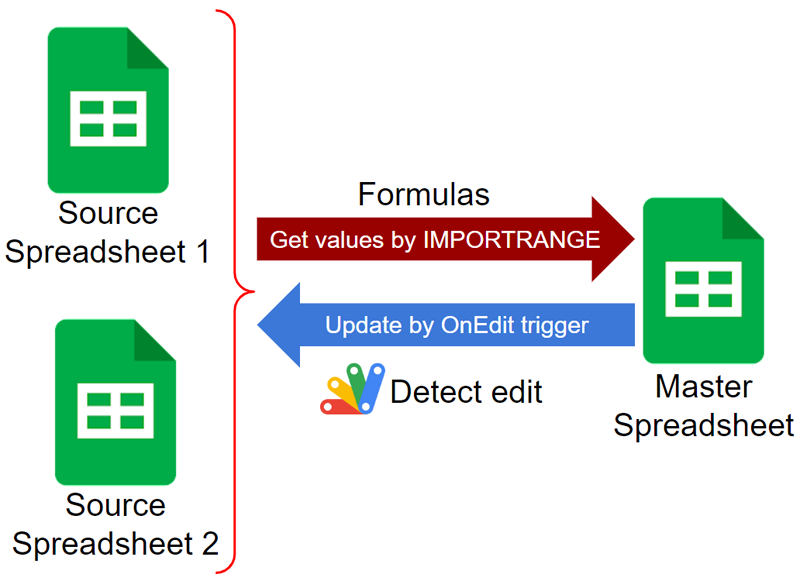
Abstract
One day, you might have a situation where you are required to update a sheet using Google Apps Script when the cell values retrieved by IMPORTRANGE are changed. This report introduces a workaround for achieving this situation.
Introduction
Google Apps Script can be executed by several triggers. Ref When a cell in a Google Spreadsheet is manually edited, a function of Google Apps Script can be executed by detecting this edit. In most cases, the OnEdit trigger trigger of the simple trigger or the installable trigger is used. When the OnEdit trigger is used, a function can be executed by manually editing a cell. When the function is executed, the function can be run by giving the event object including the information about the edited cell.
Gists
This is a sample script for exporting Google Documents as HTML with the image hyperlinks using Google Apps Script.
Recently, it seems that the specification for exporting Google Documents as HTML data has been changed. When a Google Document are exported as HTML data before, the images in the Google Document were the image hyperlinks, which are publicly shared. But, in the current stage, when a Google Document is exported as HTML data, the images in the Google Document are the data URL (base64 data) of the images. I guess that this might be related to enhancing the security. When the Google Document is exported as a ZIP file, the HTML and images are separated. But, in this case, the images are required to be included in a specific folder like “/images”. I’m worried that this might bring another issue.
Gists
This is a workaround for automatically installing the OnEdit trigger to the copied Google Spreadsheet using Google Apps Script.
The sample situation for this workaround is as follows.
- You have a Google Spreadsheet.
- Your Spreadsheet is shared with a user as the writer.
- Your Spreadsheet has a button for executing a script for copying the active Spreadsheet.
- Your Spreadsheet has a function
installedOnEdit for executing by the installable OnEdit trigger.
- You want to make the user copy the active Spreadsheet by clicking the button, and also, you want to automatically install the OnEdit trigger to
installedOnEdit for the copied Spreadsheet, simultaneously.
This method is from “Using OnEdit Trigger to Google Spreadsheet by Hiding Google Apps Script from Other Users (Author: me)” and “Using OnEdit trigger on Google Spreadsheet Created by Service Account (Author: me)”.
Gists
This is a workaround for retrieving the hyperlink from the cell of a number value using Google Apps Script.
As a sample situation, it supposes that a cell “A1” has a number value like 123, and a hyperlink of https://tanaikech.github.io is set to the cell. In order to retrieve the hyperlink from the cell, it is required to use the methods of getRichTextValue() and getRichTextValues(). But, in the current stage, when the cell value is a number value, when the RichText is retrieved by getRichTextValue(), null is returned. By this, unfortunately, the hyperlink of the cell cannot be retrieved. This has already been reported in the Google issue tracker. Ref
Gists
This report is a workaround for reflecting the latest Google Apps Script to the deployed Web Apps without redeploying.
Pattern 1
Of course, when the developer mode of https://script.google.com/macros/s/###/dev is used, the latest script can be used without redeploying.
But, in this case, only the permitted users can use it using the access token. when you want to achieve this using the endpoint of https://script.google.com/macros/s/###/exec without the access token, in order to reflect the latest script to Web Apps, it is required to redeploy. As another pattern, I would like to introduce a workaround for this situation.
Gists
This is a current workaround for putting the multiple hyperlinks to a cell using Sheets API.
Description
Recently, at Spreadsheet service, the multiple hyperlinks got to be able to be put to a cell. Ref In this case, it can be achieved using RichTextValue. On the other hand, at Sheets API, in the current stage, there are no methods for directly putting the multiple hyperlinks to a cell. And also, such methods have not been added. I believe that such methods will be added in the future update. I think that when this is implemented, it might be added to TextFormatRun.
Gists
This is a sample script for correctly exporting the charts on Google Spreadsheet as the images using Google Apps Script. In the current stage, using Google Apps Script, when the charts on Google Spreadsheet are exported as the images, it seems that the exported images are not the same with the original one on Google Spreadsheet. About this, today, I could notice that I had answered for 2 questions. Q1, Q2 And also, I had already been reported this at the issue tracker. Ref