About Event Objects
For example, it thinks the situation of input text of ’test’ to ‘A1’ on a sheet.
When you use only ‘onEdit(e)’ without an installing trigger, ’e’ has following parameters.
{authMode=LIMITED, range=Range, source=Spreadsheet, user=, value=test}
In this case, the event cannot send an e-mail because of ‘authMode=LIMITED’.
When you use “onEdit(e)” with an installing trigger of “Edit”, ’e’ has following parameters.
{authMode=FULL, range=Range, source=Spreadsheet, value=test, triggerUid=#####}
In this case, the event can send an e-mail because of ‘authMode=FULL’.
Rule
-
Following scripts have to be made into a project of Google Apps Script.
-
Deploy the GAS project as a web application. Ref
-
After updated the script, it has to be updated as a new version.
Form.html :
<html>
<body>
<form>
<input type="file" name="imageFile">
<input type="button" value="ok" onclick="google.script.run.upload(this.parentNode)">
</form>
</body>
</html>
GAS :
function doGet() {
return HtmlService.createHtmlOutputFromFile('Form.html');
}
function upload(e) {
var destination_id = '#####'; // Folder ID of destination folder
// Reference : https://developers.google.com/apps-script/reference/base/blob#getAs(String)
// You can use 'application/pdf', 'image/bmp', 'image/gif', 'image/jpeg' and 'image/png'.
var contentType = 'image/jpeg';
var img = e.imageFile;
var destination = DriveApp.getFolderById(destination_id);
var img = img.getAs(contentType);
destination.createFile(img);
}
When you set ‘image/jpeg’ as “contentType” and upload png file, the uploaded image file is converted to jpeg file and saved it to the destination folder.
File.txt :
a1
a2
a3
a4
a5
a6
Code :
awk '{array[NR]=$0} END {for (i in array) {if (i>1) {{print array[i-1]","array[i]}}}}' File.txt
Result :
a1,a2
a2,a3
a3,a4
a4,a5
a5,a6
After the all rows are imported to an array, it shows next row to current row under a condition of row > 1.
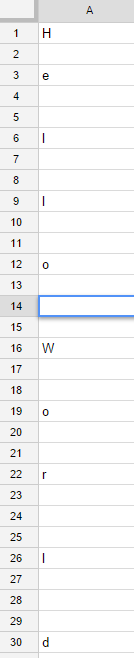
This is a sample script for retrieving cells without blank cells. Figure 1 shows the sample spreadsheet. In this sheet, the row 14 has one space.
|
 |
| Fig. 1: Sample spreadsheet. |
Data is retrieved as follows.
var data = SpreadsheetApp
.getActiveSpreadsheet()
.getActiveSheet()
.getRange('a1:a30')
.getValues();
1. Retrieving cells with spaces and no blank cells.
var Result = [i for each (i in data)if (i)].join('');
Result : Hello World
I made One Liner Code to retrieve data using Netatmo API. There are 2 ways. One is for windows dos. Another is for unix bash. Requirement tools are curl and jq.
windows dos
> setlocal & curl -s -d "grant_type=password&client_id='#####'&client_secret='#####'&username='#####'&password='#####'&scope=read_station" "https://api.netatmo.net/oauth2/token" | for /f "usebackq tokens=*" %a in (`jq -r ".access_token"`) do @set a="%a" | curl -s -d "access_token=%a&device_id='#####'" "https://api.netatmo.net/api/getstationsdata" > dat.txt & for /f "usebackq tokens=*" %b in (`jq -r ".body.devices[0].dashboard_data.Temperature" dat.txt`) do @set b="%b" | echo: & set /p nb=Indoor: Temperature %b [degree C],<nul & for /f "usebackq tokens=*" %b in (`jq -r ".body.devices[0].dashboard_data.Humidity" dat.txt`) do @set b="%b" | set /p nb=Humidity %b [%],<nul & for /f "usebackq tokens=*" %b in (`jq -r ".body.devices[0].dashboard_data.Pressure" dat.txt`) do @set b="%b" | set /p nb=Pressure %b [hPa]<nul & for /f "usebackq tokens=*" %b in (`jq -r ".body.devices[0].modules[0].dashboard_data.Temperature" dat.txt`) do @set b="%b" | echo: & set /p nb=Outdoor: Temperature %b [degree C],<nul & for /f "usebackq tokens=*" %b in (`jq -r ".body.devices[0].modules[0].dashboard_data.Humidity" dat.txt`) do @set b="%b" | set /p nb=Humidity %b [%]<nul & del dat.txt
Indoor: Temperature 12 [degree C], Humidity 56 [%], Pressure 1000.2 [hPa]
Outdoor: Temperature 12.3 [degree C], Humidity 56 [%]
unix bash
$ curl -s -d "grant_type=password&client_id='#####'&client_secret='#####'&username='#####'&password='#####'&scope=read_station" "https://api.netatmo.net/oauth2/token"|curl -s -d "access_token=`jq -r '.access_token'`&device_id='#####'" "https://api.netatmo.net/api/getstationsdata"|jq -r '"\nIndoor: Temperature "+(.body.devices[0].dashboard_data.Temperature|tostring)+" [degree C], Humidity "+(.body.devices[0].dashboard_data.Humidity|tostring)+" [%], Pressure "+(.body.devices[0].dashboard_data.Pressure|tostring)+" [hPa]\nOutdoor: Temperature "+(.body.devices[0].modules[0].dashboard_data.Temperature|tostring)+" [degree C], Humidity "+(.body.devices[0].modules[0].dashboard_data.Humidity|tostring)+" [%]"'
Indoor: Temperature 12 [degree C], Humidity 56 [%], Pressure 1000.2 [hPa]
Outdoor: Temperature 12.3 [degree C], Humidity 56 [%]
If you want to use these One Liner Codes, you can use following code. Please replace “#####” to yours.
This “souwapy” is a library for summing array elements with high speed by new algorithm (Pyramid method). The speed is faster than csv and panbdas module of python and v8 engine of node.js. The souwapy module is 2.3 and 3.1 times faster than csv and pandas module, respectively. This was really surprised me. It was found that the theory was correct.
At first, I have created this theory for Google Apps Script. But recently I had to use large data and output a csv file on python. So I made this library. Additionally, I had wanted to know how to public own library to PyPI before. This chance was good for me. If this library is helpful for other people, I’m glad.
Suddenly I had to need this.
This script can get the duplicate number of each element in array at Python. In this script, the duplicate number of each element is obtained and sorted by the duplicate number. This was expressed by the comprehension.
data = ['a', 'b', 'c', 'd', 'b', 'c', 'd', 'b', 'c', 'b']
result = sorted({i: data.count(i) for i in set(data)}.items(), key=lambda x: x[1], reverse=True)
print(result)
>>> [('b', 4), ('c', 3), ('d', 2), ('a', 1)]
I may be slow a bit, but I could notice much convenience of CoffeeScript just now. I didn’t know that scripts of GAS can be made by CoffeeScript up until now. This will have me work more effectively! :D
Kanshi TANAIKE
Abstract
I have already reported that the pyramid method is one of very effectively algolithms for summing string elements in an array using Google Apps Script (GAS). This report describes the adaptability of the pyramid method to any languages except for GAS. c++ (g++), Go, Java, Javascript on Node.js, Python and Ruby were chosen as the sample languages. In those languages, there are languages which have the distinctive commands for summing the array elements. In this report, “+” operator as a standard command and a special command for each language were used. For c++ (g++), Javascript on Node.js and Python which have no distinctive commands for summing the array elements, only “+” operator was used. For others, both “+” operator and each special command such as “[]byte”, “StringBuilder” and “«” were used. For languages without the distinctive commands for summing, the pyramid method made us show some interesting phenomena. It was found that the pyramid method shows a good effect on only the specific language. It was found that “+” operator had been optimized for g++ and Node.js. “+” operator of Python was corresponding to theoretical results. This means that “+” operator of Python is not optimized. On the other hand, for languages with the distinctive commands for summing, it was found that the distinctive commands is incompatible to the pyramid method. These results made us show the possibility of visualization for the optimized codes.
Kanshi TANAIKE
Abstract
I considered an efficient algorithm for summation of array elements. All elements in an array are string. When those elements are summed using scripts, a standard method is to add each element in order. If the script is run without any optimize, the process becomes gradually sluggish, because the total amount of active data during the summation process is proportional to the square of the number of array elements. This leads directly to the high process-cost. Such phenomenon notably appears at Google Apps Script (GAS). This report says about the solution of this problem using a new algorithm of a pyramid method. The pyramid method achieves that the total amount of active data increases proportional to the linear of the number of array elements. By this, the processing time becomes much shorter than that of the process using the standard method. The pyramid method achieved the process-cost reduction of $99.7%$ compared with the standard method at GAS. I realized again that new discoveries are hidden into the familiar scenes of every-day life.