Abstract
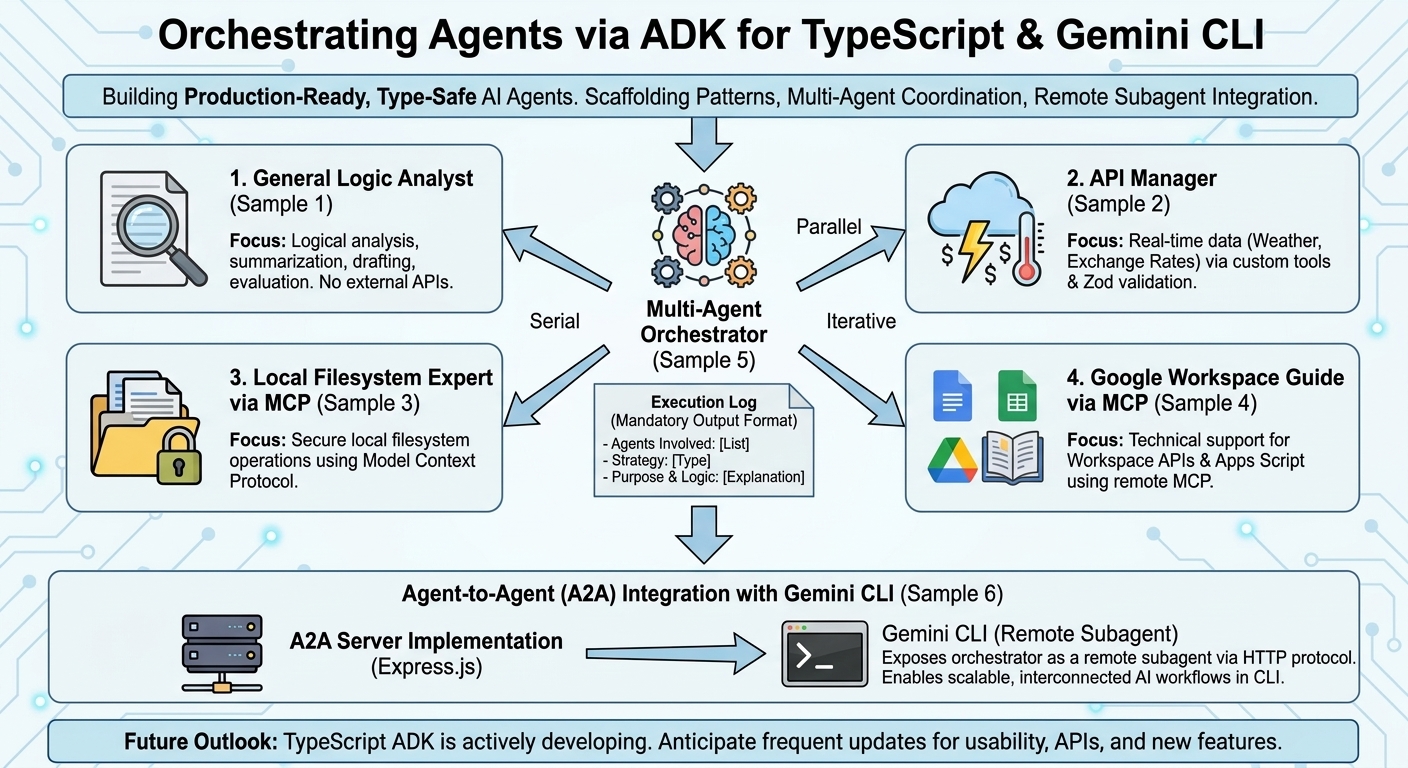
Explore how to build and orchestrate production-ready, type-safe AI agents using Google’s TypeScript Agent Development Kit (ADK). This guide provides practical scaffolding patterns, multi-agent coordination strategies, and seamless integration techniques for deploying remote subagents within the Gemini CLI ecosystem.
Introduction
As the artificial intelligence landscape rapidly evolves, modern generative AI increasingly relies on autonomous agents equipped with sophisticated components, including system instructions, specialized skills, and Model Context Protocol (MCP) servers. To facilitate the development of such AI-driven applications, Google has released the Agent Development Kit (ADK) across multiple programming languages Ref. Among these, the ADK for TypeScript Ref offers distinct advantages for modern engineering paradigms:
- Full-Stack Synergy: Essential for modern web applications (e.g., Next.js or React), allowing developers to share types and logic between the frontend and backend to streamline the development lifecycle.
- Scalability & Reliability: Crucial for large-scale enterprise systems, where static typing and robust refactoring tools ensure long-term maintainability and minimize runtime errors.
- High Concurrency: Highly effective for agents that must efficiently handle numerous asynchronous events, streaming responses, and real-time user interactions.
Despite these architectural merits, a critical gap exists in ecosystem maturity. While Python remains the “Gold Standard” with first-class support in AI research, TypeScript is often viewed as an emerging platform. Although there is a rising demand for integrating AI agents into enterprise web applications, quantitative data indicates that TypeScript-specific ADK resources account for less than 5% of the total search volume compared to the Python-centric ecosystem. This overwhelming scarcity of documentation and community-driven knowledge presents a significant barrier to entry for full-stack developers.
To fill this critical information void and catalyze the development of type-safe, production-ready AI agents, this article provides a comprehensive framework and practical scaffolding patterns using the TypeScript ADK. Furthermore, it introduces advanced methodologies for establishing a multi-agent architecture. Specifically, this article demonstrates how to seamlessly integrate these custom-built TypeScript agents as remote subagents within the Gemini CLI, leveraging agent-to-agent protocols to enable scalable, interconnected AI workflows.
Project Setup and Prerequisites
You can view the complete repository of sample scripts athttps://github.com/tanaikech/ts-multi-agent-scaffolding.
To follow along with this guide, ensure your environment meets the following requirements:
- Node.js is installed and configured on your system.
- Gemini CLI is installed and accessible via your terminal.
To retrieve and initialize the sample scripts, execute the following commands in your terminal:
git clone https://github.com/tanaikech/ts-multi-agent-scaffolding
cd ts-multi-agent-scaffolding
npm install
Building Specialized AI Agents
The following samples demonstrate how to construct specialized, single-purpose agents using the TypeScript ADK. Each agent is designed to handle a distinct operational domain.
1. General Logic Analyst (Sample 1)
Focus: Logical analysis, summarization, drafting, and evaluation.
This foundational agent focuses on parsing text and validating logical structures without relying on external API tools.
sample1/agent.ts
import { LlmAgent } from "@google/adk";

export const rootAgent = new LlmAgent({
  name: "general_logic_analyst",
  description:
    "Handles general reasoning, text summarization, and logical validation of information.",
  model: "gemini-3-flash-preview",
  instruction: `You are a Senior Logic Analyst and General Assistant.
Your role is to process general queries and synthesize information from various sources.

### Key Responsibilities:
1. **Summarization**: Condense long texts or technical logs into concise, actionable insights.
2. **Logical Validation**: Check if a given statement or piece of code follows logical consistency.
3. **Drafting**: Create professional emails, reports, or documentation based on raw data.
4. **Knowledge Retrieval**: Answer general knowledge questions using your internal training data.

### Constraints:
- Keep responses professional and structured.
- If you receive data from other agents (like weather or file logs), focus on explaining the *implications* of that data.
- Do not invent facts; if information is missing, clearly state so.

### Output Style:
Use bullet points for clarity and always provide a brief "Conclusion" or "Next Steps" section at the end of long responses.`,
});
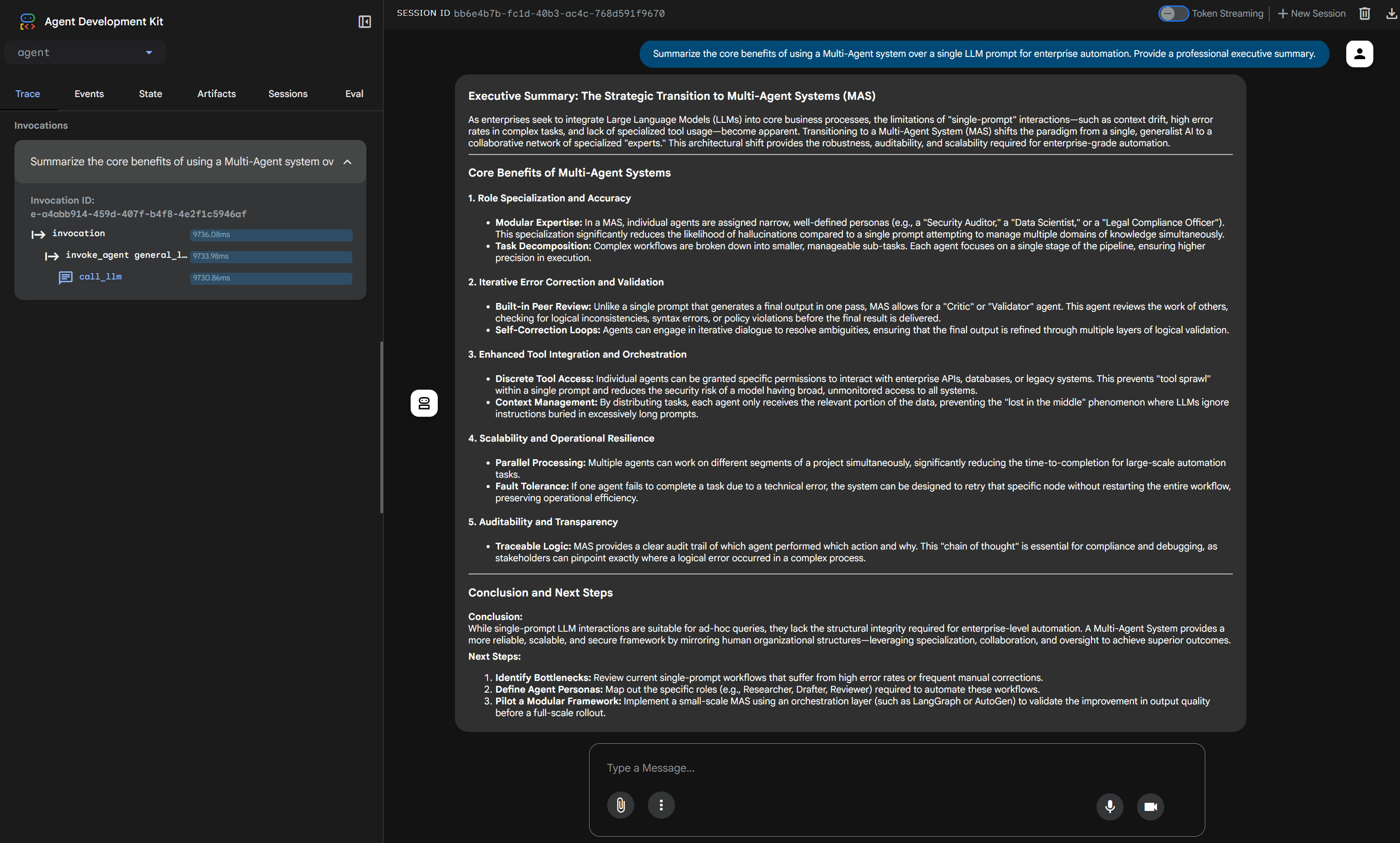
Launch the agent as a local web server:
npm run sample1
Access http://localhost:8000 in your browser to interact with the web interface.
2. API Manager for Real-Time Data (Sample 2)
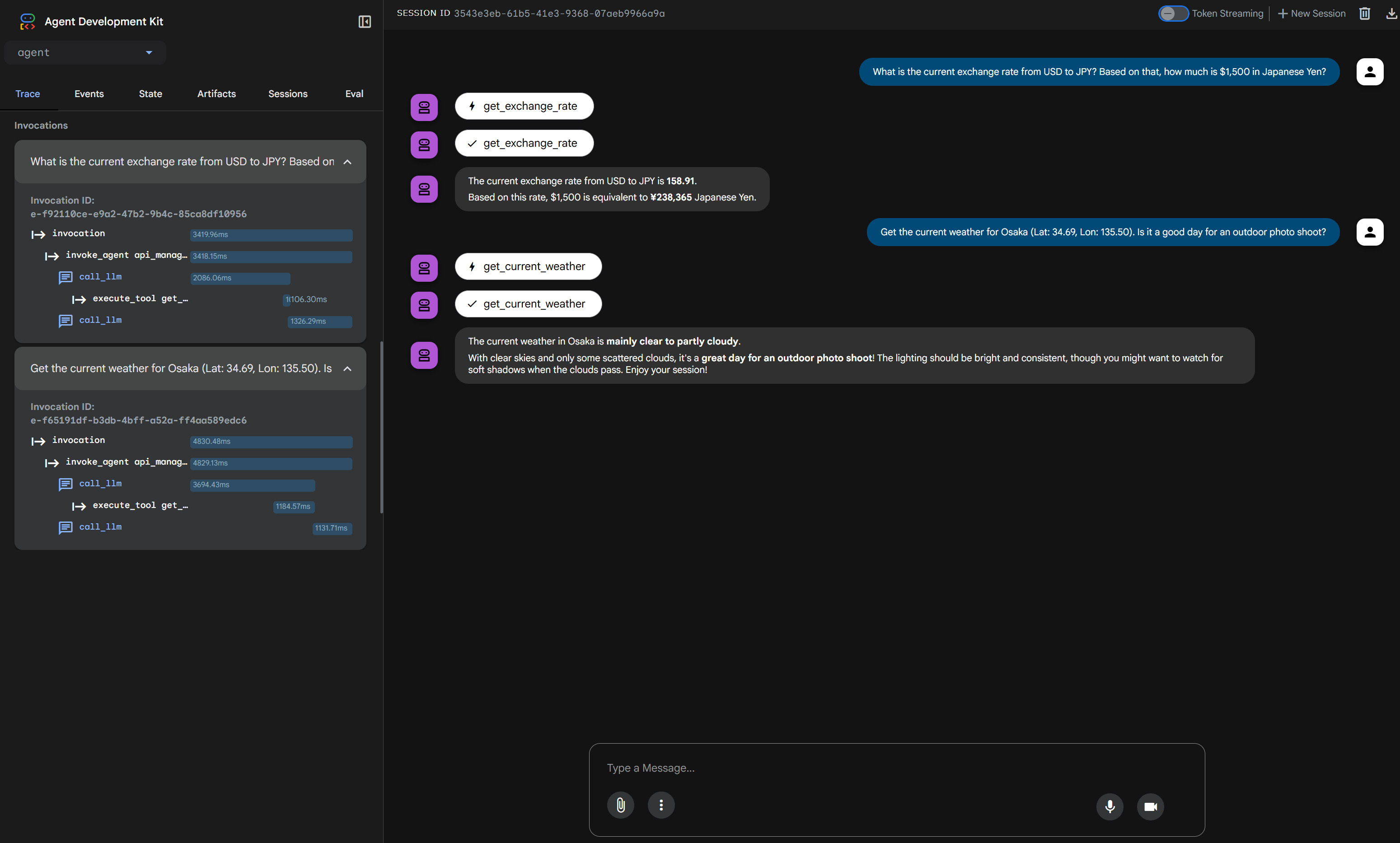
Focus: Real-time data retrieval via external APIs (Weather, Exchange Rates).
This agent leverages custom tools built with Zod schema validation to dynamically fetch external data, demonstrating how AI can interact with the real world.
sample2/agent.ts
/**
 * agent.ts
 * AI Agent definition with dynamic date context and Tool definitions.
 *
 * npx adk web
 */
import { LlmAgent, FunctionTool } from "@google/adk";
import { z } from "zod";

// ==========================================
// 1. Dynamic Date Helper
// ==========================================
const now = new Date();
const currentDateTime = now.toLocaleString("ja-JP", {
  year: "numeric",
  month: "2-digit",
  day: "2-digit",
  hour: "2-digit",
  minute: "2-digit",
  timeZone: "Asia/Tokyo",
});

// ==========================================
// 2. Tools Definition
// ==========================================

const getExchangeRateTool = new FunctionTool({
  name: "get_exchange_rate",
  description: "Use this to get current exchange rate between currencies.",
  parameters: z.object({
    currency_from: z
      .string()
      .default("USD")
      .describe("Source currency (major currency)."),
    currency_to: z
      .string()
      .default("EUR")
      .describe("Destination currency (major currency)."),
    currency_date: z
      .string()
      .default("latest")
      .describe("Date of the currency in ISO format (YYYY-MM-DD) or 'latest'."),
  }),
  execute: async ({ currency_from, currency_to, currency_date }) => {
    try {
      const response = await fetch(
        `https://api.frankfurter.app/${currency_date}?from=${currency_from}&to=${currency_to}`,
      );
      if (!response.ok) throw new Error(`API status: ${response.status}`);
      const data: any = await response.json();
      const rate = data.rates[currency_to];
      return [
        `The raw data from the API is ${JSON.stringify(data)}.`,
        `The currency rate at ${currency_date} from "${currency_from}" to "${currency_to}" is ${rate}.`,
      ].join("\n");
    } catch (error: any) {
      return `Error retrieving exchange rate: ${error.message}`;
    }
  },
});

const getCurrentWeatherTool = new FunctionTool({
  name: "get_current_weather",
  description:
    "Use this to get the weather using the latitude and the longitude.",
  parameters: z.object({
    latitude: z.number().describe("The latitude of the inputed location."),
    longitude: z.number().describe("The longitude of the inputed location."),
    date: z
      .string()
      .describe("Date for searching the weather. Format: 'yyyy-MM-dd HH:mm'"),
    timezone: z.string().describe("The timezone (e.g., 'Asia/Tokyo')."),
  }),
  execute: async ({ latitude, longitude, date, timezone }) => {
    const codeMap: Record<number, string> = {
      0: "Clear sky",
      1: "Mainly clear, partly cloudy, and overcast",
      2: "Mainly clear, partly cloudy, and overcast",
      3: "Mainly clear, partly cloudy, and overcast",
      45: "Fog and depositing rime fog",
      48: "Fog and depositing rime fog",
      51: "Drizzle: Light, moderate, and dense intensity",
      53: "Drizzle: Light, moderate, and dense intensity",
      55: "Drizzle: Light, moderate, and dense intensity",
      56: "Freezing Drizzle: Light and dense intensity",
      57: "Freezing Drizzle: Light and dense intensity",
      61: "Rain: Slight, moderate and heavy intensity",
      63: "Rain: Slight, moderate and heavy intensity",
      65: "Rain: Slight, moderate and heavy intensity",
      66: "Freezing Rain: Light and heavy intensity",
      67: "Freezing Rain: Light and heavy intensity",
      71: "Snow fall: Slight, moderate, and heavy intensity",
      73: "Snow fall: Slight, moderate, and heavy intensity",
      75: "Snow fall: Slight, moderate, and heavy intensity",
      77: "Snow grains",
      80: "Rain showers: Slight, moderate, and violent",
      81: "Rain showers: Slight, moderate, and violent",
      82: "Rain showers: Slight, moderate, and violent",
      85: "Snow showers slight and heavy",
      86: "Snow showers slight and heavy",
      95: "Thunderstorm: Slight or moderate",
      96: "Thunderstorm with slight and heavy hail",
      99: "Thunderstorm with slight and heavy hail",
    };
    try {
      const endpoint = `https://api.open-meteo.com/v1/forecast?latitude=${latitude}&longitude=${longitude}&hourly=weather_code&timezone=${encodeURIComponent(timezone)}`;
      const response = await fetch(endpoint);
      const data: any = await response.json();
      const targetTime = date.replace(" ", "T").trim();
      const widx = data.hourly.time.indexOf(targetTime);
      if (widx !== -1) {
        return codeMap[data.hourly.weather_code[widx]] || "Unknown condition.";
      }
      return "No weather data found for the specified time.";
    } catch (error: any) {
      return `Error retrieving weather: ${error.message}`;
    }
  },
});

// ==========================================
// 3. Agent Definition
// ==========================================

export const rootAgent = new LlmAgent({
  name: "api_manager_agent",
  description: "An agent that manages currency and weather API tools.",
  model: "gemini-3-flash-preview",
  instruction: `You are a professional API Manager.
Current date and time is ${currentDateTime}. Use this information to calculate relative dates.
1. Use 'get_exchange_rate' for currency queries.
2. Use 'get_current_weather' for weather queries. "date" is required to be "yyyy-MM-dd HH:00".
3. Provide precise, helpful responses based on tool outputs.`,
  tools: [getExchangeRateTool, getCurrentWeatherTool],
});
Launch the agent:
npm run sample2
Access http://localhost:8000 to interact with this API-connected agent.
3. Local Filesystem Expert via MCP (Sample 3)
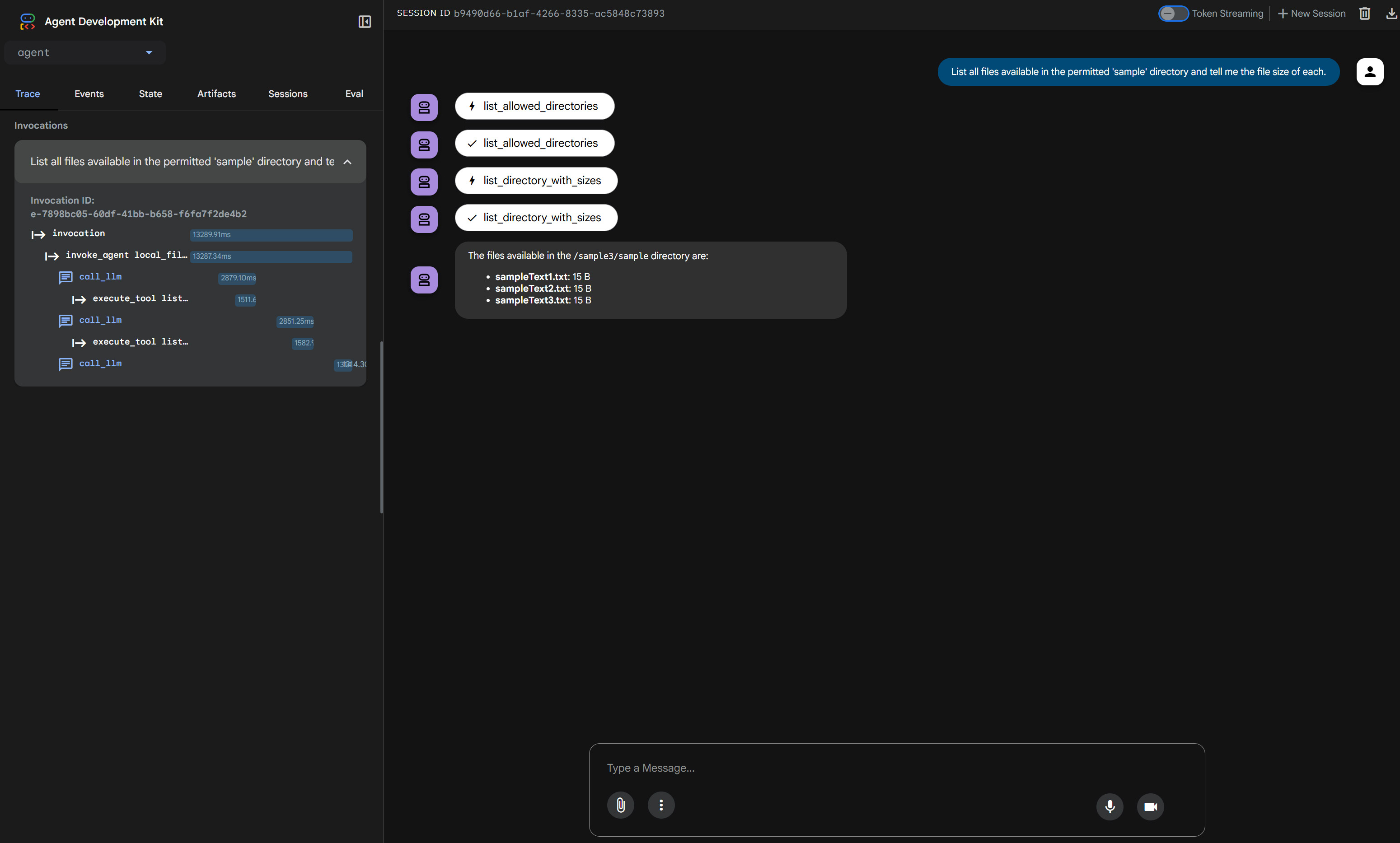
Focus: Local filesystem operations via MCP.
By integrating the Model Context Protocol (MCP), this agent gains secure, managed access to the local filesystem. For this sample, target files should be placed in the sample3/sample directory.
sample3/agent.ts
import { LlmAgent, MCPToolset } from "@google/adk";

export const rootAgent = new LlmAgent({
  name: "local_file_expert",
  model: "gemini-3-flash-preview",
  instruction:
    "You are a local file manager. Help users organize and understand their files. Here, you can access only a directory of 'sample' given by the MCP server.",
  tools: [
    new MCPToolset({
      type: "StdioConnectionParams",
      serverParams: {
        command: "npx",
        args: [
          "-y",
          "@modelcontextprotocol/server-filesystem",
          "sample3/sample",
        ],
      },
    }),
  ],
});
Launch the agent:
npm run sample3
Access http://localhost:8000 to instruct the agent to read and organize your local files.
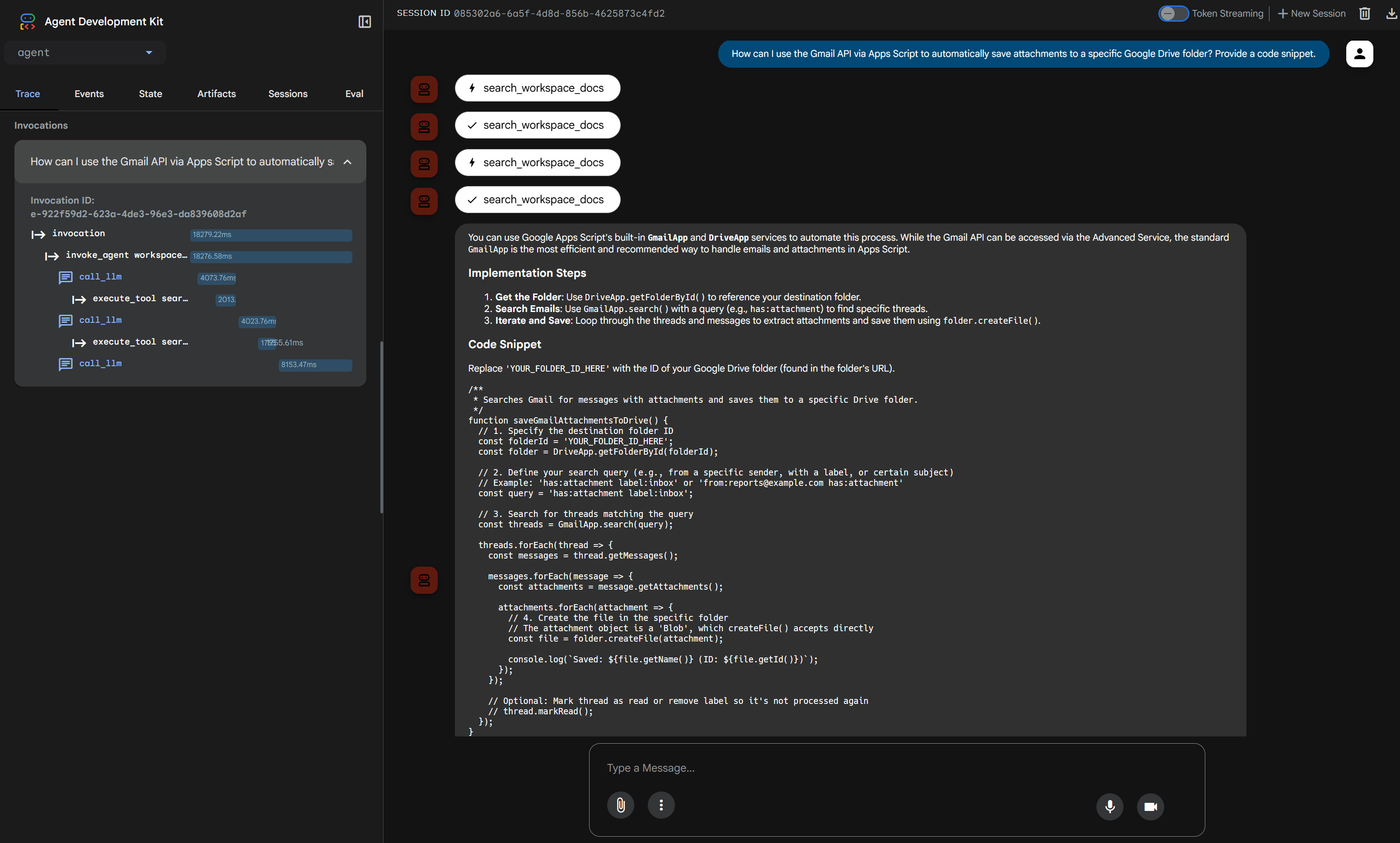
4. Google Workspace Technical Guide via MCP (Sample 4)
Focus: Technical support for Google Workspace APIs and Apps Script (GAS).
This agent utilizes a remote MCP server to stream up-to-date Workspace documentation, creating a highly specialized technical support assistant.
sample4/agent.ts
import { LlmAgent, MCPToolset } from "@google/adk";

export const rootAgent = new LlmAgent({
  name: "workspace_doc_guide",
  model: "gemini-3-flash-preview",
  instruction:
    "You are a Google Workspace expert. Use the provided tools to answer questions about Apps Script and Workspace APIs.",
  tools: [
    new MCPToolset({
      type: "StreamableHTTPConnectionParams",
      url: "https://workspace-developer.goog/mcp",
    }),
  ],
});
Launch the agent:
npm run sample4
Access http://localhost:8000 to query the agent regarding complex Workspace developer documentation.
Orchestrating Multi-Agent Workflows
5. Multi-Agent Orchestrator (Sample 5)
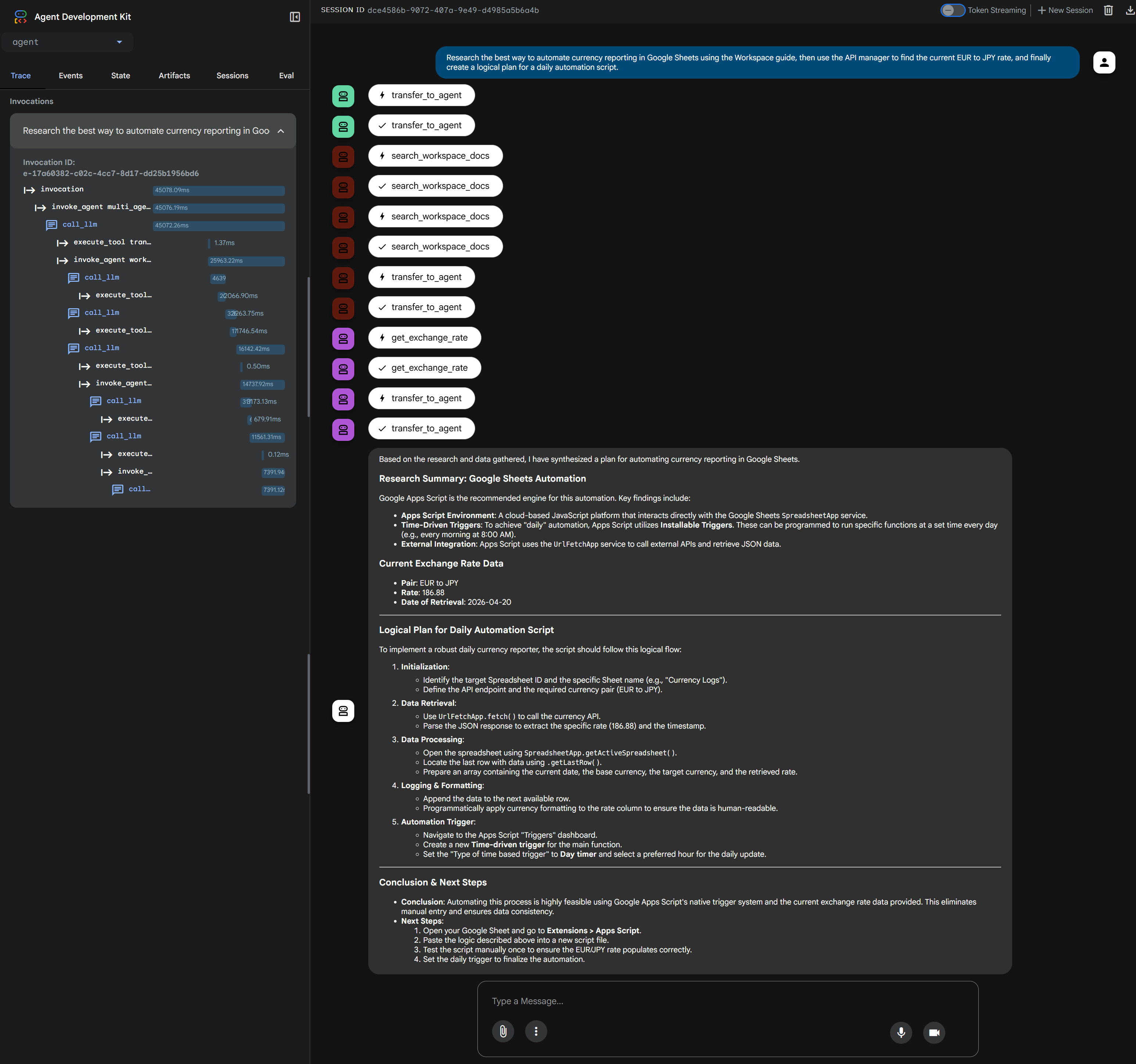
Focus: Coordination of multiple agents using serial, parallel, and iterative execution strategies.
Once individual subagents are established, they can be orchestrated by a primary agent. This orchestrator acts as a dynamic manager, delegating tasks to the specialized subagents (Agents 1 through 4) based on the user’s prompt.
sample5/agent.ts
import { LlmAgent } from "@google/adk";

import { rootAgent as agent1 } from "../sample1/agent.ts";
import { rootAgent as agent2 } from "../sample2/agent.ts";
import { rootAgent as agent3 } from "../sample3/agent.ts";
import { rootAgent as agent4 } from "../sample4/agent.ts";

export const rootAgent = new LlmAgent({
  name: "multi_agent_orchestrator",
  description:
    "Advanced orchestrator capable of serial, parallel, and iterative task execution.",
  model: "gemini-3-flash-preview",
  instruction: `You are a Senior Multi-Agent Orchestrator. Your role is to analyze user prompts and delegate tasks to the most suitable sub-agents.

### Available Sub-Agents & Expertise:
- "general_logic_analyst" (agent1): Logic validation, summarization, and final report drafting.
- "api_manager_agent" (agent2): Real-time currency exchange and weather data retrieval.
- "local_file_expert" (agent3): Local file system operations within the workspace.
- "workspace_doc_guide" (agent4): Google Workspace APIs and Apps Script documentation.

### Operational Protocols:
1. **Selection & Purpose**: Clearly identify which agent(s) you are using and why.
2. **Execution Strategy**:
   - **Serial**: When one agent's output is needed as input for another.
   - **Parallel**: When multiple independent data points are needed.
   - **Iterative**: When you need to re-run an agent or call a new one based on fresh findings.
3. **Reporting (Strict Requirement)**: You MUST start your response with an "Execution Log".

### Mandatory Output Format (in English):
---
## Execution Log
- **Agents Involved**: [List names of agents used]
- **Execution Strategy**: [Single / Serial / Parallel / Iterative]
- **Purpose & Logic**:[Briefly explain why these agents were chosen and how they were coordinated]

## Result[Provide the comprehensive final answer in the language requested by the user]
---`,
  subAgents: [agent1, agent2, agent3, agent4],
});
Launch the orchestrator:
npm run sample5
Access http://localhost:8000 to witness complex routing and multi-agent problem-solving in action.
Agent-to-Agent (A2A) Integration with Gemini CLI
6. A2A Server Implementation (Sample 6)
Focus: Exposing the multi-agent system to external clients via an A2A server.
To fully integrate these TypeScript agents into enterprise workflows, we can expose them as an Agent-to-Agent (A2A) service. This allows tools like the Gemini CLI to communicate directly with our orchestrator.
sample6/a2aserver.ts
/**
 * sample6/a2aserver.ts
 *
 * A2A server that dynamically loads agents.
 * Usage: SAMPLE_TYPE=5 npx tsx sample6/a2aserver.ts
 */
import { LlmAgent, toA2a } from "@google/adk";
import express from "express";
import "dotenv/config";

import { rootAgent as agent1 } from "../sample1/agent.ts";
import { rootAgent as agent2 } from "../sample2/agent.ts";
import { rootAgent as agent3 } from "../sample3/agent.ts";
import { rootAgent as agent4 } from "../sample4/agent.ts";
import { rootAgent as agent5 } from "../sample5/agent.ts";

const port = 8000;
const host = "localhost";

const agents: Record<string, LlmAgent> = {
  "1": agent1,
  "2": agent2,
  "3": agent3,
  "4": agent4,
  "5": agent5,
};

async function startServer() {
  const type = process.env.SAMPLE_TYPE || "5";
  const targetAgent = agents[type];

  if (!targetAgent) {
    console.error(`Invalid SAMPLE_TYPE: ${type}.`);
    process.exit(1);
  }

  const app = express();

  app.use((req, res, next) => {
    console.log(`[${new Date().toISOString()}] ${req.method} ${req.url}`);
    next();
  });

  // For A2A
  await toA2a(targetAgent, {
    protocol: "http",
    basePath: "",
    host,
    port,
    app,
  });

  app.listen(port, () => {
    console.log(`Server started on http://${host}:${port}`);
    console.log(`Try: http://${host}:${port}/.well-known/agent-card.json`);
  });
}

startServer().catch(console.error);
Launch the A2A server:
npm run sample6
Upon execution, you will see a confirmation output in your terminal indicating the server and MCP roots have started successfully:
$ npm run sample6

> adk-full-samples@1.0.0 sample6
> npx tsx sample6/a2aserver.ts

Secure MCP Filesystem Server running on stdio
Client does not support MCP Roots, using allowed directories set from server args:[ '/{your directory}/sample3/sample' ]
Server started on http://localhost:8000
Try: http://localhost:8000/.well-known/agent-card.json
To configure this A2A server as a subagent for the Gemini CLI, create or update .gemini/agents/sample-adk-agent.md with the following configuration:
---
kind: remote
name: sample-adk-agent
agent_card_url: http://localhost:8000/.well-known/agent-card.json
---
Once configured, launch the Gemini CLI. You will now be able to delegate complex tasks directly to your sample-adk-agent subagent:
Additionally, you can inspect the agent card specifications directly by navigating to the provided URL (http://localhost:8000/.well-known/agent-card.json) in your browser.
While this article demonstrates running the A2A server in a local environment for testing purposes, deploying this architecture to fully managed serverless platforms—such as Google Cloud Run or similar services—will significantly increase its scalability. Cloud-native hosting ensures the A2A server can automatically scale to meet the demands of high-concurrency enterprise workloads.
Future Outlook
It is important to note that the TypeScript version of the ADK is still actively under development. As the framework evolves, developers can anticipate frequent updates that will introduce further usability improvements, streamlined APIs, and robust new features, continuing to close the maturity gap with its Python counterpart.
Summary
- Google’s TypeScript ADK provides an optimal foundation for building highly concurrent, type-safe AI agents tailored for modern full-stack web architectures.
- Specialized, single-purpose subagents drastically improve output reliability, efficiently handling discrete tasks ranging from logical validation to real-time API integrations.
- The Model Context Protocol (MCP) securely extends agent capabilities, enabling direct interactions with local filesystems and remote knowledge bases without compromising security.
- Advanced orchestration models allow complex workflows to be dynamically distributed across multiple agents using serial, parallel, or iterative execution strategies.
- Implementing an Agent-to-Agent (A2A) server allows seamless external integration, transforming custom TypeScript agents into scalable remote subagents executable natively within the Gemini CLI.