Abstract
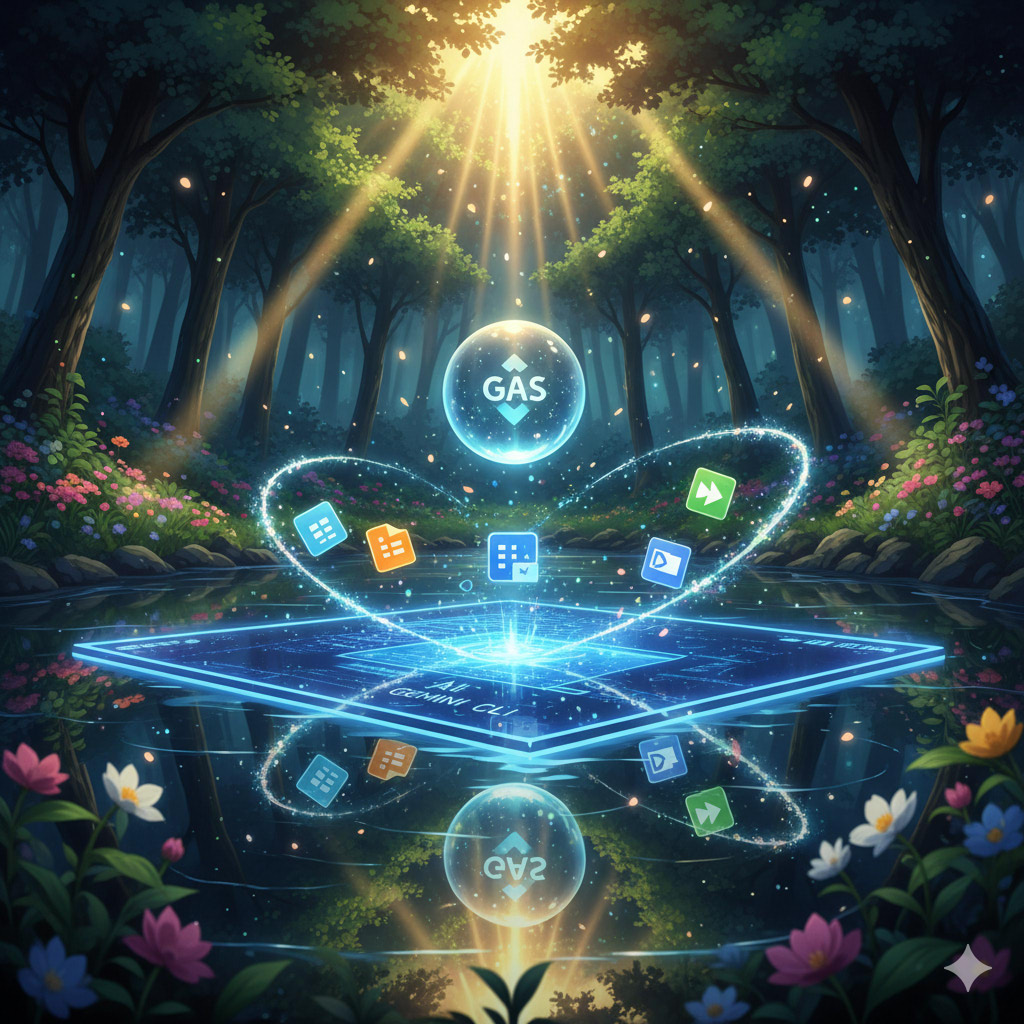
This article redefines Google Apps Script (GAS) as a central integration hub in the AI era. It introduces the forefront of Google Workspace automation, realized through the fusion of the Model Context Protocol (MCP), Agent2Agent (A2A), and the Gemini CLI ecosystem. I cover everything from data integration bridging local and cloud environments (RAG) and sandbox technologies for safely executing AI-generated GAS, to the coordination of autonomous agents on the newly released Google Antigravity. We will explore next-generation work styles and implementation methods where complex workflows are completed autonomously through simple natural language instructions.
Introduction
The rise of Artificial Intelligence (AI), particularly Large Language Models (LLMs), is fundamentally changing how we automate systems. Until now, script execution has followed an “imperative” approach: developers write code and trigger it manually or via events. This has also been true for Google Apps Script (GAS), the automation engine for Google Workspace. As described in the official documentation, GAS has long established itself as a reliable automation tool, being “the only low-code platform that makes it quick and easy to build business solutions that integrate, automate, and extend Google Workspace.” Ref
However, the evolution of AI is now adding new dimensions of “autonomy” and “dialogue” to this traditional paradigm. We are moving toward a workflow where humans convey intent (prompts) via natural language, and AI agents interpret them, select appropriate tools, and execute tasks. At the heart of this new style is the Model Context Protocol (MCP), a communication standard connecting AI with external tools. Ref Through MCP, AI evolves from a simple text generator into an agent capable of coordinating multiple scripts to perform practical work.
This transformation spread to the terminal environment—the most native habitat for developers—with the arrival of the Gemini CLI. Ref Furthermore, Gemini CLI Extensions have expanded the ecosystem, accelerating terminal-based AI-driven development. Ref Currently, with the advent of Agent2Agent (A2A) Ref, a next-generation protocol allowing AI agents to collaborate to solve tasks, and the supporting platform Google Antigravity Ref, automation is shifting from processing individual tasks to the autonomous completion of complex workflows.
In this article, I will systematically review the initiatives I have undertaken over this year. I will delve deep into the practical knowledge and new possibilities for Google Apps Script opened up by the Gemini CLI ecosystem—redefining GAS as an “integration hub for the AI era,” utilizing it as an MCP/A2A server, building RAG to eliminate data silos between local and cloud environments, and implementing sandbox technologies to safely execute AI-generated code.
Application of Google Apps Script to AI
Here, I will introduce my journey of exploration along with the articles I have published. As this is not just a technical explanation but a record of trial and error, I will write from a subjective perspective.
Building an MCP Server with Google Apps Script
When I first encountered the concept of MCP, I intuitively understood it as a protocol standardizing AI Function Calling. At the time, sample code was predominantly Python. However, as I tested it and grasped its potential, I became convinced that linking this with Google Workspace would bring revolutionary convenience to many users. This is because the biggest barrier to manipulating Google Workspace from a local environment has always been the complexity of OAuth authentication. Questions regarding authentication are frequent on Stack Overflow, suggesting it is a major bottleneck for many users trying to access Google Workspace externally. By using GAS, authentication is handled automatically during script execution, allowing users to access data seamlessly. I believed this characteristic of GAS was the key to eliminating the bottleneck in AI agent utilization.
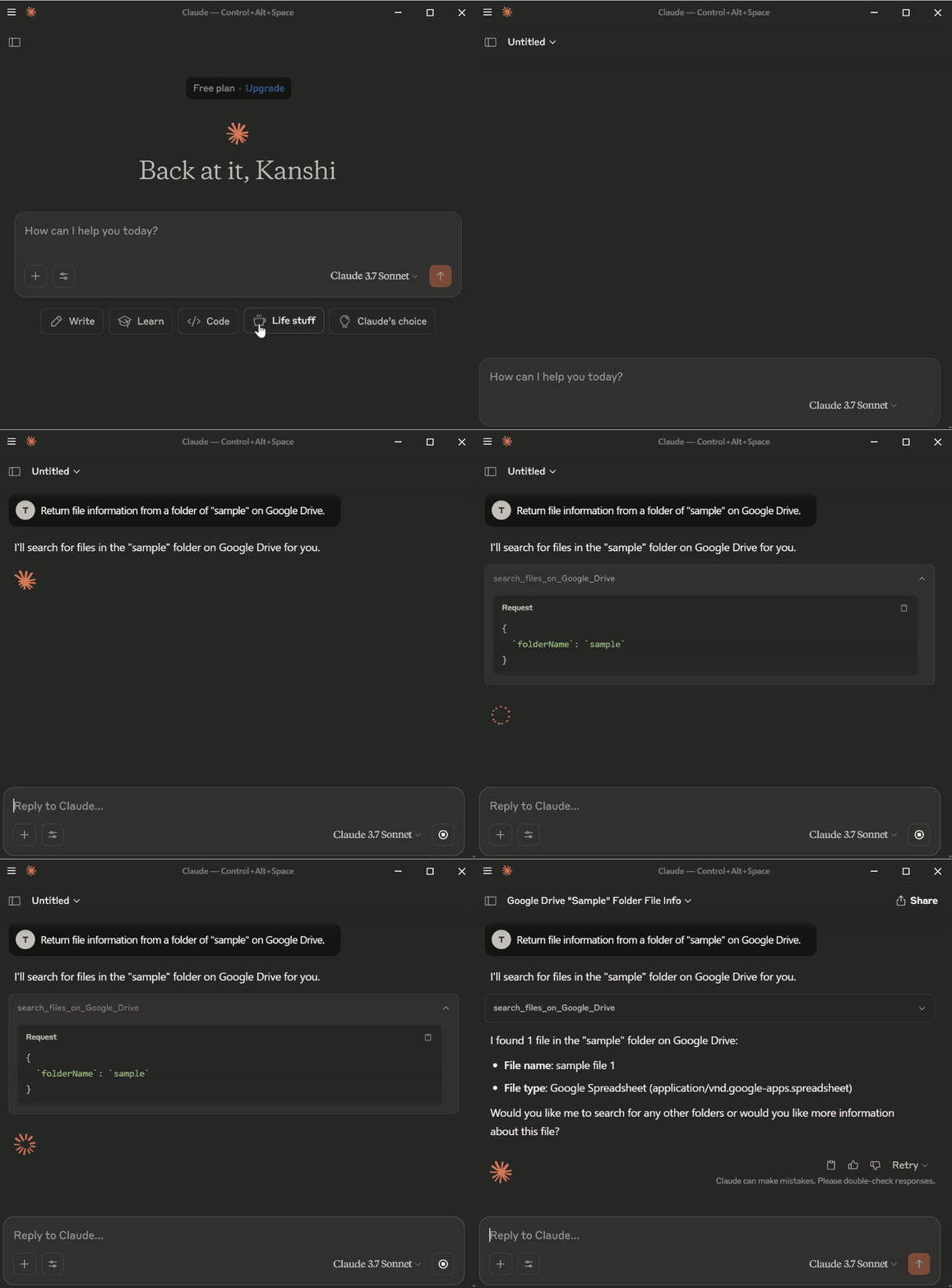
After analyzing the MCP server specifications, I determined it could be implemented using the Web Apps feature of GAS and immediately began developing a prototype. (Ref A1) I started by building a simple MCP server in GAS and verifying that it operated according to the protocol by calling it from Claude Desktop and a self-made GAS client. (Ref A2, A3) The moment I was able to manipulate Gmail with a single natural language instruction, I was convinced this was the new tide of automation.
Related Articles A
Medium:
- Building Model Context Protocol (MCP) Server with Google Apps Script
- Gmail Processing using MCP Network Powered by Google Apps Script
GitHub:
Connecting from Gemini CLI to GAS MCP Server
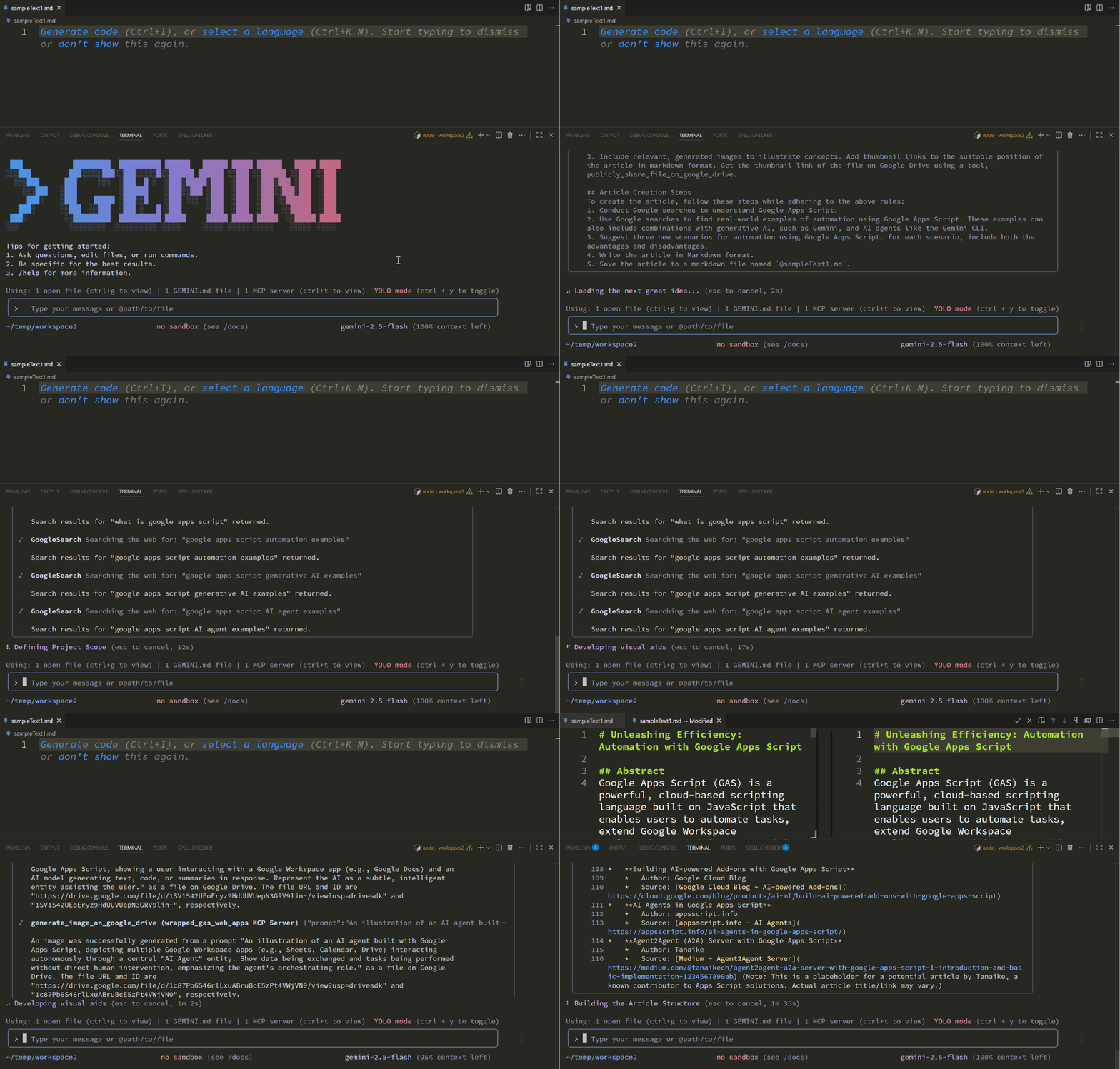
The arrival of the Gemini CLI opened the door to the next stage. Since the GAS-based MCP server I built was protocol-based and client-independent, I assumed it could be used as is, and immediately tested it. As expected, I succeeded in calling tools on GAS from the terminal and manipulating Google Workspace seamlessly. (Ref B1, B2)
This combination compensated for the weaknesses of GAS while maximizing its strengths. Traditionally, GAS struggled with local file interaction and the 6-minute execution time limit. However, via the Gemini CLI, AI agents can effectively overcome these limits by instructing multiple executions. Furthermore, the terminal is the foundation of all development environments, including local machines, Google Cloud Shell, and Firebase Studio. Since authentication is complete the moment it is deployed as a GAS Web App, you can safely manipulate Google Workspace data using natural language from anywhere. This was a major step in unleashing the potential of GAS from the cloud to local environments and every development scene.

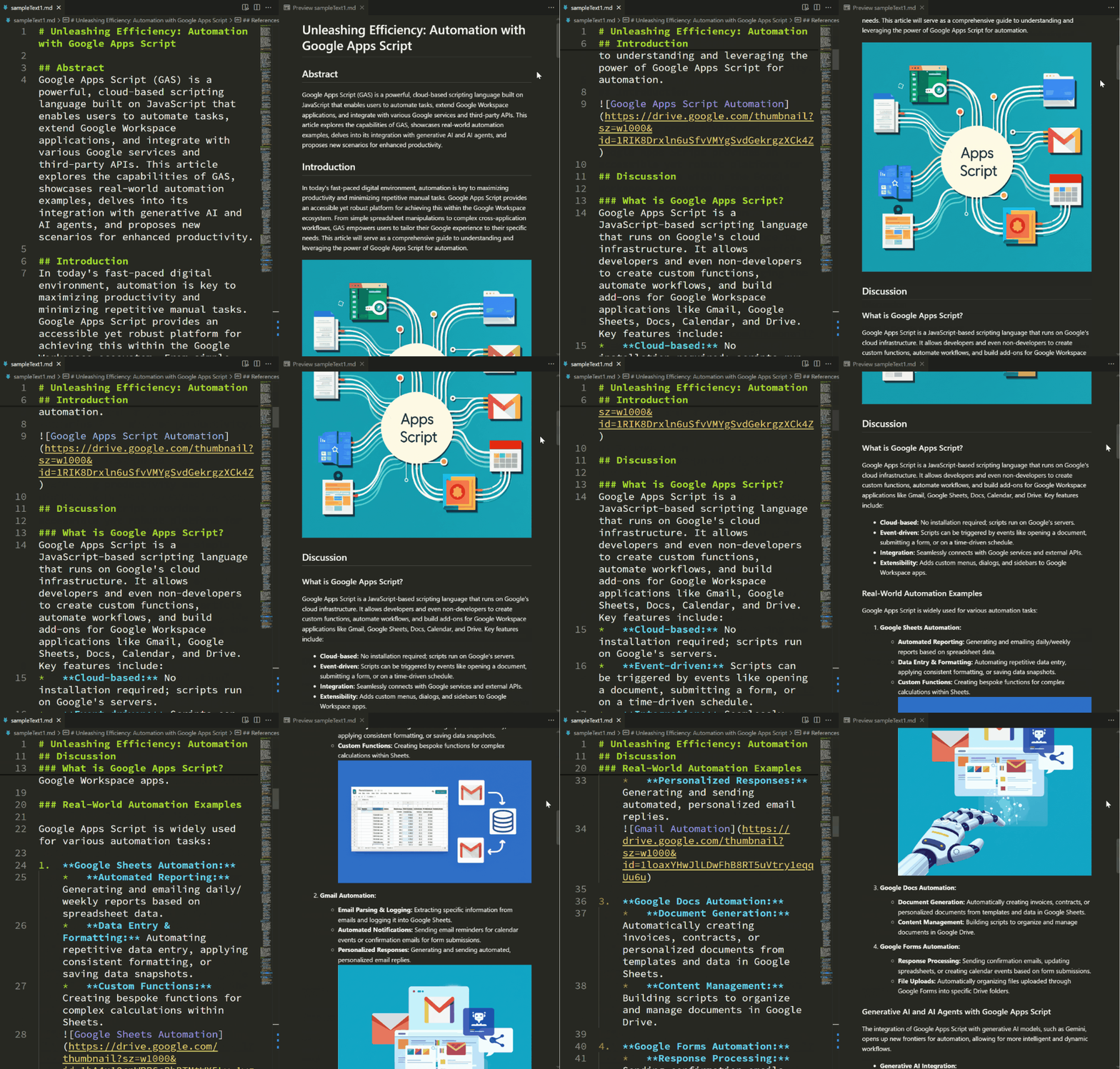
Following this success, I developed a suite of tools specialized for various Google Workspace services and released them as libraries. (Ref B3, B13) This allowed for the natural language control of a wide range of services including Docs, Sheets, Slides, Forms, Calendar, Maps, Classroom, and Analytics, dramatically expanding the scope of application from data analysis to content generation. (Ref B4-B11) In fact, I am utilizing this very system for drafting this article. (Ref B12)
Related Articles B
Medium:
- Gemini CLI with MCP Server Built by Web Apps of Google Apps Script
- Gemini CLI with MCP Server: Expanding Possibilities with Google Apps Script
- Gemini CLI: Featuring an Enhanced ToolsForMCPServer
- Next-Level Data Automation: Gemini CLI, Google Sheets, and MCP
- Managing Google Docs, Sheets, and Slides by Natural Language with Gemini CLI and MCP
- Next-Level Data Automation: Gemini CLI, Google Calendar, and MCP
- Enhanced Guide to Using Prompts in Gemini CLI
- Next-Level Classroom Automation: Gemini CLI, Google Classroom, and MCP
- Unifying Google Workspace with Natural Language: Integrated Collaboration through Gemini CLI and MCP
- Streamlining Web Page Insights with Natural Language using Gemini CLI, Google Analytics, and MCP
- Google Maps with Natural Language: Integrated Collaboration through Gemini CLI and MCP
- Streamlining Content Creation: A Guide to Using Gemini CLI, MCP Server, and VSCode
GitHub:
Accelerating GAS MCP Servers as Gemini CLI Extensions
As I moved towards practical implementation, a new challenge emerged: the initial load time of the GAS MCP server. Due to MCP specifications, at least four HTTP requests occur for the client to retrieve the tool list. (See workflow below) As the number of GAS MCP servers increased, this overhead became impossible to ignore.
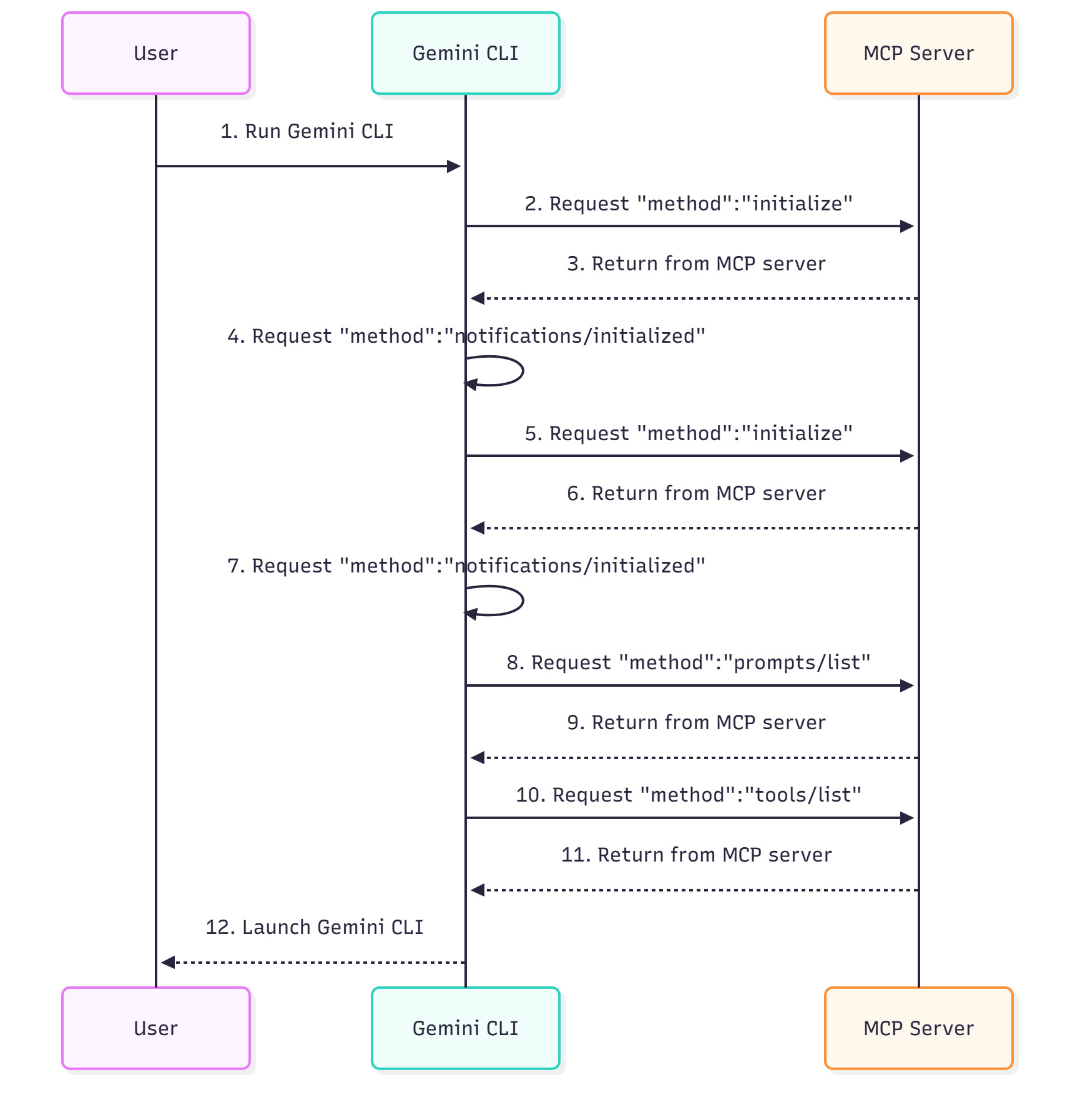
To solve this, I devised an architecture that places a locally running Node.js MCP server as a wrapper between the Gemini CLI and the GAS server. (Ref C1) This wrapper caches tool definitions, minimizing requests to the GAS side. As a result, I succeeded in dramatically shortening the initial load time—reducing it by a factor of 15. Furthermore, aligning with the release of Gemini CLI Extensions, I packaged this as an extension to make it easily installable for anyone. (Ref C2, C5)
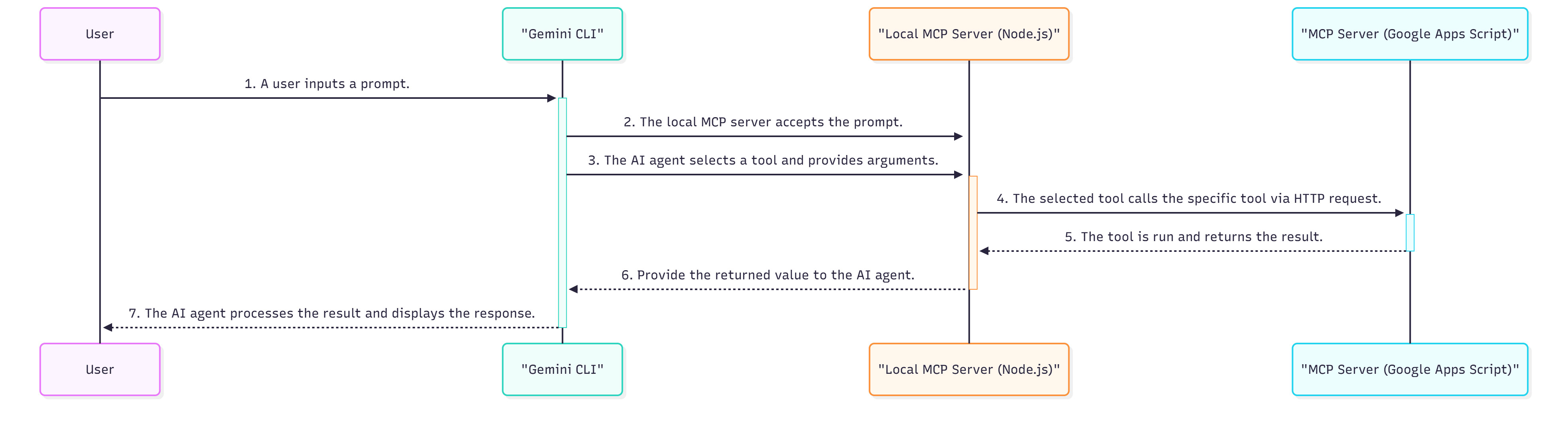
Currently, this extension contains over 160 tools, yet the initial load time is only about 1 second. The tool execution speed is comparable to calling GAS directly, achieving both convenience and performance.
On November 18, 2025, the new development platform Google Antigravity was released. Ref Google Antigravity provides an “AI Agent-First” environment where multiple AI agents coordinate to autonomously complete complex workflows, rather than just executing single tasks. Naturally, integration with MCP servers is natively supported. With this, Google Workspace automation has entered a new phase. We can now differentiate usage based on the scenario: use Gemini CLI for tasks requiring immediacy, and entrust complex tasks requiring long inference or multi-step processes to autonomous agents on Google Antigravity. (Ref C3)
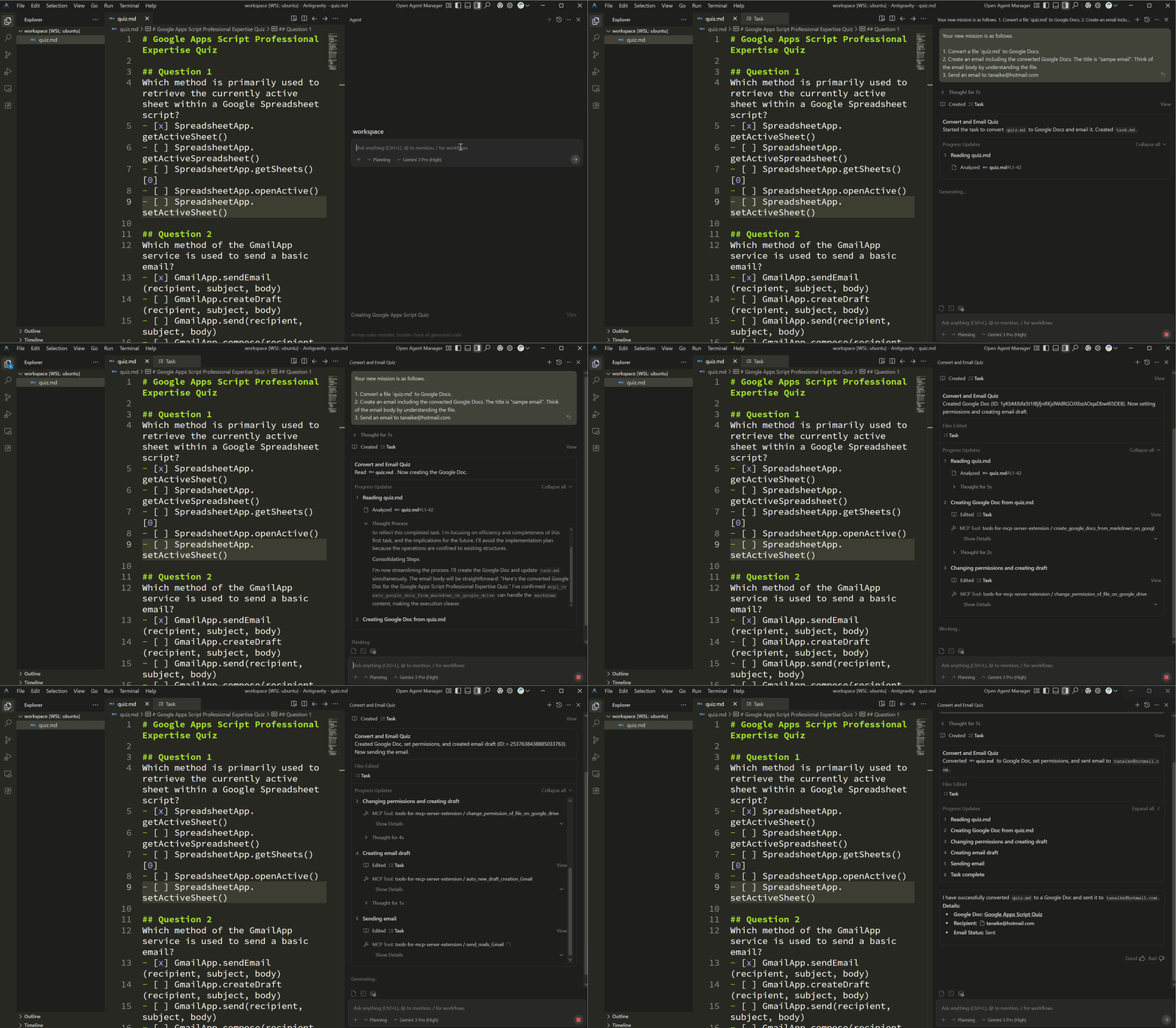
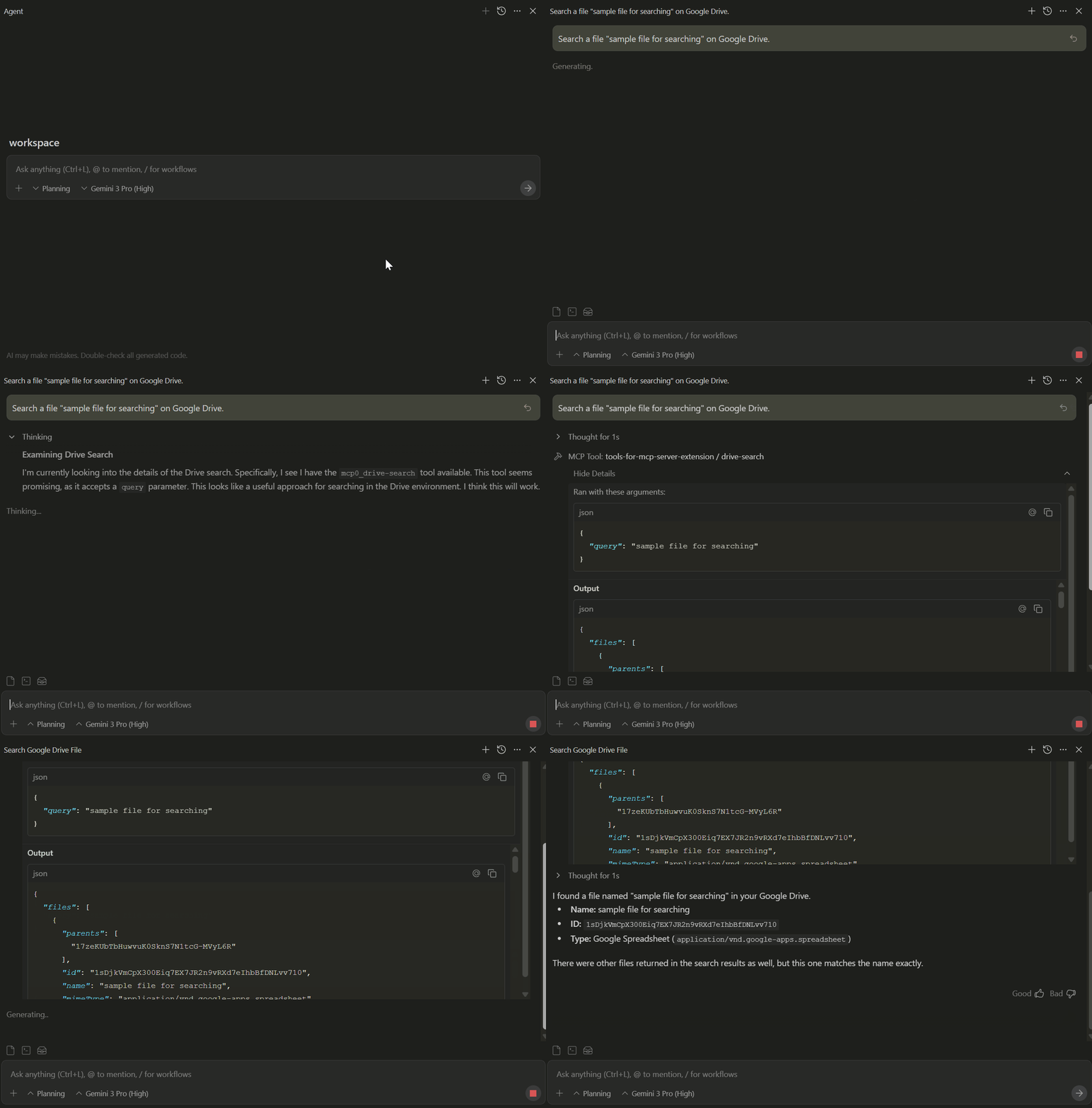
On November 25, 2025, the official Gemini CLI Extension for Google Workspace was released. Ref The greatest feature of this Extension is its smooth authentication flow. After installation, launching the Gemini CLI automatically opens the browser, and once authentication is completed, it is immediately ready for use. The mechanism involves sending requests directly from the local environment to the Google Workspace API to retrieve and process data. Due to its high convenience, development using this Extension is expected to become the standard. Furthermore, as shown in the figure below, I attempted to use the MCP server from this official Google Workspace Extension within Google Antigravity. (Ref C4) Enabling the use of Google Workspace within Google Antigravity is likely to lead to applications and discoveries in even more diverse scenarios.
Related Articles C
Medium:
- Accelerating Gemini CLI: A Node.js Wrapper for Google Apps Script MCP Servers
- Simplified Google Workspace Automation with Gemini CLI Extensions
- Agentic Automation in Google Workspace: Bridging Antigravity and Gemini 3.0
- Integrating Google Antigravity: Unlocking the Google Workspace Extension for Gemini CLI
GitHub:
Seamless Integration of Local and Workspace Data into File Search
I have shown that the combination of Gemini CLI and GAS MCP servers can bridge local and cloud data. As the next application of this architecture, I focused on the new “File Search” feature of the Gemini API. (Ref D1)
While uploading local files to the File Search data store is simple, uploading data from Google Drive docs or spreadsheets involves the hassle of downloading them locally first. To solve this data silo problem, I developed a GAS tool that directly uploads files on Google Workspace to the File Search store. This paved the way for realizing cross-functional RAG (Retrieval-Augmented Generation) by integrating local files and Google Workspace information into a single data store. (Ref D2, D3)
Related Articles D
Medium:
- Integrating File Search with the Gemini CLI Extension
- From Data Silos to Unified RAG: Gemini CLI Extensions Unify Local and Google Workspace for a Powerful File Search
GitHub:
Challenge of Building an A2A Network with Google Apps Script
After my success with MCP, my gaze turned to the next-generation protocol, Agent2Agent (A2A). A2A realizes a world where AI agents interact autonomously and collaborate to solve tasks. I hypothesized that GAS could serve as a hub here as well and began verification.
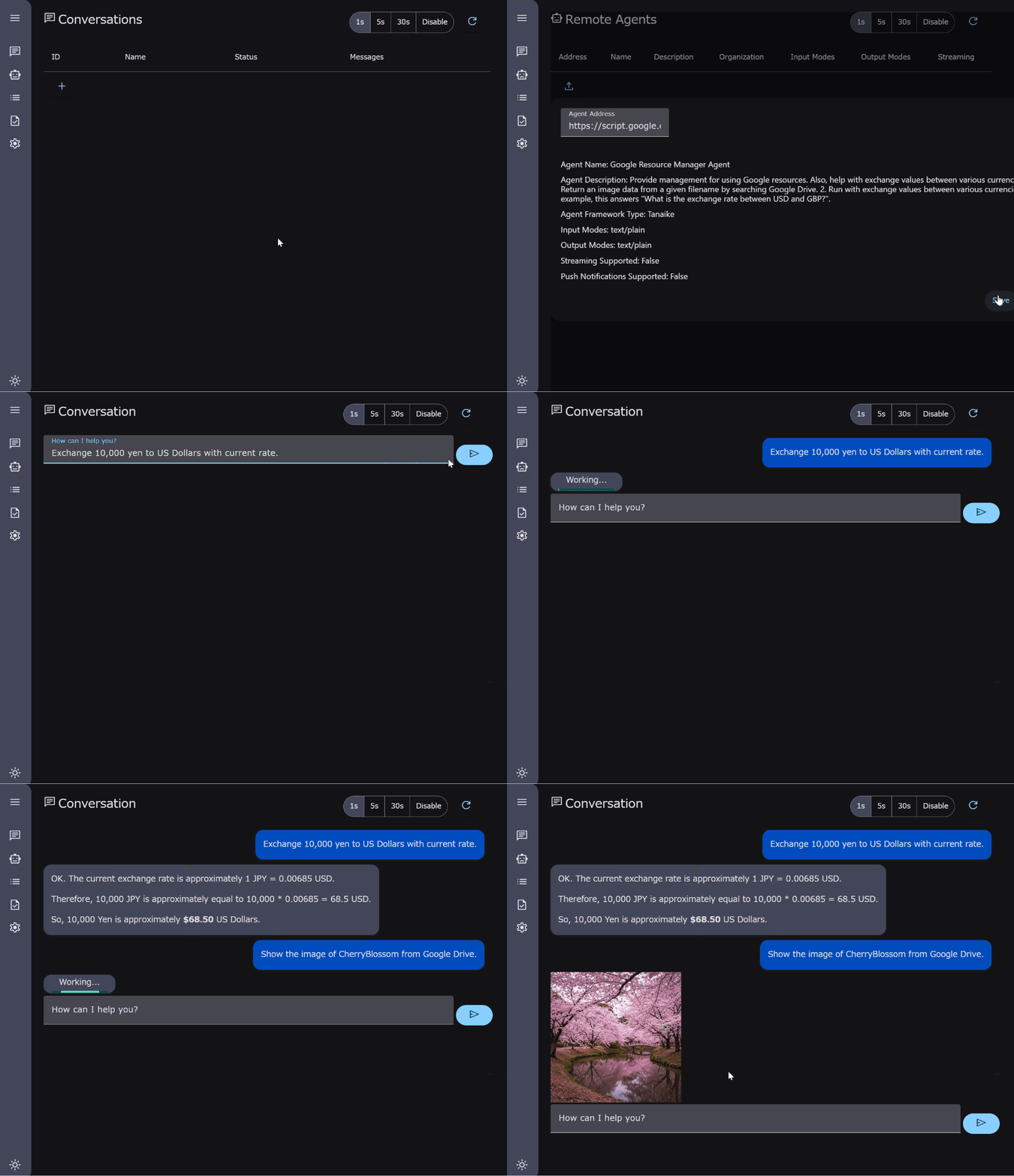
However, A2A had different technical requirements than MCP. Specifically, access to a specific path .well-known/agent.json was mandatory, which could not be directly supported by the standard URL structure of GAS Web Apps. I knew from experience that accessing this path would currently require an access token with Drive scope. Therefore, I modified an existing A2A client to include an access token in the request, bypassing this issue. Thus, I successfully confirmed the operation of an A2A server using GAS. (Ref E1, E4)
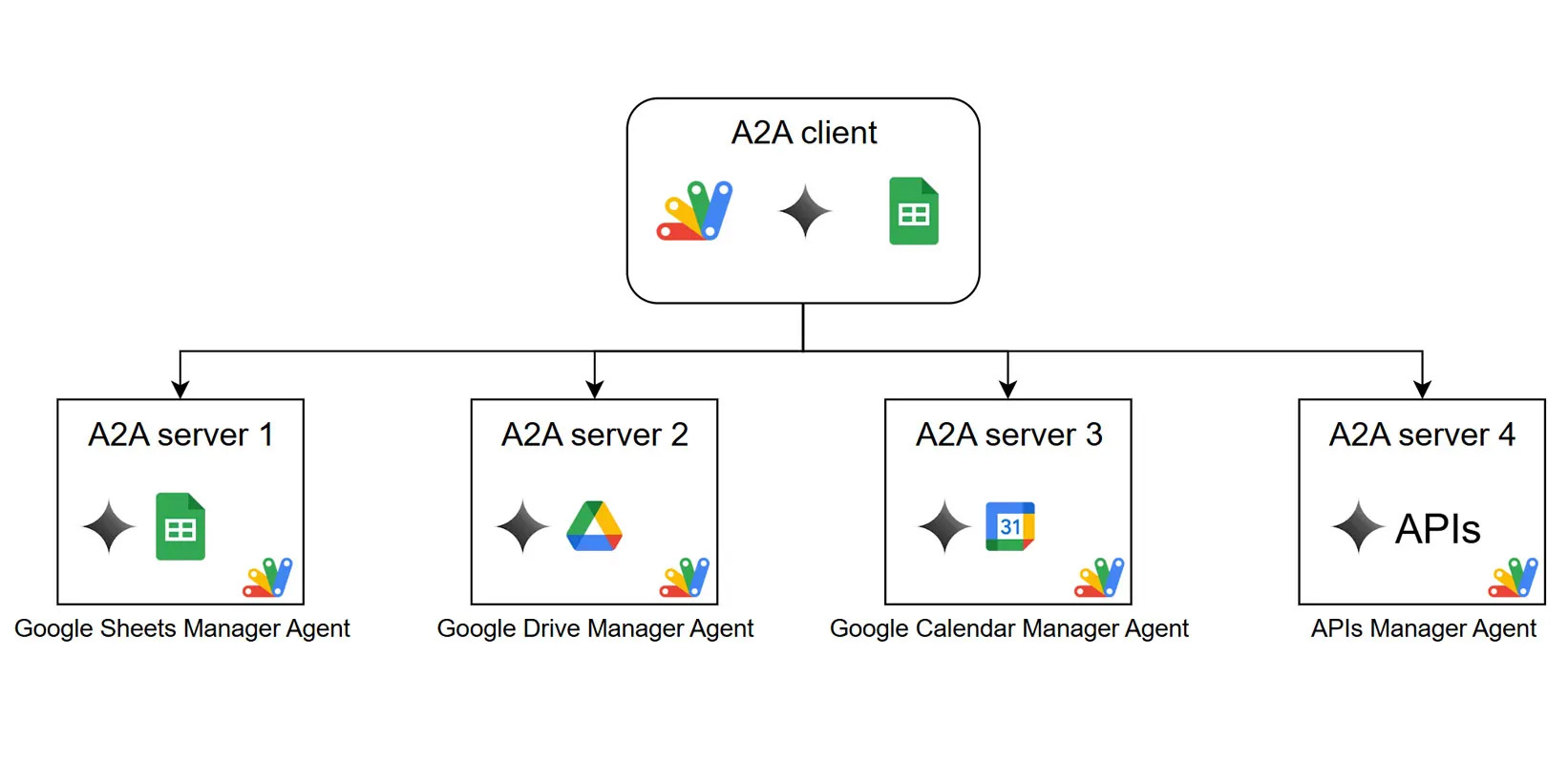
Furthermore, by implementing the client side in GAS as well, I reasoned that authentication could be handled seamlessly, allowing for the construction of a complete A2A network within the GAS ecosystem. I worked on its implementation as shown in the workflow diagram below. (Ref E2)
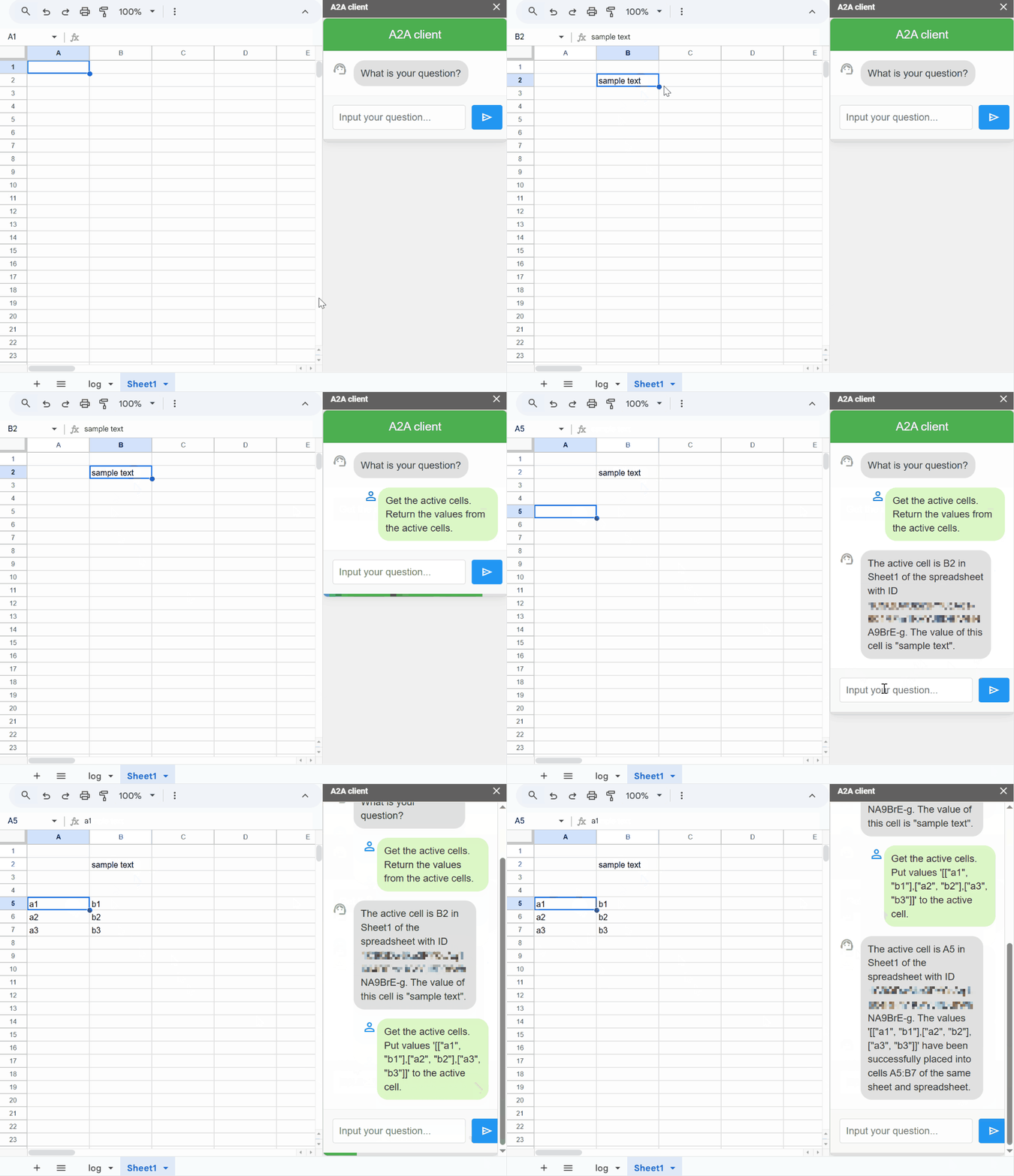
This enables more advanced automation, such as multiple AI agents collaborating to process data based on the value of an active cell in Google Sheets, as shown in the figure below.
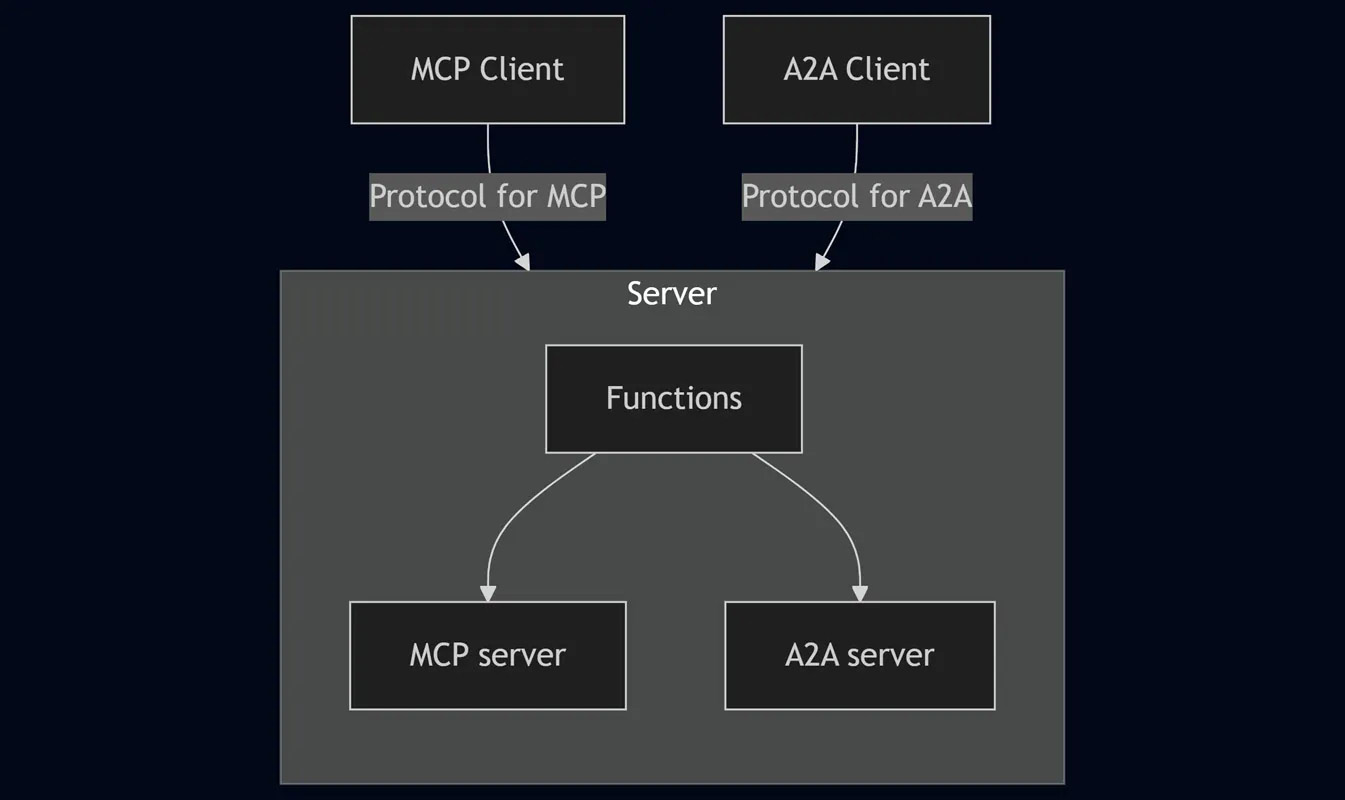
Finally, I integrated the functions of the MCP server and A2A server into a single GAS project, constructing a hybrid server that switches protocols according to the request from the client, as shown in the workflow diagram below. (Ref E3) I believe this integrated server will become a powerful gateway for connecting Google Workspace with diverse external agents in the coming era of AI agents.
Related Articles E
Medium:
- Building Agent2Agent (A2A) Server with Google Apps Script
- Enabling Collaborative Agent Systems through Google Apps Script-based Agent2Agent (A2A) Network
- Consolidating Generative AI Protocols: A Single Server Solution for MCP and A2A
GitHub:
In Search of a Safe Execution Environment for AI-Generated GAS Code
The Gemini CLI is also a very powerful assistant for generating GAS code. However, executing AI-generated code without verification carries significant security risks. Since GAS often requires access rights to all files in Google Drive, establishing a safe execution environment (sandbox) was essential. I had envisioned a sandbox for GAS even before generative AI became publicly available, but development had stalled due to the difficulty of realization.
The turning point was receiving an invitation from Mr. Bruce McPherson to participate in his gas-fakes project. gas-fakes is a grand project aiming to replicate all GAS classes and methods in a local Node.js environment, enabling the same code to run both in the cloud and locally. When I understood this, I was convinced that the sandbox concept I had nearly given up on could be realized with gas-fakes.
Through discussion and joint development with Bruce, we finally completed a prototype of a GAS sandbox and were the first in the world to demonstrate its feasibility. (Ref F1) This sandbox safely executes AI-generated GAS code while finely controlling access to files, folders, and usable methods. Furthermore, by publishing this sandbox function as an MCP server, we established a workflow (shown below) where GAS code can be safely generated and executed via natural language from the Gemini CLI. (Ref F2)
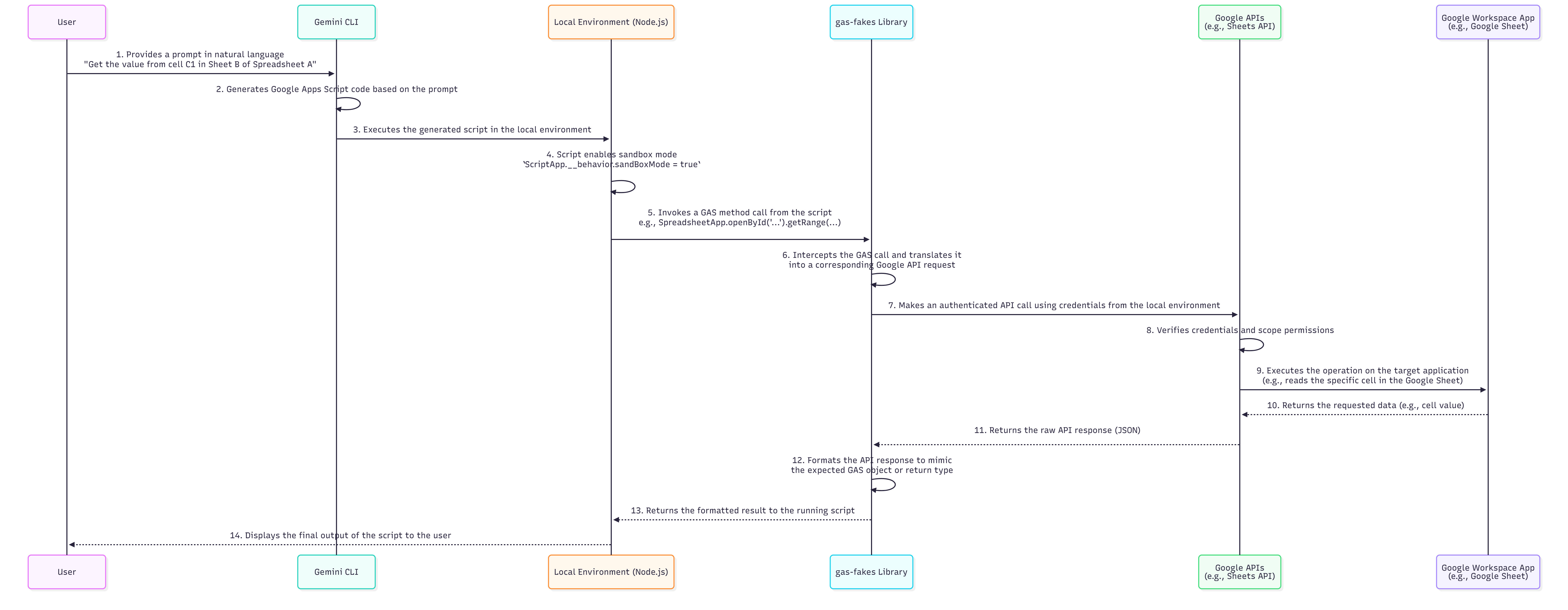
Subsequently, to further enhance the convenience of gas-fakes, we developed it into a CLI tool and released it as the Gemini CLI Extension “GAS Development Kit.” (Ref F3, F4, F9) This created an environment where the latest GAS development workflow can be practiced anywhere there is a terminal, whether locally or in the cloud (Google Cloud Shell, Firebase Studio, etc.). (Ref F5, F6)
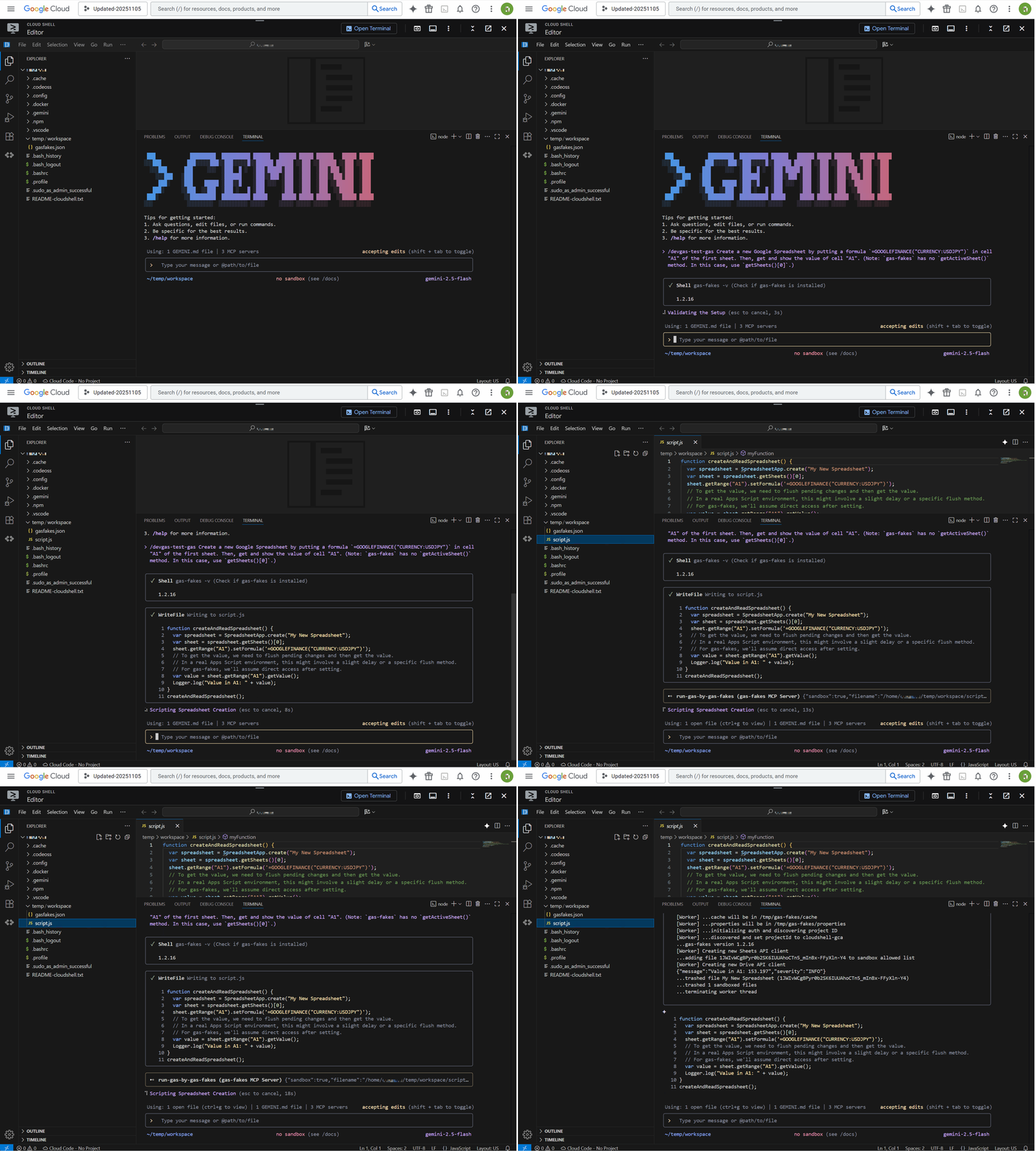
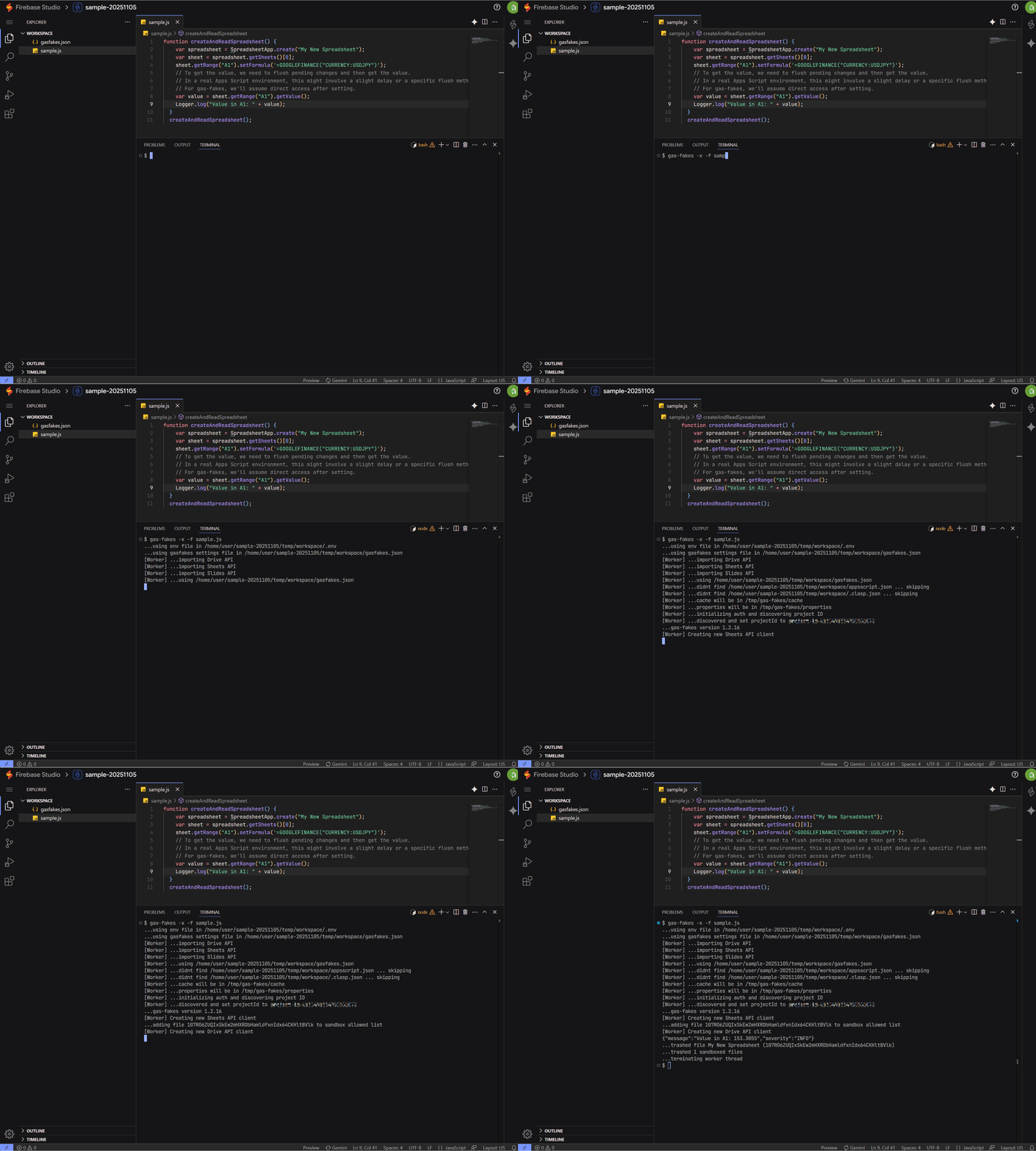
This secure execution foundation foreshadows the future style of automation. I also succeeded in an experiment to dynamically add real-time generated scripts as tools to the MCP server, making them reusable. (Ref F7) In the future, fixed MCP servers may become unnecessary; we may see a world where AI generates the optimal code (or something similar) on the spot to solve a task given by a prompt and executes it immediately within a sandbox. At that time, groups of AI agents specialized for individual tasks and protocols like A2A that connect them will play a decisive role.
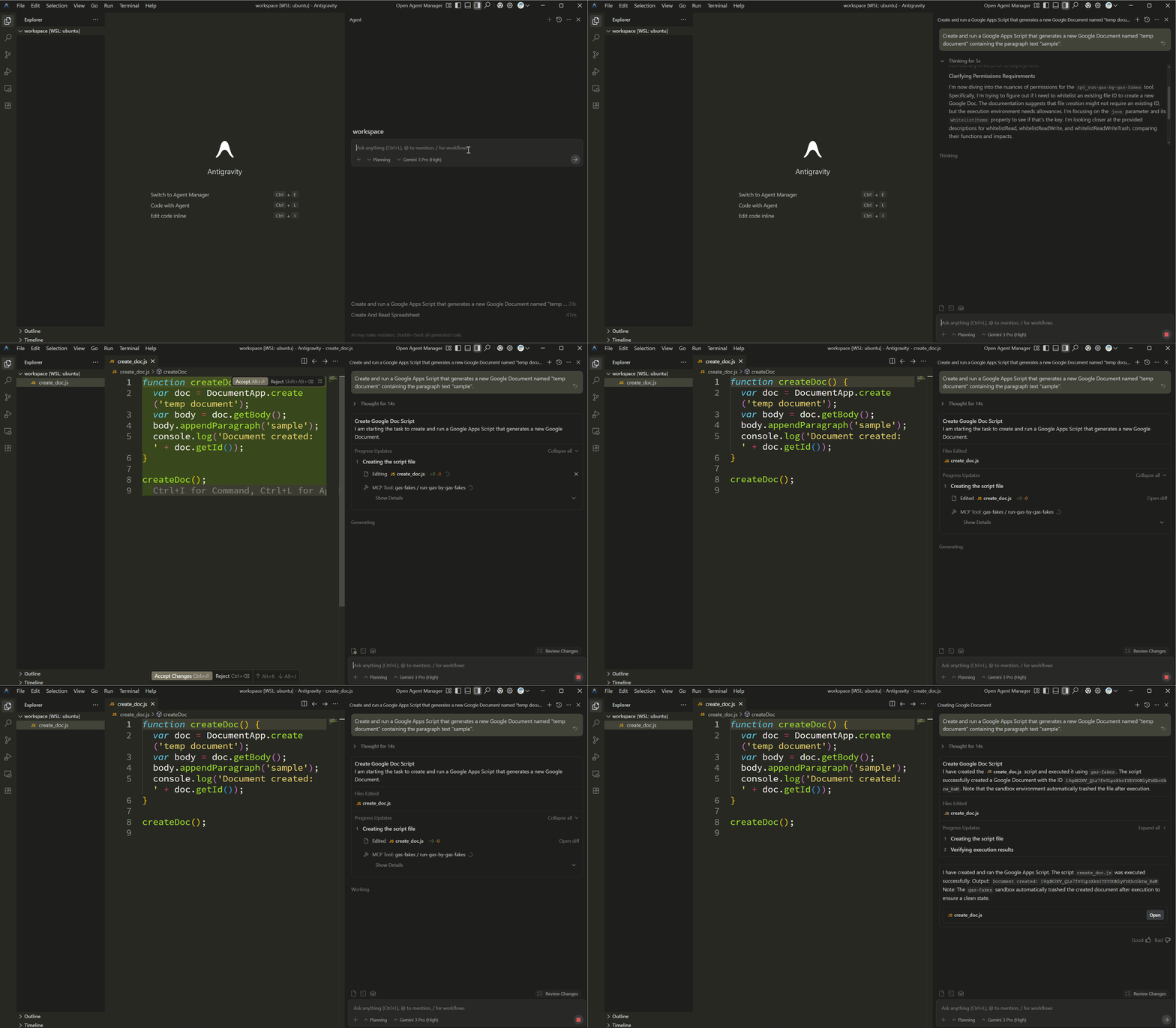
Google Antigravity becomes the critical piece in realizing this vision. The combination of Gemini 3.0’s advanced reasoning capabilities and the Antigravity execution environment allows the cycle of “Code Generation → Verification in Sandbox → Execution” to be run autonomously without human intervention. Moving forward, in addition to prototyping with Gemini CLI, “AI Agent-First” GAS development on Antigravity is expected to take root as the new standard. (Ref F8)
Related Articles F
Medium:
- A Fake-Sandbox for Google Apps Script: A Feasibility Study on Securely Executing Code Generated by Gemini CLI
- Secure and Conversational Google Workspace Automation: Integrating Gemini CLI with a gas-fakes MCP Server
- Streamlining Google Apps Script Development with Gemini CLI Extensions and VSCode
- Secure and Streamlined Google Apps Script Development with gas-fakes CLI and Gemini CLI Extension
- Bridging the Gap: Seamless Integration for Local Google Apps Script Development
- Modern Google Apps Script Workflow Building on the Cloud
- Dynamic Tool Creation for Google Workspace Automation with Gemini CLI
- Next-Generation Google Apps Script Development: Leveraging Antigravity and Gemini 3.0
GitHub:
Summary
Through the review of one year of practice and the latest technological trends in this article, the fusion of Google Apps Script (GAS) and AI technology has moved beyond simple task automation into a phase of autonomous business execution.
- Redefinition as an Integration Hub in the AI Era: The Web Apps functionality and robust authentication mechanisms of GAS serve as a crucial “hub” connecting AI agents and Google Workspace in protocols like MCP and A2A. With the arrival of the official Google Workspace Extension, this connection has become more standardized and accessible.
- Dissolution of Boundaries between Local and Cloud: The integration with Gemini CLI has liberated GAS from the closed environment of the cloud. Starting from the terminal, local resources, Google Workspace, and AI platforms like Google Antigravity connect seamlessly, realizing a location-independent hybrid development environment.
- Overcoming Performance via Architecture: The challenge of initial response speed (cold start) has been resolved through architectural ingenuity using Gemini CLI Extensions and caching strategies, ensuring fast responses suitable for practical operation.
- Elimination of Data Silos and Deepening of RAG: By making GAS function as a gateway, data within Workspace can be directly integrated into external contexts like File Search, building an advanced Retrieval-Augmented Generation (RAG) foundation that is agnostic to where information is stored (local/cloud).
- “Safe Execution Foundation” Supporting Autonomy: Sandbox technology using
gas-fakesis essential for dynamically and safely executing code generated by AI. This is a core technology for shifting from a stage of simply using prepared tools to a world where AI generates, verifies, and executes code on the spot to solve problems. - Evolution to “Agentic Automation”: The advent of Google Antigravity and Gemini 3.0 has determined a future where multiple AI agents coordinate to complete complex workflows. In this new ecosystem, GAS will increase in importance as the operational force of agents or the glue between them.
Acknowledgements
I would like to express my sincere gratitude to Mr. Bruce McPherson for the many constructive discussions and valuable insights provided during the joint development of gas-fakes.