Gists
This sample script is for downloading files under a specific folder using Node.js. It can download files with Google Docs and others.
This sample supposes as follows. So please confirm it.
- quickstart is used and default quickstart works fine.
In order to use this sample, please carry out as follows.
- Replace
listFiles() of the default quickstart to this sample.
- Set
folderid. This script can retrieve files in the folder with folderid.
- Delete
drive-nodejs-quickstart.json. I think that there is the file at .credentials in your home directory.
- Change the SCOPE from
var SCOPES = ['https://www.googleapis.com/auth/drive.metadata.readonly']; to var SCOPES = ['https://www.googleapis.com/auth/drive.readonly'];.
- Run script, retrieve the code and authorize.
Script :
function listFiles(auth) {
var folderid = "### folder ID ###"; // Folder ID. This script downloads files in the folder with this folder ID.
var outputExtension = "pdf"; // Extension of output file. This is adapted to only Google Docs.
var outputMimeType = mime.lookup(outputExtension);
var service = google.drive('v3');
service.files.list({
auth: auth,
q: "'" + folderid + "' in parents and trashed=false",
fields: "files(id, name, mimeType)"
}, function(err, response) {
if (err) {
console.log('The API returned an error: ' + err);
return;
}
response.files.forEach(function(e){
if (e.mimeType.includes("application/vnd.google-apps")) {
var dlfile = fs.createWriteStream(e.name + "." + outputExtension);
service.files.export({
auth: auth,
fileId: e.id,
mimeType: outputMimeType
}).on('end', function() {
console.log("'%s' was downloaded as %s.", e.name, outputExtension);
}).on('error', function(err) {
console.error(err);
return process.exit();
}).pipe(dlfile);
} else {
var dlfile = fs.createWriteStream(e.name);
service.files.get({
auth: auth,
fileId: e.id,
alt: 'media'
}).on('end', function() {
console.log("'%s' was downloaded as %s.", e.name, mime.extension(e.mimeType));
}).on('error', function(err) {
console.error(err);
return process.exit();
}).pipe(dlfile);
}
});
});
}
This is a library of Google Apps Script for using Microsoft OneDrive.
Feature
This library can carry out following functions using OneDrive APIs.
- Retrieve file list on OneDrive.
- Delete files and folders on OneDrive.
- Create folder on OneDrive.
- Download files from OneDrive to Google Drive.
- Upload files from Google Drive to OneDrive.
Demo

You can see the detail information here https://github.com/tanaikech/OnedriveApp
Gists
In order to use this script, please retrieve client id, client secret and refresh token before. About this, you can see the detail information at https://gist.github.com/tanaikech/d9674f0ead7e3320c5e3184f5d1b05cc.
1. Simple item upload
This is for the simple item upload is available for items with less than 4 MB of content. The detail information is https://dev.onedrive.com/items/upload_put.htm.
var fs = require('fs');
var mime = require('mime');
var request = require('request');
var file = './sample.zip'; // Filename you want to upload on your local PC
var onedrive_folder = 'SampleFolder'; // Folder name on OneDrive
var onedrive_filename = 'sample.zip'; // Filename on OneDrive
request.post({
url: 'https://login.microsoftonline.com/common/oauth2/v2.0/token',
form: {
redirect_uri: 'http://localhost/dashboard',
client_id: onedrive_client_id,
client_secret: onedrive_client_secret,
refresh_token: onedrive_refresh_token,
grant_type: 'refresh_token'
},
}, function(error, response, body) {
fs.readFile(file, function read(e, f) {
request.put({
url: 'https://graph.microsoft.com/v1.0/drive/root:/' + onedrive_folder + '/' + onedrive_filename + ':/content',
headers: {
'Authorization': "Bearer " + JSON.parse(body).access_token,
'Content-Type': mime.getType(file), // When you use old version, please modify this to "mime.lookup(file)",
},
body: f,
}, function(er, re, bo) {
console.log(bo);
});
});
});
2. Resumable item upload
This is for the resumable item upload is provided for large files or when a resumable transfer may be necessary.
The detail information is https://dev.onedrive.com/items/upload_large_files.htm.
Report
Netatmo API had been down from Aug. 10, 2017 19:30 JST to Aug. 11, 2017 19:00 JST. Now it’s working.
Gists
Updated: January 22, 2023
This sample script is for the interconversion between Google Docs (document, spreadsheet and presentation) and Microsoft Docs (word, excel and powerpoint). The feature is to convert them without Advanced Google Services.
Since Advanced Google Services is not used for this, if you publish your script with this script, you are not necessary to explain how to install Advanced Google Services. This script converts between Google Docs and Microsoft Docs using UrlFetchApp.fetch(). Although Drive API v3 is used, Drive API is automatically enabled by the recent update on Google. Ref (I’m sorry. This is Japanese language.) So you are not necessary to explain about the use of Drive API. By this, users will be easy to use the scripts that Drive API is used. This is very important for a lot of users.
Report
Netatmo API had been down from Aug. 8, 2017 21:30 JST to Aug. 9, 2017 17:30 JST. Now it’s working.
I got an e-mail from Netatmo. They say that the issue was solved.
Report
Netatmo API had been down from Aug. 7, 2017 00:00 a.m. JST to Aug. 7, 2017 07:30 a.m. JST. Now it’s working.
Gists
When the shared files on Google Drive is downloaded, it is necessary to change the download method by the file size. The boundary of file size when the method is changed is about 40MB.
File size < 40MB
CURL
filename="### filename ###"
fileid="### file ID ###"
curl -L -o ${filename} "https://drive.google.com/uc?export=download&id=${fileid}"
File size > 40MB
When it tries to download the file with more than 40MB, Google says to download from following URL.
Gist
Overview
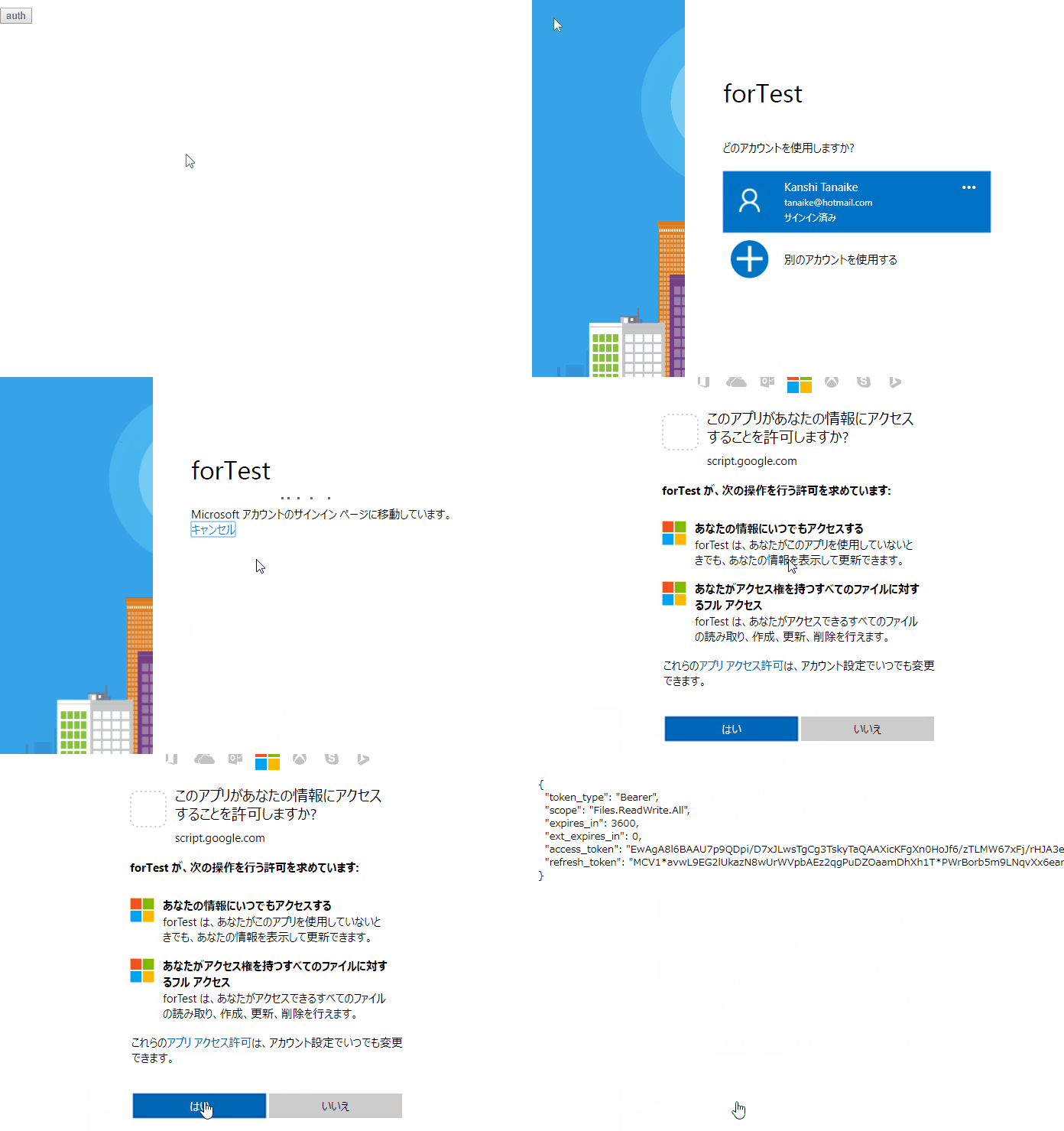
This GAS sample is for retrieving access token to use OneDrive APIs using Google Apps Script.
In this script, the authorization code is automatically retrieved.
Demo

Usage
In order to use this, both accounts of Google and OneDrive (MSN) are required.
Google side
- Copy and paste the sample script to your script editor. You can use the standalone script for this.
- Deploy Web Apps.
- On the Script Editor
- File
- -> Manage Versions
- -> Save New Version
- Publish
- -> Deploy as Web App
- -> At Execute the app as, select “your account”
- -> At Who has access to the app, select “Only myself”
- -> Click “Deploy”
- -> Copy URL of “latest code” (This is important!)
- -> Click “OK”
- URL of “latest code” is
https://script.google.com/macros/s/###/dev. So please modify this URL. Replace from “dev” to “usercallback” for the URL. And copy this modified URL.
- From :
https://script.google.com/macros/s/###/dev
- To :
https://script.google.com/macros/s/###/usercallback
OneDrive side
- Log in to Microsoft Azure portal.
- Search “Azure Active Directory” at the top of text input box. And open “Azure Active Directory”.
- Click “App registrations” at the left side bar.
- In my environment, when I used Chrome as the browser, no response occurred. So in that case, I used Microsoft Edge.
- Click “New registration”
- app name: “sample app name”
- Supported account types: “Accounts in any organizational directory (Any Azure AD directory - Multitenant) and personal Microsoft accounts (e.g. Skype, Xbox)”
- Redirect URI (optional): Web
- URL:
https://script.google.com/macros/s/###/usercallback
- Click “Register”
- Copy “Application (client) ID”.
- Click “Certificates & secrets” at the left side bar.
- Click “New client secrets”.
- After input the description and select “expire”, click “Add” button.
- Copy the created secret value.
By above operation, the preparation is done.
Gists
When it uses Google Sheets API v4, GridRange is used for it as the range property. These sample scripts are for converting from a1Notation to GridRange. You can chose from following 2 scripts. Both scripts can retrieve the same result.
Script 1 :
This is from me.
function a1notation2gridrange1(sheetid, a1notation) {
var data = a1notation.match(/(^.+)!(.+):(.+$)/);
var ss = SpreadsheetApp.openById(sheetid).getSheetByName(data[1]);
var range = ss.getRange(data[2] + ":" + data[3]);
var gridRange = {
sheetId: ss.getSheetId(),
startRowIndex: range.getRow() - 1,
endRowIndex: range.getRow() - 1 + range.getNumRows(),
startColumnIndex: range.getColumn() - 1,
endColumnIndex: range.getColumn() - 1 + range.getNumColumns(),
};
if (!data[2].match(/[0-9]/)) delete gridRange.startRowIndex;
if (!data[3].match(/[0-9]/)) delete gridRange.endRowIndex;
return gridRange;
}
Script 2 :
String.prototype.to10 was used for this script. String.prototype.to10 is from Alexander Ivanov. I think that String.prototype.to10 is a clever solution.