
Abstract
This article introduces a Node.js wrapper that dramatically reduces the startup time for the Gemini CLI when used with MCP servers built on Google Apps Script. This optimization enhances user experience by accelerating the initialization process, achieving a speed boost of approximately 15 times.
1. Introduction
The Model Context Protocol (MCP) is a vital open standard enabling AI agents to connect with external tools and data sources for complex, real-world tasks. To integrate the Gemini AI agent with Google Workspace, I developed two open-source tools: MCPApp, for managing the MCP server lifecycle, and ToolsForMCPServer, a suite of tools for interacting with services like Gmail and Drive. These are built with Google Apps Script for use with the Gemini CLI.
A significant bottleneck with this setup was the slow startup speed of the Gemini CLI, which often took around 30 seconds to launch. This article presents a new approach using a Node.js wrapper to resolve this performance issue, resulting in a 15-fold reduction in startup time and making the integration far more efficient.
2. The Problem: Slow Startup with Google Apps Script
It is considered that the delay in launching the Gemini CLI stems from its synchronous initialization process and the latency at the Google Apps Script Web Apps side. When the CLI starts, it makes a series of blocking HTTP requests to the Google Apps Script Web App to load the MCP server’s tools and prompts.
The typical startup flow involves these steps:
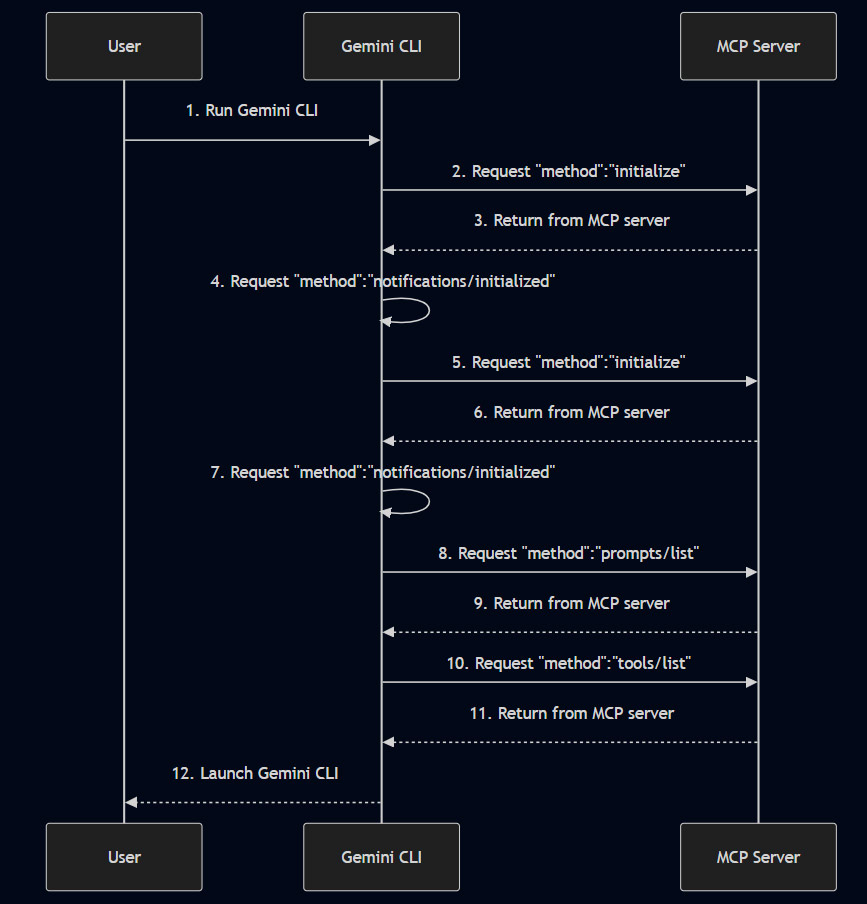
Each request to the Google Apps Script server (steps 2, 5, 8, and 10) introduces a delay, leading to the slow overall startup time.
3. The Solution: A Node.js Wrapper
To accelerate the startup, a new approach was developed using a local Node.js wrapper. This wrapper acts as an intermediary MCP server that communicates with the Gemini CLI via standard I/O (stdio), which is significantly faster than HTTP requests.
With the new approach, the initialization process (steps 2-11) runs asynchronously on the local machine. The Node.js server handles the initial handshake with the Gemini CLI almost instantly. It only makes an HTTP request to the Google Apps Script Web App when a tool is actually executed.
Flow when using a tool:
- Gemini CLI sends a
"method":"tools/call"request to the local Node.js wrapper via stdio. - The Node.js wrapper makes an HTTP request to the Google Apps Script Web App.
- The result is returned from the Web App to the Gemini CLI through the Node.js wrapper.
This change means the startup is fast, and the overhead of an HTTP request is only incurred during tool execution, which is a much more acceptable user experience.
4. Usage Guide
Follow these steps to set up and test the performance improvement.
Step 1: Install Gemini CLI
First, ensure you have the Gemini CLI installed.
- Installation Guide: https://github.com/google-gemini/gemini-cli
Step 2: Deploy Google Apps Script MCP Server
Next, deploy the MCP server using Google Apps Script.
- Setup Instructions: https://github.com/tanaikech/ToolsForMCPServer?tab=readme-ov-file#usage
Step 3: Test the Original (Slow) Approach
To experience the baseline performance, configure the Gemini CLI to connect directly to your deployed Web App.
Modify your settings.json file with the following, replacing the URL with your own:
{
  "theme": "Default",
  "selectedAuthType": "### your setting ###",
  "mcpServers": {
    "gas_web_apps": {
      "command": "npx",
      "args": [
        "mcp-remote",
        "https://script.google.com/macros/s/###/exec?accessKey=sample"
      ],
      "env": {}
    }
  }
}
Run $ gemini and note the slow startup speed. You can verify the tools are loaded with the /mcp command.
Step 4: Test the New (Fast) Approach
Now, implement the Node.js wrapper to accelerate the startup.
- Create a new workspace directory and navigate into it.
- Install the necessary libraries:
npm install @modelcontextprotocol/sdk zod@3. - Download the two required script files
wrapped_gas_web_apps.jsandtools.jsfrom my repository. - Modify
settings.jsonto use the Node.js wrapper. Replace{your path}with the absolute path towrapped_gas_web_apps.js.
{
  "theme": "Default",
  "selectedAuthType": "### your setting ###",
  "mcpServers": {
    "wrapped_gas_web_apps": {
      "command": "node",
      "args": ["{your path}/wrapped_gas_web_apps.js"]
    }
  }
}
Run $ gemini again. You should observe a significantly faster startup. In my tests, the startup time was reduced by approximately 15 times. While the performance of individual tool execution remains the same, the improved startup time makes the CLI much more practical and user-friendly.
5. Summary
Here are the key takeaways from this new approach:
- Problem: The Gemini CLI’s synchronous HTTP requests to Google Apps Script MCP servers cause slow startup times of around 30 seconds.
- Solution: A local Node.js wrapper is used to handle the CLI’s initialization process via fast stdio transport.
- Performance: The new approach reduces the startup time by approximately 15 times, dramatically improving the user experience.
- Mechanism: The Node.js wrapper only makes HTTP requests to the Google Apps Script server when a tool is executed, not during the initial launch.
- Impact: This optimization makes the integration of Gemini CLI with Google Workspace tools more efficient and practical for daily use.
6. Additional information
- In this approach, by changing
mcpServersofsettings.jsonbetween the original approach and the new approach, you can switch the approach method. - When this wrapper is used, an additional advantage is that requests made from Node.js to Google Apps Script Web Apps can run with an access token. Specifically, you can access Web Apps using an access token retrieved by OAuth2 and a service account. This will lead to highly secure access.