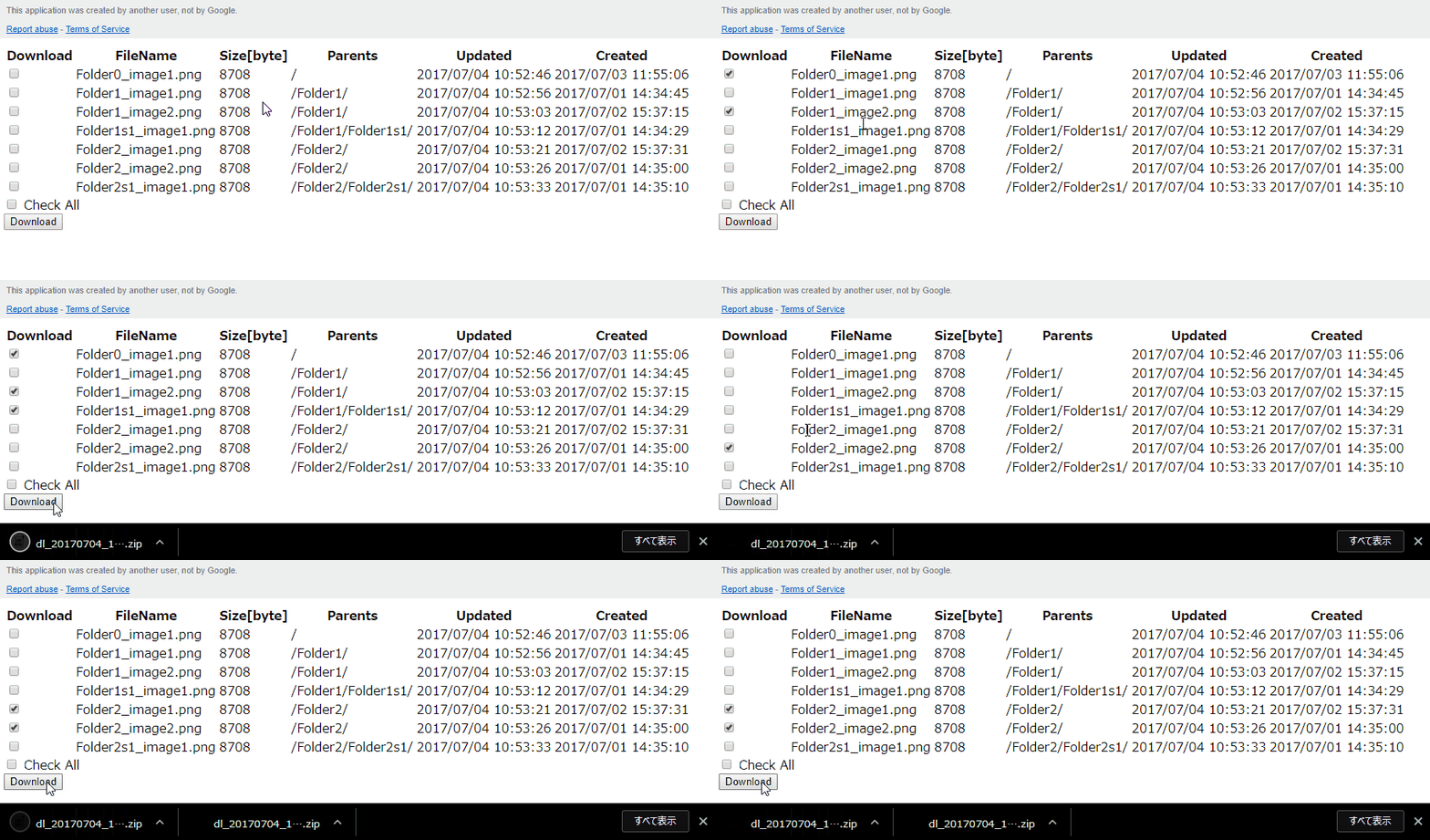
File Transfer for Google Drive Without Authorization

Overview

In this article, I would like to introduce how to transfer files for Google Drive under no authorization.

This has also been published here. https://github.com/tanaikech/FileTransfer

Description

When we download and upload files for Google Drive, it usually has to use Drive API. In order to use Drive API, access token is required. If you want to make your friends download and upload files for your Google Drive, the authorization process is to take time. So I proposal this.

Dynamical Nested JSON Objects by Golang

This sample script dynamically creates nested JSON objects.

Script

obj := map[string]interface{}{}
for i := 1; i <= 5; i++ {
    value := map[string]interface{}{
        fmt.Sprintf("B_key%d", i): map[string]interface{}{
            "C_key": "value",
        },
    }
    obj[fmt.Sprintf("A_key%d", i)] = value
}

Result

{
  "A_key1": {
    "B_key1": {
      "C_key": "value"
    }
  },
  "A_key2": {
    "B_key2": {
      "C_key": "value"
    }
  },
  "A_key3": {
    "B_key3": {
      "C_key": "value"
    }
  },
  "A_key4": {
    "B_key4": {
      "C_key": "value"
    }
  },
  "A_key5": {
    "B_key5": {
      "C_key": "value"
    }
  }
}

Changing Slack Status using Google Apps Script

This script changes slack status using GAS. If you want to change it on time you decided, it can be achieved by installing this method as a trigger.

In order to use this, the required scope is users.profile:write.

function setSlackStatus(token, user, status_text, status_emoji) {
  return UrlFetchApp.fetch(
    'https://slack.com/api/users.profile.set',
    {
      method: 'post',
      payload: {
        token: token,
        user: user,
        profile: JSON.stringify({status_text: status_text, status_emoji: status_emoji})
      },
      muteHttpExceptions: true
    }
  ).getContentText();
}

function main() {
  var res = setSlackStatus(
    '### Your access token ###',
    '### User ID ###',
    'sample',
    ':coffee:'
  );
  Logger.log(res)
}

Delete Line Feed Code by DOS and Bash

Input JSON

text.txt :

{
  "values": [
    [
      "a1",
      "b1",
      "c1"
    ],
    [
      "a2",
      "b2",
      "c2"
    ],
    [
      "a3",
      "b3",
      "c3"
    ],
    [
      "a4",
      "b4",
      "c4"
    ],
    [
      "a5",
      "b5",
      "c5"
    ]
  ]
}

Windows DOS

type text.txt | jq -c "."

Linux Bash

$ cat text.txt | jq -c '.'

Output JSON

{"values":[["a1","b1","c1"],["a2","b2","c2"],["a3","b3","c3"],["a4","b4","c4"],["a5","b5","c5"]]}

Updated: CLI Tool - gogauth

gogauth is a CLI tool to easily retrieve access token for using APIs on Google.

I thought that if the access token can easily retrieve, it may be useful for users who can use various convenience Google APIs. So I created this. Also this can be used for testing sample script like the demo. If this will be helpful for you, I’m glad.

Today, it was updated to v2.0.1. Please check it out. https://github.com/tanaikech/gogauth

OCR using Google Drive API

This is a sample script for OCR using Google Drive API. A text file which converted by OCR can be retrieved by inputting an image file.

In this sample, Python Quickstart is used. The detail information is https://developers.google.com/drive/v3/web/quickstart/python. Please read “Step 1: Turn on the Drive API” and “Step 2: Install the Google Client Library”.

from __future__ import print_function
import httplib2
import os
import io

from apiclient import discovery
from oauth2client import client
from oauth2client import tools
from oauth2client.file import Storage
from apiclient.http import MediaFileUpload, MediaIoBaseDownload

try:
    import argparse
    flags = argparse.ArgumentParser(parents=[tools.argparser]).parse_args()
except ImportError:
    flags = None

# If modifying these scopes, delete your previously saved credentials
# at ~/.credentials/drive-python-quickstart.json
SCOPES = 'https://www.googleapis.com/auth/drive'
CLIENT_SECRET_FILE = 'client_secret.json'
APPLICATION_NAME = 'Drive API Python Quickstart'


def get_credentials():
    """Gets valid user credentials from storage.

    If nothing has been stored, or if the stored credentials are invalid,
    the OAuth2 flow is completed to obtain the new credentials.

    Returns:
        Credentials, the obtained credential.
    """
    credential_path = os.path.join("./", 'drive-python-quickstart.json')
    store = Storage(credential_path)
    credentials = store.get()
    if not credentials or credentials.invalid:
        flow = client.flow_from_clientsecrets(CLIENT_SECRET_FILE, SCOPES)
        flow.user_agent = APPLICATION_NAME
        if flags:
            credentials = tools.run_flow(flow, store, flags)
        else:  # Needed only for compatibility with Python 2.6
            credentials = tools.run(flow, store)
        print('Storing credentials to ' + credential_path)
    return credentials


def main():
    credentials = get_credentials()
    http = credentials.authorize(httplib2.Http())
    service = discovery.build('drive', 'v3', http=http)

    imgfile = 'sample.png'  # Image with texts (png, jpg, bmp, gif, pdf)
    txtfile = 'output.txt'  # Text file outputted by OCR

    mime = 'application/vnd.google-apps.document'
    res = service.files().create(
        body={
            'name': imgfile,
            'mimeType': mime
        },
        media_body=MediaFileUpload(imgfile, mimetype=mime, resumable=True)
    ).execute()

    downloader = MediaIoBaseDownload(
        io.FileIO(txtfile, 'wb'),
        service.files().export_media(fileId=res['id'], mimeType="text/plain")
    )
    done = False
    while done is False:
        status, done = downloader.next_chunk()

    service.files().delete(fileId=res['id']).execute()
    print("Done.")


if __name__ == '__main__':
    main()

Converting PDF to TXT

This is a sample script for converting a PDF file to a TXT file. 2 steps are required for this.

  1. Upload a PDF file as a Google Document
  2. Download a Google Document as a TXT file

In this sample, Python Quickstart is used. The detail information is https://developers.google.com/drive/v3/web/quickstart/python. Please read “Step 1: Turn on the Drive API” and “Step 2: Install the Google Client Library”.

from __future__ import print_function
import httplib2
import os
import io

from apiclient import discovery
from oauth2client import client
from oauth2client import tools
from oauth2client.file import Storage
from apiclient.http import MediaFileUpload, MediaIoBaseDownload

try:
    import argparse
    flags = argparse.ArgumentParser(parents=[tools.argparser]).parse_args()
except ImportError:
    flags = None

SCOPES = 'https://www.googleapis.com/auth/drive'
CLIENT_SECRET_FILE = 'client_secret.json'
APPLICATION_NAME = 'Drive API Python Quickstart'


def get_credentials():
    credential_path = os.path.join("./", 'drive-python-quickstart.json')
    store = Storage(credential_path)
    credentials = store.get()
    if not credentials or credentials.invalid:
        flow = client.flow_from_clientsecrets(CLIENT_SECRET_FILE, SCOPES)
        flow.user_agent = APPLICATION_NAME
        if flags:
            credentials = tools.run_flow(flow, store, flags)
        else:  # Needed only for compatibility with Python 2.6
            credentials = tools.run(flow, store)
        print('Storing credentials to ' + credential_path)
    return credentials


def main():
    credentials = get_credentials()
    http = credentials.authorize(httplib2.Http())
    service = discovery.build('drive', 'v3', http=http)

    pdffile = 'sample.pdf'
    txtfile = 'sample.txt'

    mime = 'application/vnd.google-apps.document'
    res = service.files().create(
        body={
            'name': pdffile,
            'mimeType': mime
        },
        media_body=MediaFileUpload(pdffile, mimetype=mime, resumable=True)
    ).execute()

    dl = MediaIoBaseDownload(
        io.FileIO(txtfile, 'wb'),
        service.files().export_media(fileId=res['id'], mimeType="text/plain")
    )
    done = False
    while done is False:
        status, done = dl.next_chunk()
    print("Done.")


if __name__ == '__main__':
    main()

Retrieving User Information with Shared Spreadsheet

This sample script retrieves the user information which is editing the shared spreadsheet.

It was found as follows.

  • User information retrieving by Class Session is the owner and users which installed triggers by themselves.
  • When each user installs a trigger, user information retrieving by Class Session losts the accuracy. So user information has to be retrieved using a temporally installed trigger.
  • Using onOpen(), it cannot directly install triggers and authorize.
  • Using menu bar, it can install triggers and authorize Google Services using API.

Here, I thought 2 problems.

CLI Tool - goris

Overview

This is a CLI tool to search for images with Google Reverse Image Search.

Motivation

Because I had wanted to search for images with an image URL and file on my terminal, I created this. This can download images from searched image URLs.

The detail information and how to get this are https://github.com/tanaikech/goris.