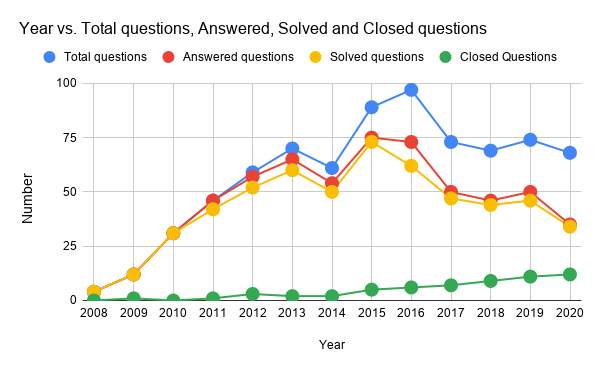
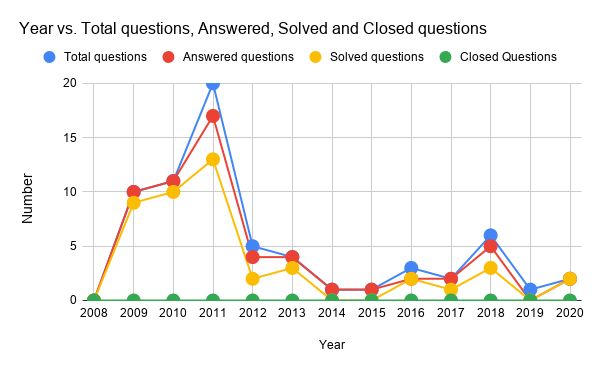
Tags Using Together with google-apps-script Tag at Stackoverflow
This table shows all tags using together with the tag of “google-apps-script” at Stackoverflow. The tags are summarized every year. At 2020, the data is retrieved from January 1, 2020 to July 16, 2020. The number enclosed (###) means the number of use of the tag. When this table was a material for discussing about the current tags for “google-apps-script”, I’m glad.
| Year | Used Tag list |
|---|---|
| 2008 | |
| 2009 | google-form(1),google-sheets(1),google-apps-script(1) |
| 2010 | google-apps-script(50),google-sheets(31),javascript(23),google-apps(4),custom-function(2),google-calendar-api(2),spreadsheet(2),google-docs-api(2),vba(2),google-docs(2),amazon(1),amazon-web-services(1),api(1),timezone(1),ms-office(1),xml-namespaces(1),xml(1),closures(1),google-sites(1),google-maps-api-3(1),array-formulas(1),google-sheets-formula(1),google-data-api(1),date-manipulation(1),datetime(1) |
| 2011 | google-apps-script(72),google-sheets(31),google-apps(16),javascript(15),google-docs(8),google-spreadsheet-api(4),google-form(3),google-api(3),google-docs-api(2),spreadsheet(2),google-fusion-tables(2),google-calendar-api(2),java(2),google-app-engine(2),number-formatting(1),file-upload(1),google-apps-marketplace(1),json(1),email(1),html(1),tabpanel(1),gmail(1),performance(1),user-interface(1),zend-framework(1) |
| 2012 | google-apps-script(1877),google-sheets(345),javascript(161),google-docs(63),google-sites(61),google-apps(54),google-spreadsheet-api(44),google-drive-api(44),gmail(40),google-calendar-api(31),google-docs-api(29),html(19),google-visualization(18),triggers(18),email(15),google-form(15),spreadsheet(14),urlfetch(13),gwt(13),oauth(13),custom-function(13),google-app-engine(12),user-interface(11),jquery(11),jdbc(10) |
| 2013 | google-apps-script(2606),google-sheets(765),javascript(413),google-drive-api(124),google-docs(120),google-form(97),google-spreadsheet-api(78),google-apps(77),gmail(58),google-sites(57),html(56),google-calendar-api(41),google-api(34),email(31),google-docs-api(26),jquery(24),arrays(23),triggers(22),forms(22),google-app-engine(21),google-visualization(21),user-interface(20),spreadsheet(20),json(19),google-caja(19) |
| 2014 | google-apps-script(2758),google-sheets(875),javascript(606),google-form(177),google-drive-api(168),google-docs(143),google-spreadsheet-api(90),google-apps(84),html(81),google-calendar-api(61),google-sites(56),gmail(54),email(53),jquery(49),arrays(45),forms(39),spreadsheet(35),triggers(35),excel(33),json(33),google-docs-api(28),google-api(28),google-app-engine(24),google-visualization(22),google-bigquery(22) |
| 2015 | google-apps-script(2781),google-sheets(1134),javascript(714),google-form(159),html(158),google-docs(127),google-apps(115),google-spreadsheet-api(98),google-drive-api(97),gmail(66),arrays(57),google-calendar-api(57),jquery(51),google-api(46),forms(40),spreadsheet(39),email(38),google-docs-api(36),json(35),triggers(33),google-sites(32),regex(32),google-visualization(30),php(23),css(20) |
| 2016 | google-apps-script(2888),google-sheets(1198),javascript(783),google-form(156),html(118),google-drive-api(117),google-apps(117),google-docs(77),arrays(74),google-spreadsheet-api(73),json(60),gmail(59),email(46),google-calendar-api(43),google-sheets-api(42),google-api(42),triggers(38),google-visualization(31),jquery(31),spreadsheet(31),google-docs-api(29),date(24),regex(23),forms(22),csv(22) |
| 2017 | google-apps-script(3873),google-sheets(1537),javascript(979),google-form(194),html(158),google-sheets-api(137),google-docs(127),google-apps(122),google-drive-api(122),google-spreadsheet-api(114),arrays(110),gmail(85),email(64),json(56),gmail-api(52),google-api(52),triggers(51),jquery(51),spreadsheet(48),google-calendar-api(42),regex(34),google-sites(31),forms(27),custom-function(27),excel(27) |
| 2018 | google-apps-script(4716),google-sheets(2062),javascript(1046),google-form(189),google-drive-api(189),google-docs(167),google-sheets-api(165),gmail-addons(155),html(134),triggers(129),gmail(120),arrays(111),google-calendar-api(79),json(68),google-app-maker(63),email(59),google-apps-script-addon(55),gmail-api(54),google-api(50),regex(50),custom-function(48),gsuite(47),google-bigquery(45),google-slides-api(43),web-applications(43) |
| 2019 | google-apps-script(6731),google-sheets(3300),javascript(1352),google-form(263),html(250),google-sheets-api(223),google-drive-api(216),google-sheets-formula(168),google-docs(158),gmail(154),web-applications(143),arrays(141),google-sheets-macros(134),triggers(128),google-apps-script-web-application(112),google-calendar-api(88),gmail-addons(85),google-apps-script-addon(85),json(82),google-apps(77),gsuite(76),google-api(69),google-app-maker(64),scripting(61),google-apps-script-editor(61) |
| 2020 | google-apps-script(4853),google-sheets(2503),javascript(1221),html(199),google-form(176),google-drive-api(161),google-apps-script-web-application(160),arrays(154),google-sheets-api(149),google-docs(124),google-sheets-formula(120),google-sheets-macros(90),gmail(86),json(85),google-apps-script-simple-triggers(69),google-calendar-api(68),urlfetch(66),google-apps-script-addon(65),spreadsheet(57),triggers(51),gsuite-addons(48),gs-installable-triggers(47),email(47),gsuite(47),google-apps-script-editor(45) |