GAS Library - DocsServiceApp

Overview

This is a Google Apps Script library for supporting Document service, Docs API, Spreadsheet service, Sheets API, Slides service and Slides API. The aim of this library is to compensate the processes that they services cannot achieve.

GAS Library - DocsServiceApp

Description

The Google services, which are Document service, Docs API, Spreadsheet service, Sheets API, Slides service and Slides API, are growing now. But, unfortunately, there are still the processes that they cannot done. I created this GAS library for supporting the Google services.

Retrieving All URLs in Google Document using Google Apps Script

Gists

This is a sample script for retrieving All URLs in Google Document using Google Apps Script. In this sample script, the method of “documents.get” in Google Docs API is used. By this, the URL can be retrieve using JSON.parse().

Sample script

Before you use this script, please enable Google Docs API at Advanced Google Services.

const documentId = "###"; // Please set the Google Document ID.

const content = Docs.Documents.get(documentId).body.content;
const urls = [];
JSON.parse(JSON.stringify(content), (k, v) => {
  if (k == "url") urls.push(v);
});
console.log(urls);

References

Using Values Submitted from HTML Form using Google Apps Script

Gists

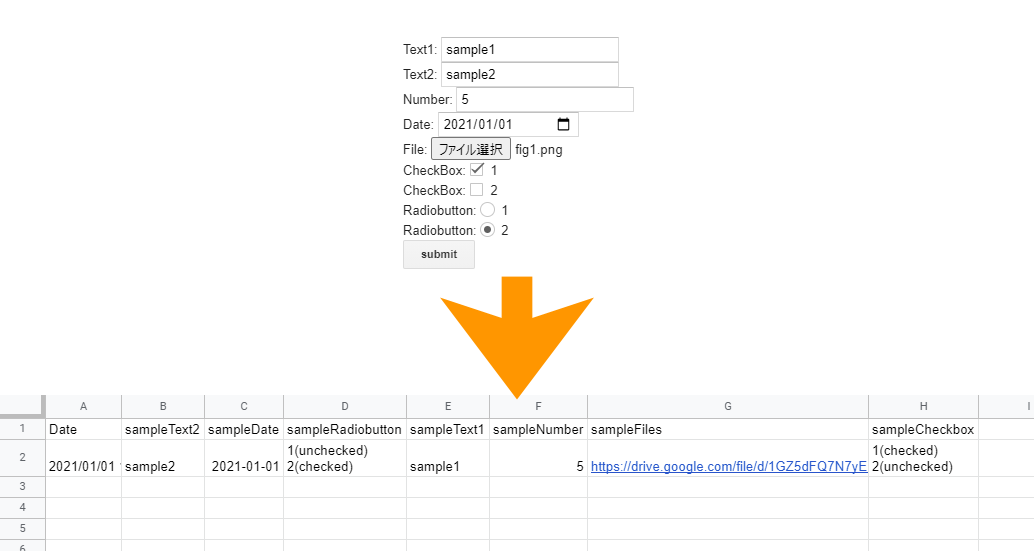
This is a sample script for using the values submitted from the HTML form using Google Apps Script and Javascript. In this case, the values include the files.

Issue

<form>
  Text: <input type="text" name="sampleText1" /><br />
  Single file: <input type="file" name="sampleFile1" /><br />
  <input
    type="submit"
    name="button"
    value="submit"
    onclick="main(this.parentNode)"
  />
</form>
<script>
  function main(e) {
    google.script.run.sample(e);
  }
</script>

This is a simple sample script for sending the values of form to Google Apps Script. In this case, texts and file are sent. When the button is clicked, main() is run. In this case, this.parentNode is sent to google.script.run.sample(this.parentNode). At that time, at Google Apps Script side, the text value can be correctly retrieved. But the file cannot be correctly sent. When the file is created as a file on Google Drive, the file is broken. I think that the reason of this issue might be due to character code.

Converting Range in Google Spreadsheet as Image using Google Apps Script

Another approach

10 Aug 2022: Report: Challenging Exporting Selected Cells on Spreadsheet as Image using Google Apps Script and Javascript

Old approach

Gists

This is a sample script for converting a range in Google Spreadsheet as an image data using Google Apps Script. Unfortunately, there are no methods for directly converting the range in Google Spreadsheet as an image data in the built-in functions. So in this case, as a workaround, Charts Service is used.

Modifying 1st-Page Header in Google Document using Google Apps Script

Gists

These are sample scripts for modifying the 1st-page header in Google Document using Google Apps Script. Unfortunately, in the current stage, the 1st-page header cannot be modified by Document service. In this case, it is required to use Google Docs API. Here, I would like to introduce 2 sample scripts for modifying the 1st page header using Docs API.

When you use this, please enable Google Docs API at Advanced Google services.

Uploading File to Google Drive from External HTML without Authorization

Gists

This is a sample script for uploading a file to Google Drive from the external HTML without the authorization. In this case, the client side can be used at the outside of Google. And as the server side, the Web Apps created by Google Apps Script is used.

Usage

Please do the following flow.

1. Create new project of Google Apps Script.

Sample script of Web Apps is a Google Apps Script. So please create a project of Google Apps Script.

Decoding QR code on Google Slides using Google Apps Script

Gists

This is a sample script for decoding a QR code put in Google Slides using Google Apps Script. In this case, Javascript is used at the opened dialog. And Canvas API and jsQR are used. So unfortunately, this method cannot be used with the time-driven trigger and the Google Apps Script project of the standalone type.

Of course, this method can be also used for Google Document and Google Spreadsheet. But at Google Spreadsheet, I recommend to retrieve the image of QR code with the fetch method from URL.