Number of Requests for Sheets API using Google Apps Script

Gists

This is a report for checking the number of requests for Sheets API. I had contact about the quota for Sheets API. So, in order to explain this, I used the following simple sample scripts.

Sample 1

This sample puts a value of “sample” to a cell “A1” using the batchUpdate method. This request body includes one request. When this script is run, one API quota is used.

function sample1() {
  const spreadsheetId = "###";
  const sheetId = 0;

  const requests = [{
    "updateCells": {
      "rows": [
        {
          "values": [
            {
              "userEnteredValue": {
                "stringValue": "sample"
              }
            }
          ]
        }
      ],
      "range": {
        "sheetId",
        "startRowIndex": 0,
        "endRowIndex": 1,
        "startColumnIndex": 0,
        "endColumnIndex": 1
      },
      "fields": "userEnteredValue.stringValue"
    }
  }];
  Sheets.Spreadsheets.batchUpdate({ requests }, spreadsheetId);
}

Sample 2

This sample puts 1000 values like “sample#” to the cells of “B1:B1000” using the batchUpdate method. This request body includes 1000 requests. When this script is run, one API quota is used.

Updated: CLI Tool - goris to v301

goris is a CLI tool to search for images with Google Reverse Image Search.

Today, it was updated to v3.0.1. Please check it out. https://github.com/tanaikech/goris

  • v3.0.1 (May 2, 2022)

    1. About the option -w, a bug was resolved. By this, the URLs of the related Web site are returned. As the default, 10 URLs are returned. If you want to retrieve more, please use the option -n like -n 20.

Increasing Column Letter by One using Google Apps Script

Gists

This is a sample script for increasing the column letter by one using Google Apps Script.

Sample script

const increase = (ar) =>
  ar.map((e) => {
    const idx = [...e].reduce(
      (c, e, i, a) =>
        (c += (e.charCodeAt(0) - 64) * Math.pow(26, a.length - i - 1)),
      -1
    );

    // Ref: https://stackoverflow.com/a/53678158
    columnIndexToLetter = (n) =>
      (a = Math.floor(n / 26)) >= 0
        ? columnIndexToLetter(a - 1) + String.fromCharCode(65 + (n % 26))
        : "";

    return columnIndexToLetter(idx + 1);
  });

const samples = ["A", "Z", "AA", "AZ", "ZZ"];
const res = increase(samples);
console.log(res); // <--- [ 'B', 'AA', 'AB', 'BA', 'AAA' ]
  • When this script is used, the column letters of ["A", "Z", "AA", "AZ", "ZZ"] is increased by one. As the result, [ 'B', 'AA', 'AB', 'BA', 'AAA' ] is obtained.

Testing

GAS Library - DocNamedRangeApp

Overview

GAS Library - DocNamedRangeApp

This is a Google Apps Script library for managing the named range on Google Documents.

Description

Google Document can use the named range. When the named range is used, the users can directly access the contents using the named range. For example, the developer can guide the users to the specific content in Google Documents using the named range. But, unfortunately, in the current stage, it seems that the named range cannot be directly used by the UI on Google Documents. It is required to use Google Apps Script. But, I thought that when I saw the official document of the named range, it might be difficult to understand it. Ref So, I created this library. When this library is used, the named ranges on Google Documents can be managed.

Analyzing Responses from Grid Items of Google Form using Google Apps Script

Gists

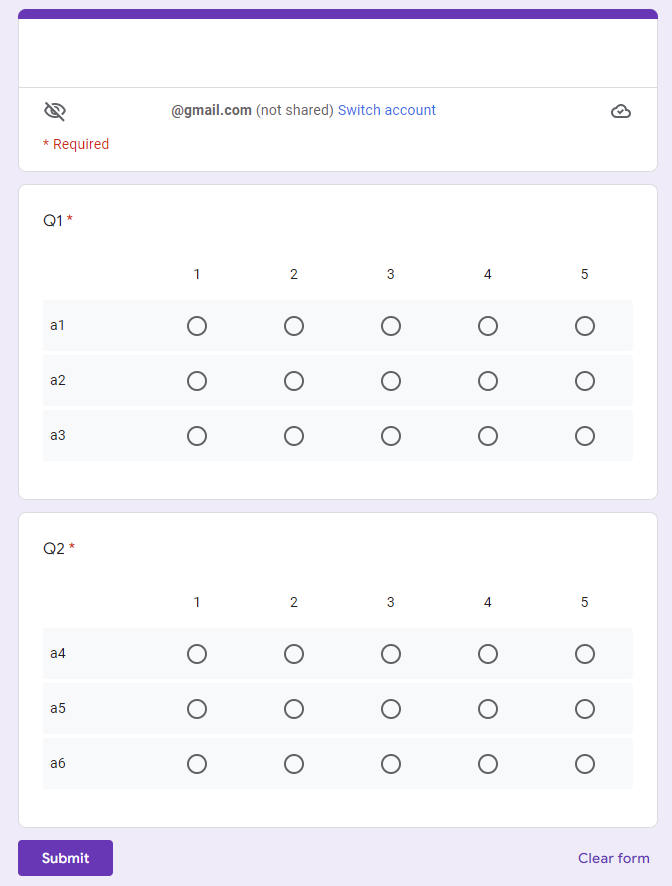
This is a sample script for analyzing the responses from Grid Items of Google Form using Google Apps Script.

In this sample situation, all responses are retrieved from Grid Items of Google Form, and the average values of each row of each question are calculated. And, the result is put on the Spreadsheet.

Sample situation

Input: Sample Google Form

The sample Google Form is as follows.

Analyzing Responses from Grid Items of Google Form using Google Apps Script

Report: Handling 10,000,000 cells in Google Spreadsheet using Google Apps Script

Gists

Introduction

On March 14, 2022, it reported about “Google Sheets doubles cell limit”. Ref By this update, now, the users can use 10,000,000 cells in a Google Spreadsheet. This is great news for us. When I tried to handle 10,000,000 cells in a Google Spreadsheet using Google Apps Script, it was found that there were various important points. In this report, I would like to introduce the important points for handling 10,000,000 cells in Google Spreadsheet using Google Apps Script.

Replacing Multiple Paragraphs on Google Document with a Regex using Google Apps Script

Gists

This is a sample script for replacing the multiple paragraphs on Google Document with a regex using Google Apps Script. There is the method of replaceText(searchPattern, replacement) for replacing the text on Google Document. Ref For example, when a text of sample1 is replaced with sample2, this can be achieved by a script like DocumentApp.getActiveDocument().getBody().replaceText("sample1", "sample2"). But, when the texts for replacing are the multiple paragraphs, this script cannot be used. Namely, it is considered that in the current stage, replaceText cannot be used for replacing the multiple paragraphs. In this post, I would like to introduce a sample script for replacing the texts with the multiple paragraphs using Google Apps Script.

Simply Converting HTML to Plain Text using Google Apps Script

Gists

This is a sample script for simply converting HTML to plain text using Google Apps Script.

Sample values

HTML (input value)

<div id="sample1">sample text1</div>
<div id="sample2">sample text2</div>
<ul id="sample3">
  <li>sample list 1</li>
  <li>sample list 2</li>
</ul>
<table id="sample4">
  <tbody>
    <tr>
      <td>a1</td>
      <td>b1</td>
      <td>c1</td>
    </tr>
    <tr>
      <td>a2</td>
      <td>b2</td>
      <td>c2</td>
    </tr>
  </tbody>
</table>

Text (output value)

sample text1
sample text2

   - sample list 1
   - sample list 2

a1 b1 c1
a2 b2 c2

Sample script

function myFunction() {
  const sampleHTML = `<div id="sample1">sample text1</div>
<div id="sample2">sample text2</div>
<ul id="sample3">
  <li>sample list 1</li>
  <li>sample list 2</li>
</ul>
<table id="sample4">
  <tbody>
    <tr>
      <td>a1</td>
      <td>b1</td>
      <td>c1</td>
    </tr>
    <tr>
      <td>a2</td>
      <td>b2</td>
      <td>c2</td>
    </tr>
  </tbody>
</table>`;
  const temp = GmailApp.createDraft("", "", "", { htmlBody: sampleHTML });
  const plainText = temp.getMessage().getPlainBody();
  temp.deleteDraft();
  console.log(plainText);
}
  • This method uses GmailApp.createDraft for converting HTML to plain text. When a draft email is created with GmailApp.createDraft by giving an HTML body, when the message content is retrieved with getPlainBody(), the plain text is retrieved. This method uses this situation.
  • When this sample script is run, the result in “Sample values” section can be obtained.

Note

  • This method is a simple conversion from HTML to plain text. So I’m not sure whether this method can be used for all HTML data. Please be careful about this.

References

Google OAuth Verification & Application Privacy Policy

Registered Application Name: Workspace & Gemini AI Orchestration Engine

Application Purpose & Core Functionality:

This web page serves as the official homepage and privacy compliance interface for the application "Workspace & Gemini AI Orchestration Engine". This specialized developer utility is designed to research, benchmark, and optimize advanced integrations between Google Workspace services, the Google Apps Script API, and Gemini AI models (via Google Vertex AI / Gemini API endpoints).

The application facilitates automated multi-agent scaffolding, programmatic script deployment, project resource management, and structural analysis of Google Apps Script projects. It allows developers and autonomous AI agents (operating via Model Context Protocol / MCP) to securely evaluate execution performance, implement high-performance batch requests, and test agent-to-agent (A2A) workflows within a controlled and structured environment.

Google User Data Policy Compliance Statements:

1. Data Access & Specific Usage

Our application explicitly requests access to specific Google user accounts through OAuth scopes required strictly for interacting with the Google Apps Script API and Google Workspace endpoints. This access is utilized solely to execute user-initiated or agent-orchestrated programmatic operations—such as creating, modifying, deploying, or benchmarking script projects and executing automated workflows. No background automated extraction occurs without explicit session initiation.

2. Data Storage & Zero-Retention Policy

Adhering to a strict Zero-Retention Model, this application does not store, log, or persist any personal data, OAuth tokens, script source codes, or Google account configurations on any external server, database, or persistent storage medium. All data processing and API responses are handled entirely in-memory or securely on the client side within the active session context, ensuring complete cryptographic transient isolation.

3. Data Sharing & Third-Party Non-Disclosure

We maintain absolute data privacy. No data accessed via Google OAuth scopes is shared, sold, rented, or transferred to third-party entities, advertising networks, or data brokers. All data transmissions are strictly point-to-point, encrypted in transit using industry-standard protocols, and limited entirely to the direct channel between the execution environment and Google's official API gateways.

For inquiries regarding this developer application, technical benchmarks, or verification compliance, please refer to the official documentation and repositories linked on this homepage (tanaikech.github.io).