Turn Google Sheets into a Fully Interactive, Differential ACID Mutation Console for Apache Iceberg without Reverse ETL SaaS or Cloud Servers.
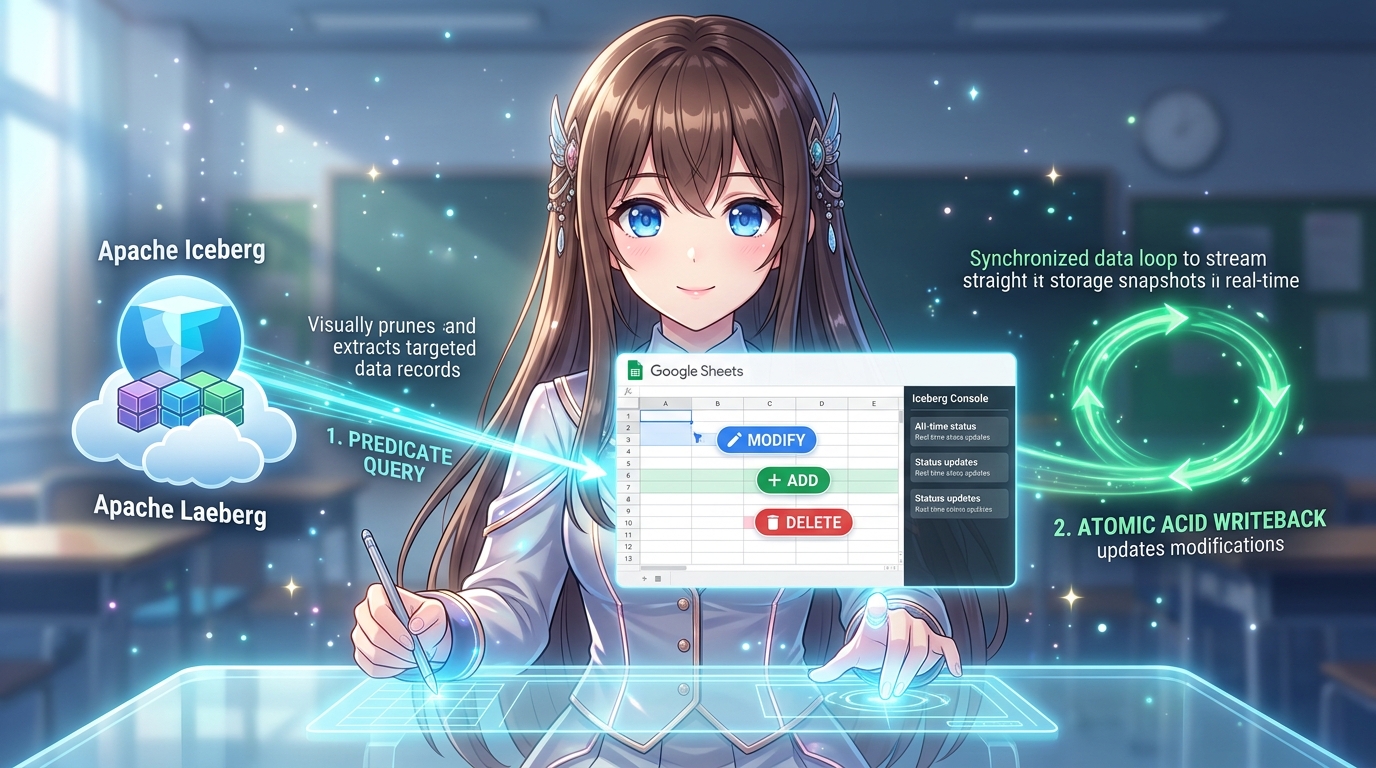 Hero Infographic: Interactive Bidirectional Lakehouse Writeback via Google Sheets & Apache Iceberg. Enables business operators to query filtered records from an open Apache Iceberg table on Google Cloud Storage, visually edit values, add new rows, or purge obsolete records directly within a Google Sheets grid with an embedded dark-themed console, and commit atomic, microsecond-tolerant ACID mutations back to Parquet storage via BigQuery without Reverse ETL SaaS or persistent servers.
Structural Analysis of the Hero Infographic:
The hero infographic illustrates the complete, self-contained operational loop connecting frontline spreadsheet agility with immutable open lakehouse storage across three interconnected stages:
- 1. Predicate Query (Apache Iceberg Open Lakehouse on GCS): The left section shows the enterprise analytical foundation hosted on Google Cloud Storage, where Apache Iceberg manages immutable Parquet data files, hierarchical Avro metadata, and commit snapshots. When a user requests high-value records, BigQuery acts as an on-demand distributed compute accelerator, executing SQL queries with predicate pushdown (e.g.,
SELECT * WHERE price > 1000 ORDER BY id ASC) to fetch precise subsets in sub-seconds. - 2. Frontline Editing in Google Sheets (Intuitive Operational Experience): The central section features a modern, user-friendly Google Sheets grid docked with the sleek dark-themed Iceberg Lakehouse Console sidebar. A business user effortlessly modifies data on the grid with immediate visual feedback: modifying existing values (e.g., updating price from
1500to123), appending new rows with unique primary keys (+ ADD (New Row id:121)), and deleting obsolete rows (🗑️ DELETE (Removed id:104)). Native cell validation guarantees data cleanliness, while a Privacy Mode toggle ([🔒 Privacy: ON]) automatically masks sensitive project identifiers during live broadcasting and screencasting. - 3. Atomic ACID Writeback (Google Apps Script CDC & MERGE INTO): The right section highlights the serverless Change Data Capture (CDC) engine operating entirely in Google Apps Script. It detects diffs against an immutable hidden baseline and synthesizes a single atomic
MERGE INTOSQL statement equipped with Optimistic Concurrency Control (OCC) and microsecond-discrepancy tolerance (TIMESTAMP_DIFF). BigQuery commits the transaction back to the Iceberg table in sub-seconds, generating fresh Parquet snapshots with zero third-party SaaS subscription fees ($0/month) and zero data egress risk.
Abstract
In our previously published foundational article, Unifying Google Workspace and Apache Iceberg: Serverless Lakehouse Management, we demonstrated how the open-source IcebergApp library overcomes Google Sheets’ 10-million cell limit and script timeouts by offloading petabyte-scale analytical queries to BigQuery-accelerated Apache Iceberg storage. While that work established high-throughput read access and metadata pruning, enterprise frontline workflows require a complete operational loop: the ability to persist frontline spreadsheet edits, row additions, and deletions back to the analytical lakehouse.
Commercial Reverse ETL SaaS platforms bridge this writeback gap only at the cost of steep recurring subscriptions ($1,500–$5,000/month), third-party data egress risks, and high operational complexity. This article introduces a 100% serverless, zero-maintenance bidirectional writeback architecture built upon IcebergApp and Google Apps Script (GAS). Note that while the underlying IcebergApp library natively supports arbitrary binary data (BYTES), this writeback architecture and test suite operate on Google Sheets and are specifically designed for structured tabular text and numerical data. By coupling an in-memory Change Data Capture (CDC) engine with BigQuery’s distributed compute accelerator, this system empowers end users to interactively query, validate, edit, and commit differential mutations directly to open Apache Iceberg tables on Google Cloud Storage. The architecture features an atomic single-query MERGE INTO SQL synthesis with explicit type casting and Optimistic Concurrency Control (OCC) equipped with microsecond-discrepancy tolerance (TIMESTAMP_DIFF), a Privacy Mode toggle for screencasts and video demonstrations, deterministic primary-key sorting (ORDER BY id ASC), a 100,000-cell browser safety guard, an interactive dark-themed sidebar console with dynamic execution badges and in-app guidance, a fully autonomous headless test suite guaranteeing zero-residue lifecycle cleanup, and an unedited 77-second end-to-end video demonstration showcasing the complete 10-step operational lifecycle.
1. Introduction: The Operational Gap in Modern Lakehouses
Modern enterprise analytical architectures have standardized on open table formats, with Apache Iceberg emerging as the dominant standard across Google Cloud, AWS, and modern data stacks. By decoupling physical Parquet storage on Google Cloud Storage (GCS) from compute engines, Apache Iceberg provides ACID transactions, partition evolution, snapshot isolation, and sub-second Predicate Pushdown.
Yet, a critical disconnect persists on the enterprise frontlines: business operators live in spreadsheets, while analytical data lives in lakehouses.
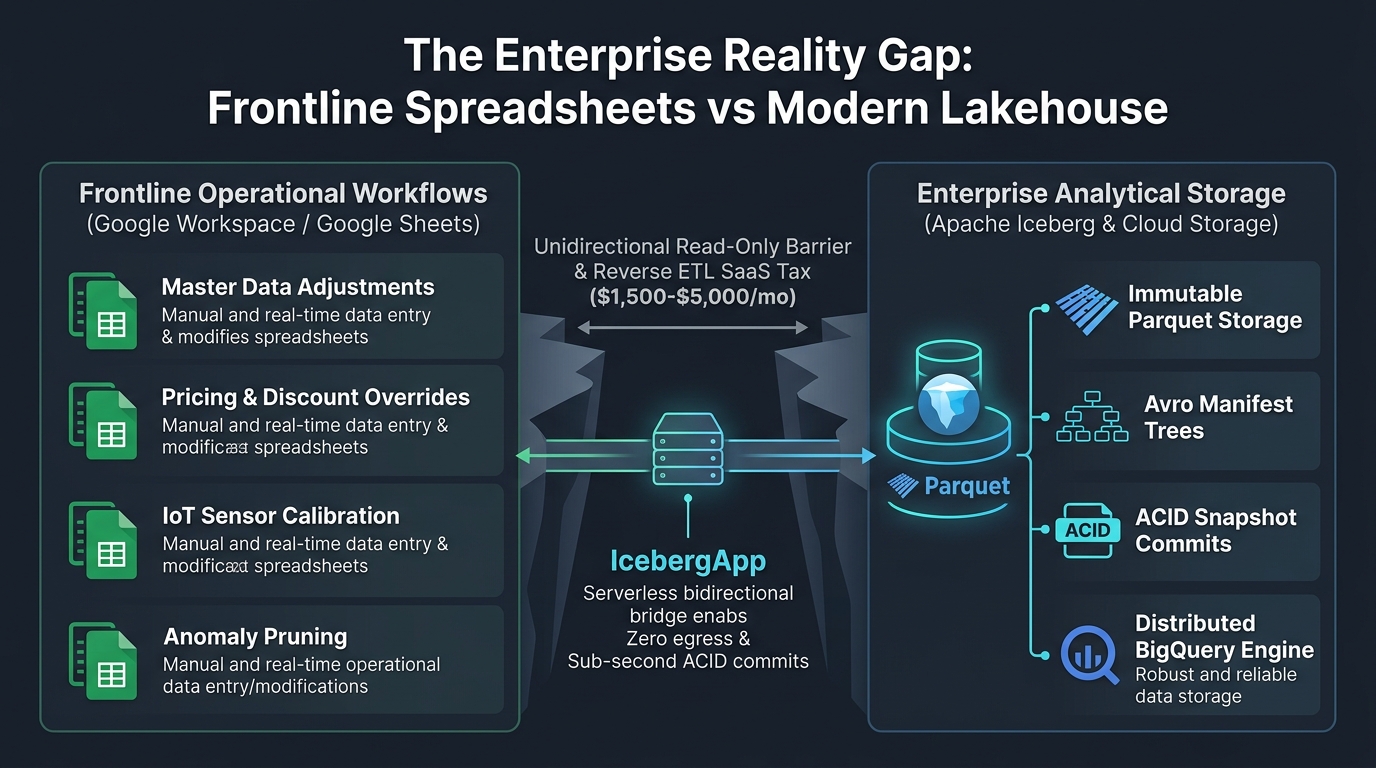 Figure 1: The Enterprise Reality Gap: Frontline Spreadsheets vs. Modern Lakehouse. Illustrates the operational chasm between agile frontline business tasks in Google Workspace and immutable analytical storage in Apache Iceberg on Google Cloud, bridged seamlessly by IcebergApp’s serverless bidirectional writeback engine.
Architectural Narrative for Figure 1:
As illustrated in Figure 1, the modern enterprise data landscape is sharply divided into two disconnected environments:
- Left Panel (Frontline Operational Workflows): Business users work dynamically within Google Workspace (Google Sheets), performing daily operational adjustments such as master data corrections, price and discount overrides, IoT telemetry calibration offsets, and data anomaly removals. These operations require immediate visual feedback and frictionless spreadsheet manipulation.
- Right Panel (Enterprise Analytical Storage): Core analytical assets reside in Google Cloud Storage as Apache Iceberg tables composed of immutable Parquet data files, hierarchical Avro manifest trees, and snapshot commit logs managed by BigQuery’s distributed MPP query engine.
- The Central Chasm & The IcebergApp Bridge: Between these two worlds stands an operational disconnect. Traditional tools like Google Connected Sheets provide only a unidirectional, read-only window, while third-party Reverse ETL SaaS platforms impose severe cost penalties ($1,500–$5,000/month) and enterprise compliance egress risks. IcebergApp functions as the vital serverless bidirectional bridge, enabling frontline operators to commit verified, sub-second ACID mutations directly to Parquet storage without intermediate SaaS platforms or persistent server infrastructure.
Consider common frontline operations: a pricing manager adjusts discount thresholds based on supply chain volatility; an operations engineer enters calibration offsets for industrial IoT sensors; or a master data steward flags and deletes corrupted duplicate records. In every modern organization, these decisions occur visually within Google Sheets.
1.1 The Connected Sheets Wall: The Unidirectional Bottleneck
Google Cloud addressed petabyte-scale spreadsheet querying by introducing Google Connected Sheets. Connected Sheets connects spreadsheets directly to BigQuery, enabling non-technical users to build pivot tables, charts, and formulas over billions of rows without writing SQL.
However, Connected Sheets is strictly unidirectional (Read-Only). If a business operator identifies a mispriced SKU, corrects an inaccurate telemetry reading, or deletes an invalid row in the spreadsheet grid, Connected Sheets offers no native pathway to write those mutations back to BigQuery or the underlying Apache Iceberg catalog. The user is forced to request data engineering tickets, manually export CSV files, or rely on ad-hoc scripts.
1.2 The SaaS Reverse ETL Tax & Compliance Egress
To solve this writeback dilemma, enterprises frequently turn to commercial Reverse ETL platforms (e.g., Census, Hightouch, Coefficient). While functional, these platforms introduce severe architectural drawbacks:
- Extravagant Subscription Overhead: Enterprise Reverse ETL platforms typically cost between $1,500 and $5,000 per month, introducing substantial recurring operational expenditure for what is fundamentally periodic tabular synchronization.
- Data Sovereignty & Compliance Egress: Synchronizing data via third-party SaaS vendors requires granting external platforms read and write access to internal datasets, transmitting confidential enterprise records outside the Google Cloud Virtual Private Cloud (VPC) and violating strict regulatory frameworks (GDPR, HIPAA, SOC2).
- Lakehouse Metadata Ignorance: Most Reverse ETL tools operate at the generic SQL table layer and lack native understanding of Apache Iceberg metadata, triggering frequent small-file updates, manifest fragmentation, and uncoordinated snapshot generation.
1.3 The Solution: Serverless Bidirectional Lakehouse Writeback
Building directly upon the foundational IcebergApp engine established in our published companion article (Unifying Google Workspace and Apache Iceberg: Serverless Lakehouse Management), this work presents an end-to-end, container-bound Google Sheets application (applications/writeback-sheets-ui). Operating entirely within the Google Cloud and Google Workspace ecosystem, this architecture delivers:
- Zero-Infrastructure Cost: Runs 100% serverlessly inside Google Apps Script (GAS) and BigQuery on-demand compute; $0 in monthly SaaS subscription fees.
- Strict Data Sovereignty: All data remains strictly within customer-owned BigQuery datasets and Google Cloud Storage buckets. Zero third-party data egress.
- Differential Change Data Capture (CDC): Accurately isolates
ADDED,MODIFIED, andDELETEDrecords by comparing the active spreadsheet grid against an immutable hidden baseline, with floating-point numeric tolerance to eliminate false diffs. - Atomic Single-Query
MERGE INTO: Consolidates all mutations into a single optimized BigQueryMERGE INTOstatement with explicit type casting and Optimistic Concurrency Control (OCC). - OCC with Microsecond Discrepancy Tolerance: Evaluates second-level delta assertions (
TIMESTAMP_DIFF(T.updated_at, S._orig_updated_at, SECOND) = 0) to seamlessly bridge the microsecond precision disparity between BigQuery ($10^{-6}$s) and Google Sheets ($10^{-3}$s) while strictly intercepting concurrent background overwrites. - Privacy Mode for Video & Public Demonstrations: One-click DOM masking toggle (
[🛡️ Privacy: OFF]⇄[🔒 Privacy: ON]) to mask sensitive GCP Project IDs, Dataset IDs, Bucket URIs, and queries with bullets (••••••••••••), enabling confidential screencasting while maintaining 100% backend execution fidelity. - Deterministic Primary-Key Ordering: Guarantees ascending primary-key sort order (
ORDER BY id ASC) across both predicate pushdown queries and post-commit inspections. - Dual Operational Modes: A polished, dark-themed interactive console (
Sidebar.html) featuring dynamic step badges, inline results, and in-app guidance for business operators, alongside an autonomous headless test suite (HeadlessTest.js) for CI/CD and engineering automation. - Text & Tabular Data Specification: While the core
IcebergApplibrary natively supports arbitrary binary payloads (BYTESfor PDFs, images, audio, and vector embeddings as explored in Article 2), this writeback architecture and test suite are specifically designed around the tabular grid characteristics of Google Sheets, focusing on structured text, numerical, and timestamp data only.
2. Technical Architecture & Component Interaction
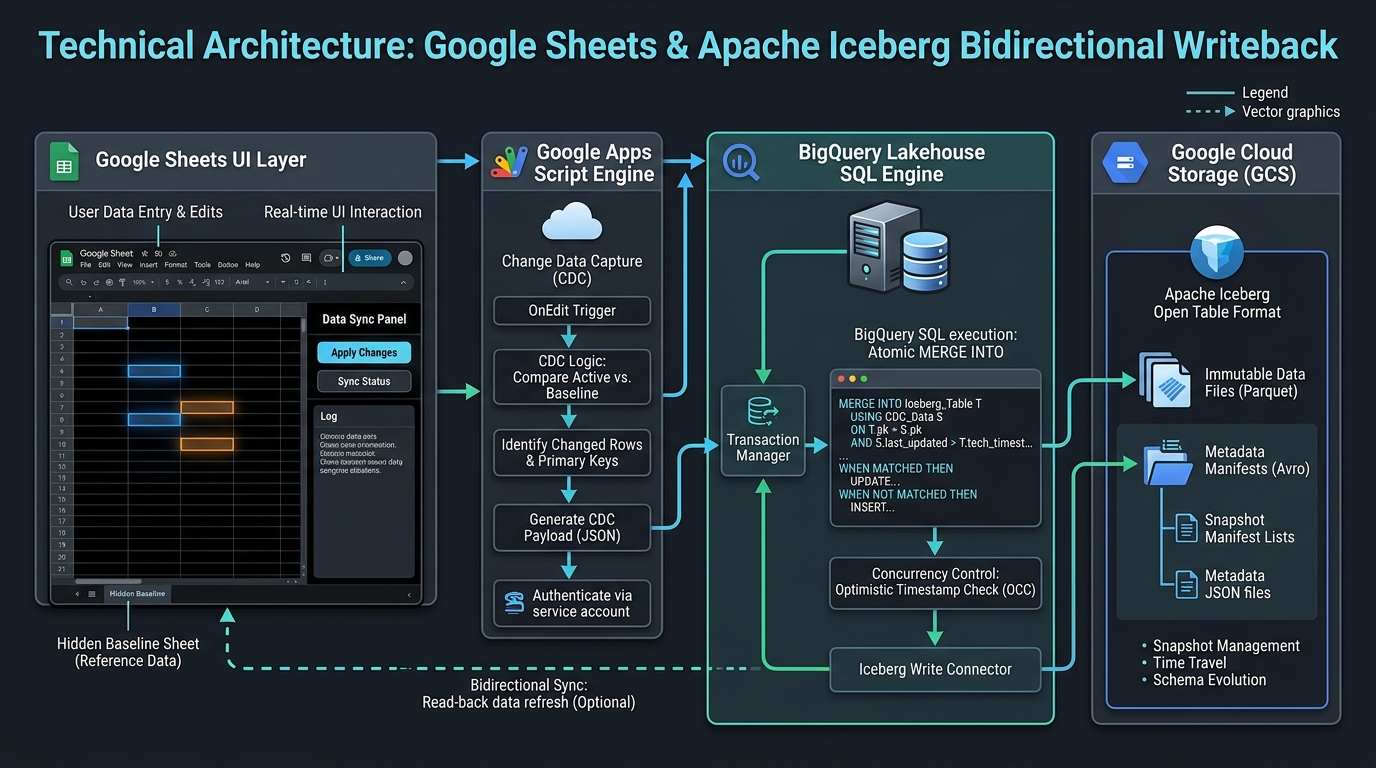 Figure 2: End-to-end technical architecture of the Google Sheets to Apache Iceberg bidirectional writeback system. Displays the Google Sheets presentation tier, Apps Script CDC engine, BigQuery SQL accelerator, and Google Cloud Storage open lakehouse tier.
As visualized in Figure 2, the architecture cleanly decouples the spreadsheet presentation layer from serverless compute and open lakehouse storage across four synchronized tiers:
Architectural Narrative for Figure 2:
Figure 2 details the multi-tier operational coordination between Google Workspace and Google Cloud:
- Tier 1: Presentation Tier (Google Sheets Ecosystem): Frontline users operate within standard Google Sheets tabs (
queried_data,current_data) reinforced with native Data Validation rules. The interface is powered bySidebar.html, rendering real-time execution badges, animated status spinners, an in-app editing guide, and an on-the-fly Privacy Mode toggle for secure screen broadcasting. - Tier 2: Orchestration & CDC Engine (Google Apps Script): Operating inside the serverless Apps Script V8 runtime,
Code.jsmanages state transitions, tracks active edits against the hidden__iceberg_baseline__sheet, applies floating-point tolerance filters, and synthesizes dynamic SQL payloads without requiring an intermediary backend server. - Tier 3: Distributed Compute Accelerator (BigQuery): BigQuery executes dynamic DDL/DML, interacts with the Iceberg REST Catalog, handles partition pruning, and atomically commits
MERGE INTOoperations with OCC timestamp assertions. - Tier 4: Open Lakehouse Storage (Google Cloud Storage): Apache Iceberg stores immutable columnar Parquet data files and Avro metadata trees directly in customer-controlled Cloud Storage buckets. Because data remains in open Iceberg format, external distributed engines (Apache Spark, Trino, DuckDB) can read and write concurrently without vendor lock-in.
2.1 Component Breakdown
- Google Sheets Presentation Layer (
Sidebar.html& Sheets Ecosystem):- Custom Toolbar Menu:
[Iceberg Lakehouse] -> [Open Lakehouse Console]provides immediate discovery. - Modern Dark-Themed Sidebar UI: Styled with deep slate tones (
#0f172a,#1e293b) and cyber-blue accents (#38bdf8), rendering real-time step lifecycle badges (PENDING,RUNNING,COMPLETED,FAILED), inline execution summaries, interactive cards, animated spinners, toast alerts, a one-click Privacy Mode toggle ([🛡️ Privacy: OFF]⇄[🔒 Privacy: ON]), an interactive in-app test guidance modal, and direct hyperlinks to the upstream GitHub repository. - Tabular Sheets:
default_data: Staging area for initial sample records (5 columns $\times$ 20 rows).queried_data: Active working sheet populated with query results and reinforced with native Google Sheets Data Validation rules.current_data: Full lakehouse inspection sheet guarded by a 100,000-cell boundary limit and deterministically sorted by primary key (id ASC).__iceberg_baseline__: Hidden, protected sheet holding the exact, immutable ground-truth snapshot of the most recent query.
- Custom Toolbar Menu:
- Google Apps Script Change Data Capture (CDC) Engine (
Code.js):- Dynamic header-to-schema resolution, providing resilience against column reordering in the sheet.
- In-memory primary key (
id) index comparison between active cells and baseline cells. - Floating-point numeric tolerance ($< 10^{-9}$) to eliminate false diffs caused by display formatting.
- Synthesis of atomic BigQuery
MERGE INTOSQL with explicit casting (CAST(val AS TYPE)) and string sanitization. - Optimistic Concurrency Control (OCC) assertions checking row-level timestamps via
TIMESTAMP_DIFF(T.updated_at, S._orig_updated_at, SECOND) = 0to prevent microsecond roundoff conflicts.
- BigQuery Lakehouse Compute Accelerator:
- Executes dynamic DDL (
CREATE OR REPLACE TABLE) and DML (MERGE INTO). - Serves as the distributed query engine that interfaces with the Iceberg REST Catalog, evaluating partition specifications and metadata pruning.
- Executes dynamic DDL (
- Apache Iceberg Open Lakehouse (Google Cloud Storage):
- Houses open Apache Parquet data files and Avro metadata manifests (
*.metadata.json,*.avro). - Maintains transactional snapshot history, enabling point-in-time Time Travel and multi-engine concurrent queries via Spark, Trino, and BigQuery without vendor lock-in.
- Houses open Apache Parquet data files and Avro metadata manifests (
3. The Algorithmic Core: Differential CDC & Atomic MERGE INTO
The core innovation of this writeback engine is the transformation of visual spreadsheet cell edits into a single, ACID-compliant database commit.
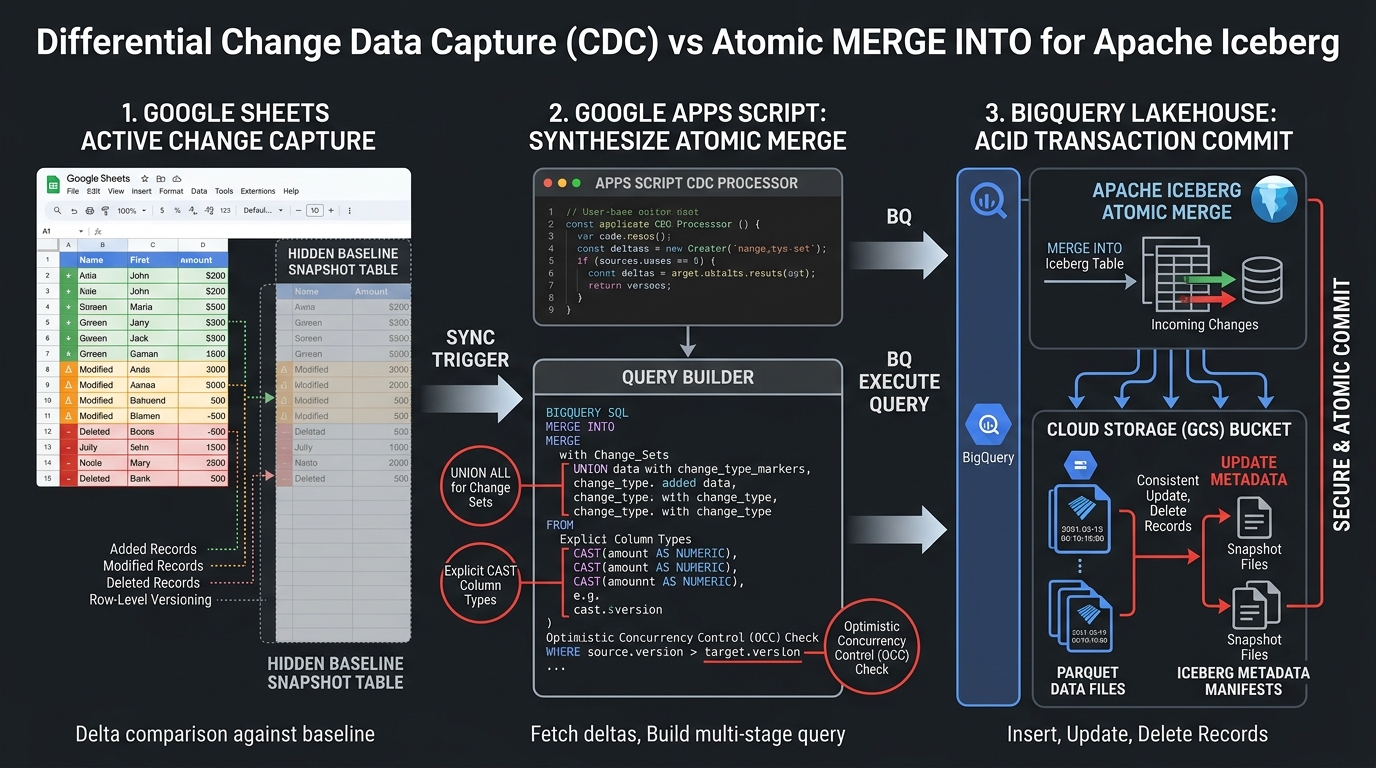 Figure 3: Algorithmic workflow of the Differential CDC Engine and Atomic MERGE INTO synthesis. Compares active sheet rows against the hidden baseline snapshot and generates an atomic BigQuery SQL query with explicit casting and OCC timestamp validation.
Algorithmic Narrative for Figure 3:
Figure 3 illustrates the five-phase algorithmic lifecycle that transforms frontline visual spreadsheet edits into an atomic, ACID-compliant database commit:
- Phase 1 (Baseline Snapshotting): When rows are queried from the lakehouse via
IcebergApp.getValues(), the active working dataset is populated intoqueried_data, and an exact, immutable clone is captured in the hidden__iceberg_baseline__sheet, locked against user edits. - Phase 2 (Frontline Visual Manipulation): The business operator modifies existing cells, appends new rows with unique IDs, or deletes obsolete rows directly in the spreadsheet grid.
- Phase 3 (In-Memory CDC Diffing): Clicking “Commit Changes (Writeback)” triggers the CDC engine, which indexes baseline and active rows by primary key (
id), compares column hashes with numeric floating-point tolerance ($< 10^{-9}$), and partitions mutations intoADDED,MODIFIED, andDELETEDsets. - Phase 4 (Atomic Single-Query MERGE INTO Synthesis): Rather than dispatching separate HTTP requests for each mutated row—which would cause timeouts and manifest fragmentation—the engine serializes all mutation sets into a single BigQuery
MERGE INTOstatement with an in-memoryUNION ALLsource table, explicit SQL type casting, and second-level OCC timestamp matching (TIMESTAMP_DIFF(T.updated_at, S._orig_updated_at, SECOND) = 0). - Phase 5 (ACID Commit & Baseline Synchronization): BigQuery executes the atomic transaction against Cloud Storage, updates Iceberg snapshot manifests, verifies that
numDmlAffectedRowsmatches expected mutations, synchronizes__iceberg_baseline__to the committed state, and alerts the operator via a success badge.
3.1 The Baseline Snapshot Strategy
When an operator queries the lakehouse (e.g., via stepExecuteQuery), the returned 2D array is rendered into queried_data. Simultaneously, an identical clone is written into __iceberg_baseline__.
This baseline sheet is:
- Marked with Google Sheets protection to prevent accidental edits.
- Programmatically hidden from the workbook tab bar (
baselineSheet.hideSheet()). - Treated as the immutable ground-truth state against which all subsequent edits are measured.
3.2 In-Memory CDC Differentiation Algorithm
When the operator clicks “Commit Changes (Writeback)”, the CDC engine in Code.js executes the following algorithm:
// Step 1: Index baseline rows by Primary Key (id)
const baselineMap = new Map();
for (let r = 1; r < baselineValues.length; r++) {
  const row = baselineValues[r];
  const pk = row[baselineIdIdx];
  if (pk !== null && pk !== "") {
    baselineMap.set(String(pk), rowToRecord_(row, baselineHeaders));
  }
}

// Step 2: Scan active sheet for Added and Modified rows
const addedRows = [];
const modifiedRows = [];
const activePkSet = new Set();
const nowIso = new Date().toISOString();

for (let r = 1; r < activeValues.length; r++) {
  const row = activeValues[r];
  const pk = row[activeIdIdx];
  if (!pk) continue;
  const pkStr = String(pk);
  activePkSet.add(pkStr);

  const activeRecord = rowToRecord_(row, activeHeaders);

  if (!baselineMap.has(pkStr)) {
    // ADDED Set: PK exists in active sheet, but absent in baseline
    activeRecord.updated_at = activeRecord.updated_at || nowIso;
    addedRows.push(activeRecord);
  } else {
    // MODIFIED Set: PK exists in both; verify column-level value hash
    const baseRecord = baselineMap.get(pkStr);
    if (isRecordModified_(activeRecord, baseRecord)) {
      activeRecord._orig_updated_at = baseRecord.updated_at; // Capture for OCC
      activeRecord.updated_at = nowIso; // New commit timestamp
      modifiedRows.push(activeRecord);
    }
  }
}

// Step 3: Scan baseline for Deleted rows
const deletedRows = [];
for (let [pkStr, baseRecord] of baselineMap.entries()) {
  if (!activePkSet.has(pkStr)) {
    // DELETED Set: PK exists in baseline, but absent in active sheet
    baseRecord._orig_updated_at = baseRecord.updated_at;
    deletedRows.push(baseRecord);
  }
}
3.3 Atomic MERGE INTO SQL Synthesis
Rather than executing individual INSERT, UPDATE, and DELETE statements across multiple network roundtrips—which would cause Google Apps Script timeouts and create dozens of fragmented Parquet commit files—the engine consolidates all mutations into a single, atomic BigQuery MERGE INTO query.
Every record across the Added, Modified, and Deleted sets is serialized into an in-memory UNION ALL source table constructor with explicit SQL type casting:
MERGE INTO `my-project.my_dataset.products` AS T
USING (
  -- ADDED RECORD: INSERT
  SELECT
    CAST(121 AS INT64) AS id,
    CAST('Quantum Frequency Comb' AS STRING) AS product,
    CAST(6200.0 AS FLOAT64) AS price,
    CAST(5 AS INT64) AS stock,
    TIMESTAMP '2026-09-07T06:15:00.000Z' AS updated_at,
    'INSERT' AS _action,
    TIMESTAMP '1970-01-01T00:00:00Z' AS _orig_updated_at
  UNION ALL
  -- MODIFIED RECORD: UPDATE
  SELECT
    CAST(105 AS INT64) AS id,
    CAST('Photonic Switch Array' AS STRING) AS product,
    CAST(2550.0 AS FLOAT64) AS price,
    CAST(8 AS INT64) AS stock,
    TIMESTAMP '2026-09-07T06:15:00.000Z' AS updated_at,
    'UPDATE' AS _action,
    TIMESTAMP '2026-09-07T00:00:00.000Z' AS _orig_updated_at
  UNION ALL
  -- DELETED RECORD: DELETE
  SELECT
    CAST(110 AS INT64) AS id,
    CAST(NULL AS STRING) AS product,
    CAST(NULL AS FLOAT64) AS price,
    CAST(NULL AS INT64) AS stock,
    TIMESTAMP '1970-01-01T00:00:00Z' AS updated_at,
    'DELETE' AS _action,
    TIMESTAMP '2026-09-07T00:00:00.000Z' AS _orig_updated_at
) AS S
ON T.id = S.id
-- 1. UPDATE MATCHED ROW WITH OCC TIMESTAMP GUARD (SECOND-LEVEL TOLERANCE)
WHEN MATCHED AND S._action = 'UPDATE' AND (TIMESTAMP_DIFF(T.updated_at, S._orig_updated_at, SECOND) = 0 OR S._orig_updated_at IS NULL) THEN
  UPDATE SET T.product = S.product, T.price = S.price, T.stock = S.stock, T.updated_at = S.updated_at
-- 2. DELETE MATCHED ROW WITH OCC TIMESTAMP GUARD (SECOND-LEVEL TOLERANCE)
WHEN MATCHED AND S._action = 'DELETE' AND (TIMESTAMP_DIFF(T.updated_at, S._orig_updated_at, SECOND) = 0 OR S._orig_updated_at IS NULL) THEN
  DELETE
-- 3. INSERT UNMATCHED NEW ROW
WHEN NOT MATCHED AND S._action = 'INSERT' THEN
  INSERT (id, product, price, stock, updated_at)
  VALUES (S.id, S.product, S.price, S.stock, S.updated_at);
3.4 Optimistic Concurrency Control (OCC) Protection & Microsecond Precision Tolerance
In enterprise environments, multiple automated ETL pipelines, IoT streaming jobs, or peer users may modify the same lakehouse table concurrently. To prevent the classic “lost update” anomaly, the MERGE INTO statement incorporates Optimistic Concurrency Control (OCC):
- When an active row is modified or deleted, its original timestamp (
_orig_updated_at) captured during query time is injected into theWHEN MATCHEDclause. - The Microsecond Discrepancy Challenge: BigQuery stores TIMESTAMP values with microsecond precision ($10^{-6}$s) and returns them via its REST API as floating-point epoch seconds (e.g.,
"1700000000.123456"). Conversely, Google Sheets and standard JavaScriptDateobjects operate at millisecond precision ($10^{-3}$s). A naive strict equality comparison (T.updated_at = S._orig_updated_at) invariably causes false concurrency conflicts even on completely untouched rows due to sub-millisecond truncation and floating-point roundoff. - Resolution via
TIMESTAMP_DIFF: The OCC condition enforces second-level equality:TIMESTAMP_DIFF(T.updated_at, S._orig_updated_at, SECOND) = 0Coupled with automatic ISO 8601 normalization inIcebergApp.jsand flexible epoch parsing inCode.js, this provides ironclad concurrency protection against actual external updates while completely eliminating false collision errors. - If an external process modifies that row between query and writeback,
TIMESTAMP_DIFFevaluates to non-zero. The row mutation is skipped, causing BigQuery’s reportednumDmlAffectedRowsto fall below the expected count (added.length + modified.length + deleted.length). - The script immediately intercepts this discrepancy and throws an actionable Concurrency Conflict exception, preserving database integrity.
4. Interactive UI Walkthrough: The 10-Step Operational Lifecycle
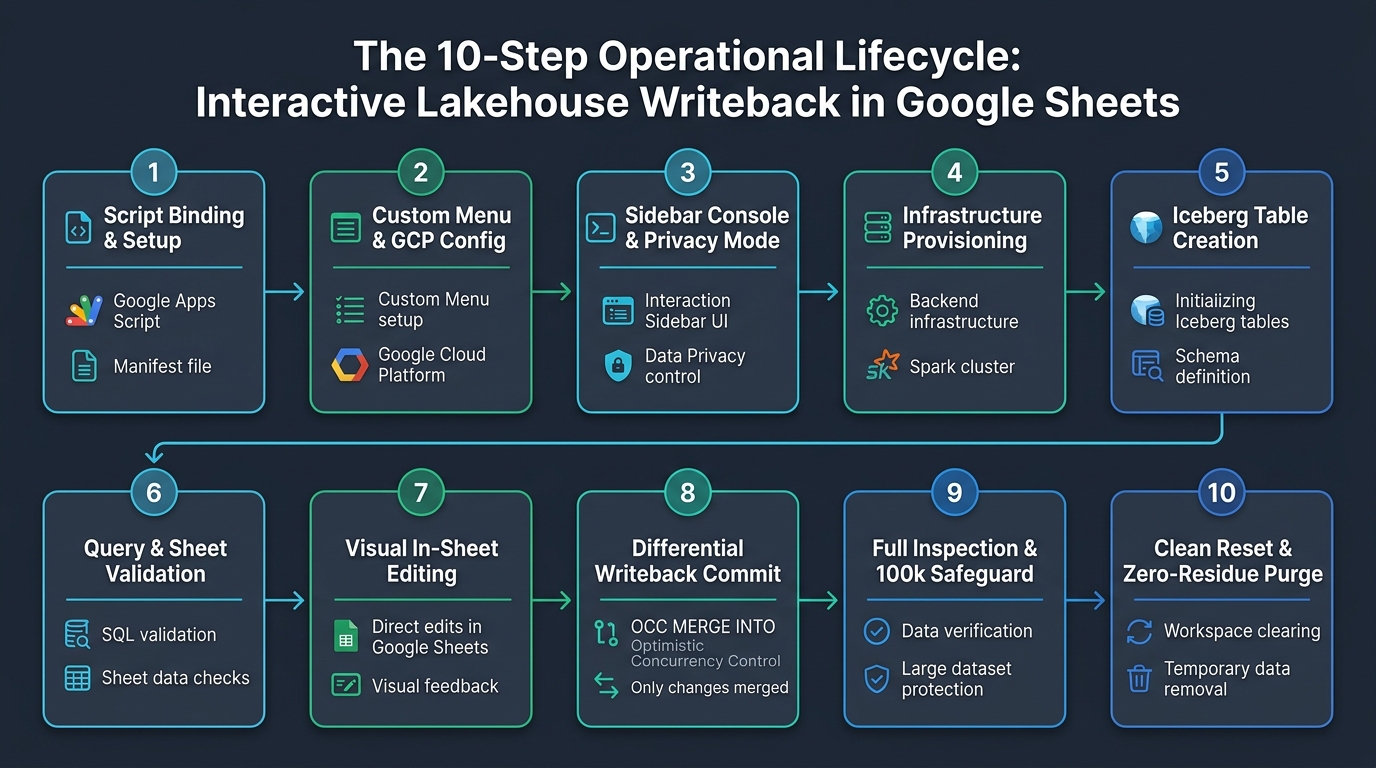 Figure 4: The 10-Step Operational Lifecycle: Interactive Lakehouse Writeback in Google Sheets. Illustrates the end-to-end operational journey across 10 progressive phases from container-bound script binding to zero-residue cloud teardown.
Operational Narrative for Figure 4:
As visualized in the 10-step workflow of Figure 4, the system orchestrates a structured, self-guided operational journey arranged across two interconnected rows of five progressive phases:
- Phase 1: Environment Setup & Interface Initialization (Steps 1–3):
- Step 1 (Script Binding & Setup): Developers bind the foundational
IcebergApp.jslibrary, application backendCode.js, frontendSidebar.html, andHeadlessTest.jsinto the Google Spreadsheet container, enabling the BigQuery v2 Advanced Service inappsscript.json. - Step 2 (Custom Menu & GCP Config): The spreadsheet initializes a top toolbar menu
[Iceberg Lakehouse] -> [Open Lakehouse Console]and prompts the operator for GCP Project ID and Region, securely caching them inUserProperties. - Step 3 (Sidebar Console & Privacy Mode): The modern dark console launches in the right sidebar, offering dynamic lifecycle badges (
PENDING,RUNNING,COMPLETED,FAILED) and a one-click Privacy Mode toggle ([🛡️ Privacy: OFF]⇄[🔒 Privacy: ON]) for confidential video broadcasting.
- Step 1 (Script Binding & Setup): Developers bind the foundational
- Phase 2: Cloud Infrastructure & Table Provisioning (Steps 4–5):
- Step 4 (Infrastructure Provisioning): Automated background routines provision an isolated BigQuery dataset and Cloud Storage bucket, while staging 20 sample product records into
default_data. - Step 5 (Iceberg Table Creation):
IcebergApp.create()synthesizes the Iceberg table withDATE(updated_at)partitioning andidclustering, streaming initial records into Parquet storage.
- Step 4 (Infrastructure Provisioning): Automated background routines provision an isolated BigQuery dataset and Cloud Storage bucket, while staging 20 sample product records into
- Phase 3: Predicate Pushdown & Frontline Manipulation (Steps 6–7):
- Step 6 (Query & Sheet Validation): Executes filtered lakehouse queries with predicate pushdown into
queried_data, injects native Google Sheets Data Validation rules, clones an immutable baseline snapshot into__iceberg_baseline__, and launches an in-app test guidance modal. - Step 7 (Visual In-Sheet Editing): Business users modify prices or stock, append new rows with unique primary keys in column A, or delete obsolete rows directly on the spreadsheet grid.
- Step 6 (Query & Sheet Validation): Executes filtered lakehouse queries with predicate pushdown into
- Phase 4: ACID Commit, Full Audit & Zero-Residue Purge (Steps 8–10):
- Step 8 (Differential Writeback Commit): The CDC engine computes diffs, synthesizes a single atomic
MERGE INTOSQL query with microsecond-tolerant OCC (TIMESTAMP_DIFF), and executes sub-second commit to BigQuery. - Step 9 (Full Inspection & 100k Safeguard): Evaluates dataset volume against the 100,000-cell browser safety limit and exports all lakehouse rows to
current_datasorted deterministically by primary key (id ASC). - Step 10 (Clean Reset & Zero-Residue Purge): Drops the Iceberg table, purges GCS bucket objects, deletes the bucket and dataset, and clears spreadsheet tabs while preserving GCP project configuration for instant re-testing.
- Step 8 (Differential Writeback Commit): The CDC engine computes diffs, synthesizes a single atomic
Live Demonstration Video: The Complete 10-Step Lifecycle in Action (77s)
The following screencast video demonstration captures the entire unedited operational lifecycle (77 seconds) directly within Google Sheets and the right-docked “Iceberg Lakehouse Console” sidebar—from infrastructure initialization, Iceberg table provisioning, and predicate pushdown querying, to frontline grid modifications (in-place edits and row deletions), differential CDC commit via atomic MERGE INTO, full data inspection, and zero-residue environment teardown.
Live Demonstration Video: End-to-end execution of the interactive Apache Iceberg bidirectional writeback console in Google Sheets (77s). ▶️ Open raw video file (demo.mp4)
Video Timeline & Operational Highlights:
| Timestamp | Operational Phase & Action | On-Screen Behavior & Backend Execution |
|---|---|---|
| 0:00 - 0:10 | Step 1: Setup & Staging | Privacy Mode ON (automatically masking GCP Project IDs and Dataset names as ••••••••••). The user clicks Initialize Infrastructure, provisioning an ephemeral BigQuery dataset and GCS bucket, and staging 20 sample rows into default_data. |
| 0:10 - 0:20 | Step 2: Table Creation | The user clicks Create Iceberg Table. IcebergApp.create() generates the Apache Iceberg table on GCS and commits the initial 20 rows in Parquet format. The sidebar query textarea is pre-populated with a filtered query. |
| 0:20 - 0:32 | Step 3: Query & Validate | The user executes the query (WHERE price > 1000.0 ORDER BY id ASC). Predicate pushdown loads matching records into queried_data, injects native column validation rules (positive numbers, integers), and clones the baseline. |
| 0:32 - 0:48 | Frontline Grid Manipulation | Direct editing on queried_data: • Row 2 ( id: 101): Updates product name to Sample 1 and price to 123.• Row 3 ( id: 103): Updates product name to Sample 2 and price to 456.• Row 4 ( id: 104): Right-clicks and selects “Delete row”, removing Superconducting Resonator. |
| 0:48 - 0:55 | Step 4: Differential Writeback | The user clicks Commit Changes (Writeback). In-memory CDC detects diffs instantly and synthesizes a single MERGE INTO SQL statement with microsecond OCC, committing it to BigQuery.Badge: ✅ Done: Committed: 0 added, 2 modified, 1 deleted (Affected: 3 rows). |
| 0:55 - 1:08 | Step 5: Full Inspection | The user clicks Get All Current Data (enforcing the 100k-cell safety guard). Exports all lakehouse rows to current_data sorted deterministically by primary key (ORDER BY id ASC).Confirms id: 101 and 103 are updated, 104 is purged, and 102 & 105+ are intact. |
| 1:08 - 1:17 | Step 6: Reset & Teardown | The user clicks All Reset & Purge (Danger zone). Drops the Iceberg table, deletes all GCS objects and bucket, removes the BigQuery dataset, and clears working tabs—restoring the pristine initial state with zero leftover cloud residue. |
The application provides a seamless, self-guided experience directly inside Google Sheets, illustrated in Figure 4 and demonstrated in the live screencast:
Step 1: Container-Bound Script Setup
The core library (src/IcebergApp.js) and application code files (Code.js, Sidebar.html, HeadlessTest.js) are bound directly to the active spreadsheet via Extensions > Apps Script (or linked as a library), with the BigQuery v2 Advanced Service enabled in appsscript.json. Incorporating src/IcebergApp.js as the foundational engine is a mandatory prerequisite that provides full-featured Iceberg DDL, metadata-driven predicate pushdown, and transactional table operations.
Step 2: Custom Menu & GCP Initialization
Upon opening the spreadsheet, the onOpen() hook registers the top menu: [Iceberg Lakehouse] -> [Open Lakehouse Console]. If GCP properties are not yet set, an input dialog prompts the operator for their GCP Project ID and Region (defaulting to asia-northeast1), storing them securely in PropertiesService.getUserProperties().
Step 3: Modern Dark-Themed Sidebar Console & Privacy Mode
Opening the console displays Sidebar.html in the right dock. The interface features a status panel showing active GCP parameters, real-time connection badges, a one-click Privacy Mode toggle ([🛡️ Privacy: OFF] ⇄ [🔒 Privacy: ON]) to mask sensitive project IDs and SQL queries for video recording, hyperlinks to the upstream GitHub repository, and sequentially numbered action cards with dynamic lifecycle badges (PENDING, RUNNING, COMPLETED, FAILED). (The embedded screencast demo clearly showcases Privacy Mode enabled throughout execution, ensuring sensitive GCP Project IDs and Dataset names are masked as •••••••••• without impacting backend execution.)
Step 4: Infrastructure Provisioning & default_data Staging
Clicking “Initialize Infrastructure” triggers:
ensureBigQueryDataset_: Creates an isolated BigQuery datasetlakehouse_writeback_[timestamp].ensureGcsBucket_: Creates an isolated Cloud Storage bucketgs://lakehouse-iceberg-wb-[project]-[timestamp]with Uniform Bucket-Level Access.stageDefaultData_: Creates a clean sheet nameddefault_dataand populates 20 realistic enterprise product records (headers:id,product,price,stock,updated_at).- The Step 1 card updates with a green
COMPLETEDbadge and inline details of the provisioned resources.
Step 5: Iceberg Table Provisioning
Clicking “Create Iceberg Table” invokes IcebergApp.create(), defining the table schema, setting the Cloud Storage URI, configuring DATE(updated_at) partitioning, and setting id clustering. The 20 staged rows are inserted via table.insertValues(), the Step 2 card displays a green COMPLETED badge showing the created table name and ingested row count, and the sidebar query textarea is automatically populated with:
SELECT * FROM `project.dataset.products` WHERE price > 1000.0 ORDER BY id ASC
Step 6: Query Execution & In-Sheet Data Validation Injection
Clicking “Execute Query” runs the query with Predicate Pushdown. The results are written to queried_data. Simultaneously, the engine injects native Google Sheets Data Validation rules:
price: Locks inputs to positive numbers ($> 0$).stock: Locks inputs to non-negative integers ($\ge 0$).id: Restricts inputs to valid positive integer IDs. An exact replica is copied to the hidden, protected sheet__iceberg_baseline__.
Interactive In-App Guidance: Upon query completion, an informative modal dialog automatically appears explaining how to test differential edits (Modify, Delete, Add) inqueried_data. Users click “Got it! Close & Start Editing” to immediately begin testing, with a persistent[View Guide]button available in the card for subsequent reference.
Step 7: Visual In-Sheet Manipulation
The business operator performs standard spreadsheet edits in queried_data:
- Modify: Edits
priceorstockin place (e.g., updatesid=105price to2550.0). - Add: Appends a new row at the bottom with a unique ID in column A (e.g.,
id=121,"Quantum Frequency Comb", price=6200.0, stock=5). Note that primary keyidis strictly mandatory. - Delete: Right-clicks and deletes an obsolete row (e.g., deletes
id=110).
Step 8: Differential Writeback Commit
Clicking “Commit Changes (Writeback)” triggers the CDC engine. The diff is calculated, the single atomic MERGE INTO SQL is synthesized with second-level timestamp tolerance (TIMESTAMP_DIFF(..., SECOND) = 0) and floating-point tolerance ($10^{-9}$), BigQuery executes the transaction, numDmlAffectedRows is verified, and __iceberg_baseline__ is updated. A green toast and inline summary confirm:
"Committed successfully: 1 added, 1 updated, 1 deleted (Total DML affected rows: 3)."
Step 9: Full Data Inspection & 100,000-Cell Safeguard
Clicking “Get All Current Data” runs a pre-flight row count check. If total_rows * columnCount > 100,000, the operation aborts with an alert to prevent browser memory saturation. Otherwise, all rows are exported to current_data via table.exportToSheet() with { orderBy: "id ASC" } and sorted by ID ascending at the sheet level, guaranteeing deterministic primary key ordering for visual audit of the lakehouse state.
Step 10: All Reset & Zero-Residue Purge
Clicking “All Reset & Purge” displays a confirmation dialog. Upon approval, the engine drops the Iceberg table, deletes all objects in the GCS bucket, removes the bucket, drops the BigQuery dataset, and purges spreadsheet tabs. Crucially, the engine preserves ICEBERG_PROJECT_ID and ICEBERG_REGION in UserProperties, allowing immediate frictionless re-testing from Step 1 while guaranteeing 100% zero leftover cloud storage or table resources.
5. Comparative Benchmark: IcebergApp vs. Reverse ETL SaaS vs. Connected Sheets
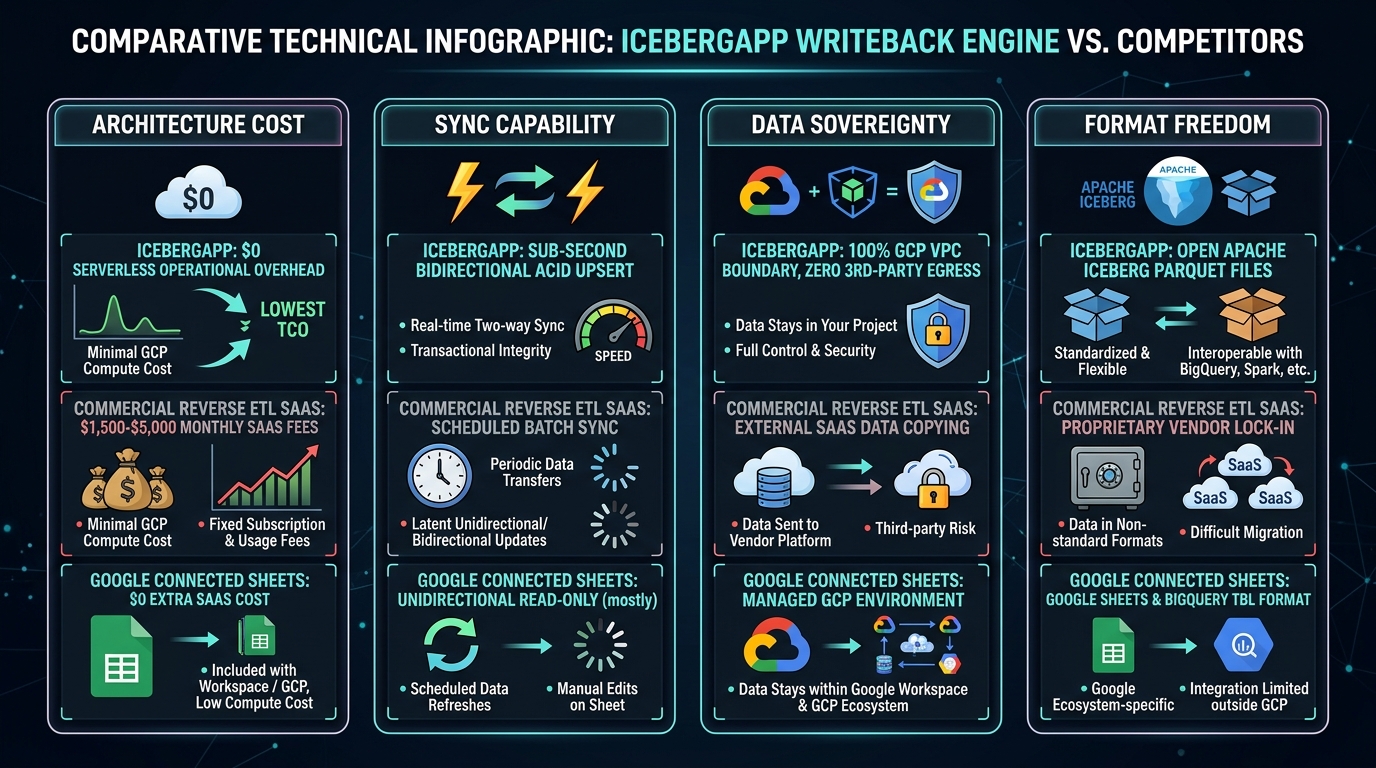 Figure 5: Architectural, cost, and security comparison between IcebergApp Writeback Engine, Commercial Reverse ETL SaaS platforms, and Google Connected Sheets across four critical dimensions.
Comparative Narrative for Figure 5:
Figure 5 evaluates the three competing architectural paradigms across four critical operational dimensions:
- Dimension 1: Total Cost of Ownership (TCO): Commercial Reverse ETL SaaS platforms impose recurring subscription commitments ranging from $1,500 to $5,000 per month based on sync frequency and sync row volume. In contrast, Google Connected Sheets and the IcebergApp Writeback Engine incur $0 in monthly licensing fees, operating on serverless, pay-per-query BigQuery compute.
- Dimension 2: Synchronization Directionality & Latency: Connected Sheets remains strictly unidirectional (read-only), offering zero writeback capability. Commercial Reverse ETL tools operate via scheduled micro-batches that introduce 5-minute to 1-hour delays. The IcebergApp Writeback Engine delivers sub-second, interactive bidirectional synchronization, committing frontline edits immediately via atomic
MERGE INTOtransactions. - Dimension 3: Data Sovereignty & Security Compliance: Commercial Reverse ETL forces confidential enterprise records across third-party SaaS infrastructure, creating significant egress vulnerabilities and complicating GDPR, HIPAA, and SOC2 compliance. Conversely, Connected Sheets and IcebergApp operate 100% within customer-owned Google Cloud tenants, guaranteeing that data never leaves the organizational boundary.
- Dimension 4: Table Format & Multi-Engine Openness: Reverse ETL platforms typically synchronize into proprietary staging caches or basic relational tables. IcebergApp commits mutations directly to open Apache Iceberg Parquet files and Avro manifest trees on Google Cloud Storage, allowing simultaneous, zero-copy querying by Apache Spark, Trino, Snowflake, and BigQuery without vendor lock-in.
To quantify the strategic advantages of this architecture, Figure 5 and the table below evaluate the three primary approaches to spreadsheet-lakehouse integration:
| Evaluation Metric | Commercial Reverse ETL SaaS (Census, Hightouch) | Google Connected Sheets | IcebergApp Writeback Engine (This Work) |
|---|---|---|---|
| Monthly Infrastructure Cost | $1,500 – $5,000 / month (Tiered subscription + data volume) | $0 (Included with Google Workspace & GCP) | $0 (Serverless; on-demand BigQuery queries only) |
| Data Synchronization Direction | Bidirectional (via separate scheduled sync flows) | Strictly Unidirectional (Read-Only) | Fully Bidirectional (Interactive Read & Differential Writeback) |
| Transaction & Latency Profile | Scheduled micro-batches (5 min – 1 hour delay) | Scheduled queries or manual refresh | Sub-Second ACID Upsert (MERGE INTO) |
| Data Sovereignty & Security | Egress Risk: Data transmitted to 3rd-party SaaS infrastructure | 100% GCP VPC: Data remains in BigQuery | 100% GCP VPC: Pure direct BigQuery & GCS interaction |
| Storage & Table Format | Generic SQL tables (often proprietary data copies) | BigQuery Managed Tables | Open Apache Iceberg Parquet & Avro Manifests |
| Concurrency Protection | Basic batch overwrite or last-write-wins | N/A (Read-Only) | Optimistic Concurrency Control (OCC) with Timestamp Gates |
| Setup & Maintenance Overhead | High: External OAuth, webhooks, SaaS connectors | Low: Native UI feature | Zero: Single Google Sheets container-bound script |
Why the Serverless Writeback Engine Wins
- **$0 Fixed TCO**: Eliminates enterprise SaaS licensing fees entirely. An organization performing 100 daily writebacks spends less than $0.05 per month in BigQuery query fees.
- Zero Vendor Lock-In: Because data is committed directly to Apache Iceberg format on Cloud Storage, external engines (Apache Spark, Trino, Snowflake) can immediately read committed data without re-exporting.
- Ironclad Enterprise Security: Compliance officers do not need to review third-party vendor SOC2 reports or execute Data Processing Agreements (DPAs); all data stays strictly within the organization’s GCP tenant.
6. Autonomous Headless Test Suite (HeadlessTest.js): The Primary Verification Gate
As a foundational best practice, the architecture implements a two-stage verification workflow: users execute the autonomous headless suite (HeadlessTest.js) first directly in the Apps Script editor. Running runAutonomousWritebackHeadlessTest() validates that GCP credentials, IAM roles, BigQuery Advanced Service, and the core IcebergApp.js engine operate flawlessly without any UI or spreadsheet interference. Once this primary gate passes cleanly, users proceed to the interactive Google Sheets UI console with full confidence.
6.1 Headless Execution Flow & Assertions
Operating completely in the Google Apps Script V8 runtime without opening Google Sheets or touching UI components, the test suite executes an 8-stage verification pipeline adhering to Protocol 17 (Note: While the core IcebergApp library natively supports binary BYTES payloads, this test suite is purpose-built to validate bidirectional interoperability with Google Sheets tabular grids, meaning its verification schema is strictly specified for structured text and numerical fields: id INT64, product STRING, price FLOAT64, stock INT64, updated_at TIMESTAMP):
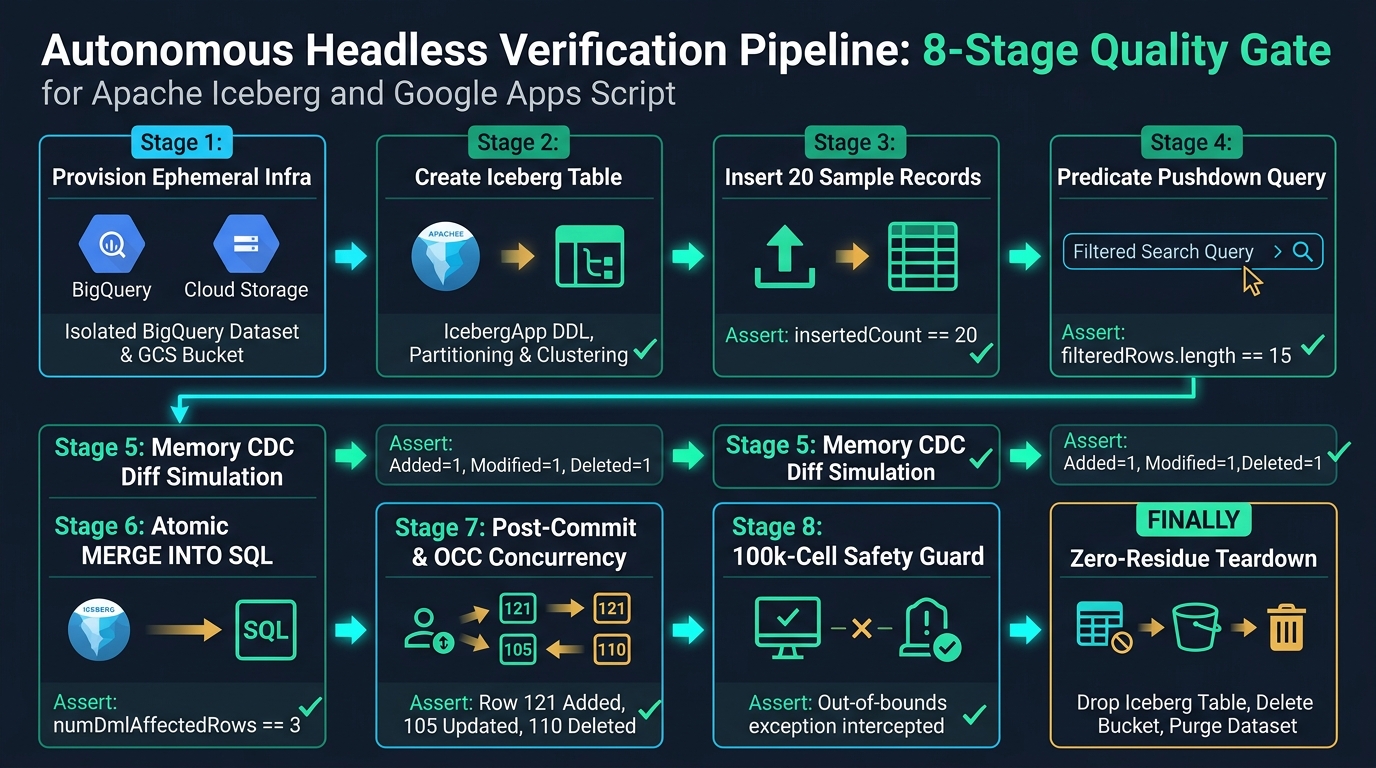 Figure 6: Autonomous Headless Verification Pipeline: 8-Stage Quality Gate for Apache Iceberg and Google Apps Script. Illustrates the end-to-end headless quality gate across 8 sequential verification stages and final zero-residue teardown.
Operational Narrative for Figure 6:
As visualized in Figure 6, the headless verification engine orchestrates an automated 8-stage quality gate followed by guaranteed resource cleanup:
- Stages 1–2 (Ephemeral Provisioning & DDL): Stage 1 provisions an isolated, timestamped BigQuery dataset and Cloud Storage bucket. Stage 2 executes
IcebergApp.create()to generate the partitioned and clustered open Iceberg table. - Stages 3–4 (Ingestion & Predicate Pushdown): Stage 3 inserts 20 structured records (asserting
insertedCount === 20). Stage 4 executes a filtered query with SQL predicate pushdown (price > 1000.0), asserting that exactly 15 records match. - Stages 5–6 (CDC Simulation & Atomic Mutation): Stage 5 simulates frontline spreadsheet modifications in memory (1 added, 1 modified, 1 deleted row). Stage 6 synthesizes and fires the atomic
MERGE INTOSQL statement, asserting thatnumDmlAffectedRows === 3. - Stages 7–8 (OCC Integrity & Safety Guard): Stage 7 verifies post-commit row states and validates that stale timestamps are strictly rejected by Optimistic Concurrency Control. Stage 8 deliberately triggers the 100,000-cell boundary to assert that defensive memory guards prevent client crash.
- FINALLY (Absolute Zero-Residue Teardown): Purges all Parquet data, drops the Iceberg table, and permanently removes the bucket and dataset, leaving zero lingering cloud resources.
6.2 Verifying the Zero-Residue Lifecycle
The finally block in HeadlessTest.js guarantees that even if an assertion fails midway through execution, all created cloud resources are completely eradicated:
finally {
  console.log("--- ABSOLUTE CLEANUP: Purging Ephemeral Headless Test Resources ---");
  if (table) {
    try { table.remove(true); } catch (e) { console.warn(e.message); }
  }
  if (datasetCreated) {
    try { BigQuery.Datasets.remove(projectId, testCatalogName, { deleteContents: true }); } catch (e) { console.warn(e.message); }
  }
  if (bucketCreated) {
    try { deleteGcsBucketCompletely_(testBucketName); } catch (e) { console.warn(e.message); }
  }
  console.log("✨ Headless cleanup complete. Zero residue.");
}
7. Security, Defensive Protocols & Best Practices
- SQL Injection Immunity: All spreadsheet text cells are sanitized using strict string escape routines (
escapeSqlString_), converting backslashes to\\\\and single quotes to\\'. Numeric columns are strictly validated viaNumber.isFinite(), and empty numeric cells are cast safely toCAST(NULL AS FLOAT64). - BigQuery DML Error Interception: In compliance with Protocol 17,
runBqJob_pollsBigQuery.Jobs.getQueryResultsand inspects theerrorsarray. Any syntax, quota, or permission errors are formatted into human-readable alerts rather than failing silently. - Data Validation Hard Boundaries: Attaching Google Sheets Data Validation rules directly to columns at query time prevents users from entering malformed data (such as entering negative stock or alphanumeric strings in price columns) before writeback dispatch.
- 100,000-Cell Memory Guard: Google Sheets tabs can become sluggish or crash browser tabs when rendering hundreds of thousands of cells. Pre-flight calculation of
total_rows * column_countprevents uncontrolled full-table dumps. - Privacy Mode Credential Shielding: Client-side DOM masking allows operators to record tutorial videos or perform public demonstrations without revealing project IDs, dataset names, or storage paths. Dynamic in-memory unmasking ensures backend RPC execution remains 100% genuine and seamless.
- Microsecond Timestamp & Float Tolerance: Precision normalization and second-level delta checks (
TIMESTAMP_DIFF(..., SECOND) = 0) in SQL OCC prevent subtle millisecond-to-microsecond roundoff mismatches between Google Sheets and BigQuery from corrupting transactional integrity.
8. Conclusion & Future Horizons
The Apache Iceberg End-User Writeback UI demonstrates that Google Sheets and enterprise open lakehouses are not mutually exclusive. By pairing Google Apps Script with BigQuery as a distributed compute engine and Apache Iceberg on Google Cloud Storage, developers can construct responsive, secure, and bidirectional operational interfaces in minutes without paying recurring SaaS subscription fees.
Future Horizons & Extensions:
- Multi-Table Relational Writebacks: Extending the CDC engine to support composite foreign key joins across multiple related sheets.
- Gemini Agentic Governance: Integrating Google Workspace AI (Gemini) directly into the sidebar console to perform automated anomaly audits and explain CDC deltas in plain English before writeback execution.
- Delta Lake & Hudi Federation: Adapting the single-query
MERGE INTOsynthesizer to support multi-format lakehouse engines simultaneously.
The complete code, sidebar templates, and headless test suites are open source and available in the IcebergApp repository.
References & Documentation
- Article 1: Unifying Google Workspace and Apache Iceberg: Serverless Lakehouse Management (Dev.to)
- Article 2: Serverless Multimodal Vector Search on Apache Iceberg via Google Apps Script: Unifying Documents, Images, and Text (Dev.to)
- IcebergApp GitHub Repository
- Apache Iceberg Official Specification
- Google Cloud Lakehouse & Apache Iceberg Overview
- BigQuery Apache Iceberg Tables Documentation
- Google Apps Script BigQuery Advanced Service