Description
This script converts soft breaks to hard breaks in a Google Document using Google Apps Script.
Usage
Follow these steps:
1. Create a New Google Document
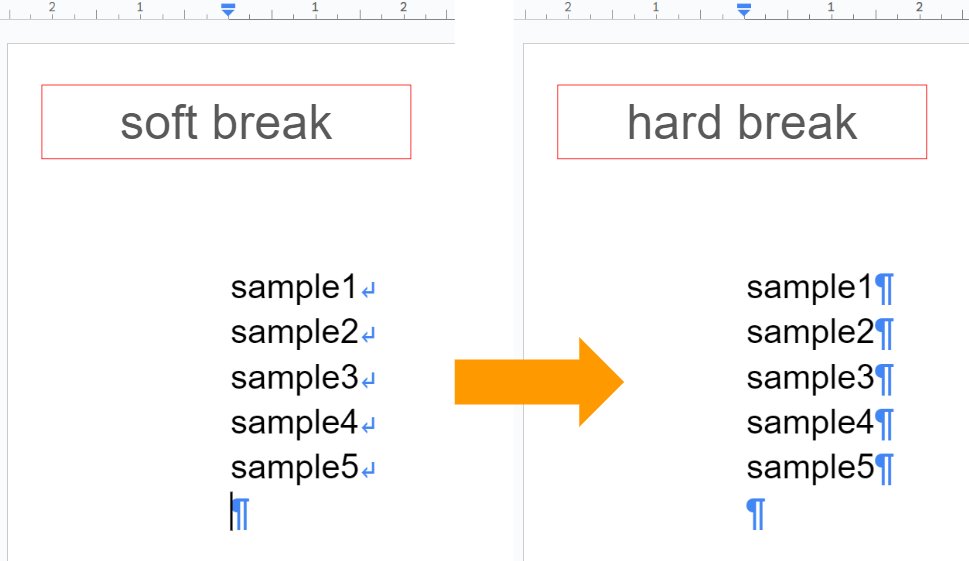
Create a new Google Document and open it. Go to “View” -> “Show non-printing characters” in the top menu to see line breaks in the document body (as shown in the image below).
2. Sample Script
Copy and paste the following script into the script editor of your Google Document.
Important: Before using this script, enable the Google Docs API in Advanced Google services. Ref
function myFunction() {
  const doc = DocumentApp.getActiveDocument();
  const requests = [
    { replaceAllText: { replaceText: "\n", containsText: { text: "\u000b" } } },
  ];
  Docs.Documents.batchUpdate({ requests }, doc.getId());
}
- The script searches for soft breaks using
\u000b. - It replaces them with
\n, which creates hard breaks.
Testing
Running the script on a sample document with soft breaks will convert them to hard breaks as follows.
Note
- The soft breaks can be searched with
findText("\\v"). But, whenreplaceText("\\v", '\n')is run, it seems that\nis used as the soft breaks. I’m not sure whether this is the current specification or a bug. From this situation, I thought that Google Docs API might be able to be used. But, it seems that Google Docs API cannot search the soft breaks with\v. So, I thought that\u000bmight be able to be used.
References
- Method: documents.batchUpdate
- ReplaceAllTextRequest
- Stack Overflow Thread: https://stackoverflow.com/q/78258654 (original script post)