This is a sample script for setting the line space of paragraphs on Google Documents using Google Apps Script.
When the line space of a paragraph on Google Documents is manually set, you can do it as follows.
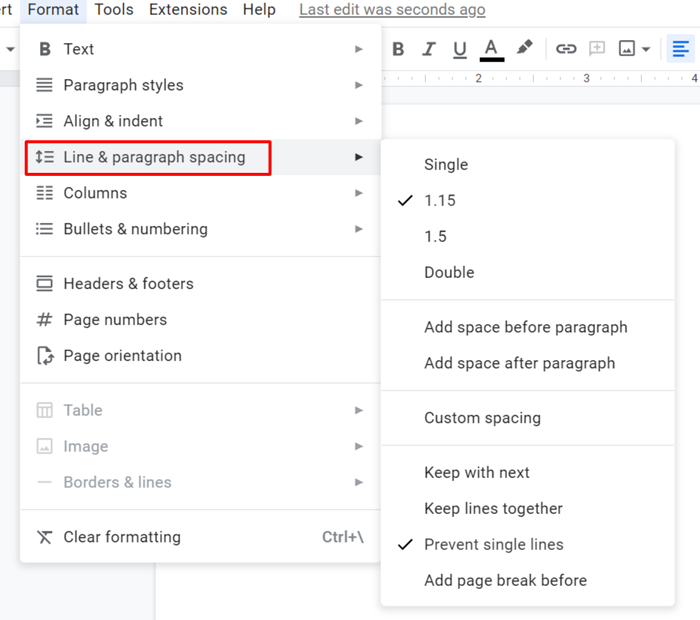
When it is set with Google Apps Script, the following script can be used.
function sample1() {
  const doc = DocumentApp.getActiveDocument();
  const body = doc.getBody();
  const paragraph = body.appendParagraph(
    "sample paragraph 1\nsample paragraph 2\nsample paragraph 3"
  );
  paragraph.setLineSpacing(2); // Double
}
When this script is run, the appended paragraphs have a line space of 2 (Double).
Here, when the numbers less than 1 are used to setLineSpacing like setLineSpacing(0.8), the line space becomes 1 without errors, while the numbers more than 1 like 2, 3, and 10 are used, those can be used with setLineSpacing. From this situation, it seems that in the current stage, setLineSpacing cannot be used for a number less than 1. I’m not sure whether this is the current specification or a bug.
When you want to set the numbers less than 1 to the line space, in the current stage, it is required to use Google Docs API. When Google Docs API is used, numbers less than 1 can be used for the line space. The sample script is as follows.
function sample2() {
  const doc = DocumentApp.getActiveDocument();
  doc
    .getBody()
    .appendParagraph(
      "sample paragraph 1\nsample paragraph 2\nsample paragraph 3"
    );
  doc.saveAndClose();
  const id = doc.getId();
  const { startIndex, endIndex } = Docs.Documents.get(id).body.content.pop();
  const requests = [
    {
      updateParagraphStyle: {
        paragraphStyle: { lineSpacing: 80 },
        range: { startIndex, endIndex },
        fields: "lineSpacing",
      },
    },
  ];
  Docs.Documents.batchUpdate({ requests }, id);
}
When this script is run, the appended paragraphs have a line space of 0.8 (Custom line space).
References
-
-
From this official document, it says as follows.
lineSpacing: The amount of space between lines, as a percentage of normal, where normal is represented as 100.0. If unset, the value is inherited from the parent.
-
-
I answered this sample script to this thread in Stackoverflow.