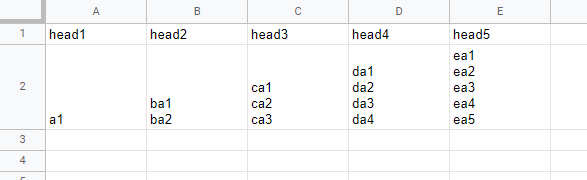
This is a sample script for expanding the rows in Google Spreadsheet using Google Apps Script. The sample situation is as follows.
Sample situation
Input
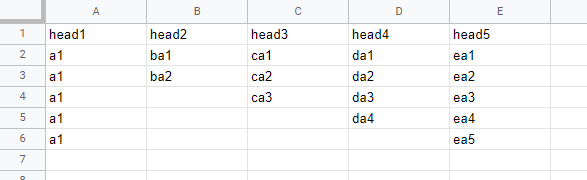
Output
Sample script
function myFunction() {
  const expandedColumns = [2, 3, 4, 5]; // Please set the expanded columns you expect.
  const delimiter = "\n"; // Please set the delimiter.
  const srcSheetName = "Sheet1"; // Please set the source sheet name.
  const dstSheetName = "Sheet2"; // Please set the destination sheet name.

  const ss = SpreadsheetApp.getActiveSpreadsheet();
  const [srcSheet, dstSheet] = [srcSheetName, dstSheetName].map((s) =>
    ss.getSheetByName(s)
  );
  const [head, ...values] = srcSheet.getDataRange().getValues();
  const res = [
    head,
    ...values.flatMap((r) => {
      const { v, max } = expandedColumns.reduce(
        (o, c, i) => {
          const s = r[c - 1].split(delimiter);
          o.v[c - 1] = s;
          const len = s.length;
          if (i == 0) {
            o.max = len;
          } else {
            o.max = o.max > len ? o.max : len;
          }
          return o;
        },
        { v: {}, max: 0 }
      );
      return [...Array(max)].map((_, j) =>
        r.map((c, k) => (!v[k] ? c : v[k][j] || null))
      );
    }),
  ];
  dstSheet.getRange(1, 1, res.length, res[0].length).setValues(res);
}
- When this script is run, the above sample situation can be obtained.
- For example, when you change
const expandedColumns = [2, 3, 4, 5];toconst expandedColumns = [5];, only the column “E” is expanded.