tanaike - Google Apps Script, Gemini API, and Developer Tips

The Thinker

GAS Library - ManifestsApp

Overview

This is a Manifests library for Google Apps Scripts.

Description

By recent update of Google, Manifests was added to Google Apps Script Project. At the moment I saw the detail, I thought that this Manifests will blow a new wind for a lot of GAS developers. So I created this.

This library makes users easily access Manifests using Google Apps Script. If this was useful for you, I’m glad.

GAS Library - ProjectApp

Overview

This is a GAS project library for Google Apps Script (GAS).

Description

There are Class SpreadsheetApp and Class DocumentApp for operating spreadsheet and document, respectively. But there is no Class for operating GAS project. If there is the Class ProjectApp, GAS project can be directly operated by GAS script. I thought that this will lead to new applications, and created ProjectApp.

On the other hand, as a CLI tool for operating GAS project, there has already been ggsrun.

Uploading Local Files to Google Drive without Authorization using HTML Form

Gists

This is a sample script for uploading local file to Google Drive without the authorization using HTML form. A selected file in your local PC using HTML form is uploaded to Google Drive and saved to Google Drive.

When you use this, at first, please deploy Web Apps. The script is doPost() of following scripts.

Script : Google Apps Script

function doPost(e) {
  var data = Utilities.base64Decode(e.parameters.data);
  var blob = Utilities.newBlob(data, e.parameters.mimetype, e.parameters.filename);
  DriveApp.createFile(blob);
  var output = HtmlService.createHtmlOutput("<b>Done!</b>");
  output.setXFrameOptionsMode(HtmlService.XFrameOptionsMode.ALLOWALL);
  return output;
  // return ContentService.createTextOutput("Done.") <--- Here, an error occurred.
}

Flow :

  • Retrieve data, filename and mimetype as e.parameters.data, e.parameters.filename and e.parameters.mimetype, respectively.
  • Decode the data using Utilities.base64Decode().
  • Create blob using Utilities.newBlob().
  • Create the file in the root folder of Google Drive.

Script : HTML

https://script.google.com/macros/s/#####/exec is the URL obtained when the Web Apps was deployed. Please replace it to your Web Apps URL. You can open this HTML for the browser of your local PC.

Create New Project with Original Manifests

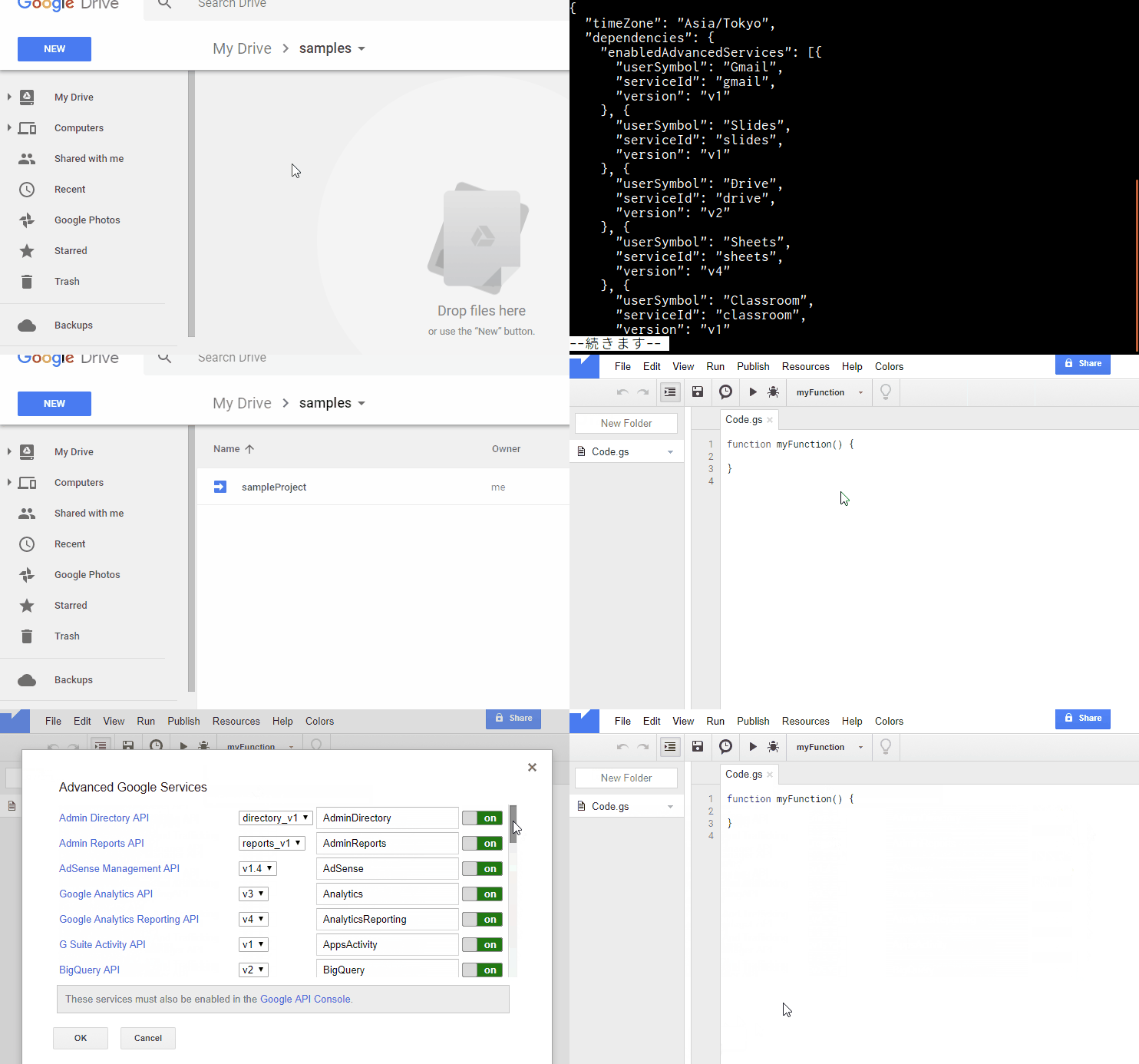
It was found that you can also create new project with your original Manifests using ggsrun. By using this, for example, when you created new project, the project can have libraries, Advanced Google Services and so on at the initial stage. I think that this can be used as a template for Project.

$ ggsrun u -pn [Project name] -f appsscript.json

https://github.com/tanaikech/ggsrun/blob/master/help/README.md#ModifyManifests

You can check this and download ggsrun at https://github.com/tanaikech/ggsrun.

Updated ggsrun to v133

ggsrun was updated to v.1.3.3

Awesome points of Manifests :

Awesome points of Manifests that I think are below.

Measuring Execution Time of Built-In Functions for Google Spreadsheet

Gists

This sample script is for measuring the execution time of built-in functions for Google Spreadsheet. Unfortunately, there are not measurement tools for retrieving the execution time of built-in functions. So I thought of about a workaround.

Flow :

  1. Import a value to a cell. The value is anything good, because this is used as a trigger. Please do this by yourself.
    • Custom functions cannot use setValue(). So I used onEdit().
  2. func1() imports a formula that you want to measure the execution time by the script launched by the trigger.
  3. At func2(), after set the formula, the measurement is started. The confirmation when built-in function was completed is carried out using loop.
    • By measuring the cost per one call for getValue(), it was found that that was about 0.0003 s. So I thought that this can be used.
  4. The result of measurement can be seen at Stackdriver as milliseconds.

Sample script :

function func1(range, formula) {
  range.setFormula(formula);
}

function func2(range) {
  var d = range.getValue();
  while (r == d) {
    var r = range.getValue();
  }
}

function onEdit() {
  var formula = '### Built-in function ###'; // Set the built-in function you want to measure.

  var label = "Execution time for built-in functions.";
  var ss = SpreadsheetApp.getActiveSheet();
  var cell = ss.getActiveCell();
  var range = ss.getRange(cell.getRow(), cell.getColumn());
  func1(range, formula);
  console.time(label);
  func2(range);
  console.timeEnd(label);
}

Note :

  • When built-in functions with very long time is measured, an error may occur at getValue().
    • In my environment, the built-in function for 10 seconds worked fine.

Straightening Elements in 2 Dimensional Array using Google Apps Script

Gists

This sample script is for straightening elements in 2 dimensional array using Google Apps Script (GAS). When applications using Spreadsheet are developed by GAS, it usually uses 2 dimensional array by setValues(). And the lengths of each element are required to be the same. On the other hand, data used for the applications might not be the same length for each element in 2 dimensional array. This sample script can be used under such situation.

Updated ggsrun to v132

ggsrun was updated to v.1.3.2

  • v1.3.2 (October 20, 2017)

    1. Updated ggsrun’s Install manual (README.md). Since I thought that the manual became too complicated, I separated it to the simple version and the detail version. And also , recently, since Google’s specification was updated, about how to deploy API executable and enable APIs for ggsrun’s Install manual were updated.
    2. From this version, scripts in a project can be rearranged. The rearrangement can be done by interactively on your terminal and/or a configuration file. The usage is here
      • For rearranging scripts, there is one important point. When scripts in a project is rearranged, version history of scripts is reset once. So if you don’t want to reset the version history, before rearranging, please copy the project. By copying project, the project before rearranging is saved.

Updated go-rearrange and gorearrange to v102

go-rearrange and gorearrange were updated to v.1.0.2

From this version, data included multi-bytes characters can be used. At Linux, it works fine. At Windows DOS, rearranging and selecting data can be done. But the displayed data is shifted. Although this may be a bug of termbox-go, I don’t know the reason. I’m sorry. On the other hand, data with only single-byte characters works fine. About MAC, I don’t have it. If someone can confirm and tell me it, I’m glad.

Updated go-rearrange and gorearrange to v101

go-rearrange and gorearrange were updated to v.1.0.1

  • As one of outputs, indexmode (bool) was added. If this is true, the rearranged result is output as the change of index for the source data. For example, if the source data and rearranged data are ["a", "b", "c"] and ["c", "b", "a"], respectively. The output will become [2, 1, 0].

By this, the specification for creating applications will expand.

The detail information and how to get this are https://github.com/tanaikech/gorearrange.