tanaike - Google Apps Script, Gemini API, and Developer Tips

The Thinker

Benchmark: Search for Array Processing using Google Apps Script

Gists

Benchmark: Search for Array Processing using Google Apps Script

July 2, 2018

Kanshi Tanaike

Introduction

Please be careful! This result can be only used for Google Apps Script.

There are a limit executing time for Google Apps Script (GAS). That is 6 minutes.1 So users always have to pay attention to reducing the process cost of the scripts. Especially, it is very important to know the process cost for the array processing, because the array processing is often used for spreadsheet and Google APIs. Recently, I have reported about the process cost of the loop for the array processing.2 Also I have reported “Improved Algorithms for Summation of Array Elements” as a method for reducing the process cost.3 From these reports, it has found that GAS shows much different process cost from other languages. So it is important to investigate the process cost for various scenes. In this report, the process cost of “searching strings in an array” for the array processing using GAS has been investigated.

Resumable Conversion from CSV File with Large Size (> 50 MB) to Several Spreadsheets by Splitting File

Gists

Overview

This is a sample script which can achieve the resumable conversion from the large CSV-file to several spreadsheets by splitting the CSV file using Google Apps Script (GAS).

Description

Is there a situation that you want to convert a CSV file with the large size (> 50 MB) to Spreadsheet? When such large CSV file is converted to Spreadsheet, you will experience the error. The reason is the size and/or also it may be due to the total cells (> 2,000,000 cells) of CSV file. In this case, you will think that when the file is split, each file can be converted to Spreadsheet. But the blob which can be used at GAS is less than 50 MB (52,428,800 bytes). Ref1 So when you have a CSV file with more than 50 MB, it is not possible to split it. In this case, you can split such large file by files.get of Drive API. files.get of Drive API has a function of Partial download. Ref2 Using this, the file can be split. By the way, in my environment, when a CSV file with the size of 100 MB is used for this sample script, when the file is split by 10 MB, about 65 seconds was required to convert a chunk to Spreadsheet. In this case, when the CSV file is completely converted, it is considered that it will be over the limitation time (6 min) for executing GAS. So in this post, I would like to introduce a sample script which can achieve the resumable conversion from the large CSV-file to several spreadsheets.

Cryptopia API for Google Apps Script

Gists

By the Google’s update at June 19, 2018, finally, Utilities.computeDigest(), Utilities.computeHmacSha256Signature() and Utilities.computeHmacSignature() got to be able to use the byte arrays. By this, using only native Google Apps Script, the result can be retrieved without using jsSHA. So Cryptopia API can be created using only Google Apps Script. If this is useful for you, I’m glad.

Sample script :

When you use this, at first, please input the requiring values. Now the sample values are used.

About Updated Utilities.computeHmacSignature()

Gists

By the Google’s update at June 19, 2018, finally, Utilities.computeDigest(), Utilities.computeHmacSha256Signature() and Utilities.computeHmacSignature() got to be able to use the byte arrays. By this, using only native Google Apps Script, the result can be retrieved without using jsSHA. When I used the updated them, the response speed is much faster than that of jsSHA. It is considered that this may be optimized for Google Apps Script. As a sample, it shows 2 samples as follows. The both results are the same.

GAS Library - FilesApp

Overview

FilesApp is a GAS library for retrieving file and folder list in Google Drive using Google Apps Script (GAS). Also this can create a tree from all files and folders in Google Drive.

Description

When I create some applications using Google Drive, there are often the case which is required to retrieve the file list and folder list. I had prepared the script each time for each case so far. But recently, I thought that if there is a library for retrieving the file and folder list (as a tree), it will be useful for me and other developers. So I created this. If this was useful for your situation, I’m glad.

Retrieving Reformatted Scripts without Comments in a Project using Google Apps Script

Gists

Overview

This is a sample script for easily retrieving the reformatted scripts without comments in a project using Google Apps Script (GAS).

Description

When I create GAS script, if the format of script is not correct, the script editor lets me know about it. By this, I can find that the script editor and/or Google Drive checks the format of scripts. I had wished if I could use this function. Recently, I noticed an interesting function. A GAS project is created and when function myFunction() {Logger.log(this)} is run in the script, I noticed that all scripts in the project are included in this. Furthermore, when I saw the retrieved script, also I noticed that their scripts are reformatted and all comments are removed. In the case of Apps Script API, when the scripts are retrieved by the API, the retrieved script is the same to the original one. So I think that this will help users retrieve simply the reformatted GAS scripts, and such the reformatted scripts will be able to be used for the various situations.

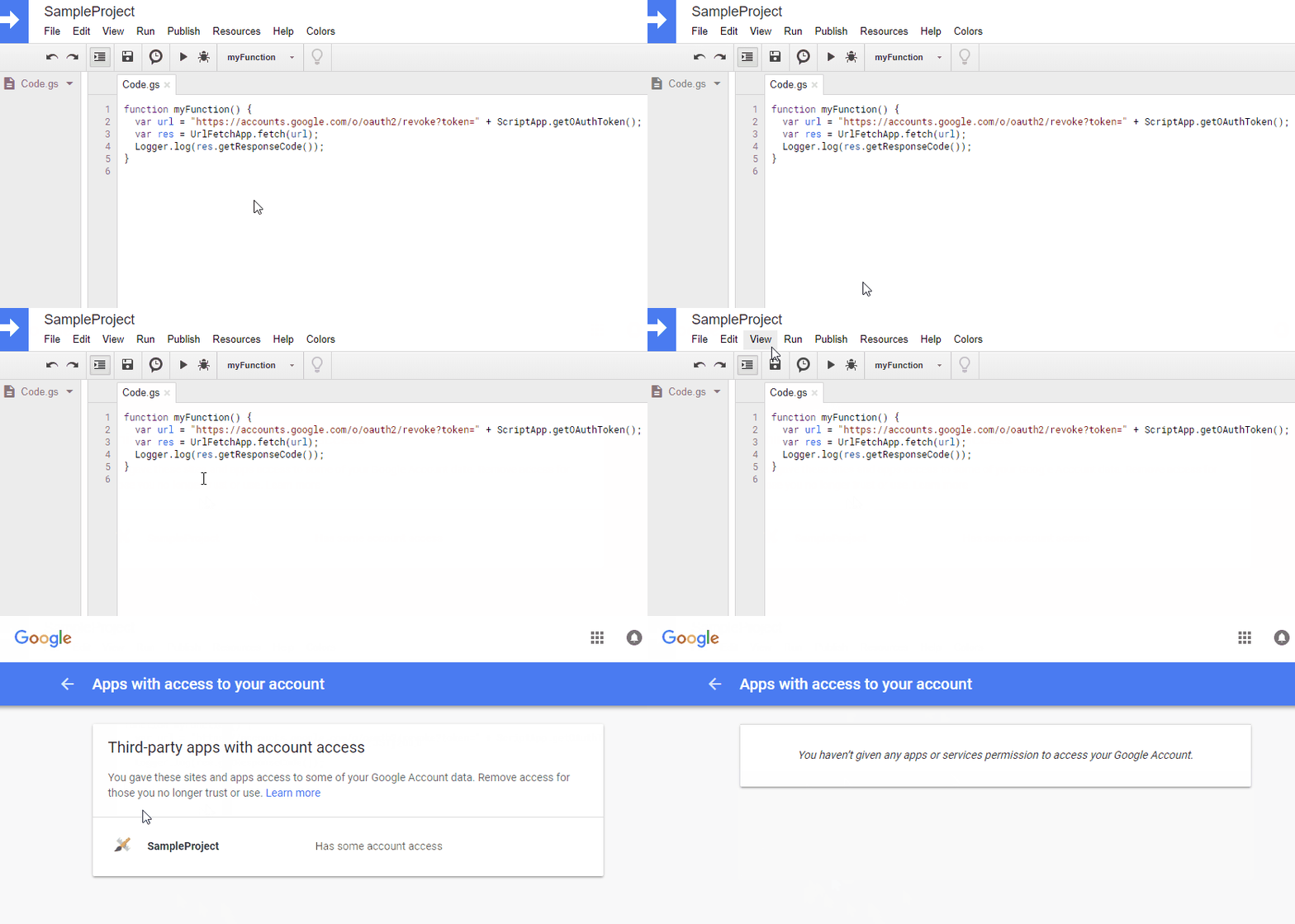
Remove Third-party Apps with Account Access using Google Apps Script

Gists

Overview

This is a method for removing Third-party Apps with Account Access using a script.

Demo

Description

When users create a script in a project and run the script, if the methods which are required to use scopes are included, users have to authorize to use the scopes using the browser. By authorizing it, users can use the script. The authorized projects can be seen at Third-party Apps with Account Access. One day, I had a situation that it required to remove the authorization of project, because of the security. Third-party Apps with Account Access can be manually removed as you know. But at that time, I wanted to remove using a script. So I came up with this method.

Create Folder Tree of Google Drive using Node.js

Gists

This is a sample script for retrieving a folder tree using Node.js. In this sample, you can set the top of folder for the folder tree. In generally, the folder tree is created by retrieving folders from the top folder in order. For example, when Google Apps Script is used, the script becomes like this. But when Drive API is used for this situation, if there are a lot of folders in the top folder, a lot of APIs are required to be called. So in this sample, I have tried to create the folder tree by a small number of API calls as possible.

Resumable Upload for Web Apps using Google Apps Script

News

Overview

This is a sample script for uploading files with large size (> 50 MB) at Web Apps using Google Apps Script (GAS). The resumable upload method is used for uploading files. This script can be also applied to the script using gapi of javascript.