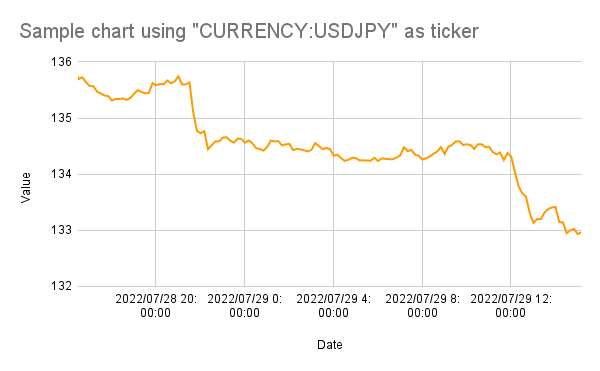
This is a sample script for checking the exchange rate using GOOGLEFINANCE with Google Apps Script.
Recently, I have published a report of “Report: Obtaining Values from GOOGLEFINANCE using Google Apps Script”. Ref In this post, I would like to introduce a sample script for checking the exchange rate using Google Apps Script.
Sample script
Please copy and paste the following script to the script editor of Spreadsheet.
// When this script is run, a trigger for executing "checkCurrency" function is installed.
function setTrigger() {
  const functionName = "checkCurrency";
  const trigger = ScriptApp.getScriptTriggers().find(t => t.getHandlerFunction() == functionName);
  if (trigger) {
    ScriptApp.deleteTrigger(trigger);
  }
  ScriptApp.newTrigger(functionName).timeBased().everyMinutes(10).create();
}

function checkCurrency() {
  const threshold = ###; // Please set the the threshold value you want to check.
  const ticker = "CURRENCY:USDJPY"; // Please set ticker you want to check.
  const email = "###"; // Please set the email address you want to notice.

  const ss = SpreadsheetApp.getActiveSpreadsheet();
  const sheet = ss.getSheets()[0];
  const range = sheet.getRange(sheet.getLastRow() + 1, 1, 1, 2);
  range.setFormulas([["=NOW()", `=GOOGLEFINANCE("${ticker}")`]]);
  range.offset(0, 0, 1, 1).setNumberFormat("yyyy/MM/dd H:mm:ss");
  SpreadsheetApp.flush();
  const values = range.getValues();
  range.setValues(values);
  if (values[0][1] > threshold) { // Or if you want to check when the current value is less than the threshold, please modify this to values[0][1] < threshold
    MailApp.sendEmail({
      to: email,
      subject: `Report: Value is over the threshold (${threshold})`,
      htmlBody: `<p>Current value is ${values[0][1].toFixed(2)}.</p><p><a href="${ss.getUrl()}">Open Spreadsheet</a>`,
    });
  }
}
-
In this script, when the function of
checkCurrencyis run, the current value of exchange rate is retrieved as a fixed value without using the formula. When the value is overthreshold, an email is sent. -
When this script is used, the top chart can be created in Google Spreadsheet.
Note
- This sample script uses this situation. So, when this specification is changed by Google side, this script might not be able to be used. Please be careful about this.